Finderio vs Ninjapear: Which Email Finder Wins in 2026?
Finderio and Ninjapear both promise verified B2B emails at a low price. Here is how they actually compare on accuracy, catch-all handling, API depth, and true cost per usable contact in 2026.
TL;DR
- Finderio and Ninjapear sit in the same bracket: budget-friendly email finders aimed at small outbound teams that want contacts fast without an enterprise contract.
- Finderio is the broader suite play — bundled lead tools, list building, and a familiar dashboard. Ninjapear is the leaner, extension-first option built around one-off lookups.
- Neither publishes a third-party audited accuracy figure, so treat any "98% accurate" marketing claim from either as unverified until you run your own sample test.
- The metric that decides this comparison is not price per credit — it is cost per verified, non-bouncing contact, and both tools change ranking once you factor in catch-all domains.
- If you need a documented API, transparent verification statuses, and predictable pricing at scale, a dedicated finder like Tomba Email Finder is the safer third option.
What are Finderio and Ninjapear?#
Both are B2B contact-discovery tools. You give them a name and a company domain — or just a domain — and they return likely work email addresses, usually with a confidence score attached.
Finderio positions itself as part of a wider lead-generation suite. The pitch is consolidation: find emails, build lists, and manage prospects without stitching four subscriptions together. That suits a solo founder or a two-person sales team who would rather have one login than a best-of-breed stack.
Ninjapear takes the opposite approach. It is narrower, faster to learn, and leans on a browser extension workflow — you are on a company site or a LinkedIn profile, you click, you get an address. There is less to configure, and less to fall back on when the lookup fails.
That difference in philosophy drives almost every practical trade-off below. Suites optimise for breadth and tend to be shallower per feature. Point tools optimise for one workflow and fall over outside it.
One honest caveat before the tables: neither vendor is a large, widely benchmarked platform, and both have changed plan structures more than once. Pricing tiers, credit definitions, and verification behaviour shift. Check the vendor's own pricing page and their G2 category listing before you commit budget, and treat the figures here as directional — the shape of the comparison is stable even when the numbers move.
How do Finderio and Ninjapear compare head to head?#
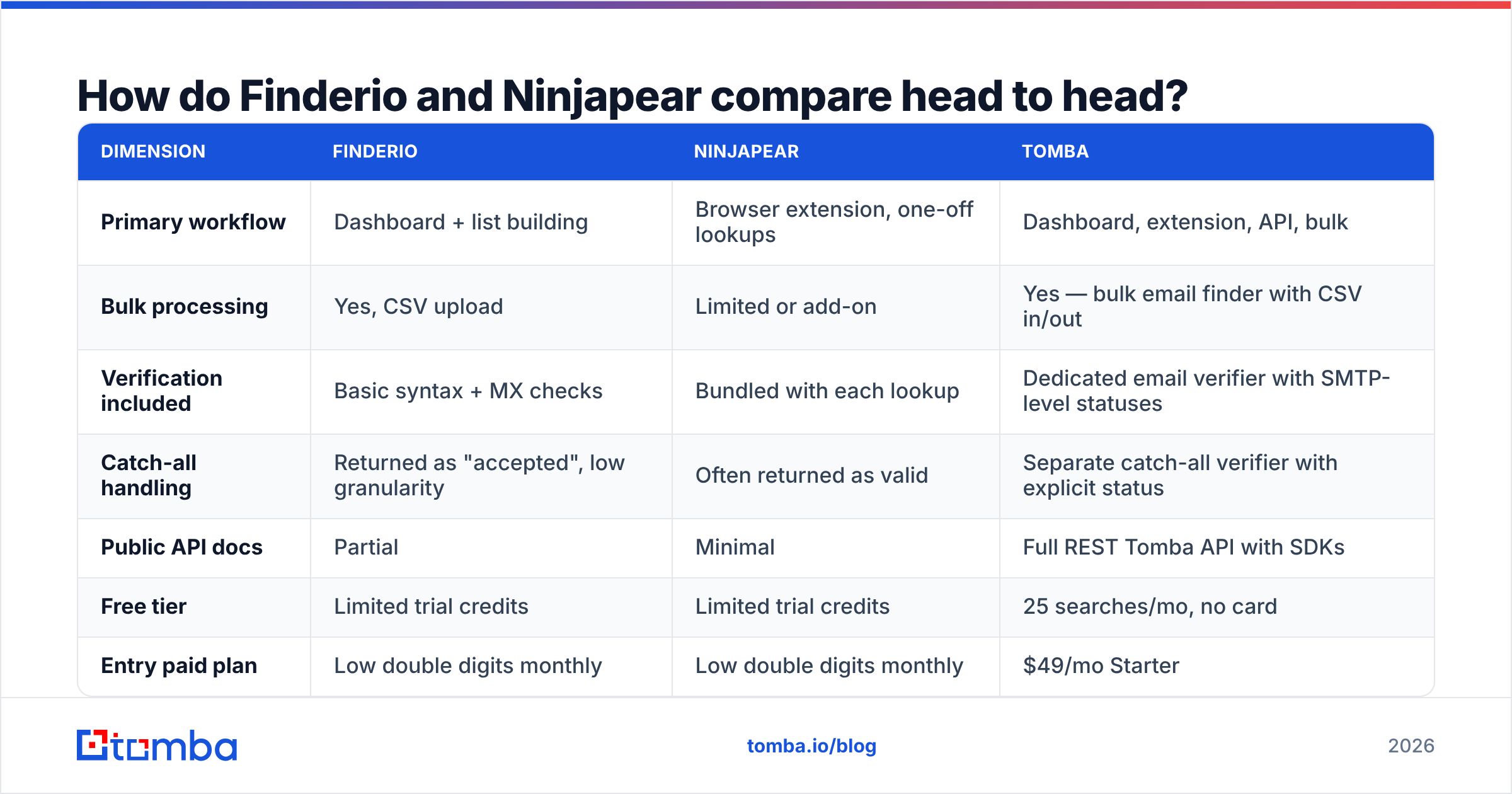
| Dimension | Finderio | Ninjapear | Tomba |
|---|---|---|---|
| Primary workflow | Dashboard + list building | Browser extension, one-off lookups | Dashboard, extension, API, bulk |
| Bulk processing | Yes, CSV upload | Limited or add-on | Yes — bulk email finder with CSV in/out |
| Verification included | Basic syntax + MX checks | Bundled with each lookup | Dedicated email verifier with SMTP-level statuses |
| Catch-all handling | Returned as "accepted", low granularity | Often returned as valid | Separate catch-all verifier with explicit status |
| Public API docs | Partial | Minimal | Full REST Tomba API with SDKs |
| Free tier | Limited trial credits | Limited trial credits | 25 searches/mo, no card |
| Entry paid plan | Low double digits monthly | Low double digits monthly | $49/mo Starter |
| Credit rollover | Typically no | Typically no | Plan-dependent, see Tomba pricing |
| Best for | One-login generalists | Fast manual prospecting | Teams that need volume + API |
Read that table with one thing in mind: the first three rows are where money actually leaks. A tool that finds an address but cannot tell you whether it will bounce has moved the problem, not solved it.

Which one finds more valid emails?#
This is the only question that matters, and it is the one both vendors answer with a number they generated themselves.
Here is the honest position: you cannot resolve accuracy from marketing pages. Every email finder in this bracket quotes something in the 95–99% range, and every one of those numbers is measured differently. Some count "we returned an address" as a hit. Some count "the address passed a syntax check." Almost none count "the address received a message without bouncing three weeks later," which is the only definition your domain reputation cares about.

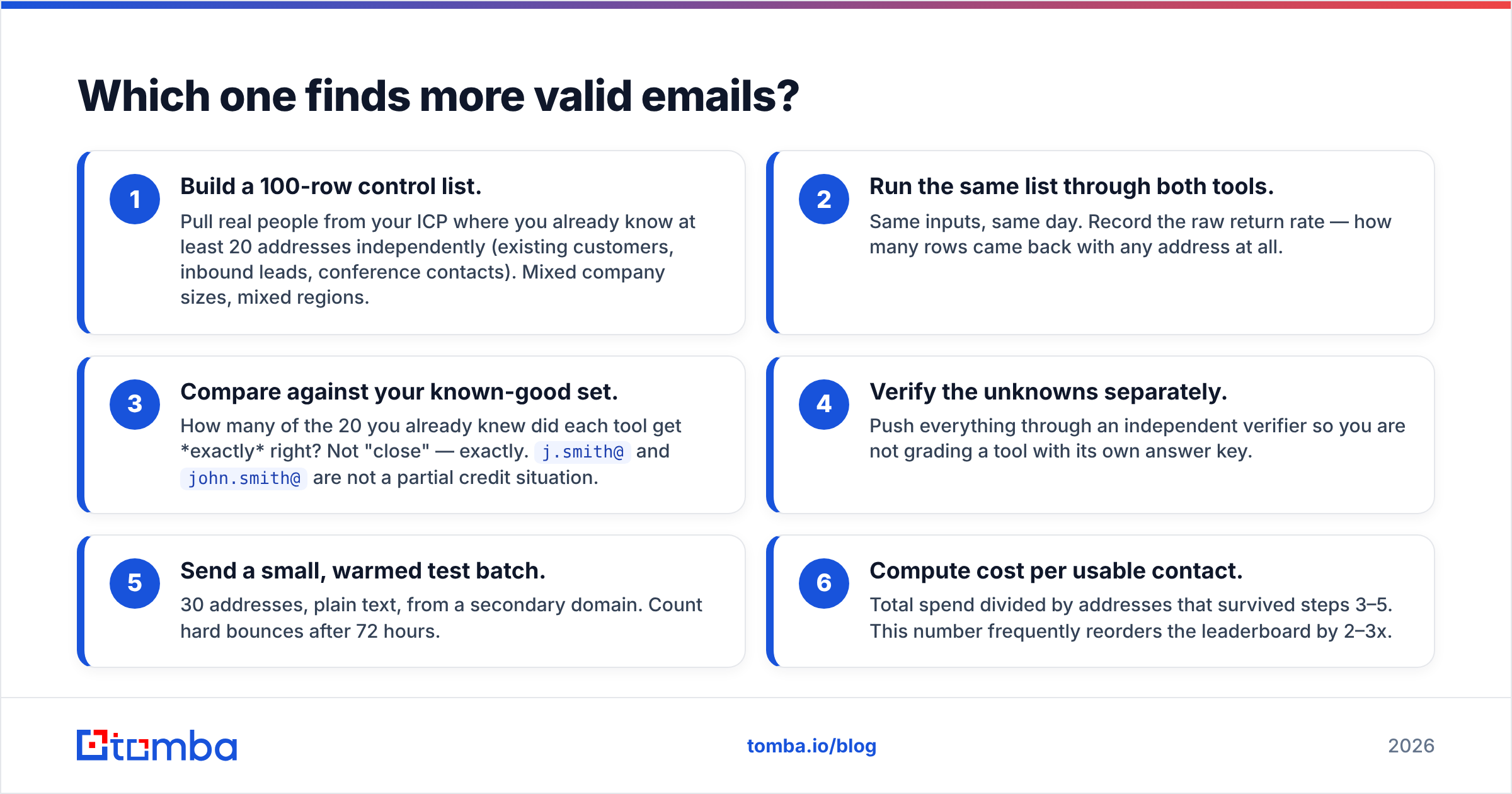
Run your own test instead. It takes 40 minutes:
- Build a 100-row control list. Pull real people from your ICP where you already know at least 20 addresses independently (existing customers, inbound leads, conference contacts). Mixed company sizes, mixed regions.
- Run the same list through both tools. Same inputs, same day. Record the raw return rate — how many rows came back with any address at all.
- Compare against your known-good set. How many of the 20 you already knew did each tool get exactly right? Not "close" — exactly.
j.smith@andjohn.smith@are not a partial credit situation. - Verify the unknowns separately. Push everything through an independent verifier so you are not grading a tool with its own answer key.
- Send a small, warmed test batch. 30 addresses, plain text, from a secondary domain. Count hard bounces after 72 hours.
- Compute cost per usable contact. Total spend divided by addresses that survived steps 3–5. This number frequently reorders the leaderboard by 2–3x.
Most teams discover that the tool with the higher return rate has the lower usable rate. Aggressive pattern-guessing inflates coverage and deflates quality — the tool guesses firstname.lastname@domain.com because that is the most common corporate pattern, marks it "probable", and hands you a bounce.
What about catch-all domains?#
Catch-all domains are the quiet failure mode in this entire product category, and they are where Finderio and Ninjapear both get uncomfortable.
A catch-all (or accept-all) mail server accepts messages to any address at the domain, valid or not, and decides what to do with them later. When a verifier pings such a server via SMTP, it gets a "yes" regardless of whether the mailbox exists. Roughly a quarter of B2B domains are configured this way, and the share is higher in enterprise and among companies using certain security gateways.
Three behaviours are possible, and they are not equally honest:
- Mark it valid. Cheapest to build, worst for you. Your bounce rate absorbs the error.
- Mark it invalid. Safe but wasteful — you throw away a large block of genuinely reachable enterprise contacts.
- Mark it "catch-all / risky" as a distinct status. Correct. You decide the risk policy per campaign instead of inheriting the vendor's.
Ask both vendors directly which of the three they do. If a support rep cannot answer in one sentence, assume option one. Tomba splits this out deliberately — the catch-all verifier returns catch-all as its own state so you can route those contacts to a lower-volume, higher-warmth sequence instead of blasting them and eating the bounce.
Is Finderio or Ninjapear better value?#
Value in this category is a trap, because the unit everyone advertises — the credit — is not standardised.
Watch for these four pricing mechanics:
- What consumes a credit. A search that returns nothing should be free. Many tools charge anyway. Over a 5,000-row list with a 65% hit rate, that is 1,750 wasted credits.
- Whether verification is separate. Finding and verifying are often two line items. A plan that looks 30% cheaper stops being cheaper the moment you add verification.
- Rollover and expiry. Monthly credits that vanish at midnight on the 30th punish uneven outbound cycles — and outbound cycles are always uneven.
- Export and API limits on lower tiers. Some plans cap CSV exports or lock the API behind the top tier, which quietly forces an upgrade the first time you try to automate.
Tomba's structure is deliberately boring here: Free at 25 searches/mo, Starter at $49/mo, Growth at $99/mo, Pro at $249/mo, and custom Enterprise. The API is not paywalled to the top tier, which matters if you plan to enrich inside your CRM rather than in a spreadsheet.

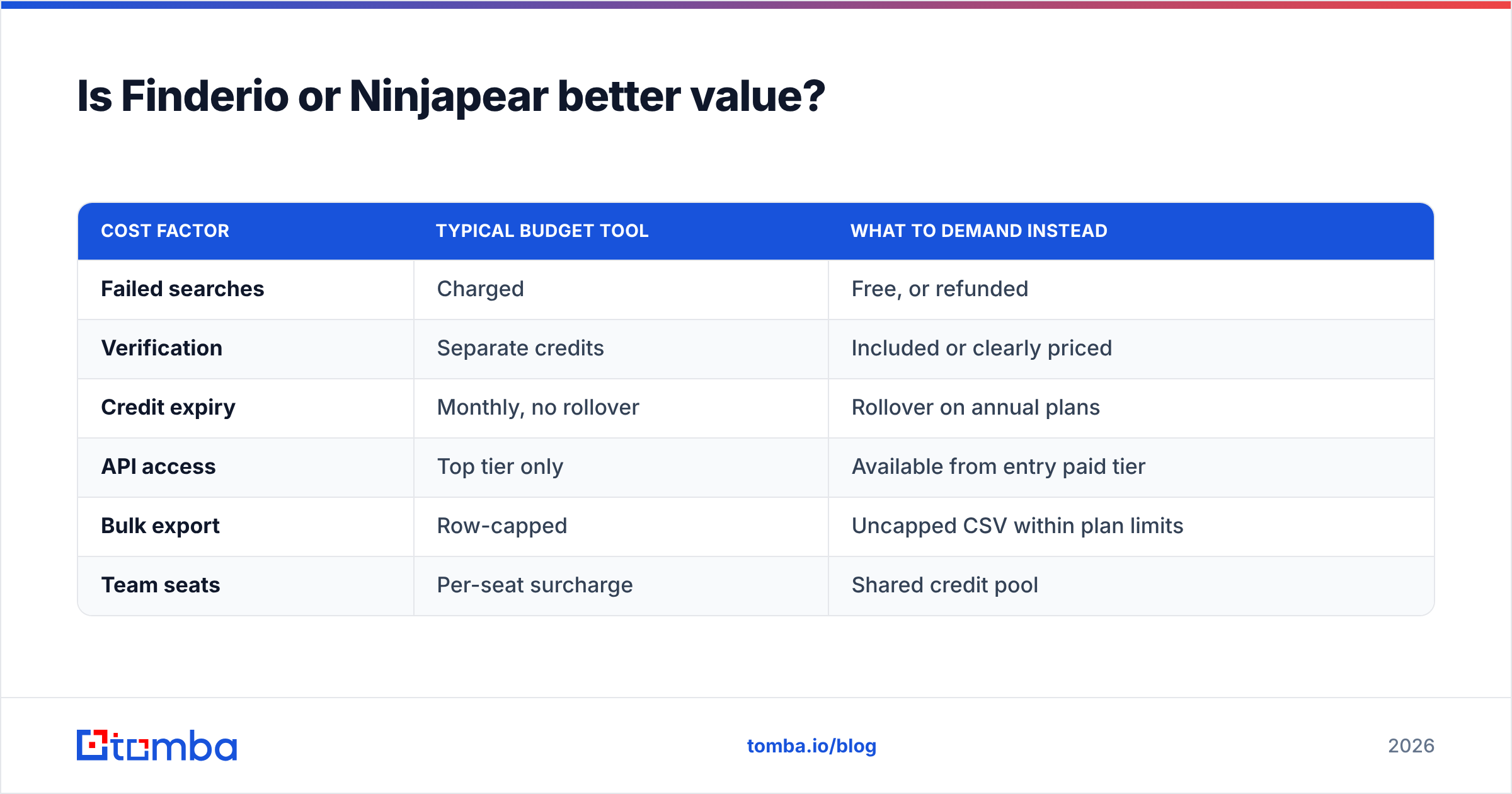
| Cost factor | Typical budget tool | What to demand instead |
|---|---|---|
| Failed searches | Charged | Free, or refunded |
| Verification | Separate credits | Included or clearly priced |
| Credit expiry | Monthly, no rollover | Rollover on annual plans |
| API access | Top tier only | Available from entry paid tier |
| Bulk export | Row-capped | Uncapped CSV within plan limits |
| Team seats | Per-seat surcharge | Shared credit pool |
Which is better for API and automation work?#
If your outbound runs through a spreadsheet, this section does not apply and either tool is fine. If it runs through code, this section decides the whole comparison.
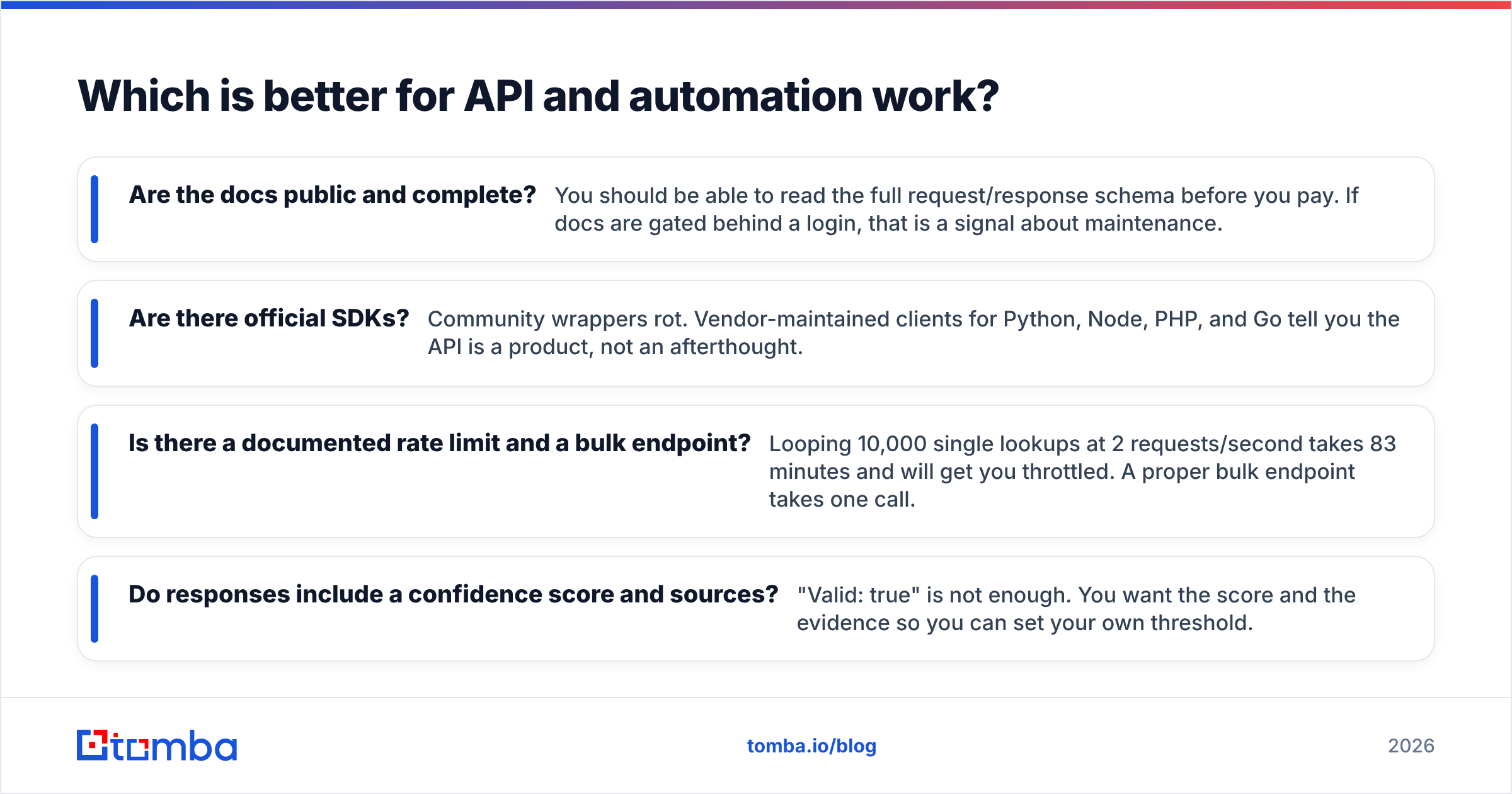
The questions that separate a real API from a marketing bullet:
- Are the docs public and complete? You should be able to read the full request/response schema before you pay. If docs are gated behind a login, that is a signal about maintenance.
- Are there official SDKs? Community wrappers rot. Vendor-maintained clients for Python, Node, PHP, and Go tell you the API is a product, not an afterthought.
- Is there a documented rate limit and a bulk endpoint? Looping 10,000 single lookups at 2 requests/second takes 83 minutes and will get you throttled. A proper bulk endpoint takes one call.
- Do responses include a confidence score and sources? "Valid: true" is not enough. You want the score and the evidence so you can set your own threshold.
This is where lean point tools like Ninjapear tend to lose ground — an extension-first product often treats the API as a side door. Suite products like Finderio usually have an API, but coverage across the suite's modules is uneven. Tomba publishes complete docs, official SDKs, a CLI, and an MCP server, which is worth checking against whichever tool you are leaning toward — not because the logo differs, but because the depth is the actual differentiator.

What does the deliverability cost of a bad tool look like?#
Cheap contacts are not cheap. A 12% hard-bounce rate on a 2,000-contact campaign is 240 bounces, and mailbox providers read that as a signal you bought a list. The downstream costs are:
- Inbox placement drops across your entire sending domain, including replies to warm threads.
- Recovery takes weeks, not days — you throttle volume, warm up again, and lose a quarter of pipeline generation while you do.
- Spam-trap risk rises. Recycled traps sit on exactly the kind of stale addresses a guess-heavy finder surfaces.
Keeping hard bounces under 2% is the working benchmark most outbound teams target, and HubSpot's sales blog makes the same point from the campaign side: list quality outranks copy quality. That means verification is not an optional add-on you buy when budget allows. It is the thing you are actually paying for. The finding part — pattern inference plus source matching — is close to commoditised across every vendor in this bracket. Verification quality is where they genuinely diverge.
So which should you pick?#
Pick Finderio if you want one subscription covering several lead-gen jobs, your volume is modest, and you would rather accept some accuracy variance than manage three tools.
Pick Ninjapear if your prospecting is manual and browser-based, you value speed over batch processing, and you never need to enrich a list of 5,000 rows overnight.
Pick neither if any of these are true: you send more than a few hundred cold emails a month, you enrich inside a CRM via API, you sell into enterprise where catch-all domains dominate, or your domain reputation is already fragile. In those cases the marginal saving on a budget plan is dwarfed by one deliverability incident.
Whatever you choose, do the 100-row control test first. Both vendors offer trial credits, both tests fit in one afternoon, and the result is worth more than every comparison article on the internet — including this one.
Ready to run that test? Start with the Tomba Email Finder free tier — 25 searches a month, no card required — and put it head to head against whichever tool you are currently paying for. Feed all three the same 100 rows, verify the output independently, and compare cost per usable contact rather than cost per credit. If Tomba wins your test, Starter is $49/mo with the full API included; if it does not, you have lost nothing but an afternoon and gained a number you can actually defend to your CFO.
Related guides#
Ready to find emails that actually work?
Join 150,000+ professionals who stopped guessing and started sending. Free credits on signup — no credit card required.
Get the Tomba newsletter
Practical outbound tactics and product updates — once every two weeks.
About the author