Finderio vs Revli (2026): Which Email Finder Actually Wins?
Finderio and Revli both promise cheap B2B emails, but they win on very different things. Here's the honest breakdown on accuracy, credits, catch-all handling, and cost per usable contact in 2026.
TL;DR
- Finderio (finder.io, part of the 500apps bundle) is cheapest per seat if you already want the wider suite — CRM, forms, helpdesk — and you treat email finding as one feature among fifty.
- Revli is the leaner, single-purpose tool: sign up, search, export. Better UX for a solo founder or a two-person SDR team who just wants contacts today.
- Neither publishes independently audited accuracy numbers, so treat marketing claims of "95%+ accuracy" from both as unverified until you run your own test list.
- The metric that decides this is cost per usable (verified, non-bouncing) contact, not headline credit price. A $0.01 credit that resolves to a catch-all you can't verify costs you more than a $0.04 verified one.
- If you need API-grade reliability, catch-all verification, and a real free tier to test with, run all three side by side before committing — Tomba's free tier gives you 25 searches/month with no card.
What are Finderio and Revli, exactly?#
They are both B2B email finders, but they arrive at that job from opposite directions.
Finderio is the email-finding module inside the 500apps ecosystem. The pitch is bundle economics: you pay one seat price and get access to a large catalog of business apps, of which the email finder is one. That framing matters. Product roadmaps in bundles tend to be spread thin — the finder competes for engineering attention with the CRM, the helpdesk, and forty-eight other tools. You can check the current product page at finder.io.
Revli is a standalone email finder and verification product. Smaller surface area, faster to learn, and the whole product is judged on one thing: does the email exist and does it land? Its own site is revli.com. Standalone tools live or die on data quality, which is usually good news for buyers who only want data quality.
The functional overlap is high. Both do domain-level search (give me everyone at stripe.com), name-plus-domain lookup, some form of verification, CSV bulk upload, and a Chrome extension. The differences show up in three places: how they price credits, how they handle catch-all domains, and how much of the product you can reach through an API.

How do Finderio and Revli compare on features and pricing?#
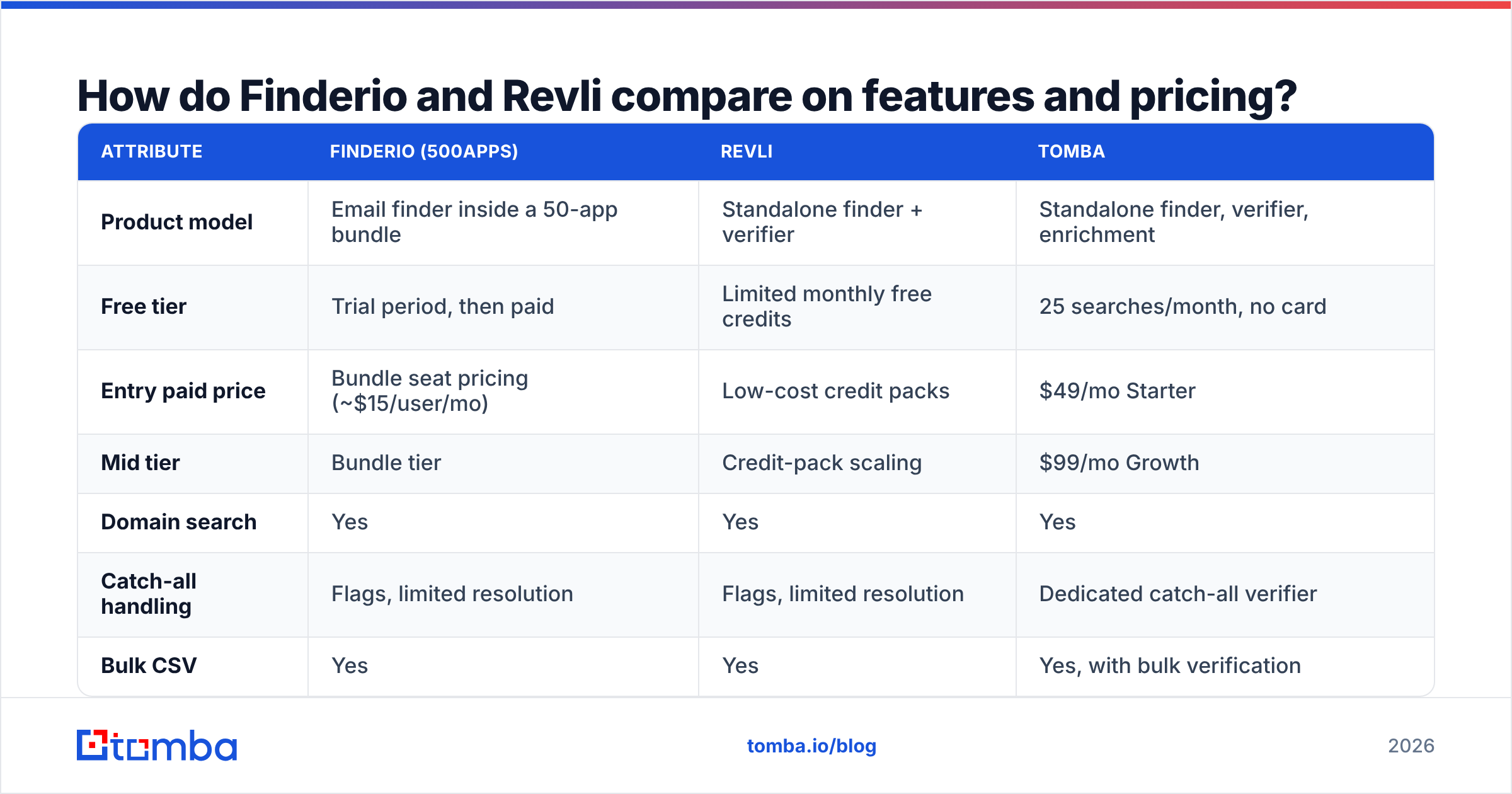
Here is the head-to-head on the attributes that actually change your workflow. Published pricing moves frequently on both — verify on the vendor sites before you buy; the figures below reflect list pricing at time of writing.
| Attribute | Finderio (500apps) | Revli | Tomba |
|---|---|---|---|
| Product model | Email finder inside a 50-app bundle | Standalone finder + verifier | Standalone finder, verifier, enrichment |
| Free tier | Trial period, then paid | Limited monthly free credits | 25 searches/month, no card |
| Entry paid price | Bundle seat pricing (~$15/user/mo) | Low-cost credit packs | $49/mo Starter |
| Mid tier | Bundle tier | Credit-pack scaling | $99/mo Growth |
| Domain search | Yes | Yes | Yes |
| Catch-all handling | Flags, limited resolution | Flags, limited resolution | Dedicated catch-all verifier |
| Bulk CSV | Yes | Yes | Yes, with bulk verification |
| Public API | Limited, bundle-gated | Available | Full REST API, CLI, MCP server |
| Native integrations | Strong inside 500apps | Zapier-level | HubSpot, Salesforce, Pipedrive, Sheets, Airtable |
| Best for | Teams already buying the bundle | Solo founders, small SDR teams | Teams that need verified data at scale |

The table exposes the real trade. Finderio's price is only cheap if you use the bundle. If you buy 500apps purely for the finder, you are paying a suite price for a single module and inheriting a suite's support queue. Revli's price is genuinely low at small volumes but scales linearly — there is no volume cliff that suddenly makes 50,000 lookups cheap.
Which one finds more valid emails?#
Nobody can answer this from the marketing pages, and you should be suspicious of any blog post that claims to. Both vendors advertise accuracy in the 90s. Neither publishes a reproducible methodology: which domains, what company sizes, what regions, what the denominator was.
What we can say is how accuracy claims decompose, because the number you see is almost always one of three different things:
- Hit rate — of 100 names you searched, how many returned any email at all. Vendors love this number because you can inflate it by returning pattern guesses.
- Deliverability rate — of the emails returned, how many actually accepted mail. This is the number that predicts your bounce rate.
- Verified rate — of the emails returned, how many the vendor is willing to mark "valid" rather than "accepted_all" or "unknown". This is the honest number, and it is always lowest.
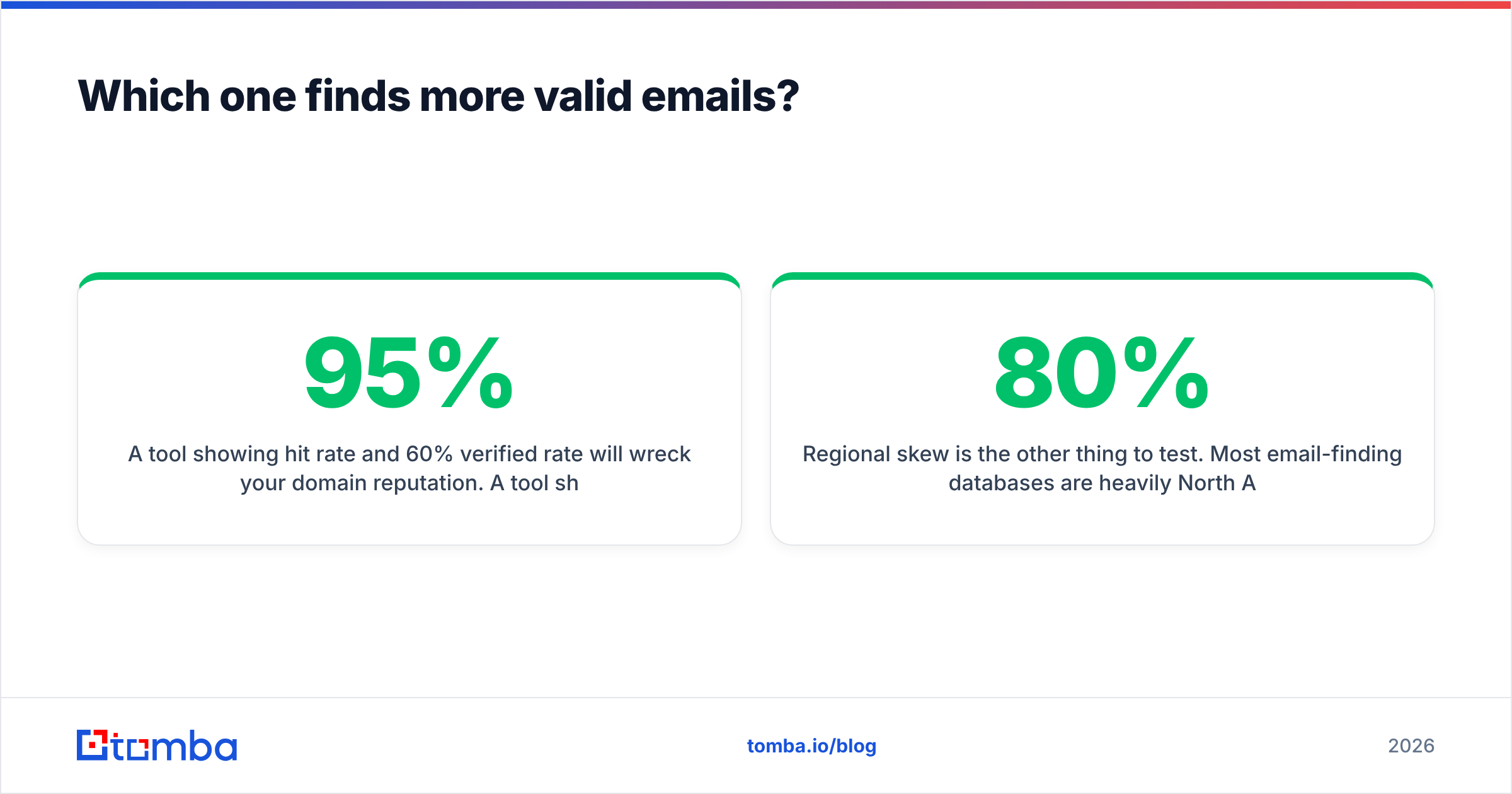
A tool showing 95% hit rate and 60% verified rate will wreck your domain reputation. A tool showing 70% hit rate and 68% verified rate will not.

Run this test yourself before you spend anything. Take 100 contacts you already know are valid — people who have replied to you in the last six months. Strip the emails, keep name plus company domain, and feed the list to each tool. Score three columns: returned, matched the known address, and marked valid. That gives you a real hit rate and a real precision rate in about twenty minutes, and it is specific to your ICP rather than to a vendor's cherry-picked benchmark.
Regional skew is the other thing to test. Most email-finding databases are heavily North America weighted. If you sell into DACH, the Nordics, or Southeast Asia, a tool that scores 80% on US SaaS contacts can drop into the 40s on your actual list. That gap is invisible in every vendor comparison chart including this one — only your own test list surfaces it.
What does each tool actually cost per usable contact?#
Credit price is a vanity metric. What you care about is the cost of one contact that is verified, deliverable, and inside your ICP.
The arithmetic:
- Effective cost = (monthly price ÷ credits) ÷ (hit rate × verified rate)
Work an example. Say a plan gives you 5,000 credits for $100 — $0.02 per credit. If the tool returns an email for 70% of your searches and only 65% of those come back verified, your usable yield is 0.455. Your true cost per usable contact is $0.044 — more than double the sticker.
Now add the second cost most teams forget: bounces. At a 5% bounce rate on a 1,000-send campaign you burn 50 sends and take a measurable hit to sender reputation. At 12% you risk your domain. The cheapest credit in the world is expensive if it forces you to warm a new domain.
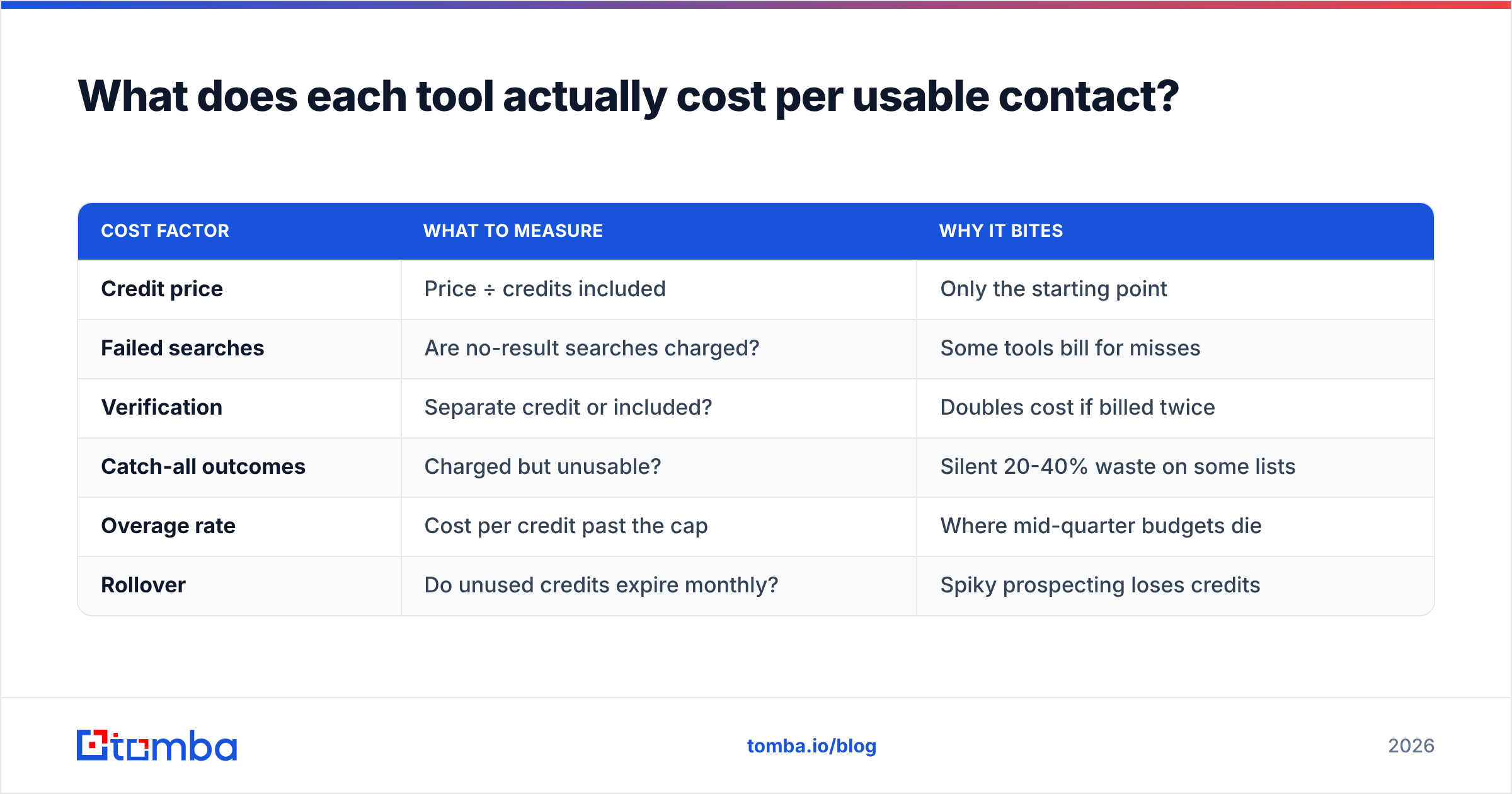
| Cost factor | What to measure | Why it bites |
|---|---|---|
| Credit price | Price ÷ credits included | Only the starting point |
| Failed searches | Are no-result searches charged? | Some tools bill for misses |
| Verification | Separate credit or included? | Doubles cost if billed twice |
| Catch-all outcomes | Charged but unusable? | Silent 20-40% waste on some lists |
| Overage rate | Cost per credit past the cap | Where mid-quarter budgets die |
| Rollover | Do unused credits expire monthly? | Spiky prospecting loses credits |
Ask both vendors two direct questions in writing: do you charge for searches that return nothing, and is verification a separate credit. The answers change the real price more than the plan tier does.
Where does each tool fit best?#
Rather than declaring a universal winner, match the tool to the situation:
- You already pay for 500apps — Finderio is close to free at the margin. Use it. The integration inside the bundle CRM is the actual value, and the marginal cost of the finder is near zero.
- You are a solo founder doing 200 lookups a month — Revli. Low commitment, fast onboarding, no suite to learn, and at that volume the linear pricing never becomes a problem.
- You run a 3-8 person outbound team — neither is comfortable. Finderio's bundle overhead and Revli's linear scaling both start to chafe around the 5,000-lookup mark, which is where dedicated platforms with volume tiers pull ahead.
- You need programmatic enrichment — API depth decides it. Revli edges Finderio here, but if the API is the core of your workflow, evaluate a platform where the API is the product rather than a bundle add-on.
- Your list is catch-all heavy — neither resolves catch-alls well. Enterprise domains running Microsoft 365 with accept-all configured will come back as "unknown" from most tools. You will need a dedicated catch-all verifier regardless of which of these two you pick.
- You sell outside North America — test both hard on your actual geography before signing anything longer than monthly.

What are the deal-breakers to check before you buy?#
Five things that don't appear on any pricing page and reliably cause buyer's remorse:
Data provenance. Ask where the records come from and whether the vendor can produce a GDPR-compliant lawful-basis statement. If you sell into the EU and your data vendor cannot explain sourcing, that is your legal exposure, not theirs. Reputable providers publish this; Tomba documents its data sources publicly.
Refresh cadence. B2B contact data decays roughly 2-3% per month as people change jobs. A database refreshed quarterly is 8% stale on average the day you download it. Ask for the refresh interval in weeks.
Export ownership. Can you export everything you found, at any time, in CSV, without a fee? Some bundle products gate exports behind higher tiers. Check before your data is locked inside a subscription you want to cancel.
Bounce credit policy. Will the vendor refund credits for emails they marked valid that hard-bounced? Vendors confident in their verification say yes. Vendors that aren't add fine print.
Support SLA reality. Bundle products spread support across every app in the suite. For a standalone tool, the finder is the support queue. Read recent reviews on G2 filtered to the last six months — older reviews describe products that no longer exist.
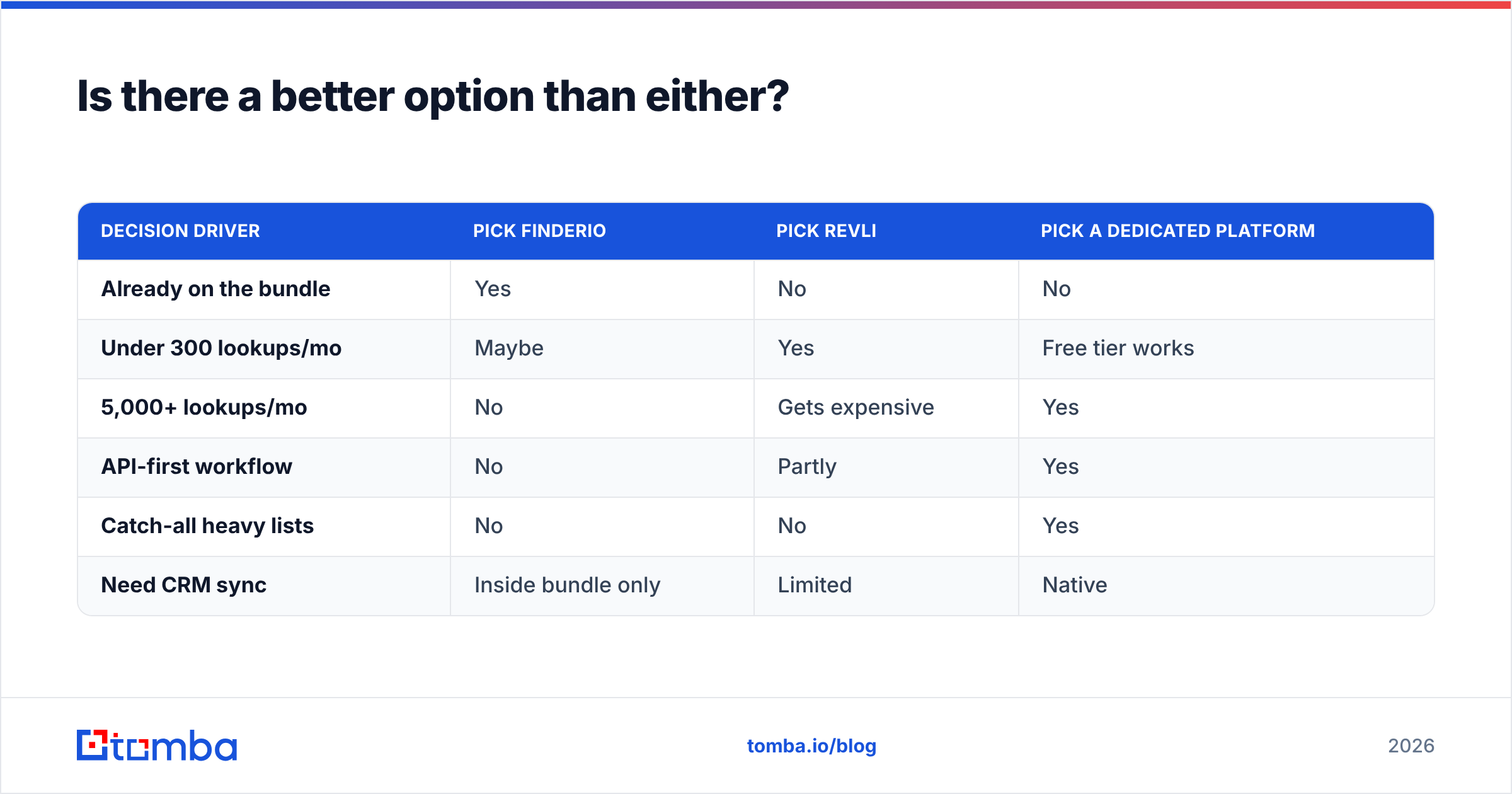
Is there a better option than either?#
Depends on what you're optimising for, and it's worth being direct about the shape of this market rather than pretending it's a two-horse race.
If your priority is a large pre-built database with country and role filters, providers like BookYourData do that well and it's a genuinely different purchase — you're buying a list, not a lookup engine. If your priority is finding a specific person at a specific company on demand, you want a search-and-verify tool.
Where a dedicated platform earns its higher entry price is the combination of verification depth and programmatic access. Being able to run a search, verify the result, resolve a catch-all, and enrich the record in one API round trip removes an entire class of glue code and a second vendor invoice. Tomba's stack covers that path: the email finder for lookup, the email verifier for validation, catch-all verification for the hard 30%, and a documented API with CLI and MCP access for automation. Pricing runs Free (25 searches/month), $49 Starter, $99 Growth, $249 Pro — see Tomba pricing for the current breakdown.
| Decision driver | Pick Finderio | Pick Revli | Pick a dedicated platform |
|---|---|---|---|
| Already on the bundle | Yes | No | No |
| Under 300 lookups/mo | Maybe | Yes | Free tier works |
| 5,000+ lookups/mo | No | Gets expensive | Yes |
| API-first workflow | No | Partly | Yes |
| Catch-all heavy lists | No | No | Yes |
| Need CRM sync | Inside bundle only | Limited | Native |
How should you run the evaluation?#
Give yourself one week and one spreadsheet.
Day one, build the 100-contact control list described earlier. Day two, run it through every candidate's free tier or trial and record returned / matched / verified. Day three, take the emails each tool marked valid and send a genuine one-touch campaign of 50 from a warmed domain — measure actual bounces, because SMTP truth beats any dashboard. Day four, price the winner at your real monthly volume including overage. Day five, ask each vendor the two billing questions and the five deal-breaker questions and see who answers in plain language.
That process costs you a week and saves you a year on the wrong annual contract. The teams that skip it are the ones filing support tickets in month three about bounce rates.
The bottom line#
Finderio wins on bundle economics, Revli wins on simplicity and speed to first result, and both leave the hardest 30% of B2B lists — catch-all domains, non-US contacts, recently-changed roles — largely unsolved. That gap is where deliverability problems are born.
If your outbound depends on contacts that actually land, start with the layer that most tools treat as an afterthought: verification. Run your control list through the Tomba Email Finder free tier, compare the verified rate against whatever you're using now, and let the bounce data pick the winner instead of the pricing page.
Related guides#
Ready to find emails that actually work?
Join 150,000+ professionals who stopped guessing and started sending. Free credits on signup — no credit card required.
Get the Tomba newsletter
Practical outbound tactics and product updates — once every two weeks.
About the author