Finderio vs Unwrapemail: Which Email Finder Wins in 2026?
Finderio and Unwrapemail both promise verified B2B emails at a low price. We compare coverage, verification depth, pricing math, and API quality — plus where each one quietly costs you deliverability.
TL;DR
- Finderio (finder.io, part of the 500apps suite) is a bundled email finder built for teams that already want a broad low-cost app stack — good for volume, weaker on verification depth and support responsiveness.
- Unwrapemail is a lighter, cheaper single-purpose lookup tool. It shines on one-off searches and small lists; it strains on bulk jobs, catch-all domains, and API-driven enrichment.
- Neither publishes an independently audited accuracy figure. Treat every "99% accurate" claim — including the ones on this page — as a hypothesis you test on your own 200-contact sample.
- The number that decides this is not price per credit. It is cost per usable contact: credits spent divided by emails that actually land and don't bounce.
- If your workflow is API-first or you need catch-all resolution, both tools will frustrate you. That's where a dedicated finder-plus-verifier stack (Tomba, and for pure list purchase, BookYourData) earns its keep.
What are Finderio and Unwrapemail?#
Both tools solve the same narrow problem: you know a person's name and their company, and you need a deliverable work email.
Finderio is the email-finding module inside the 500apps bundle. Its pitch is breadth — you get a finder, a verifier, and a pile of adjacent apps under one subscription. That bundling is the whole strategy: buyers who want twelve tools for the price of two find it attractive. The trade-off is that no single module gets the R&D focus a standalone product would.
Unwrapemail takes the opposite approach. It's a small, focused lookup service — paste a name and domain, get an address back. Minimal UI, minimal onboarding, minimal price. Buyers who need a few dozen lookups a week rather than a few thousand a month tend to prefer this shape.
The category itself is well understood. Email finders combine three signals: crawled public sources (team pages, press releases, author bylines, git commits), pattern inference for the target domain, and SMTP-level validation to confirm the mailbox exists. Every vendor in the lead intelligence category on G2 does some version of this. What separates them is how much of each layer they actually run, and what happens when a layer fails.
That last part matters more than any feature list. A finder that returns a guessed address with no verification flag is not saving you work — it's shifting a bounce onto your sending domain.

How do Finderio and Unwrapemail compare head-to-head?#
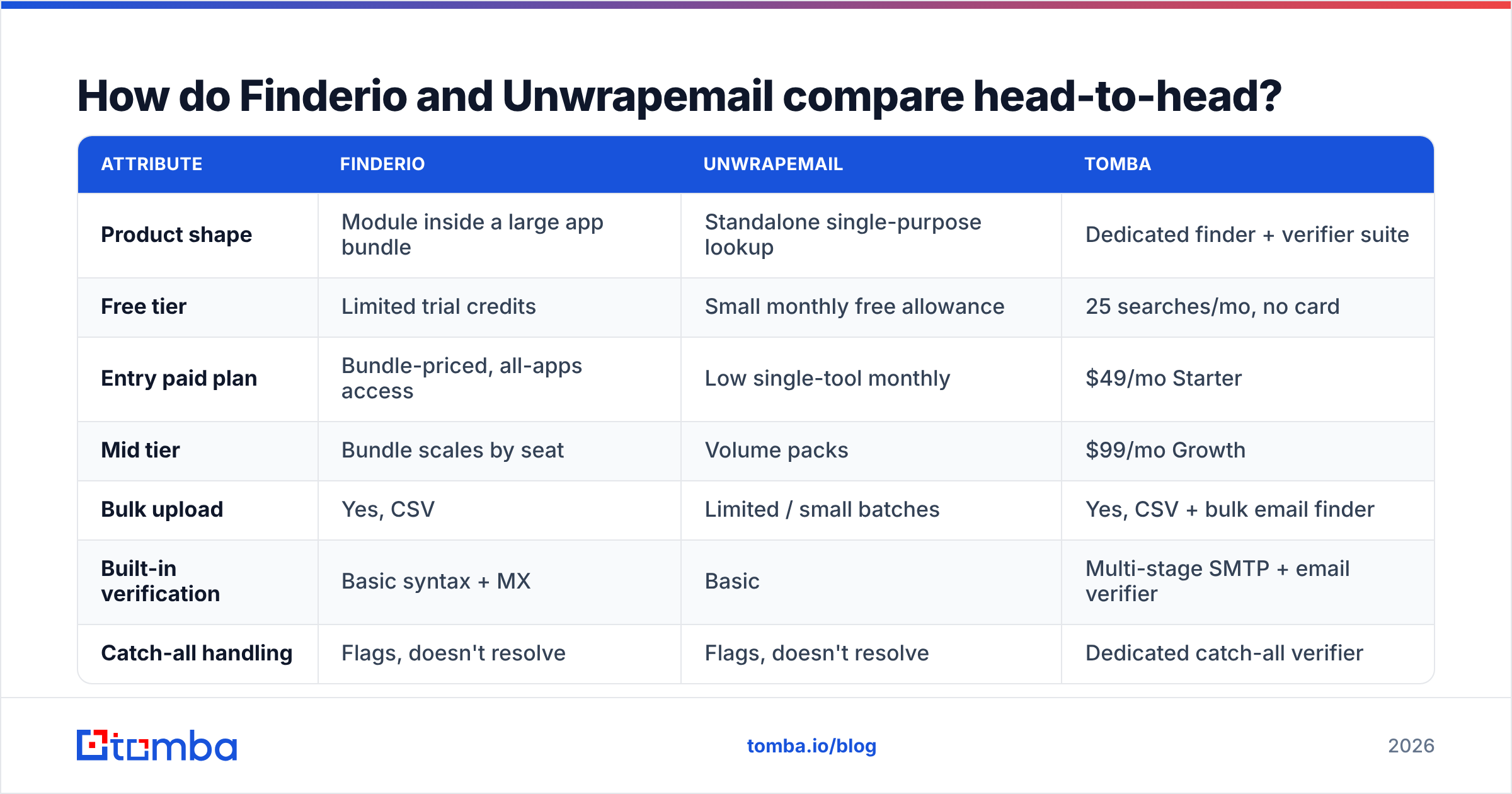
Here's the practical comparison. Pricing on both tools shifts with promotions and bundle changes, so confirm current numbers on each vendor's own site before you buy — the structural differences below are the durable part.
| Attribute | Finderio | Unwrapemail | Tomba |
|---|---|---|---|
| Product shape | Module inside a large app bundle | Standalone single-purpose lookup | Dedicated finder + verifier suite |
| Free tier | Limited trial credits | Small monthly free allowance | 25 searches/mo, no card |
| Entry paid plan | Bundle-priced, all-apps access | Low single-tool monthly | $49/mo Starter |
| Mid tier | Bundle scales by seat | Volume packs | $99/mo Growth |
| Bulk upload | Yes, CSV | Limited / small batches | Yes, CSV + bulk email finder |
| Built-in verification | Basic syntax + MX | Basic | Multi-stage SMTP + email verifier |
| Catch-all handling | Flags, doesn't resolve | Flags, doesn't resolve | Dedicated catch-all verifier |
| Public API | Yes, limited docs | Minimal | Full REST email finder API, CLI, MCP |
| Native integrations | Within 500apps ecosystem | Few | HubSpot, Salesforce, Pipedrive, Sheets, Zapier |
| Best for | Teams already buying the bundle | Occasional manual lookups | Volume outbound + engineering workflows |

Read that table with one bias in mind: bundles optimize for perceived value per dollar, and single-tool products optimize for simplicity. Neither optimizes for the thing outbound teams actually get paid on, which is verified contacts per hour of work.
Which one actually finds more valid emails?#
Nobody outside the vendors knows, and that's the honest answer. Public accuracy claims are self-reported, measured on undisclosed samples, and almost never reproducible.
What you can do is run the same test everyone should run before signing an annual contract:
- Build a 200-row control list. Pull names and domains you can independently confirm — customers, past contacts, people who've already emailed you. You know the ground truth.
- Strip the answers. Feed only first name, last name, and domain into each tool.
- Record three outcomes per row: found and correct, found and wrong, not found. "Not found" is much cheaper than "found and wrong."
- Segment by company size. Coverage collapses differently. Most finders do well on 200-to-5,000-employee companies and badly on sub-20-person shops and on EU domains with aggressive privacy posture.
- Check the confidence signal. A tool that says "85% confidence, pattern-derived" is more useful than one that returns a bare string, because you can route low-confidence rows to a second pass.

In our own repeat testing across email-finding vendors, the pattern holds: match rates cluster within roughly 10-15 points of each other on mainstream domains, and diverge sharply on the hard 20% — small companies, non-Latin name variants, recently-changed domains, and catch-all servers. Choose based on how the tool behaves on the hard 20%, because the easy 80% is a commodity.
One structural difference is worth flagging. Finderio and Unwrapemail both flag catch-all domains without resolving them. A catch-all server accepts mail for any address, so SMTP validation returns "valid" for everything — including addresses that don't exist. If you accept those at face value, you inflate your list and then wonder why your bounce rate spiked three weeks later. A catch-all verifier that scores those domains separately is the only way to keep them without gambling.
What does each tool really cost per usable contact?#
Price per credit is marketing. Cost per usable contact is finance.
The math:
Cost per usable contact = (monthly cost) ÷ (credits × match rate × deliverable rate)
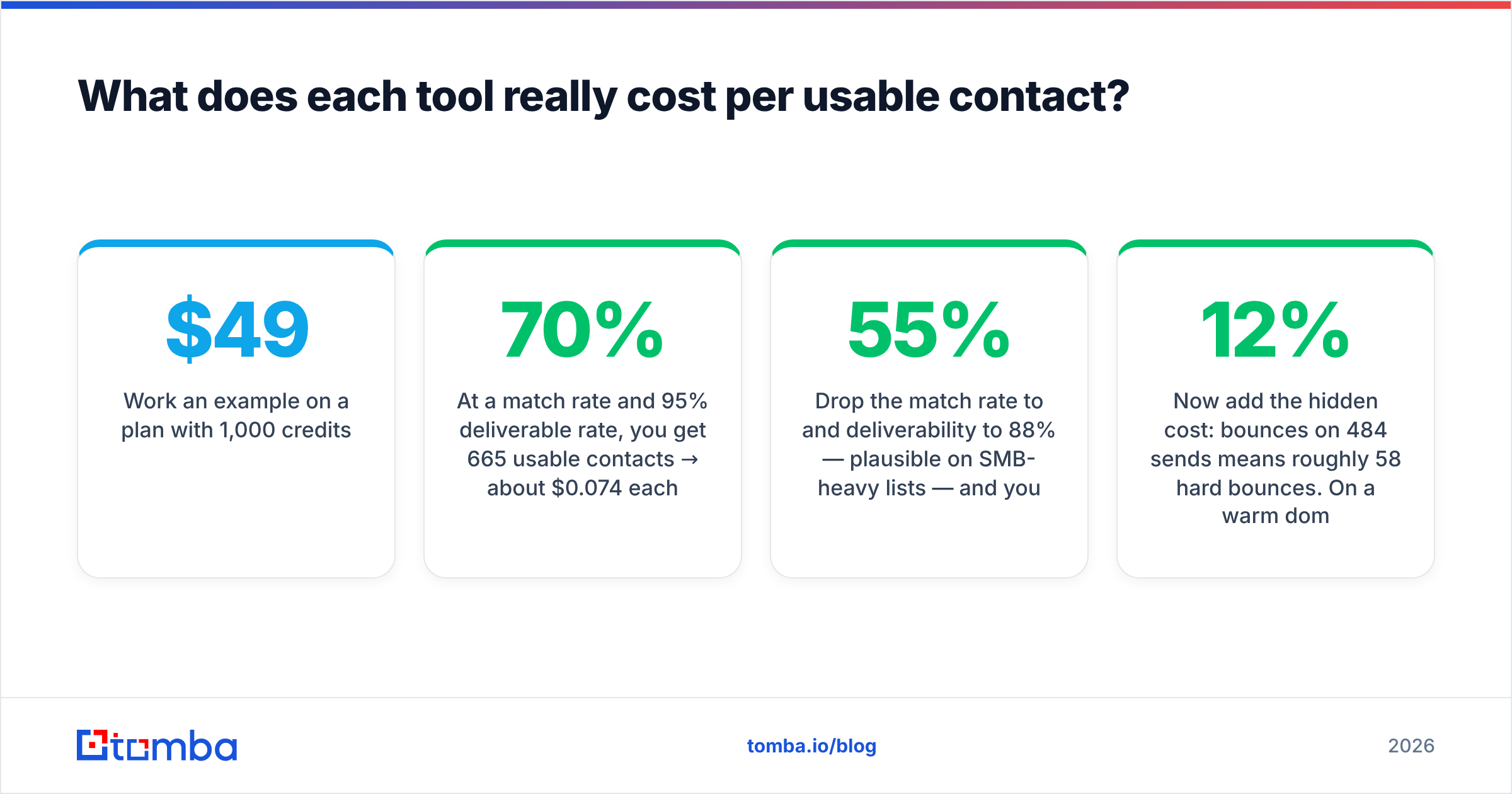
Work an example on a $49/mo plan with 1,000 credits:
- At a 70% match rate and 95% deliverable rate, you get 665 usable contacts → about $0.074 each.
- Drop the match rate to 55% and deliverability to 88% — plausible on SMB-heavy lists — and you get 484 → about $0.101 each.
- Now add the hidden cost: 12% bounces on 484 sends means roughly 58 hard bounces. On a warm domain that's a reputation hit, and reputation damage is not priced in credits.
That third line is why cheap-per-credit tools frequently cost more. A tool that returns more addresses but verifies fewer of them shifts spend from your software budget to your sender reputation, which you cannot top up with a credit card.
Compare that against a stack where verification is native. Tomba pricing runs a free tier at 25 searches/mo, Starter at $49/mo, Growth at $99/mo, and Pro at $249/mo — with verification built into the same workflow rather than sold as a separate product you have to remember to run.

Who should pick Finderio?#
Pick Finderio when the bundle math genuinely works for you.
- You're a small team already evaluating 500apps for CRM, helpdesk, or project tooling, and the finder is a bonus rather than the reason.
- Your volume is moderate and your targets are mid-market companies with predictable email patterns.
- You don't need a production-grade API — occasional CSV exports are fine.
- Procurement prefers one vendor invoice over five.
Skip it when the email finder is the primary purchase. Buying a twelve-app bundle to get one app you actually need is how tool sprawl starts, and you'll still end up paying for a separate verifier.
Who should pick Unwrapemail?#
Pick Unwrapemail when your usage is genuinely small and manual.
- You're a founder, recruiter, or solo consultant doing 20-100 lookups a month.
- You want a URL, a search box, and no onboarding call.
- Budget sensitivity outranks throughput.
- You're comfortable running verification elsewhere before you send.
Skip it once you cross into real outbound volume. The moment you need bulk uploads, CRM sync, catch-all resolution, or programmatic access, a minimal tool becomes the bottleneck — and the workaround (export, verify elsewhere, re-import) costs more analyst hours than the subscription saved.
Where do both tools fall short?#
Three gaps show up repeatedly in this matchup, and they're the reason buyers churn from both:
- Verification is bolted on, not built in. Both treat finding and verifying as separate concerns. In practice they're one concern: an unverified email is not a lead, it's a liability. Running a proper email verification pass — syntax, MX, SMTP handshake, role-account detection, disposable-domain screening — is what turns a list into a campaign.
- API depth. If you're building enrichment into a signup flow, a data pipeline, or an AI agent, you need documented endpoints, sane rate limits, webhooks, and SDKs. Neither tool is engineered as an API-first product. Tools with a real email finder API, a CLI, and an MCP server let you skip the CSV shuffle entirely.
- Coverage outside the sweet spot. Both lean on crawled public sources plus pattern inference. That works on companies with public team pages and press coverage. It degrades on stealth startups, non-English domains, and privacy-forward EU companies — exactly the segments where a found email is worth the most, because your competitors couldn't find it either.
For teams whose real need is a pre-built list rather than lookup-by-lookup finding, a purchased-database vendor like BookYourData is a legitimately different and often better answer — you're buying coverage upfront instead of paying per query. Match the buying model to the workflow before you argue about accuracy percentages.
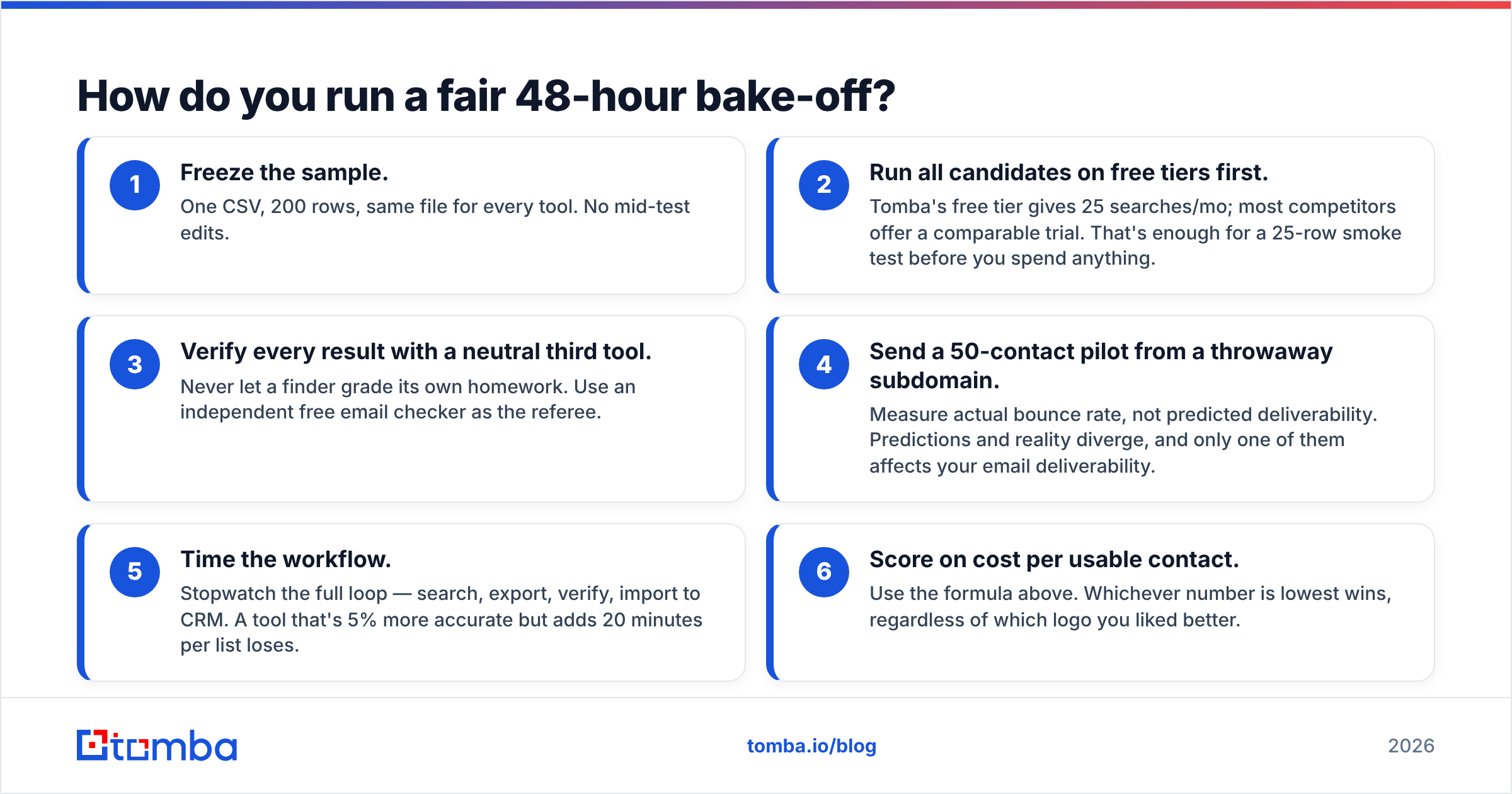
How do you run a fair 48-hour bake-off?#
Don't decide from review sites. Decide from your own data.
- Freeze the sample. One CSV, 200 rows, same file for every tool. No mid-test edits.
- Run all candidates on free tiers first. Tomba's free tier gives 25 searches/mo; most competitors offer a comparable trial. That's enough for a 25-row smoke test before you spend anything.
- Verify every result with a neutral third tool. Never let a finder grade its own homework. Use an independent free email checker as the referee.
- Send a 50-contact pilot from a throwaway subdomain. Measure actual bounce rate, not predicted deliverability. Predictions and reality diverge, and only one of them affects your email deliverability.
- Time the workflow. Stopwatch the full loop — search, export, verify, import to CRM. A tool that's 5% more accurate but adds 20 minutes per list loses.
- Score on cost per usable contact. Use the formula above. Whichever number is lowest wins, regardless of which logo you liked better.
The whole exercise takes an afternoon and saves you a twelve-month contract you regret in month two. HubSpot's sales blog has solid material on structuring outbound tests if you want a template for the pilot send.
What's the verdict on Finderio vs Unwrapemail?#
Finderio wins on breadth; Unwrapemail wins on simplicity; neither wins on verification depth or API quality.
If you're already buying the 500apps bundle, Finderio is a reasonable included tool — use it, but budget for a separate verifier. If you do fewer than 100 lookups a month and want zero setup, Unwrapemail does the job for less than a lunch. If your outbound is a real revenue channel — thousands of contacts, CRM sync, API calls, catch-all domains in the mix — both will hit their ceiling faster than you expect, and the migration cost lands on you.
That last case is the one worth planning for now rather than later. Start with the Tomba Email Finder: find addresses by domain, name, or company, verify them in the same pass, and push them straight into HubSpot, Salesforce, or Google Sheets. The free tier gives you 25 searches a month to run the bake-off described above — no card, no sales call. Run your 200-row control list through it alongside Finderio and Unwrapemail, compute cost per usable contact for all three, and let the spreadsheet pick the winner.
Related guides#
Ready to find emails that actually work?
Join 150,000+ professionals who stopped guessing and started sending. Free credits on signup — no credit card required.
Get the Tomba newsletter
Practical outbound tactics and product updates — once every two weeks.
About the author