Finderio vs UpLead 2026: Data Accuracy, Pricing, Verdict
Finder.io bundles an email finder into a 50-app suite for a flat fee. UpLead sells a premium verified B2B database by the credit. Here is how they actually compare on accuracy, credit math, and true cost per usable email.
Finderio vs UpLead is a matchup between two very different tools. Finder.io (often typed as Finderio) looks up emails when you already have a name and a domain. UpLead finds people you did not know existed. Here is the short answer, then the math.
TL;DR
Finder.io (part of the 500apps bundle) is the cheap-per-seat option. You get an email finder, a verifier, and a pile of other business apps for one flat fee. Coverage is thinnest on mid-market and EMEA companies.
UpLead is the premium option. It sells a curated B2B database with real-time verification at export and strong intent filters. Credits run out fast if you burn them carelessly.
The two tools solve different problems. Finder.io is a lookup tool. UpLead is a database tool. Compare them on price alone and you will pick the wrong one.
Judge both on cost per verified, deliverable email, not on sticker price. A $99 plan with 170 credits and a 92% hit rate can cost more per usable contact than a $49 plan with 5,000 searches at 88%.
Do you mostly need accurate emails at API volume rather than a full sales-intelligence suite? A dedicated finder like Tomba usually lands cheaper per verified contact than both.
What are Finder.io and UpLead?#
They both put an email address in your CRM. They get there in completely different ways.
Finder.io is a contact-lookup product inside the 500apps suite. The pitch is bundling. For one low price per user you get email search, email verification, and dozens of other business apps (CRM, helpdesk, project management, and so on). The finder itself does domain search, single email lookup, bulk upload, and verification. It runs on a crawled index plus pattern inference — the same mechanical approach most email finders use.
UpLead is a standalone B2B prospecting database. You search a contact universe with 50+ filters: title, seniority, industry, revenue, headcount, tech stack, and intent signals. Then you spend credits to reveal contacts. Its hardest-pushed differentiator is real-time email verification at the moment of export, backed by a published accuracy guarantee. If a contact you paid for bounces, you get the credit back.
That difference in architecture drives everything else. Finder.io answers "what is Jane Doe's email at acme.com?" UpLead answers "give me 400 VP-level ops leaders at 200–1,000 employee SaaS companies using Snowflake." One is a resolver. One is a discovery engine.
Finderio vs UpLead: how do they compare on paper?#
Here is the honest side-by-side. Pricing is what each vendor listed publicly when we wrote this. Both change tiers often, so confirm on their own pages before you commit.
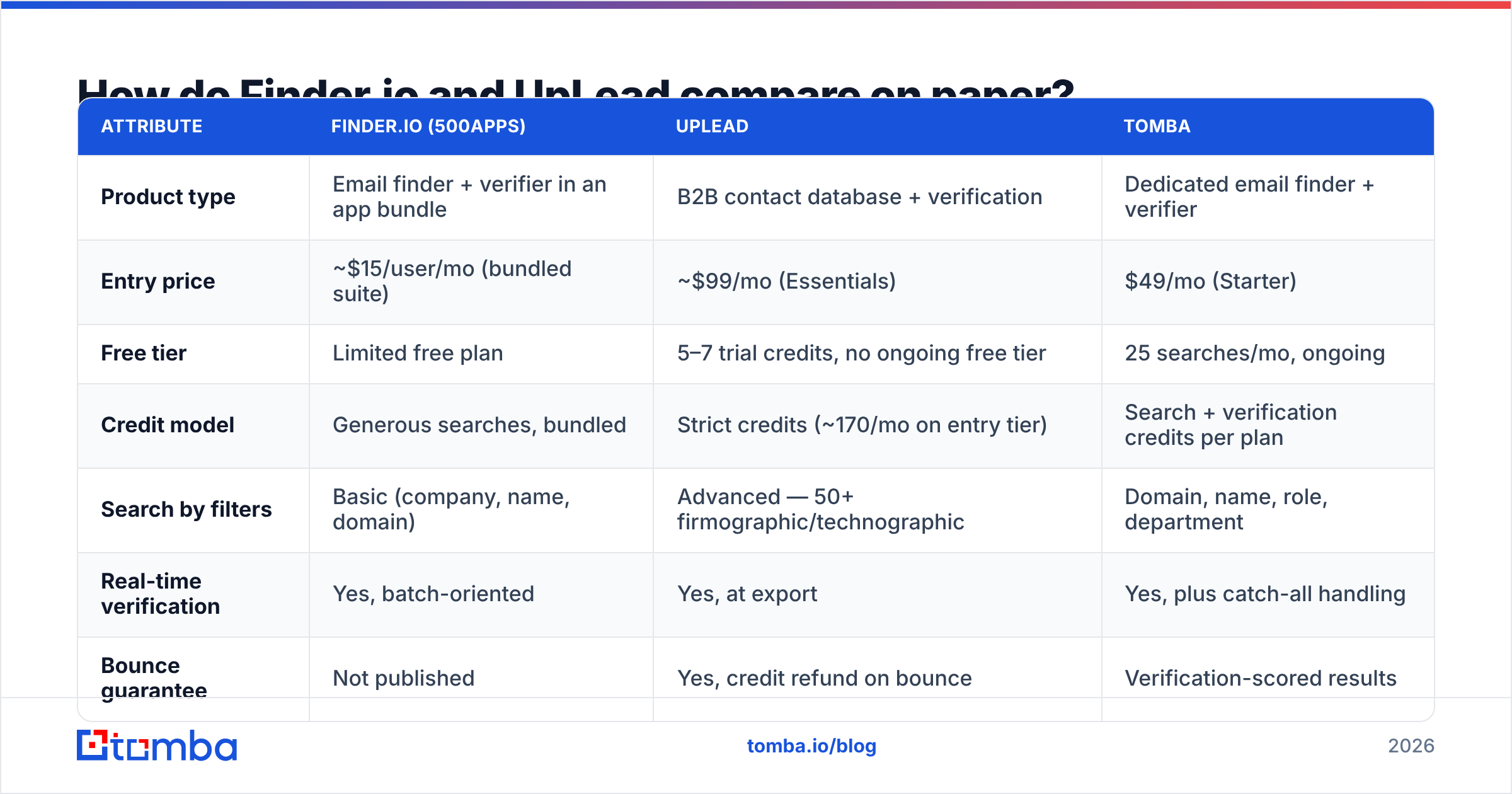
| Attribute | Finder.io (500apps) | UpLead | Tomba |
|---|---|---|---|
| Product type | Email finder + verifier in an app bundle | B2B contact database + verification | Dedicated email finder + verifier |
| Entry price | ~$15/user/mo (bundled suite) | ~$99/mo (Essentials) | $49/mo (Starter) |
| Free tier | Limited free plan | 5–7 trial credits, no ongoing free tier | 25 searches/mo, ongoing |
| Credit model | Generous searches, bundled | Strict credits (~170/mo on entry tier) | Search + verification credits per plan |
| Search by filters | Basic (company, name, domain) | Advanced — 50+ firmographic/technographic | Domain, name, role, department |
| Real-time verification | Yes, batch-oriented | Yes, at export | Yes, plus catch-all handling |
| Bounce guarantee | Not published | Yes, credit refund on bounce | Verification-scored results |
| API access | Available | Available on higher tiers | Full API on all paid plans |
| Best for | Budget teams wanting many tools | Mid-market ABM and targeted list-building | High-volume, accuracy-first email discovery |
The table shows where each one earns its money. UpLead charges a premium for finding people you did not know existed. Finder.io charges almost nothing, because the finder is a hook for the wider suite. Neither is dishonest about it. But if you buy UpLead to do domain lookups, you are paying database prices for resolver work.
Which tool has better data accuracy?#
UpLead wins on verified-at-export accuracy. Finder.io wins on how much you can throw at it. Those are not the same thing, and mixing them up is the most common mistake in this comparison.

Accuracy here is really three separate measurements. Vendors love to blur them into one number:
Hit rate (coverage) — of 1,000 people you look up, how many return any email? A big crawled index helps here. Finder.io is mid-pack, especially outside US tech.
Precision (validity) — of the emails returned, how many are real, active mailboxes? UpLead's verify-on-export step targets this directly. That is why its guarantee is framed around bounces rather than coverage.
Freshness (decay) — B2B contact data decays roughly 2–3% per month as people change jobs. A record found in January is much less reliable by June. Database products store rows instead of resolving them live, so they carry more stale data.
The practical result is easy to miss. A database tool with a 98% "accuracy" claim and a 35% coverage rate can leave you with fewer usable contacts than a finder with 90% precision and 70% coverage. Ask any vendor for both numbers, in writing, on your target segment — not their aggregate.
Test it yourself before you buy. Take 100 contacts whose emails you already have from closed deals or replied threads. Strip the emails. Run the names and domains through each tool's trial. Score coverage and precision separately. It takes an hour, and it beats every review site.

What does each tool actually cost per verified email?#
This is the section that changes decisions. Sticker price is meaningless. Cost per usable contact is the metric.
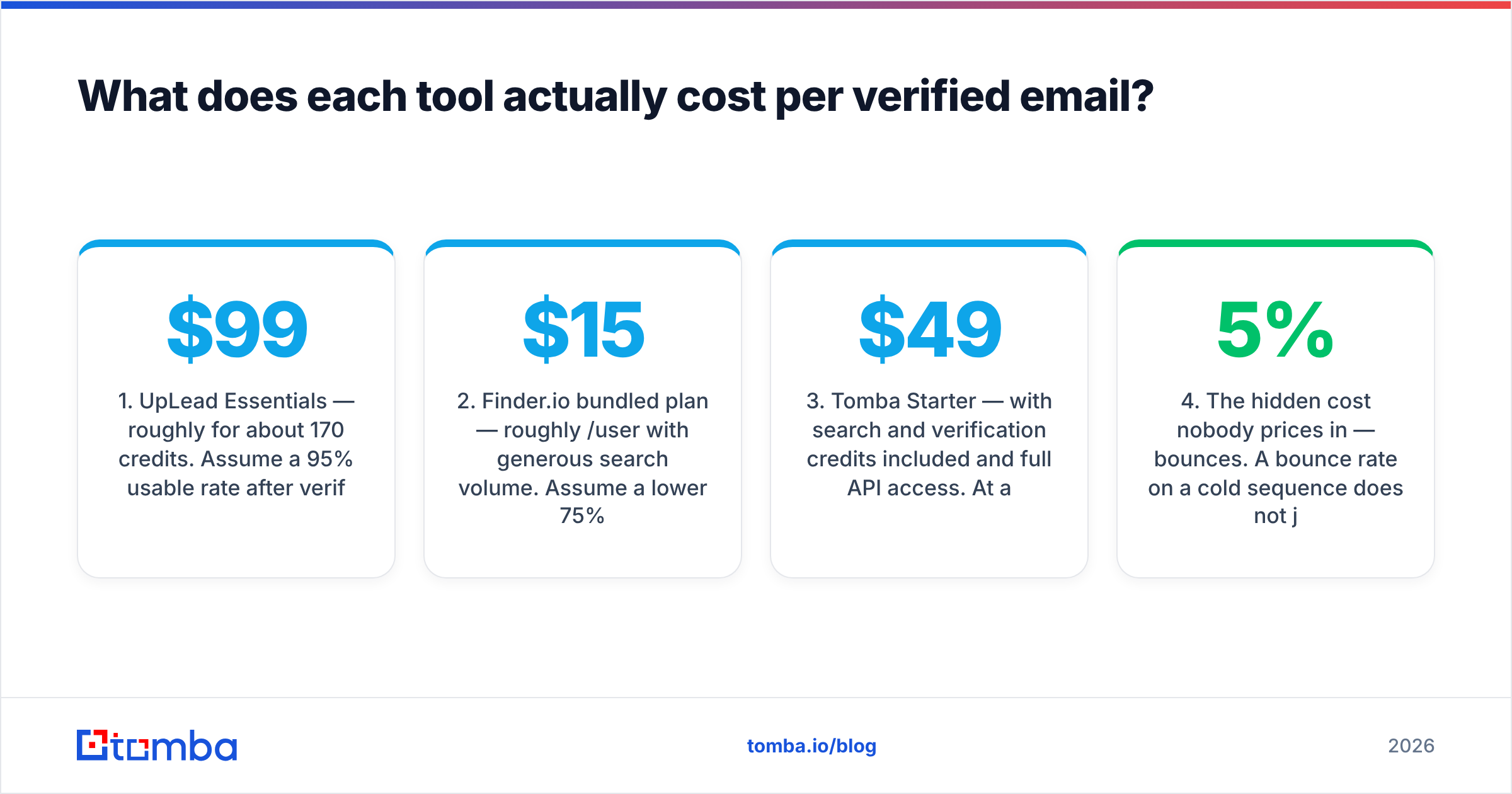
Run the arithmetic on the entry tiers:
UpLead Essentials — roughly $99/mo for about 170 credits. Assume a 95% usable rate after verification. That is
161 usable contacts, or **$0.61 per verified email**. Credits do not always roll over, so unused capacity evaporates.Finder.io bundled plan — roughly $15/user/mo with generous search volume. Assume a lower 75% usable rate on a mixed international list of 1,000 lookups. That is
750 usable contacts, or **$0.02 per verified email**. That only holds if your targets sit inside its index at all.Tomba Starter — $49/mo with search and verification credits included, plus full API access. At a mid-range usable rate you land in the low single-digit cents per verified email. A free tier of 25 searches lets you test first. See Tomba pricing for exact per-tier credit counts.
The hidden cost nobody prices in — bounces. A 5% bounce rate on a cold sequence does more than waste credits. It degrades sender reputation and drags down inbox placement for every other email your domain sends that month. That cost dwarfs the credit price.
The second hidden cost — seats. Finder.io's per-user pricing looks cheap until an eight-person SDR team needs access. UpLead's credit pool is shared, which is friendlier for teams but harsher for individuals.
Read the credit fine print on both. Some vendors charge a credit for a search even when it returns nothing. Others charge only on a successful reveal. That single policy difference can double or halve your real cost. UpLead's model is reveal-based, which is more customer-friendly than the search-based charging you see elsewhere.
What are the workflow and integration differences?#
If you live in a CRM, integration depth decides whether a tool sticks after month two.
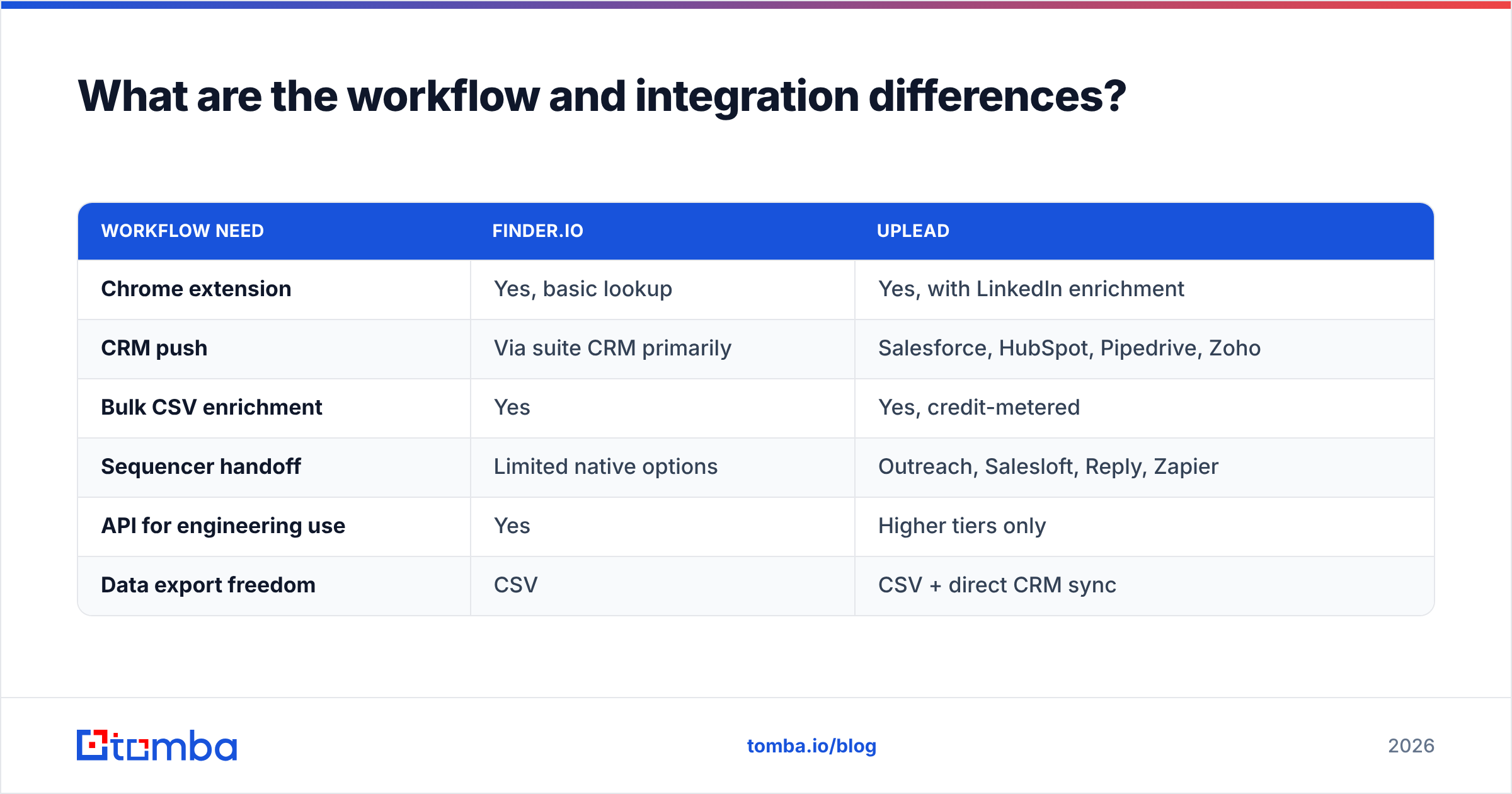
| Workflow need | Finder.io | UpLead |
|---|---|---|
| Chrome extension | Yes, basic lookup | Yes, with LinkedIn enrichment |
| CRM push | Via suite CRM primarily | Salesforce, HubSpot, Pipedrive, Zoho |
| Bulk CSV enrichment | Yes | Yes, credit-metered |
| Sequencer handoff | Limited native options | Outreach, Salesloft, Reply, Zapier |
| API for engineering use | Yes | Higher tiers only |
| Data export freedom | CSV | CSV + direct CRM sync |
UpLead is built for a revenue team that already runs HubSpot or Salesforce. Enriched records land in the right object without manual CSV shuffling. If you want that pipeline, check whether the HubSpot integration or equivalent supports the fields you actually map — not just "contacts sync," but title, company size, and source attribution.
Finder.io's integration story is inward-facing. It plays best with the other 500apps products. If you are already committed to that ecosystem, that is a feature. If you are not, expect to move data by CSV or build against the API yourself.
One workflow gap both tools share: catch-all domains. Many enterprise domains accept every address at the SMTP layer. Standard verification then returns "unknown" rather than valid or invalid. Neither tool solves this cleanly. If a large share of your ICP sits behind catch-alls — common in finance, healthcare, and large enterprise — add a dedicated catch-all verifier to the stack regardless of which you pick.
Who should choose Finder.io?#
Pick Finder.io if these describe you:
You are cost-constrained and volume-driven. Early-stage teams doing broad outreach, where a 20% miss rate is fine, get more raw contacts per dollar here than anywhere near UpLead's price point.
You already use or want the 500apps suite. The finder is far more compelling as the twelfth app you get for free than as a standalone purchase.
Your prospecting is domain-first. You have a target account list already and just need contacts at those domains — not discovery.
You do not need firmographic filtering. If "VP Marketing at Series B fintechs in DACH" is not a query you run, you are paying UpLead for capability you will never touch.
Where it disappoints: international coverage, freshness on smaller companies, and support depth. Bundled products rarely get the engineering attention standalone products do, and it shows in edge cases.
Who should choose UpLead?#
Pick UpLead if these describe you:
You need to build lists from scratch. Discovery by filter is the core value, and it is genuinely good. The technographic filters let you build "companies running Shopify Plus" lists that a resolver simply cannot produce.
Bounce rate is a board-level metric. The verify-at-export step plus the credit-back policy is real protection. It is the single strongest argument for paying the premium. Read current customer reports on G2 first.
You sell to US mid-market. That is where its coverage is strongest and where the price gets justified fastest.
You have CRM discipline. UpLead pays off when records flow into a well-governed CRM. Dumped into a spreadsheet, the premium is wasted.
Where it disappoints: credit anxiety. Teams on Essentials often ration lookups by the third week of the month. That behavior kills prospecting consistency. If your team hesitates before running a search, the tool is mispriced for you.
Where does Tomba fit between the two?#
Honestly: in the middle, and deliberately so.

Tomba does not try to be a sales-intelligence platform with intent data — UpLead does that better. It also does not bundle a CRM and a helpdesk — Finder.io's suite does that. It focuses on one job: resolving and verifying professional email addresses at scale, with an API engineers can actually build on.
| Scenario | Best fit |
|---|---|
| Build a filtered list of 500 net-new accounts | UpLead |
| Enrich a 20,000-row account list with contacts | Tomba (bulk + API) |
| Cheapest possible contacts, quality secondary | Finder.io |
| Programmatic enrichment inside your own product | Tomba API |
| Team already standardized on 500apps | Finder.io |
| Bounce guarantee required by compliance | UpLead |
Concretely: domain search returns every discoverable address at a company plus the detected email pattern. The email verifier scores deliverability before you send. Both run through the same API on every paid tier, not behind an enterprise upsell. Pricing runs Free (25 searches/mo), Starter $49/mo, Growth $99/mo, Pro $249/mo. The Growth tier matches UpLead's entry price with much more search volume, though without the filtered-discovery database.
The honest framing: if discovery is your bottleneck, buy UpLead. If resolution and verification are your bottleneck, buy a dedicated finder. Plenty of teams run both. UpLead handles quarterly list-building sprints, a finder handles continuous enrichment. That combination usually costs less than forcing one tool to do both jobs badly.

How should you run the evaluation?#
Do not settle Finderio vs UpLead by reading a comparison post, including this one. Run this test in a week:
Define the segment. Pull 100 target companies that match your real ICP, including the awkward ones: non-US, sub-50 headcount, non-tech.
Run all three trials on the same 100. Finder.io's free plan, UpLead's trial credits, Tomba's 25 free searches. The sample sizes differ, so normalize by percentage.
Score coverage and precision separately. Coverage = emails returned ÷ attempts. Precision = valid on independent verification ÷ emails returned.
Compute cost per verified contact. Monthly price ÷ (monthly capacity × coverage × precision). This one number ranks the options for your market, which is the only ranking that matters.
Test the annoying path. Try a catch-all domain, a hyphenated surname, and a person who changed companies last quarter. Tools separate on edge cases, not on
john@microsoft.com.
Whichever you pick, verify before you send. Bounces cost more than credits. A damaged sending domain takes weeks to repair, and no amount of good data fixes it after the fact.
Ready to test the resolution side?#
Is your bottleneck turning known companies and names into deliverable inboxes rather than discovering new accounts? Start with the Tomba Email Finder. The free tier gives you 25 searches a month with no card — enough to run the 100-contact benchmark above against whatever you use now. Score the coverage, score the precision, and let the cost-per-verified-email number make the call instead of a pricing page.
Related guides#
Ready to find emails that actually work?
Join 150,000+ professionals who stopped guessing and started sending. Free credits on signup — no credit card required.
Get the Tomba newsletter
Practical outbound tactics and product updates — once every two weeks.
About the author