FindThatLead Reviews (2026): Features, Pricing & Accuracy
FindThatLead has been a budget email finder since 2015, but does it still hold up in 2026? We break down coverage, verification quality, credit rules and pricing against the tools teams switch to.
TL;DR
- FindThatLead is a low-cost, all-in-one prospecting suite: email finder, lead search, Chrome extension, verifier, and a built-in cold email sender (Scrapper + Prospector + Campaigns).
- Most FindThatLead reviews land in the same place: good value, decent B2B coverage in Europe and LATAM, but inconsistent hit rates on smaller domains and a verification layer you should not fully trust on its own.
- Credits are consumed per search — including searches that return nothing useful on some plans — and unused credits generally do not roll over. Budget for waste.
- It is a reasonable pick if you want finding + sending in one $49-ish subscription. It is the wrong pick if accuracy per credit, API throughput, or catch-all handling is your bottleneck.
- Teams that outgrow it usually split the stack: a high-accuracy email finder plus a dedicated sending tool.
What is FindThatLead, and who is it actually for?#
FindThatLead is a Barcelona-built B2B prospecting platform that launched in 2015 and has stayed deliberately cheap. Think of it as a Swiss Army knife rather than a scalpel: instead of doing one job at a benchmark-topping level, it bundles four or five jobs into a single subscription so a solo founder or a two-person sales team never has to buy a second tool.
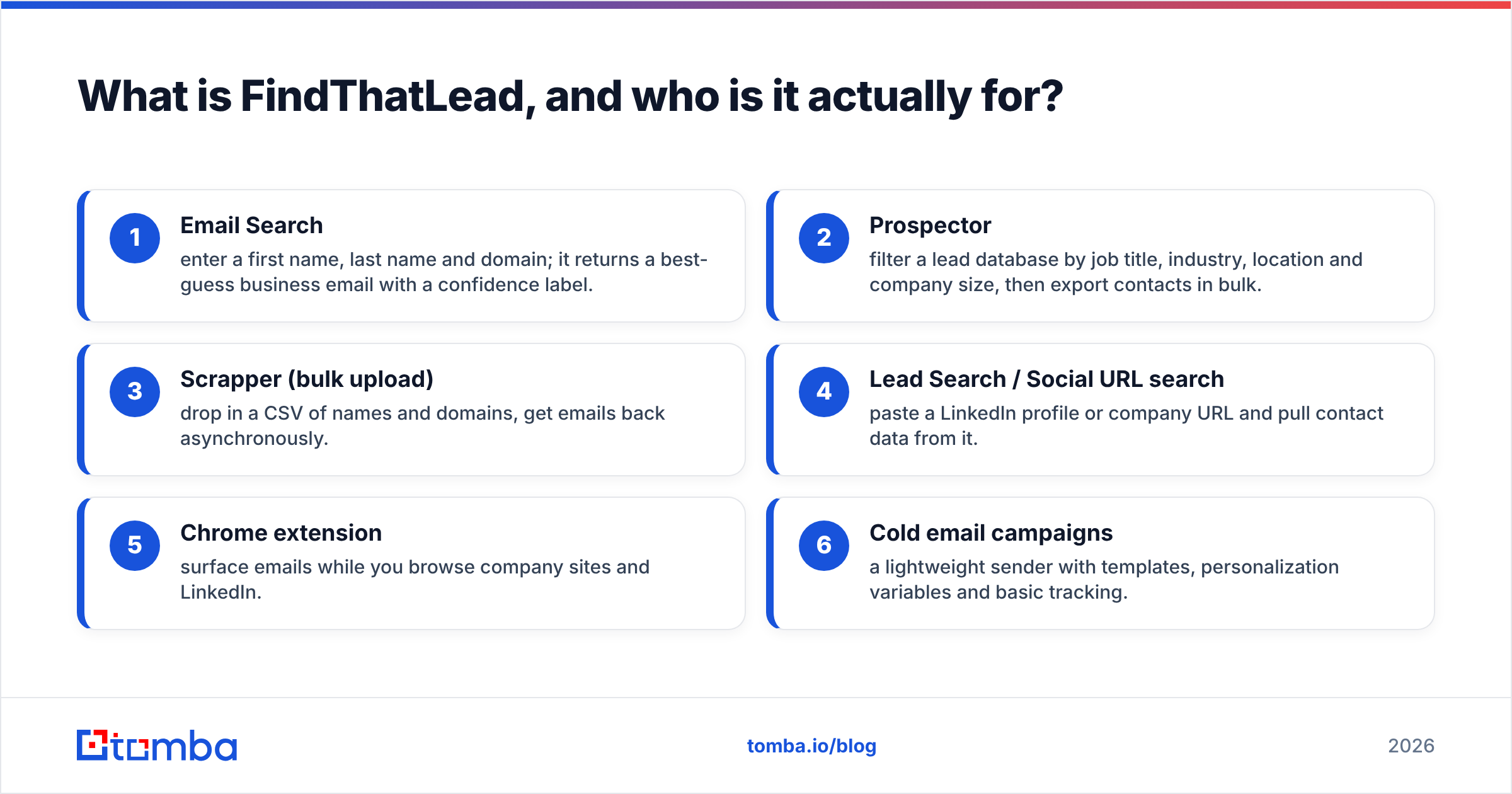
The product breaks into these pieces:
- Email Search — enter a first name, last name and domain; it returns a best-guess business email with a confidence label.
- Prospector — filter a lead database by job title, industry, location and company size, then export contacts in bulk.
- Scrapper (bulk upload) — drop in a CSV of names and domains, get emails back asynchronously.
- Lead Search / Social URL search — paste a LinkedIn profile or company URL and pull contact data from it.
- Chrome extension — surface emails while you browse company sites and LinkedIn.
- Cold email campaigns — a lightweight sender with templates, personalization variables and basic tracking.
That last bullet is the strategic difference. Hunter, Tomba, Apollo and most email finders assume you already have a sending tool. FindThatLead assumes you don't. For a founder doing 200 emails a week, that consolidation is worth real money. For an outbound team running multiple inboxes with domain rotation and reply routing, the built-in sender is a toy compared to a dedicated platform.
The honest audience profile: solo founders, freelancers, small agencies, and Spanish/LATAM-market sellers who want one login and one invoice. Everyone else should read the limits section before committing.

What do FindThatLead reviews consistently agree on?#
Scrape enough public feedback on G2's lead intelligence category and vendor comparison threads and the same five themes surface. They are worth separating from marketing copy on the official FindThatLead site.
The consistent praise:
- Price-to-feature ratio. Very few tools give you finder + database + sender under $50/month.
- Ease of onboarding. Non-technical users get their first list out in under 15 minutes.
- European and LATAM coverage. Reviewers repeatedly note better hit rates on Spanish, Italian and Latin American domains than US-centric databases deliver.
- Responsive support. Small-company support that actually replies is a recurring positive.
The consistent complaints:
- Inconsistent accuracy. Hit rate varies sharply by region and company size. Enterprise domains are fine; sub-50-employee companies and personal-brand domains are where results thin out.
- Credit burn. Searches that return low-confidence or unusable results still cost credits on most plans, and unused credits typically expire at the end of the billing cycle rather than rolling over.
- Verification you shouldn't lean on. The built-in validation flags obvious syntax and MX problems but is not equivalent to a dedicated SMTP-level verifier, particularly on catch-all domains.
- Dated UI. Functional, not delightful. Bulk job status and export flows feel like 2018.
- Campaign module is basic. No real warmup, limited inbox rotation, thin analytics.
None of that makes FindThatLead a bad tool. It makes it a bounded tool — and knowing the boundary is the entire point of reading reviews before you buy.
How accurate is FindThatLead in 2026?#
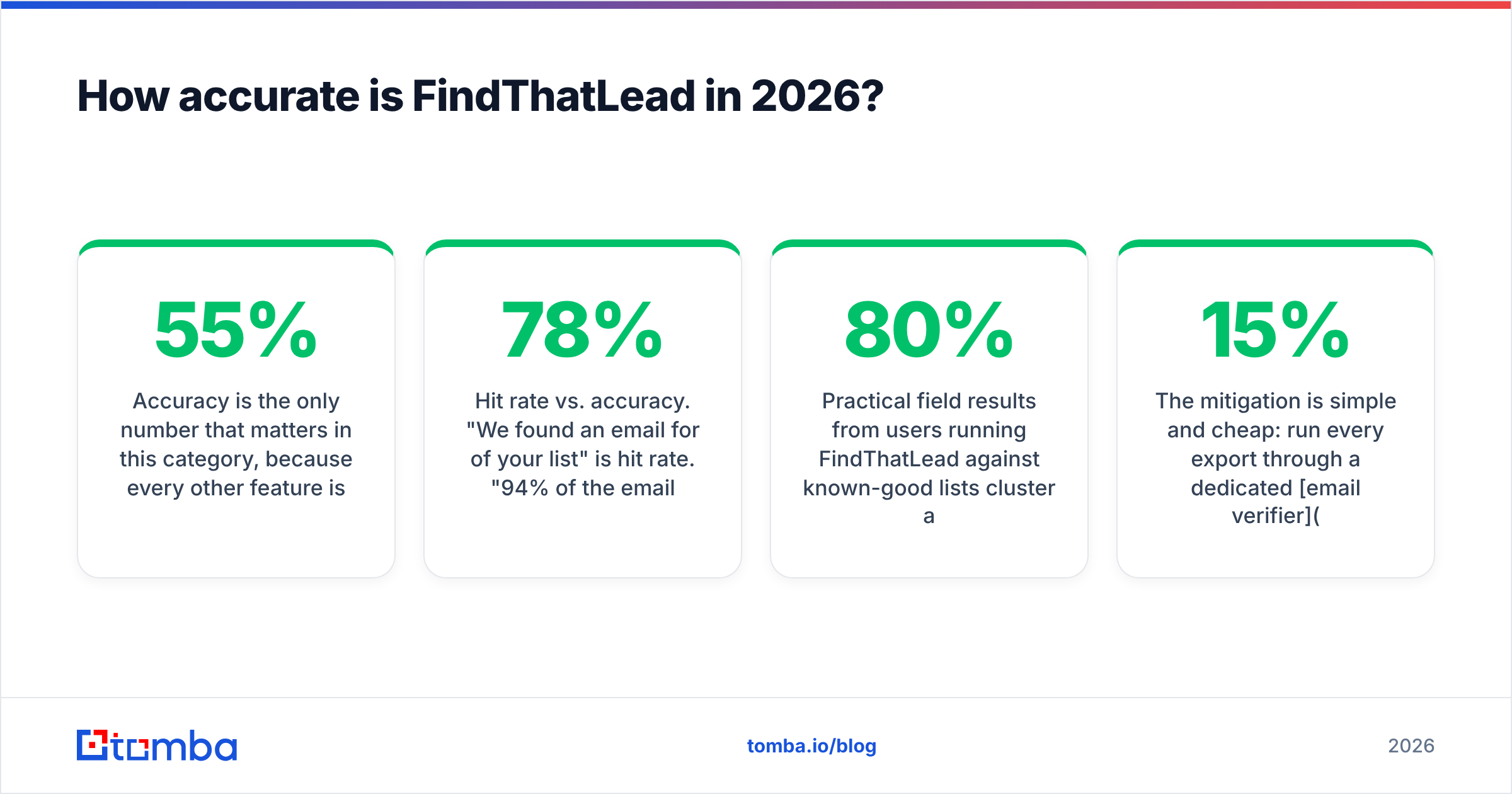
Accuracy is the only number that matters in this category, because every other feature is downstream of "is this address real?" A cheap tool that returns 55% valid emails is more expensive than a premium tool at 92% valid, once you price in bounced sends and burned domain reputation.

Three things distort accuracy claims from any vendor, FindThatLead included:
- Hit rate vs. accuracy. "We found an email for 78% of your list" is hit rate. "94% of the emails we returned were deliverable" is accuracy. Vendors quote whichever number looks better. Always test both.
- Pattern guessing vs. verified data. Many mid-tier finders generate
first.last@domain.comfrom a known pattern and label it "high confidence" without ever confirming the mailbox exists. That inflates hit rate and destroys accuracy. - Catch-all domains. On a catch-all server, every address accepts mail at SMTP time, so naive verifiers mark garbage as valid. This is where cheap tools quietly fail. If you send to unverified catch-alls at volume, you learn about it through bounce messages and a wrecked sender score.
Practical field results from users running FindThatLead against known-good lists cluster around 65–80% hit rate with roughly 80–88% deliverability on the returned addresses, skewing higher for established mid-market companies and lower for micro-businesses. That is acceptable for low-volume outreach and genuinely risky at 5,000+ sends per month without a second verification pass.
The mitigation is simple and cheap: run every export through a dedicated email verifier before it touches your sequencer. A separate verification pass typically strips 8–15% of a FindThatLead export — and those are exactly the addresses that would have bounced.
What does FindThatLead cost, and where do the credits go?#
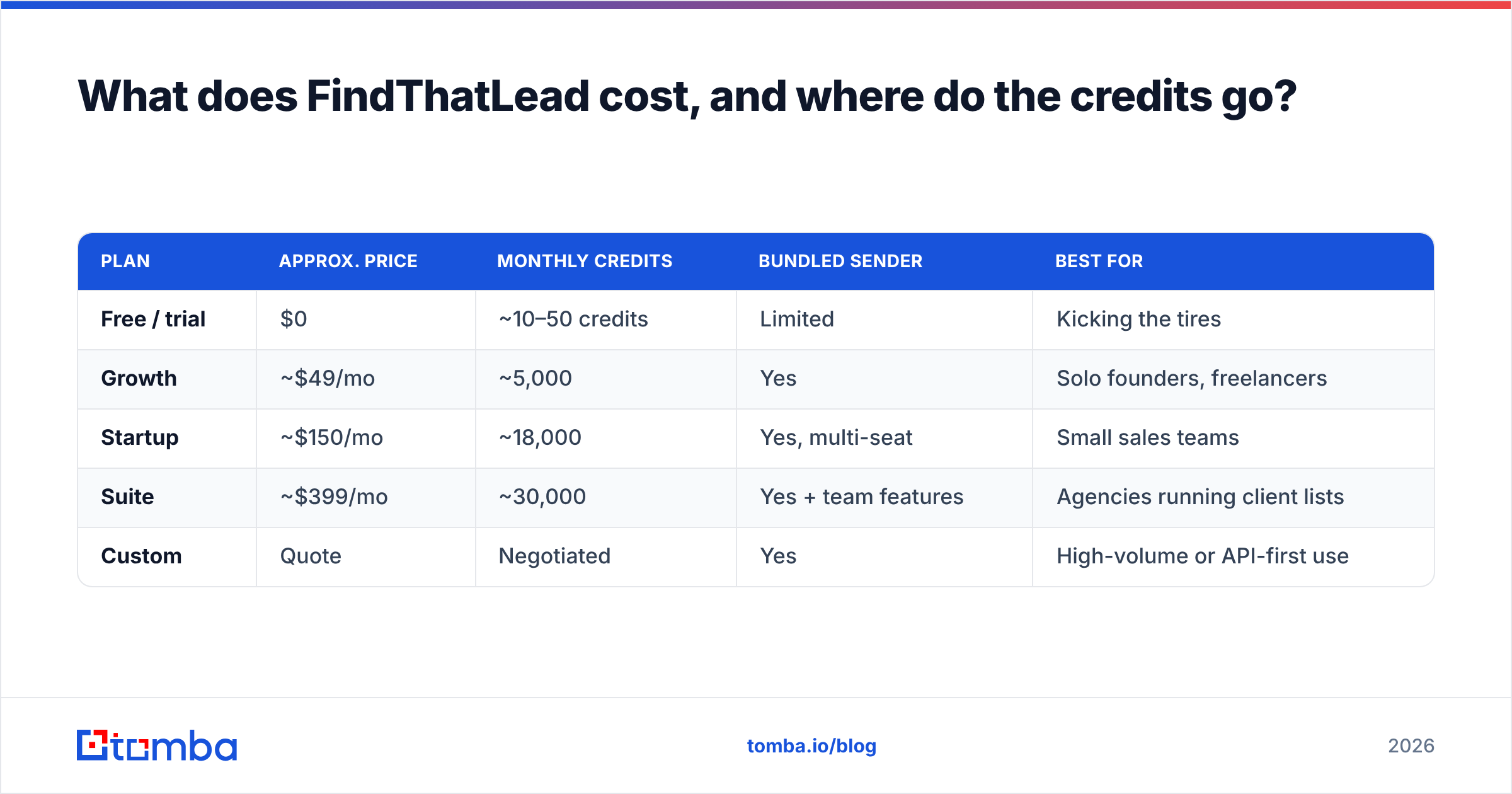
FindThatLead prices by monthly credits, with the sender bundled at every paid tier. List prices move, so treat the table below as a shape rather than a quote and confirm on the vendor's own pricing page before you buy.
| Plan | Approx. price | Monthly credits | Bundled sender | Best for |
|---|---|---|---|---|
| Free / trial | $0 | ~10–50 credits | Limited | Kicking the tires |
| Growth | ~$49/mo | ~5,000 | Yes | Solo founders, freelancers |
| Startup | ~$150/mo | ~18,000 | Yes, multi-seat | Small sales teams |
| Suite | ~$399/mo | ~30,000 | Yes + team features | Agencies running client lists |
| Custom | Quote | Negotiated | Yes | High-volume or API-first use |
Three cost mechanics decide whether that headline price is real:
- Credit consumption per action. A single-email search, a bulk row, and a database export can each consume differently. Bulk jobs on large CSVs eat credits far faster than the plan label suggests.
- No rollover. Unused credits generally reset at renewal. If your prospecting is lumpy — heavy in launch months, quiet otherwise — you pay for capacity you never use.
- Failed lookups. Whether a no-result search refunds the credit is the single most important question to ask support before you subscribe. It changes the effective cost per usable contact by 20–40%.
Compare that to Tomba pricing, which runs a genuinely usable free tier at 25 searches/month, Starter at $49/mo, Growth at $99/mo and Pro at $249/mo. Same entry price at the Starter tier, different philosophy: Tomba spends its budget on verification depth and API access rather than a bundled sender.
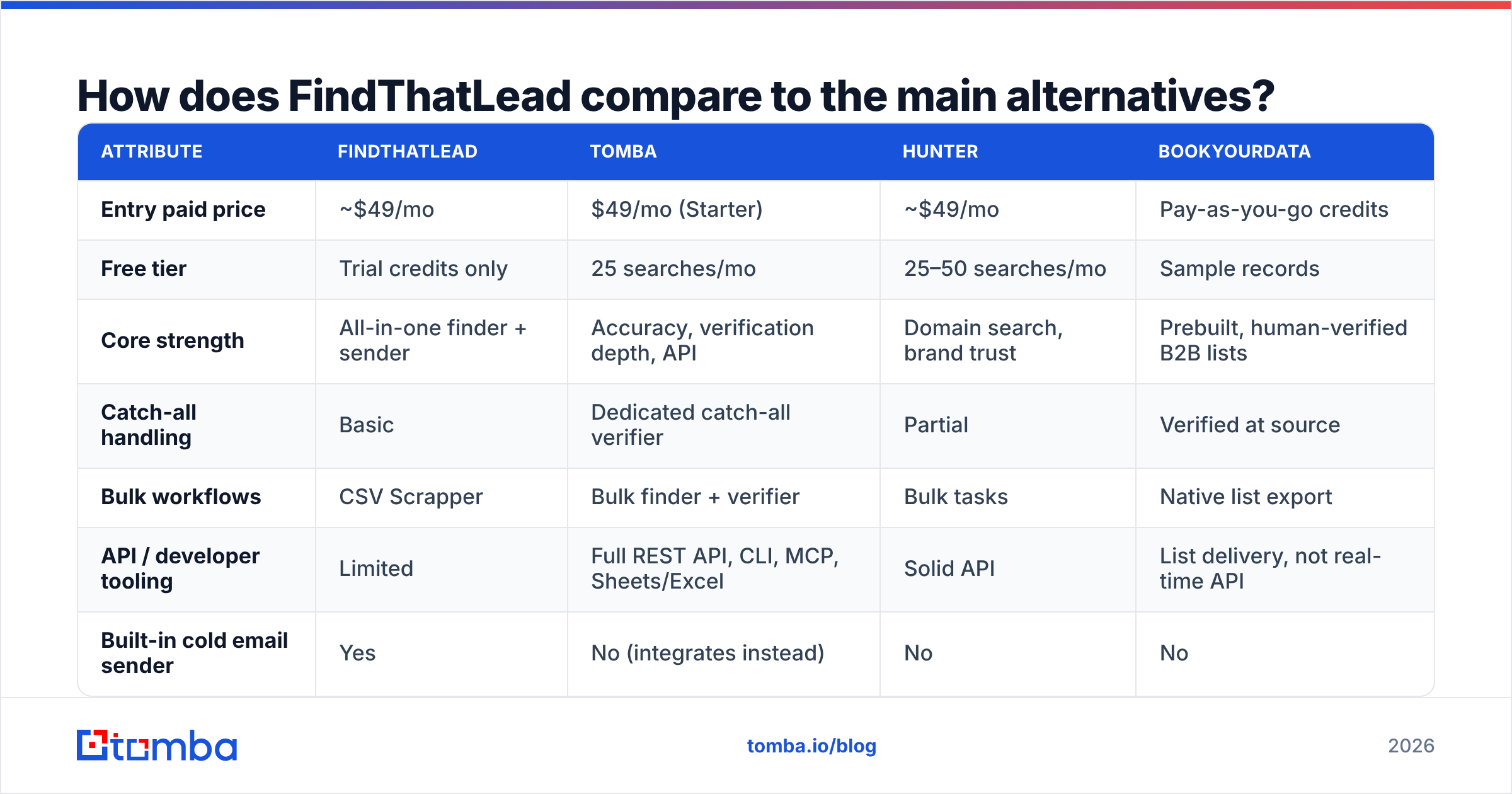
How does FindThatLead compare to the main alternatives?#

| Attribute | FindThatLead | Tomba | Hunter | BookYourData |
|---|---|---|---|---|
| Entry paid price | ~$49/mo | $49/mo (Starter) | ~$49/mo | Pay-as-you-go credits |
| Free tier | Trial credits only | 25 searches/mo | 25–50 searches/mo | Sample records |
| Core strength | All-in-one finder + sender | Accuracy, verification depth, API | Domain search, brand trust | Prebuilt, human-verified B2B lists |
| Catch-all handling | Basic | Dedicated catch-all verifier | Partial | Verified at source |
| Bulk workflows | CSV Scrapper | Bulk finder + verifier | Bulk tasks | Native list export |
| API / developer tooling | Limited | Full REST API, CLI, MCP, Sheets/Excel | Solid API | List delivery, not real-time API |
| Built-in cold email sender | Yes | No (integrates instead) | No | No |
| Best fit | Solo founders wanting one tool | Teams that need clean data at scale | Marketers doing domain research | Buyers who want a list, not a tool |
Read that table as a positioning map, not a scoreboard. Each column wins a different job.
- FindThatLead wins when consolidation beats precision — you want to find and send from one dashboard tonight.
- Tomba wins when the cost of a bad address is high: it separates finding from verifying, ships a catch-all verifier for the hardest domains, and exposes everything through the Tomba API so it can sit inside your own pipeline.
- Hunter wins on brand familiarity and domain-level research.
- BookYourData wins when you'd rather buy a finished, human-verified list than operate a search tool at all — a genuinely different and often faster path for teams targeting a defined ICP.
What are FindThatLead's real limits?#
Every tool has a ceiling. Here is where users typically hit FindThatLead's:
- Volume. Past roughly 10,000 lookups a month, the per-usable-contact cost stops being competitive once you factor in re-verification and waste.
- API depth. The API exists but is thin compared to finder-first platforms. If you're enriching records programmatically inside a CRM or product, you'll feel the constraint quickly.
- Catch-all domains. Expect ambiguous results. Any serious catch-all strategy needs a purpose-built verification step, not a confidence badge.
- Deliverability tooling. The bundled sender has no meaningful warmup, weak inbox rotation and shallow reply handling. Running real volume through it will hurt your domain.
- US enterprise coverage. Strong in Europe and LATAM, thinner on mid-market US tech than the US-first databases.
- Data freshness. Job-change churn runs 20–30% annually in B2B. Any list you pull decays fast; re-enrich quarterly regardless of vendor. A scheduled data enrichment pass is cheaper than the bounces.
Should you buy FindThatLead in 2026?#
Buy it if: you're a solo founder or small agency, sending under ~2,000 cold emails a month, targeting European or LATAM companies, and you want one subscription instead of three. At that scale, the accuracy gap costs you a handful of bounces and the consolidation saves you real time and money.
Skip it if: you're sending at volume, you need programmatic enrichment, you're targeting US mid-market tech, or you already own a sending platform you like. In those cases you're paying for a bundled sender you won't use and accepting a verification layer that will let bad addresses through.
The hybrid most teams land on: use a high-accuracy finder for data, a dedicated verifier as a gate, and a proper sequencer for sending. Three tools, three jobs, no single point of failure. It costs a little more per month and dramatically less per bounced send.
Whatever you choose, adopt one rule: never send to an address your finder returned without a second verification pass. That single habit protects your sender reputation more than any subject-line optimization ever will.
Ready to test your list against a finder built for accuracy?#
If your FindThatLead exports are bouncing more than you'd like, run the same list through the Tomba Email Finder and compare deliverability side by side. The free tier gives you 25 searches a month — enough to benchmark a sample before you spend anything — and paid plans start at $49/mo with full API, bulk, and catch-all verification access included. Test both on the same 100 contacts and let the bounce rate pick the winner.
Related guides#
Ready to find emails that actually work?
Join 150,000+ professionals who stopped guessing and started sending. Free credits on signup — no credit card required.
Get the Tomba newsletter
Practical outbound tactics and product updates — once every two weeks.
About the author