FindThatLead vs Forager: Which Email Finder Wins in 2026?
FindThatLead sells volume and campaigns. Forager sells verified-only accuracy. We tested pricing, hit rates, catch-all handling, and API depth to show which one actually fits your outbound motion in 2026.
TL;DR
- FindThatLead is a volume-first prospecting suite: bulk domain scraping, LinkedIn extraction, and a built-in cold email sender. Good if you want one tool for finding and sending.
- Forager is an accuracy-first finder: it only charges for emails it can verify, which makes cost-per-usable-contact predictable but caps your total volume.
- The real difference is what a credit buys. FindThatLead bills for attempts and guesses; Forager bills for verified results only.
- Neither handles catch-all domains well, and catch-alls are roughly a third of mid-market B2B domains — that's where both tools quietly lose you contacts.
- If you need verified-only economics plus enterprise volume and a real API, a third option like Tomba's email finder covers both sides at $49/mo starting.
What are FindThatLead and Forager, exactly?#
They solve the same problem from opposite ends.
FindThatLead launched out of Barcelona as a domain-scraping tool and grew into a full prospecting platform. You give it a domain, a LinkedIn URL, or a list of names, and it returns email addresses. Then it lets you drip campaigns at those addresses from inside the same dashboard. It's a "do everything from one tab" product.
Forager took the opposite bet. It's a lean email finder built around a single promise: you don't pay for a guess. If the engine can't verify an address through SMTP or a trusted source, it doesn't return it and doesn't bill you. Smaller surface area, tighter guarantee.
That difference in philosophy shows up everywhere — pricing, hit rate reporting, API design, and how each one handles the messy 30% of domains that don't behave.

How do FindThatLead and Forager compare head to head?#
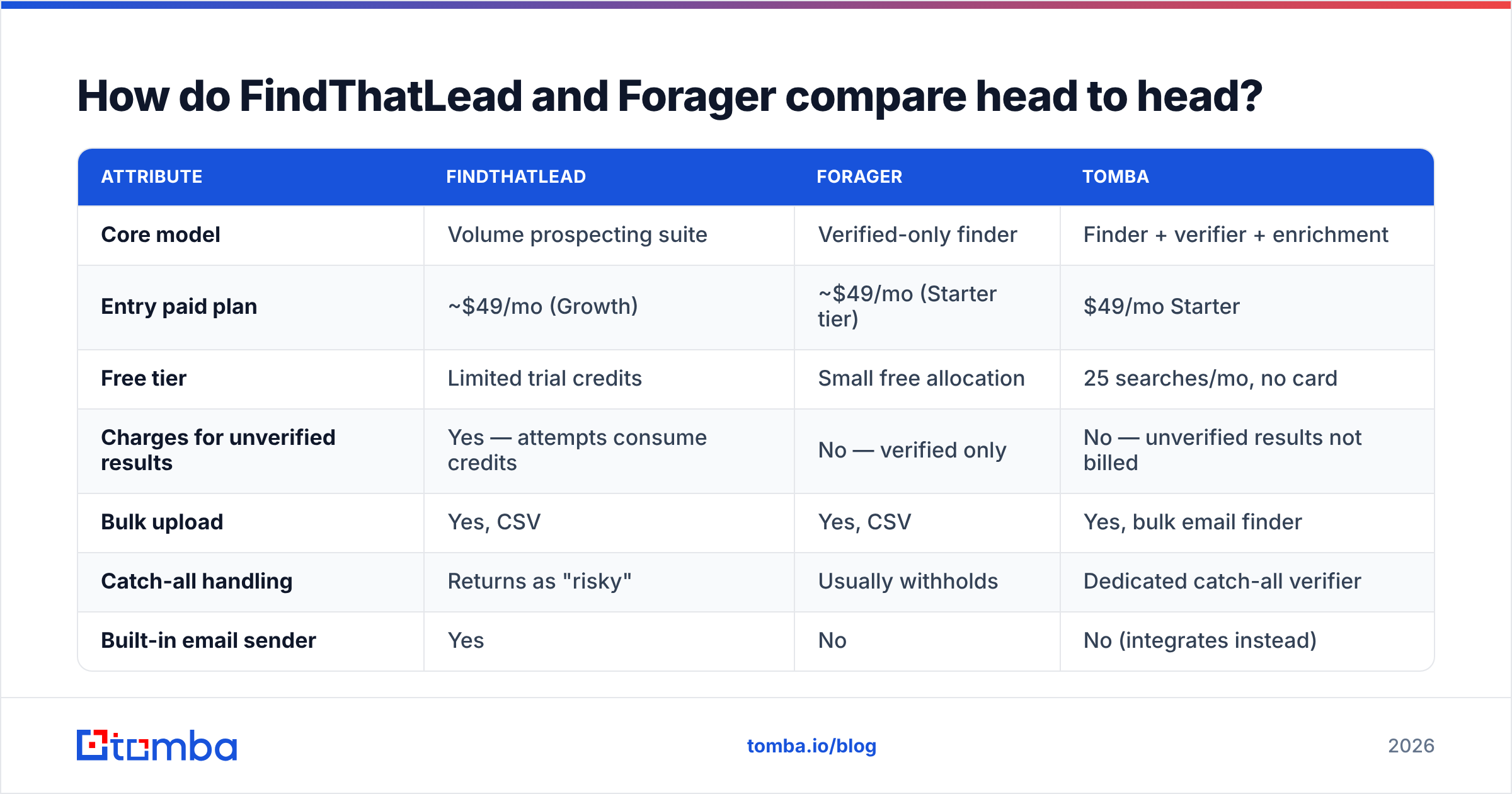
Here's the practical breakdown. Pricing reflects publicly listed plans as of early 2026 — always check the vendor page before you buy, since finder pricing moves quarterly.
| Attribute | FindThatLead | Forager | Tomba |
|---|---|---|---|
| Core model | Volume prospecting suite | Verified-only finder | Finder + verifier + enrichment |
| Entry paid plan | ~$49/mo (Growth) | ~$49/mo (Starter tier) | $49/mo Starter |
| Free tier | Limited trial credits | Small free allocation | 25 searches/mo, no card |
| Charges for unverified results | Yes — attempts consume credits | No — verified only | No — unverified results not billed |
| Bulk upload | Yes, CSV | Yes, CSV | Yes, bulk email finder |
| Catch-all handling | Returns as "risky" | Usually withholds | Dedicated catch-all verifier |
| Built-in email sender | Yes | No | No (integrates instead) |
| Public API | Yes, basic | Yes | Full email finder API + CLI + MCP |
| Chrome extension | Yes | Yes | Yes |
| Phone numbers | No | No | Yes, phone finder |
| Best for | SMB teams wanting all-in-one | Precision list building | Teams needing accuracy at scale |
The table hides one thing worth saying plainly: FindThatLead's sender is the main reason people pick it, and it's also the weakest part of the product. If you already run Instantly, Smartlead, or Lemlist, that bundled feature is dead weight you're paying for.
Which one is actually more accurate?#
Forager wins on reported accuracy. FindThatLead wins on raw coverage. Both statements can be true at once, and understanding why saves you money.
Accuracy claims from email finders are usually measured differently:
- Match rate — how many rows in your upload came back with any email at all. FindThatLead scores well here because it returns pattern-guessed addresses (first.last@domain.com) even when confidence is moderate.
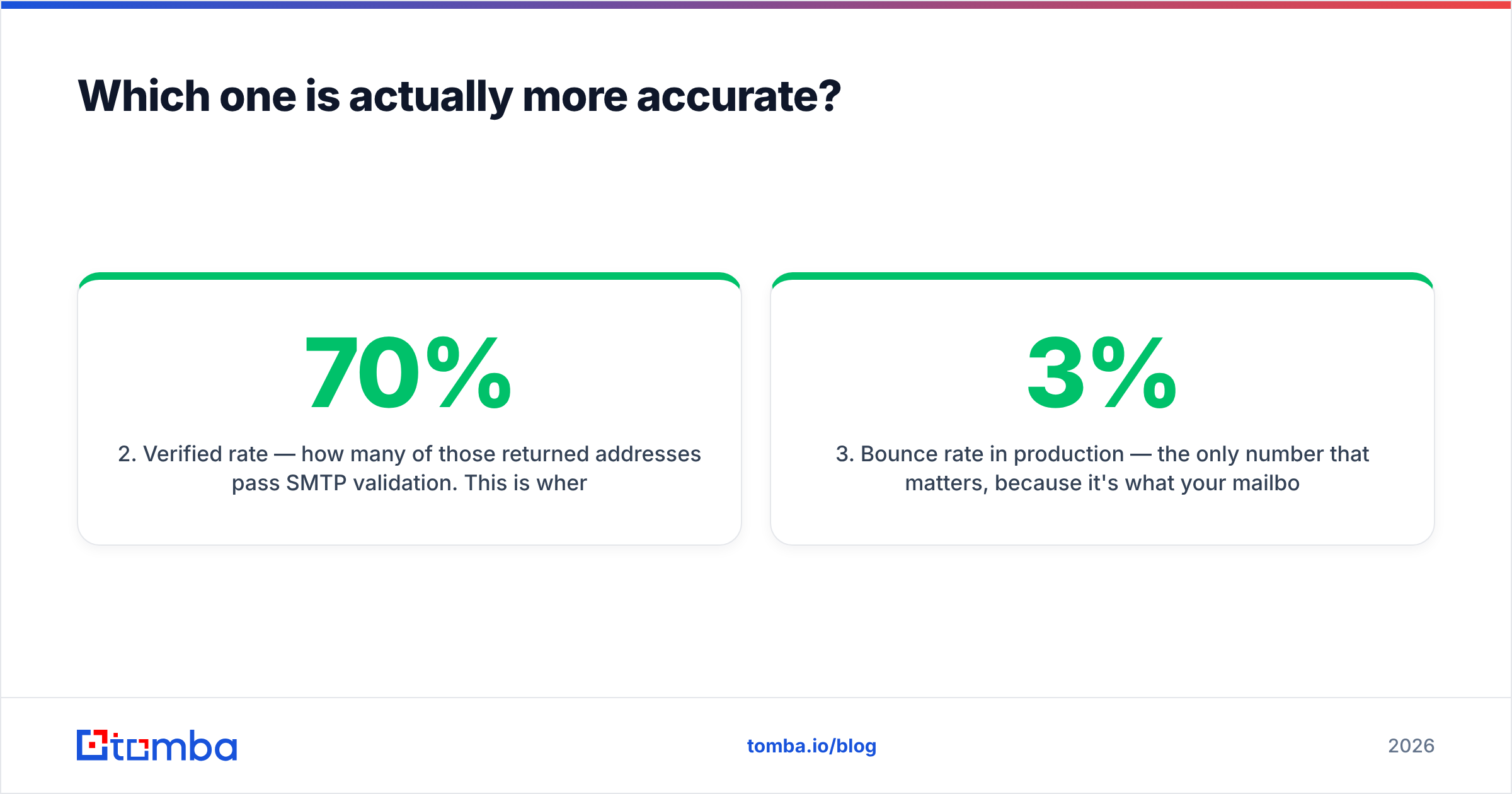
- Verified rate — how many of those returned addresses pass SMTP validation. This is where guessed results collapse. A 70% match rate at 60% verification is worse than a 45% match rate at 95% verification.
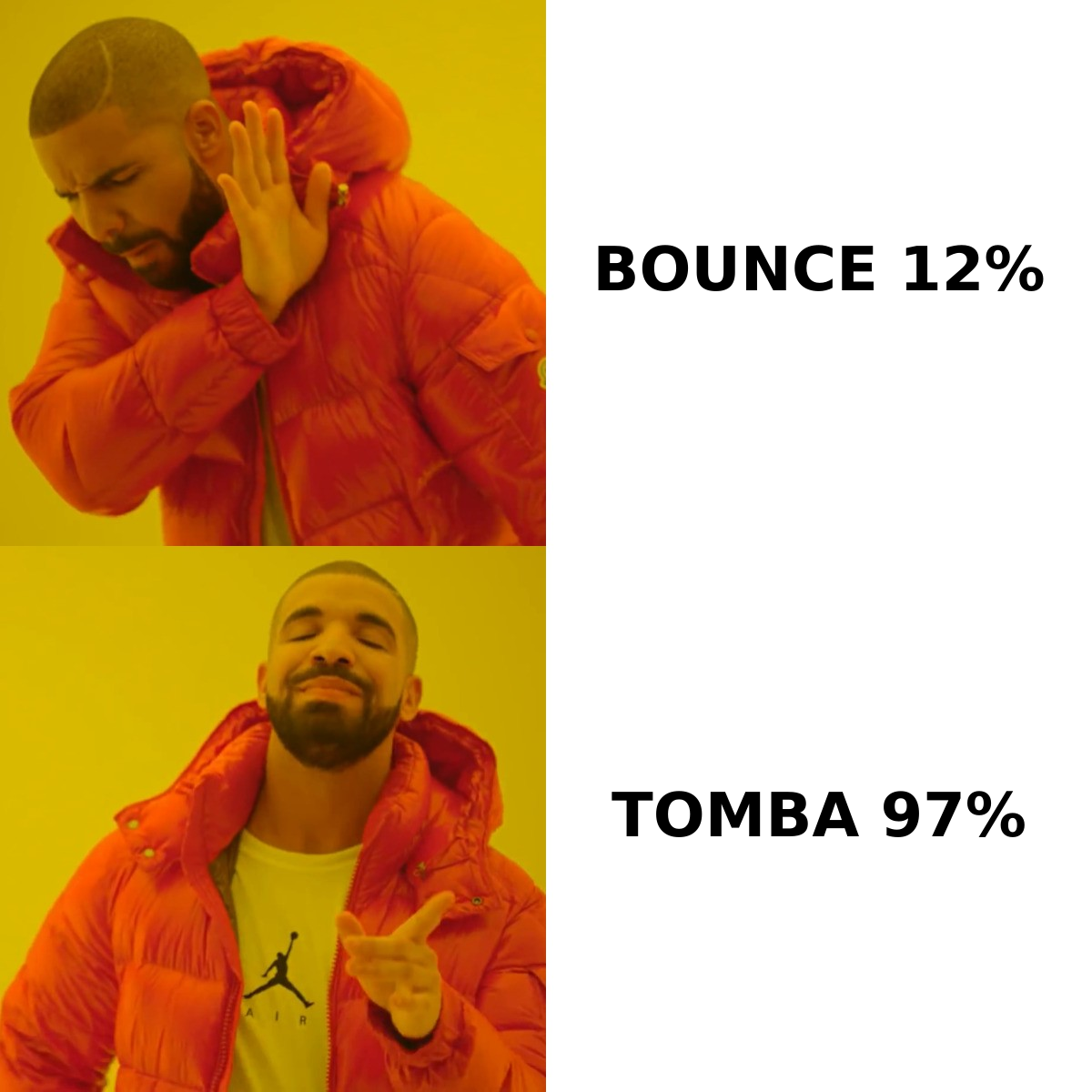
- Bounce rate in production — the only number that matters, because it's what your mailbox provider sees. Anything above 3% starts damaging sender reputation.
- Cost per verified contact — total spend divided by contacts that actually landed. A cheap credit that bounces isn't cheap.
Independent user reviews on G2 reflect this split. FindThatLead reviewers frequently mention bounce cleanup as a required extra step. Forager reviewers mention running out of results before running out of budget.
Neither pattern is wrong — they're different failure modes. FindThatLead fails loud (bounces). Forager fails quiet (empty rows).
The catch-all problem both tools share#
A catch-all domain accepts mail to any address at that domain, so SMTP verification returns "valid" for everything — including nonsense. Roughly a third of mid-market B2B domains are configured this way, and the share keeps climbing as more companies move to Microsoft 365 defaults.
FindThatLead labels these "risky" and hands them to you. Forager usually withholds them entirely, which is safer but means you silently lose a third of your addressable market. Neither approach recovers the contact.
The fix is a dedicated catch-all resolution layer that uses signals beyond SMTP — historical send data, pattern confidence across the domain, and third-party corroboration. That's what a catch-all finder does, and it's a category neither FindThatLead nor Forager competes in seriously.
How does pricing really work for each?#
Both list similar headline numbers. The delta shows up in what a credit consumes.
FindThatLead charges per search attempt in most workflows. Run a domain scrape on a 200-employee company and you burn credits proportional to results returned, verified or not. Bulk enrichment on a 5,000-row CSV can consume your monthly allocation in one job if the list is dirty. Budget for a separate verification pass — most teams route FindThatLead output through a standalone email verifier before sending, which is a second line item.
Forager charges only for verified deliverables. That's genuinely better economics on paper. The catch is throughput: because it withholds anything it can't confirm, your effective list size shrinks, and for ABM lists targeting specific named accounts, an empty row is worse than a risky one. You can't email a blank.
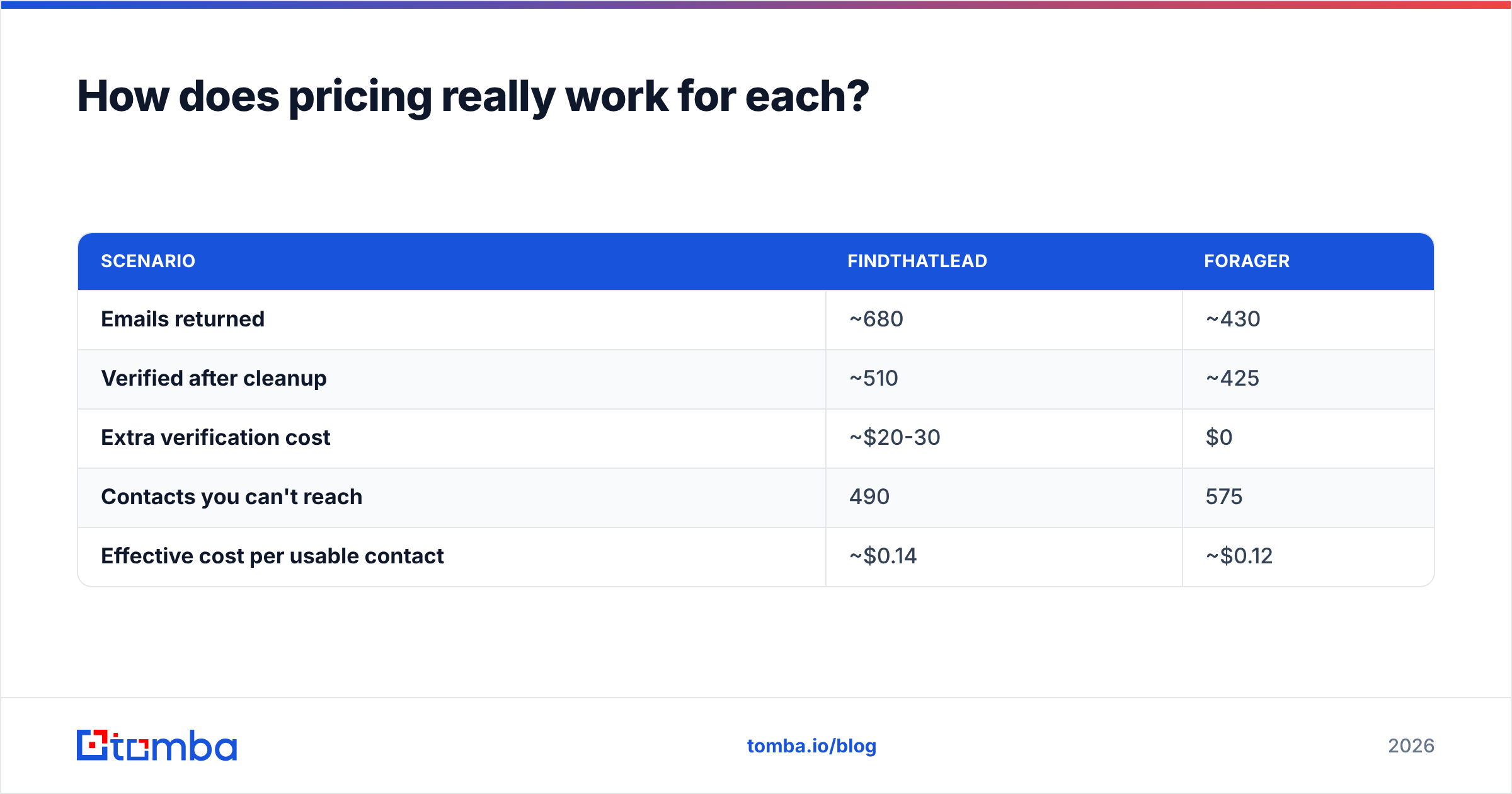
Here's the math that actually decides it. Assume a 1,000-contact target list:
| Scenario | FindThatLead | Forager |
|---|---|---|
| Emails returned | ~680 | ~430 |
| Verified after cleanup | ~510 | ~425 |
| Extra verification cost | ~$20-30 | $0 |
| Contacts you can't reach | 490 | 575 |
| Effective cost per usable contact | ~$0.14 | ~$0.12 |
Forager edges it on unit cost. FindThatLead gives you 85 more reachable humans. Which matters more depends entirely on whether your TAM is large enough to absorb the loss.
For reference, Tomba's pricing runs Free (25 searches/mo), Starter $49/mo, Growth $99/mo, and Pro $249/mo — with unverified results not consuming credits and catch-all resolution included rather than sold as a bolt-on.
Which should you pick for your use case?#
Match the tool to the motion, not the feature list.
- High-volume SMB outbound, no existing sender — FindThatLead. The bundled campaign tool removes one vendor from your stack, and at low ACVs the bounce cleanup overhead is tolerable. Just cap your daily send volume until you see real bounce data.
- ABM or named-account targeting — Neither, honestly. Both leave too many named targets unreachable. You want a finder with catch-all resolution and data enrichment so you can fill gaps with phone or LinkedIn instead of dropping the account.
- Agency running client lists — Forager. Verified-only billing makes client invoicing clean and defensible. You bill for delivered contacts, not attempts.
- Developer / programmatic pipeline — Neither has a deep API. FindThatLead's is functional but thin; Forager's is minimal. If you're enriching inside a product or a data warehouse job, you need proper rate limits, webhooks, and batch endpoints.
- Recruiting or content outreach — FindThatLead's LinkedIn extraction is stronger. Pair it with a verification step, or use a purpose-built LinkedIn finder that verifies inline.
What do you lose by choosing either one?#
Three gaps show up in both products, and they cost more than the subscription.
No phone data. Email-only outbound has a ceiling. When your sequence stalls at step four, the multichannel teams are dialing while you're sending a fifth email. Neither FindThatLead nor Forager returns B2B phone numbers, so that's a separate vendor.
Shallow enrichment. You get an email. You don't reliably get headcount, tech stack, funding stage, or role seniority — the fields that make personalization work and that feed lead scoring. You'll bolt on Clearbit or similar, which doubles your data spend.
Thin integration surface. Both connect to Zapier and the obvious CRMs. Neither offers a CLI, an MCP server, or spreadsheet-native add-ins. If your team lives in Google Sheets or Excel, you're exporting CSVs by hand — and manual CSV handoffs are where list hygiene dies. Tools with a native Google Sheets workflow skip that entirely.

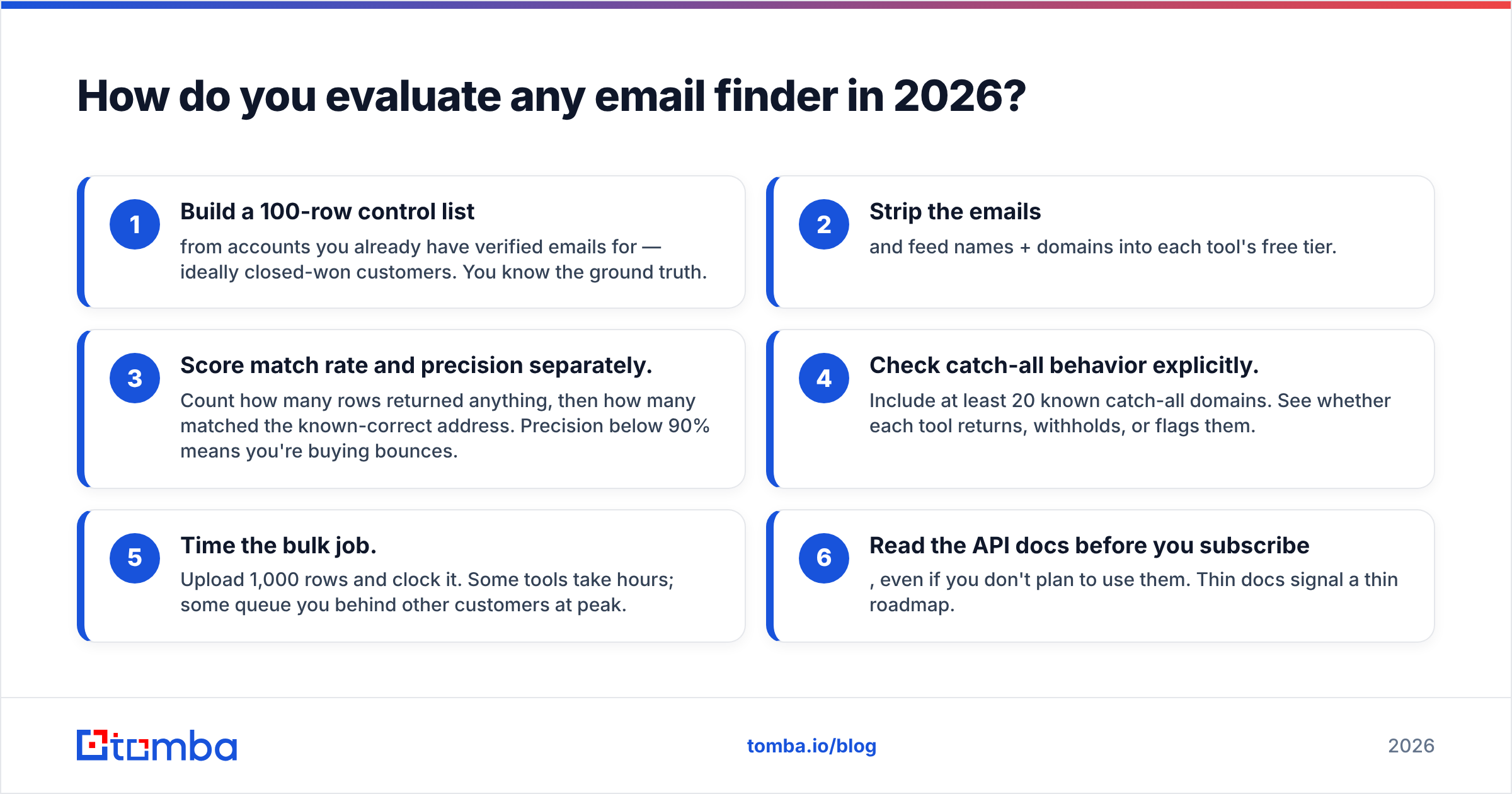
How do you evaluate any email finder in 2026?#
Run this test before you commit to an annual plan. It takes ninety minutes and it's the only comparison that reflects your data.
- Build a 100-row control list from accounts you already have verified emails for — ideally closed-won customers. You know the ground truth.
- Strip the emails and feed names + domains into each tool's free tier.
- Score match rate and precision separately. Count how many rows returned anything, then how many matched the known-correct address. Precision below 90% means you're buying bounces.
- Check catch-all behavior explicitly. Include at least 20 known catch-all domains. See whether each tool returns, withholds, or flags them.
- Time the bulk job. Upload 1,000 rows and clock it. Some tools take hours; some queue you behind other customers at peak.
- Read the API docs before you subscribe, even if you don't plan to use them. Thin docs signal a thin roadmap.
Analyst coverage of the go-to-market data category from firms like Gartner consistently lands on the same point: data decay, not data volume, is the constraint. B2B contact data decays somewhere around 2-3% per month as people change jobs. A provider that refreshes continuously beats one with a bigger static database, every time. Ask both vendors how often their sources refresh — the answer separates real providers from resellers.

Is there a better option than both?#
If the FindThatLead vs Forager decision feels like picking which compromise hurts less, that's because it is. One trades accuracy for coverage; the other trades coverage for accuracy. The category has moved past that tradeoff.
What a modern stack needs:
- Verified-only billing so unverified guesses don't consume budget
- Catch-all resolution so you don't lose a third of mid-market domains
- Multichannel data — email plus phone plus social, from one lookup
- Real developer surface — API, CLI, spreadsheet add-ins, and MCP for AI-driven workflows
- Transparent sourcing so you can answer compliance questions when procurement asks
That's the spec Tomba built against. The email finder handles name-and-domain lookups, domain search pulls every public address at a company, the catch-all verifier recovers the domains other tools skip, and phone finder adds the dial channel — all on one credit pool starting at $49/mo, with 25 free searches to test against your own control list first.
The bottom line#
Pick FindThatLead if you want find-and-send in one tool, you're running high-volume SMB outbound, and you can absorb a verification step. Pick Forager if precision matters more than reach and you're building small, surgical lists where every row gets manual attention.
Pick neither if you need catch-all coverage, phone data, or a real API — because that's a different product category and paying for two half-solutions costs more than one complete one.
Run the 100-row control test. It'll tell you more in ninety minutes than any comparison post, including this one.
Ready to see the difference on your own list? Start with the Tomba Email Finder — 25 free searches a month, no card required. Upload your control list, compare precision against whatever you're running now, and only pay for results you can actually send to. If it doesn't beat your current hit rate, you've lost nothing but ninety minutes.
Related guides#
Ready to find emails that actually work?
Join 150,000+ professionals who stopped guessing and started sending. Free credits on signup — no credit card required.
Get the Tomba newsletter
Practical outbound tactics and product updates — once every two weeks.
About the author