FindThatLead vs Generect: Which Email Finder Wins in 2026?
FindThatLead sells volume and campaigns. Generect sells fresh LinkedIn-sourced data through an API. We break down credits, coverage, accuracy and real cost per usable contact — plus when neither is the right call.
FindThatLead vs Generect is a choice between two very different tools. One sells a full outbound suite. The other sells fresh B2B data through an API. Here is how they compare on price, data quality and real cost per contact.
TL;DR
- FindThatLead is a breadth play. You get bulk domain search, a Chrome extension, lead scoring and a built-in cold email sender. It is sold on big credit counts at a low monthly price.
- Generect is a depth play. It serves real-time, LinkedIn-sourced B2B contact data through an API. It suits teams that build their own pipelines instead of clicking through a dashboard.
- Neither vendor publishes an audited accuracy number. Treat any "95%+" claim as marketing until you run your own sample test.
- The real cost is not the sticker price. It is the cost per verified, deliverable contact, once bounces, duplicates and catch-all guesses are stripped out.
- Want raw find-and-verify accuracy with per-result confidence scoring and a clean API? Run a three-way test with Tomba before you sign an annual plan.
What are FindThatLead and Generect, actually?#
People compare them because both sell B2B contact data. They stop looking alike about ten minutes into a trial.
FindThatLead started in Barcelona as a simple email finder. It has since added a full outbound suite. You get domain search, lead search by role and location, and a Chrome extension called Prospector that pulls contacts off LinkedIn pages. You also get a bulk CSV tool, basic verification, and sending for cold sequences. The pitch is "one tab, whole campaign."
Generect goes the other way. Its core product is a data API. It returns company and people records built from LinkedIn and public sources. Freshness is the selling point: records are resolved when you ask, not served from a stale warehouse. There is a UI, but the product is built for engineers, RevOps teams and agencies.
So the honest framing of FindThatLead vs Generect is not "which one finds more emails." It is simpler. Do you want a self-serve campaign tool, or a data faucet you plug into your own stack?
FindThatLead vs Generect: how do they compare head to head?#
Here is the practical breakdown. Prices move often on both sides, so check each vendor's page before you buy.
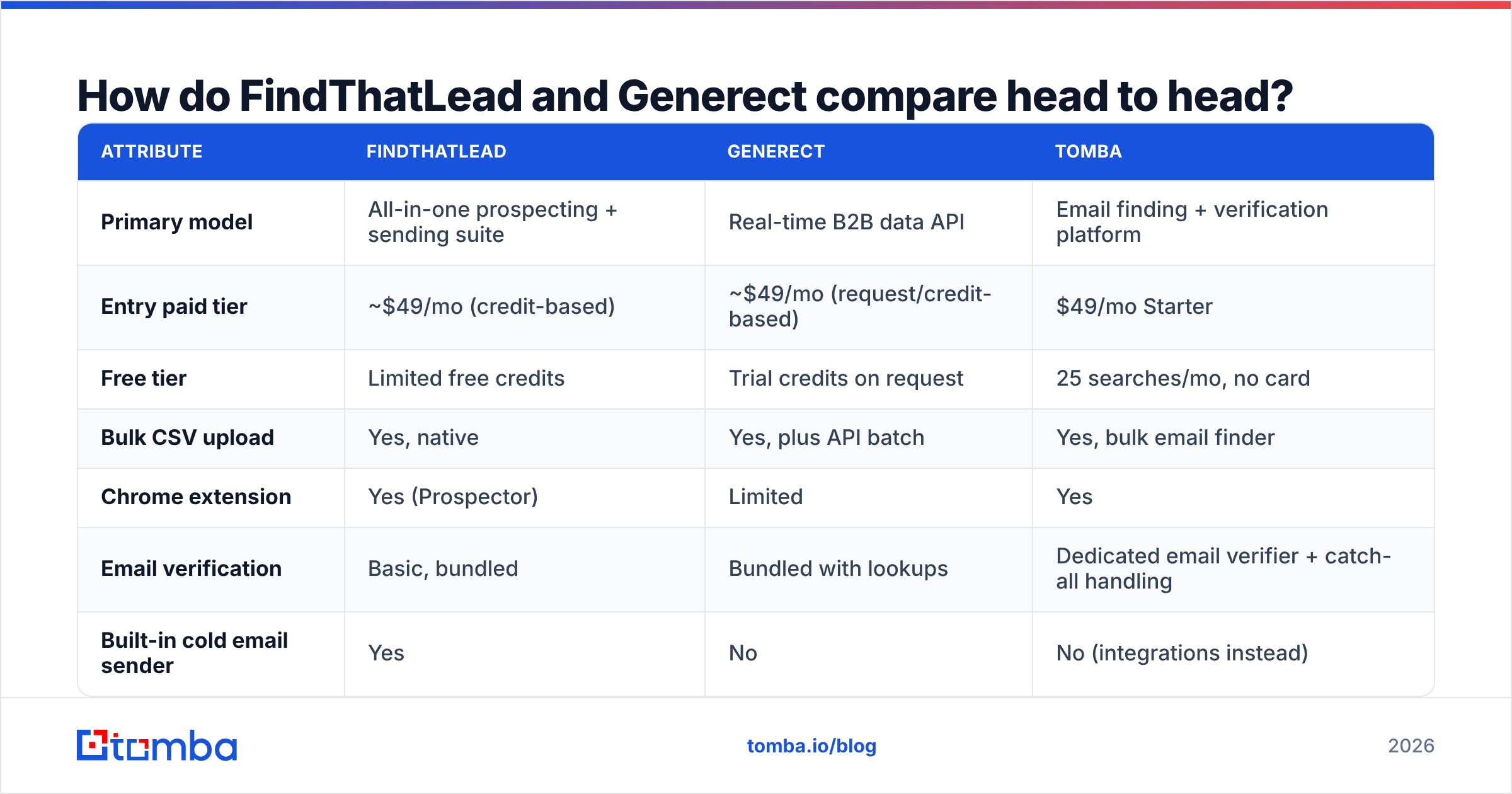
| Attribute | FindThatLead | Generect | Tomba |
|---|---|---|---|
| Primary model | All-in-one prospecting + sending suite | Real-time B2B data API | Email finding + verification platform |
| Entry paid tier | ~$49/mo (credit-based) | ~$49/mo (request/credit-based) | $49/mo Starter |
| Free tier | Limited free credits | Trial credits on request | 25 searches/mo, no card |
| Bulk CSV upload | Yes, native | Yes, plus API batch | Yes, bulk email finder |
| Chrome extension | Yes (Prospector) | Limited | Yes |
| Email verification | Basic, bundled | Bundled with lookups | Dedicated email verifier + catch-all handling |
| Built-in cold email sender | Yes | No | No (integrations instead) |
| API depth | Functional, secondary to UI | Core product, well documented | Full REST email finder API, CLI, MCP |
| Best for | Solo founders, SMB campaigns in one tool | Engineering-led data pipelines | Accuracy-first finding at any scale |
| Weakest at | Data freshness on niche/EU domains | Non-technical self-serve workflows | Native sequence sending |
The table hides one point worth saying plainly. FindThatLead wins on "I want to start today with no developer." Generect wins on "I want 40,000 enriched records in Snowflake every Monday." Those are different companies with different problems.

Which one has better data accuracy?#
Accuracy is where comparison posts go soft. Let's not.
Both vendors claim accuracy in the mid-90s. Neither shares a method, a sample size, or the domains tested. That is normal for this market. It also means the numbers are a rough guide at best. Three things shape real accuracy far more than any homepage claim:
- Domain type. Big company domains follow clear patterns, like first.last@. Every tool does well there. Small agencies, EU SMBs and firms with odd aliases are where tools split by 20 points or more.
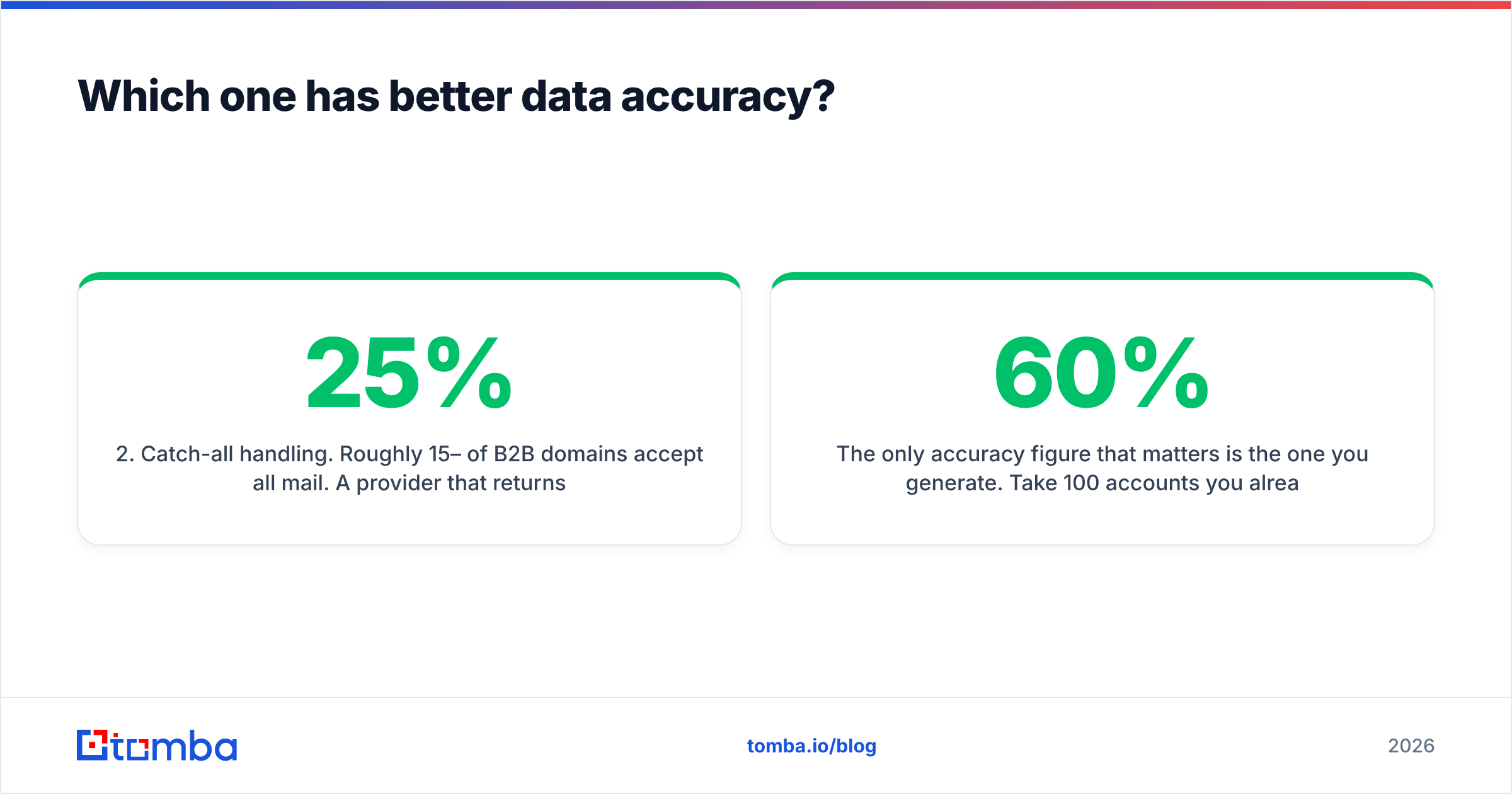
- Catch-all handling. Roughly 15–25% of B2B domains accept all mail. A tool that marks those "valid" flatters its own score and hands you a bounce. A tool that flags them looks worse on paper and does better in your inbox. Use a catch-all verifier instead of a plain valid/invalid flag.
- Recency. A correct email for someone who left in March is still a bounce in August. Generect resolves records in real time, and that is a genuine edge. FindThatLead's warehouse ages faster on high-churn roles like SDR and marketing manager.

The only accuracy number that matters is your own. Take 100 accounts you already know. Use customers, past deals, or CRM contacts with confirmed addresses. Run them through each tool. Score the hit rate. Then score the bounce rate on those hits. A tool with a 60% hit rate and a 2% bounce rate beats one with an 85% hit rate and a 22% bounce rate. The second one quietly burns your sender reputation.
Screenshot placeholder: side-by-side export of the same 100-domain test list from FindThatLead, Generect and Tomba, with hit rate and bounce rate columns highlighted.
Is FindThatLead's all-in-one approach worth it?#
Sometimes. It depends on whether you would otherwise pay for a separate sending tool.
Where FindThatLead earns its keep:
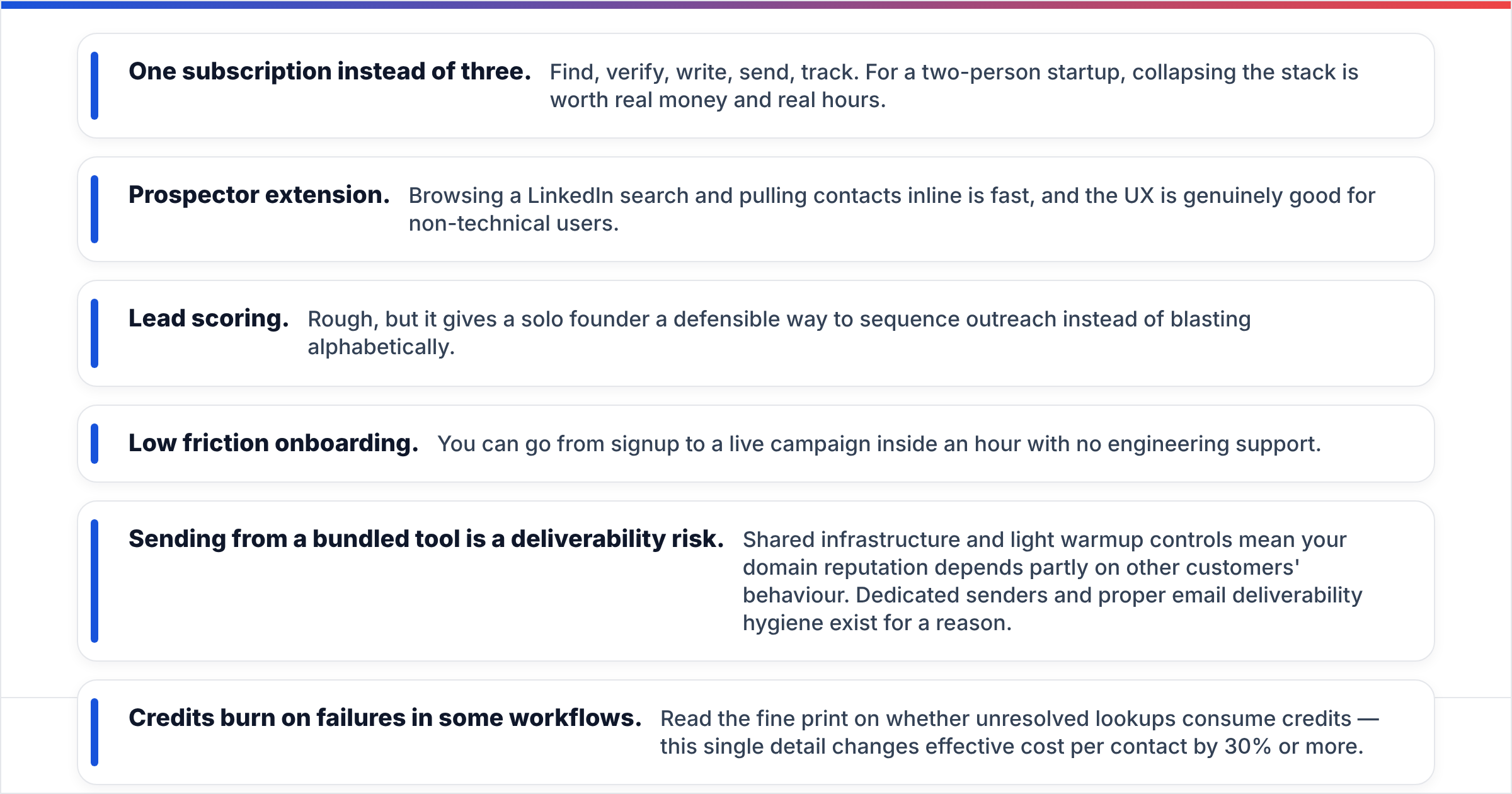
- One subscription instead of three. Find, verify, write, send, track. For a two-person startup, that saves real money and real hours.
- Prospector extension. You can pull contacts inline while you browse a LinkedIn search. Non-technical users like it.
- Lead scoring. It is rough. Still, it gives a solo founder a way to rank outreach instead of blasting the list alphabetically.
- Low friction onboarding. You can go from signup to a live campaign in an hour, with no engineer.
Where it hurts:
- Sending from a bundled tool is a deliverability risk. You share infrastructure, and warmup controls are light. Your domain reputation then rides partly on other customers. That is why dedicated senders and good email deliverability hygiene exist.
- Credits can burn on failures. Read the fine print on whether failed lookups eat credits. That one detail can change your cost per contact by 30% or more.
- Verification is "good enough," not forensic. If you hold a high bar for list quality, you will buy a second verify tool anyway. That wipes out the all-in-one savings.
Reviews on G2 show the same split. High marks for ease of use and value. Softer marks for data depth outside North America, and for support on the lower tiers.
Is Generect worth it if you don't have a developer?#
Probably not. That is not a knock. It is how the product is built.
Generect gives you fresh, structured company and people data on demand. Filters like headcount, industry, seniority, region and tech stack are API options. If your team can call that in code, you get something FindThatLead cannot match. You get a repeatable data pipeline you can audit and version. You define your ICP once, and the list rebuilds itself.
If your team cannot, you pay API prices for a thin UI. A non-technical SDR manager will find it far less polished than FindThatLead.
Signals you're a Generect fit:
- You already run a warehouse or CDP and want contact data as a source, not an end point.
- Your ICP is a set of filters, not a hand-picked account list.
- Freshness beats breadth for you. You would rather have 500 current records than 5,000 that are 40% stale.
- You're an agency with many clients and need lists split in code, not in shared dashboard folders.
Screenshot placeholder: Generect API response payload showing a resolved company + contact object, annotated with which fields are refreshed at query time.

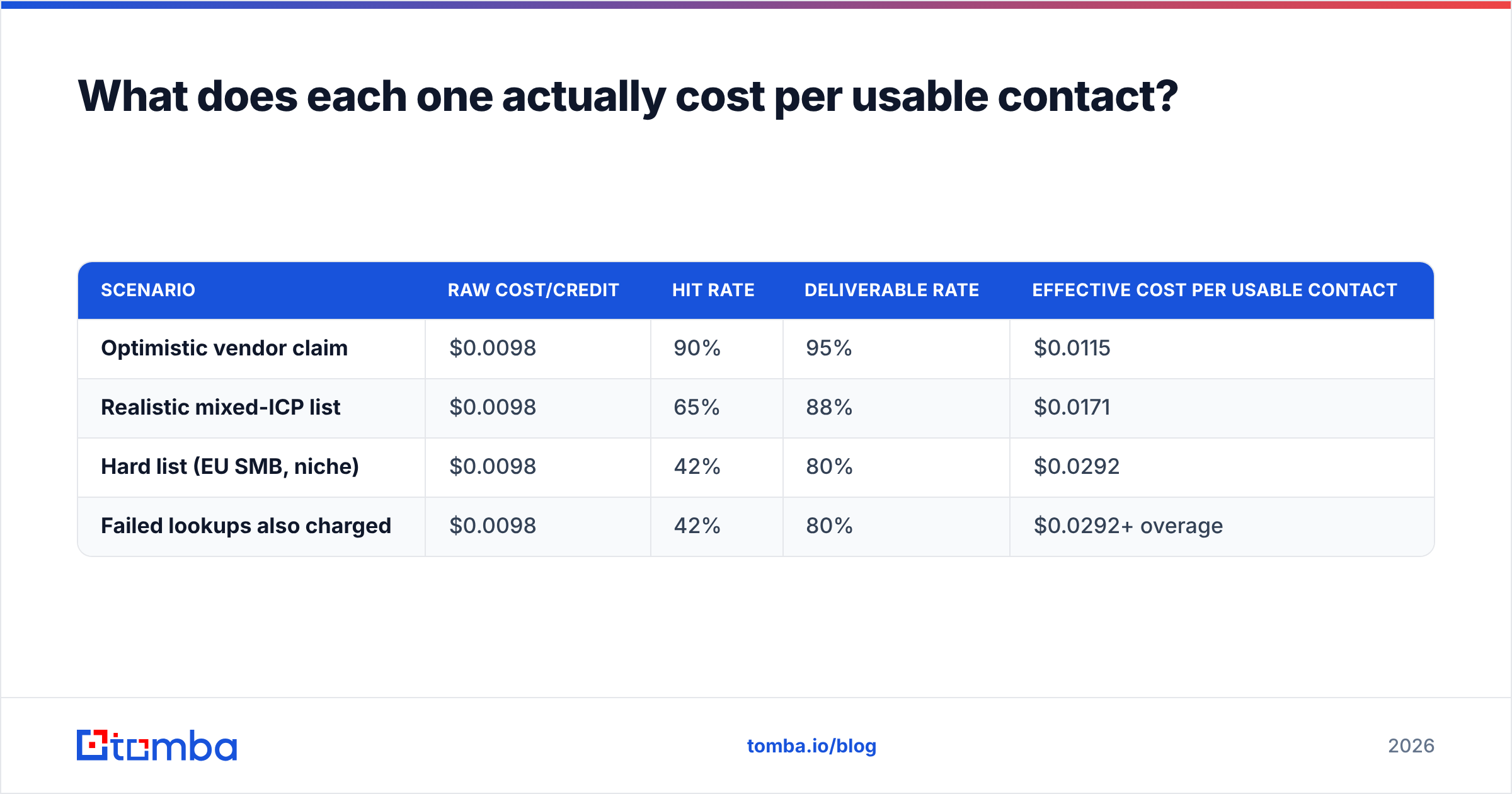
What does each one actually cost per usable contact?#
Build your decision on this number. Work it out like this:
Cost per usable contact = (monthly price ÷ credits granted) ÷ (hit rate × deliverable rate)
Here is a worked example on a $49 tier with 5,000 credits:
| Scenario | Raw cost/credit | Hit rate | Deliverable rate | Effective cost per usable contact |
|---|---|---|---|---|
| Optimistic vendor claim | $0.0098 | 90% | 95% | $0.0115 |
| Realistic mixed-ICP list | $0.0098 | 65% | 88% | $0.0171 |
| Hard list (EU SMB, niche) | $0.0098 | 42% | 80% | $0.0292 |
| Failed lookups also charged | $0.0098 | 42% | 80% | $0.0292+ overage |
Three practical takeaways:
- A cheap plan with a weak hit rate costs more. Row one and row three differ by almost 3x on the same sticker price.
- Ask both vendors, in writing, if failed lookups use credits. It is the highest-value question in the whole review.
- Price verification on its own. If a third party has to clean the output, add that cost to the math. For example, Tomba pricing puts verification in the same credit pool — Free (25 searches/mo), Starter $49/mo, Growth $99/mo, Pro $249/mo, Enterprise custom. That removes one line item from the comparison.

FindThatLead vs Generect: which should you choose in 2026?#
Short version:
- Choose FindThatLead if you want prospecting and sending under one login. It fits a founder or small team with a mostly North American ICP, who values speed over data precision. It is a fine first tool and a poor last one.
- Choose Generect if you have engineering time and your outbound runs on filters, not named accounts. Pick it when you need data freshness you can prove. The API-first design is a real edge, not a slogan.
- Choose neither if your problem is accuracy on each contact. That job needs per-result confidence scores, clear catch-all labels and a documented data sources trail. Sequence builders and filters do not help there.
Whatever you pick, do these three things before you sign an annual deal:
- Run the 100-known-contact test on all candidates, same list, same day.
- Send a 200-email pilot from a warmed domain. Measure the real bounce rate, not the tool's guess.
- Check the exit. Can you export full records, with enrichment fields, as CSV? Some plans lock export on lower tiers. That turns your database into a rental.
One more note: this market has more than two players. Tools like BookYourData sell pre-built, pay-as-you-go lists instead of lookups. For some teams that is a better buy than either tool here.
Where does Tomba fit in this comparison?#
Tomba is not a campaign suite or a pure data pipe. It does the one job both tools treat as a side feature. It finds a correct, verified work email, and it tells you how confident it is.
In practice that means a domain search that shows patterns and sources. It means a verifier that separates catch-all domains from confirmed mailboxes, instead of hiding them behind a green check. You also get a documented REST API, a CLI and an MCP server for agent-driven workflows. Native integrations connect HubSpot, Salesforce, Pipedrive, Sheets and Zapier, so you keep the sender and CRM you already trust.
Still stuck on FindThatLead vs Generect, and on how many emails actually land? Start with the Tomba Email Finder free tier. You get 25 searches a month, no card. Run the same 100-domain test you ran on the other two. Compare hit rate, bounce rate and cost per usable contact. Let the numbers pick the winner, not the homepage copy.
Related guides#
Ready to find emails that actually work?
Join 150,000+ professionals who stopped guessing and started sending. Free credits on signup — no credit card required.
Get the Tomba newsletter
Practical outbound tactics and product updates — once every two weeks.
About the author