FindThatLead vs Gigasheet: Which One Do You Actually Need?
FindThatLead finds contacts. Gigasheet makes sense of huge files. Comparing them head-to-head only works once you know which half of the pipeline is actually broken — here's the honest breakdown.
TL;DR
- FindThatLead is a prospecting tool: it sources contacts, finds and verifies work emails, and sends cold sequences. Gigasheet is a browser-based big-data spreadsheet: it opens files far past Excel's row ceiling and lets you filter, group, and clean them without SQL.
- They overlap in exactly one place — the CSV. FindThatLead produces it, Gigasheet consumes it. Most teams that "compare" them actually need both, or neither.
- Pick FindThatLead if your bottleneck is not having contacts. Pick Gigasheet if your bottleneck is drowning in contacts you can't sort.
- FindThatLead's weak point is data freshness and per-credit cost at volume; Gigasheet's weak point is that it enriches nothing on its own — garbage in, beautifully-filtered garbage out.
- If your real goal is high-accuracy contact data you can pull programmatically instead of exporting by hand, an API-first finder like Tomba solves the sourcing half and skips the CSV shuffle entirely.
What are FindThatLead and Gigasheet, actually?#
They are not competitors. That is the single most useful thing to understand before you spend money on either.
FindThatLead is a Barcelona-built B2B prospecting suite. You give it a domain, a name, or a set of filters, and it returns business email addresses. It bundles a lead search (build a list by industry, location, headcount), a domain search, a bulk uploader, an email verifier, a Chrome extension, and a cold-email sender so you can go from list to sequence inside one login. It is a supply tool — it creates rows.
Gigasheet is a no-code analytics spreadsheet that runs in your browser. It exists because Excel gives up around a million rows and Google Sheets gives up much earlier. Gigasheet handles files that would otherwise force you into Python or a data warehouse: filter 40 million rows, group by domain, dedupe, join two files, all through a familiar grid UI. It is a processing tool — it makes sense of rows someone else created.
Think of it like a kitchen. FindThatLead is the supplier delivering crates of produce. Gigasheet is the prep station where you wash, sort, and chop it. Asking "which is better" is like asking whether the farmer or the chef's knife is more important to dinner.

Why does the FindThatLead vs Gigasheet comparison keep coming up?#
Because both get shortlisted by the same person: the operator who just inherited a messy go-to-market motion and has one budget line to fix it. The search intent behind "findthatlead vs gigasheet" is usually one of five underlying problems.
- "I have no leads." — That is a sourcing problem. Gigasheet cannot help you. You need FindThatLead, a B2B database, or a scraper.
- "I bought a 2 GB list and can't open it." — That is a processing problem. FindThatLead cannot help you. Gigasheet is built precisely for this.
- "My list opens fine but half the emails bounce." — That is a verification problem. Neither tool is the strongest answer; a dedicated email verifier with catch-all handling is.
- "I need this to run every day without me." — That is an automation problem. Gigasheet has an API and integrations; FindThatLead has one too, but neither is designed as an enrichment backbone.
- "I want one vendor, not four." — That is a consolidation problem, and it's the only case where a genuine head-to-head makes sense — you're picking which single tool covers the most of your workflow.
Be honest about which of the five you're in before you read the pricing tables. It changes the answer completely.
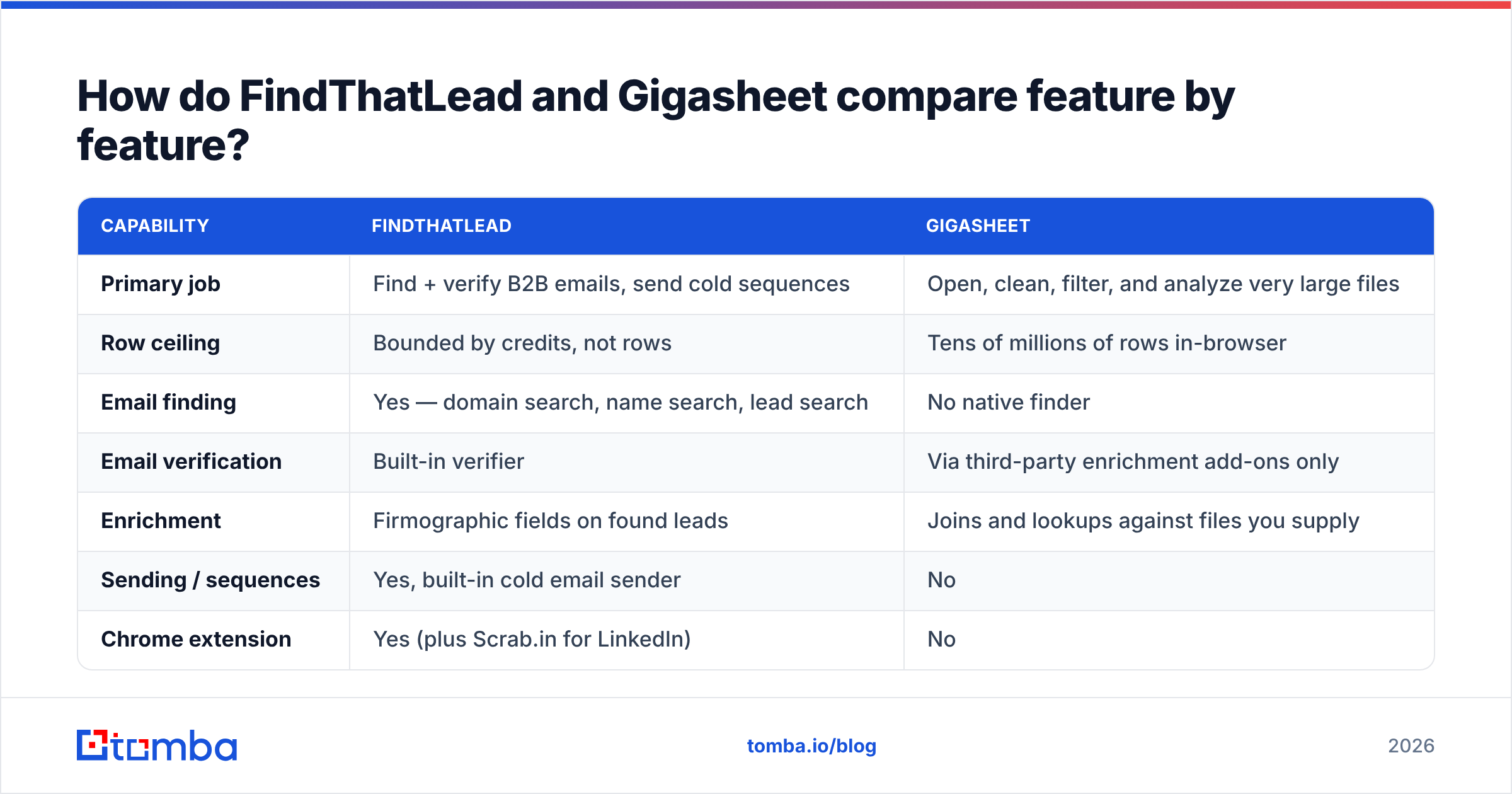
How do FindThatLead and Gigasheet compare feature by feature?#
| Capability | FindThatLead | Gigasheet |
|---|---|---|
| Primary job | Find + verify B2B emails, send cold sequences | Open, clean, filter, and analyze very large files |
| Row ceiling | Bounded by credits, not rows | Tens of millions of rows in-browser |
| Email finding | Yes — domain search, name search, lead search | No native finder |
| Email verification | Built-in verifier | Via third-party enrichment add-ons only |
| Enrichment | Firmographic fields on found leads | Joins and lookups against files you supply |
| Sending / sequences | Yes, built-in cold email sender | No |
| Chrome extension | Yes (plus Scrab.in for LinkedIn) | No |
| API access | Yes, on paid tiers | Yes |
| Learning curve | Low — form fields and buttons | Low-to-medium — spreadsheet literacy required |
| Free tier | Limited monthly credits | Free plan with file-size and row caps |
| Best-fit user | SDR, founder, agency doing outbound | RevOps, data analyst, list broker |
The table makes the split obvious. There is exactly one row where they collide — "API access" — and even there they're doing different jobs. FindThatLead's API returns contacts. Gigasheet's API pushes and pulls datasets.
What does each one cost in 2026?#
Pricing on both platforms has moved more than once, and both publish current numbers on their own sites — treat the figures below as the shape of the pricing, not a quote. Verify before you buy.
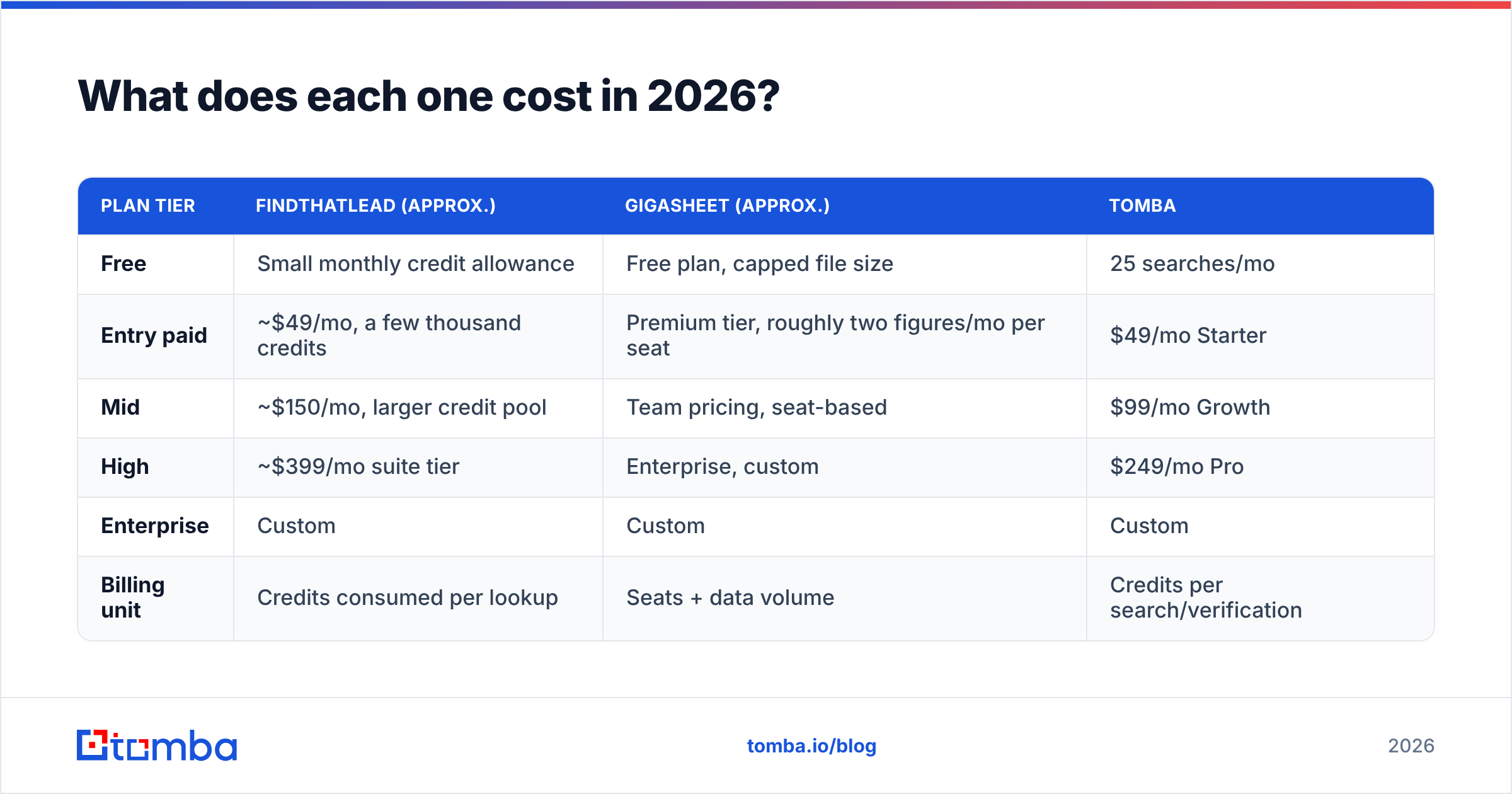
| Plan tier | FindThatLead (approx.) | Gigasheet (approx.) | Tomba |
|---|---|---|---|
| Free | Small monthly credit allowance | Free plan, capped file size | 25 searches/mo |
| Entry paid | ~$49/mo, a few thousand credits | Premium tier, roughly two figures/mo per seat | $49/mo Starter |
| Mid | ~$150/mo, larger credit pool | Team pricing, seat-based | $99/mo Growth |
| High | ~$399/mo suite tier | Enterprise, custom | $249/mo Pro |
| Enterprise | Custom | Custom | Custom |
| Billing unit | Credits consumed per lookup | Seats + data volume | Credits per search/verification |
Two structural differences matter more than the headline numbers:
- FindThatLead bills consumption. Every search burns credits whether or not the result is usable. If your accept rate is 60%, your effective cost per usable contact is 1.7× the sticker price. Model it that way.
- Gigasheet bills capacity. You pay for seats and volume, not per query. Once you're in, filtering the same file forty times costs nothing extra. That's excellent for exploration and terrible if you only need one cleanup a quarter.
Compare that against Tomba pricing, which is credit-based like FindThatLead but bundles finding, verification, and enrichment into the same balance — so a verify step doesn't require a second vendor contract.
Which tool wins for your specific use case?#
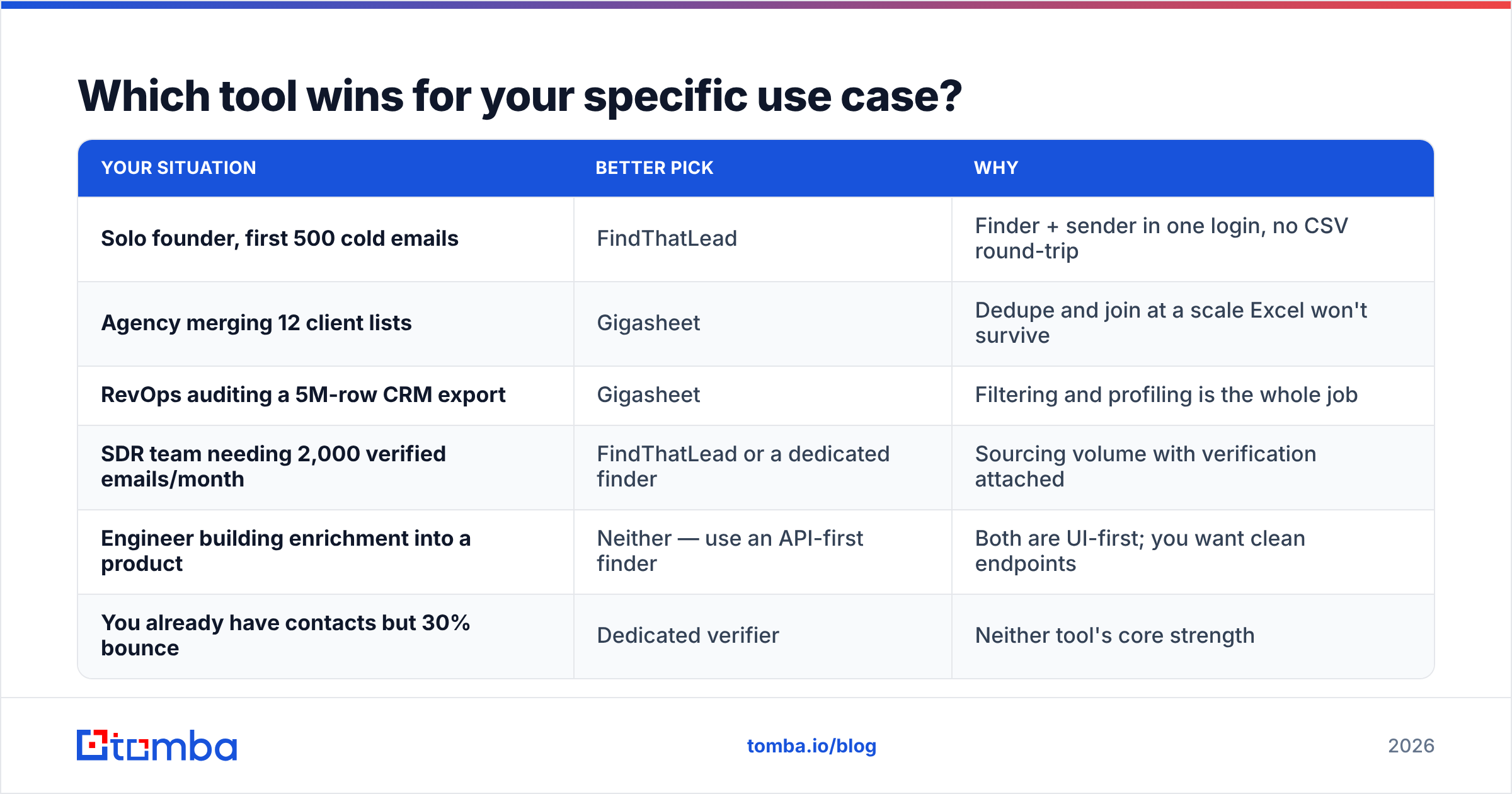
| Your situation | Better pick | Why |
|---|---|---|
| Solo founder, first 500 cold emails | FindThatLead | Finder + sender in one login, no CSV round-trip |
| Agency merging 12 client lists | Gigasheet | Dedupe and join at a scale Excel won't survive |
| RevOps auditing a 5M-row CRM export | Gigasheet | Filtering and profiling is the whole job |
| SDR team needing 2,000 verified emails/month | FindThatLead or a dedicated finder | Sourcing volume with verification attached |
| Engineer building enrichment into a product | Neither — use an API-first finder | Both are UI-first; you want clean endpoints |
| You already have contacts but 30% bounce | Dedicated verifier | Neither tool's core strength |
Notice how often the honest answer is "neither, exactly." That isn't a dodge. FindThatLead is a good generalist for people who want one screen to run outbound from. Gigasheet is genuinely excellent at the narrow thing it does. But the moment your requirement is accurate contact data delivered programmatically at volume, you've walked out of both product categories.

Where does each tool actually break down?#
FindThatLead's honest limitations. Coverage skews toward Europe and Latin America — strong there, thinner on APAC and on smaller US companies. Like every finder that leans on pattern inference, it will confidently return first.last@domain.com for a company whose real format is flast@domain.com, and the built-in verifier will mark it as "risky" rather than wrong when the domain is catch-all. The bundled sender is convenient but basic; teams that get serious about deliverability usually graduate to a dedicated sequencer within a year. And credit burn on bulk jobs is the most common complaint you'll see in G2 reviews across this entire tool category.
Gigasheet's honest limitations. It creates no data. If your source file is 40% stale, Gigasheet gives you a fast, elegant view of 40% stale data. Its enrichment options exist but are add-on integrations, priced and metered separately, which means your "one tool" quietly becomes two. Collaboration and version control are lighter than a real warehouse. And for teams that already have dbt or BigQuery, Gigasheet solves a problem they've already solved — its real audience is non-technical operators without a data stack.
The shared blind spot. Neither tool treats catch-all domains as a first-class problem, and catch-alls are now a meaningful share of mid-market B2B domains. A catch-all server accepts every address at SMTP time, so naive verification returns "valid" for addresses that will hard-bounce. That's why a catch-all verifier is a separate capability, not a checkbox — and why bounce rates surprise people who assumed "verified" meant verified.
Can you use FindThatLead and Gigasheet together?#
Yes, and it's a reasonable stack. The realistic pipeline looks like this:
- Source — build the target list in FindThatLead by industry, geography, and headcount filters.
- Export — pull the CSV. This is where the two tools shake hands.
- Consolidate — load it into Gigasheet alongside your CRM export, past campaign lists, and any purchased data.
- Dedupe and suppress — remove existing customers, open opportunities, unsubscribes, and competitor domains. This step alone justifies Gigasheet for most agencies.
- Verify — run the survivors through a real verification pass before anything touches a mailbox.
- Ship — push the clean segment back into your sequencer or CRM.
The friction is step 2 and step 6. Every manual export/import is a place where data goes stale, a column gets mangled, and someone forgets which version is current. If you run that loop weekly, automate it: an email finder API that returns contacts as JSON removes the export step entirely, and bulk verification removes the round-trip to a third vendor.
What should you actually buy?#
Conclusion first: buy for the bottleneck, not the brand.
- If you cannot name your bottleneck, you are not ready to buy either tool. Take one campaign, measure where it stalls — no contacts, bad contacts, or unmanageable file — and let the answer pick the category.
- If the bottleneck is volume of rows, Gigasheet is a strong, fairly-priced answer with a free tier generous enough to test properly.
- If the bottleneck is not having contacts at all, FindThatLead is a competent all-in-one for small teams, with the caveat that its coverage and credit economics deserve a trial run against your actual ICP before you commit annually.
- If the bottleneck is accuracy — bounces, catch-alls, stale records — neither tool is the sharpest instrument available, and you should evaluate dedicated finders and verifiers on your own domain sample rather than on a vendor's demo list.
Run the same 100 target companies through every shortlisted tool. Count how many usable, deliverable addresses come back and divide by what you paid. That single number settles more arguments than any feature matrix, including this one.
Where does Tomba fit in this comparison?#
Tomba sits on the sourcing side, next to FindThatLead rather than Gigasheet — but built for teams that care about accuracy and automation more than about bundling a sequencer.
The Tomba Email Finder returns work emails by domain, name, or company with a confidence score attached, so you can set your own accept threshold instead of trusting a binary "found/not found." Verification, catch-all handling, domain search, and enrichment share the same credit balance, so cleaning a list doesn't mean signing a second contract. Plans start free at 25 searches per month and scale from $49/mo Starter through $99/mo Growth and $249/mo Pro, with the same endpoints available on every paid tier.
If your workflow today is export from finder → clean in spreadsheet → import to sequencer, try replacing the first two steps with a single API call and see how much of the CSV shuffle disappears. Start on the free tier, run it against 25 of your hardest-to-find prospects, and compare the hit rate to whatever you're paying for now.
Related guides#
Ready to find emails that actually work?
Join 150,000+ professionals who stopped guessing and started sending. Free credits on signup — no credit card required.
Get the Tomba newsletter
Practical outbound tactics and product updates — once every two weeks.
About the author