FindThatLead vs Global Database: Which B2B Data Tool Wins
FindThatLead vs Global Database: one tool finds and verifies emails at scale. The other sells structured company records with financials. Here is how the two compare on data model, accuracy, pricing, and fit.
FindThatLead vs Global Database comes down to one question: do you need emails, or do you need company data? Both sell B2B data. They sell very different kinds of it.
TL;DR
- FindThatLead is an email finder with a light sending layer. Global Database is a company database with firmographics, financials, and compliance data. They solve different halves of one problem.
- Pick FindThatLead if you already know who to reach and need emails fast. You pay per credit, and a sender is built in.
- Pick Global Database if picking the right accounts is the hard part. You can filter by revenue, credit score, filings, or tech stack before anyone writes an email.
- Neither one removes the need to verify. Both ship a mix of verified and guessed addresses. The bounce risk lands on your domain, not theirs.
- Want coverage, verification, and enrichment under one API? Tomba starts at $49/mo, with no quote call.
What is FindThatLead and what is Global Database?#
People compare these two because they show up in the same "B2B lead data" searches. They were built for different jobs.
FindThatLead is a Barcelona-built prospecting tool. It started as a Chrome extension that pulled emails off LinkedIn profiles and company sites. Today it bundles four things: a single email finder, a domain-based "Prospector" search, a bulk CSV processor, and a cold-email sender (Scrab.in / Email Sender, depending on the plan). The unit of work is a credit. One credit buys one email address.
Global Database is a UK business intelligence provider. Its unit of work is a company record: registered address, SIC code, filed accounts, directors, credit score, employee bands, installed technology, and — on some modules — contacts for decision-makers. You buy access by database module and by country, usually on an annual contract with a demo call in front of it.
The practical difference is simple. FindThatLead assumes you already have a target list and need addresses. Global Database assumes you do not yet know which 400 companies to target.
FindThatLead vs Global Database: how do the data models differ?#
This is the part that decides which tool you should even test. Five structural differences matter more than any feature list.
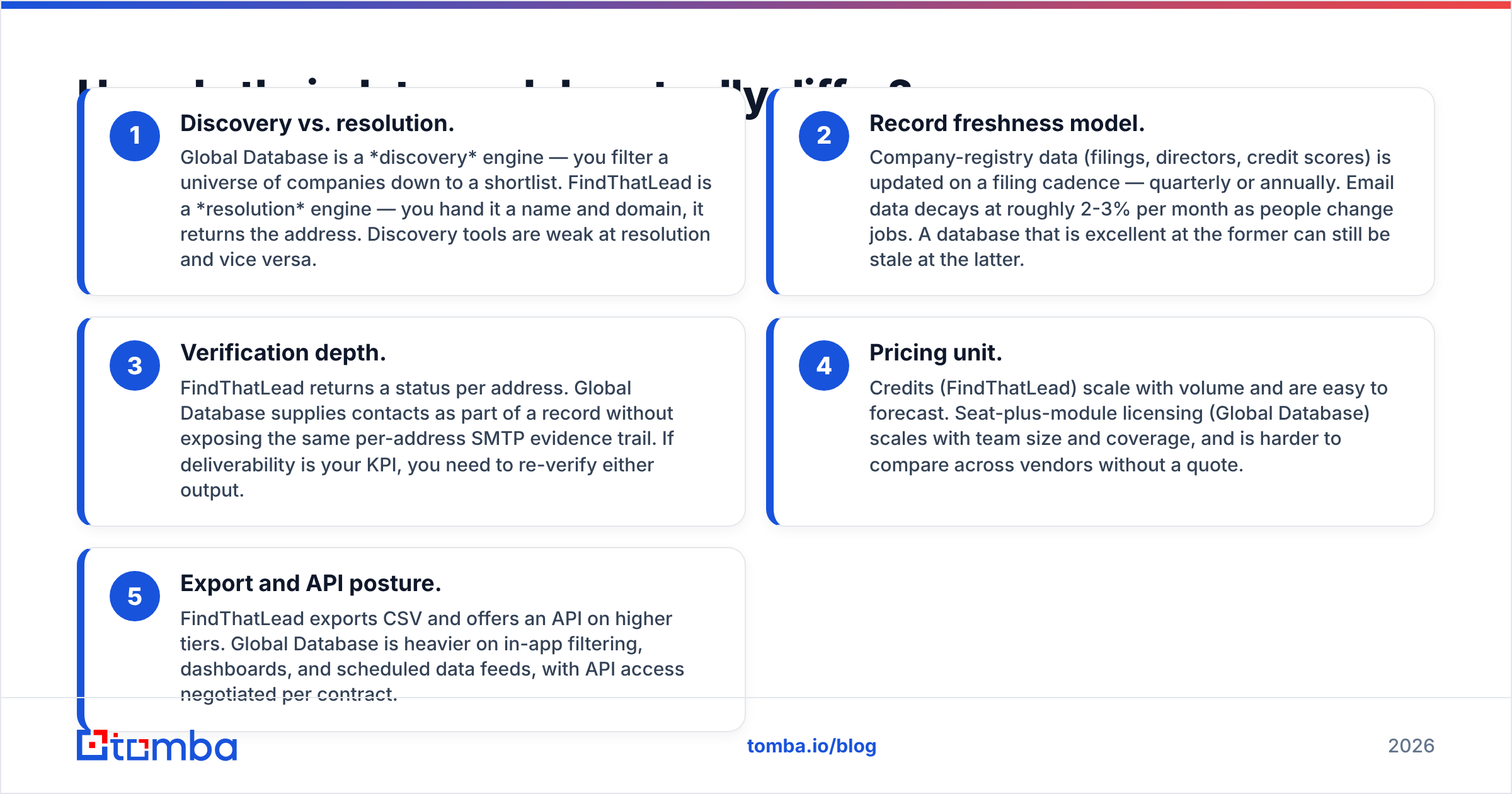
- Discovery vs. resolution. Global Database is a discovery engine. You filter a universe of companies down to a shortlist. FindThatLead is a resolution engine. You hand it a name and a domain, and it returns the address. Few tools are good at both.
- Record freshness. Registry data (filings, directors, credit scores) updates on a filing cadence, so quarterly or yearly. Email data decays about 2-3% a month as people change jobs. A database can be excellent at one and stale at the other.
- Verification depth. FindThatLead returns a status for each address. Global Database ships contacts inside a record, without the same per-address SMTP evidence. Either way, re-verify before you send.
Two more differences show up on the invoice rather than in the product.
- Pricing unit. Credits (FindThatLead) scale with volume and are easy to forecast. Seat-plus-module licensing (Global Database) scales with team size and country coverage. That is hard to compare across vendors without a quote.
- Export and API posture. FindThatLead exports CSV and offers an API on higher tiers. Global Database leans on in-app filters, dashboards, and scheduled data feeds. API access is negotiated per contract.

Which one has better data accuracy?#
Neither vendor publishes an audited accuracy score. Treat any headline number — theirs or a rival's — as marketing until you test it on your own list.
What you can judge is method. FindThatLead, like most finders, blends three sources: crawled public pages, a historical contact index, and pattern guessing (firstname.lastname@, f.lastname@, and so on). A check against the mail server then grades the guess.
Pattern guessing is where accuracy quietly drops. Hit rates are high when a company uses a clean, consistent format and runs a responsive mail server. They fall on catch-all domains. A catch-all server accepts every address, even ones with no mailbox behind them, so the check returns "accept" for garbage. That is a finder-wide problem, not a FindThatLead one. It is also why a catch-all verifier exists as its own product category.
Global Database leans on registry filings and licensed business data. That makes the company layer unusually reliable. If a firm filed accounts showing £4.2M turnover, that figure is as good as public record gets. The person layer has the usual B2B problem: nobody files a job change, so a director listed as CFO may have left eight months ago.

The practical rule: run whatever you buy through an email verifier before it touches a sequence. A 4% bounce rate is enough to dent your sender reputation, and mailbox providers weight that signal heavily.
FindThatLead vs Global Database: how does pricing compare?#
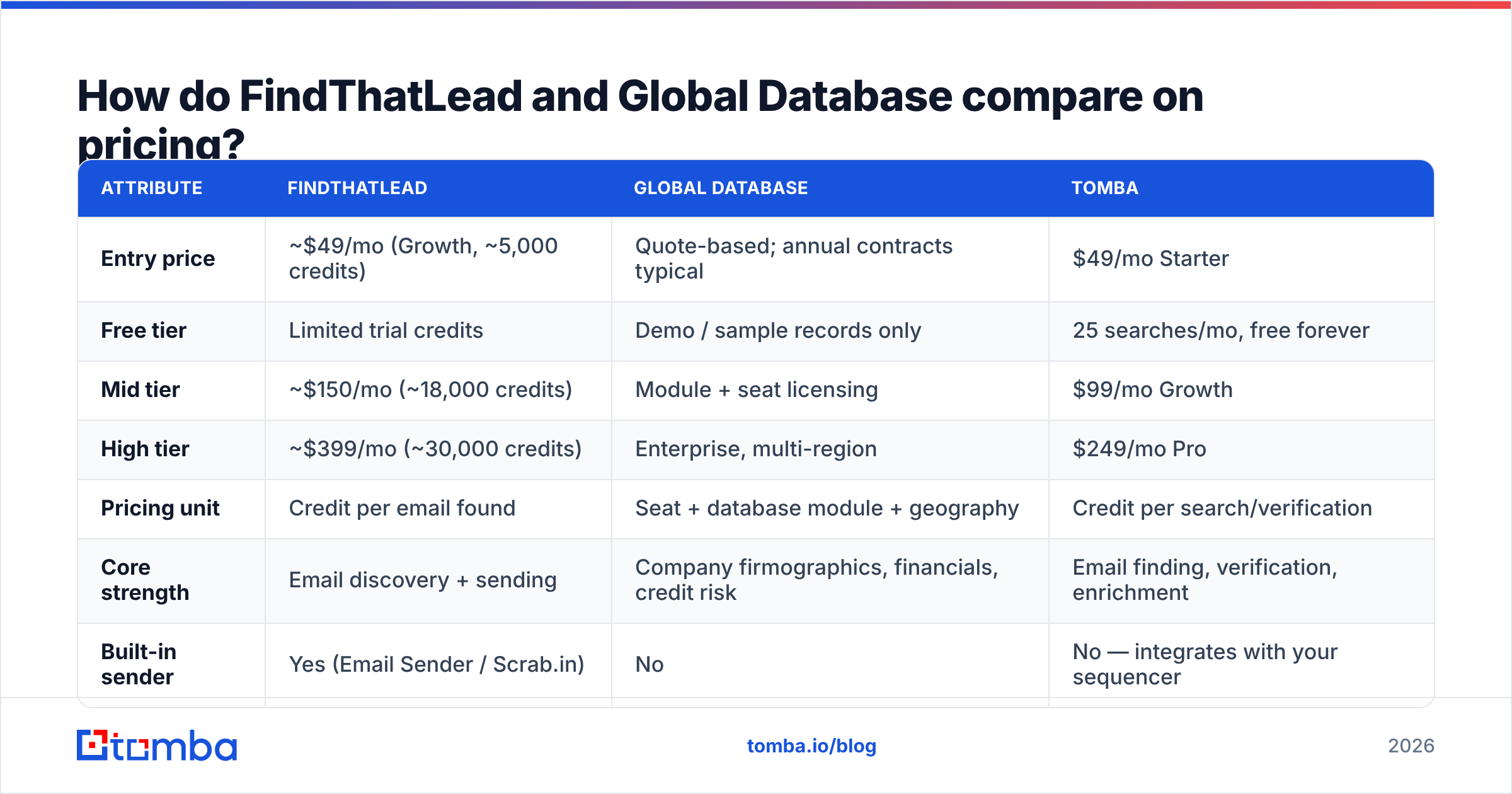
The prices below are publicly listed figures at the time of writing. Global Database quotes most of its modules, so treat that column as directional and confirm on a call.
| Attribute | FindThatLead | Global Database | Tomba |
|---|---|---|---|
| Entry price | ~$49/mo (Growth, ~5,000 credits) | Quote-based; annual contracts typical | $49/mo Starter |
| Free tier | Limited trial credits | Demo / sample records only | 25 searches/mo, free forever |
| Mid tier | ~$150/mo (~18,000 credits) | Module + seat licensing | $99/mo Growth |
| High tier | ~$399/mo (~30,000 credits) | Enterprise, multi-region | $249/mo Pro |
| Pricing unit | Credit per email found | Seat + database module + geography | Credit per search/verification |
| Core strength | Email discovery + sending | Company firmographics, financials, credit risk | Email finding, verification, enrichment |
| Built-in sender | Yes (Email Sender / Scrab.in) | No | No — integrates with your sequencer |
| API access | On higher plans | Contract-dependent | All paid plans |
| Self-serve signup | Yes | No, sales-led | Yes |
| Best for | SDRs needing volume addresses | Analysts and ABM account selection | Teams needing accurate contact data via API |

Two things fall out of that table.
First, the pricing models do not compare line for line. A credit tool gets cheaper per unit as you scale. A seat-and-module license gets more expensive as you add users and countries. A three-person SDR team burning 20,000 lookups a month will read these price sheets very differently from a two-analyst ABM team pulling 300 deeply qualified accounts.
Second, sales-led pricing has a hidden cost: time. If you need data this week, a self-serve tool you can buy with a card beats a better database stuck behind a two-week procurement cycle. Compare that with Tomba pricing, where the tier you see is the tier you get.
Which tool fits which use case?#
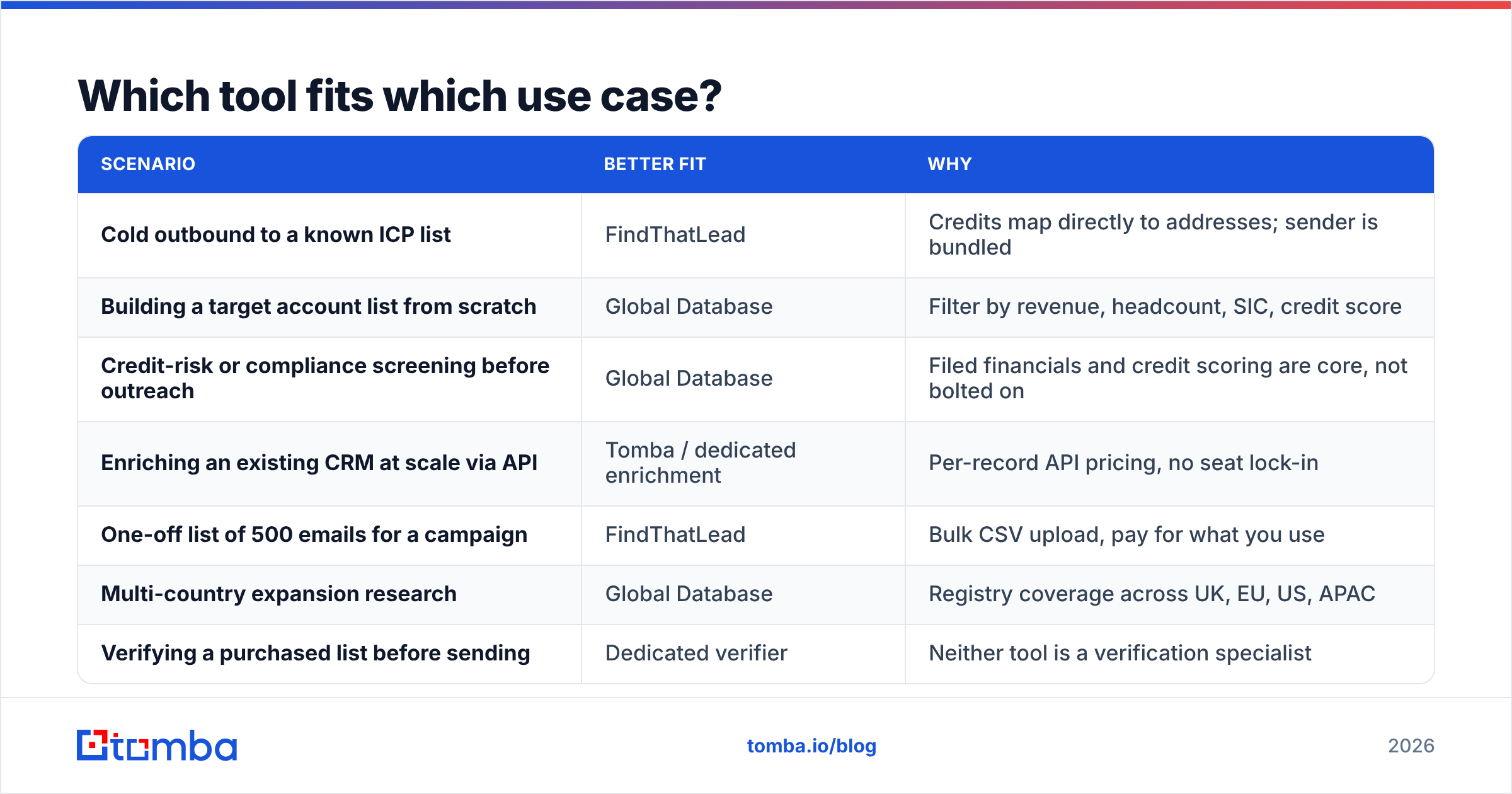
| Scenario | Better fit | Why |
|---|---|---|
| Cold outbound to a known ICP list | FindThatLead | Credits map directly to addresses; sender is bundled |
| Building a target account list from scratch | Global Database | Filter by revenue, headcount, SIC, credit score |
| Credit-risk or compliance screening before outreach | Global Database | Filed financials and credit scoring are core, not bolted on |
| Enriching an existing CRM at scale via API | Tomba / dedicated enrichment | Per-record API pricing, no seat lock-in |
| One-off list of 500 emails for a campaign | FindThatLead | Bulk CSV upload, pay for what you use |
| Multi-country expansion research | Global Database | Registry coverage across UK, EU, US, APAC |
| Verifying a purchased list before sending | Dedicated verifier | Neither tool is a verification specialist |
Note the last row. It is a gap in both tools. Finders optimise for coverage: return something for as many rows as possible. Verifiers optimise for precision: tell you honestly when an address is dead, risky, or a catch-all. Those two goals pull against each other. Buying one product that claims to do both perfectly is how you end up with a 6% bounce rate.
What do reviewers say about each one?#
Public reviews on G2 and similar directories cluster around the same themes. Read them as directional signal, not gospel. Review counts on both are small next to the Apollo-scale players.
FindThatLead recurring praise: simple interface, fast bulk processing, low barrier to entry. The Chrome extension is genuinely handy for one-off lookups while you browse LinkedIn.
FindThatLead recurring criticism: hit rates drop sharply outside US and EU tech companies. Some plans burn credits on searches that return nothing usable. The bundled sender is basic next to a dedicated sequencer. Support response times vary.
Global Database recurring praise: the depth of company data is hard to match. Risk teams trust the financial and credit modules. UK and European registry coverage is strong.
Global Database recurring criticism: the UI feels dated next to modern sales tools. Contact-level email coverage is thinner than the company data. The sales-led motion and annual commitment put off small teams. You often pay for modules you barely use.
Where does Tomba fit into this comparison?#
Honest framing first. Tomba does not replace Global Database's financial and registry intelligence. If your workflow depends on filed accounts, directorships, or credit scoring, no email-finder product covers that. Weigh Global Database against Dun & Bradstreet or Creditsafe instead.
Tomba is a direct alternative to the FindThatLead half of the equation: finding and validating business email addresses.
- Finding. The email finder turns a name and domain into an address. Domain search returns every address it can find on a company domain, with department and seniority labels and the detected email pattern.
- Verifying. Verification is a first-class product, not a checkbox on the finder. Catch-all domains are flagged, not waved through as "valid".
- Bulk. Bulk email finder handles CSVs of tens of thousands of rows, with no per-seat penalty.
- API-first. Every paid plan includes the Tomba API, so enrichment runs inside your own pipeline instead of as an export-import chore.
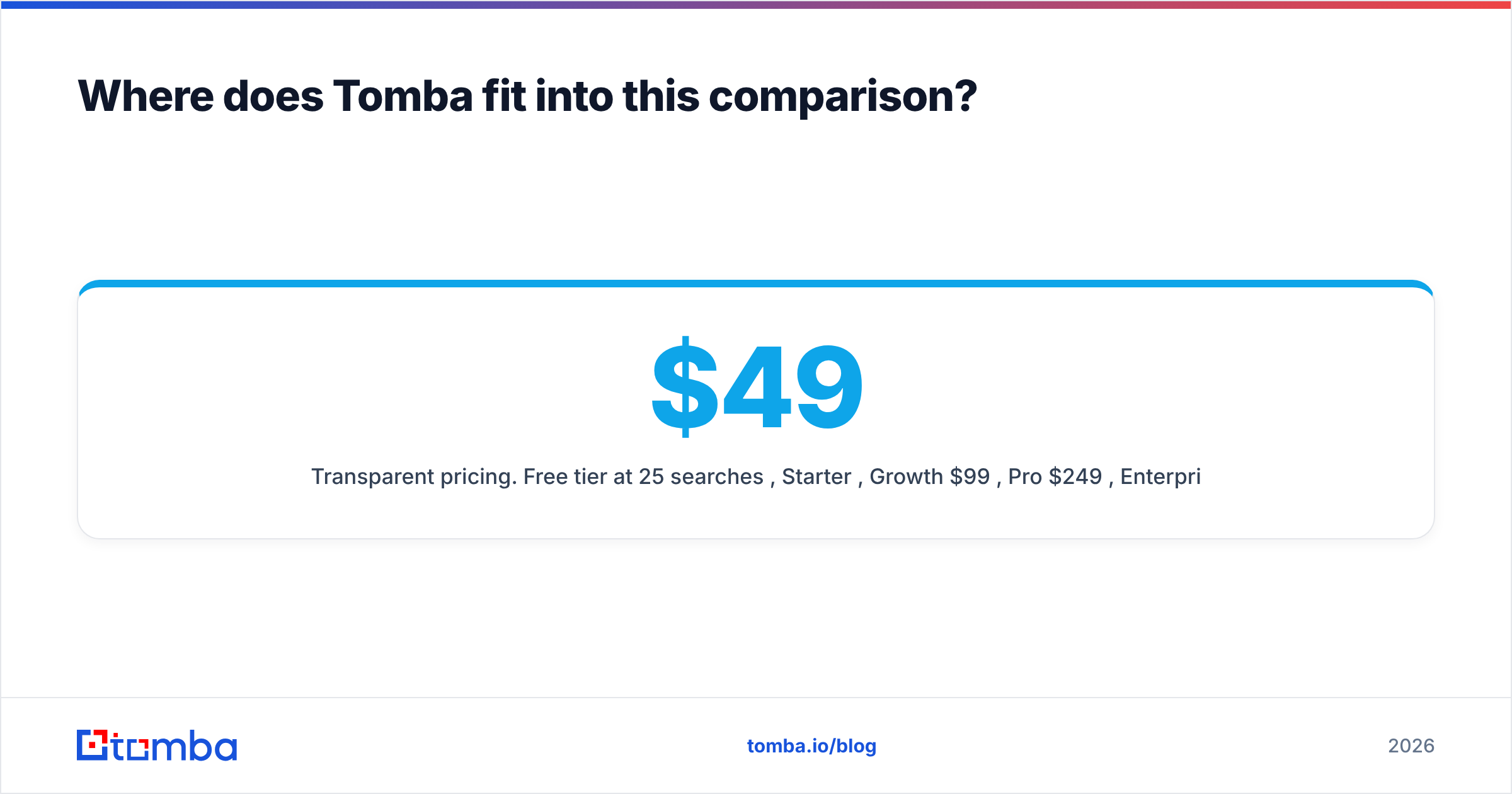
- Transparent pricing. Free tier at 25 searches/mo, Starter $49/mo, Growth $99/mo, Pro $249/mo, Enterprise custom. No quote call to find out whether you can afford it.
One thing Tomba does not do: send email. There is no bundled sequencer. That matters if the built-in sender is exactly why FindThatLead appealed to you. Tomba assumes you already run Instantly, Smartlead, Outreach, HubSpot, or similar, and plugs into them.
How should you run a fair head-to-head test?#
The FindThatLead vs Global Database question is easy to settle with your own data. Do not decide from feature pages. You can run this in an afternoon.
- Build a 100-row control list from your real ICP. Skip the clean list of US SaaS names. Include the messy parts: SMBs, non-English domains, agencies, and catch-all mail servers.
- Run the same 100 rows through each trial. Record the hit rate, then the usable hit rate: rows that survive an independent check.
- Verify with a neutral third tool. Never let the tool that found an address be the tool that grades it.
- Send 50 of them. Only a real bounce rate from a warmed domain settles the argument.
- Cost the whole workflow. Add credits burned on misses, seats, and the hours spent stitching exports together. The cheapest sticker price is often the priciest workflow.
- Check the exit cost. Can you export your data? Is the contract annual? What happens to your enriched records if you leave?
Teams that skip step 4 tend to over-buy. Teams that skip step 6 tend to regret the annual contract by month seven.
So which should you choose in 2026?#
Choose FindThatLead if you run a small outbound team, your targeting is already settled, and you want addresses plus a basic sender in one self-serve plan. It does that job well, and the credit model is easy to reason about.
Choose Global Database if account selection is the hard part of your funnel. Think regulated industries, credit-sensitive deals, European market research, or ABM programmes where the wrong 200 accounts cost more than any data subscription. The company layer is the real product. Treat the contact layer as a bonus, not a foundation.
Choose neither, or add a third tool, if what you need is accurate contact data through an API with verification built into the same pipeline. That is the gap both leave open, and that gap is what produces bounces.
Start free with the Tomba Email Finder: 25 searches a month, no card, and the same finder, verifier, and domain search that power the paid tiers. Run your control list through it next to whichever tool you are trialling. Then let the bounce rate pick the winner, not the pricing page.
Related guides#
Ready to find emails that actually work?
Join 150,000+ professionals who stopped guessing and started sending. Free credits on signup — no credit card required.
Get the Tomba newsletter
Practical outbound tactics and product updates — once every two weeks.
About the author