FindThatLead vs Go4Database: Which B2B Data Tool Wins?
One tool finds emails live, the other sells you a prebuilt list. Here's how FindThatLead and Go4Database compare on accuracy, pricing, coverage, and compliance — plus which one actually fits your outbound motion.
TL;DR
- They're not the same category. FindThatLead is a live email finder plus a lightweight cold-email sender. Go4Database is a list vendor — you buy a prebuilt B2B contact file and download it.
- Freshness is the whole argument. Live lookups resolve a contact at the moment you query. Static files were compiled months (sometimes years) before you paid for them, and B2B data decays roughly 2–3% per month.
- Cost per usable contact matters more than sticker price. A cheap 50,000-row file with a 35% bounce rate is more expensive than a $99/mo tool that returns 3,000 verified contacts.
- Verification is non-negotiable for both. Neither vendor removes your obligation to re-verify before send — especially on catch-all domains.
- Pick by motion: targeted ABM and founder-led outbound → live finder. Broad volume plays in a fixed geography → list purchase, then heavy scrubbing.
Most "FindThatLead vs Go4Database" comparisons treat these two as interchangeable lead sources. They aren't. Choosing between them is really choosing between two data philosophies: find the contact when you need it, or buy a warehouse of contacts and hope they're still valid. That distinction drives everything downstream — your bounce rate, your domain reputation, your compliance exposure, and your real cost per meeting.
Here's the honest breakdown.
What is FindThatLead?#
FindThatLead is a Spanish-built prospecting suite that has been around since 2015. Its core is an email finder: give it a first name, last name, and company domain, and it returns a best-guess professional email with a confidence score. Around that core it wraps several convenience layers:
- Domain search — pull the contacts it knows for a given company domain.
- Lead Search — a filterable prospect builder (industry, location, job title) that outputs a list rather than one-off lookups.
- Chrome extension — scrape prospects while you browse LinkedIn or a company site.
- Prospector / sender — a built-in cold-email sending module so you can go from list to sequence without exporting.
- Bulk CSV upload — drop in a file of names and domains, get emails back.
The pitch is consolidation: finder, enrichment, and sender in one subscription. That's genuinely useful for a solo founder or a two-person SDR team who doesn't want a separate sending tool. The trade-off is that each individual module is decent rather than best-in-class — the sender doesn't match a dedicated sequencer, and the database is smaller than the big US-centric providers.
FindThatLead is strongest on European data, which is unusual and worth knowing. If your ICP is Spanish, French, or Italian SMBs, it will typically outperform tools tuned for North American enterprise.
What is Go4Database?#
Go4Database sits in a different bucket entirely: it's a B2B list broker. You tell them the segment you want — "IT decision makers in healthcare, US, 500+ employees" — and they quote you a file. You pay, you download a CSV or XLSX, the transaction ends.
List vendors in this space, including reputable ones like BookYourData, generally offer:
- Prebuilt industry, technology, and job-function lists
- Custom list building against your stated filters
- Append/enrichment services on a file you already own
- Volume-based pricing (per record, dropping as you buy more)
- Some form of accuracy guarantee or bounce-credit policy
Go4Database markets very broad coverage — tens of millions of contacts across industries and geographies — plus healthcare, technology, and professional-services segments. The appeal is obvious: one purchase, thousands of rows, no per-credit metering, no API to integrate.
The risk is equally obvious. You have no visibility into when each row was last verified, no way to re-query a record that's gone stale, and no recourse beyond whatever refund policy is in the contract. Read the accuracy guarantee carefully before you wire money — "95% accuracy" means very different things depending on whether it covers syntax, deliverability, or job-title correctness.
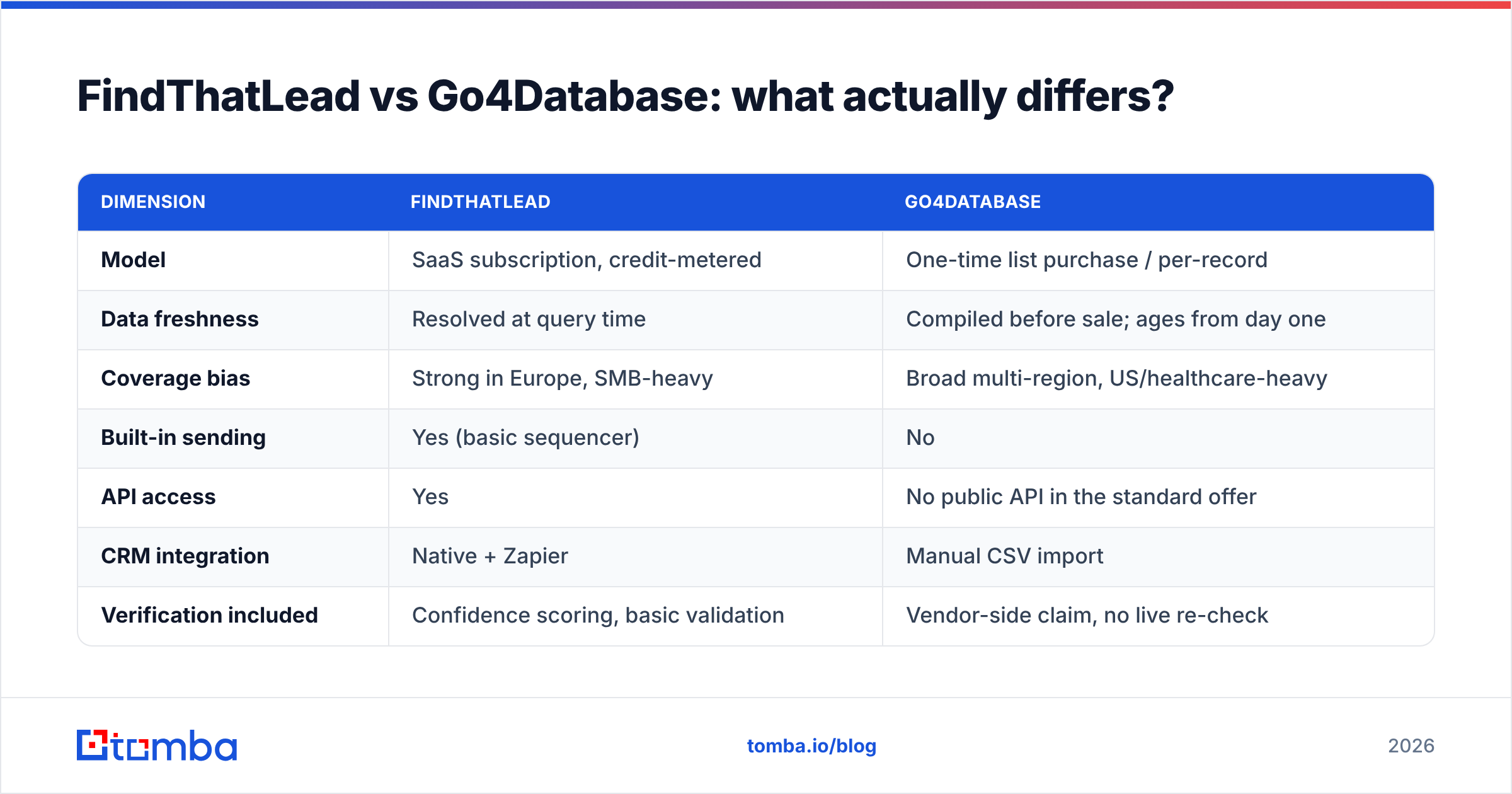
FindThatLead vs Go4Database: what actually differs?#
| Dimension | FindThatLead | Go4Database |
|---|---|---|
| Model | SaaS subscription, credit-metered | One-time list purchase / per-record |
| Data freshness | Resolved at query time | Compiled before sale; ages from day one |
| Coverage bias | Strong in Europe, SMB-heavy | Broad multi-region, US/healthcare-heavy |
| Built-in sending | Yes (basic sequencer) | No |
| API access | Yes | No public API in the standard offer |
| CRM integration | Native + Zapier | Manual CSV import |
| Verification included | Confidence scoring, basic validation | Vendor-side claim, no live re-check |
| Re-query a stale contact | Yes, any time | No — buy a new file |
| Typical buyer | Founder, small SDR team | Marketing ops running volume campaigns |
| Compliance posture | You collect per-query, documented source | You inherit the vendor's sourcing |
The line that matters most is "re-query a stale contact." A subscription tool is an ongoing relationship with the data; a purchased file is a snapshot. If your sales cycle is longer than a quarter, half your snapshot has moved on before you finish working it.
How accurate is each one, really?#
Nobody should take a vendor's accuracy claim at face value — including Tomba's. Here's how to actually test it.
Build a control set. Take 200 contacts you already know are valid (current customers, people who've replied to you, contacts confirmed via LinkedIn in the last 30 days). Strip the emails. Run the names + domains through the finder, or check them against the purchased file.
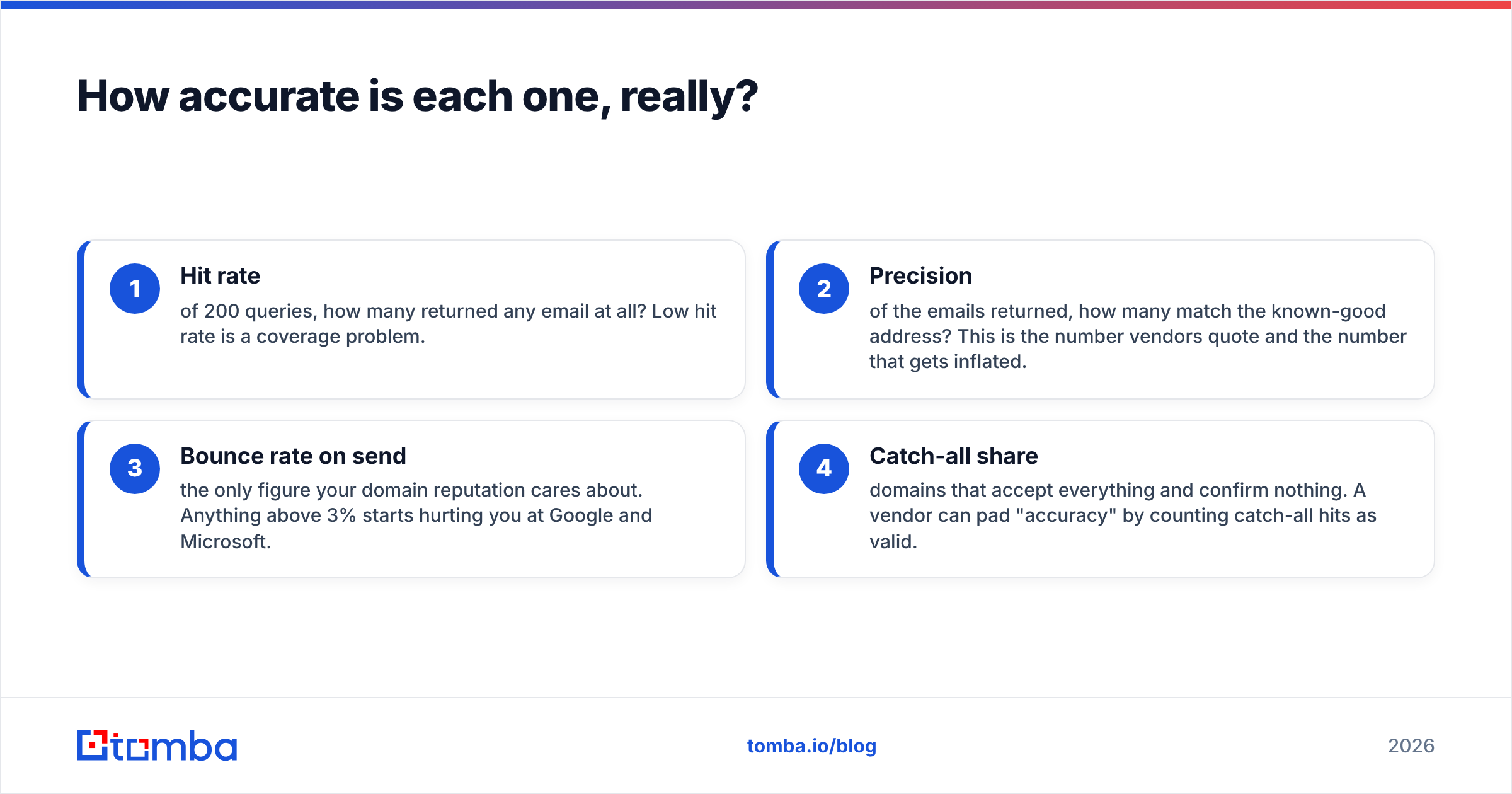
Measure four things, not one:
- Hit rate — of 200 queries, how many returned any email at all? Low hit rate is a coverage problem.
- Precision — of the emails returned, how many match the known-good address? This is the number vendors quote and the number that gets inflated.
- Bounce rate on send — the only figure your domain reputation cares about. Anything above 3% starts hurting you at Google and Microsoft.
- Catch-all share — domains that accept everything and confirm nothing. A vendor can pad "accuracy" by counting catch-all hits as valid.

On our own tests, live finders consistently beat static files on precision — not because the finder's underlying data is magically better, but because a live query runs SMTP-level checks against the current mail server. A CSV row can't do that. It was true when the file was built and it is a guess today.
That said, live finders lose on volume economics. If you need 40,000 contacts for a broad awareness play in a market you've never sold into, per-credit pricing gets painful fast. That's the legitimate case for a list vendor.
Whichever you choose, run the output through a dedicated email verifier before the first send. On purchased files this isn't optional — expect to discard 15–30% of rows, and budget for it. Catch-all domains need a separate pass; a catch-all verifier is the only way to get a real signal on domains that reflexively accept everything.
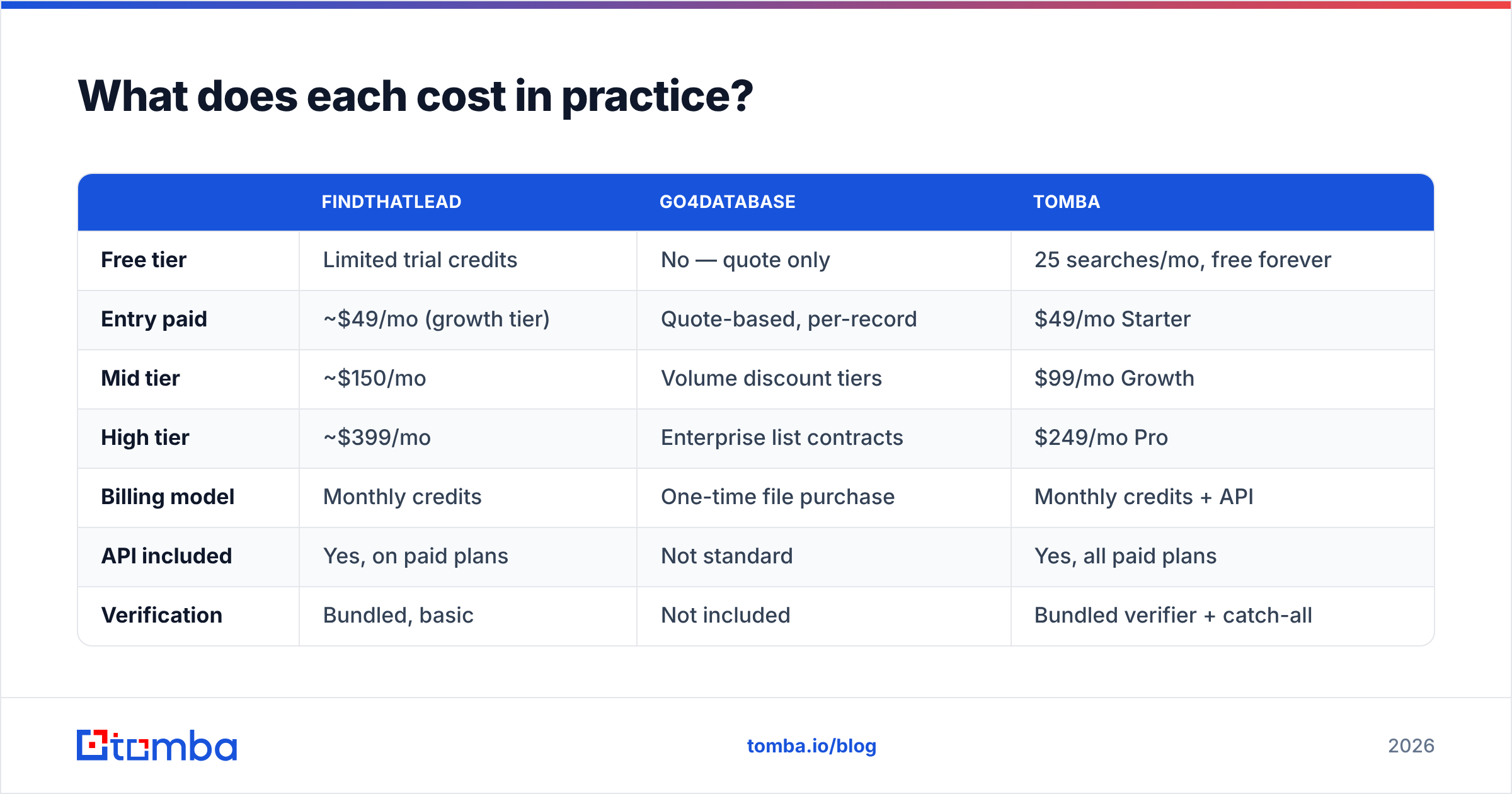
What does each cost in practice?#
Published pricing shifts often, so treat these as directional and verify on the vendor's own page before buying.
| FindThatLead | Go4Database | Tomba | |
|---|---|---|---|
| Free tier | Limited trial credits | No — quote only | 25 searches/mo, free forever |
| Entry paid | ~$49/mo (growth tier) | Quote-based, per-record | $49/mo Starter |
| Mid tier | ~$150/mo | Volume discount tiers | $99/mo Growth |
| High tier | ~$399/mo | Enterprise list contracts | $249/mo Pro |
| Billing model | Monthly credits | One-time file purchase | Monthly credits + API |
| API included | Yes, on paid plans | Not standard | Yes, all paid plans |
| Verification | Bundled, basic | Not included | Bundled verifier + catch-all |
The number that should drive the decision isn't the row on this table — it's cost per contact that actually replies. Work it out like this:
- Purchased file: $2,000 for 40,000 rows = $0.05/row. Strip 25% invalid → 30,000 usable. Real cost: $0.067. Add the deliverability damage from the bounces you didn't catch, and it climbs.
- Live finder: $99/mo for ~3,000 lookups = $0.033/lookup. At a 75% hit rate → 2,250 contacts. Real cost: $0.044, with far fewer bounces.
The list looks cheaper per row and is often more expensive per usable contact. Run your own numbers with your own hit rates — but run them, don't assume.

Which one fits your outbound motion?#
Match the tool to the shape of your campaign, not to the sticker price.
- Targeted ABM (under 500 accounts) — Live finder, every time. You need the right person at the right company right now, and you'll re-query as roles change. A purchased file is overkill and stale.
- Founder-led outbound in Europe — FindThatLead's regional strength is a real edge here. The bundled sender saves you a second subscription while volume is low.
- Broad awareness blast in a new geography — This is where a list vendor earns its place. Buy the segment, then scrub aggressively before touching it.
- Recruiting or agency prospecting — Live finder plus a LinkedIn finder workflow. Profiles change too fast for static files to keep up.
- Programmatic enrichment inside your product or CRM — Neither a list nor a bundled sender helps. You need an API, and Go4Database doesn't offer one in its standard package.
- Rebuilding a decayed CRM — Enrichment beats acquisition. Feed your existing records through a data enrichment pass rather than buying net-new rows you already have.
Where do both tools fall short?#
FindThatLead's gaps: the database skews SMB and European, so US enterprise coverage thins out at the VP+ level. The built-in sender is functional but basic — no real deliverability tooling, limited inbox rotation, and reporting that won't satisfy a RevOps lead. Credit consumption on failed lookups is a common complaint in G2 reviews, so check whether a no-result query still burns a credit on your plan.
Go4Database's gaps: no API, no re-query, no live verification, and limited transparency on when each record was last touched. You're also inheriting the vendor's sourcing for GDPR and CCPA purposes — if a European contact files a data-subject request, "we bought a list" is a weak position. Ask for documented provenance before purchase, not after.
Both share one gap: neither gives you a defensible, repeatable pipeline. You're either paying for a bundled sender you'll outgrow, or a file you'll have to rebuy. If you plan to scale, look at where the data plugs in — CRM, spreadsheet, warehouse, or code.

What's the verdict?#
If you have to pick one: FindThatLead for most teams, Go4Database for one specific job.
FindThatLead wins on freshness, re-queryability, API access, and the ability to work one account at a time — which is how most B2B outbound actually gets done in 2026. Go4Database wins when you need tens of thousands of rows in a defined segment, you've priced in a 20–30% scrub, and you have the deliverability discipline to send safely from a purchased file. That's a narrower use case than list vendors like to admit, but it's a real one.
The setup that beats both for most teams is unglamorous: a live finder with an API, a verifier in the same pipeline, and no separate list purchase at all. You query when you need the contact, you verify before you send, and you never pay for rows you won't work.
Where does Tomba fit?#
Tomba is built for that third path. The email finder resolves contacts live by name and domain, the verifier and catch-all checks run in the same workflow instead of as a bolt-on, and every paid plan ships with API access so enrichment can live inside your CRM or your product rather than in a spreadsheet someone forgot to update.
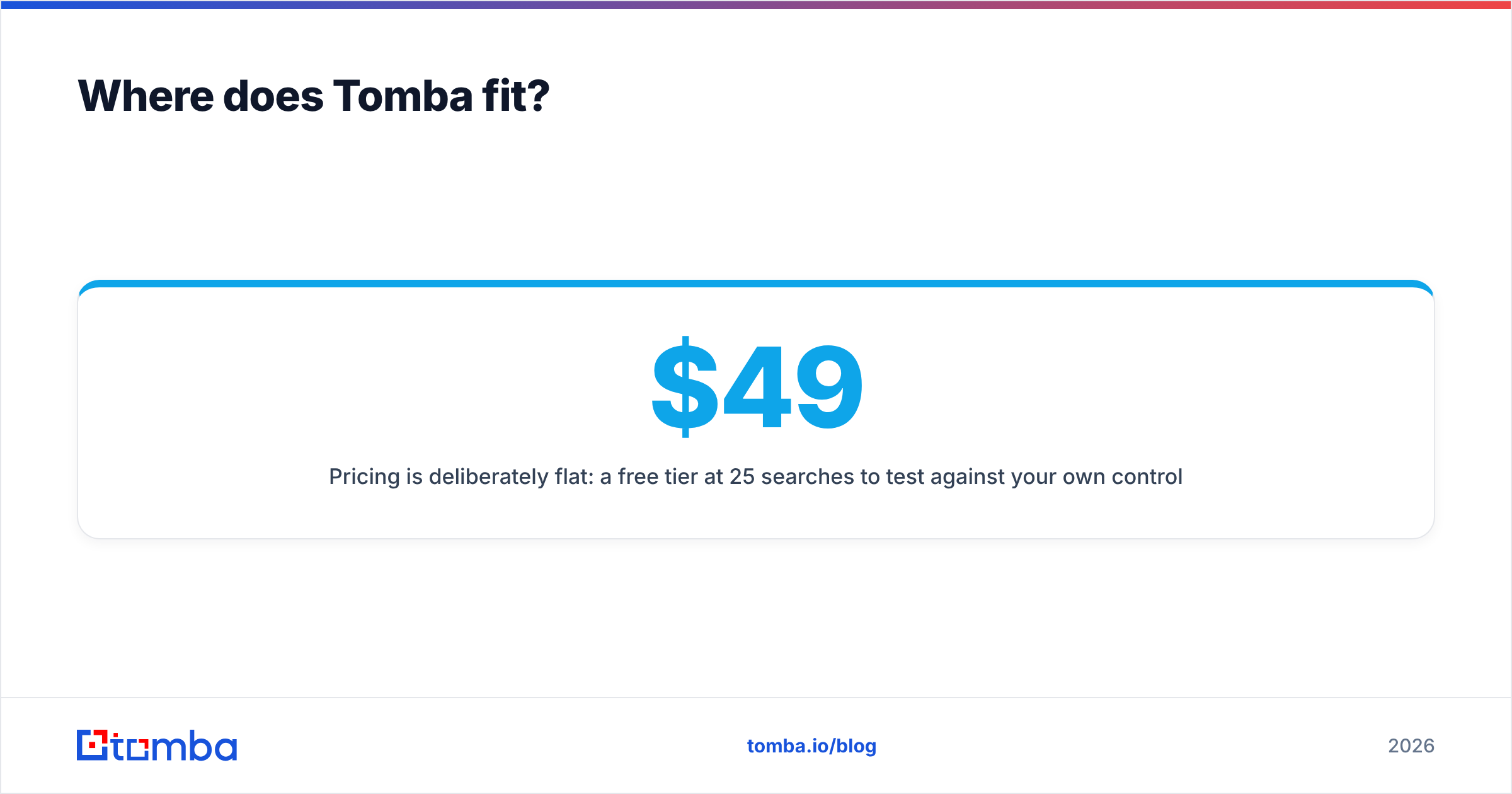
Pricing is deliberately flat: a free tier at 25 searches/month to test against your own control set, Starter at $49/mo, Growth at $99/mo, and Pro at $249/mo — full Tomba pricing is public, with no quote calls to compare a list file against a subscription.
Start with the free tier and run the 200-contact control test described above against whatever you're using now. If Tomba doesn't beat your current hit rate and bounce rate on your own data, don't switch. If it does, you've just cut your cost per reply — try the Tomba Email Finder and see what your list actually looks like when every address is verified before it leaves your outbox.
Related guides#
Ready to find emails that actually work?
Join 150,000+ professionals who stopped guessing and started sending. Free credits on signup — no credit card required.
Get the Tomba newsletter
Practical outbound tactics and product updates — once every two weeks.
About the author