FindThatLead vs GoCustomer: Which Wins for Cold Outreach?
FindThatLead sells volume prospecting. GoCustomer sells AI personalization. They solve different halves of the same problem — and picking wrong costs you a quarter of pipeline. Here is the honest breakdown.
FindThatLead vs GoCustomer is a fair question with an unfair answer: the two tools solve different problems. One builds the list. The other writes the copy. Here is what each does well, what each really costs, and which one your team should buy.
TL;DR
- These two tools are not really competitors. FindThatLead is a prospecting-and-send platform built around volume list building. GoCustomer is an AI personalization layer built around message quality.
- A head-to-head only makes sense if you want one purchase to answer both "who do I email" and "what do I say."
- FindThatLead wins on transparency and self-serve speed. Published pricing, a Chrome extension, a free trial tier, and a workflow you can learn in an afternoon.
- GoCustomer wins on message-level differentiation. AI-written, per-prospect opening lines and sequence variants are its whole reason to exist. It is also sales-led, so you will talk to a rep before you see a number.
- Neither one is a data company. Both resell or scrape contact data, and both leave verification to you. If your bounce rate is above 3%, the fix is a dedicated finder plus verifier, not a better sequence.
- The pragmatic stack for most teams: a high-accuracy email finder for the data layer, then whichever sending tool your team will actually log into daily.
What are FindThatLead and GoCustomer?#
FindThatLead is a Spain-built B2B prospecting suite that has been around since 2015. Its core loop is simple. Search by domain, role, or LinkedIn URL. Pull a list of emails and verify them. Drop them into the built-in cold email sender and send. It is aimed at founders, agencies, and small sales teams who want one login instead of four.
GoCustomer comes at outbound from the opposite end. Its pitch is AI-driven hyper-personalization. Feed it a prospect list, and it writes individual first lines, subject lines, and sequence variants based on signals like company news, website copy, or LinkedIn activity. Data sourcing exists, but the product's center of gravity is the message, not the list.
That distinction matters more than any feature table. If you are drowning in "I have no one to email," FindThatLead is closer to your problem. If you are drowning in "I email 3,000 people a month and get 0.4% replies," GoCustomer is closer to yours.
FindThatLead vs GoCustomer: how do features and pricing compare?#
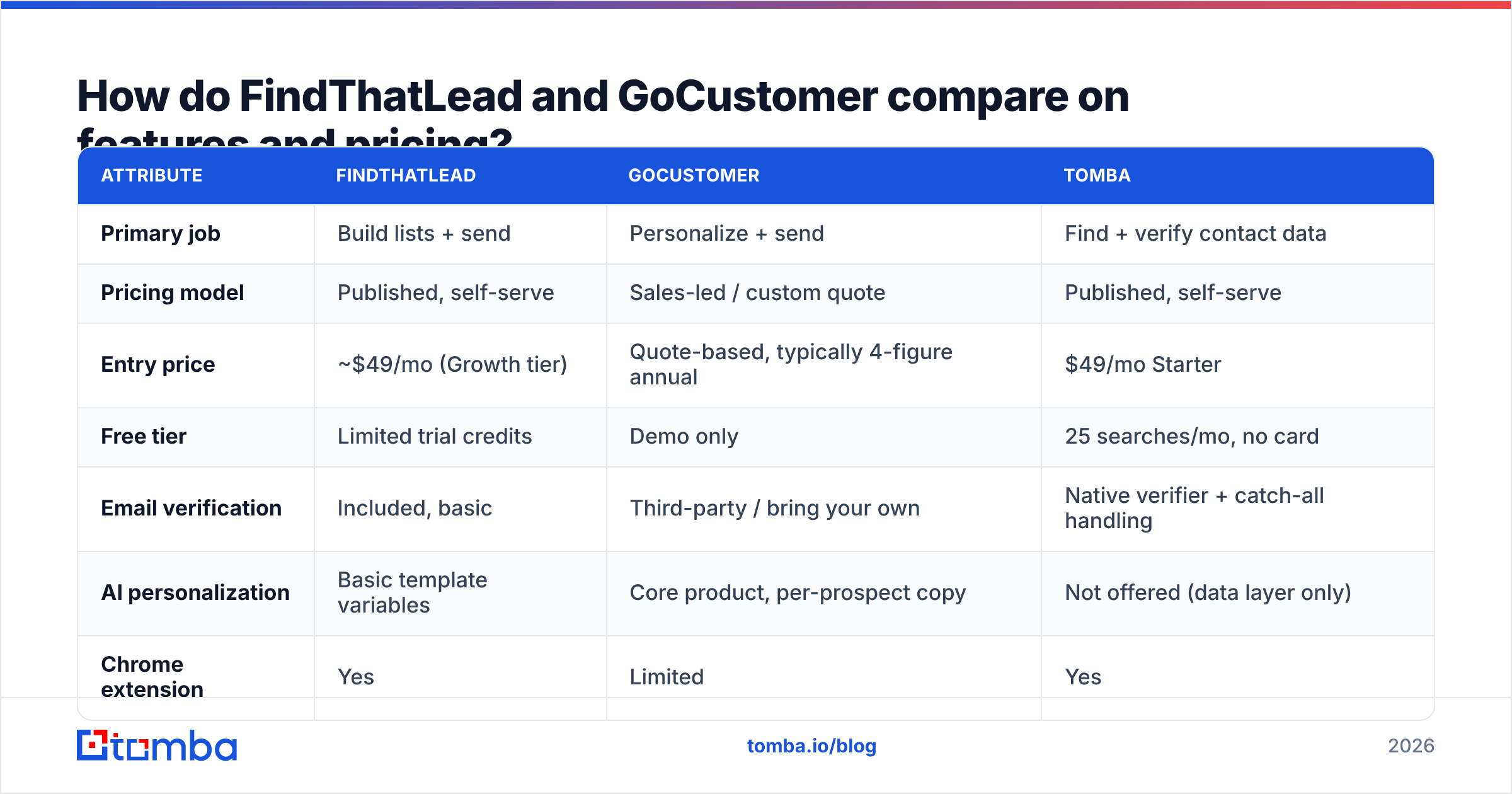
Here is the practical side-by-side. Treat the pricing rows as directional. Both vendors change plans, and GoCustomer routes buyers through a rep rather than a public checkout. Always confirm on the vendor page before you commit budget.
| Attribute | FindThatLead | GoCustomer | Tomba |
|---|---|---|---|
| Primary job | Build lists + send | Personalize + send | Find + verify contact data |
| Pricing model | Published, self-serve | Sales-led / custom quote | Published, self-serve |
| Entry price | ~$49/mo (Growth tier) | Quote-based, typically 4-figure annual | $49/mo Starter |
| Free tier | Limited trial credits | Demo only | 25 searches/mo, no card |
| Email verification | Included, basic | Third-party / bring your own | Native verifier + catch-all handling |
| AI personalization | Basic template variables | Core product, per-prospect copy | Not offered (data layer only) |
| Chrome extension | Yes | Limited | Yes |
| API access | Yes, on higher tiers | Enterprise | Yes, on all paid tiers |
| Bulk enrichment | CSV upload | CSV upload | Bulk finder + enrichment |
| Best for | Solo founders, agencies | Mid-market SDR teams | Any team that needs clean data |
The row that should decide most purchases is the "primary job" row. Buying GoCustomer to solve a list problem is like buying a better espresso machine when the issue is stale beans.
Which one actually finds more valid emails?#
Neither vendor publishes an audited accuracy number. Be skeptical of any vendor that quotes one without sharing the method. What you can control is how you test.
Run this before you sign anything:
- Build a 100-contact ground-truth set. Pick people you can verify on your own — customers, past colleagues, or contacts in your CRM with a confirmed reply history.
- Strip the emails out and feed only names + domains into each tool's finder or enrichment flow.
- Measure coverage and precision separately. Coverage is how many rows came back with something. Precision is how many of those matched your ground truth. A tool that returns 95% coverage at 60% precision is worse than one returning 70% at 96%.
- Segment by company size. Most finders look great on 500-person SaaS companies and fall apart on 12-person agencies or non-English domains. Your ICP skew changes the winner.
- Check catch-all handling explicitly. Roughly a fifth of B2B domains accept everything at the SMTP layer. A tool that marks those "valid" is guessing on your behalf.
That last point explains a lot of "the data was terrible" complaints. A catch-all domain will happily accept notarealperson@company.com. So any verifier that only runs an SMTP handshake will greenlight garbage. Tools that handle this properly — including a dedicated catch-all verifier — use pattern confidence, past sightings, and other signals instead of a single handshake.
FindThatLead's verification is bundled and fine for a first pass. GoCustomer expects you to arrive with a list, so your data quality was decided before the tool ever ran. In both cases, a separate email verifier in the pipeline is not redundancy. It is the actual control on deliverability.
Does AI personalization beat better data?#
Short answer: no, but it compounds with it.
The order of operations for reply rate is unforgiving. A perfect email to a bounced address gets 0% reply. A perfect email to the wrong persona gets close to 0%. Personalization multiplies a base that is already correct. It does not replace one.
That said, generic outbound has stopped working at scale. G2's software review data shows the whole sales engagement category moving to AI-assisted copy. So the edge on "we write your first line" is shrinking fast. GoCustomer was early to that idea, and its per-prospect research pass beats merge-tag templating.
The uncomfortable part is auditability. AI-written opening lines sometimes cite something the prospect never said, misread a press release, or praise a product that was killed two years ago. That is a brand risk, and it scales as fast as your sending does. If you adopt an AI personalization layer, review the first few hundred generations per segment by hand. Then cap the tool's ability to send anything unreviewed.
FindThatLead's personalization is more modest — variables, spintax, basic conditional blocks. Less impressive in a demo, and much harder to embarrass yourself with.
What does each tool cost at real volume?#
Sticker price and actual cost diverge quickly in this category. Three things inflate the bill:
- Credit burn on failed lookups. Some tools charge for a search that returns nothing. Ask explicitly. Over a 20,000-contact quarter, a 30% miss rate you still pay for is a 30% price increase.
- Seats. Per-user pricing punishes teams that want ops, marketing, and SDRs all touching the same lists.
- The tool you buy anyway. If a platform's verification is weak, you will add a verifier. If its coverage is thin in your region, you will add an enrichment vendor. Model the stack, not the line item.
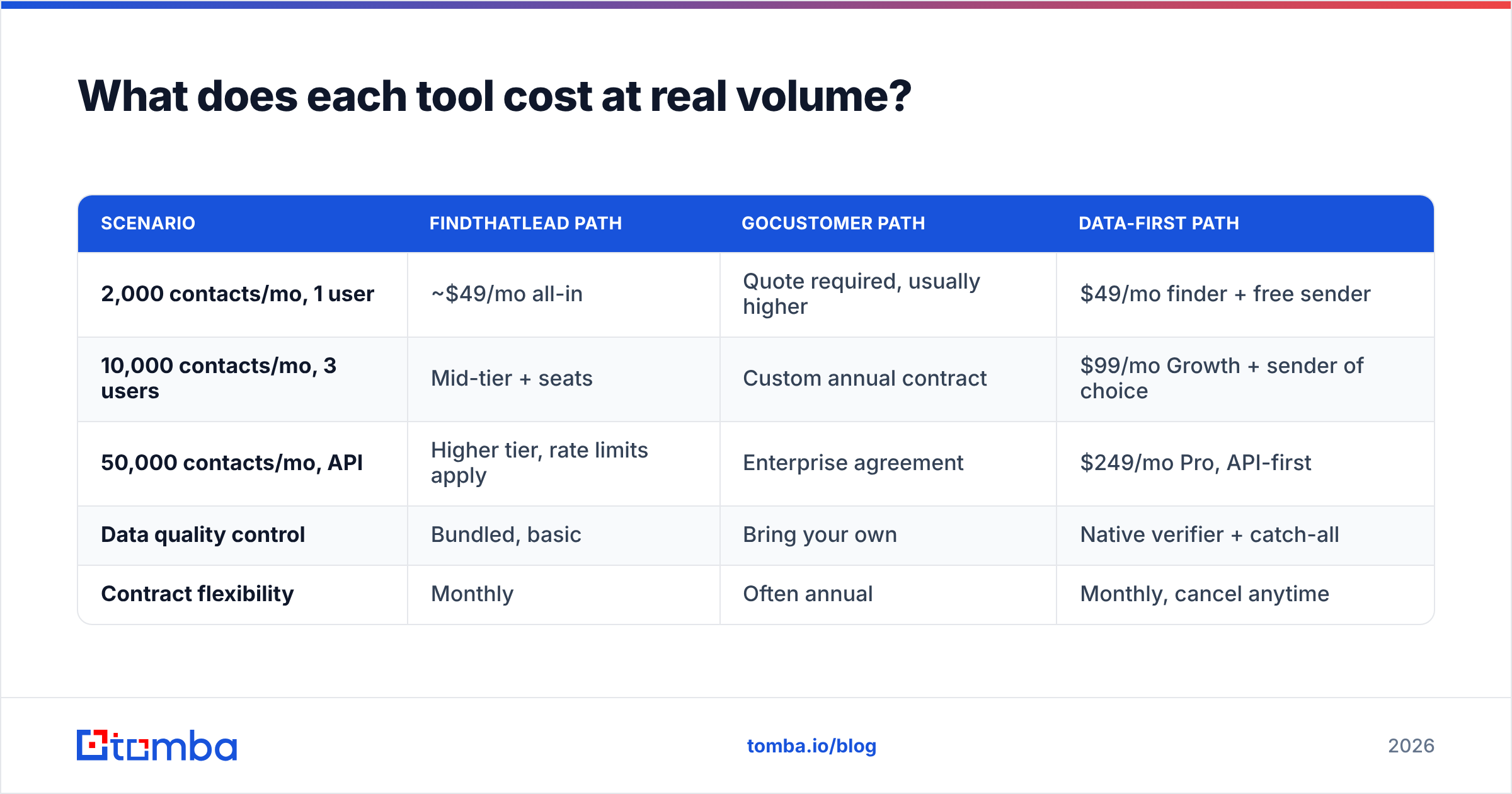
| Scenario | FindThatLead path | GoCustomer path | Data-first path |
|---|---|---|---|
| 2,000 contacts/mo, 1 user | ~$49/mo all-in | Quote required, usually higher | $49/mo finder + free sender |
| 10,000 contacts/mo, 3 users | Mid-tier + seats | Custom annual contract | $99/mo Growth + sender of choice |
| 50,000 contacts/mo, API | Higher tier, rate limits apply | Enterprise agreement | $249/mo Pro, API-first |
| Data quality control | Bundled, basic | Bring your own | Native verifier + catch-all |
| Contract flexibility | Monthly | Often annual | Monthly, cancel anytime |
The data-first column is a structural point more than a plug. If your data layer is separate from your sending layer, you can swap either one without a migration. Teams that bundle everything into one vendor learn the cost of that the first time deliverability tanks and they cannot isolate the cause.
For reference on the data side, Tomba pricing runs $49/mo Starter, $99/mo Growth, and $249/mo Pro. The free tier is 25 searches per month, with custom Enterprise terms above that.
Which tool fits which team?#
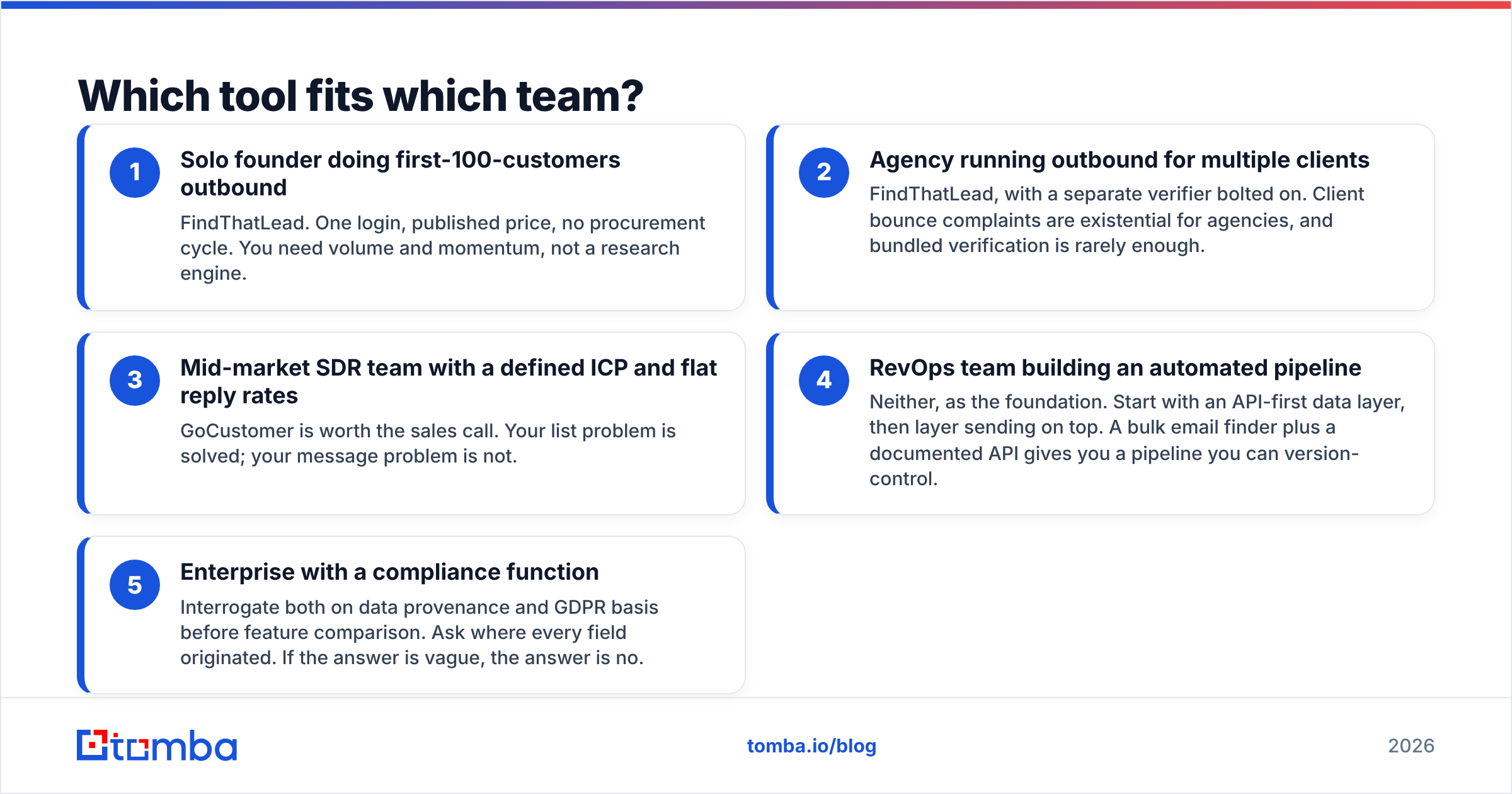
Match the tool to the bottleneck, not to the demo you enjoyed most.
- Solo founder doing first-100-customers outbound — FindThatLead. One login, published price, no procurement cycle. You need volume and momentum, not a research engine.
- Agency running outbound for multiple clients — FindThatLead, with a separate verifier bolted on. Client bounce complaints are existential for agencies, and bundled verification is rarely enough.
- Mid-market SDR team with a defined ICP and flat reply rates — GoCustomer is worth the sales call. Your list problem is solved. Your message problem is not.
- RevOps team building an automated pipeline — Neither, as the foundation. Start with an API-first data layer, then add sending on top. A bulk email finder plus a documented API gives you a pipeline you can version-control.
- Enterprise with a compliance function — Ask both vendors about data provenance and GDPR basis before you compare features. Ask where every field came from. If the answer is vague, the answer is no.

Where do both tools fall short?#
To be fair to both: the gaps are structural, not incompetence.
FindThatLead's ceiling is depth. It is a capable generalist, and generalists get outclassed on any single axis. Its personalization is thinner than a dedicated AI tool. Its coverage of European mid-market is solid, but weaker on APAC and on companies under 20 people. Its sending works, but it is not Instantly or Smartlead.
GoCustomer's ceiling is the funnel. Sales-led pricing means slow evaluation, annual commitments, and no way to test with $50 and a Tuesday afternoon. The honest way to evaluate this category is "run 100 rows and check." Gated pricing blocks that, and it costs the vendor deals.
Both share the same blind spot. They treat contact data as a commodity input. It isn't. Research on B2B data decay finds that a large share of contact records go stale within a year as people change roles. A list you built in January is measurably worse by June. Any tool that does not re-verify at send time is quietly degrading under you.
That is the case for keeping a real data layer in the stack: a domain search to map an account's contactable surface, verification at send time rather than at import time, and an API you can call from your own scheduler.
What is the verdict?#
The FindThatLead vs GoCustomer choice comes down to your bottleneck. Pick FindThatLead if you need lists, speed, and a published price. Pick GoCustomer if your list is fine and your reply rate is the problem, and you can absorb a sales cycle plus an annual deal. Pick neither as your data foundation.
The strongest setup we see in teams that hit their number is boring. One tool that is excellent at finding and verifying contacts. One tool that is excellent at sending. A clear line between them. When something breaks, you know which half broke.
If the data half is where you are bleeding — bounces above 3%, half your enrichment rows empty, catch-all domains hurting your sender reputation — start there. The Tomba Email Finder gives you name-and-domain lookup, native verification with real catch-all handling, and an API that plugs into any sending stack. The free tier is 25 searches a month with no card. That is enough to run the 100-row ground-truth test above and see the numbers before you spend anything.
Test the data first. The sequence builder can wait.
Related guides#
Ready to find emails that actually work?
Join 150,000+ professionals who stopped guessing and started sending. Free credits on signup — no credit card required.
Get the Tomba newsletter
Practical outbound tactics and product updates — once every two weeks.
About the author