FindThatLead vs GrowMeOrganic: Which Lead Tool Wins in 2026?
One is a Barcelona-built email finder with a sender attached. The other is an India-built LinkedIn scraper with a CRM attached. We broke down credits, accuracy, hidden limits and real cost per valid email.
TL;DR
- FindThatLead is an email finder with a light sending layer bolted on. It is strongest when you already know the domain or company and want emails fast, in bulk, from a simple UI.
- GrowMeOrganic is a LinkedIn-first prospecting suite. Its real product is the Chrome extension that scrapes Sales Navigator lists, plus a basic CRM and sequencer around it.
- They are not really the same category. Choosing between them is mostly a question of where your list starts: a domain (FindThatLead) or a LinkedIn search (GrowMeOrganic).
- Neither is a serious verification tool. Both include a validity signal, but both leave enough risky addresses in the export that you should verify separately before sending.
- Cost per valid email is the only number that matters. A "unlimited" plan that returns 60% deliverable addresses is more expensive than a metered plan that returns 95%.
If you are comparing FindThatLead vs GrowMeOrganic, you are probably at the stage where you have a list-building bottleneck and a limited budget. This breakdown is written for that decision — not as a feature dump.
What is FindThatLead and who is it for?#
FindThatLead is a Barcelona-based B2B prospecting tool that has been around since 2015. Its core loop is simple: give it a domain, a company name, or a first name + last name + domain combination, and it returns the professional email address with a confidence score.
Around that core it has added:
- Prospector — filter a database by role, industry, country and pull a list
- Lead Search — domain-level bulk extraction
- Social URL search — paste a LinkedIn profile, get the work email
- Email Sender — a basic campaign tool for sending directly from the platform
The product philosophy is "find and send in one tab." That is genuinely useful for solo founders and small agencies who do not want to stitch together three subscriptions. It is less useful for teams that already run Instantly, Smartlead or Lemlist, because the sending layer becomes dead weight you paid for.
You can see the current plan structure on the FindThatLead site — pricing has moved more than once, so treat any number you read in a blog post (including this one) as directional and confirm on the vendor page.
What is GrowMeOrganic and how is it different?#
GrowMeOrganic started life as a LinkedIn automation and scraping tool and grew outward. If you strip the marketing away, the product is:
- A Chrome extension that extracts profiles from LinkedIn and Sales Navigator search results in bulk
- An email finder that appends work emails to those scraped profiles
- An email sequencer with basic multi-step drip logic
- A lightweight CRM to track replies and pipeline stages
- A local business / Google Maps scraper for SMB and agency use cases
The pitch is "unlimited." Historically GrowMeOrganic has sold plans framed around unlimited exports and unlimited email sending rather than strict per-credit metering — a positioning it built partly through lifetime deals on AppSumo. That framing is attractive until you read the fair-use language, which is where per-day extraction ceilings and enrichment caps live.
The important structural difference: GrowMeOrganic assumes your list starts on LinkedIn. FindThatLead assumes your list starts with a domain. Everything downstream follows from that assumption.
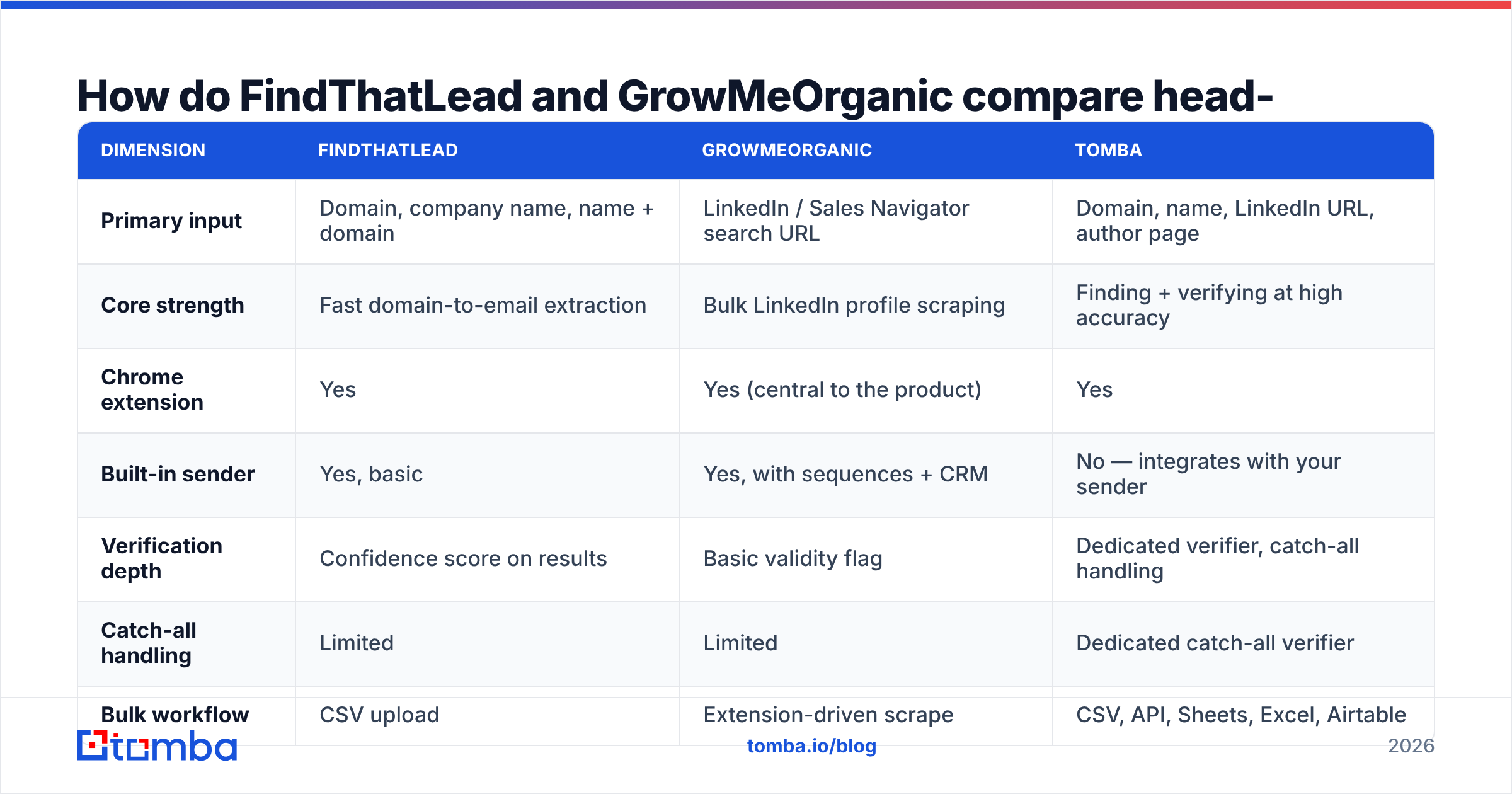
How do FindThatLead and GrowMeOrganic compare head-to-head?#
Here is the practical comparison, plus where a dedicated finder like Tomba sits, because most teams end up running a finder alongside whatever suite they bought.
| Dimension | FindThatLead | GrowMeOrganic | Tomba |
|---|---|---|---|
| Primary input | Domain, company name, name + domain | LinkedIn / Sales Navigator search URL | Domain, name, LinkedIn URL, author page |
| Core strength | Fast domain-to-email extraction | Bulk LinkedIn profile scraping | Finding + verifying at high accuracy |
| Chrome extension | Yes | Yes (central to the product) | Yes |
| Built-in sender | Yes, basic | Yes, with sequences + CRM | No — integrates with your sender |
| Verification depth | Confidence score on results | Basic validity flag | Dedicated verifier, catch-all handling |
| Catch-all handling | Limited | Limited | Dedicated catch-all verifier |
| Bulk workflow | CSV upload | Extension-driven scrape | CSV, API, Sheets, Excel, Airtable |
| API access | Yes | Limited | Full REST API + CLI + MCP |
| Free tier | Trial credits | Trial credits | 25 searches/mo, no card |
| Entry paid plan | ~$49/mo tier | ~$49/mo tier | $49/mo Starter |
| Best fit | Domain-first list building | LinkedIn-first list building | Accuracy-critical outbound at any volume |

Two honest notes on that table. First, "built-in sender: yes" is not automatically a win — a sender that lacks inbox rotation, warmup and real deliverability reporting will quietly burn your domain. Second, "unlimited" in the GrowMeOrganic column is not a lie, but it applies to extraction volume, not to the underlying data quality.
Which one actually finds more valid emails?#
This is where most comparison posts get vague, so let's be concrete about method. The only fair test is: take one list of 500 real companies with named contacts, run it through each tool, then send every returned address to an independent verifier and count what survives.
Three numbers come out of that test:
- Hit rate — of 500 requested contacts, how many addresses came back at all
- Deliverable rate — of the returned addresses, how many pass independent verification
- Effective yield — hit rate × deliverable rate, the only number that predicts your bounce rate
Tools optimise for the first number because it is the one on the marketing page. A finder can push hit rate to 90% simply by guessing patterns (first.last@, f.last@, first@) and returning the guess with a "medium confidence" tag. That inflates the headline and dumps the risk on your sending domain.

In practice, both FindThatLead and GrowMeOrganic return a meaningful share of pattern-guessed addresses. FindThatLead surfaces a confidence score you can filter on, which is the more honest design. GrowMeOrganic's enrichment leans on the fact that you have already confirmed the person exists on LinkedIn, which helps with identity accuracy but does nothing for mailbox accuracy — the person is real, the inbox may not be.
The workaround is the same for both: run every export through a real email verifier before it touches your sequencer. If you are exporting from a catch-all domain, you also need a catch-all verifier, because standard SMTP checks return "accept all" and tell you nothing.
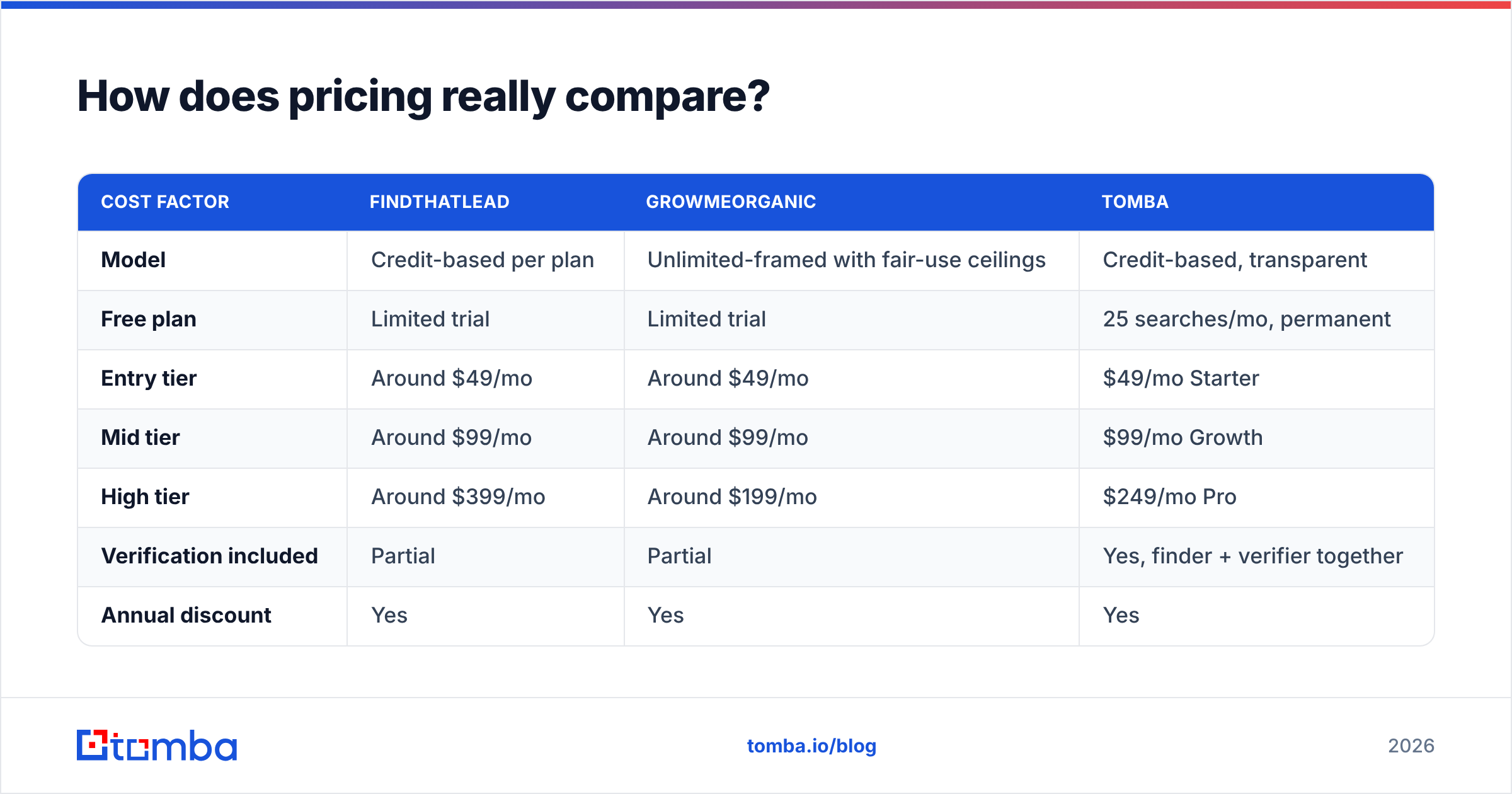
How does pricing really compare?#
Both vendors sit in the same broad range at the entry point, so the sticker price is not the differentiator. The structure is.
| Cost factor | FindThatLead | GrowMeOrganic | Tomba |
|---|---|---|---|
| Model | Credit-based per plan | Unlimited-framed with fair-use ceilings | Credit-based, transparent |
| Free plan | Limited trial | Limited trial | 25 searches/mo, permanent |
| Entry tier | Around $49/mo | Around $49/mo | $49/mo Starter |
| Mid tier | Around $99/mo | Around $99/mo | $99/mo Growth |
| High tier | Around $399/mo | Around $199/mo | $249/mo Pro |
| Verification included | Partial | Partial | Yes, finder + verifier together |
| Annual discount | Yes | Yes | Yes |
| Enterprise / custom | Yes | Yes | Custom |
Prices move; check the vendor pages and Tomba pricing before you commit. The point of the table is the shape, not the digits.
The trap in "unlimited" plans is that your true cost is cost ÷ valid emails, not cost ÷ rows exported. Run the arithmetic yourself:
- $99/mo, 10,000 rows exported, 55% deliverable = 5,500 usable contacts = $0.018 each
- $99/mo, 4,000 credits, 95% deliverable = 3,800 usable contacts = $0.026 each
On raw math the first looks cheaper. Now add the cost of a 12% bounce rate: a burned sending domain, a Google Postmaster reputation drop, and two weeks of re-warmup. That is not a rounding error — it is the entire quarter's pipeline. Cheap-per-row is only cheap if you never send.
Is GrowMeOrganic's LinkedIn scraping worth the risk?#
Straight answer: it is useful, and it carries account risk you should price in.
LinkedIn's user agreement prohibits automated scraping, and enforcement is inconsistent but real. Teams running heavy extraction from a single account see connection limits, warnings, and occasional restrictions. The standard mitigations are:
- Use a burner account with a real profile history, not a fresh one
- Cap daily extraction well below whatever the tool allows
- Never run scraping and connection automation from the same account on the same day
- Rotate the source so you are not pulling from one saved search repeatedly
If you want LinkedIn-sourced emails without running the scrape from your own logged-in session, a LinkedIn finder that takes profile URLs as input is a lower-risk pattern — you supply the URL, the resolution happens server-side against public data sources rather than through your authenticated session.
FindThatLead has a social URL lookup that works the same way for individual profiles, but it does not do bulk Sales Navigator extraction. If that extraction is the specific job you are hiring for, GrowMeOrganic is the more direct answer of the two.
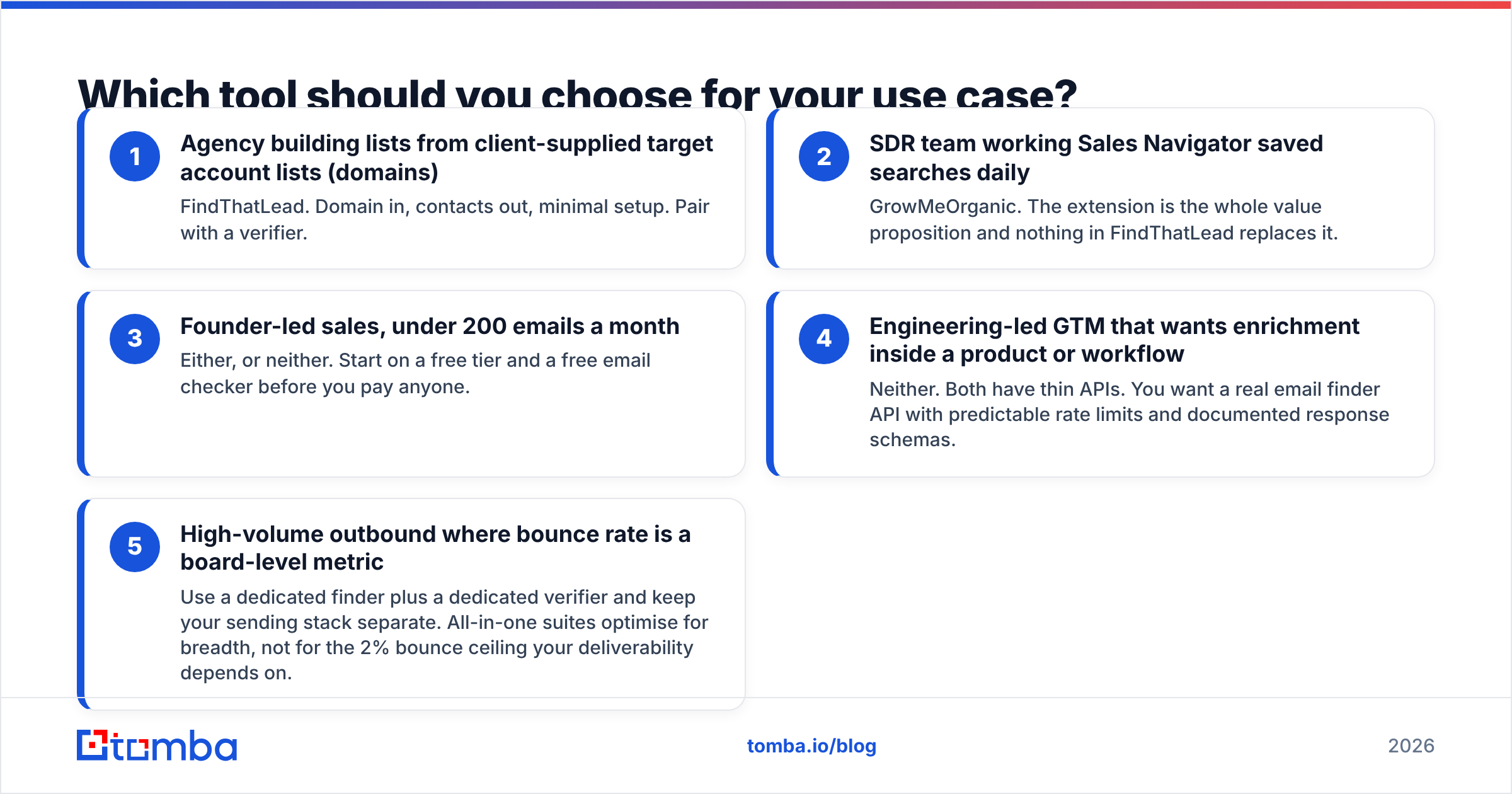
Which tool should you choose for your use case?#
Match the tool to where your list actually originates. Five common scenarios:
- Agency building lists from client-supplied target account lists (domains) — FindThatLead. Domain in, contacts out, minimal setup. Pair with a verifier.
- SDR team working Sales Navigator saved searches daily — GrowMeOrganic. The extension is the whole value proposition and nothing in FindThatLead replaces it.
- Founder-led sales, under 200 emails a month — Either, or neither. Start on a free tier and a free email checker before you pay anyone.
- Engineering-led GTM that wants enrichment inside a product or workflow — Neither. Both have thin APIs. You want a real email finder API with predictable rate limits and documented response schemas.
- High-volume outbound where bounce rate is a board-level metric — Use a dedicated finder plus a dedicated verifier and keep your sending stack separate. All-in-one suites optimise for breadth, not for the 2% bounce ceiling your deliverability depends on.
Cross-check whichever way you lean against current user reviews on G2 — both tools have vocal user bases and the complaints cluster in useful, specific places (support responsiveness for one, data freshness for the other).
Do you still need a separate email finder?#
For most teams running real volume: yes, and the reason is architectural rather than competitive.
An all-in-one suite has to spread engineering across scraping, finding, verifying, sending, and CRM. A specialist spends all of it on one problem. That shows up in the edge cases that actually break lists — catch-all domains, ccTLD-heavy European targets, companies with multiple mail domains, contacts whose pattern differs from their org's default.
This is where a focused tool earns its keep. Tomba's email finder is built around one job — resolving a person and a domain to a deliverable mailbox — with the verifier, domain search, catch-all handling and bulk email finder sitting alongside it rather than competing for roadmap. Free tier is 25 searches a month, Starter is $49/mo, Growth $99/mo, Pro $249/mo, and Enterprise is custom.
The pragmatic setup most teams land on: use GrowMeOrganic or FindThatLead for the sourcing motion that suits your list origin, then route every export through a specialist finder and verifier before it reaches your sequencer. You pay a little more per contact and you stop paying the much larger tax of a damaged sending domain.
What's the verdict on FindThatLead vs GrowMeOrganic?#
Neither one "wins" outright, because they solve adjacent problems:
- Pick FindThatLead if your prospecting starts with a list of companies and you want a clean, fast domain-to-email workflow with a confidence score you can filter on.
- Pick GrowMeOrganic if your prospecting starts on LinkedIn, you want bulk extraction plus a basic sequencer and CRM in one subscription, and you are willing to manage the account risk.
- Pick neither as your sole data source if bounce rate is a metric anyone senior looks at. Both need a verification layer downstream.
Ready to stop guessing at email patterns? Run your next list through the Tomba Email Finder and compare the deliverable-address count against whatever your current tool returns. The free tier gives you 25 searches a month with no card required — enough to test the same 25 contacts through both stacks and see the yield difference for yourself before you renew anything.
Related guides#
Ready to find emails that actually work?
Join 150,000+ professionals who stopped guessing and started sending. Free credits on signup — no credit card required.
Get the Tomba newsletter
Practical outbound tactics and product updates — once every two weeks.
About the author