FindThatLead vs Istari.ai (2026): Which Data Tool Wins?
One tool hands you verified contact emails, the other maps entire markets from web text. Here is how FindThatLead and Istari.ai actually differ, what each costs, and which belongs in your outbound stack.
FindThatLead vs Istari.ai is an odd matchup. One tool finds work emails. The other maps whole markets. Here is what each one does, what it costs, and which one your outbound stack really needs.
TL;DR
- FindThatLead finds contacts. It returns emails, scrapes LinkedIn, and sends cold email. Small sales teams and solo founders are the target.
- Istari.ai reads company websites at scale. It sorts firms by industry, tech use, and business model. It never hands you a person's inbox.
- So FindThatLead vs Istari.ai is not a fair fight. Istari.ai picks the accounts. FindThatLead finds the people.
- Pricing splits too. FindThatLead starts near $49/mo and is self-serve. Istari.ai sells by quote.
- Need emails that land, not market maps? A finder plus verifier stack (Tomba, free tier through $249/mo Pro) beats bolting either tool onto the wrong job.
What is FindThatLead?#
FindThatLead is a B2B prospecting suite from Barcelona. It launched in 2015. The core job is simple. You give it a domain, or a name plus a company. It gives you back a likely work email.
Around that core it stacks a lead search, a Chrome extension, a LinkedIn scraper (Scrab.in), a bulk CSV tool, and a cold email sender. You can go from list to sequence in one tab.
The design tells you who it is for. FindThatLead suits a one to five person sales team that wants one bill, not five tools. You buy credits. You spend them on searches and checks. Then you export or send.
That bundle is also the weak spot. One vendor owns finding, enriching, and sending. Each layer gets only a slice of the engineering time. Tools that sell nothing but email lookup push harder on accuracy. Suites push on breadth.
What is Istari.ai?#
Istari.ai plays a different game. It is a German data firm with roots in academic research. It crawls company websites across whole countries. Then it turns that raw text into clean, sortable data.
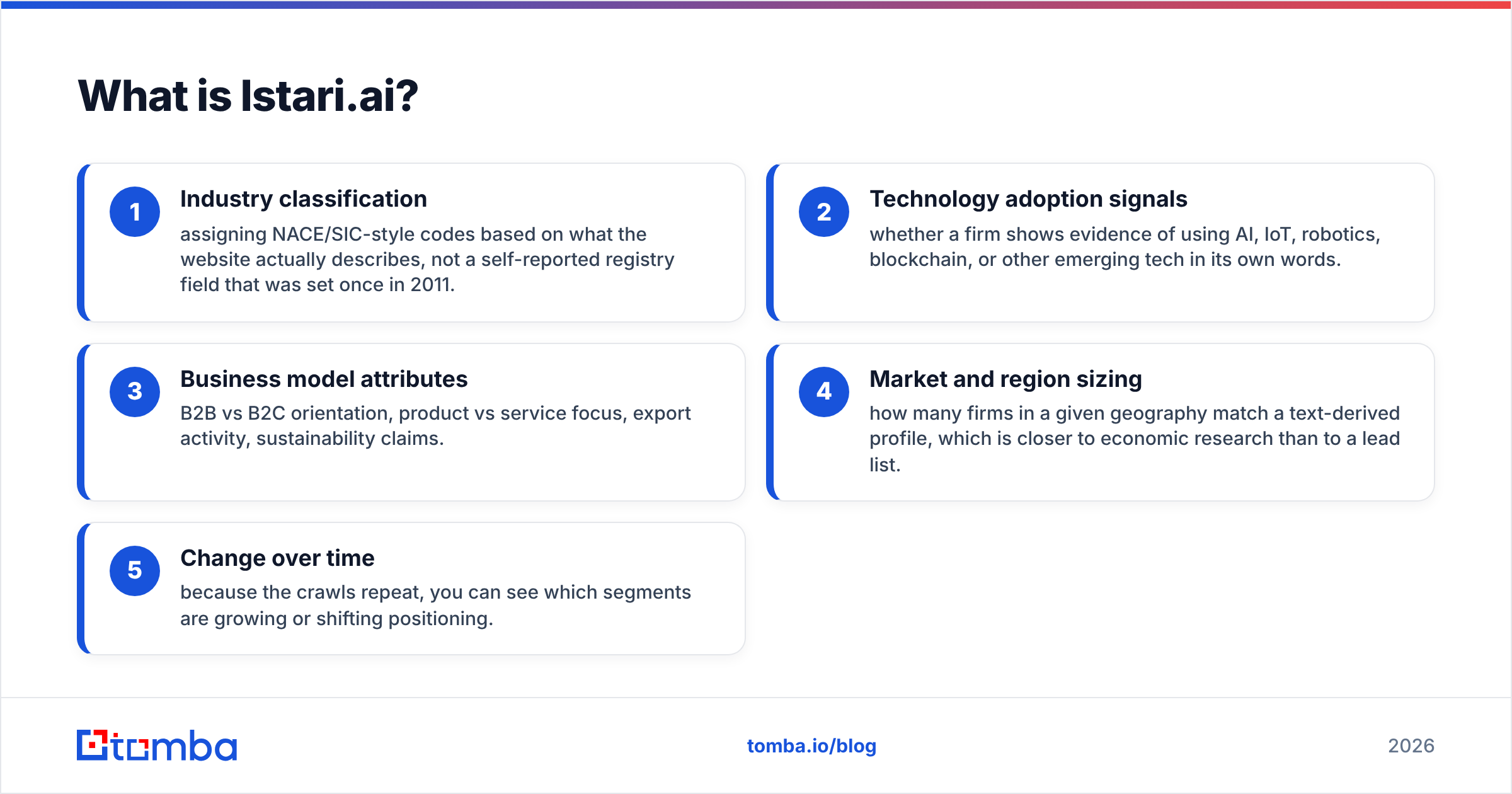
In plain terms, Istari.ai reads what a company says about itself. From that text it works out:
- Industry codes — NACE/SIC-style labels based on what the site really describes, not a registry field last touched in 2011.
- Tech signals — clues that a firm uses AI, IoT, robotics, or blockchain, in its own words.
- Business model traits — B2B or B2C, product or service, export activity, green claims.
- Market size by region — how many firms in an area fit a text-based profile. That is closer to research than to a lead list.
- Change over time — the crawls repeat, so you can see which segments grow or shift.
Who buys it? Market researchers, policy groups, investors, and large strategy teams. It also helps GTM teams that have outgrown "SaaS, 50-200 staff, US" as a targeting rule. What it will not do is hand you firstname.lastname@company.com.
FindThatLead vs Istari.ai: are they really competitors?#
Mostly, no. Grasp that before you compare them on a feature grid.
Your funnel has two data problems stacked on each other. The first is account choice: which firms deserve time this quarter. The second is contact lookup: who at that firm can say yes, and how you reach them.
Istari.ai owns the first problem. FindThatLead owns the second. Buying Istari.ai to get emails is like buying a land survey when you needed a shovel. Buying FindThatLead to size a market is like using that shovel to draw a map.
They only touch at the edges. FindThatLead's lead search filters firms by broad traits. That is a thin version of Istari.ai's core work. Istari.ai's company data can, in some setups, be joined with contact data from other vendors. That is a thin version of what FindThatLead does on its own. Neither swap holds up.
FindThatLead vs Istari.ai: the head-to-head table#
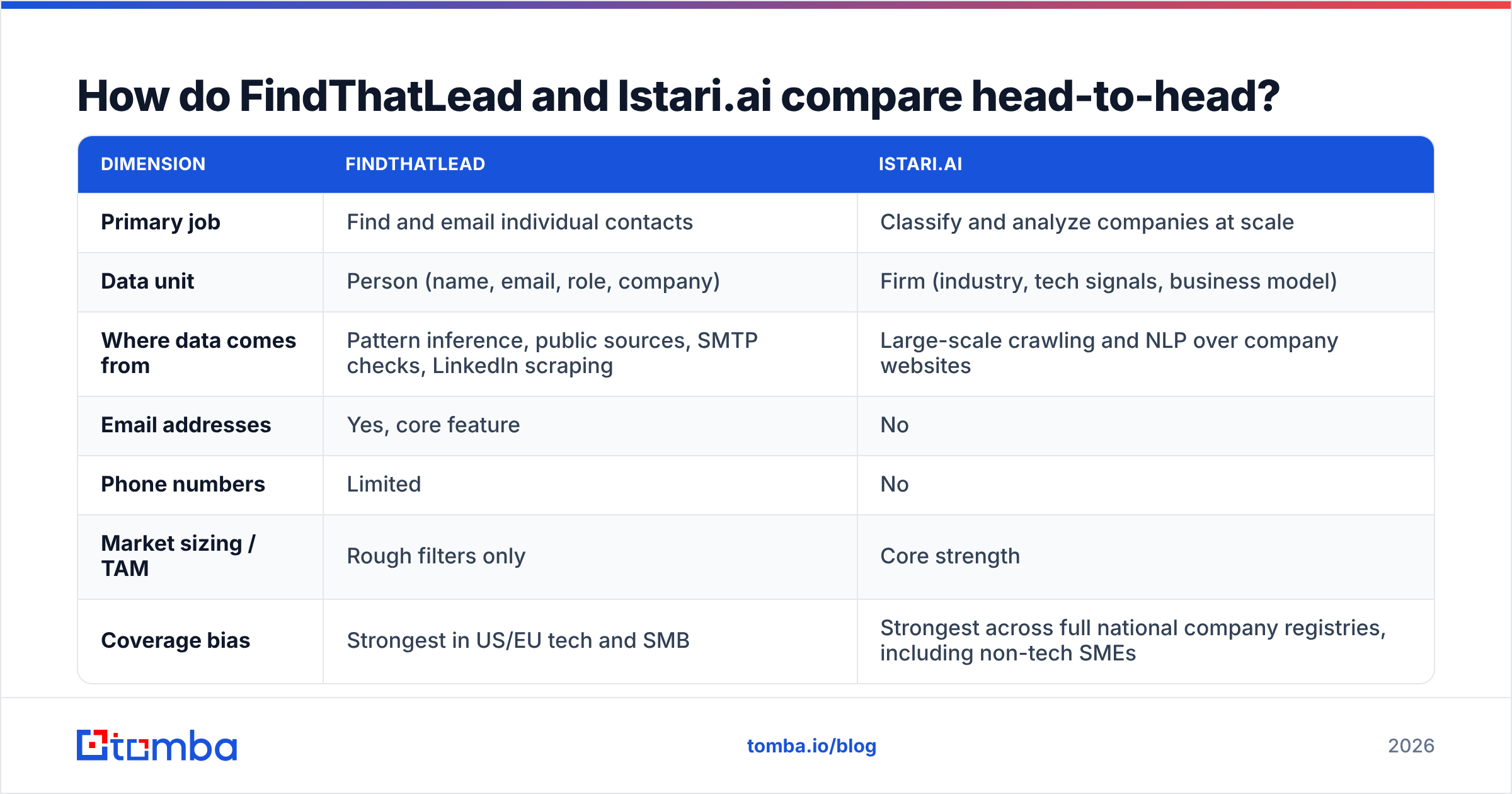
Here is the honest side by side. Treat the prices as rough. Check the vendor pages before you buy, since both firms change their packaging.
| Dimension | FindThatLead | Istari.ai |
|---|---|---|
| Primary job | Find and email individual contacts | Classify and analyze companies at scale |
| Data unit | Person (name, email, role, company) | Firm (industry, tech signals, business model) |
| Where data comes from | Pattern inference, public sources, SMTP checks, LinkedIn scraping | Large-scale crawling and NLP over company websites |
| Email addresses | Yes, core feature | No |
| Phone numbers | Limited | No |
| Market sizing / TAM | Rough filters only | Core strength |
| Coverage bias | Strongest in US/EU tech and SMB | Strongest across full national company registries, including non-tech SMEs |
| Cold email sending | Built in | Not offered |
| Delivery model | Web app, Chrome extension, CSV, API | API, data feeds, custom projects |
| Typical buyer | Founder, SDR, small agency | Market researcher, strategy team, investor, enterprise GTM |
| Pricing transparency | Public self-serve tiers | Quote-based |
| Onboarding effort | Minutes | Weeks (scoping, schema mapping) |
Read that table as a routing choice, not a scoreboard. The better tool is the one on the row that names your real blocker this month.
Which one has better data?#
They are judged on different things, so the question splits in two.
Contact accuracy comes down to one number: your bounce rate on a real send. A finder can hand you a clean-looking address that no longer exists. You learn the truth when your sender score takes the hit. FindThatLead scores its results and runs checks. Still, like every guess-the-pattern tool, it does best on firms with public data and simple email formats. It does worst on catch-all domains, freshly renamed firms, and non-English SMEs. Reviews on G2 praise its speed and price, and flag shaky hit rates in hard niches. That is fair for the whole category.
Classification accuracy is Istari.ai's test. Do its industry codes and tech flags match what a human would pick after reading the site? That is a hard language problem. Its research roots are the pitch. The failure mode differs too. A wrong label does not bounce. It quietly skews your segment view, and you may never spot it.
The lesson: never trust one source on either axis. If contact data drives revenue, push every list through a dedicated email verifier before it touches your sender. Checking is cheap. A burned domain is not.

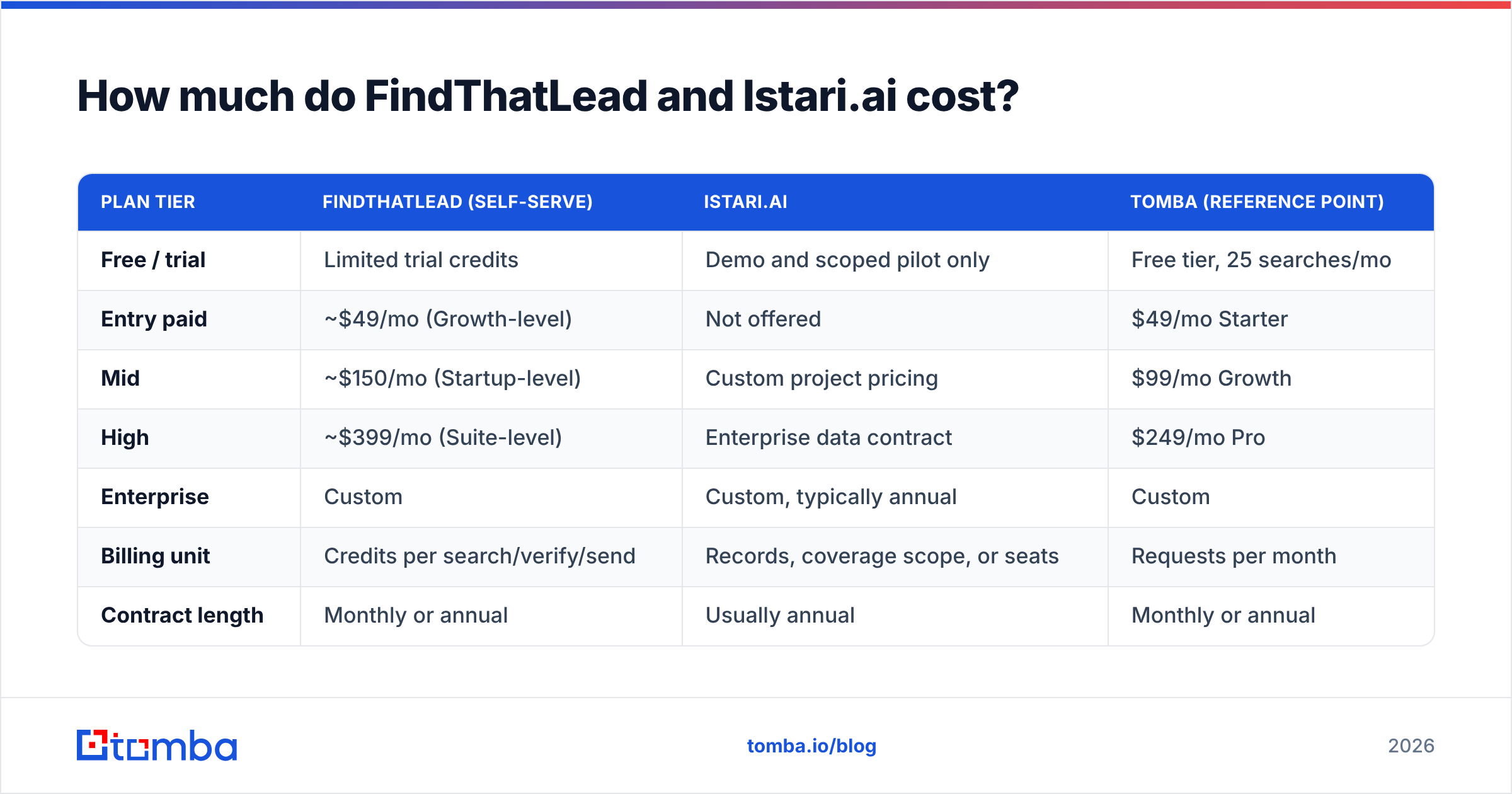
FindThatLead vs Istari.ai pricing: what each one costs#
Here the two products stop being alike at all.
| Plan tier | FindThatLead (self-serve) | Istari.ai | Tomba (reference point) |
|---|---|---|---|
| Free / trial | Limited trial credits | Demo and scoped pilot only | Free tier, 25 searches/mo |
| Entry paid | ~$49/mo (Growth-level) | Not offered | $49/mo Starter |
| Mid | ~$150/mo (Startup-level) | Custom project pricing | $99/mo Growth |
| High | ~$399/mo (Suite-level) | Enterprise data contract | $249/mo Pro |
| Enterprise | Custom | Custom, typically annual | Custom |
| Billing unit | Credits per search/verify/send | Records, coverage scope, or seats | Requests per month |
| Contract length | Monthly or annual | Usually annual | Monthly or annual |
Two things stand out.
First, Istari.ai has no impulse-buy tier. If you cannot make a case that survives a procurement call, you are not the buyer. That is not a knock. Enterprise data is a different market.
Second, credits hide the real cost of FindThatLead. Failed searches and failed checks still burn budget in most credit plans. So your cost per usable email sits above the sticker price. Compare against Tomba pricing, or any other finder, on cost per verified, sendable address rather than cost per lookup. That one switch reorders most tools in this space.
Which tool should you pick for your use case?#
Match the tool to the question you are stuck on:
- "I have a target list and need to reach people." Use FindThatLead or a dedicated email finder. Istari.ai adds nothing here.
- "I don't know which firms to target." Use Istari.ai. It shines when your ICP is about tech use or behavior, not headcount and revenue bands.
- "I need both, on a small budget." Build the account list with cheap proxies: industry filters, job-post signals, tech-stack checks. Spend the rest on contact accuracy. Market intelligence is the wrong first purchase for your first 500 cold emails.
- "I need both, at enterprise scale." Run them in order, not against each other. Istari.ai sets and refreshes the account universe. A contact-data API then resolves people at each account.
- "I research or invest, I don't sell." Istari.ai, clearly. FindThatLead cannot answer analyst questions.
- "My CRM is full of stale records." Neither tool comes first. Start with data enrichment and re-checks on what you own. That is almost always cheaper than buying new data.
What does the combined stack look like?#
If you are big enough to justify both, the clean setup is a three-stage pipeline.
Stage one: pick the universe. Istari.ai, or a similar web-mined source, returns a scored list of domains that fit your ICP. Refresh it each quarter. Output: domains and company traits, no people.
Stage two: find the people. For each domain, an API call returns the right roles and their emails. A domain search endpoint earns its keep here, because you start from domains, not from names you already know. Output: candidate contacts with confidence scores.
Stage three: the quality gate. Every address gets checked before it reaches the sequencer. Catch-all domains go to a small, separate campaign instead of the main one. Output: a send-safe list plus a quarantine bucket.
FindThatLead can cover stages two and three, plus sending. That is why small teams like it. The catch: when one vendor owns all three, you cannot swap the weakest layer without rebuilding the flow. Teams that pass a few thousand sends a month tend to split it up anyway.
What are the honest downsides of each?#
FindThatLead. Credits burn on failed lookups, and users notice. Hit rates fall on non-English SMEs, catch-all domains, and odd email formats. The built-in sender is handy but thin next to a real sequencing tool, so you may replace it within six months. It also ships scraping-style features, so check your own legal stance on LinkedIn data before a wide rollout.
Istari.ai. No self-serve entry, no contact data, and a scoping phase that eats weeks. The value only shows up if your team can act on segment-level insight. Many small sales teams cannot. You also have to trust a model you cannot fully audit, and its errors stay silent rather than loud.
Both. Neither tool keeps your sending reputation clean for you. Warm your domains, watch your bounce rate, and check your auth records. For a quick sanity test, run your domain through an SPF checker before the next campaign.
Is there a middle option between the two?#
Yes. It is where most B2B teams land: a focused contact-data platform with an API, priced for self-serve, that plugs into the account list you already build.
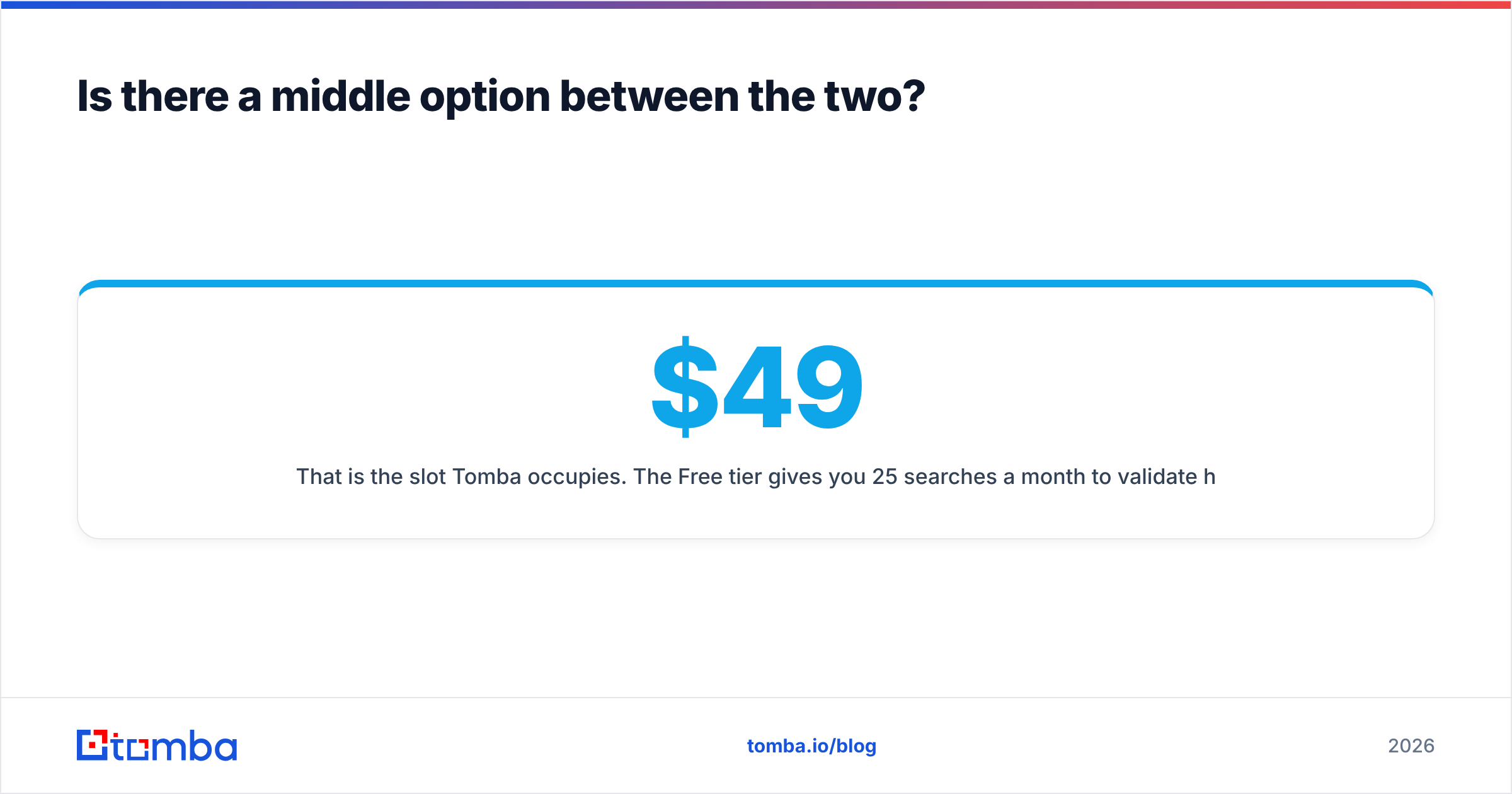
That is Tomba's slot. The free tier gives you 25 searches a month, so you can test hit rates on your own domains before you pay. Starter is $49/mo, Growth $99/mo, Pro $249/mo. Enterprise is by quote. Email finding, verification, domain search, catch-all handling, phone lookup, and enrichment share one API. So stages two and three above are a couple of endpoints, not a couple of vendors.
Tomba does not replace Istari.ai. Saying otherwise would be dishonest. But most teams weighing FindThatLead vs Istari.ai are asking something narrower: where do I get emails that do not bounce, at a price a spreadsheet can survive?
Ready to test hit rates on your own list?#
Take twenty domains you already care about. Run them through the Tomba Email Finder. Measure two numbers: how many returned a contact, and how many passed verification. Then run the same twenty through the tool you use today. That fifteen-minute test settles FindThatLead vs Istari.ai for your market faster than any comparison article, this one included. The free tier covers the test, and the API docs are ready when you want to wire it into the pipeline.
Related guides#
Ready to find emails that actually work?
Join 150,000+ professionals who stopped guessing and started sending. Free credits on signup — no credit card required.
Get the Tomba newsletter
Practical outbound tactics and product updates — once every two weeks.
About the author