FindThatLead vs Lead Carrot (2026): Which One Wins?
FindThatLead and Lead Carrot both promise verified B2B contacts, but they solve different problems. Here is how they compare on accuracy, pricing, workflow fit, and where a dedicated email finder beats both.
TL;DR
- FindThatLead is a search-first email finder with a Chrome extension, domain/lead search, and a built-in cold email sender. Best if you want prospecting and sending in one cheap box.
- Lead Carrot is a local-business lead database built around scraped business listings, website tech signals, and contact details. Best if you sell services to SMBs and local businesses.
- They barely overlap. FindThatLead targets tech/B2B company domains; Lead Carrot targets plumbers, dentists, gyms, and agencies' local clients.
- Neither tool is a strong pure email-finding engine. If verification accuracy and API access matter more than bundled sending, a dedicated finder like Tomba usually returns fewer bounces per 1,000 rows.
- Pick FindThatLead for classic B2B outbound. Pick Lead Carrot for local/SMB agency lead gen. Pick a specialist finder if your bounce rate is what's actually hurting you.
What is FindThatLead and what is Lead Carrot?#
They get compared because both sell "leads," but they're built on different data foundations.
FindThatLead is a Spanish-built prospecting suite. You give it a domain, a name plus company, or a set of LinkedIn filters, and it returns professional email addresses. Around that core it adds a Chrome extension, a bulk CSV processor, a lead-scoring layer, and Scrapper — its cold email sending module. The pitch is "find, verify, send" without leaving one dashboard.
Lead Carrot comes from the agency world. It indexes local business listings and enriches them with signals an agency cares about: does the site have a Facebook pixel, is it running Google Ads, is the site mobile-friendly, does it have a chatbot, when was the domain registered. You search "dentists in Austin with no Facebook pixel" and get a list with emails and phone numbers attached.
So the honest framing for FindThatLead vs Lead Carrot is not "which finds more emails." It's "which universe of companies do you sell to."
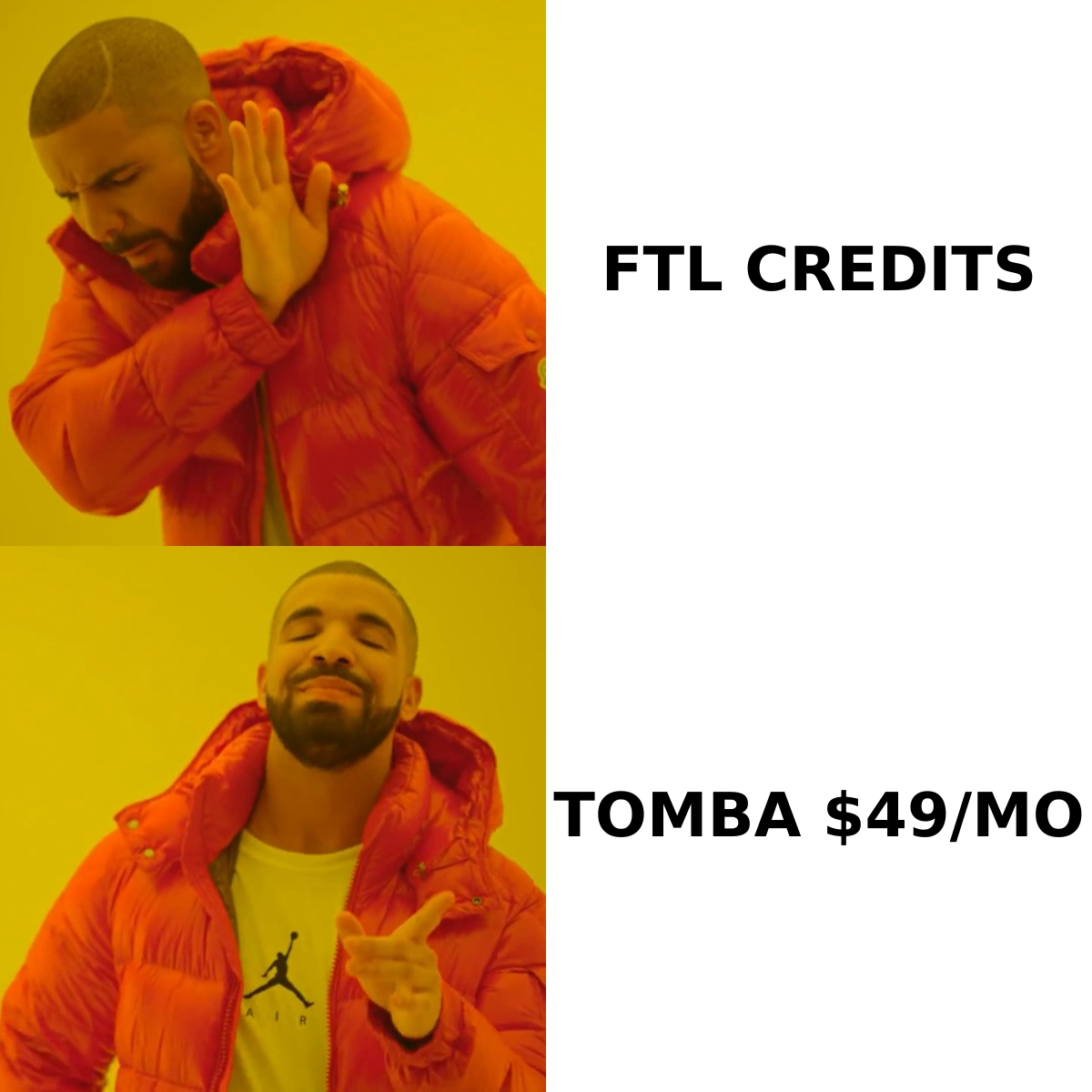
How do FindThatLead and Lead Carrot compare at a glance?#
| Attribute | FindThatLead | Lead Carrot |
|---|---|---|
| Primary data universe | B2B company domains, tech/startup skew | Local + SMB business listings |
| Core search input | Domain, name + company, LinkedIn URL | Niche + city + tech/marketing filters |
| Contact types returned | Work email, some enrichment fields | Email, phone, address, social, site signals |
| Verification | Built-in verifier, single + bulk | Basic validation on export |
| Cold email sending | Yes (Scrapper module) | No native sender |
| Chrome extension | Yes | No |
| API access | Yes, on higher tiers | Limited |
| Best for | SaaS, agencies selling to tech companies | Agencies selling to local businesses |
| Weak spot | Accuracy on non-US/EU and small domains | Almost no coverage of enterprise B2B |
If your ICP is "Series A SaaS companies in Berlin," Lead Carrot will return close to nothing useful. If your ICP is "HVAC companies in Ohio without a mobile site," FindThatLead has no filter that even expresses that query.
How accurate is the data in each tool?#
Accuracy is where most email-finder comparisons get sloppy, so define terms first. There are two numbers that matter and they are not the same:
- Hit rate — of the contacts you asked for, how many did the tool return an address for at all. High hit rate looks great in marketing and means nothing on its own.
- Bounce rate — of the addresses returned, how many actually deliver. This is the number your ESP and your sender reputation care about.
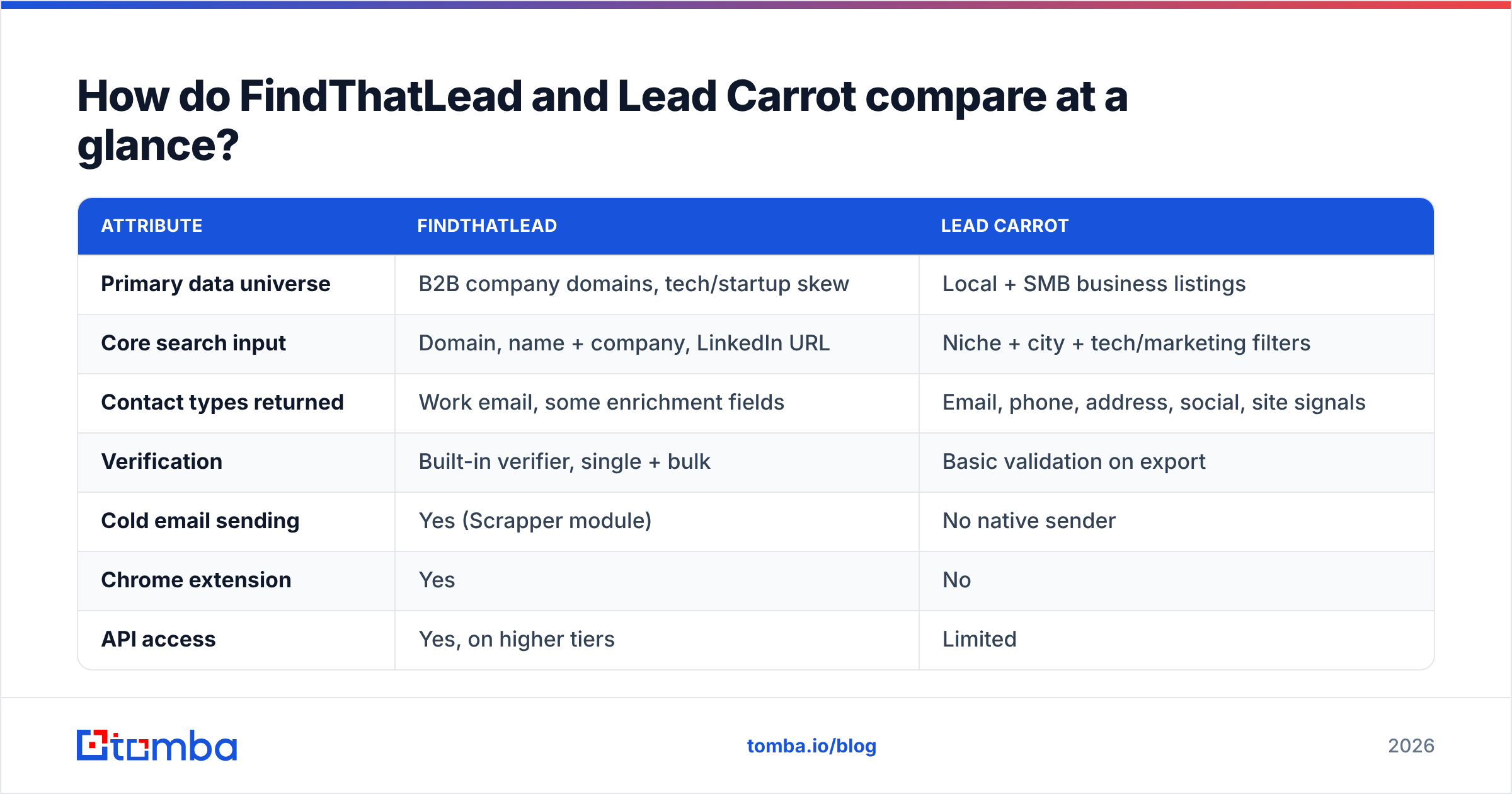
A tool can hit 80% and bounce 15%, which is worse for you than a tool that hits 55% and bounces 2%. FindThatLead leans toward the first profile: generous returns, including pattern-guessed addresses that were never SMTP-confirmed. Users on G2 consistently flag bounce complaints on bulk uploads for exactly this reason.
Lead Carrot's accuracy problem is different. Its emails are frequently scraped from public business listings, which means you get a lot of info@, contact@, and office@ role accounts. Those deliver fine — role addresses rarely bounce — but they land in a shared inbox and convert poorly. High deliverability, low reply rate.

The practical fix in both cases is the same: never send to a raw export. Run every list through an independent email verifier before it touches your sequencer. A second-opinion verification pass on a 5,000-row list typically strips 8–20% of addresses and costs less than the reputation damage from a single 12% bounce campaign.
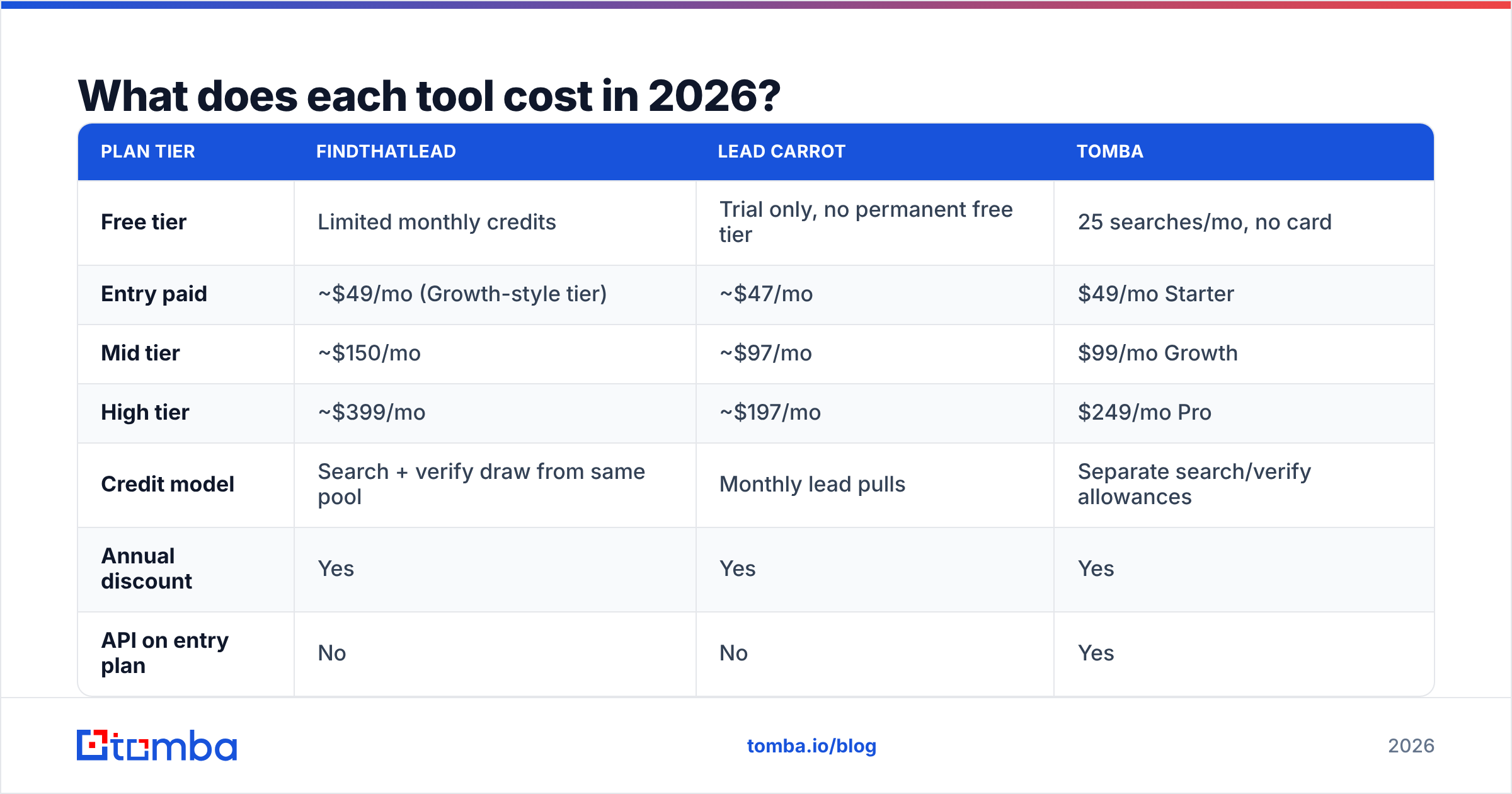
What does each tool cost in 2026?#
Pricing on both moves, so treat these as shape-of-the-market rather than quotes — check the vendor page before you buy.
| Plan tier | FindThatLead | Lead Carrot | Tomba |
|---|---|---|---|
| Free tier | Limited monthly credits | Trial only, no permanent free tier | 25 searches/mo, no card |
| Entry paid | ~$49/mo (Growth-style tier) | ~$47/mo | $49/mo Starter |
| Mid tier | ~$150/mo | ~$97/mo | $99/mo Growth |
| High tier | ~$399/mo | ~$197/mo | $249/mo Pro |
| Credit model | Search + verify draw from same pool | Monthly lead pulls | Separate search/verify allowances |
| Annual discount | Yes | Yes | Yes |
| API on entry plan | No | No | Yes |
Two things worth flagging.
First, FindThatLead's shared credit pool is the hidden cost. Every verification consumes credits from the same bucket as searches, so a careful workflow — find, then verify, then re-verify before sending — burns through a plan roughly twice as fast as the headline number suggests.
Second, Lead Carrot's per-lead economics look excellent until you account for role accounts. If 40% of a 1,000-lead pull is info@, your effective cost per named decision-maker is roughly 1.7× the sticker price.
For reference, Tomba pricing starts at $49/mo for Starter, $99/mo for Growth and $249/mo for Pro, with a permanent free tier at 25 searches/month and API access included rather than gated to the top plan.
Which workflows does each tool actually fit?#
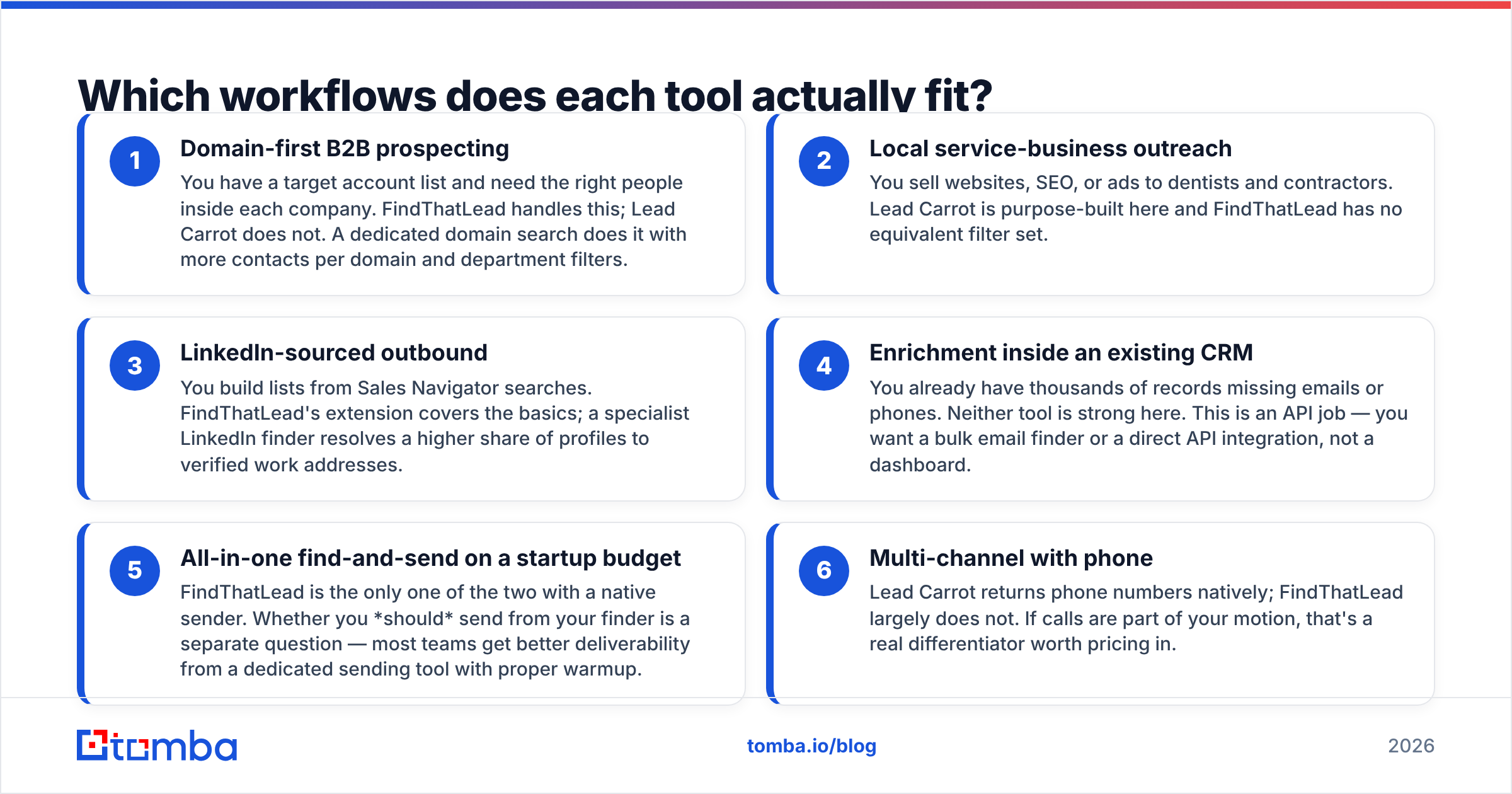
Rather than a feature checklist, match the tool to the motion you're running:
- Domain-first B2B prospecting — You have a target account list and need the right people inside each company. FindThatLead handles this; Lead Carrot does not. A dedicated domain search does it with more contacts per domain and department filters.
- Local service-business outreach — You sell websites, SEO, or ads to dentists and contractors. Lead Carrot is purpose-built here and FindThatLead has no equivalent filter set.
- LinkedIn-sourced outbound — You build lists from Sales Navigator searches. FindThatLead's extension covers the basics; a specialist LinkedIn finder resolves a higher share of profiles to verified work addresses.
- Enrichment inside an existing CRM — You already have thousands of records missing emails or phones. Neither tool is strong here. This is an API job — you want a bulk email finder or a direct API integration, not a dashboard.
- All-in-one find-and-send on a startup budget — FindThatLead is the only one of the two with a native sender. Whether you should send from your finder is a separate question — most teams get better deliverability from a dedicated sending tool with proper warmup.
- Multi-channel with phone — Lead Carrot returns phone numbers natively; FindThatLead largely does not. If calls are part of your motion, that's a real differentiator worth pricing in.
Is FindThatLead better than Lead Carrot for cold email?#
For classic B2B cold email, yes — with caveats.
FindThatLead gives you named-person addresses, which is the baseline requirement for a personalized first line. Lead Carrot's role-account skew means you're writing to info@ and hoping a receptionist forwards it. That structurally caps your response rate no matter how good the copy is.
But "better" here is relative to a low bar. FindThatLead's bundled sender is thin compared to purpose-built sequencers, and its verification is not strong enough to send on blind. The workflow that actually works looks like this:
- Build the list in whichever tool matches your ICP.
- Export raw, do not trust the tool's own "verified" flag.
- Run an independent verification pass and drop everything that isn't a confirmed deliverable.
- Handle catch-all domains separately — a catch-all verifier tells you whether an accept-all domain is worth risking, instead of forcing a binary keep/drop.
- Send from a warmed domain with SPF, DKIM, and DMARC configured.
Skip step three and your email deliverability degrades within two or three campaigns, at which point the tool choice stops mattering entirely.

Where do both tools fall short?#
Three gaps show up repeatedly in user reviews of both products.
Stale records. Lead Carrot's listing data ages quickly — local businesses close, rebrand, and change phone numbers constantly. FindThatLead's pattern-inferred addresses go stale when people leave companies, and there's no reliable freshness timestamp on exports from either.
Geographic coverage. Both are strongest in North America. FindThatLead has decent Western European coverage given its Spanish origins, but Asia-Pacific and Latin America thin out fast. Lead Carrot is heavily US-centric by design.
Automation ceiling. Neither is built for engineering teams. If you want to enrich records at signup, score inbound leads in real time, or run enrichment inside a data pipeline, you need a proper email finder API with predictable rate limits and documented response codes — not a dashboard with an API bolted on at the top tier.

If you're evaluating beyond these two, the honest shortlist splits by job. For local/SMB lists, Lead Carrot's closest peers are the listing-scraper tools. For verified B2B contact data at volume, credible options include BookYourData for pay-as-you-go verified lists, and dedicated finders for search-and-verify workflows. Compare them on bounce rate against your own test list, not on total database size — every vendor's database number is unauditable marketing.
Which one should you choose in 2026?#
Decide by ICP first, then by workflow:
| If your situation is... | Choose |
|---|---|
| Selling SaaS or services to tech companies | FindThatLead, with external verification |
| Agency selling to local/brick-and-mortar SMBs | Lead Carrot |
| Need phone numbers alongside emails | Lead Carrot, or a dedicated phone finder |
| Bounce rate is your bottleneck | A specialist finder + verifier stack |
| Need API-driven enrichment at scale | Neither — go API-first |
| Testing on a tight budget before committing | Start on a free tier and benchmark 100 known contacts |
That last row is the one most teams skip. Before you pay anyone, take 100 contacts you already know are valid — customers, partners, people you've emailed successfully — strip the emails, and run the list through each tool's free tier. Score hit rate and, separately, bounce rate on the returned addresses. That thirty-minute test tells you more than any comparison article, including this one.
FAQ#
Can FindThatLead and Lead Carrot be used together? Yes, and for a services agency it can make sense: Lead Carrot for local client lists, FindThatLead for the enterprise accounts you're chasing. You're paying two subscriptions for two universes, so make sure both are actually producing pipeline.
Do either of them guarantee accuracy? Neither publishes an audited accuracy figure with a methodology you can reproduce. Treat all vendor accuracy claims — including this category's leaders — as unverified until you test them on your own list.
Is a free email finder good enough? For a handful of lookups per month, yes. Free tiers exist precisely so you can validate fit. Once you're building lists in the hundreds, the cost of bounces exceeds the cost of a paid plan quickly.
What about catch-all domains? Both tools will happily return addresses on catch-all domains and mark them as valid, because the domain accepts everything. That's the single biggest source of surprise bounces. Handle catch-alls with a dedicated check rather than trusting a green checkmark.
The bottom line#
FindThatLead and Lead Carrot aren't really competitors — they're two different answers to two different questions. FindThatLead is the B2B search-and-send box. Lead Carrot is the local-business list machine. Pick based on who you sell to, then fix the verification gap that both leave open.
If what you actually need is the highest ratio of deliverable, named-decision-maker addresses per dollar — with API access from the entry plan and verification that isn't competing with your search credits — start with the Tomba Email Finder. The free tier gives you 25 searches a month, enough to run the 100-contact benchmark above and see the bounce numbers for yourself before you commit a budget to anyone.
Related guides#
Ready to find emails that actually work?
Join 150,000+ professionals who stopped guessing and started sending. Free credits on signup — no credit card required.
Get the Tomba newsletter
Practical outbound tactics and product updates — once every two weeks.
About the author