FindThatLead vs Lead Kahuna: Which Lead Tool Wins in 2026?
FindThatLead is a cloud prospecting suite. Lead Kahuna is a desktop lead scraper. They solve different problems badly if you pick the wrong one — here is the honest breakdown, with bounce rates, pricing, and a third option.
TL;DR
- FindThatLead is a cloud prospecting suite (email finder, domain search, LinkedIn extraction, built-in sender). Lead Kahuna is a Windows desktop scraper built for agencies harvesting local-business and website-owner contacts.
- They are not really competitors. FindThatLead targets B2B SaaS and sales teams working from company domains; Lead Kahuna targets agencies working from map listings, niche sites, and directories.
- Accuracy is the real dividing line. Pattern-guessed and scraped addresses need a separate verification step or your bounce rate climbs past what Google and Microsoft tolerate.
- Pricing models differ completely: FindThatLead is a monthly credit subscription; Lead Kahuna has historically sold as a desktop license. Compare cost per verified contact, not per raw row.
- If you want an API-first email finder with verification baked into the same call, Tomba starts at $49/mo (free tier: 25 searches) and covers the gaps both tools leave.
What are FindThatLead and Lead Kahuna?#
FindThatLead is a cloud-based B2B prospecting platform out of Spain. You give it a domain, a name plus company, or a LinkedIn URL, and it returns professional email addresses. It bundles a Chrome extension, a bulk CSV processor, a lead-search database filtered by role and location, and a lightweight cold-email sender called Scrab.in/Prospector depending on the plan tier. You can see the current feature set on findthatlead.com.
Lead Kahuna is a different animal: desktop software (Windows-first) aimed at agencies and local-marketing consultants. It scrapes business listings, websites, and directories, then pulls whatever contact data is publicly exposed — emails, phone numbers, social profiles, sometimes tech signals like whether the site is mobile-responsive. The output is a list of small businesses you can pitch web design, SEO, or ads to.
The single sentence that matters: FindThatLead answers "what is this specific person's work email?" Lead Kahuna answers "give me 500 plumbers in Phoenix with websites." If you search for "findthatlead vs lead kahuna" expecting a fair fight, you are probably about to buy the wrong one.

How do FindThatLead and Lead Kahuna differ on data sourcing?#
Data provenance drives everything downstream — accuracy, legal exposure, and whether your domain survives the first campaign.
- Pattern inference plus verification (FindThatLead). It knows that Acme uses
first.last@acme.com, generates the candidate, then pings the mail server. Strong on companies with a discoverable pattern, weaker on small businesses and catch-all domains where the server accepts everything. - Web and directory scraping (Lead Kahuna). It reads what is published — the
info@on a contact page, the number in a map listing. Great coverage of local businesses that will never appear in a B2B database. Terrible at reaching a named decision-maker inside a 500-person company. - Database lookup (neither tool's core strength). Providers like Tomba, Apollo, and Cognism maintain a crawled-and-verified B2B database so common domains resolve instantly without a live SMTP probe.
- Live SMTP validation. The RCPT TO handshake defined in SMTP is what separates "this address looks right" from "this mailbox exists." Any tool that skips it is selling you guesses.
- Enrichment layers. Job title, company size, tech stack, phone. FindThatLead has some. Lead Kahuna surfaces website-level signals. Neither is a full enrichment platform.
The practical consequence: a scraped info@ inbox gets read by a receptionist, and a pattern-guessed sarah.chen@ that was never validated gets bounced. Both hurt, differently.
Which one finds more valid emails?#
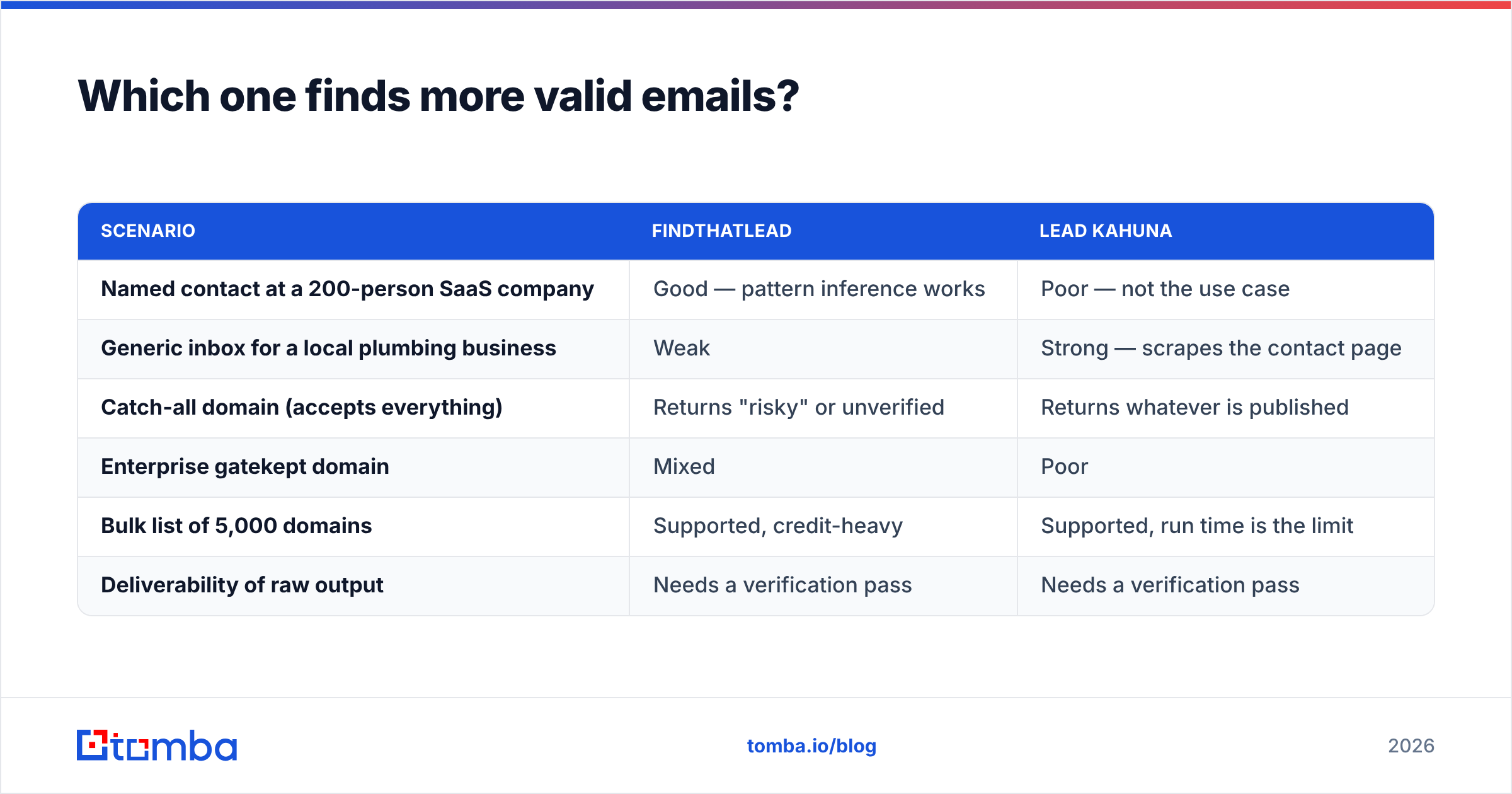
Coverage and accuracy are separate metrics and vendors love to blur them. Coverage is how many rows come back non-empty. Accuracy is how many of those actually deliver. A scraper can hit 95% coverage and 60% accuracy — you'll only find out after the campaign.

Here is how the two behave in practice, based on the mechanics of each approach:
| Scenario | FindThatLead | Lead Kahuna |
|---|---|---|
| Named contact at a 200-person SaaS company | Good — pattern inference works | Poor — not the use case |
| Generic inbox for a local plumbing business | Weak | Strong — scrapes the contact page |
| Catch-all domain (accepts everything) | Returns "risky" or unverified | Returns whatever is published |
| Enterprise gatekept domain | Mixed | Poor |
| Bulk list of 5,000 domains | Supported, credit-heavy | Supported, run time is the limit |
| Deliverability of raw output | Needs a verification pass | Needs a verification pass |
Whichever you pick, run the output through a dedicated email verifier before it touches a sending tool. Keeping hard bounces under roughly 2% is the practical threshold for maintaining sender reputation at Gmail and Outlook — and scraped lists routinely blow past it.

How do pricing and licensing compare?#
This is where the two tools diverge most sharply, and where buyers get burned.
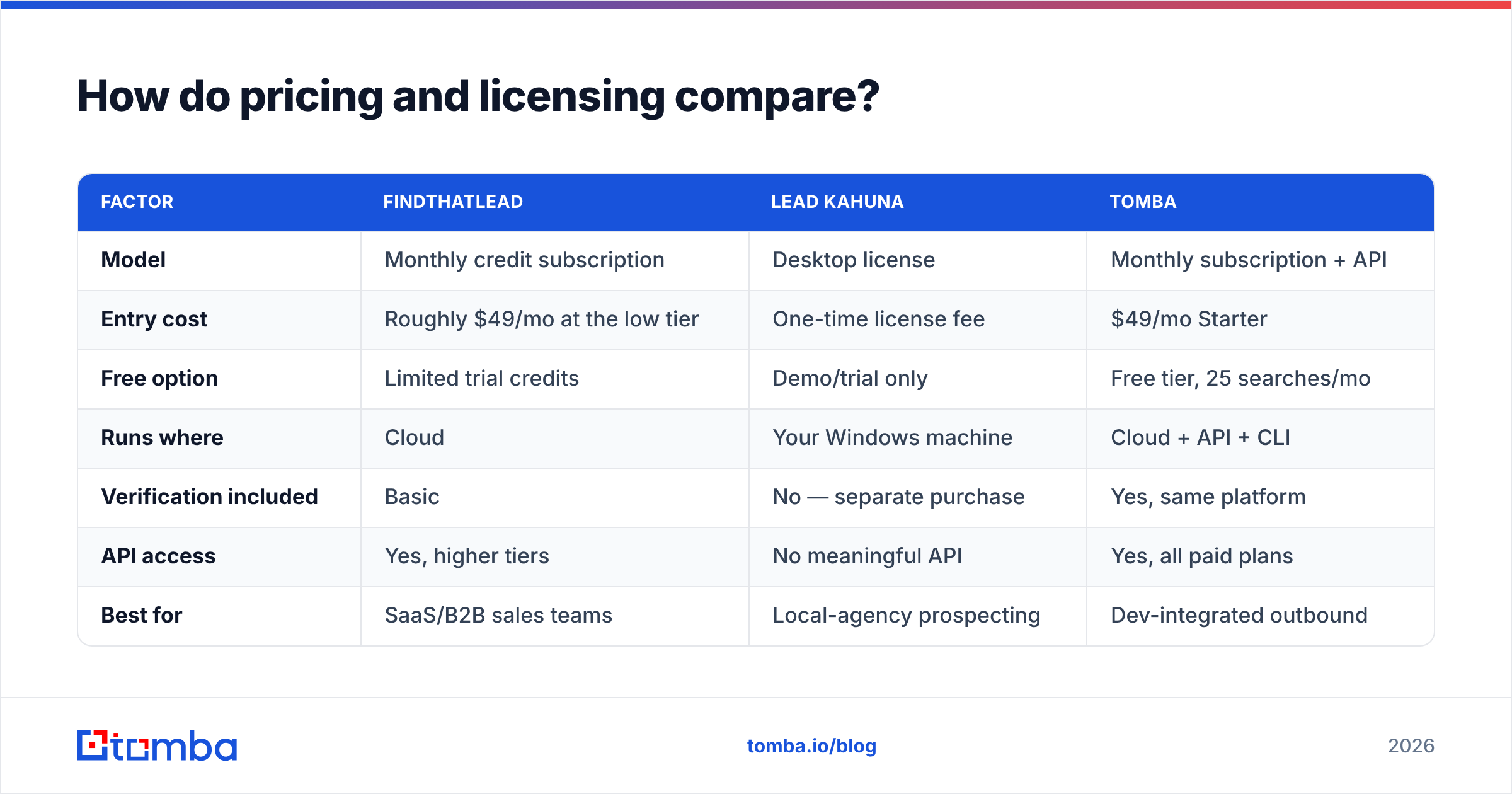
FindThatLead sells monthly credit subscriptions — you consume credits per lookup, unused credits generally do not roll over, and the higher tiers unlock the sender and team seats. Lead Kahuna has historically sold as a desktop license (one-time or annual, depending on the offer running), which looks cheap until you factor in the machine it has to run on, the proxies scraping at volume requires, and the verification service you still need to buy separately.
| Factor | FindThatLead | Lead Kahuna | Tomba |
|---|---|---|---|
| Model | Monthly credit subscription | Desktop license | Monthly subscription + API |
| Entry cost | Roughly $49/mo at the low tier | One-time license fee | $49/mo Starter |
| Free option | Limited trial credits | Demo/trial only | Free tier, 25 searches/mo |
| Runs where | Cloud | Your Windows machine | Cloud + API + CLI |
| Verification included | Basic | No — separate purchase | Yes, same platform |
| API access | Yes, higher tiers | No meaningful API | Yes, all paid plans |
| Best for | SaaS/B2B sales teams | Local-agency prospecting | Dev-integrated outbound |
| Hidden costs | Credit burn on failed lookups | Proxies, VPS, verification | Credit overage only |
Pricing on all three moves — check findthatlead.com, the vendor's own page for Lead Kahuna, and Tomba pricing before you commit. Verified vendor reviews on G2 are also worth ten minutes; the complaint patterns tell you more than the feature grid does.

The metric to compute yourself: cost per verified, deliverable contact. Take the plan price, divide by the number of lookups that returned a valid address after verification. A $49 plan returning 300 usable contacts beats a $30 plan returning 90.
Which tool fits which team?#
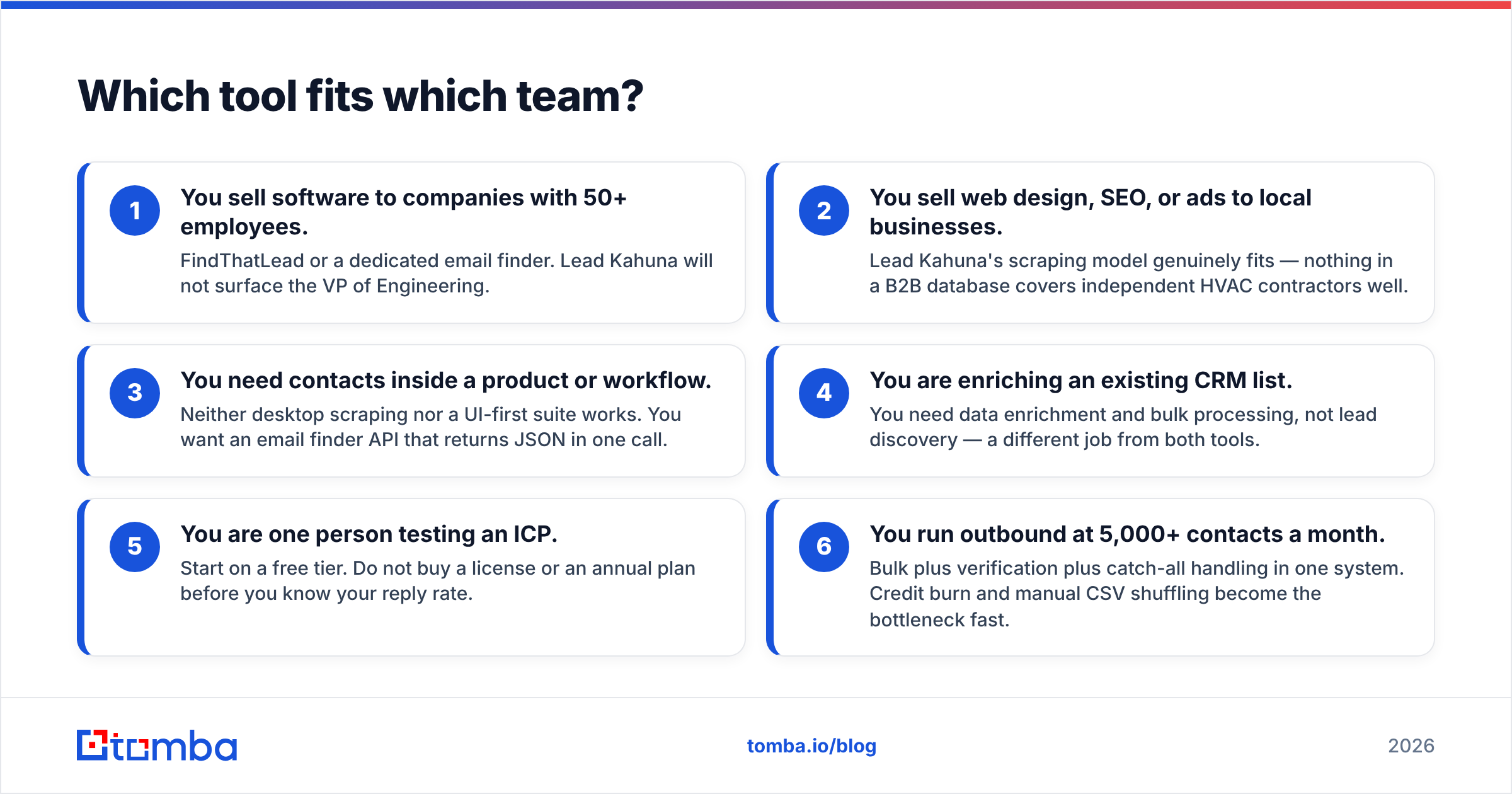
Match the tool to the motion, not to the review score.
- You sell software to companies with 50+ employees. FindThatLead or a dedicated email finder. Lead Kahuna will not surface the VP of Engineering.
- You sell web design, SEO, or ads to local businesses. Lead Kahuna's scraping model genuinely fits — nothing in a B2B database covers independent HVAC contractors well.
- You need contacts inside a product or workflow. Neither desktop scraping nor a UI-first suite works. You want an email finder API that returns JSON in one call.
- You are enriching an existing CRM list. You need data enrichment and bulk processing, not lead discovery — a different job from both tools.
- You are one person testing an ICP. Start on a free tier. Do not buy a license or an annual plan before you know your reply rate.
- You run outbound at 5,000+ contacts a month. Bulk plus verification plus catch-all handling in one system. Credit burn and manual CSV shuffling become the bottleneck fast.
What do the actual workflows look like?#
FindThatLead workflow: upload a CSV of company domains and contact names, or search the built-in database by role and geography. Credits deduct per lookup. Export the enriched CSV. Send from the bundled tool or push to your sequencer. Time to first list: under an hour, mostly waiting on the bulk job.
Lead Kahuna workflow: open the desktop app, choose a source (map listings, a directory, a keyword), define the geography, run the scrape. Watch it crawl — this can take a while and is bound by your local machine and connection. Export. Clean the results manually, because you will get duplicates, noreply@ addresses, and dead sites. Then verify externally.
The step both workflows skip: deduplication and catch-all handling. Roughly a fifth of B2B domains are catch-all — they accept mail for any address, so a standard verifier returns "unknown" rather than valid or invalid. That is where a catch-all verifier earns its keep, and it's a step neither tool solves natively.
Where do both tools fall short?#
Honest limitations, because ignoring them is how you end up re-buying in three months.
FindThatLead's gaps. Credits burn on unsuccessful lookups on some plan structures, which stings on lists of small or obscure domains. European and Latin American coverage is a genuine strength; deep US enterprise coverage is thinner than the big data providers. The bundled sender is fine for light use but is not a replacement for a proper sequencer.
Lead Kahuna's gaps. Desktop software means Windows dependency, updates that lag platform changes, and scraping that breaks when a source changes its markup. Public scraped data leans heavily toward generic inboxes. And scraping directories at scale carries terms-of-service exposure that a licensed data provider absorbs on your behalf.
Shared gap: verification. Neither is built as a verification platform. Both will hand you a list that needs a second pass. Budget for it, or budget for a burned sending domain.
Which should you pick in 2026?#
Pick FindThatLead if you sell B2B to companies with real websites and identifiable decision-makers, you want everything in a browser, and you value a European-friendly data footprint. It's a competent all-rounder with a shallow learning curve.
Pick Lead Kahuna if your customers are local businesses, your outreach is volume-driven to generic inboxes, and you're comfortable running desktop software with proxies. For that specific agency motion, cloud B2B databases genuinely can't compete on coverage.
Pick neither if your real requirement is accurate, verified, developer-accessible contact data. That is a third category. Tomba's Starter plan runs $49/mo, Growth $99/mo, and Pro $249/mo, with a free tier at 25 searches so you can benchmark accuracy on your own domain list before paying anything. Verification, domain search, catch-all handling, and bulk processing sit in the same platform and the same API — so you stop stitching three vendors together to produce one clean list.
The test that settles it: take 100 domains from your actual ICP. Run them through each tool. Verify every output with the same third-party verifier. Compare valid-address counts and divide by cost. Fifteen minutes of work beats fifteen reviews.
Ready to benchmark against your own list? Start with the Tomba Email Finder — search by domain, name, or company, get verification status returned in the same response, and export straight to CSV or pull it via API. The free tier gives you 25 searches with no card required, which is exactly enough to run the 100-domain test above and see the accuracy numbers for yourself.
Related guides#
Ready to find emails that actually work?
Join 150,000+ professionals who stopped guessing and started sending. Free credits on signup — no credit card required.
Get the Tomba newsletter
Practical outbound tactics and product updates — once every two weeks.
About the author