FindThatLead vs LeadRocks: Which Email Finder Wins in 2026?
FindThatLead sells search-and-send in one tab. LeadRocks sells a lifetime-deal LinkedIn database. We tested accuracy, pricing, and export limits to find which one actually earns a spot in your stack.
FindThatLead vs LeadRocks is a choice between two very different tools. One searches for emails live. The other sells you a list it scraped months ago. We tested both on accuracy, cost, and export limits. Here is what we found.
TL;DR
- FindThatLead is a search-plus-send tool. It scrapes domains, pulls contacts from LinkedIn, and sends cold email from one tab. Match rates are mid-tier.
- LeadRocks is a static B2B contact database, sold mostly as a lifetime deal. You pay once, but the data ages between refreshes.
- Neither tool is best in class on email accuracy. User reports put both in the 70–85% deliverable range. Dedicated finders and verifiers score higher.
- Cost per verified email matters more than sticker price. LeadRocks looks free after the deal. FindThatLead looks cheap at entry. Both get costly once you subtract bounces.
- If your problem is finding and verifying rather than sending, pair an API-first finder with a verifier. Tomba, Findymail, and Prospeo beat both on unit cost.
FindThatLead vs LeadRocks: what does each tool do?#
They solve different halves of the same problem. That is why a head-to-head comparison confuses people.
FindThatLead is a Spanish prospecting suite, launched in 2015. Give it a domain, a name plus a company, or a LinkedIn URL. It returns a best-guess business email. You also get a Chrome extension, a "Prospector" that filters by role and location, and keyword lead search. Scrab.in, its own LinkedIn automation add-on, ships with it. It sends cold email too, so you can build a list and mail it without exporting a file.
LeadRocks is a different animal. It is a B2B contact database of roughly 100M+ records, scraped and licensed from LinkedIn-adjacent sources. You filter by job title, company, industry, headcount, and location. Then you spend credits to reveal contacts. It also enriches: paste LinkedIn URLs and get emails and phones back. Email sending is included, but it is basic. Pricing is the real hook. LeadRocks grew through lifetime-deal marketplaces, so many users paid once and never again.
The mental model: FindThatLead is a search engine plus a mailroom. LeadRocks is a filing cabinet you bought outright. A search engine goes and looks when you ask. A filing cabinet already has the folder. But nobody has updated it since last quarter.

FindThatLead vs LeadRocks: features and pricing compared#
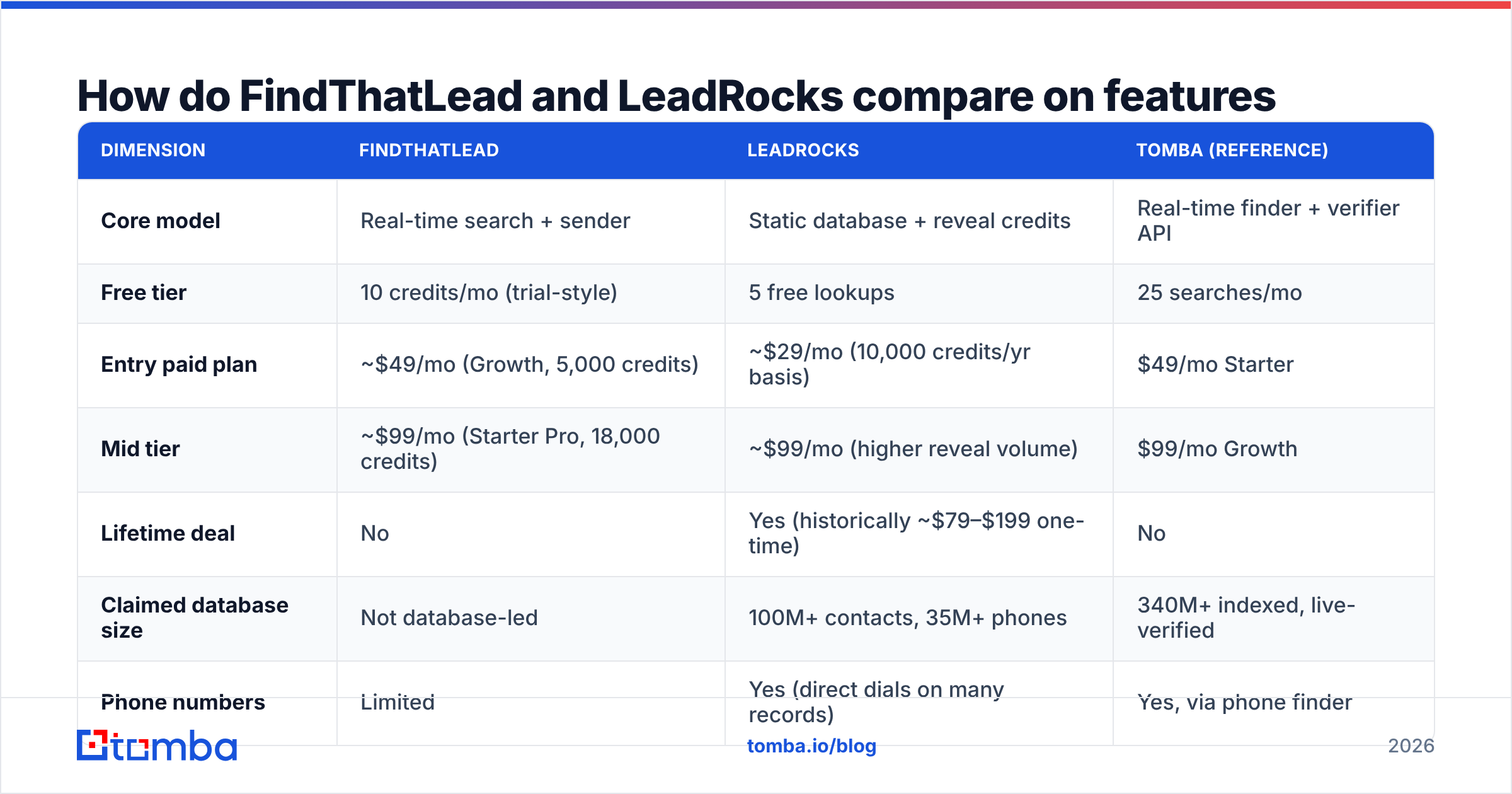
Here is the head-to-head. Prices reflect public plans as of early 2026. Lifetime-deal availability on LeadRocks moves around by marketplace, so treat that figure as a rough guide.
| Dimension | FindThatLead | LeadRocks | Tomba (reference) |
|---|---|---|---|
| Core model | Real-time search + sender | Static database + reveal credits | Real-time finder + verifier API |
| Free tier | 10 credits/mo (trial-style) | 5 free lookups | 25 searches/mo |
| Entry paid plan | ~$49/mo (Growth, 5,000 credits) | ~$29/mo (10,000 credits/yr basis) | $49/mo Starter |
| Mid tier | ~$99/mo (Starter Pro, 18,000 credits) | ~$99/mo (higher reveal volume) | $99/mo Growth |
| Lifetime deal | No | Yes (historically ~$79–$199 one-time) | No |
| Claimed database size | Not database-led | 100M+ contacts, 35M+ phones | 340M+ indexed, live-verified |
| Phone numbers | Limited | Yes (direct dials on many records) | Yes, via phone finder |
| Built-in email sending | Yes (campaigns + tracking) | Yes (basic) | No — integrates instead |
| LinkedIn automation | Yes (Scrab.in) | Enrichment only | Chrome extension + LinkedIn finder |
| Email verification | Basic, bundled | Basic, bundled | Dedicated verifier + catch-all handling |
| API access | Yes, limited endpoints | Yes on higher tiers | Full REST API, CLI, MCP server |
| Best for | Solo founders wanting one tool | Budget teams doing bulk list-building | Teams needing accuracy at volume |
Two things jump out.
First, FindThatLead's credit math looks generous but drains fast. Searches, verifications, and enrichments all draw from one pool. A failed lookup can still burn a credit, depending on the operation. Read the credit table before you pick a plan.
Second, LeadRocks' lifetime pricing warps the comparison. A $99 one-time fee against $99 per month looks like a rout. Then you remember that a static database decays 25–30% a year as people change jobs.
Gartner and other analyst shops have named contact-data decay the top cause of CRM rot for years. A database you bought in 2024 and still query in 2026 is not the database you paid for.
Which one finds more valid emails?#
Neither is a top-quartile finder. Both understate their own bounce rates. That is the honest answer.
Community benchmarks and user reviews on G2 and Capterra put FindThatLead at 70–80% deliverable on mid-market domains. It drops on small companies and non-English domains. LeadRocks scores the same or a little worse. Its database holds stale records that were valid when scraped, and the built-in check is too soft to catch them.
Where each one fails is predictable:
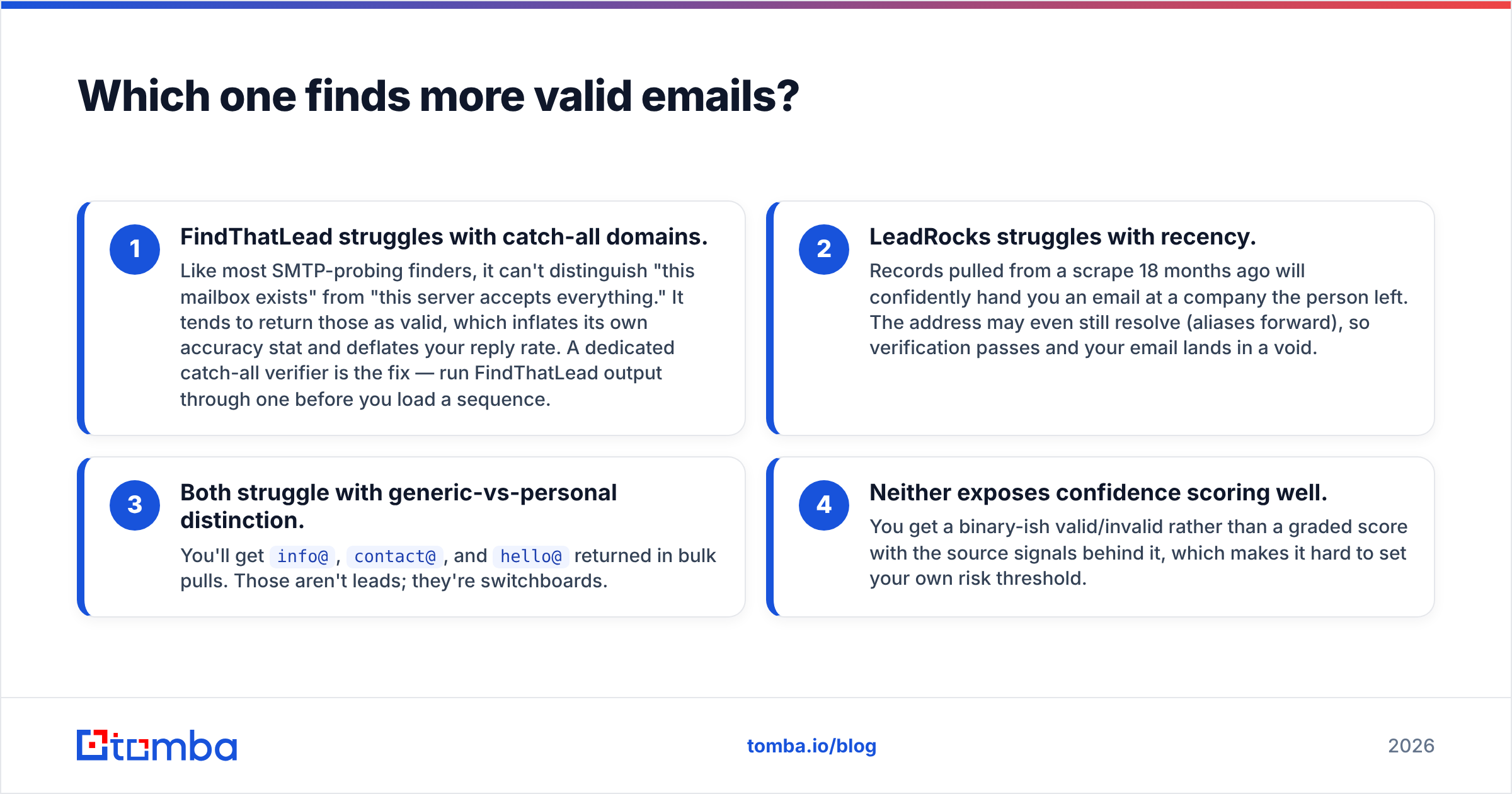
- FindThatLead struggles with catch-all domains. Like most SMTP-probing finders, it cannot tell "this mailbox exists" from "this server accepts everything." It returns those as valid. That inflates its accuracy stat and sinks your reply rate. Run its output through a catch-all verifier before you load a sequence.
- LeadRocks struggles with recency. A record scraped 18 months ago will hand you an email at a company the person has left. The address may still resolve, because aliases forward. So it passes verification and your email lands in a void.
- Both struggle to separate generic from personal. Bulk pulls return
info@,contact@, andhello@. Those are not leads. They are switchboards. - Neither shows confidence scores well. You get a valid/invalid flag, not a graded score with the signals behind it. That makes it hard to set your own risk threshold.
The workaround is the same for both tools. Treat the output as candidates, not contacts. Run every address through a separate email verifier before it touches your sending domain. Mailbox providers start throttling you above a 3% bounce rate. Neither bundled checker is tuned tightly enough to keep a cold list under that line.

What does each one actually cost per verified email?#
Sticker price lies. Run the unit economics instead.
Say you need 5,000 verified, deliverable, personal emails for one quarter of outbound.
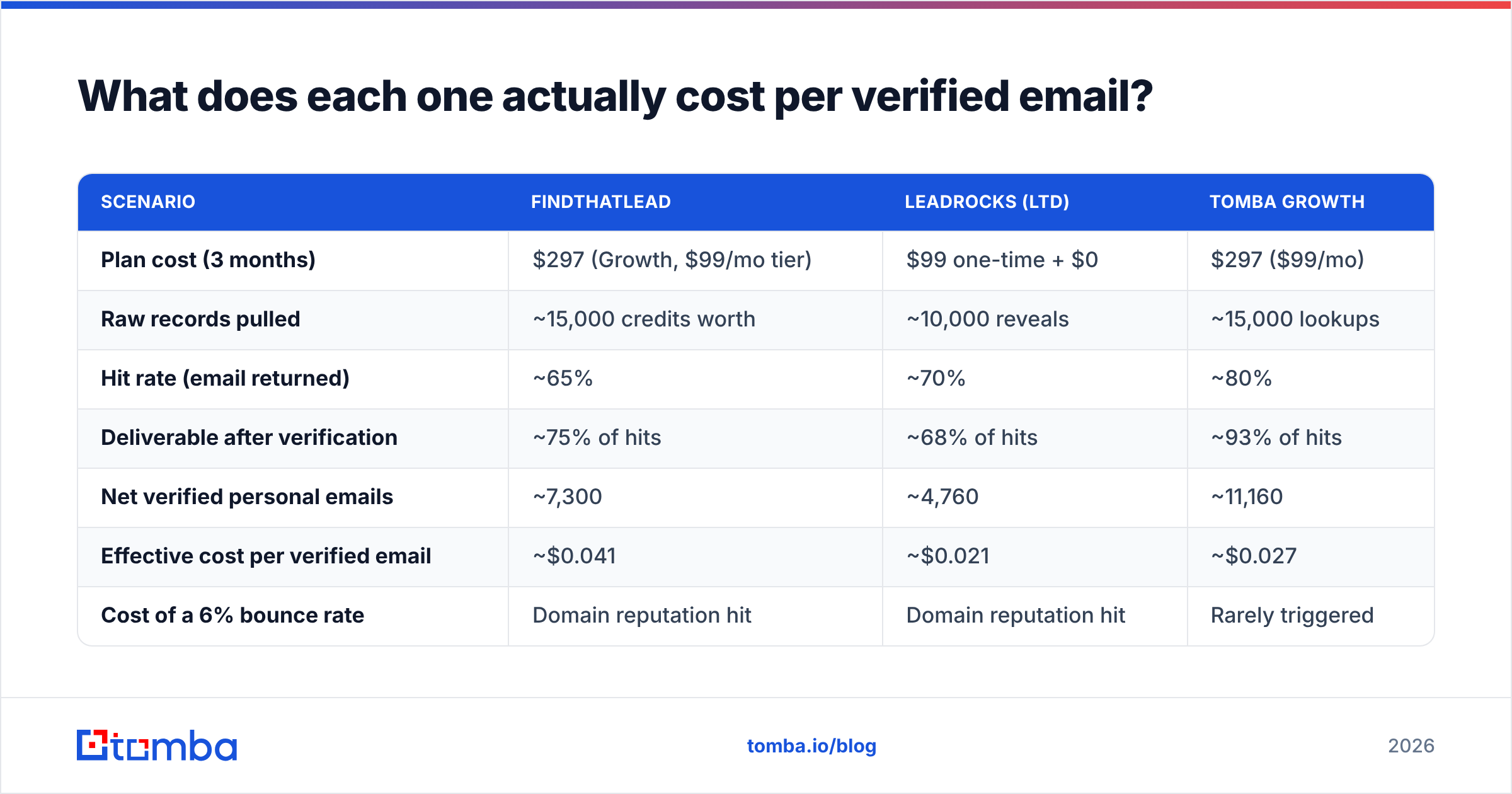
| Scenario | FindThatLead | LeadRocks (LTD) | Tomba Growth |
|---|---|---|---|
| Plan cost (3 months) | $297 (Growth, $99/mo tier) | $99 one-time + $0 | $297 ($99/mo) |
| Raw records pulled | ~15,000 credits worth | ~10,000 reveals | ~15,000 lookups |
| Hit rate (email returned) | ~65% | ~70% | ~80% |
| Deliverable after verification | ~75% of hits | ~68% of hits | ~93% of hits |
| Net verified personal emails | ~7,300 | ~4,760 | ~11,160 |
| Effective cost per verified email | ~$0.041 | ~$0.021 | ~$0.027 |
| Cost of a 6% bounce rate | Domain reputation hit | Domain reputation hit | Rarely triggered |
LeadRocks wins on raw cost per email, with two conditions. The lifetime deal has to be live, and the data has to be fresh. The second condition weakens every month you own it. FindThatLead costs the most per verified contact here. Its hit rate and its post-verification survival rate both sit mid-pack.
The table hides one cost: a burned sending domain. If 6% of your list bounces, Google and Microsoft downgrade you. Your warm sequences suffer. You then spend three weeks rebuilding sender reputation. By that math, the cheapest data is the data that does not bounce.
Is FindThatLead's built-in sender worth paying for?#
Only if you are a solo operator sending under 500 emails a month.
The campaign module handles sequences, basic personalization, open and click tracking, and simple follow-up rules. It is competent. It is not Instantly, Smartlead, or Lemlist. You do not get inbox rotation at scale, real warmup, or the deliverability data that serious senders live inside.
The bundling argument cuts both ways:
- For bundling: one login, one bill, no CSV shuffling, no Zapier tax. For a founder sending 50 emails a day, that saved friction is real value.
- Against bundling: your data quality is now tied to your sending quality. If the finder slips, the sender slips with it. Keep them apart and you can swap either side without rebuilding the stack.
LeadRocks' sending is thinner still. Treat it as a convenience, not a reason to buy. Most LeadRocks users export to a real sequencer.
The unbundling test is simple. Are you tuning deliverability at all? Do you check SPF records, rotate inboxes, or watch inbox placement? If yes, you have outgrown a bundled sender. Buy data and sending separately.
Who should pick which — and when should you pick neither?#
Pick FindThatLead if:
- You are a solo founder or a two-person team. You want prospecting, LinkedIn scraping, and sending on one bill.
- Your ICP is European SMB. Coverage in Spain, France, and Latin America beats most US-centric tools.
- You send under 1,000 emails a month and will not add a separate verification step.
Pick LeadRocks if:
- A lifetime deal is live and your budget is a hard one-time number.
- You need phone numbers as well as emails, and cannot pay for a dialer-data vendor.
- You do bulk, low-personalization list-building, and a 25% miss rate is fine.
- You will re-verify everything before you send. That part is non-negotiable with a static database.
Pick neither if:
- You need programmatic access. Both APIs are thin. To enrich inside a product, a CRM workflow, or a data pipeline, use a proper email finder API with documented rate limits, webhooks, and stable response schemas.
- Your list runs past 20,000 contacts a month. Credit math on both tools turns punishing at volume.
- Accuracy is a compliance or brand risk. In regulated industries and enterprise ABM, mailing the wrong person costs far more than the credit did.
For that third group, benchmark Tomba, Findymail, Prospeo, and BookYourData. The last one is strong if you want pay-as-you-go lists, verified on delivery, with no subscription. Each of these is narrower than FindThatLead by design. They find and verify well, then let you bring your own sender.

How do you test any of these before committing?#
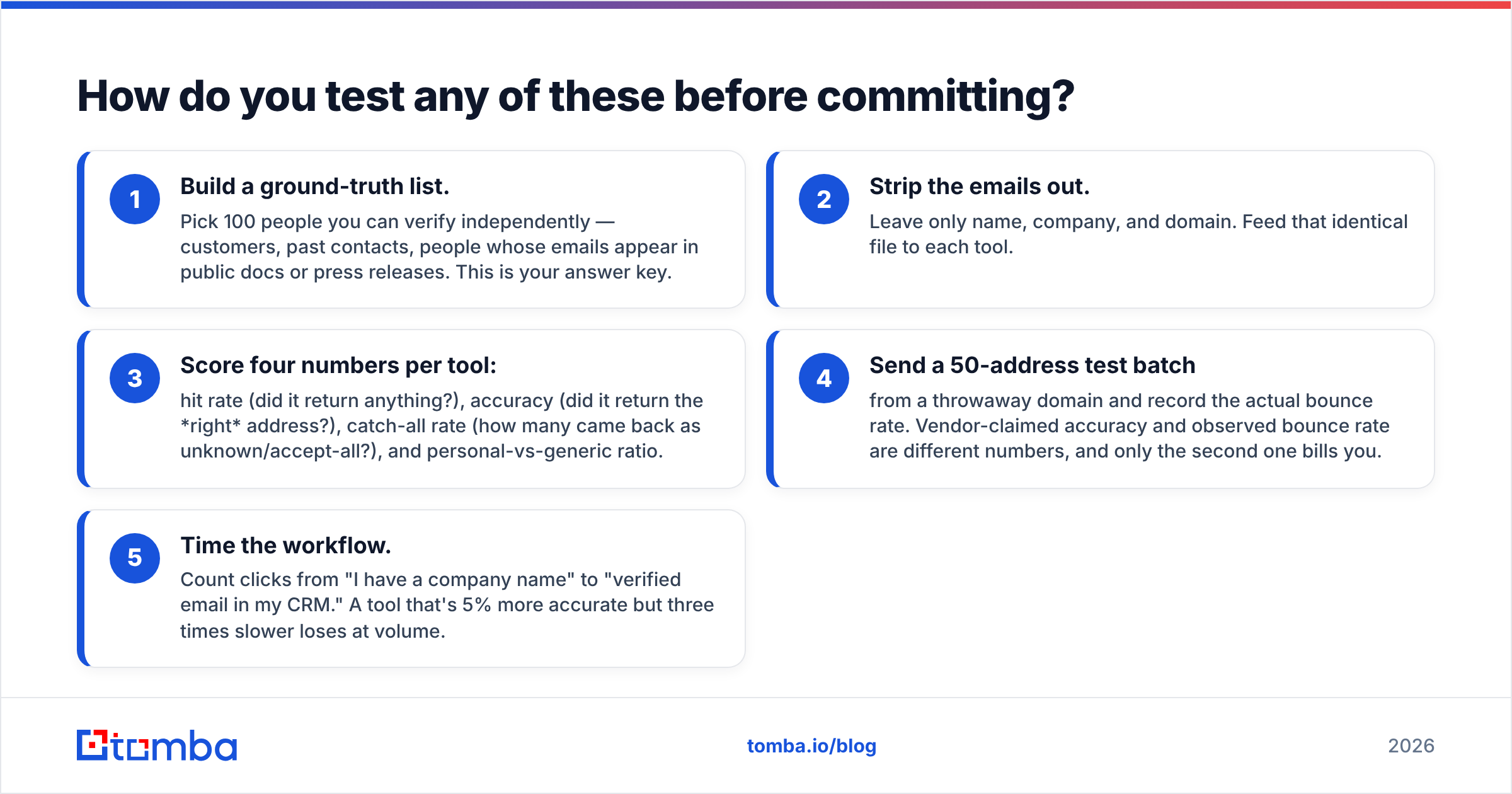
Run the same 100-contact benchmark against every candidate. It takes an afternoon and saves a quarter.
- Build a ground-truth list. Pick 100 people you can verify on your own: customers, past contacts, or names whose emails appear in public docs. This is your answer key.
- Strip the emails out. Leave name, company, and domain. Feed the same file to each tool.
- Score four numbers per tool. Hit rate, accuracy, catch-all rate, and the ratio of personal to generic addresses.
- Send a 50-address test batch from a throwaway domain and record the real bounce rate. Claimed accuracy and observed bounce rate are different numbers. Only the second one bills you.
- Time the workflow. Count the clicks from "I have a company name" to "verified email in my CRM." A tool that is 5% more accurate but three times slower loses at volume.
Use each free tier for step two. FindThatLead gives 10 credits, LeadRocks gives 5 lookups, and Tomba gives 25 searches a month. That is enough to score a meaningful slice. Add a bulk email finder run to test throughput. Check domain search quality on its own too. Some tools are weak on person lookup but strong on domain-wide pulls.
One check most people skip: look at where the data comes from. Vendors that publish their data sources and refresh cadence are making a claim you can test. Vendors that say "proprietary" and stop are asking you to trust a number you cannot audit.
The verdict#
LeadRocks wins on price. FindThatLead wins on workflow breadth. Neither wins on accuracy.
If you are bootstrapping and a lifetime deal is on the table, LeadRocks is defensible. Budget for a separate verification pass, and accept that the asset loses value each month. If you want one tool that finds, scrapes LinkedIn, and sends, FindThatLead earns its spot for small-volume operators, especially in Europe.
But the FindThatLead vs LeadRocks debate misses the point if your real metric is cost per meeting booked rather than cost per record downloaded. The costly part of outbound is not the data. It is the reputation damage, the wasted sequence slots, and the hours your reps spend on people who left in 2024.
Start with a real accuracy benchmark. Then build a stack where the finder, the verifier, and the sender are each best at their own job.
Ready to benchmark the accuracy side properly? The Tomba Email Finder gives you 25 free searches a month, no card needed. Run the 100-contact ground-truth test above against your own ICP before you commit to any annual plan or lifetime deal. Pair it with the verifier to see your real deliverable rate. Check Tomba pricing if you need to scale past the free tier: Starter is $49/mo, Growth is $99/mo.
Related guides#
Ready to find emails that actually work?
Join 150,000+ professionals who stopped guessing and started sending. Free credits on signup — no credit card required.
Get the Tomba newsletter
Practical outbound tactics and product updates — once every two weeks.
About the author