FindThatLead vs LeadsGorilla: Which Wins for B2B Leads in 2026?
FindThatLead chases B2B decision-maker emails at scale. LeadsGorilla hunts local businesses with weak online presence. They solve different problems — here is which one actually fits your pipeline, and what both get wrong.
FindThatLead vs LeadsGorilla is a matchup that confuses a lot of buyers. One tool finds work emails at named companies. The other finds local businesses with a weak web presence. Here is how they differ, and when neither one is the right buy.
TL;DR
- FindThatLead is a B2B email finder with a light cold-email sender attached. Feed it domains, names, or LinkedIn URLs and it returns work emails. Plans start around $49/mo.
- LeadsGorilla is a local-business lead scout for agencies. It scrapes Google Maps, Facebook, and Yelp, scores each business on a "lead score," and builds a PDF audit report you can send. It sells mostly as a lifetime deal.
- These are not direct competitors. FindThatLead targets named people at companies. LeadsGorilla targets small local businesses you have never heard of.
- Both share the same weak spot: verification depth. Neither one is built as a verification-first data layer, so bounce rates punish you.
- Need decision-maker emails that survive a bounce check? A dedicated finder plus verifier stack (Tomba, Hunter, Findymail-class tools) beats either one on cost-per-valid-contact.
What Are FindThatLead and LeadsGorilla, Exactly?#
People compare them because both promise "leads." But they sit on opposite ends of the funnel.
FindThatLead (findthatlead.com) is a Barcelona-built prospecting tool that launched in 2015. The core loop is simple. Give it a domain, a name, or a LinkedIn profile, and it returns a business email address. On top of that sit a Chrome extension, a bulk CSV processor called Prospector, a lead search by industry, location, and job title, and a basic cold-email sender.
LeadsGorilla (leadsgorilla.io) is an agency tool, usually sold through JVZoo-style promos. The core loop is just as simple. Pick a niche and a city, and it pulls local businesses from Google Maps, Facebook Pages, Yelp, and (in v2) Google and LinkedIn sources. It then scores each business on gaps like a missing website, no Google reviews, or an unclaimed listing. Finally, it builds a branded PDF audit you can attach to a pitch.
So: FindThatLead answers "what is the CMO of Acme Corp's email?" LeadsGorilla answers "which 40 dentists in Phoenix have a broken web presence I can sell to?"
Buying the wrong one is the most common mistake here. It usually costs you a month.

FindThatLead vs LeadsGorilla: Head-to-Head Comparison#
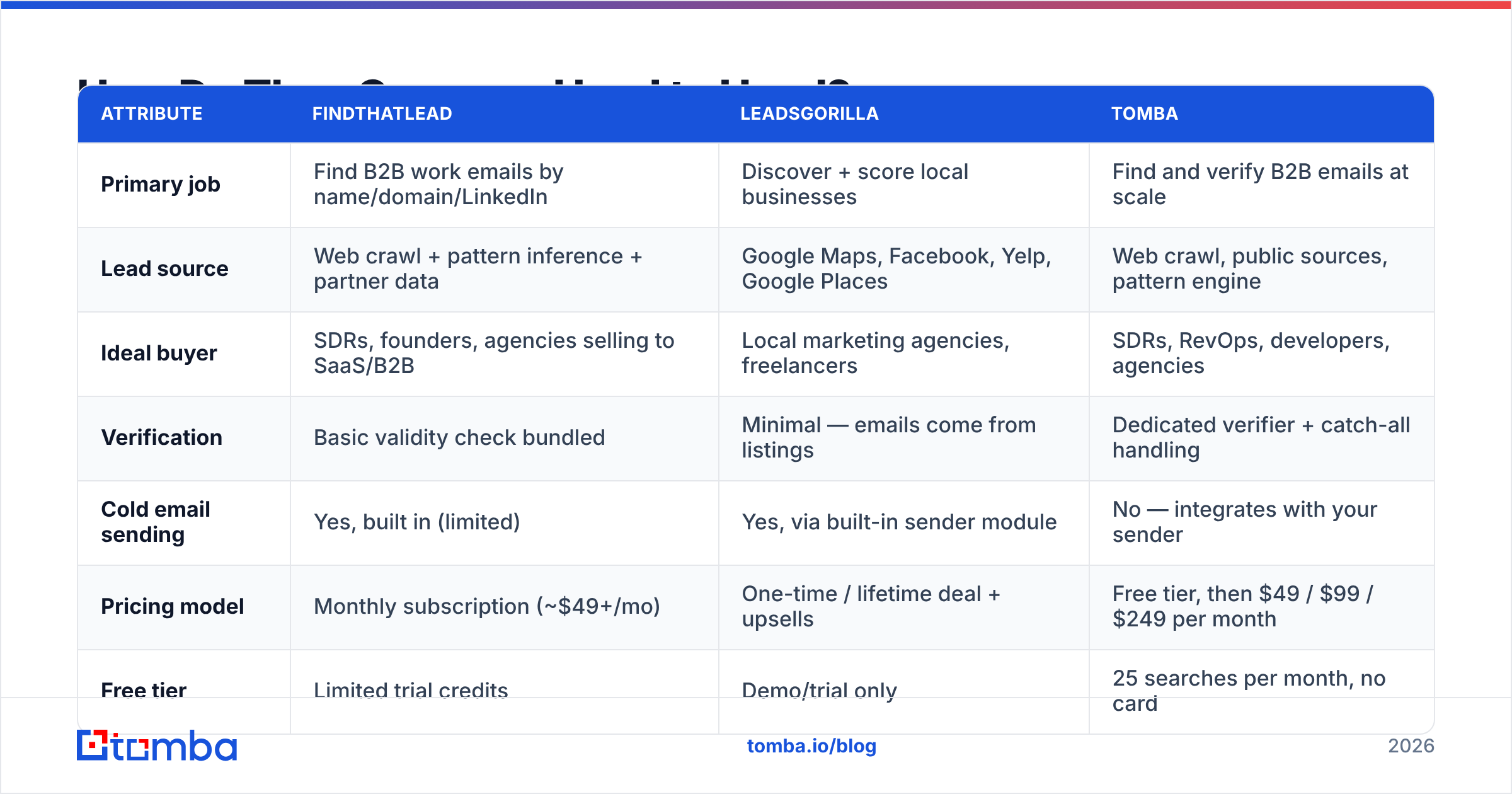
| Attribute | FindThatLead | LeadsGorilla | Tomba |
|---|---|---|---|
| Primary job | Find B2B work emails by name/domain/LinkedIn | Discover + score local businesses | Find and verify B2B emails at scale |
| Lead source | Web crawl + pattern inference + partner data | Google Maps, Facebook, Yelp, Google Places | Web crawl, public sources, pattern engine |
| Ideal buyer | SDRs, founders, agencies selling to SaaS/B2B | Local marketing agencies, freelancers | SDRs, RevOps, developers, agencies |
| Verification | Basic validity check bundled | Minimal — emails come from listings | Dedicated verifier + catch-all handling |
| Cold email sending | Yes, built in (limited) | Yes, via built-in sender module | No — integrates with your sender |
| Pricing model | Monthly subscription (~$49+/mo) | One-time / lifetime deal + upsells | Free tier, then $49 / $99 / $249 per month |
| Free tier | Limited trial credits | Demo/trial only | 25 searches per month, no card |
| API access | Yes, on higher plans | No meaningful public API | Full REST API on all paid plans |
| Best for | Named-contact B2B outbound | Local SMB agency prospecting | Accuracy-sensitive outbound + enrichment |
Read that table as a routing decision, not a scoreboard. Does your ICP have a LinkedIn profile and a corporate domain? Then the left and right columns matter. Is your ICP a pizzeria with no website? Then only the middle column does.
Which One Actually Finds More Emails?#
Neither tool publishes an audited accuracy number. Be skeptical of any vendor that claims 98% without showing its method. Here is what really drives hit rate:
- Domain coverage. Email finders infer patterns (first.last@, f.last@, first@) from addresses already seen on a domain. Large, well-crawled domains resolve at 80%+ for most tools. Small companies and non-English domains fall off a cliff. Some drop to 40%.
- Verification method. A tool that only guesses patterns will hand you bounces. A tool that runs SMTP handshakes, MX checks, and catch-all detection returns fewer addresses. It also returns far fewer bounces.
- Catch-all handling. Roughly a third of B2B domains accept all mail. A naive SMTP check then returns "valid" for everything. With no catch-all logic, an accuracy number is inflated by definition.
- Freshness. People change jobs constantly. A database refreshed once a quarter is a bounce farm by month three.
FindThatLead is a pattern-and-crawl finder with light validation. LeadsGorilla is not really an email finder at all. It surfaces whatever contact email a business lists on Maps or Facebook. That is often info@ or a form-only page. Generic inboxes convert poorly and skew your reply-rate stats.
Is accuracy your buying criterion? Then benchmark before you commit. Run the same 100-contact list through each candidate. Push every result through an independent email verifier and count what survives. Cost-per-valid-contact is the only number that matters. Cost-per-credit is not.

Is FindThatLead Worth It in 2026?#
Where it earns its price:
- All-in-one for solo founders. Find, verify-lite, and send from one dashboard. If you are one person sending 200 emails a week, the smaller tool stack is a real win.
- LinkedIn workflow. The Chrome extension pulls emails while you browse profiles. That suits manual, high-intent prospecting.
- Lead search by criteria. Filter by industry, location, and job title to build a list from scratch.
Where it frustrates people:
- Credit economics. Failed searches and low-confidence results still eat budget on many plans. Read the credit rules before you scale.
- Sending is basic. Next to a dedicated sequencer, the deliverability controls, inbox rotation, and reply detection are thin. Most serious teams pay for a separate sender anyway. At that point the "all-in-one" argument falls apart.
- Verification depth. You will still want a second-pass verifier on any list going into a real campaign. Skipping that step is the fastest way to wreck sender reputation.
Verdict: solid for solo B2B prospectors who value one login over best-in-class parts. Weak if you run volume, need API automation, or sell to small and international companies.
Is LeadsGorilla Worth It for Agencies?#
LeadsGorilla plays a different game. For the right agency, it is one of the better-value tools on the market. The pricing model is most of the reason.
Where it earns its price:
- The audit report is the pitch. The tool builds a branded PDF that shows a dentist their listing has no reviews, no claimed profile, and a broken mobile site. That report does most of the selling for you.
- Lead scoring saves triage time. Sorting 300 scraped businesses by how broken their web presence is — that is exactly the filter a local agency needs.
- One-time pricing. A lifetime deal means no monthly drag on an agency with lumpy cash flow.
Where it frustrates people:
- Data is only as good as Maps and Facebook. You get listing emails, not decision-maker emails. Reaching the owner often means a phone call.
- Upsell ladder. The base license is cheap. The useful capacity, agency rights, and extra modules are paid add-ons. Budget for the real total.
- No B2B depth. Pivot from selling to plumbers to selling to Series B SaaS companies, and the tool does not follow you.
Verdict: a good fit if your whole book of business is local SMBs and your pitch is a web-presence audit. Not a substitute for a B2B contact database.
What Should You Use Instead — or Alongside?#
Most teams that compare these two end up wanting a data layer, not a bundle. Here is the pattern that works:
- Source your accounts. Use Maps and Yelp scraping for local targets, or firmographic filters for B2B.
- Find the human. Get the named decision maker's email, not
info@. An email finder or a domain search returns every published address on a company domain, with role labels. - Verify hard. Run SMTP, MX, and catch-all checks before anything enters a sequence.
- Enrich. Add title, company size, tech stack, and phone so your copy has something to work with.
- Send from a dedicated tool. Use a real sequencer with warmup and inbox rotation, not a bolted-on module.
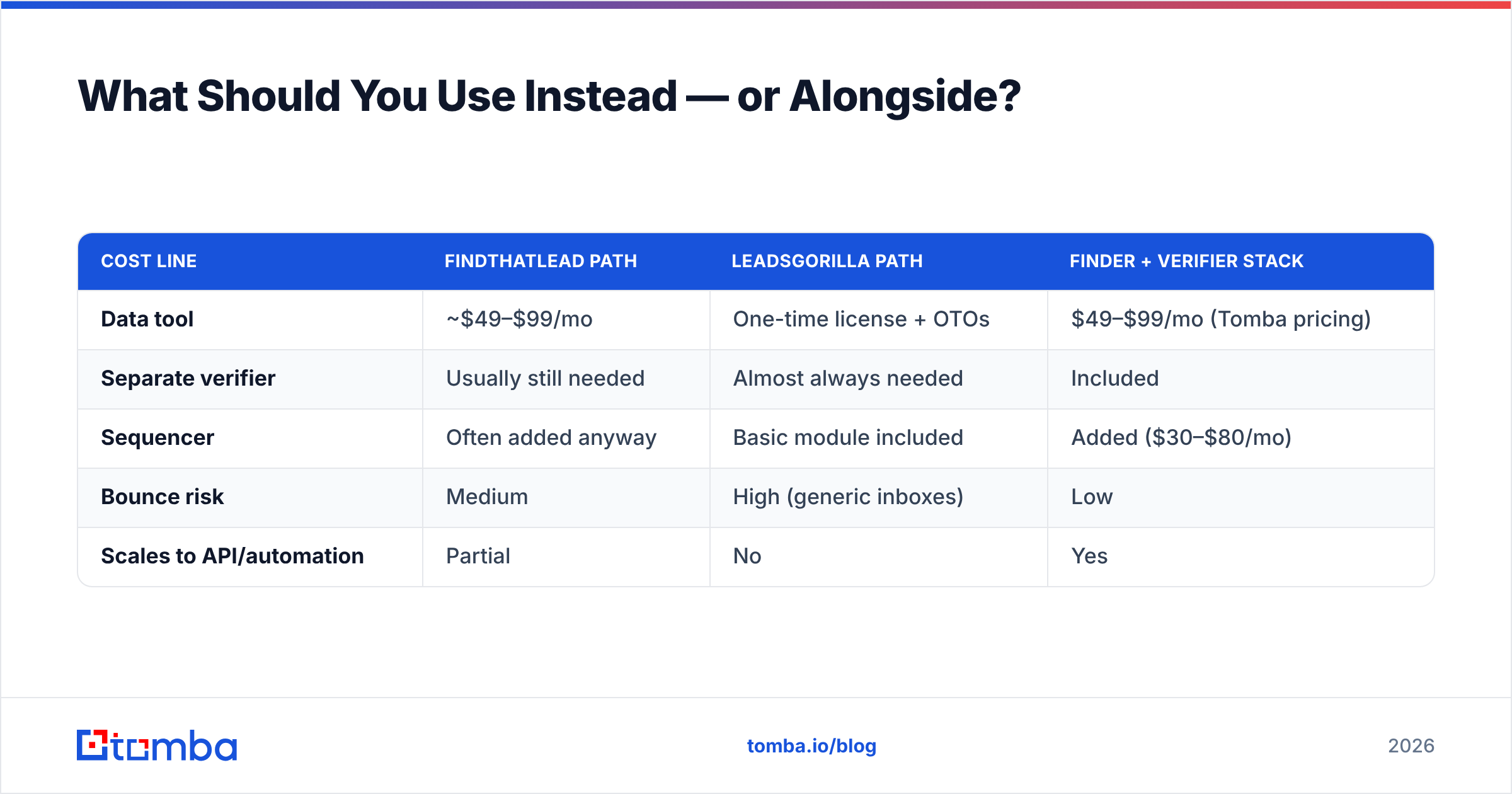
Here is how the three options map onto a monthly spend for a two-person outbound team doing about 3,000 contacts a month:
| Cost line | FindThatLead path | LeadsGorilla path | Finder + verifier stack |
|---|---|---|---|
| Data tool | ~$49–$99/mo | One-time license + OTOs | $49–$99/mo (Tomba pricing) |
| Separate verifier | Usually still needed | Almost always needed | Included |
| Sequencer | Often added anyway | Basic module included | Added ($30–$80/mo) |
| Bounce risk | Medium | High (generic inboxes) | Low |
| Scales to API/automation | Partial | No | Yes |
Want to compare the wider category, not just these two? G2's lead intelligence grid is a fair neutral starting point. HubSpot's prospecting guide is still the clearest free primer on the process side.

Worth noting: not every alternative is a like-for-like finder. Some teams need pre-built, human-verified lists rather than on-demand lookups. A database provider like BookYourData solves that half of the problem well. It is a list-purchase model, not a search-and-verify API. Plenty of teams run both.
How Do You Decide in Under 10 Minutes?#
The FindThatLead vs LeadsGorilla choice comes down to three honest answers:
- Does your ICP have a corporate domain and a LinkedIn profile? Yes → you need a B2B email finder. No → LeadsGorilla's local scraping is more useful.
- Are you sending more than 500 emails a month? Yes → verification is not optional. You need real catch-all handling and a bulk email finder workflow. No → almost anything works.
- Do you need this inside code or a CRM? Yes → API access is a hard requirement. FindThatLead offers one on higher tiers. LeadsGorilla effectively does not. A proper email finder API returns confidence scores and verification status in the same call, which removes a whole step from your pipeline.
One more sanity check. Test your pick on your domain list, not the vendor's demo. Take 100 companies you want to reach, run them through the trial, and count the valid, role-correct, non-generic addresses. Tools that look the same on a feature grid can differ 2x on that one number.
What About Deliverability After You Get the Emails?#
Finding emails is half the job. The other half is not getting filtered.
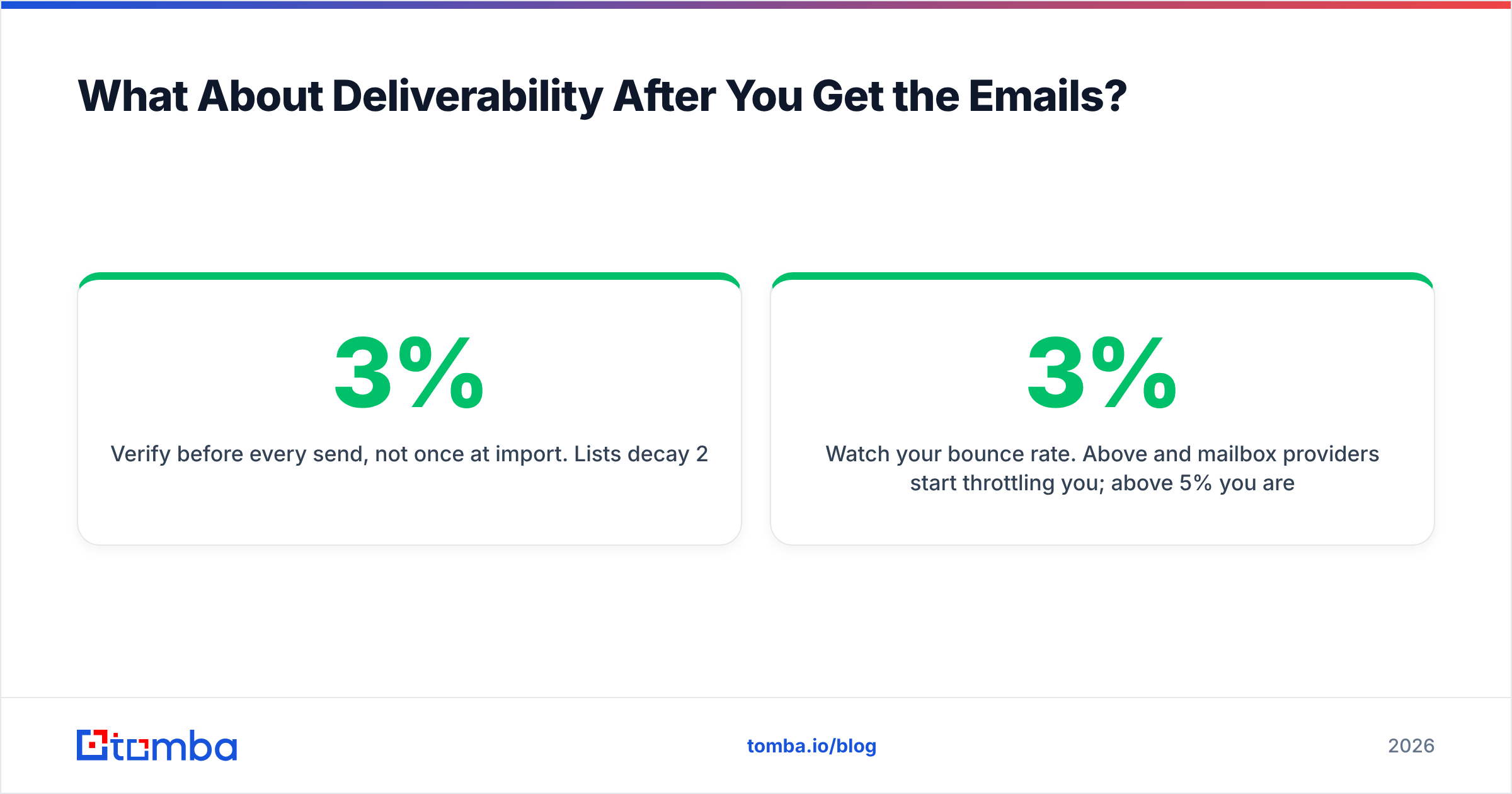
- Verify before every send, not once at import. Lists decay 2–3% per month.
- Watch your bounce rate. Above 3%, mailbox providers start to throttle you. Above 5%, you are damaging your domain.
- Separate your catch-all contacts into a smaller, lower-risk segment. A catch-all verifier tells you which ones are worth the risk.
- Never send from your primary domain. Use a dedicated sending domain with its own SPF record and DMARC alignment.
Neither tool will save you from a bad list. Both will hand you addresses that bounce, because that is not their main job.
The Bottom Line#
FindThatLead vs LeadsGorilla is not a real rivalry. FindThatLead is a B2B email finder with a sender attached. It is fine for solo founders and thin for teams that need volume, API access, or verification depth. LeadsGorilla is a local-SMB prospecting and audit machine. It is useful for agencies that sell web-presence fixes and useless for enterprise B2B.
Choosing between them usually means you are in one of two camps. You sell to companies, so pick a real B2B finder. Or you sell to local businesses, so pick LeadsGorilla and a phone. Sell to companies and care about cost-per-valid-contact? Then neither bundle is your cheapest path. A dedicated finder with built-in verification is.
Start with the accuracy test. Tomba's Email Finder gives you 25 free searches a month with no card. Every paid plan from $49/mo includes full API access. Verification, catch-all detection, and enrichment come back in the same request. Benchmark it against your current tool on your own domain list this afternoon, and let the bounce rate decide.
Related guides#
Ready to find emails that actually work?
Join 150,000+ professionals who stopped guessing and started sending. Free credits on signup — no credit card required.
Get the Tomba newsletter
Practical outbound tactics and product updates — once every two weeks.
About the author