FindThatLead vs Mailarrow: Which Cold Email Tool Wins?
FindThatLead finds the leads. Mailarrow sends the emails. They overlap less than the search term suggests - here's which one you actually need, what each costs, and where a dedicated finder beats both.
TL;DR
- FindThatLead is a data-first tool: prospecting, domain search, email verification, plus a basic campaign sender bolted on. Mailarrow is a sending-first tool: sequences, inbox rotation, warmup, deliverability. It does not find emails for you.
- If you already have lists and your problem is landing in the inbox, Mailarrow is the better buy. If your problem is "I have no contacts", FindThatLead is closer to what you need.
- Neither one is best-in-class at the other's job. FindThatLead's sender is thin next to purpose-built platforms; Mailarrow's data layer is nonexistent by design.
- Most teams end up with two subscriptions anyway. The cheapest version of that stack is a dedicated finder/verifier plus a dedicated sender, not one tool stretched across both.
- Budget reality: expect roughly $49-$150/mo for usable data, and $39-$99/mo for a sending platform with warmup. Verify current numbers on each vendor's pricing page before you commit.
What are FindThatLead and Mailarrow, exactly?#
They get compared because both show up when you search "cold email tool", but they sit on opposite ends of the outbound pipeline.
FindThatLead is a Barcelona-built B2B prospecting suite. Its core is lead discovery: search by role, industry, and location; pull every public email on a domain; verify addresses before you export. It also ships an email sender so you can run a campaign without leaving the app.
Mailarrow is a cold email outreach platform. You connect mailboxes, import a CSV or sync from your CRM, build a multi-step sequence, and let it rotate sends across inboxes with built-in warmup. There is no prospecting database. It assumes you arrive with contacts already in hand.
So the honest framing of "findthatlead vs mailarrow" is not feature-for-feature. It is: which half of the outbound problem hurts more right now?
Here is the split, stage by stage:
- Sourcing - building a list of companies and people worth contacting. FindThatLead does this. Mailarrow does not.
- Finding contact data - turning a name plus domain into a working email. FindThatLead does this. Mailarrow does not.
- Verification - killing bounces before they hit your sender reputation. FindThatLead includes a verifier. Mailarrow relies on you doing it upstream.
- Sequencing - multi-step follow-ups with conditional stops on reply. Mailarrow's strength. FindThatLead's weakest area.
- Deliverability infrastructure - inbox rotation, warmup, sending limits, spintax, bounce handling. Mailarrow's entire reason to exist.
- Reporting and iteration - opens, replies, positive-reply tracking, A/B testing. Mailarrow goes deeper; FindThatLead reports the basics.

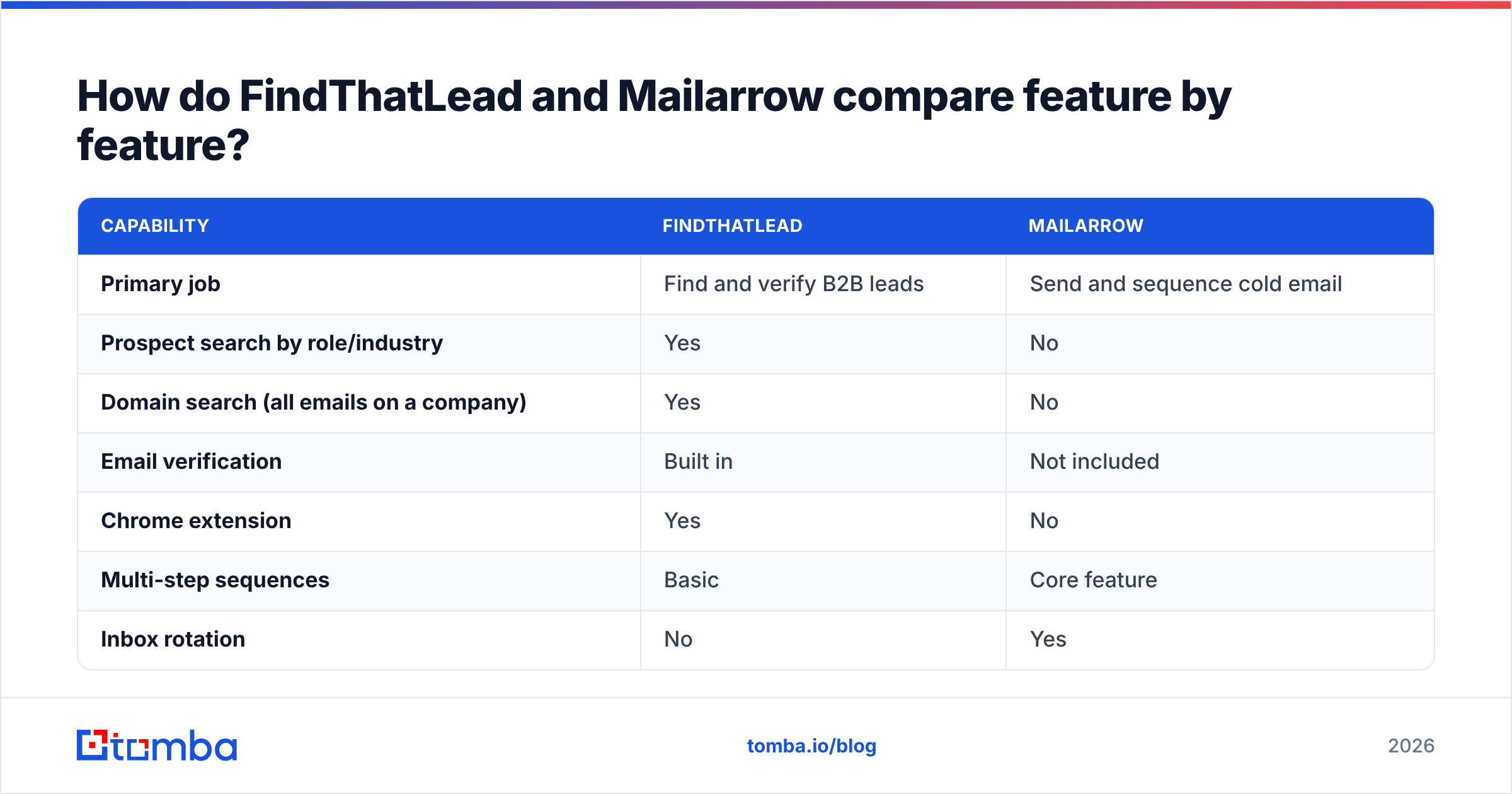
How do FindThatLead and Mailarrow compare feature by feature?#
| Capability | FindThatLead | Mailarrow |
|---|---|---|
| Primary job | Find and verify B2B leads | Send and sequence cold email |
| Prospect search by role/industry | Yes | No |
| Domain search (all emails on a company) | Yes | No |
| Email verification | Built in | Not included |
| Chrome extension | Yes | No |
| Multi-step sequences | Basic | Core feature |
| Inbox rotation | No | Yes |
| Built-in warmup | No | Yes |
| Unified reply inbox | Limited | Yes |
| Spintax / variable personalization | Limited | Yes |
| API access | Yes | Limited |
| CRM sync | Via integrations | Native + Zapier |
| Best for | Filling an empty pipeline | Scaling sends that already convert |
The pattern is clean. FindThatLead wins every row above the sequencing line. Mailarrow wins every row below it. Anyone telling you one replaces the other is selling something.
Which one gives you better lead data?#
FindThatLead, because Mailarrow does not compete here at all.
That said, "better than nothing" is a low bar, and it is worth being specific about what FindThatLead's data actually gives you. Its prospector works well for broad ICP sweeps: give it a job title, a country, and an industry, and you get a list. Its domain search is genuinely useful when you know the company but not the person. Coverage skews stronger in Europe and LATAM than in the US mid-market, which matters if your territory is North America.
Where prospecting suites tend to disappoint is catch-all domains. Roughly a third of B2B domains accept every address at the SMTP layer, so a verifier that only checks "does the server accept this?" returns a green light for garbage. If your target accounts are enterprise-heavy, this is the single biggest driver of your bounce rate, and it is worth testing a catch-all verifier against your own list before you trust any vendor's headline accuracy claim.
A practical test that takes 20 minutes: take 100 contacts you already know are valid (past customers, current pipeline, anyone who has replied to you). Run them through each tool. Count how many come back found and correct. Vendor-published accuracy percentages are marketing; your own recall on a known list is data.
Which one sends better cold email?#
Mailarrow, and it is not close.
FindThatLead's sender exists so you can run a campaign without buying a second tool. It is fine for a founder blasting 200 emails a month from one mailbox. It is not built for the mechanics that keep modern cold email out of spam:
- Inbox rotation. Google and Microsoft both throttle aggressively per-mailbox. Sending 1,000 emails a day from one address is a reputation problem regardless of your copy. Mailarrow spreads volume across connected accounts; FindThatLead does not.
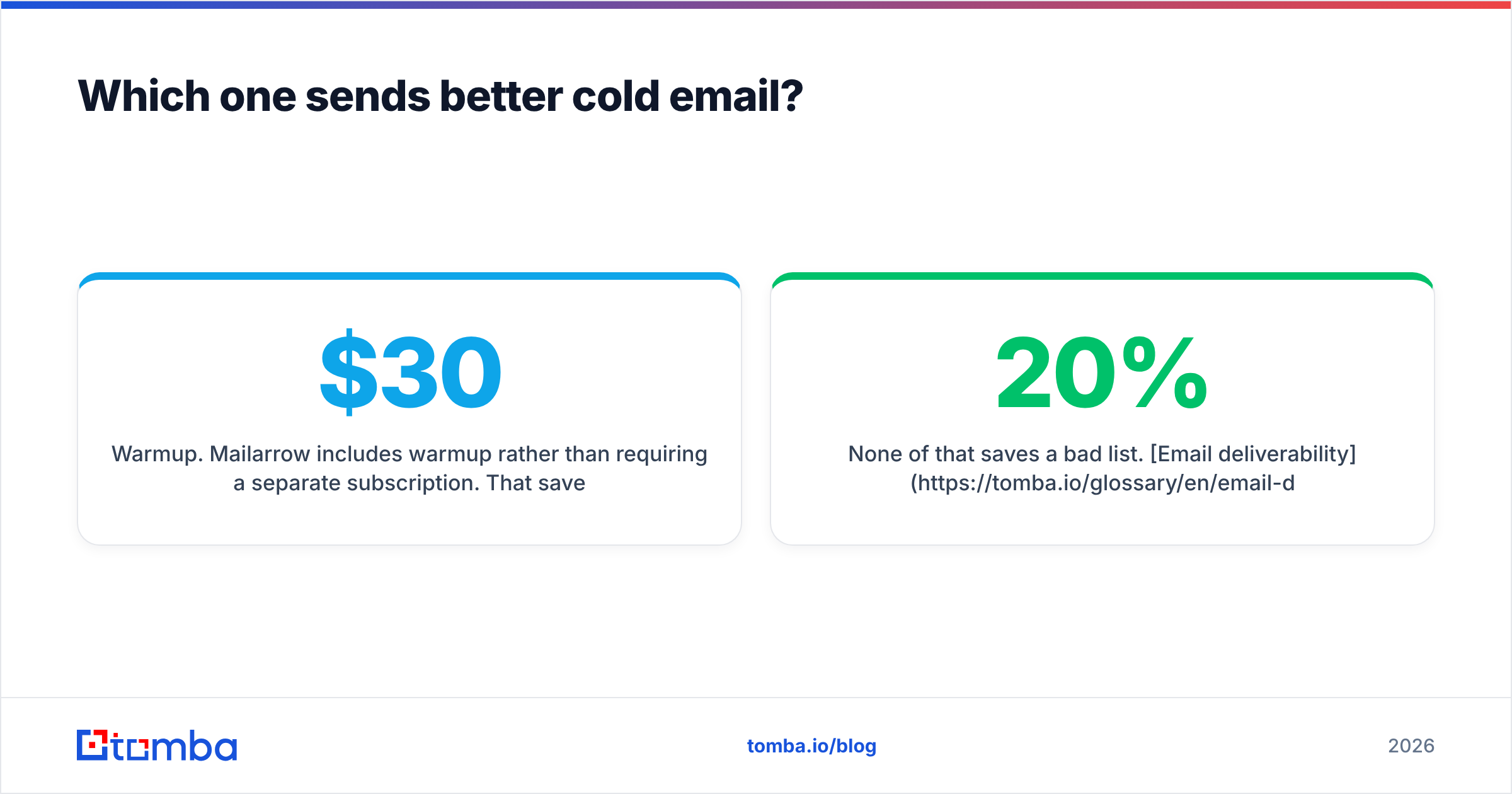
- Warmup. Mailarrow includes warmup rather than requiring a separate subscription. That saves you $30-$50/mo versus bolting on a standalone warmup service.
- Sending windows and jitter. Randomized delays and business-hours-only sending look human. Fixed-interval blasts look automated.
- Bounce circuit breakers. Auto-pausing a campaign when bounce rate crosses a threshold is the feature that saves your domain. Check whether the plan you are considering includes it.
None of that saves a bad list. Email deliverability is downstream of data quality: if 20% of your addresses bounce, no amount of warmup rescues the domain. Which is why the "just use one tool" instinct usually backfires - people economize on the data layer, then pay for it in sender reputation.
What do FindThatLead and Mailarrow cost in 2026?#
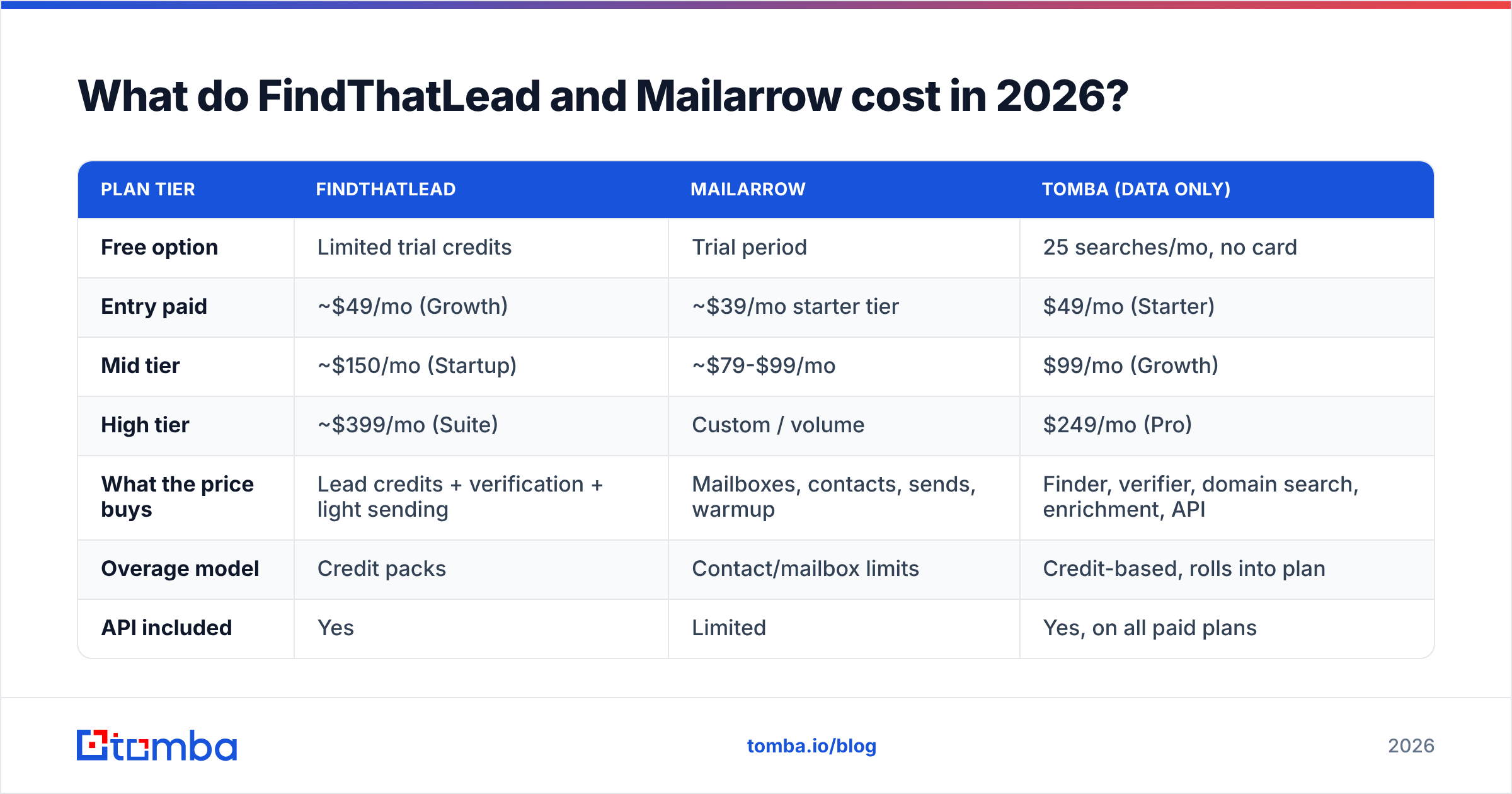
Both vendors move pricing periodically, so treat this as directional and confirm on their own pages before you buy. As listed at the time of writing:
| Plan tier | FindThatLead | Mailarrow | Tomba (data only) |
|---|---|---|---|
| Free option | Limited trial credits | Trial period | 25 searches/mo, no card |
| Entry paid | ~$49/mo (Growth) | ~$39/mo starter tier | $49/mo (Starter) |
| Mid tier | ~$150/mo (Startup) | ~$79-$99/mo | $99/mo (Growth) |
| High tier | ~$399/mo (Suite) | Custom / volume | $249/mo (Pro) |
| What the price buys | Lead credits + verification + light sending | Mailboxes, contacts, sends, warmup | Finder, verifier, domain search, enrichment, API |
| Overage model | Credit packs | Contact/mailbox limits | Credit-based, rolls into plan |
| API included | Yes | Limited | Yes, on all paid plans |
Two things to watch in the fine print.
First, credit accounting. Some prospecting tools charge a credit for a search that returns nothing. Others charge separately for finding and for verifying the same contact, which doubles your effective cost per usable lead. Ask directly: "does a failed lookup consume a credit?"
Second, contact-based vs send-based pricing on the sending side. A platform that charges by stored contacts punishes large lists you only mail once. One that charges by sends punishes long sequences. Model your actual volume against both before deciding which pricing shape is friendlier.
If you are pricing the data half separately, Tomba pricing starts at $49/mo for Starter with a free tier of 25 searches to test recall on your own domains first.
Should you stack a finder and a sender instead of picking one?#
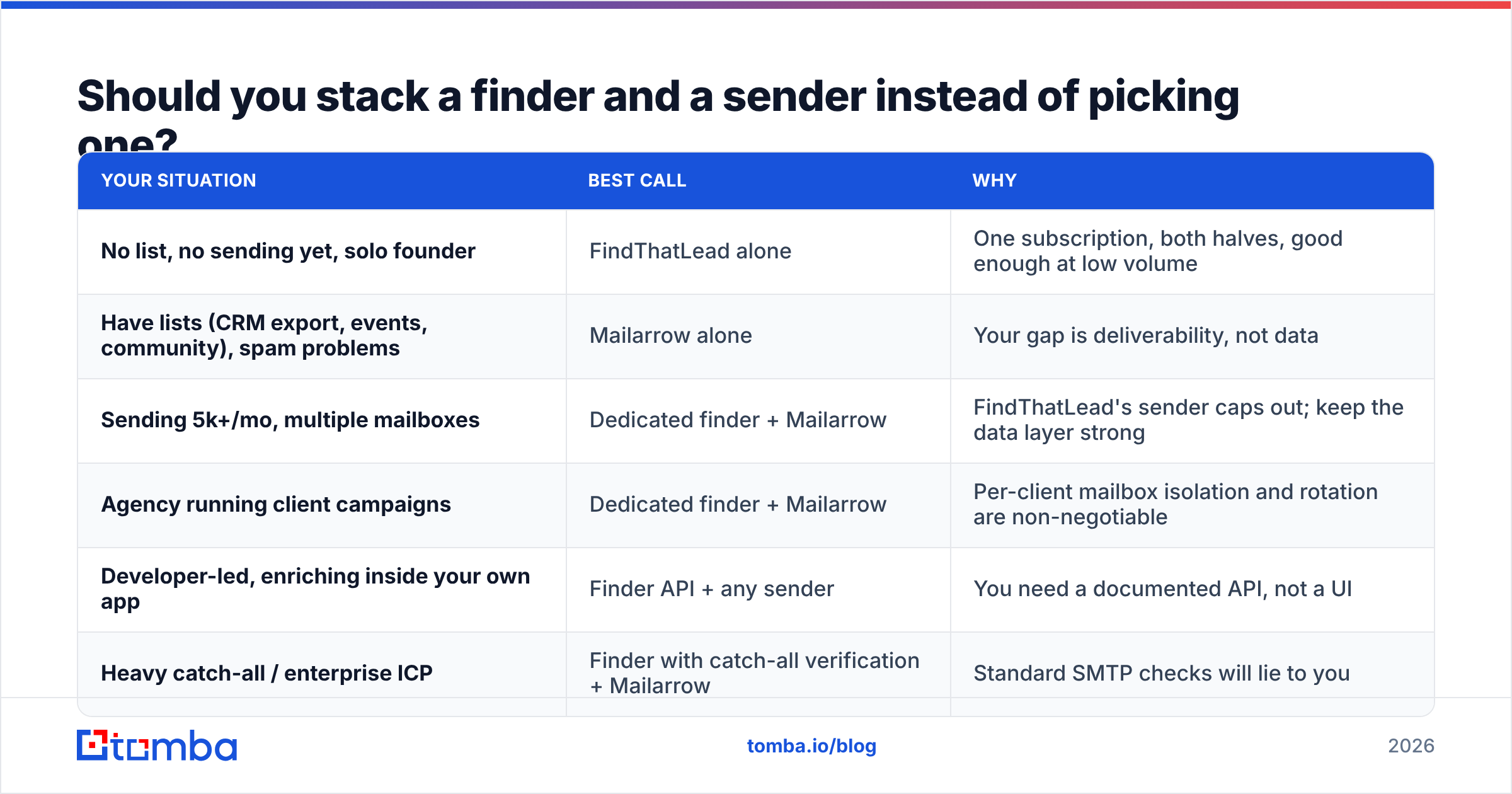
Yes, for almost every team past the first 500 emails a month. Here is the decision grid:
| Your situation | Best call | Why |
|---|---|---|
| No list, no sending yet, solo founder | FindThatLead alone | One subscription, both halves, good enough at low volume |
| Have lists (CRM export, events, community), spam problems | Mailarrow alone | Your gap is deliverability, not data |
| Sending 5k+/mo, multiple mailboxes | Dedicated finder + Mailarrow | FindThatLead's sender caps out; keep the data layer strong |
| Agency running client campaigns | Dedicated finder + Mailarrow | Per-client mailbox isolation and rotation are non-negotiable |
| Developer-led, enriching inside your own app | Finder API + any sender | You need a documented API, not a UI |
| Heavy catch-all / enterprise ICP | Finder with catch-all verification + Mailarrow | Standard SMTP checks will lie to you |
The stack argument comes down to arithmetic. FindThatLead's mid tier plus a warmup add-on lands close to what a dedicated finder plus Mailarrow costs, except the stacked version gives you a stronger tool on both ends. You are not paying more for two tools; you are paying roughly the same and getting the better version of each half.
For the data half specifically, an email finder that pairs with a separate email verifier and bulk processing gives you the piece FindThatLead does well, without paying for a sender you will not use. If you are pushing volume, bulk email finder runs handle CSV-scale lookups rather than one-at-a-time searches, and the Tomba API covers the case where enrichment should happen inside your own product or workflow automation.
What are the real limitations of each tool?#
FindThatLead's weak spots:
- Sending features lag behind dedicated platforms. No inbox rotation, no native warmup, thinner sequence logic.
- US mid-market coverage is weaker than its European coverage. Test your specific territory.
- Credit consumption on failed lookups can inflate real cost per lead. Read the terms.
- The all-in-one design means you are stuck with its sender's ceiling once you scale past it.
Mailarrow's weak spots:
- Zero data layer. Budget for a finder from day one; it is not optional.
- Smaller ecosystem than the market leaders, which shows up in integration depth and third-party tutorials.
- Reporting is solid but not as granular as enterprise sequencers on things like multi-touch attribution.
- You own list hygiene entirely. Import a bad CSV and the platform will faithfully burn your domain with it.
Neither list is disqualifying. They are just the trade-offs each product made on purpose, and worth checking against recent user reviews on G2 before you sign an annual contract.
How do you actually test both in a week?#
Do not read comparison posts (including this one) and buy on the strength of a feature table. Run this instead:
- Day 1-2: recall test. Pick 100 target contacts you can independently verify. Run them through FindThatLead. Record found rate and correct rate separately.
- Day 2-3: bounce test. Take 200 fresh, unverified addresses from your ICP. Verify with each candidate tool. Send a small batch and measure actual bounce rate against the tool's prediction.
- Day 3-5: placement test. Same copy, same list segment, sent through FindThatLead's sender and through Mailarrow. Use seed accounts across Gmail, Outlook, and one corporate domain. Compare inbox placement, not opens.
- Day 5-7: cost per reply. Divide total tool spend by positive replies. This is the only metric that settles the argument.
Most teams find the placement test decides it. When the same copy and the same list produce meaningfully different inbox rates, that gap compounds across every campaign you will ever run.
The verdict#
FindThatLead if your pipeline is empty. Mailarrow if your emails are landing in spam. Both, if you are serious.
FindThatLead is the stronger buy for a founder or small team who needs contacts today and can live with modest sending. Mailarrow is the stronger buy for anyone who has lists and needs them delivered at volume across multiple mailboxes. The comparison only feels close if you have not yet diagnosed which half of your outbound is actually broken.
And if you go the stacked route, keep the data half specialized. Start with Tomba's Email Finder on the free tier - 25 searches, no card - and run the recall test above against your own known-good contacts. If the found rate holds up on your ICP, pair it with whichever sender wins your placement test. That is a stack you will not have to rebuild in six months.
Related guides#
Ready to find emails that actually work?
Join 150,000+ professionals who stopped guessing and started sending. Free credits on signup — no credit card required.
Get the Tomba newsletter
Practical outbound tactics and product updates — once every two weeks.
About the author