FindThatLead vs ManyReach: Which Fits Your Outbound?
FindThatLead finds and sends. ManyReach sends at volume with unlimited mailboxes. They solve different halves of outbound — here's which half you're actually missing, and what each costs in 2026.
FindThatLead vs ManyReach is the wrong fight for most teams. One tool finds the emails. The other sends them at scale. Here is what each does well, what they cost in 2026, and which half of your outbound to fix first.
TL;DR
- FindThatLead is a prospecting-first tool: find emails by domain, name, or LinkedIn, verify them, then push a modest campaign out of the same dashboard.
- ManyReach is a sending-first platform: unlimited mailboxes, unlimited seats, credit-based pricing, built for agencies and teams running high-volume cold email.
- They overlap by maybe 20%. Most teams comparing them are actually deciding which half of outbound to fix first — data or delivery.
- If your bounce rate is above 5%, the sending tool is not your problem. Fix the data layer with a dedicated email finder and email verifier before you touch sequencing.
- Best combined stack for most teams: a specialist data source feeding a specialist sender. All-in-one is convenient at 200 leads/month and expensive at 5,000.
What is FindThatLead, and what does it actually do well?#
FindThatLead (findthatlead.com) started as a straight email-finder and grew a sending layer on top. The core loop is simple. Give it a domain, a first/last name, or a LinkedIn profile, and it returns a professional email address with a confidence score. A Chrome extension does the same job while you browse LinkedIn, and a bulk uploader takes a CSV of names and companies.
The parts people actually use:
- Domain search — pull every public email pattern the tool has seen on a company domain.
- Lead Search — filter a database by role, industry, and location to build a raw list without leaving the app.
- Prospector / social search — resolve a LinkedIn profile into a work email.
- Email verifier — a syntax + MX + SMTP check layered on top of finds.
- Cold email sender — basic sequences, merge tags, scheduling, and per-mailbox limits.
The trade-off is right there in the feature list: FindThatLead does five things adequately rather than one thing exceptionally. Its sending module is fine for a founder mailing 300 people a month. It is not fine for an agency running 40 client inboxes with per-domain rotation and reply routing.
What is ManyReach, and who is it built for?#
ManyReach (manyreach.com) is an outbound sending platform. It does not pretend to be a data vendor. You bring the list; it handles mailbox connection, warmup-adjacent sending controls, sequence logic, inbox rotation, reply detection, and reporting.
Two design decisions define it:
- Unlimited mailboxes and unlimited team seats. Most sending platforms meter both. ManyReach meters contacts or credits instead, which is a materially different cost curve if you run 30+ sending domains.
- Pay-as-you-go credit model. You buy volume rather than committing to a per-seat annual contract. Agencies with lumpy client demand tend to prefer this; predictable enterprise teams often don't care.
What ManyReach does not do is find you contacts. There is no domain search, no LinkedIn resolver, no permutation engine. If your CSV is full of guessed addresses, ManyReach will faithfully deliver those guesses straight into a bounce log and take your sender reputation down with it.

FindThatLead vs ManyReach: are they even competitors?#
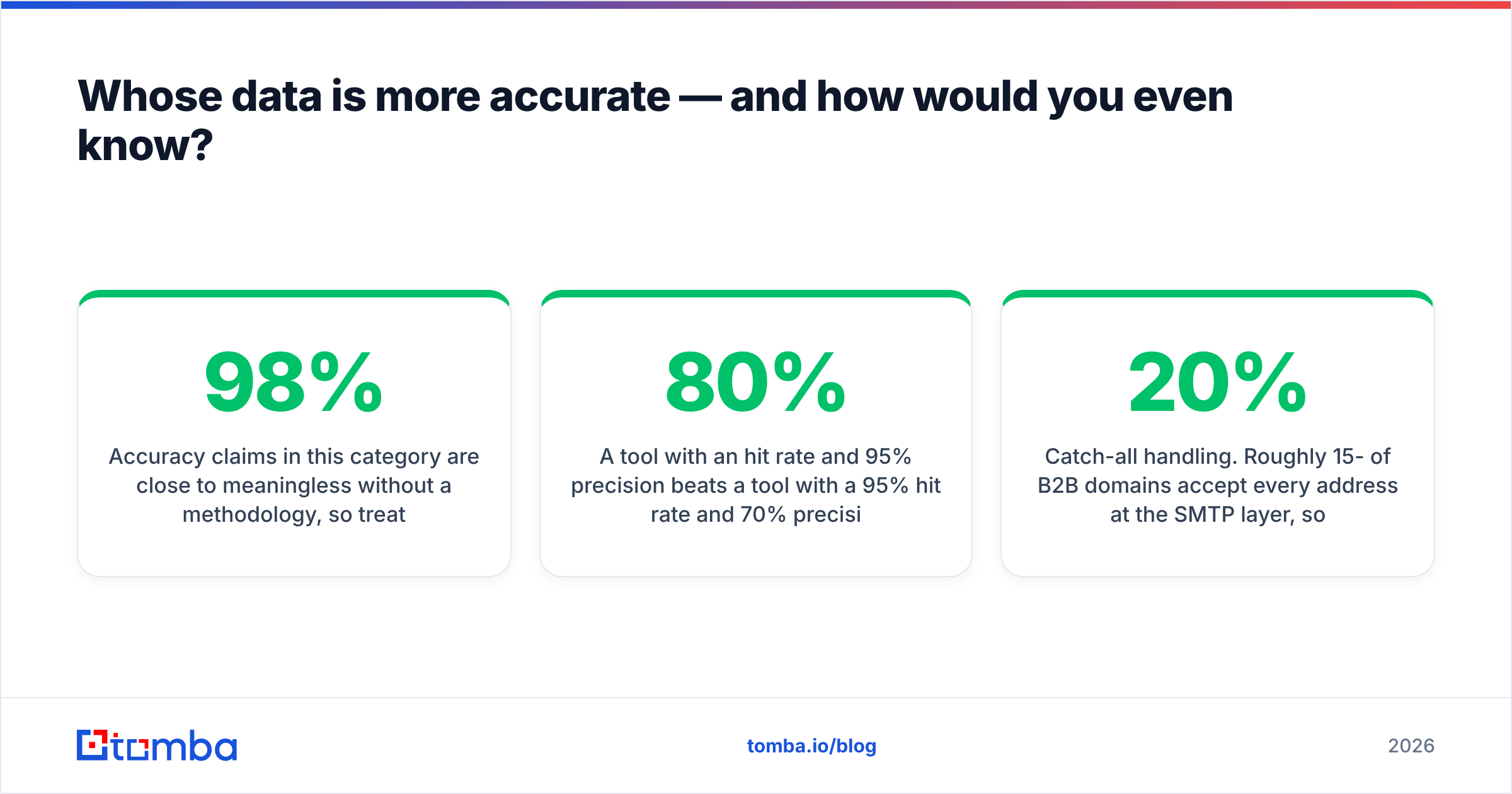
Partially. Here's the honest overlap map.
| Job to be done | FindThatLead | ManyReach | Verdict |
|---|---|---|---|
| Find an email from a name + domain | Core feature | Not offered | FindThatLead |
| Build a list from filters (role, industry) | Built-in database | Not offered | FindThatLead |
| Verify addresses before sending | Included, basic | Not a core feature | FindThatLead |
| Connect 20+ sending mailboxes | Limited | Unlimited | ManyReach |
| Inbox rotation across domains | Basic | Core feature | ManyReach |
| Multi-client / agency workspaces | Weak | Strong | ManyReach |
| Per-seat cost at 5 users | Charged per plan | Unlimited seats | ManyReach |
| Reply handling + unified inbox | Basic | Core feature | ManyReach |
Read that table again and the decision reframes itself. This is not "which product is better." It is "is my outbound currently bottlenecked on finding people or on reaching them?"
Diagnose it in ten minutes:
- Bounce rate above 5% — your data layer is broken. Fixing sequencing changes nothing.
- Open rate under 25% with clean data — deliverability or subject lines. Sending platform territory.
- Reply rate under 1% with good opens — copy and targeting, not tooling.
- You can't build a list at all — you need a finder and a database, not a sender.
- Lists are fine, but you're capped at one mailbox — you need mailbox scale, i.e. ManyReach.
- Both are broken — fix data first. Always. Bad data poisons the domain you'd need for the sending fix to matter.
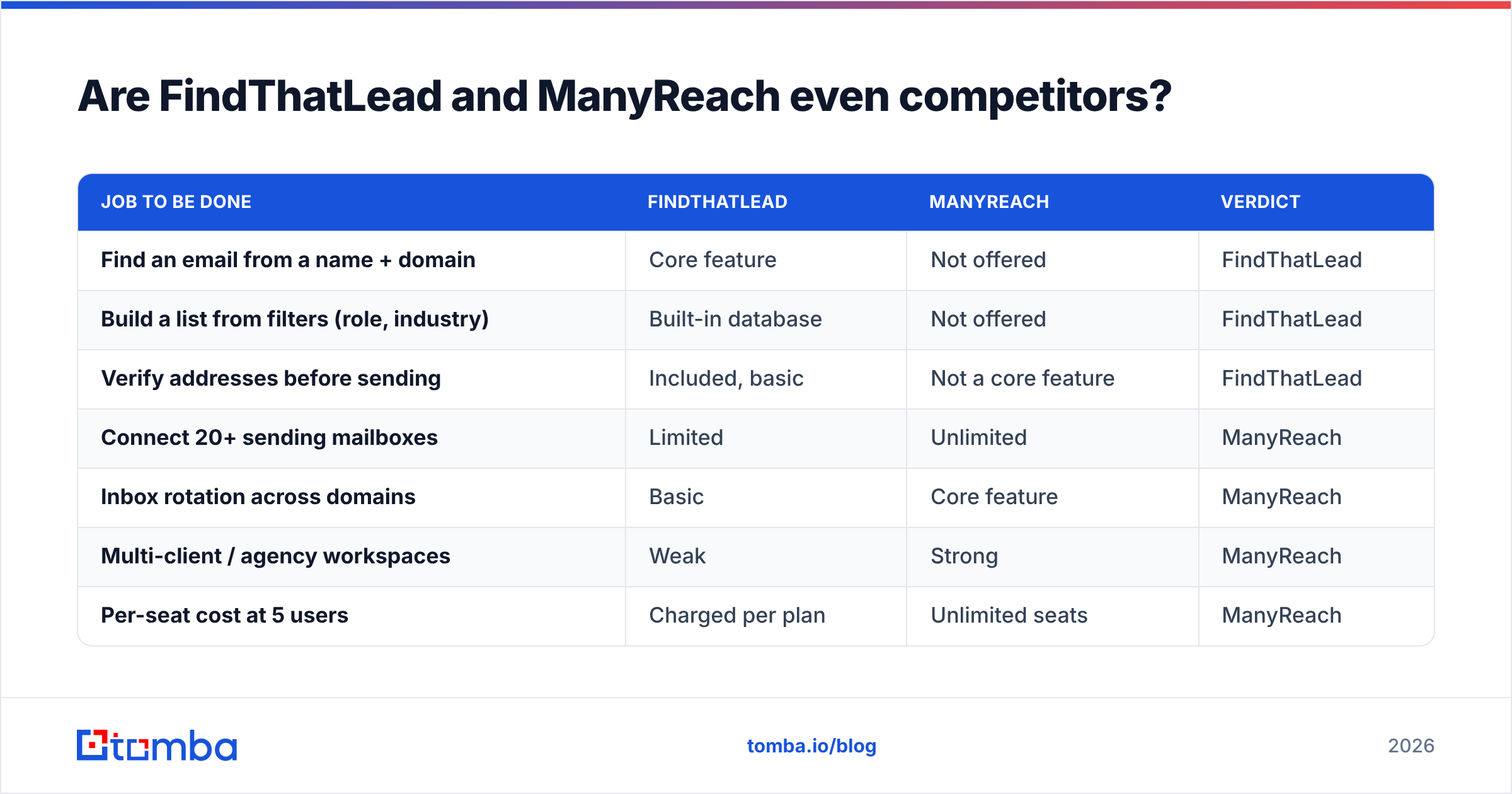
How do FindThatLead and ManyReach compare feature by feature?#
| Feature | FindThatLead | ManyReach | Tomba (data layer) |
|---|---|---|---|
| Email finder by name + domain | Yes | No | Yes |
| Domain / company-wide search | Yes | No | Yes (domain search) |
| LinkedIn profile → email | Yes | No | Yes |
| Catch-all domain handling | Basic flag | N/A | Dedicated catch-all verifier |
| Bulk enrichment (CSV) | Yes | Import only | Yes |
| Phone number lookup | Limited | No | Yes |
| Email verification | Included | No | Core feature |
| Cold email sequences | Basic | Advanced | No (by design) |
| Unlimited mailboxes | No | Yes | N/A |
| Unlimited seats | No | Yes | Per plan |
| API access | Yes | Yes | Yes (Tomba API) |
| Chrome extension | Yes | No | Yes |
| Free tier | Limited credits | Trial credits | 25 searches/mo |
The pattern is obvious once it's laid out. FindThatLead owns the left column, ManyReach owns the middle, and neither owns both. A specialist data provider slots in as the third column because the first two leave a gap. FindThatLead's finder is one feature competing against companies whose entire business is that feature, and ManyReach doesn't play in that lane at all.
Whose data is more accurate — and how would you even know?#
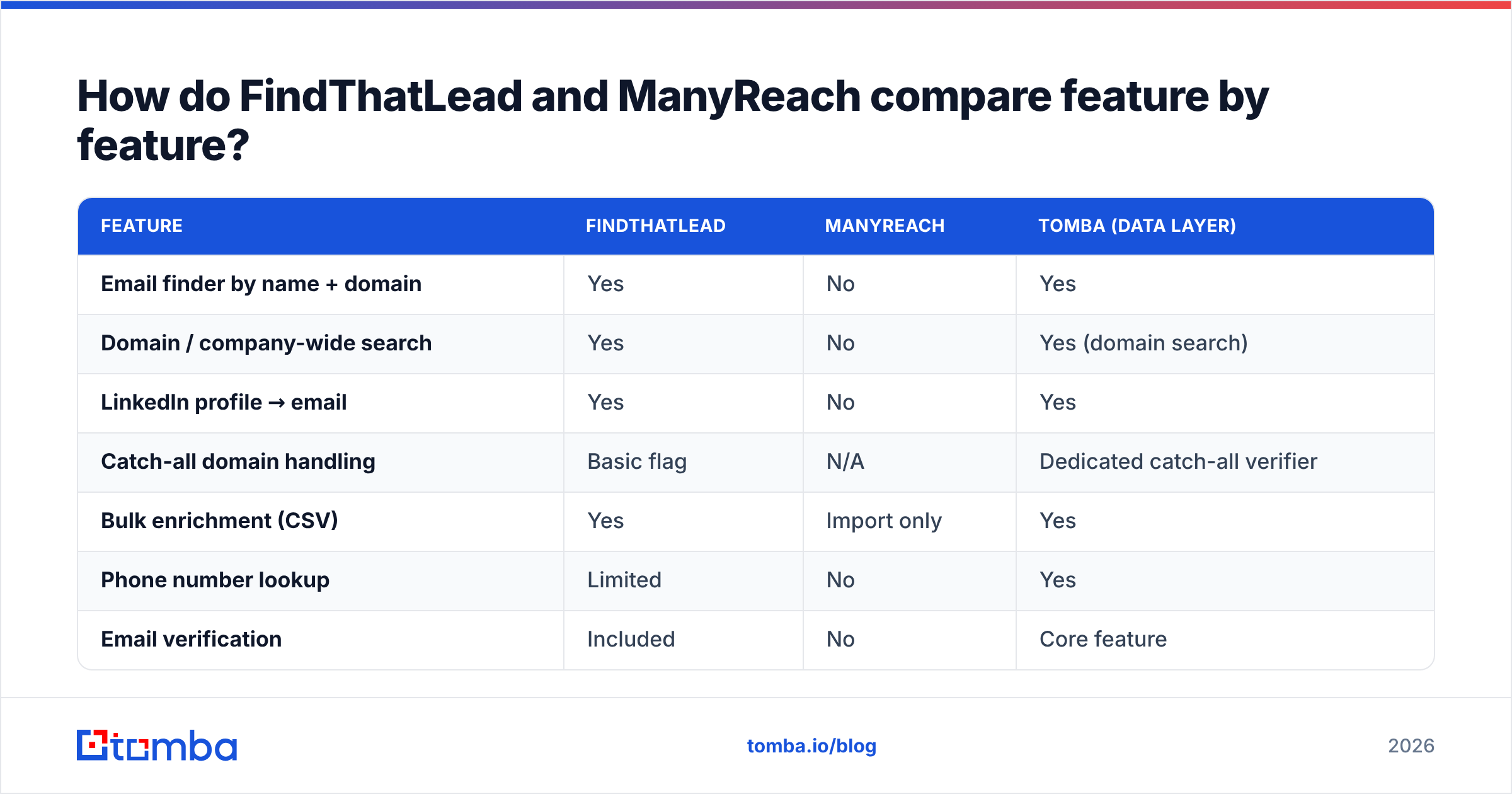
Accuracy claims in this category are close to meaningless without a methodology. Treat every "98% accurate" badge (including ours) as a hypothesis to test, not a fact to buy.
Here's the test that actually settles it. Take 200 contacts you already know are real — past customers, closed-won accounts, people who replied to you last quarter. Strip the emails. Run the name + domain pairs through each tool. Score three numbers:
- Hit rate — what percentage returned any address at all.
- Precision — of those returned, how many match the known-good address exactly.
- Cost per verified hit — total credits burned divided by correct results. This is the only number that matters commercially.
A tool with an 80% hit rate and 95% precision beats one with a 95% hit rate and 70% precision. Every time. The second tool is quietly charging you to poison your domain. Most buyers compare the first number and ignore the second.
Two structural things separate serious data vendors from convenience finders:
Catch-all handling. Roughly 15-20% of B2B domains accept every address at the SMTP layer, so a naive verifier marks garbage as "valid." A tool that returns accept_all and stops there has handed you a coin flip. A tool with a real catch-all finder uses pattern confidence and secondary signals to give you an actual probability. FindThatLead flags catch-alls; it does not resolve them with much depth.
Source transparency. Ask any vendor where the data comes from. If the answer is vague, your compliance team will eventually make it your problem. Tomba publishes its data sources; many competitors don't.
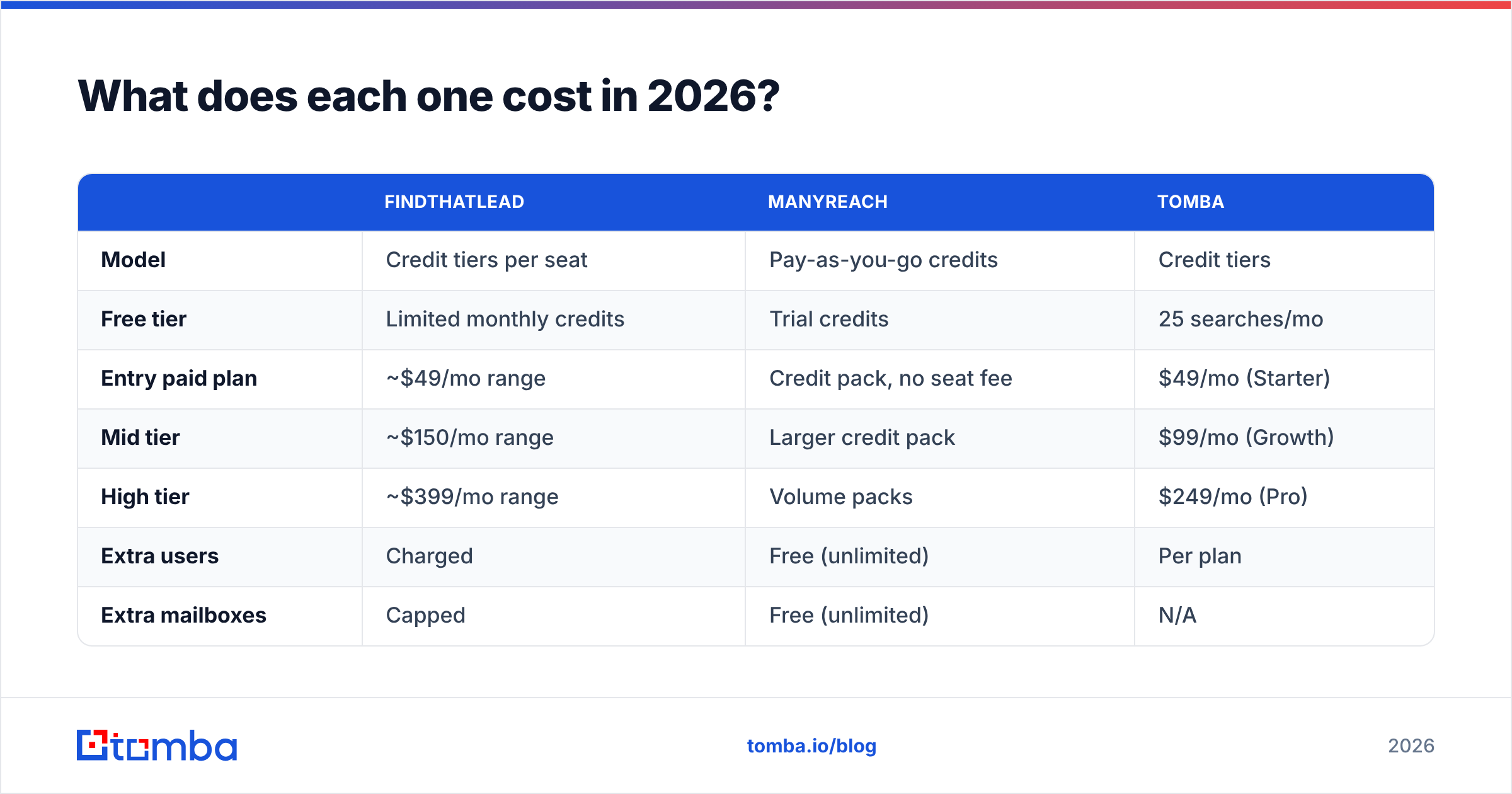
What does each one cost in 2026?#
Pricing moves, so check the vendors' own pages before you commit. But the shape of each model is stable, and that's what should drive your decision.
| FindThatLead | ManyReach | Tomba | |
|---|---|---|---|
| Model | Credit tiers per seat | Pay-as-you-go credits | Credit tiers |
| Free tier | Limited monthly credits | Trial credits | 25 searches/mo |
| Entry paid plan | ~$49/mo range | Credit pack, no seat fee | $49/mo (Starter) |
| Mid tier | ~$150/mo range | Larger credit pack | $99/mo (Growth) |
| High tier | ~$399/mo range | Volume packs | $249/mo (Pro) |
| Extra users | Charged | Free (unlimited) | Per plan |
| Extra mailboxes | Capped | Free (unlimited) | N/A |
| Annual lock-in | Discounted annual | Not required | Monthly or annual |
| Best for | Solo founders, small teams | Agencies, high-volume senders | Data layer at any scale |
Full Tomba pricing is public if you want the exact credit math.
The cost trap to watch: credits burned on failed lookups. Some finders charge you whether or not they return a usable address. Over a 10,000-contact month that's the difference between a $99 bill and a $400 one. Ask each vendor, in writing, whether failed searches consume credits. It's the single highest-leverage question in the whole evaluation, and almost nobody asks it.

Which should you choose for your situation?#
Concrete recommendations, no hedging.
If you're small or short on list data:
- Solo founder, under 500 emails/month, no list yet. FindThatLead alone. The all-in-one convenience genuinely outweighs the quality tax at this volume. Revisit at 1,000/month.
- Agency running 10+ client campaigns. ManyReach for sending, plus a dedicated data source. FindThatLead's seat and mailbox limits will break you before month three.
- SDR team of 3-8 with an existing CRM. Dedicated finder + enrichment feeding your CRM, then whichever sender your ops team already knows. Don't buy a database you'll duplicate.
If you already send at volume:
- You already have ManyReach and your bounce rate is ugly. You don't need FindThatLead — you need verification. Run the list through a bulk verify pass and re-measure before buying anything else.
- Engineering-led GTM, everything through an API. Neither all-in-one fits well. Use an email finder API for the data and your own sending infrastructure.
- You need phone numbers too. Neither tool is strong here. Layer in a phone finder rather than compromising on the email side.
What about buying both — or neither?#
The most common real-world stack among teams that have run outbound for more than a year is three tools, not one:
- A data layer that finds and verifies contacts, priced on lookups.
- A sending layer that manages mailboxes, rotation, and replies, priced on volume or seats.
- A CRM that owns the record of truth.
Bundling layer one into layer two feels efficient. Then you try to switch senders, and your contact history lives inside the tool you're leaving. Keeping the layers separate costs a little more per month and saves a migration project. G2's sales intelligence category makes the split obvious: the leaders in data and the leaders in engagement are almost entirely different companies. That's not an accident.
The counterargument is real for small teams: three subscriptions, three logins, three support queues. If you're one person sending 300 emails a month, take the all-in-one and stop optimising. The overhead of a "proper" stack exceeds its benefit until roughly the point where a bad list starts costing you a domain.
What's the deliverability risk in each setup?#
Deliverability is where the finder-vs-sender split stops being academic. Google and Microsoft both weigh bulk-sender behaviour heavily. Google's own sender requirements put spam-complaint rate and authentication front and centre. A list with 12% invalid addresses generates exactly the pattern those filters punish.
Sequence of operations that actually protects you:
- Authenticate the domain (SPF, DKIM, DMARC) before the first send.
- Find contacts with a source that reports confidence, not just a string.
- Verify every address, and treat catch-alls as a separate risk bucket rather than a pass.
- Warm the mailbox, then ramp volume gradually.
- Monitor bounce and complaint rates weekly and pause on any spike.
ManyReach helps with steps 4 and 5. FindThatLead touches 2 and 3, adequately. Neither will save you from a list you bought off a marketplace, and both will happily let you burn a domain if you skip step 3. Your email deliverability is downstream of your data quality far more than it is downstream of your sending tool's feature list.
The verdict#
The FindThatLead vs ManyReach call gets easy once you name the bottleneck.
Choose FindThatLead if you're small, you need list-building and sending in one place, and your monthly volume is low enough that data quality differences won't show up in your numbers.
Choose ManyReach if your list problem is solved and your constraint is mailbox count, seat count, or agency-style multi-client management. Its unlimited-mailbox model is genuinely differentiated and priced sanely for that use case.
Choose neither as your data layer once you cross about 1,000 contacts a month. At that point the gap between an 85%-precision finder and a 95%-precision one is measured in burned domains, not credits.
If the data half is what's broken, start there. The Tomba Email Finder resolves emails by domain, name, or company with confidence scoring and catch-all handling built in, verifies in the same pass, and exports straight into whichever sending platform you land on — including ManyReach. The free tier gives you 25 searches a month. That's enough to run the 200-contact accuracy test above before you spend a dollar. Run the test, compare the cost-per-verified-hit, and let the numbers pick your stack.
Related guides#
Ready to find emails that actually work?
Join 150,000+ professionals who stopped guessing and started sending. Free credits on signup — no credit card required.
Get the Tomba newsletter
Practical outbound tactics and product updates — once every two weeks.
About the author