FindThatLead vs Mattermark: Which B2B Data Tool Wins in 2026
FindThatLead finds contacts. Mattermark tracks companies. They get compared constantly, but they solve opposite halves of the same problem. Here is which one belongs in your stack in 2026 — and what to pair it with.
TL;DR
- FindThatLead is a contact-level prospecting tool: give it a domain, a name, or a LinkedIn URL and it returns email addresses, then sends cold sequences from the same dashboard.
- Mattermark is a company-level intelligence product: it tracks funding rounds, headcount growth, web traffic, and momentum scores so you know which accounts to chase, not who to email inside them.
- Comparing them head-to-head is slightly unfair — they sit on opposite ends of the same pipeline. The real question is which half of the problem is currently costing you more pipeline.
- Pricing philosophy differs sharply: FindThatLead sells credit packs to individual reps and small teams; Mattermark has historically sold seats and API access to funds, corp-dev teams, and enterprise GTM orgs.
- If your bottleneck is deliverable contact data rather than account selection, a dedicated finder-plus-verifier stack (Tomba, Hunter, Findymail) will usually beat both on cost per valid email.
If you landed here searching "findthatlead vs mattermark," you are probably trying to decide where the next $100–$500 a month of your data budget goes. That decision is easier once you accept that these two tools were never really competitors.
What is FindThatLead, and who is it built for?#
FindThatLead is a Barcelona-based prospecting platform that has been around since 2015. Its core loop is simple: you feed it an identifier — a company domain, a first name plus last name, or a LinkedIn profile — and it returns a business email address with a confidence score attached.
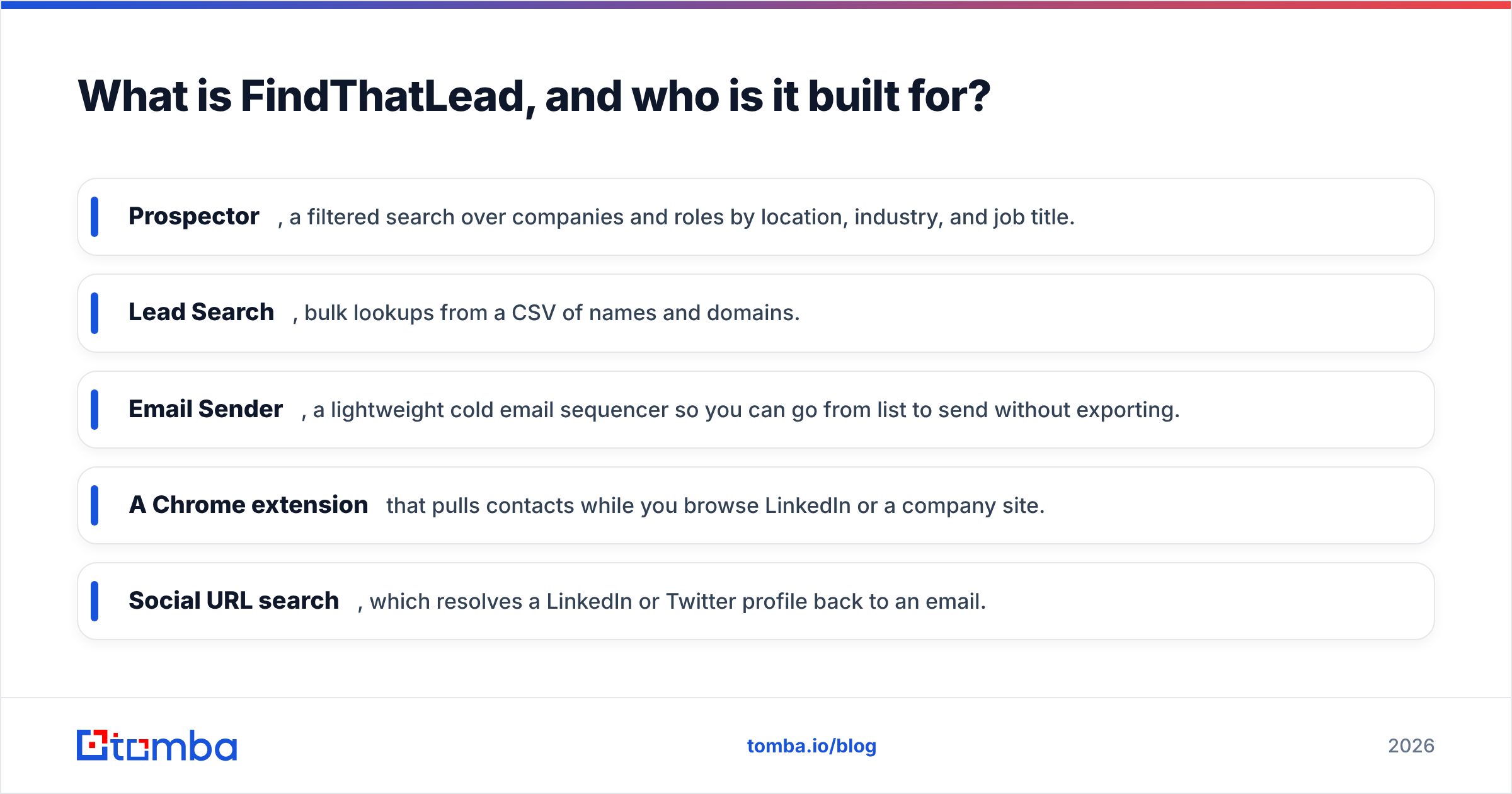
Around that core, the product stacks a few layers:
- Prospector, a filtered search over companies and roles by location, industry, and job title.
- Lead Search, bulk lookups from a CSV of names and domains.
- Email Sender, a lightweight cold email sequencer so you can go from list to send without exporting.
- A Chrome extension that pulls contacts while you browse LinkedIn or a company site.
- Social URL search, which resolves a LinkedIn or Twitter profile back to an email.
The design intent is obvious: one seat, one rep, one workflow, from "I have a target list" to "I hit send." That makes it popular with solo founders, agencies, and two-to-five-person outbound teams who do not want to wire together four vendors. You can see the current plan structure on the FindThatLead site, which has moved through several credit-pack revisions — verify the tier you want before you commit, because the credit-to-lookup ratio has changed more than once.
What FindThatLead is not is an account-intelligence product. It will not tell you that a company just closed a Series B, doubled its engineering headcount in ninety days, or started hiring for a role that implies your product is now relevant. That is Mattermark's territory.

What is Mattermark, and what problem does it actually solve?#
Mattermark launched in 2012 as a "Bloomberg terminal for private companies." It indexed startups and growth-stage businesses, then scored them on momentum — funding raised, employee count trajectory, mobile downloads, web traffic, social following, and a proprietary Mattermark Score that rolled those into a single number.
The original buyers were venture capital funds and corp-dev teams sourcing deals. B2B sales teams adopted it later for a different reason: it answered "which accounts are worth my time this quarter?" better than a static firmographic list. If your ideal customer is a Series A SaaS company that just tripled headcount, Mattermark could surface that cohort weekly.
Two things you should know before you evaluate it in 2026. First, the company was acquired by FullContact in 2017 and subsequently changed hands again, so the product has not followed the trajectory of a well-funded, independently-scaling data vendor. Second, its category has become crowded — Crunchbase, PitchBook, Apollo, Clay, and a wave of signal-based tools now overlap heavily with what Mattermark pioneered. Check Mattermark's site and current reviews on G2 for coverage and support responsiveness before signing anything annual. That is not a knock on the underlying idea; account momentum data is genuinely useful. It is a note that the "is it still actively maintained at the level I need" question matters more here than with a tool shipping weekly.
FindThatLead vs Mattermark: how do they compare head-to-head?#
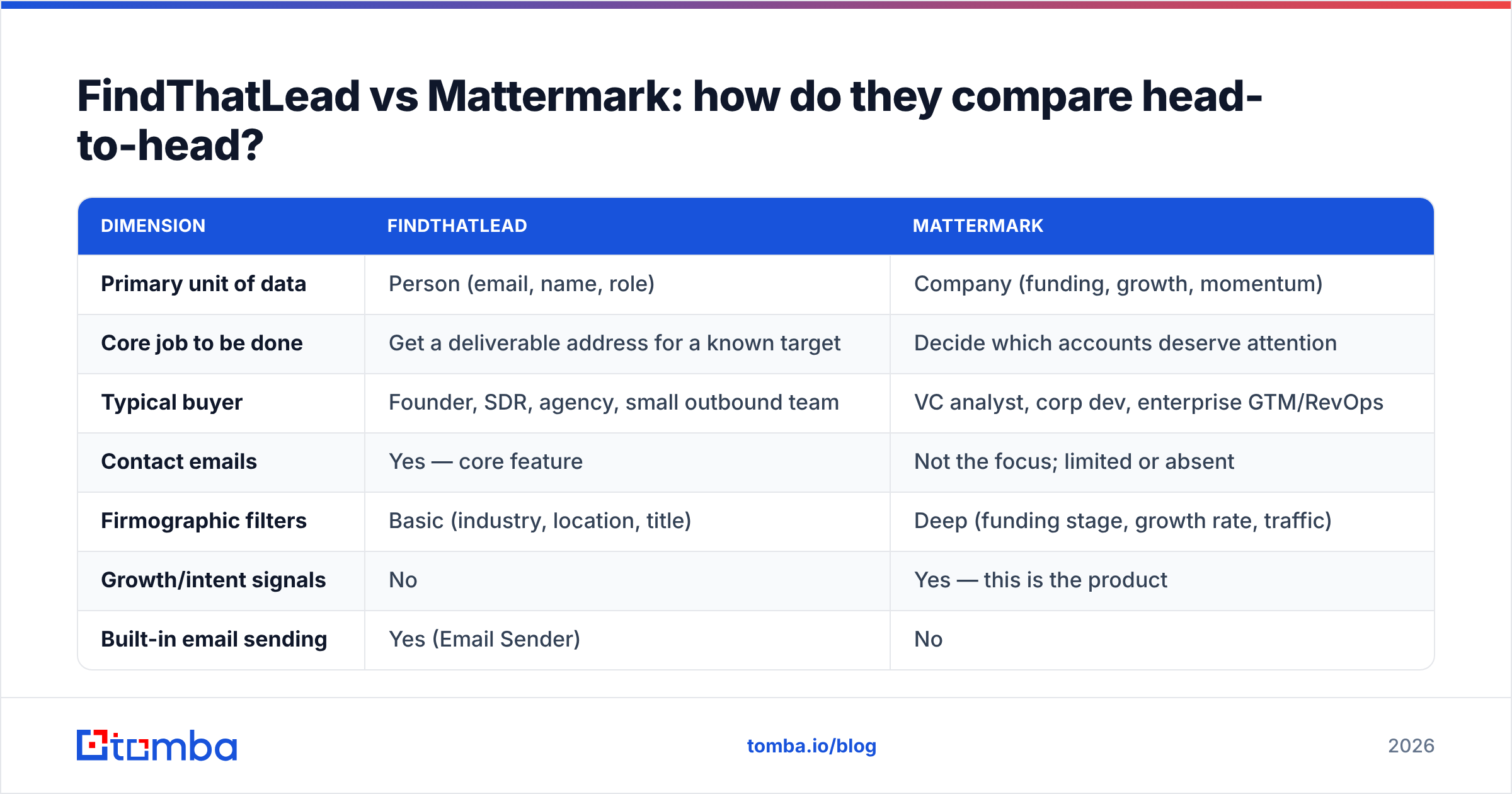
Here is the honest side-by-side. Notice how few rows have a true overlap.
| Dimension | FindThatLead | Mattermark |
|---|---|---|
| Primary unit of data | Person (email, name, role) | Company (funding, growth, momentum) |
| Core job to be done | Get a deliverable address for a known target | Decide which accounts deserve attention |
| Typical buyer | Founder, SDR, agency, small outbound team | VC analyst, corp dev, enterprise GTM/RevOps |
| Contact emails | Yes — core feature | Not the focus; limited or absent |
| Firmographic filters | Basic (industry, location, title) | Deep (funding stage, growth rate, traffic) |
| Growth/intent signals | No | Yes — this is the product |
| Built-in email sending | Yes (Email Sender) | No |
| Bulk enrichment | Yes, CSV-based | Yes, via API/exports on higher tiers |
| API access | Yes | Yes, historically on upper tiers |
| Verification depth | Confidence scoring, basic validation | Not applicable |
| Best-fit team size | 1–10 reps | 10+ or investment teams |
| Learning curve | Under an hour | Half a day to build useful saved searches |
Read that table as a routing decision, not a scoreboard. If you cannot name your target accounts, no email finder in the world helps you — you will just find addresses at companies that were never going to buy. If you can name them and simply cannot reach the right person, momentum data is an expensive way to solve the wrong problem.
Which one has better data quality?#
They fail in different ways, which is why "better" needs a qualifier.
FindThatLead's failure mode is bounce rate. Every pattern-based email finder guesses when it lacks a verified record — first.last@, f.last@, firstinitiallast@ — and then tries to validate the guess over SMTP. On well-indexed domains that works. On catch-all domains, on companies under 20 people, and outside North America and Western Europe, hit rates drop and "confidence 70%" quietly becomes "hard bounce." Users across review sites consistently flag inconsistency on smaller and non-US domains. That is not unique to FindThatLead — it is the physics of the category — but it means you should never send to a finder's raw output without a second verification pass.
Mattermark's failure mode is staleness. Company signal data ages badly. A headcount figure scraped four months ago, a funding round that closed but was never announced, a traffic estimate derived from a panel rather than actual analytics — each of these is directionally useful and precisely wrong. For deal sourcing, directionally useful is fine. For a sales trigger you are about to reference in a first line ("congrats on the Series B"), precisely wrong is embarrassing.
The practical implication: whichever you buy, budget for a verification layer. A dedicated email verifier that runs SMTP, syntax, MX, disposable-domain, and role-account checks will cut bounce rates far more cheaply than upgrading to a higher tier of either platform. And if you are prospecting into catch-all domains — which is most enterprise-grade targets now — a catch-all verifier is the only thing standing between your sequence and a damaged sending domain.
How do the pricing models compare?#
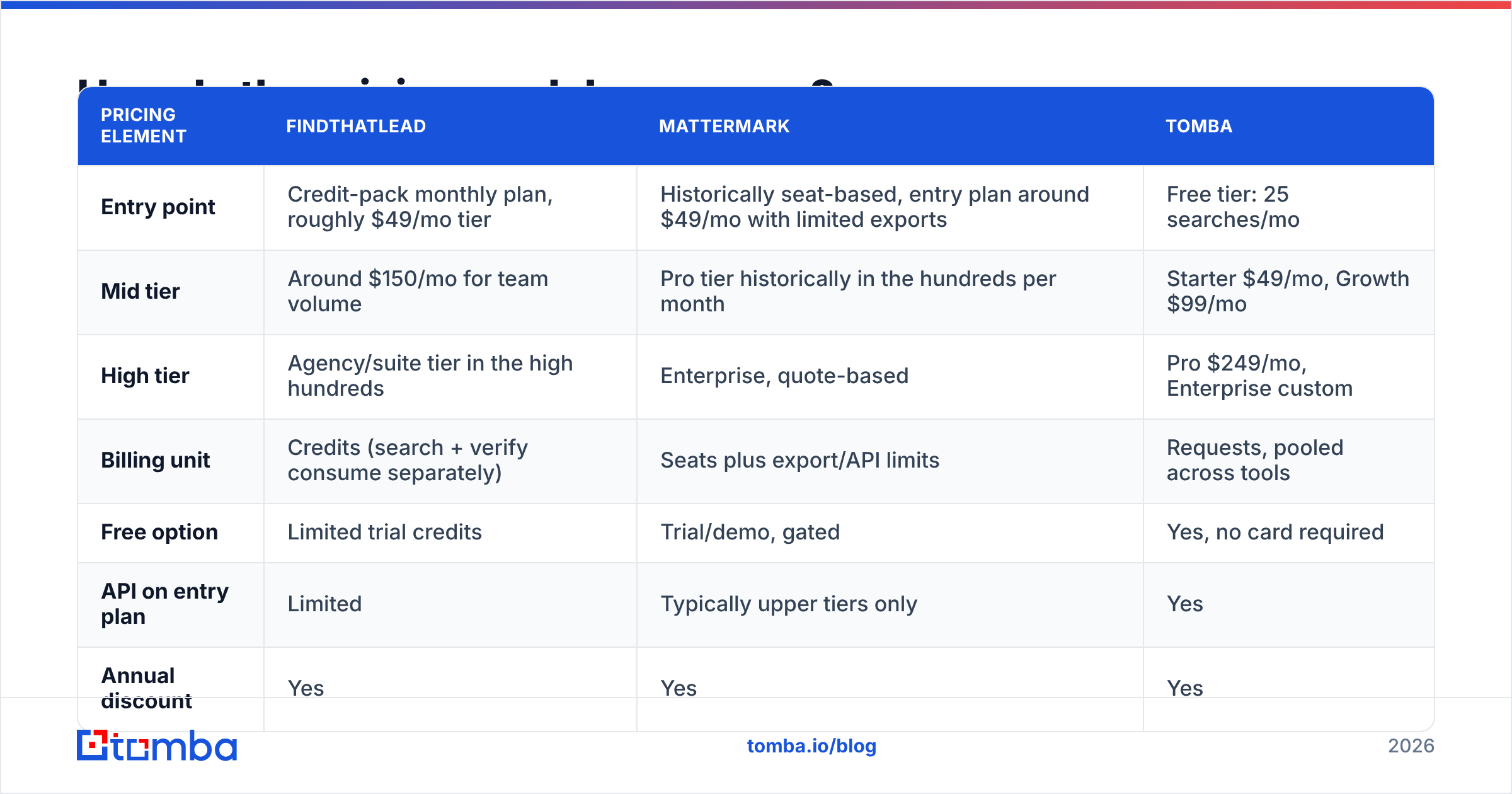
Both vendors have revised pricing more than once, so treat the shape below as the model rather than a live quote.
| Pricing element | FindThatLead | Mattermark | Tomba |
|---|---|---|---|
| Entry point | Credit-pack monthly plan, roughly $49/mo tier | Historically seat-based, entry plan around $49/mo with limited exports | Free tier: 25 searches/mo |
| Mid tier | Around $150/mo for team volume | Pro tier historically in the hundreds per month | Starter $49/mo, Growth $99/mo |
| High tier | Agency/suite tier in the high hundreds | Enterprise, quote-based | Pro $249/mo, Enterprise custom |
| Billing unit | Credits (search + verify consume separately) | Seats plus export/API limits | Requests, pooled across tools |
| Free option | Limited trial credits | Trial/demo, gated | Yes, no card required |
| API on entry plan | Limited | Typically upper tiers only | Yes |
| Annual discount | Yes | Yes | Yes |
Two things reliably surprise buyers. First, credits are not interchangeable across vendors — one "credit" may buy a search, a verification, or both, and the difference doubles or halves your effective cost per usable email. Second, export caps matter more than list size. A database of 50 million companies you can only export 500 rows a month from is a demo, not a data source. Read the export line in the contract before the coverage line.
Full Tomba pricing is published without a sales call, which is worth checking against whatever quote you get elsewhere, if only as a baseline.
What does a working 2026 prospecting stack actually look like?#
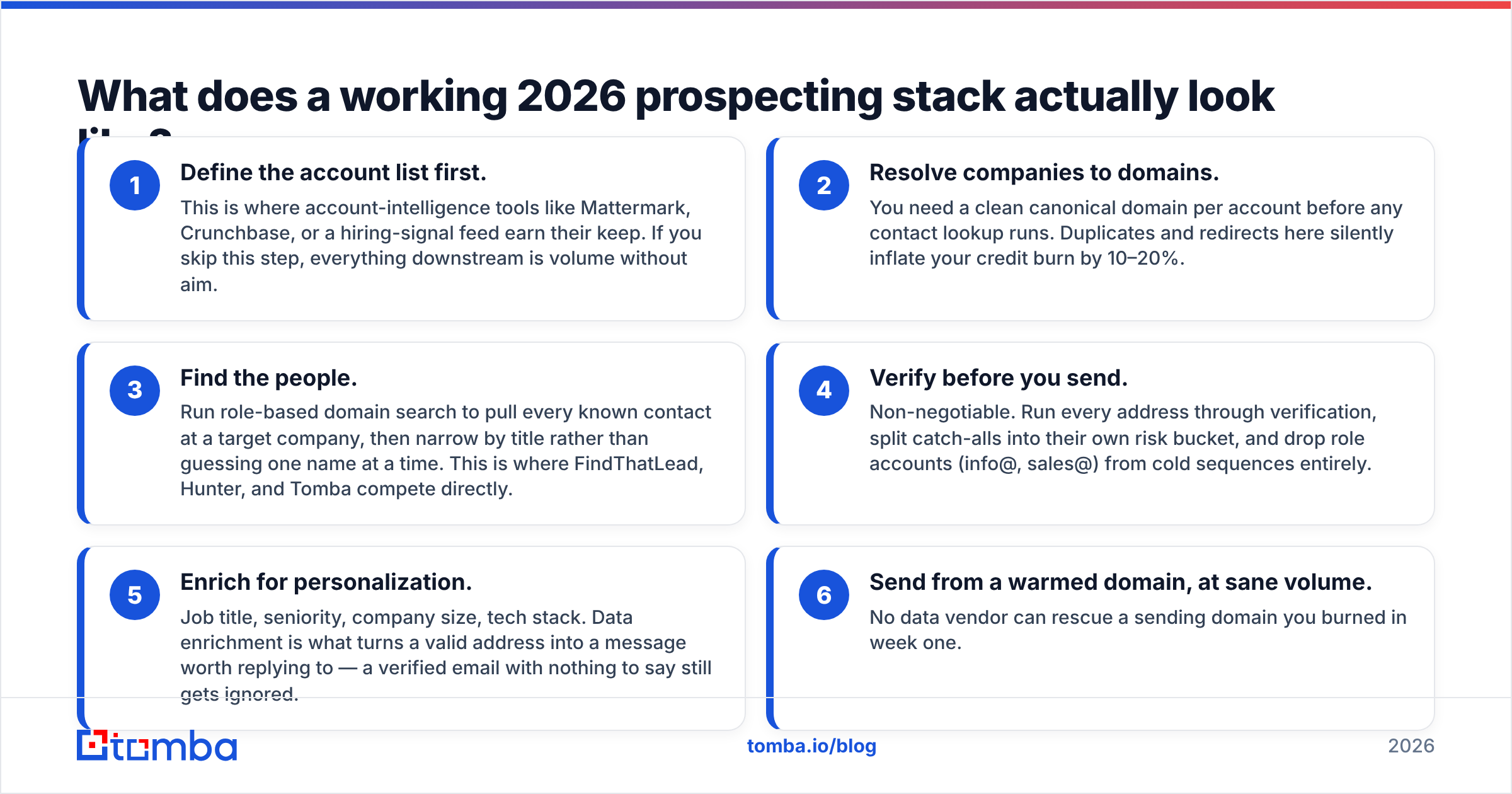
Most teams that complain about data quality have a sequencing problem, not a vendor problem. Here is the order that works, and where each tool slots in:
- Define the account list first. This is where account-intelligence tools like Mattermark, Crunchbase, or a hiring-signal feed earn their keep. If you skip this step, everything downstream is volume without aim.
- Resolve companies to domains. You need a clean canonical domain per account before any contact lookup runs. Duplicates and redirects here silently inflate your credit burn by 10–20%.
- Find the people. Run role-based domain search to pull every known contact at a target company, then narrow by title rather than guessing one name at a time. This is where FindThatLead, Hunter, and Tomba compete directly.
- Verify before you send. Non-negotiable. Run every address through verification, split catch-alls into their own risk bucket, and drop role accounts (info@, sales@) from cold sequences entirely.
- Enrich for personalization. Job title, seniority, company size, tech stack. Data enrichment is what turns a valid address into a message worth replying to — a verified email with nothing to say still gets ignored.
- Send from a warmed domain, at sane volume. No data vendor can rescue a sending domain you burned in week one.
Steps 1 and 3 are the two places money actually needs to go. Mattermark plays in step 1. FindThatLead plays in step 3. Neither covers both, and any vendor claiming to do all six well is asking you to accept mediocrity in four of them.

When should you choose FindThatLead?#
Pick FindThatLead when all of the following are true:
- You already know which companies you are targeting and need contacts inside them.
- Your team is small enough that one integrated tool beats a best-of-breed stack.
- You want sending built in and do not already pay for Instantly, Smartlead, or Lemlist.
- Your targets skew toward mid-size, well-indexed companies in Europe or North America.
- Your monthly volume sits in the low thousands of lookups, not tens of thousands.
Skip it if you need a serious API, if your ICP lives in catch-all-heavy enterprise domains, or if you already run a sequencer — in that case you are paying for a sending feature you will never open.
When should you choose Mattermark?#
Pick Mattermark when:
- Account selection is your bottleneck, not contact discovery.
- You sell into startups and growth-stage companies where funding and headcount changes are genuine buying triggers.
- You have an analyst or RevOps person who will actually build and maintain saved searches — signal tools decay fast without an owner.
- You can validate current coverage and refresh cadence during a trial. Ask specifically: how old is the median headcount figure in this segment?
Skip it if you sell to established enterprises where momentum signals barely move, if you are a solo founder without time to maintain queries, or if your CRM already ingests funding data from another source.
Is there a better option than either one?#
For the contact-data half, usually yes — because that half is the more commoditized, more measurable one.
Judge any email finder on three numbers, not on feature lists: hit rate (what percentage of your target list returns an address), bounce rate on delivery (what percentage of those addresses actually accept mail), and cost per valid email (the only figure that matters, and the one no vendor puts on its pricing page). Run the same 200-row test list through two or three tools and calculate it yourself. It takes an afternoon and routinely changes the decision.
Tomba is worth including in that test. The Tomba Email Finder sits alongside verification, catch-all detection, domain search, phone lookup, and enrichment under one credit pool, with API access on every paid tier rather than gated behind enterprise pricing. The free tier gives you 25 searches a month, which is enough to run a real bake-off before spending anything. It does not try to be an account-intelligence platform, and it does not try to be your sequencer — it does the contact layer and hands off cleanly to whatever you already use.
For the account-selection half, evaluate Mattermark against Crunchbase, Clay, and the newer signal aggregators before defaulting to it out of familiarity. That category moved a long way after 2017.
The bottom line on FindThatLead vs Mattermark#
They are not substitutes. FindThatLead answers "who do I email at this company," Mattermark answers "which companies deserve an email at all." Buy the one that fixes your actual constraint, and resist paying for the other until it becomes the constraint.
Whichever you land on, the layer neither handles well is verification — and that is the layer that decides whether your domain still has a sender reputation in six months. Start with a free run of the Tomba Email Finder: pull contacts by domain or name, verify them in the same pass, and measure your real cost per valid email before you commit budget to anything annual. Twenty-five searches a month, no card, and the same API on every plan.
Related guides#
Ready to find emails that actually work?
Join 150,000+ professionals who stopped guessing and started sending. Free credits on signup — no credit card required.
Get the Tomba newsletter
Practical outbound tactics and product updates — once every two weeks.
About the author