FindThatLead vs NinjaPear: Which Email Finder Wins in 2026?
FindThatLead and NinjaPear both promise verified B2B emails at low cost. Here's how they actually differ on accuracy, credit math, catch-all handling, and API depth — plus where a third option beats both.
TL;DR
- FindThatLead is the older, broader platform: email finder, lead search, a built-in cold email sender, and a Chrome extension. It sells a full outbound workflow, not just data.
- NinjaPear is the leaner, cheaper play: find-and-verify with a simple credit model and less surface area. Fewer buttons, less to learn, less to break.
- The real difference is not the feature list — it's what happens on catch-all domains. That single behavior explains most of the bounce-rate gap between "cheap" finders and accurate ones.
- Credits are not comparable across vendors. One tool charges for a miss, another doesn't; one charges separately for verification. Always price per usable, verified contact, not per lookup.
- If you want the data layer decoupled from the sending layer — with an API, catch-all verification, and a free tier to test on your own list — Tomba is the third option worth benchmarking against both.
What are FindThatLead and NinjaPear?#
FindThatLead launched out of Barcelona and has been in the B2B prospecting market for the better part of a decade. It bundles four things: a domain-based email search, a single-prospect finder, a lead-database search by role and location, and "Scrab.in"-style outreach sending. The pitch is "prospect and send from one tab."
NinjaPear sits in the newer wave of lightweight finders — the ones that showed up after the big platforms drifted upmarket and left a gap for something that just returns an email and a confidence score. The pitch is the opposite of FindThatLead's: no sequences, no CRM ambitions, no lead marketplace. Look up, verify, export, done.
Both are legitimate tools. Both will find you emails. The question this post answers is which one wastes less of your money — and where both of them leave value on the table.
Before you compare anything else, get clear on three numbers you'll use throughout:
- Hit rate — of 1,000 first-name/last-name/domain rows you submit, how many come back with any email at all?
- Accuracy on returned emails — of the emails returned, what share actually accept mail? This is what determines your bounce rate.
- Effective cost per usable contact — plan price divided by (rows × hit rate × accuracy). This is the only pricing number that means anything.
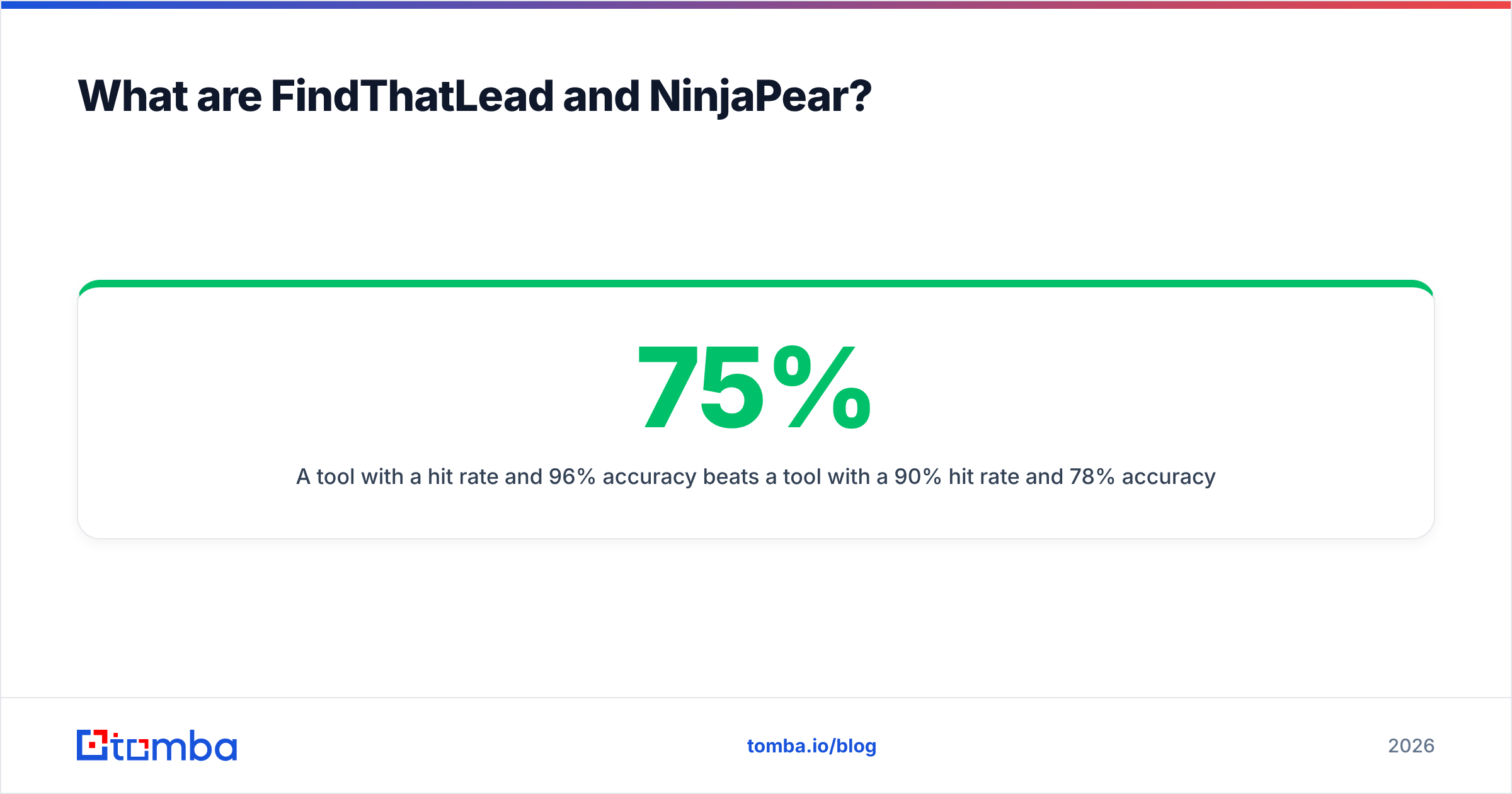
A tool with a 75% hit rate and 96% accuracy beats a tool with a 90% hit rate and 78% accuracy on almost every dimension that matters, including deliverability.
How do their core features compare?#
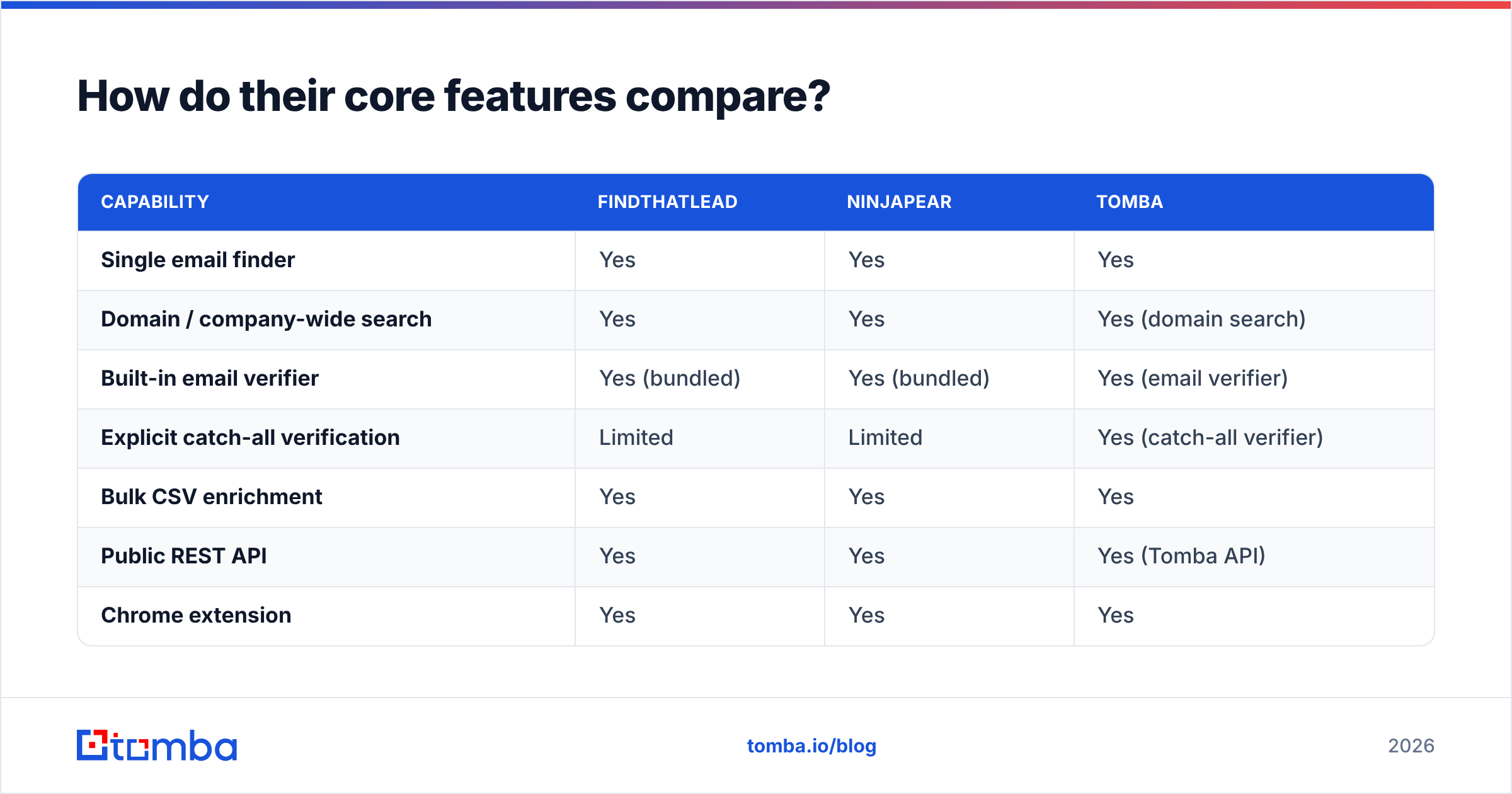
| Capability | FindThatLead | NinjaPear | Tomba |
|---|---|---|---|
| Single email finder | Yes | Yes | Yes |
| Domain / company-wide search | Yes | Yes | Yes (domain search) |
| Built-in email verifier | Yes (bundled) | Yes (bundled) | Yes (email verifier) |
| Explicit catch-all verification | Limited | Limited | Yes (catch-all verifier) |
| Bulk CSV enrichment | Yes | Yes | Yes |
| Public REST API | Yes | Yes | Yes (Tomba API) |
| Chrome extension | Yes | Yes | Yes |
| Built-in cold email sending | Yes | No | No (by design) |
| Google Sheets / Excel add-on | Partial | No | Yes |
| Free tier to test on your own list | Trial credits | Trial credits | 25 searches/mo, no card |
| Phone number lookup | No | No | Yes (phone finder) |
The table makes the strategic split obvious. FindThatLead wants to be your outbound suite. NinjaPear wants to be a component. Tomba wants to be the data layer underneath whatever sender you already picked.
Which philosophy is right depends entirely on one question: do you already have a sending tool you like? If you're running Instantly, Smartlead, Lemlist, or a CRM sequencer, FindThatLead's sending module is dead weight you're paying for. If you're starting from zero and want one bill, it's a genuine convenience.

Which one is actually more accurate?#
Accuracy is where cheap finders quietly cost you the most, and it's the hardest thing to evaluate from a pricing page — because every vendor on earth claims 95%+.

Here's the mechanic behind those numbers. Most finders build a candidate email from a known company pattern (first.last@, flast@, first@) and then try to confirm it. Confirmation happens one of three ways:
- SMTP handshake — connect to the mail server and ask whether the mailbox exists. Reliable when the server answers honestly.
- Source corroboration — the address was actually observed somewhere public (a paper, a git commit, a press release, a company page). Strongest signal available.
- Pattern inference alone — "this company uses first.last, so this must be first.last." No confirmation at all.
Everything hinges on how a vendor labels category 3. Tools that return pattern-inferred addresses with a "valid" or high-confidence label are the ones that blow up your bounce rate. Tools that label them separately — guessed, unverified, risky — let you decide.
FindThatLead has historically been generous with returns, which is good for hit rate and less good for precision on smaller or non-Western domains. NinjaPear, being newer and leaner, tends to have a thinner corroboration corpus but a straightforward scoring output. Neither is dishonest; they just make different trade-offs.
Why does catch-all handling decide this?#
A catch-all domain accepts mail to any address at that domain — ceo@, jsdhfkjh@, everything. SMTP verification returns "accepted" for all of them, so a naive verifier marks every guess as valid.
Roughly a fifth to a third of B2B domains are catch-all, and they skew toward exactly the companies you want: mid-market and enterprise using Microsoft 365 with a broad accept policy. If your finder treats catch-all as "valid," a meaningful slice of your list is fiction.
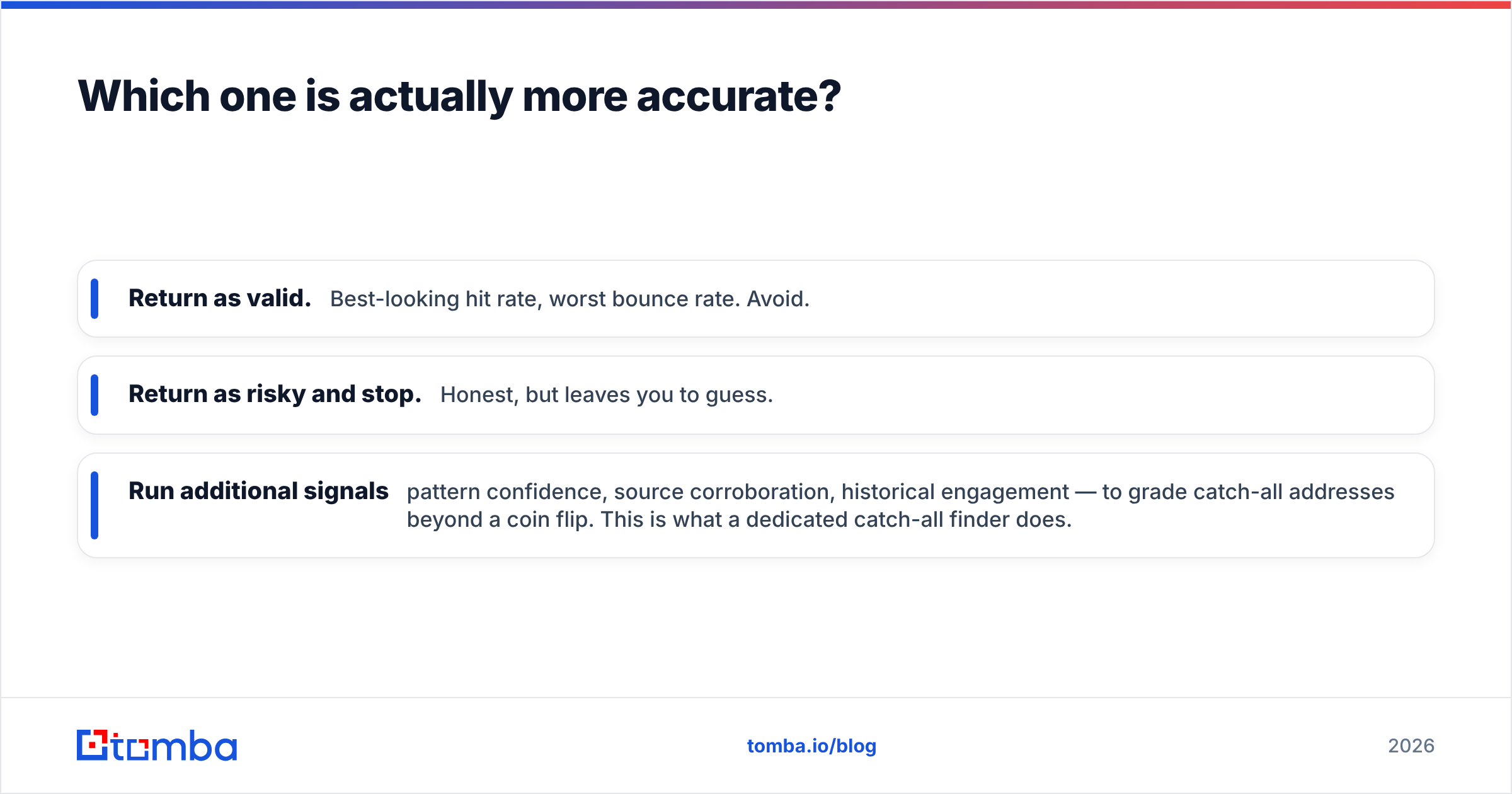
The three ways vendors handle it:
- Return as valid. Best-looking hit rate, worst bounce rate. Avoid.
- Return as risky and stop. Honest, but leaves you to guess.
- Run additional signals — pattern confidence, source corroboration, historical engagement — to grade catch-all addresses beyond a coin flip. This is what a dedicated catch-all finder does.
FindThatLead and NinjaPear both fall closer to the first two behaviors. This is the single largest technical gap between them and tools that treat catch-all as its own problem rather than a footnote.
How does pricing really compare?#
Both vendors sell credits, and credits are where cross-tool comparison quietly falls apart. Check the current FindThatLead pricing page and NinjaPear's own plan page before you commit — entry tiers in this category have moved repeatedly, and any number in a blog post ages fast.
What doesn't age is the set of questions you need answered before you buy:
- Does a failed lookup burn a credit? Some tools charge for the attempt, not the result. On a messy list this can cost you 25–35% of your allowance for zero data.
- Is verification a separate credit? If find and verify are billed separately, your real per-contact cost is roughly double the headline.
- Do credits roll over? Non-rolling credits punish the lumpy usage pattern almost every outbound team actually has.
- Is the API on every plan, or gated? Gated API access is the most common surprise upgrade in this category.
- What's the export policy? A few tools restrict CSV export or bulk download on entry tiers, which turns a "cheap" plan into a manual copy-paste job.
- Is there a real free tier, or only a trial? A trial you can use once tells you nothing about steady-state performance on your ICP.
For reference on the third option: Tomba pricing runs a free tier at 25 searches/month, Starter at $49/mo, Growth at $99/mo, Pro at $249/mo, and custom Enterprise. Credits cover finding and verification, and the API is available across paid plans rather than reserved for the top tier.

What does effective cost look like in practice?#
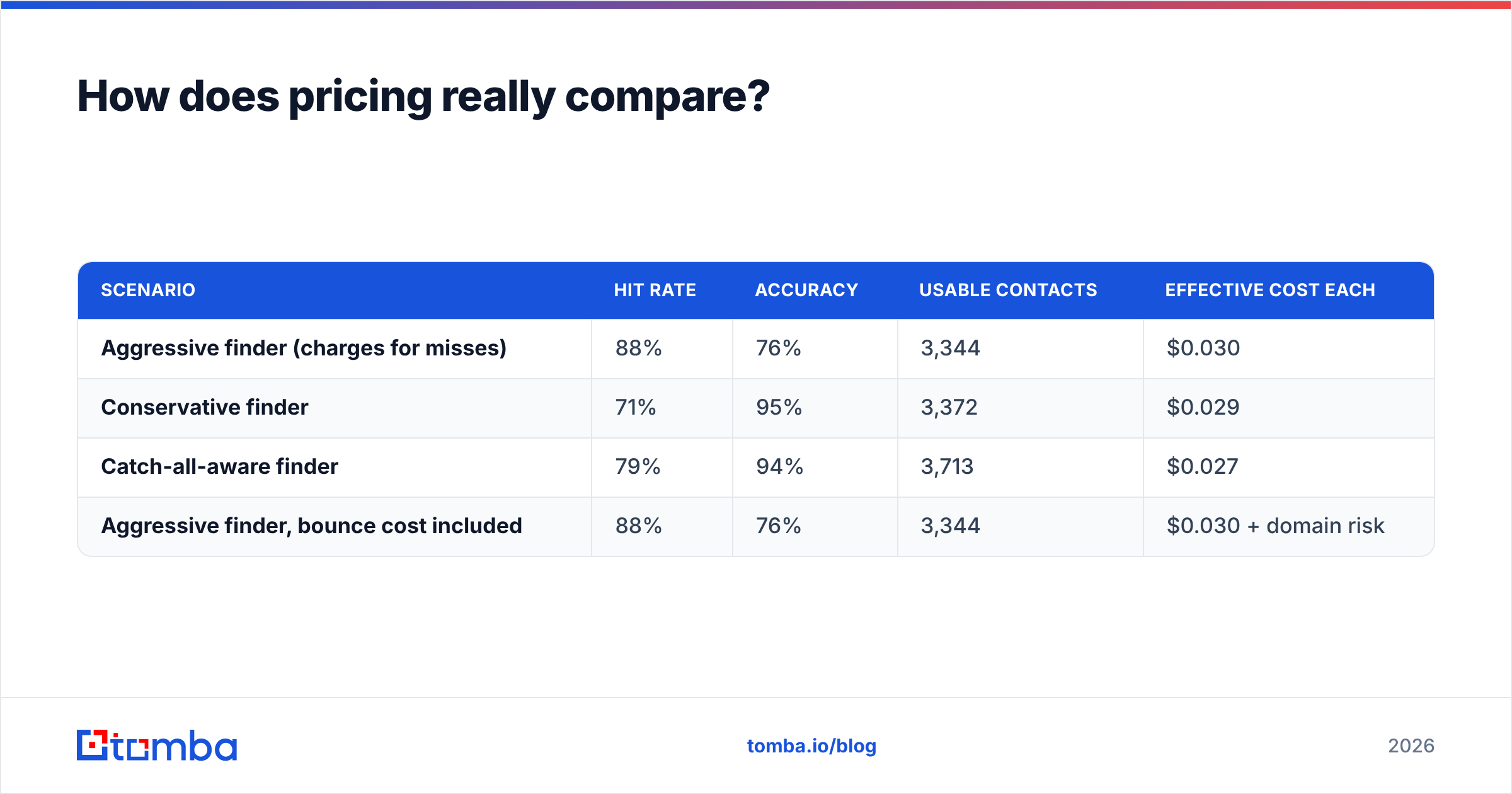
Take a 5,000-row list and three hypothetical tools at the same $99 monthly price:
| Scenario | Hit rate | Accuracy | Usable contacts | Effective cost each |
|---|---|---|---|---|
| Aggressive finder (charges for misses) | 88% | 76% | 3,344 | $0.030 |
| Conservative finder | 71% | 95% | 3,372 | $0.029 |
| Catch-all-aware finder | 79% | 94% | 3,713 | $0.027 |
| Aggressive finder, bounce cost included | 88% | 76% | 3,344 | $0.030 + domain risk |
The raw cost-per-contact numbers barely move. What moves is the fourth row: 1,056 undeliverable sends against a warmed domain. At scale, that's the expensive line item — not the subscription. Bounce rates above 3–4% start pulling inbox placement down across every campaign on that domain, which means the "cheap" tool taxes campaigns it wasn't even used for.
That's the honest argument for paying attention to accuracy over hit rate, and it's why the email deliverability conversation and the email-finder conversation are the same conversation.
Who should pick FindThatLead?#
FindThatLead makes sense when:
- You want one tool and one invoice. Prospect, verify, and send without wiring anything together. For a solo founder or a two-person sales team, the integration savings are real.
- You prospect in Spanish-speaking and European markets. Its data footprint in Spain, LATAM, and parts of the EU has historically been stronger than tools built US-first.
- You want lead discovery, not just enrichment. The search-by-role-and-location feature answers "who should I contact?" — a different question from "what's this person's email?" NinjaPear doesn't answer the first one.
- You're not yet committed to a sending platform. If you have no sequencer, the bundled sender removes a decision.
Where it strains: teams that already own a sequencer are paying for redundancy, and teams that need data piped into a warehouse or CRM programmatically will find the API adequate rather than excellent. Read recent reviews on G2's lead intelligence category and Capterra before assuming past reputation still holds — both vendors have shipped a lot since the reviews that rank highest.
Who should pick NinjaPear?#
NinjaPear makes sense when:
- You already have a sender you like. You want a data source, not a platform. Paying only for lookups is the correct trade.
- Your budget is genuinely tight. Lean tools compete on price because that's the lever they have. If your volume is low and your ICP is well-covered, it works.
- You value simplicity over surface area. Fewer features means fewer settings to misconfigure, and onboarding a new SDR takes minutes.
- Your list is already built. If you have companies and names and just need addresses, discovery features are irrelevant to you.
Where it strains: enterprise domains with catch-all policies, non-English markets, and any workflow that needs phone numbers, LinkedIn-sourced contacts, or deeper firmographic enrichment alongside the email. Lean tools stay lean by not solving those.
What do both tools leave on the table?#
Three gaps show up in almost every lean-vs-suite comparison in this category:
- Catch-all grading. Covered above. The largest source of silent list decay in B2B outbound.
- Multi-channel identifiers. Email alone is a fragile channel in 2026. Getting a verified B2B phone number or a LinkedIn profile alongside the address changes what your sequence can do. Neither tool here treats that as core.
- Workflow-native access. Most teams don't want a web app; they want the data where they already work — a spreadsheet, Airtable, a CRM, a script. Broad coverage across integrations, a CLI, and a real API matter more than the UI once you're past month one.
There's also a strategic point worth stating plainly: coupling your data vendor to your sending vendor is a lock-in risk. If FindThatLead's data stops fitting your ICP but you've built your sequences inside it, switching costs double. Keeping the data layer separate — the Tomba Email Finder feeding whichever sender you prefer — means you can swap either half independently.
How should you run the comparison yourself?#
Don't take anyone's benchmark, including this one. Run a 200-row bake-off:
- Pull 200 real prospects from your actual ICP. Not a public sample list — your list, with your industry mix and your geography mix.
- Submit the identical file to each tool. Same columns, same order, same day.
- Record four columns per tool: email returned (y/n), confidence label, verification status, and whether the domain is catch-all.
- Send a small, warmed, harmless campaign to a randomized 50-row slice from each tool's output. Measure hard bounces.
- Compute effective cost using the formula above. Rank by that number, not by plan price.
- Repeat once on a hard segment — non-US domains, sub-50-employee companies, or an industry you know is poorly covered. Averages hide the failure modes you'll actually hit.
Two weeks of that will tell you more than any comparison post, and it costs nothing but the free credits every vendor here offers.
The bottom line#
FindThatLead wins if you want a bundled outbound suite and prospect heavily in European and LATAM markets. NinjaPear wins if you want cheap, simple lookups feeding a sender you already own. Neither wins on catch-all domains, and neither gives you contact data beyond email.
If your bounce rate is the metric keeping you up at night — or you want a data layer that outlives whichever sequencer you're using this year — start with the free tier of the Tomba Email Finder. Twenty-five searches a month, no card, catch-all verification included, and an API on every paid plan starting at $49/mo. Run your 200-row bake-off against all three and let the effective-cost number pick the winner.
Related guides#
Ready to find emails that actually work?
Join 150,000+ professionals who stopped guessing and started sending. Free credits on signup — no credit card required.
Get the Tomba newsletter
Practical outbound tactics and product updates — once every two weeks.
About the author