FindThatLead vs OneMoreLead: Which Lead Tool Wins in 2026
FindThatLead sells you a search engine. OneMoreLead sells you a list. That single difference decides which one fits your outbound motion — and where both quietly cost you deliverability.
FindThatLead vs OneMoreLead is a choice between two very different tools. One looks up emails the moment you ask. The other hands you a pre-built list to filter. That single difference decides which one fits your outbound motion.
TL;DR
- FindThatLead is a search tool. You give it a domain, a name, or a LinkedIn URL, and it returns emails on demand. It also bundles a cold-email sender, which most email finders don't.
- OneMoreLead is a static database. You filter a pre-built pool of B2B contacts by industry, title, and company size, then export a list. Nothing is looked up live.
- They fail in opposite directions. Search tools miss contacts they can't source. Databases return contacts that were valid two years ago. One gives you gaps, the other gives you bounces.
Two more things to know before you buy:
- Neither ships verification you should trust blindly. Both claim "verified" data. Run any export through an independent verifier before it touches your sending domain.
- If you only pick one: FindThatLead for targeted, account-based outbound. OneMoreLead for cheap volume in well-covered US mid-market segments. For accuracy-first sourcing with an API, a dedicated finder like Tomba is the third option most teams end up on.
FindThatLead vs OneMoreLead: what is each tool?#
Both solve the same problem: you need contact data for people you want to sell to. But the two tools are built in ways that behave nothing alike.
FindThatLead is a Barcelona-based prospecting suite built around live lookup. Its core modules are Lead Search (find an email from first name, last name, and domain), Domain Search (pull every email pattern on a company domain), Prospector (build lists by role and location), a Chrome extension for LinkedIn, and Sender, a built-in cold-email sequencer. Credits burn per lookup. When you ask for someone, the system goes looking at that moment.
OneMoreLead is a B2B contact database. It ships with a large pre-indexed pool of business contacts — the vendor markets it in the tens of millions — and your job is to filter it: industry, job title, company headcount, geography, technology. You save a segment, export the CSV, and load it into whatever sequencer you already run. There's no live lookup step, because the record either exists in the index or it doesn't.
That architectural split explains almost every difference downstream: pricing model, accuracy profile, coverage outside the US, and how much verification work lands on you.
FindThatLead vs OneMoreLead: a feature-by-feature comparison#
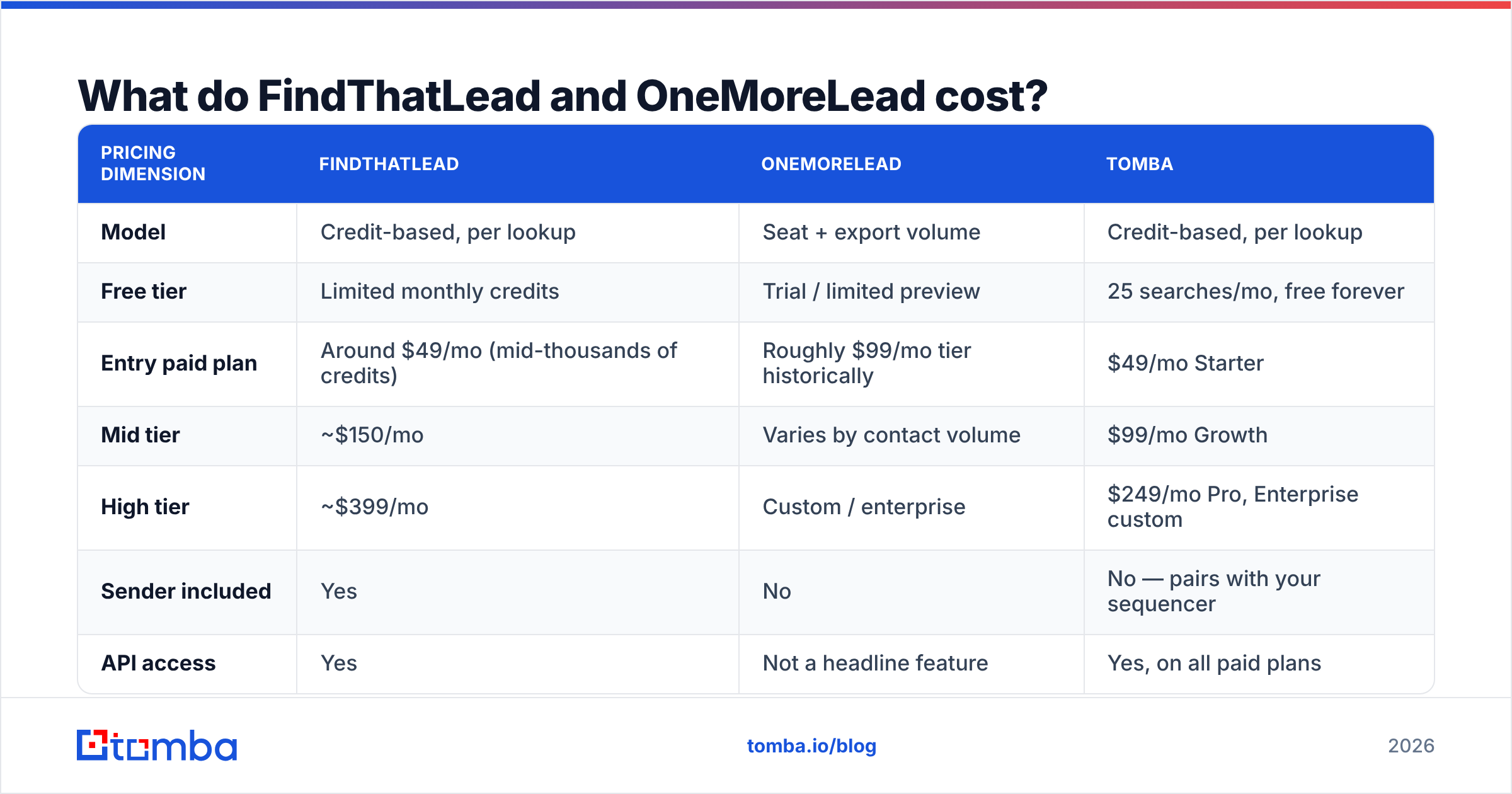
| Feature | FindThatLead | OneMoreLead |
|---|---|---|
| Core model | Live search (per-lookup credits) | Static database (filter + export) |
| Find email by name + domain | Yes | No — only what's indexed |
| Domain / company search | Yes | Partial (filter by company) |
| LinkedIn extension | Yes | Limited |
| Bulk CSV enrichment | Yes | Export-only, no enrichment of your list |
| Built-in email sender | Yes (Sender module) | No — bring your own sequencer |
| Public API | Yes | Not a primary offering |
| Phone numbers | Limited | Yes, on many records |
| Best for | Targeted ABM lists, agencies | High-volume US list building |
The practical read: FindThatLead can answer a question about a specific person you already identified. OneMoreLead can hand you 5,000 people you hadn't identified yet. Those are different jobs. Teams that buy the wrong one usually call the data bad, when the real problem is a mismatched motion.
Say you run account-based outbound. You have a target account list from your CRM, and you need the VP of Ops at each one. A database is the wrong shape here. You filter, find that 40% of your accounts aren't covered, and end up doing manual lookups anyway. Now flip it. If you target a broad ICP and you don't care which 3,000 fintech ops managers you reach, paying per lookup is a slow, costly way to build that list.

Which one has better data accuracy?#
Neither vendor publishes an audited accuracy figure. Treat both marketing claims as unverified until you test them on your own ICP.
What you can reason about is how each one goes wrong.
FindThatLead's failure mode is silent guessing. Pattern-based finders infer an address from a company's known format — first.last@, finitial+last@, and so on — then validate at the SMTP layer. Some domains are catch-all: they accept every address, even ones with no mailbox behind them. SMTP validation then returns "accepted" for garbage. You get a confident-looking result that bounces, or worse, hits a spam trap. That's why a standalone catch-all verifier matters more than most buyers expect at purchase time.
OneMoreLead's failure mode is decay. A static index is a photograph. B2B contact data rots at roughly 22-30% per year by most industry estimates — people change jobs, companies get acquired, domains migrate. If a record was collected 18 months ago and hasn't been re-verified, coin-flip odds start creeping in. Database vendors that don't publish a re-verification cadence are asking you to take the freshness question on faith.

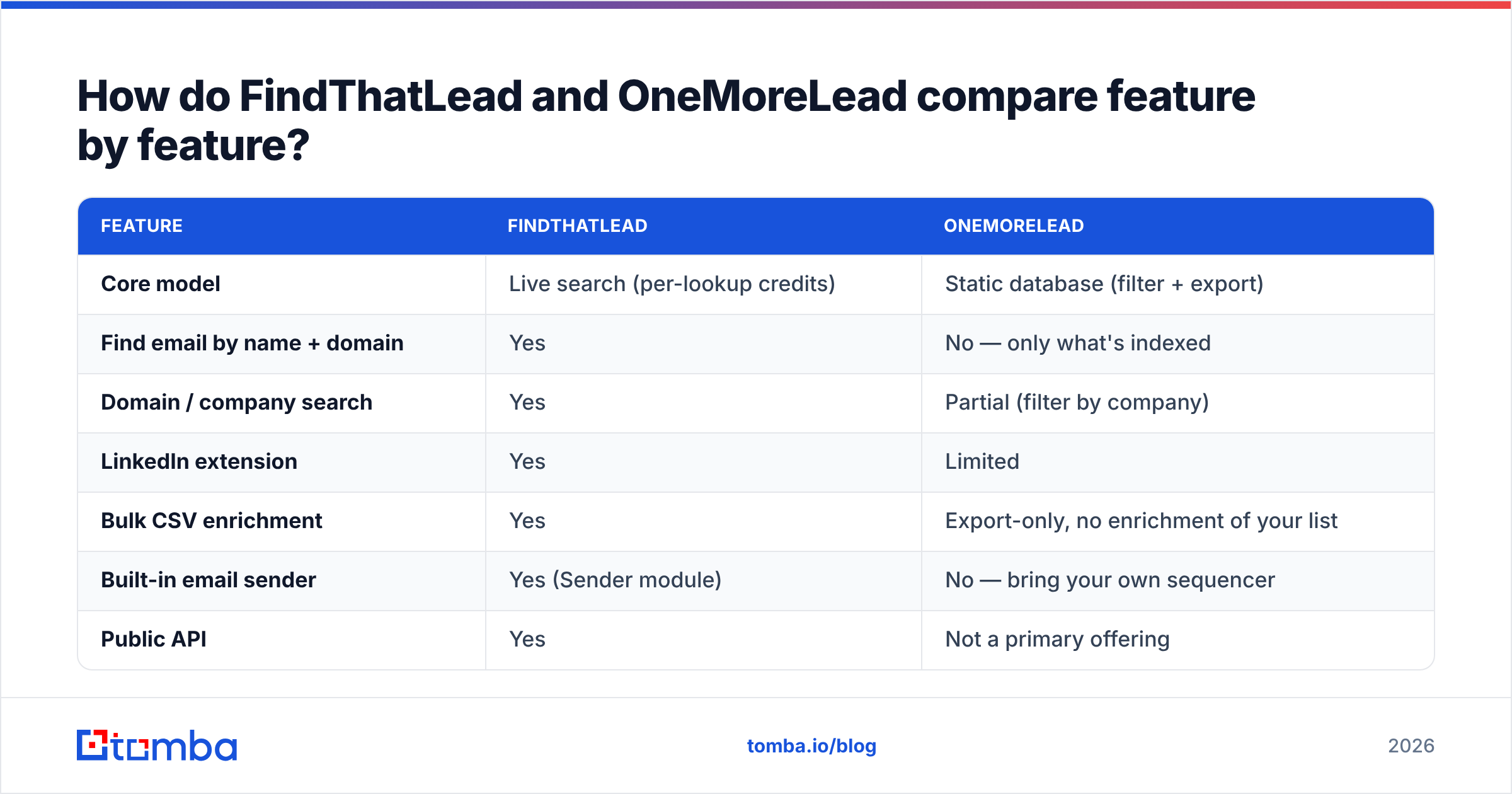
Here's the test that settles it for your specific segment, and it costs about an hour:
- Pull 200 contacts from each tool in the same ICP — same industry, same seniority, same geography. Don't let one tool pick an easier segment.
- Strip duplicates and role accounts.
info@,sales@, andcontact@inflate coverage numbers without producing replies. - Run both lists through a third-party email verifier. Never grade a vendor with its own verifier — that's the vendor scoring its own exam.
- Record three numbers separately: coverage (how many of your 200 targets got any address), valid rate (how many passed independent verification), and catch-all rate (how many are unknowable without a send).
- Send a small, warmed batch and log real bounces. Verification predicts; the bounce log is the truth.
Most teams find that the two tools score very differently by segment. US SaaS mid-market is well covered by both. European SMEs, agencies, and anything outside English-language markets tend to punish the static-database side hardest.
What do FindThatLead and OneMoreLead cost?#
Both vendors reshuffle plan names and credit allowances often. OneMoreLead has also run lifetime deals through marketplaces. Check the current numbers on the vendor pages before you commit. The shape of the pricing — not the exact digits — is what should drive the decision.
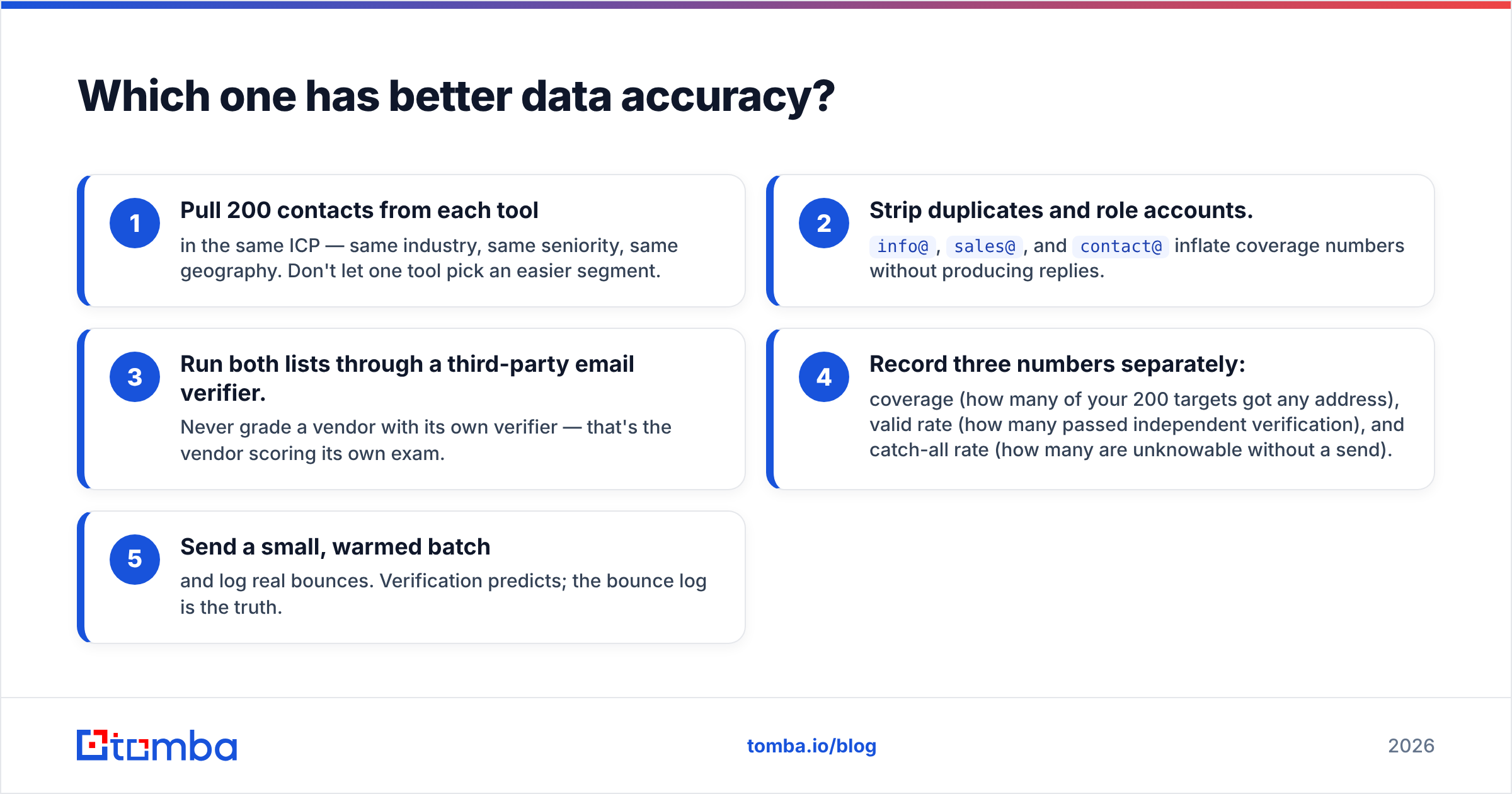
| Pricing dimension | FindThatLead | OneMoreLead | Tomba |
|---|---|---|---|
| Model | Credit-based, per lookup | Seat + export volume | Credit-based, per lookup |
| Free tier | Limited monthly credits | Trial / limited preview | 25 searches/mo, free forever |
| Entry paid plan | Around $49/mo (mid-thousands of credits) | Roughly $99/mo tier historically | $49/mo Starter |
| Mid tier | ~$150/mo | Varies by contact volume | $99/mo Growth |
| High tier | ~$399/mo | Custom / enterprise | $249/mo Pro, Enterprise custom |
| Sender included | Yes | No | No — pairs with your sequencer |
| API access | Yes | Not a headline feature | Yes, on all paid plans |
| Verification included | Basic | Claimed on records | Dedicated verifier + catch-all module |

Two cost traps worth naming.
Credits are not leads. A failed lookup still consumes budget on most credit systems. Every plan compares differently once you divide by valid results rather than returned results. A tool at $0.02 per lookup with a 60% valid rate is more expensive than one at $0.03 with a 92% valid rate. Run the math on verified contacts, not raw credits. You can sanity-check your assumptions against Tomba pricing as a reference point for credit-based finders.
Bundled senders are cheap until they aren't. FindThatLead's Sender module looks like free value next to a $99/mo standalone sequencer. But bundled senders usually lag dedicated platforms on inbox rotation, warmup, and reply detection. Switching later means rebuilding every sequence. If cold email is your primary channel, price the sender separately and judge it on its own merits.
Who should pick FindThatLead?#
FindThatLead makes sense when your list is defined by accounts, not filters.
- Agencies running client-specific ICPs. You get a target account list from the client and need contacts at exactly those companies. Live lookup handles that; database filters don't.
- Founder-led sales at small volume. A few hundred highly researched prospects a month, where a bundled sender removes one subscription from a lean stack.
- Teams already living in LinkedIn. The Chrome extension turns a Sales Navigator session into a working list without a CSV round trip.
- Anyone who needs an API. If you want enrichment inside your own product or workflow, live lookup with an endpoint beats a downloadable CSV every time.
Where it hurts: cost per contact at volume, coverage gaps outside its stronger geographies, and a sender that's serviceable rather than best-in-class.
Who should pick OneMoreLead?#
OneMoreLead makes sense when your list is defined by filters, not accounts.
- High-volume US mid-market outbound. You need 10,000 contacts matching a title-and-industry pattern, and you don't care which specific companies they come from.
- Budget-constrained teams. Flat-rate export pricing beats per-lookup credits once your monthly volume passes a few thousand contacts.
- Phone-first motions. Database vendors often carry direct dials on records where pure email finders return nothing. If your SDRs dial, that's real value — pair it with a phone validator before the list hits the dialer.
- Market research and TAM sizing. Filtering a large index is genuinely useful for "how many companies in X segment exist," even if you never email them.
Where it hurts: freshness, coverage outside the US, no way to enrich a list you already own, and no live lookup for the account that isn't indexed.
Where do both tools leave you exposed?#
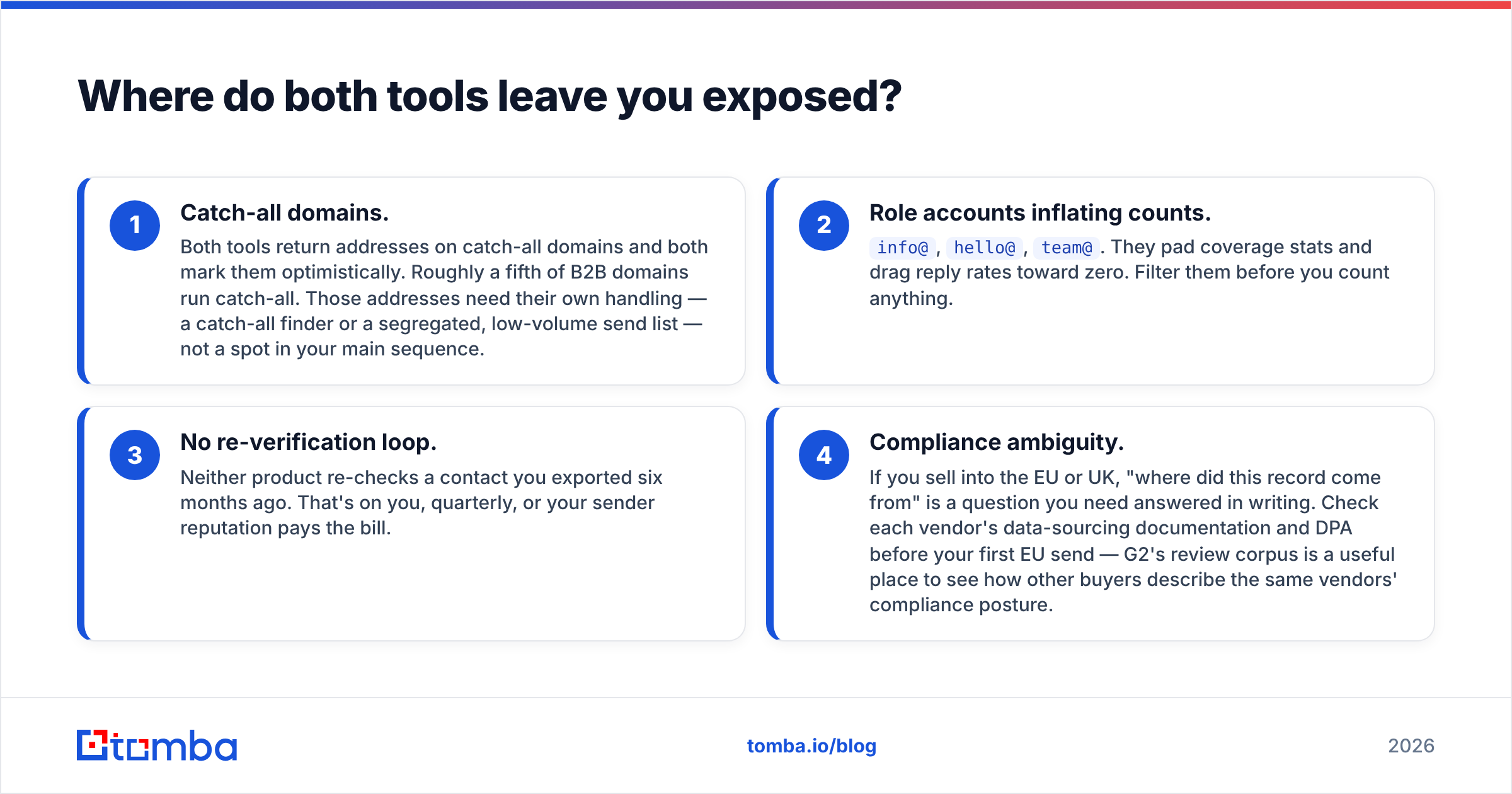
Four gaps show up in almost every deployment of either product. Two of them bite on day one:
- Catch-all domains. Both tools return addresses on catch-all domains, and both mark them optimistically. Roughly a fifth of B2B domains run catch-all. Those addresses need their own handling — a catch-all finder or a segregated, low-volume send list — not a spot in your main sequence.
- Role accounts inflating counts.
info@,hello@,team@. They pad coverage stats and drag reply rates toward zero. Filter them before you count anything.
The other two show up a few months in:
- No re-verification loop. Neither product re-checks a contact you exported six months ago. That's on you, quarterly, or your sender reputation pays the bill.
- Compliance ambiguity. If you sell into the EU or UK, "where did this record come from" is a question you need answered in writing. Check each vendor's data-sourcing docs and DPA before your first EU send. G2's review corpus is a useful place to see how other buyers describe the same vendors' compliance posture.
How do you build a stack that beats either one alone?#
The teams with the lowest bounce rates almost never run a single-vendor stack. The pattern that works:
- Source broadly, verify independently. Use whichever tool covers your segment best for discovery. Then push every address through a verifier that has no reason to grade generously.
- Waterfall your lookups. Try your primary source; on a miss, fall back to a second. A pattern-based finder plus a database covers more of a target account list than either alone.
- Segment catch-alls into their own track. Lower volume, warmer domain, tighter monitoring.
- Re-verify on a schedule. Quarterly for active sequences, and before every send for anything older than 90 days. Bulk verification makes this a ten-minute job instead of a project.
- Watch bounce rate as a leading indicator. Above 3% and your email deliverability is already degrading, whatever the dashboard claims.
FindThatLead vs OneMoreLead: so which one wins?#
There's no universal winner, and any post that declares one is selling something.
FindThatLead wins if your outbound is account-based, your volume is moderate, and you value a live API over a static export. OneMoreLead wins if you need volume in well-indexed US segments at a predictable flat cost and you already own a sequencer. If you can't tell which describes you, ask one question: do you start from a list of companies (FindThatLead) or a list of filters (OneMoreLead)?
And if the answer is "I need accuracy above everything, plus an API I can build on," neither architecture is the ceiling. Run the 200-contact test across all three candidates before you sign an annual contract. It's the only comparison that reflects your ICP rather than a vendor's best-case segment.
Start with the accuracy test. Tomba's Email Finder gives you 25 free searches a month with no card, real SMTP-level verification, catch-all detection as a separate signal instead of a hidden guess, and the same API on every paid plan from $49/mo. Run your 200 target accounts through it alongside FindThatLead and OneMoreLead. Compare verified results rather than returned results, and let your own bounce log pick the winner.
Related guides#
Ready to find emails that actually work?
Join 150,000+ professionals who stopped guessing and started sending. Free credits on signup — no credit card required.
Get the Tomba newsletter
Practical outbound tactics and product updates — once every two weeks.
About the author