FindThatLead vs Power Almanac: Which Data Wins in 2026?
One tool finds B2B emails across the open web. The other sells hand-verified contacts for 40,000 US local governments. Here is how FindThatLead and Power Almanac actually compare — and when neither is the right buy.
TL;DR
- FindThatLead vs Power Almanac is not a fair fight. The two tools serve different buyers.
- FindThatLead finds B2B emails and sends cold email. It works in any industry.
- Power Almanac sells contacts for US local government. Think mayors, city managers, clerks, and police chiefs.
- Pick Power Almanac if you sell to cities, counties, and townships.
- Pick FindThatLead if you sell to private firms and want find-plus-send in one cheap plan.
Neither tool verifies data deeply. If bounces are your bottleneck, pair your pick with a real email verifier. And watch the cost shape, not the feature list. FindThatLead bills monthly credits. Power Almanac bills per record.
FindThatLead vs Power Almanac: what does each tool do?#
Both tools hand you a list of contacts. That is where the overlap ends.
FindThatLead is a Spanish prospecting suite. Give it a domain, a name plus a company, or a LinkedIn profile. It returns a likely work email. It also ships a Prospector for role searches, a Scrapper for bulk domain lists, a Chrome extension, and a small cold-email sender. So you can go from list to campaign without exporting. It does not care what you sell.
Power Almanac goes the other way. It is narrow on purpose. It holds contact records for roughly 40,000 US local governments. That covers cities, counties, townships, and special districts. Humans build and re-check every record. The records are sorted by role, not by person. That sorting is the whole product.
Say a town of 8,000 people hires a new city manager. No crawler picks that up quickly. A researcher who calls the city clerk does.
So the honest question in FindThatLead vs Power Almanac is not which tool is better. Ask this instead: is your buyer a private employee or a public official? That one answer settles 90% of this comparison.
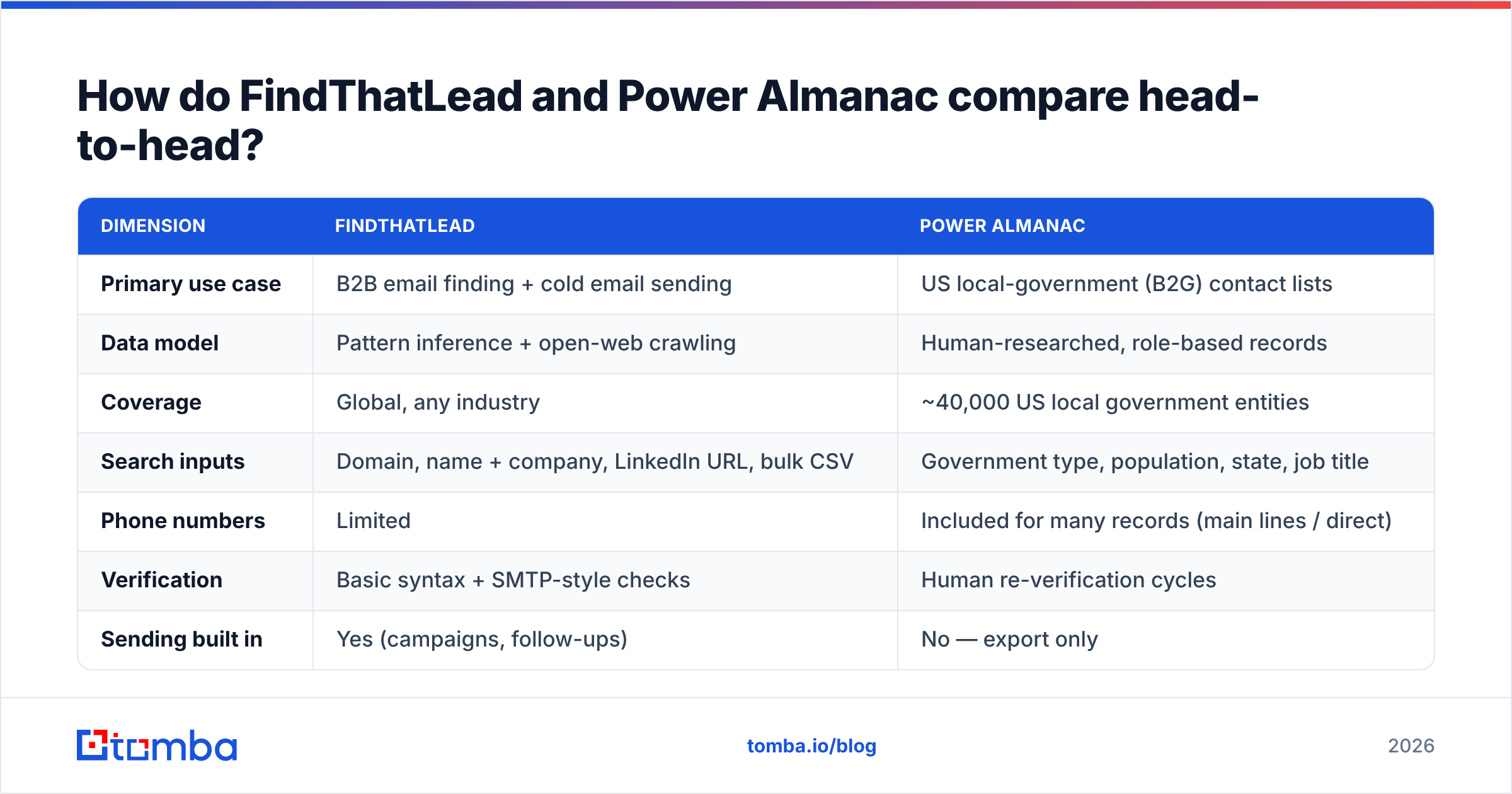
FindThatLead vs Power Almanac: the head-to-head table#
| Dimension | FindThatLead | Power Almanac |
|---|---|---|
| Primary use case | B2B email finding + cold email sending | US local-government (B2G) contact lists |
| Data model | Pattern inference + open-web crawling | Human-researched, role-based records |
| Coverage | Global, any industry | ~40,000 US local government entities |
| Search inputs | Domain, name + company, LinkedIn URL, bulk CSV | Government type, population, state, job title |
| Phone numbers | Limited | Included for many records (main lines / direct) |
| Verification | Basic syntax + SMTP-style checks | Human re-verification cycles |
| Sending built in | Yes (campaigns, follow-ups) | No — export only |
| API | Yes | Limited / export-oriented |
| Best for | SDR teams selling to companies | GovTech, public safety, civil engineering, municipal services |
| Weakness | Accuracy varies by domain type | Useless outside US local government |
The last row decides most deals. Say you sell permitting software to towns. A generic finder will not reach the building commissioner of a township. That person may have no LinkedIn profile, no email pattern, and no web footprint at all. Now flip it. If you sell developer tools, the entire Power Almanac catalog is dead weight.
FindThatLead vs Power Almanac: which data is more accurate?#
Accuracy means two different things here. Mixing them up is how teams end up with a 22% bounce rate.
Power Almanac is accurate about who holds the role. A human confirmed that Jane Doe runs a specific city today. That data is hard to build and hard to copy. But there is a catch. Government addresses are often generic, like citymanager@cityname.gov or info@township.us. Many towns route mail through a shared inbox. So you get a live address, but not always a personal one. That changes how you write the email.
FindThatLead is accurate about patterns. Like most open-web finders, it shines on domains with a well-known email format. A 500-person SaaS firm with a clean first.last@ rule is easy. Small shops, agencies with mixed formats, and catch-all domains are not. Catch-alls are the trap. A "valid" result there often turns into a bounce weeks later.

So accuracy is not really a vendor question. Whatever source you use, the same five steps protect your domain:
- Find the address from the best source for that segment.
- Verify every address with a second tool. A source that grades its own homework is not verification.
- Split out catch-alls instead of blasting them. Score them first with a catch-all verifier.
- Suppress and recycle. Drop hard bounces for good. Re-check role-based addresses each quarter, since staff turn over fast after elections.
- Warm up before volume. No data source saves a cold domain that sends 400 emails on day one.
Skip step two and the vendor choice stops mattering. Google and Microsoft judge your sending record, not your supplier's marketing page.
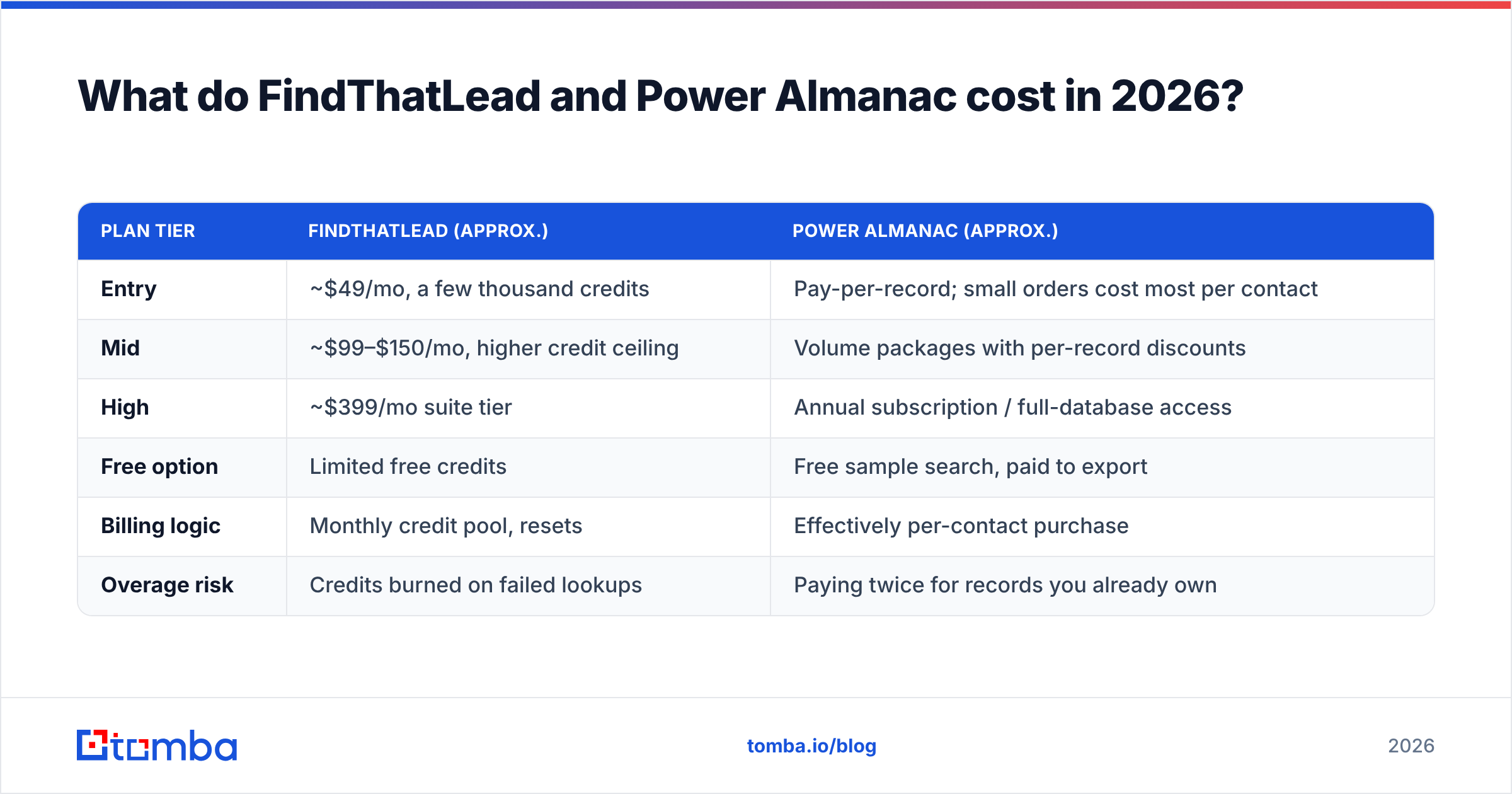
What does FindThatLead vs Power Almanac cost in 2026?#
Prices move often. Treat these as rough, and check each vendor's page before you buy. The structure is the part that matters.
| Plan tier | FindThatLead (approx.) | Power Almanac (approx.) |
|---|---|---|
| Entry | ~$49/mo, a few thousand credits | Pay-per-record; small orders cost most per contact |
| Mid | ~$99–$150/mo, higher credit ceiling | Volume packages with per-record discounts |
| High | ~$399/mo suite tier | Annual subscription / full-database access |
| Free option | Limited free credits | Free sample search, paid to export |
| Billing logic | Monthly credit pool, resets | Effectively per-contact purchase |
| Overage risk | Credits burned on failed lookups | Paying twice for records you already own |
Two traps are worth naming.
With a credit pool like FindThatLead's, failed lookups can still burn budget. It depends on how the tool counts them. Ask the sales rep straight out: do I pay for a search that returns nothing? On a list of small or obscure domains, that answer is worth hundreds of dollars a month.
With a per-record model like Power Almanac's, the cost of "just a few more" adds up fast. Teams buy 2,000 records. Then 2,000 more. Then they re-buy an overlapping slice six months later. That often costs more than an annual plan. So dedupe before you buy, not after. A quick remove duplicates pass on your CRM export shows what you already own.
Want outside opinions? G2's software category pages beat either vendor's testimonial wall. Filter reviews by company size. A 5-person agency and a 200-seat sales org live very different lives on the same credit plan.
When should you pick Power Almanac?#
Pick it when all three of these are true:
- Your buyer works in local government. Public safety software, road equipment, city ERP, grant consulting, emergency management, waste services.
- You need role coverage, not person coverage. You want every public works director in Ohio. You do not want one name you spotted on LinkedIn.
- Your list is small and high value. There are only so many US towns. A few dollars per record is cheap when one deal is worth five figures.
Where it falls short: no sending, no data on private firms, and no help with the commercial half of your pipeline. Most GovTech teams run Power Almanac next to a general stack, not instead of one.
When should you pick FindThatLead?#
Pick it when you want volume, speed, and one bill:
- You sell to private companies. Your ICP is defined by industry, size, and tech stack, not by county lines.
- You want find and send in one place. For a small team with no sequencer, built-in campaigns remove a tool from the stack.
- Your target domains are mainstream. Established firms with clean email rules are where pattern finders do best.
Where it falls short: verification depth and hard segments. If your list leans toward micro-businesses, non-English markets, or catch-all domains, expect trouble. Many "found" addresses are guesses that pass a syntax check and fail a real send.
Is there a better third option for mixed pipelines?#
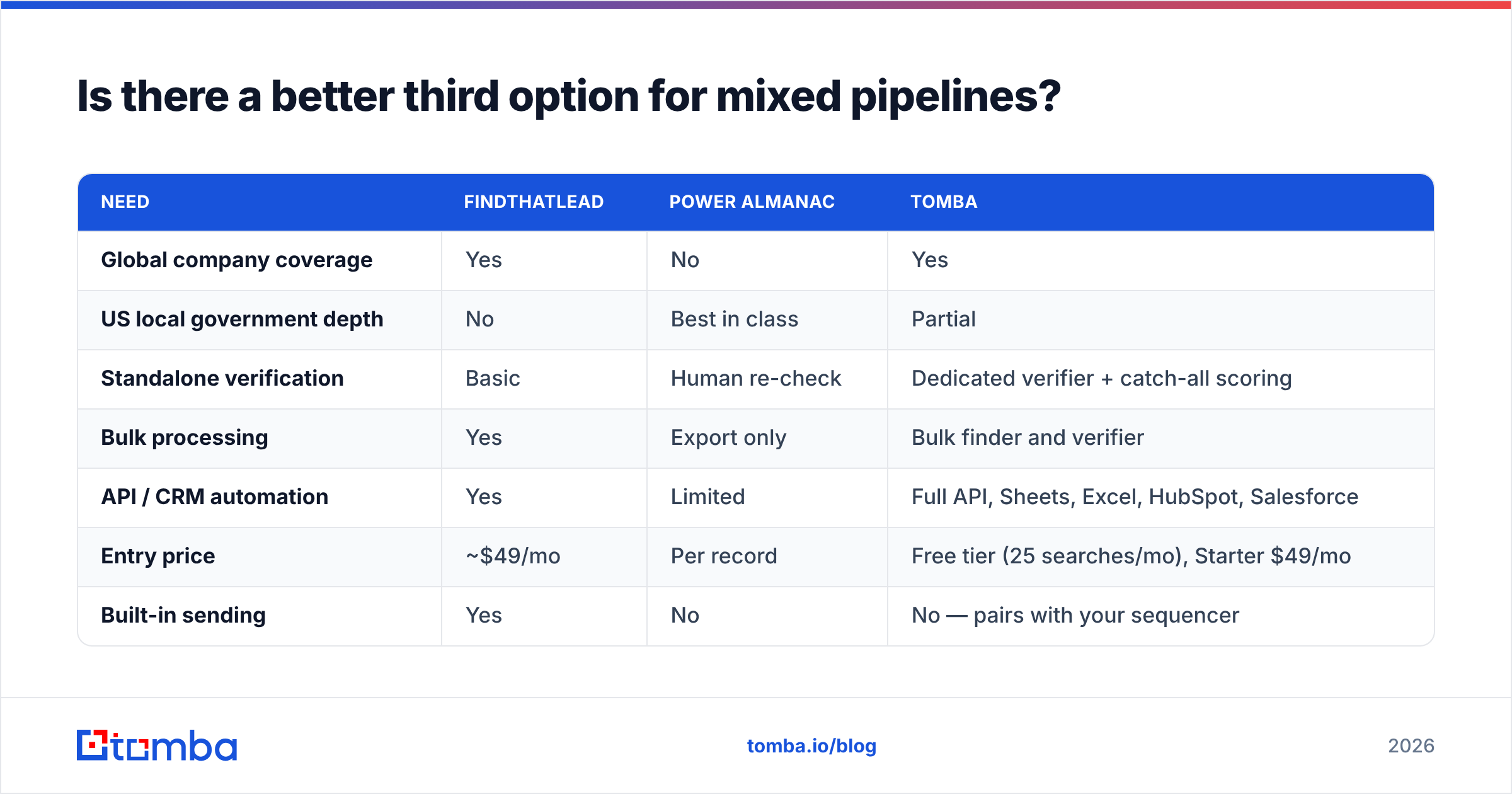
Many vendors sell to both private firms and public bodies. Infrastructure, professional services, and B2G-adjacent teams all live there. For them, one narrow database plus one shallow finder is the worst setup. You pay twice and still verify somewhere else.
Most teams land on a simpler pattern. Keep the specialist database for the segment only it covers. Then standardize everything else on one finder with a real verifier and an API. Enrichment then happens inside your CRM, not inside a spreadsheet.

| Need | FindThatLead | Power Almanac | Tomba |
|---|---|---|---|
| Global company coverage | Yes | No | Yes |
| US local government depth | No | Best in class | Partial |
| Standalone verification | Basic | Human re-check | Dedicated verifier + catch-all scoring |
| Bulk processing | Yes | Export only | Bulk finder and verifier |
| API / CRM automation | Yes | Limited | Full API, Sheets, Excel, HubSpot, Salesforce |
| Entry price | ~$49/mo | Per record | Free tier (25 searches/mo), Starter $49/mo |
| Built-in sending | Yes | No | No — pairs with your sequencer |
Read the last row honestly. Tomba does not send campaigns. If one bill that also sends is a hard rule for you, FindThatLead wins on structure. But if you already picked a sequencer, that bundle stops being a perk. Instantly, Smartlead, Outreach, or your CRM's native tool all do the job. At that point the bundle is just a constraint.

How do you build a workflow that survives either choice?#
Vendors churn. Prices change. Build a process that keeps switching cheap:
- Keep the source of truth in your CRM. Export on a schedule. Never let a tool be the only home for a contact.
- Split finding from verifying. Two vendors, two jobs. When the finder slips, your pass rate drops that week. You will not learn about it three weeks later.
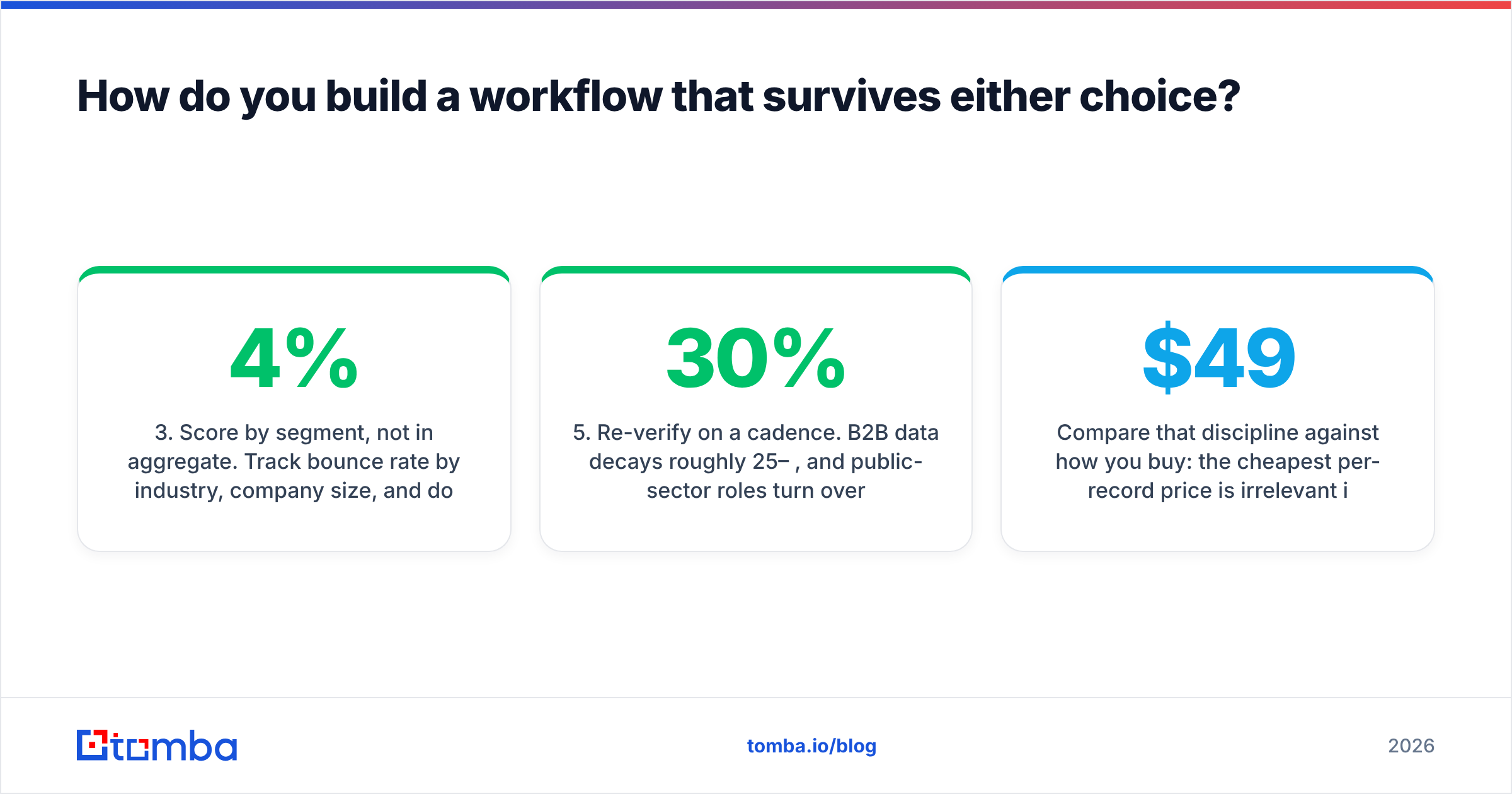
- Score by segment, not in total. Track bounces by industry, size, and domain type. A 4% overall rate can hide a 19% rate in your best vertical.
- Automate at the record level. Fire an email finder API call when a record is created. Nobody should paste domains by hand at 9am.
- Re-verify on a schedule. B2B data decays 25–30% a year. Public roles turn over faster after elections. A quarterly pass costs less than one bad quarter.
- Keep a suppression list forever. Bounces, opt-outs, and dead domains must never sneak back in through a new purchase.
Now compare that habit with how you buy. The cheapest record price means nothing if you re-buy stale records every year. Tomba's pricing starts free at 25 searches a month, then $49/mo Starter, $99/mo Growth, and $249/mo Pro. It is built around repeat find-and-verify cycles. That is the right shape for a list you maintain, not a list you buy once.
So which one should you actually buy?#
Answer the ICP question first. The tool question then answers itself:
- Selling to US cities, counties, and townships? Buy Power Almanac. Nothing else covers that segment role by role, and the per-record cost is easy to justify.
- Selling to private firms at volume, on a small budget, with no sequencer? FindThatLead is a fair all-in-one start.
- Running a mixed pipeline, or already bleeding bounces? Neither one is enough alone. Standardize on a finder with real verification and an API. Add the specialist database only for the segment that needs it.
Whatever you choose, one mistake stays the same. Do not treat "found" as "valid". Run every list through a real verification pass before it touches a sequence. That rule outlives the whole FindThatLead vs Power Almanac debate.
Start with the finding layer. Tomba's Email Finder gives you domain search, name lookup, catch-all scoring, bulk jobs, and an API for your CRM. The free tier covers 25 searches a month, so you can test it before you switch anything. Run your 100 hardest domains through all three tools. Compare verified-deliverable rates, not raw "found" counts. Let your own data pick the winner.
Related guides#
Ready to find emails that actually work?
Join 150,000+ professionals who stopped guessing and started sending. Free credits on signup — no credit card required.
Get the Tomba newsletter
Practical outbound tactics and product updates — once every two weeks.
About the author