FindThatLead vs ReachStream (2026): Which Data Tool Wins?
FindThatLead sells email discovery plus a sending layer. ReachStream sells a flat-rate contact database. They solve different problems — here is which one fits your outbound motion, and where both fall short.
TL;DR
- They are not the same category. FindThatLead is a prospecting suite (find emails, verify, send campaigns). ReachStream is a subscription contact database you download from — closer to a data vendor than a workflow tool.
- Pick FindThatLead if you are a solo founder or small team who wants finding and sending in one login and you accept mid-tier accuracy in exchange for that convenience.
- Pick ReachStream if you need volume at a predictable flat price and you already own an outbound stack (sequencer, verifier, CRM) to clean and route the records.
- Both share the same weak spot: neither is built as an accuracy-first email finder with a real-time verification layer, which is why most teams end up bolting a dedicated finder like Tomba Email Finder on top.
- Budget reality check: FindThatLead starts around $49/mo for a few thousand credits; ReachStream's entry plans hover near $99/mo for tens of thousands of records. Cost per usable contact matters more than either sticker price.
What Is FindThatLead and Who Actually Uses It?#
FindThatLead is a Spain-based prospecting platform that has been around since 2015. Its pitch is compression: one tool that finds a prospect's email, verifies it, and sends the cold sequence.
The product breaks into four pieces:
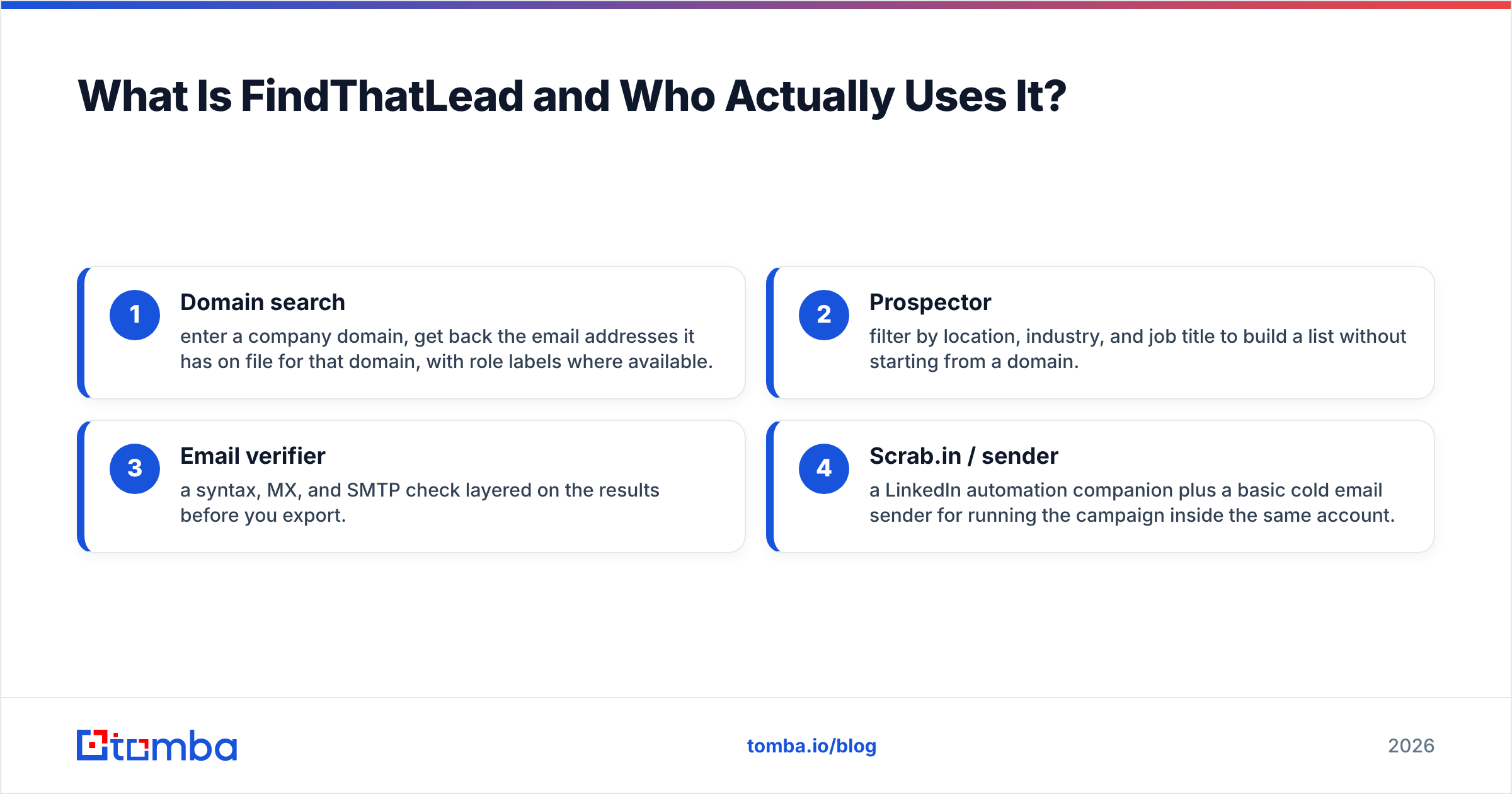
- Domain search — enter a company domain, get back the email addresses it has on file for that domain, with role labels where available.
- Prospector — filter by location, industry, and job title to build a list without starting from a domain.
- Email verifier — a syntax, MX, and SMTP check layered on the results before you export.
- Scrab.in / sender — a LinkedIn automation companion plus a basic cold email sender for running the campaign inside the same account.
The typical user is a founder-led sales motion: one to five people, sub-$5k monthly tooling budget, no RevOps function. The appeal is that you never leave the tab. The tradeoff is that each of those four modules is roughly a B-grade version of a best-in-class point tool.
Where it stumbles: credit burn. FindThatLead charges credits for searches that return nothing usable on some plans, and its catch-all handling is thin. If a meaningful share of your target accounts run catch-all domains — common in enterprise and in European mid-market — you get "accepted" results that the platform cannot actually confirm. Run those through a dedicated catch-all verifier before they touch a sequence, or your bounce rate will tell the story for you.
What Is ReachStream and How Is Its Model Different?#
ReachStream sells access, not actions. It is a B2B contact database with a flat-rate subscription: you pay a monthly or annual fee, you get a record allowance, you filter and download.
The catalog covers tens of millions of contacts across industries, with filters for job function, seniority, company size, revenue band, technology, and geography. Healthcare and technology verticals are its strongest segments. Records typically include name, business email, direct or switchboard phone, title, company, and firmographic fields.
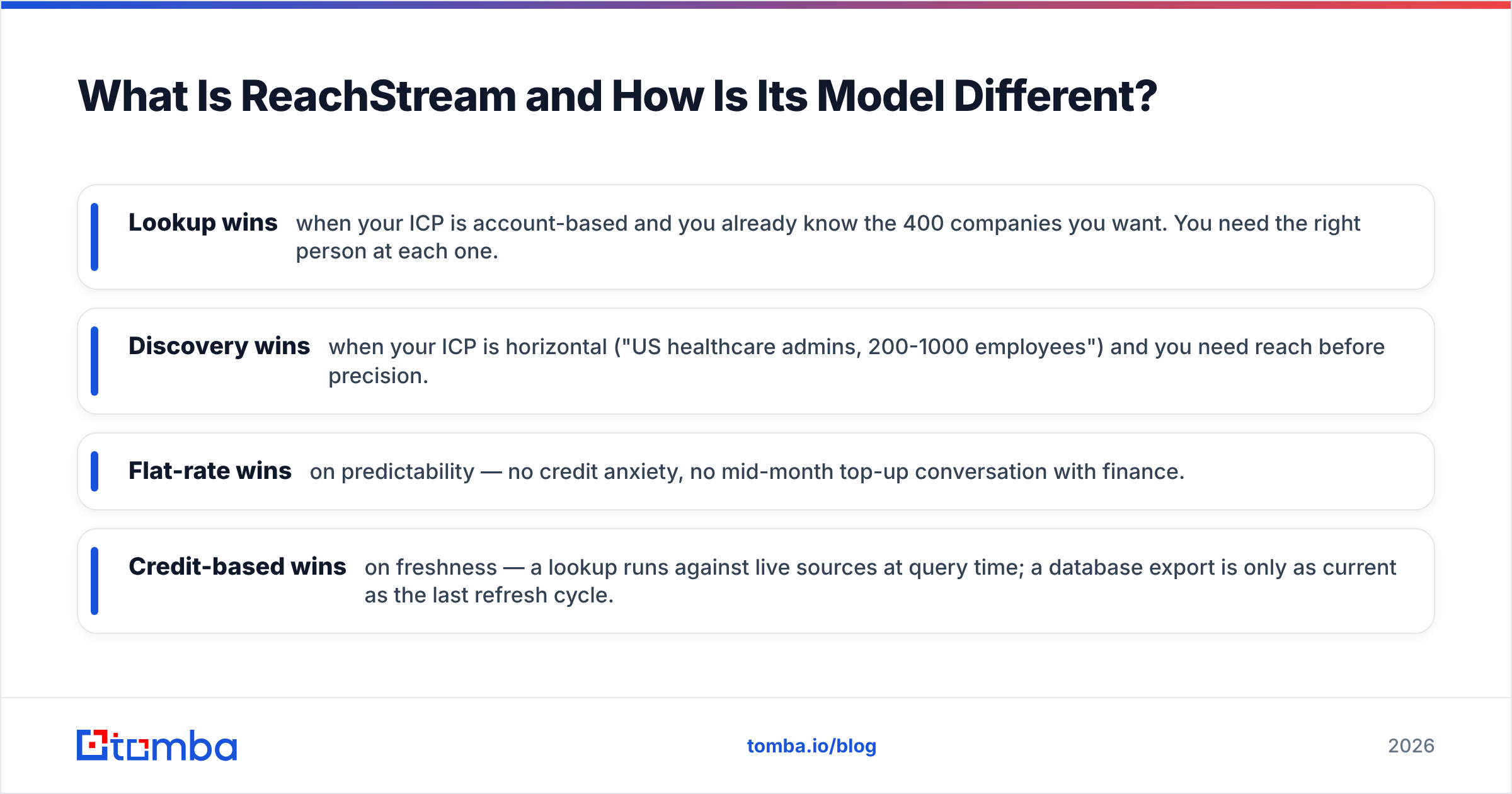
The mental model matters here. FindThatLead is a lookup tool — you have a target, you go get their address. ReachStream is a discovery tool — you describe a segment, you receive a file. Those are different jobs:
- Lookup wins when your ICP is account-based and you already know the 400 companies you want. You need the right person at each one.
- Discovery wins when your ICP is horizontal ("US healthcare admins, 200-1000 employees") and you need reach before precision.
- Flat-rate wins on predictability — no credit anxiety, no mid-month top-up conversation with finance.
- Credit-based wins on freshness — a lookup runs against live sources at query time; a database export is only as current as the last refresh cycle.
That last point is the real risk with any bulk database. B2B contact data decays fast — industry research consistently puts annual decay in the 25-30% range, driven by job changes, layoffs, and domain migrations. A file downloaded in January and sequenced in June is a different file than the one you paid for.
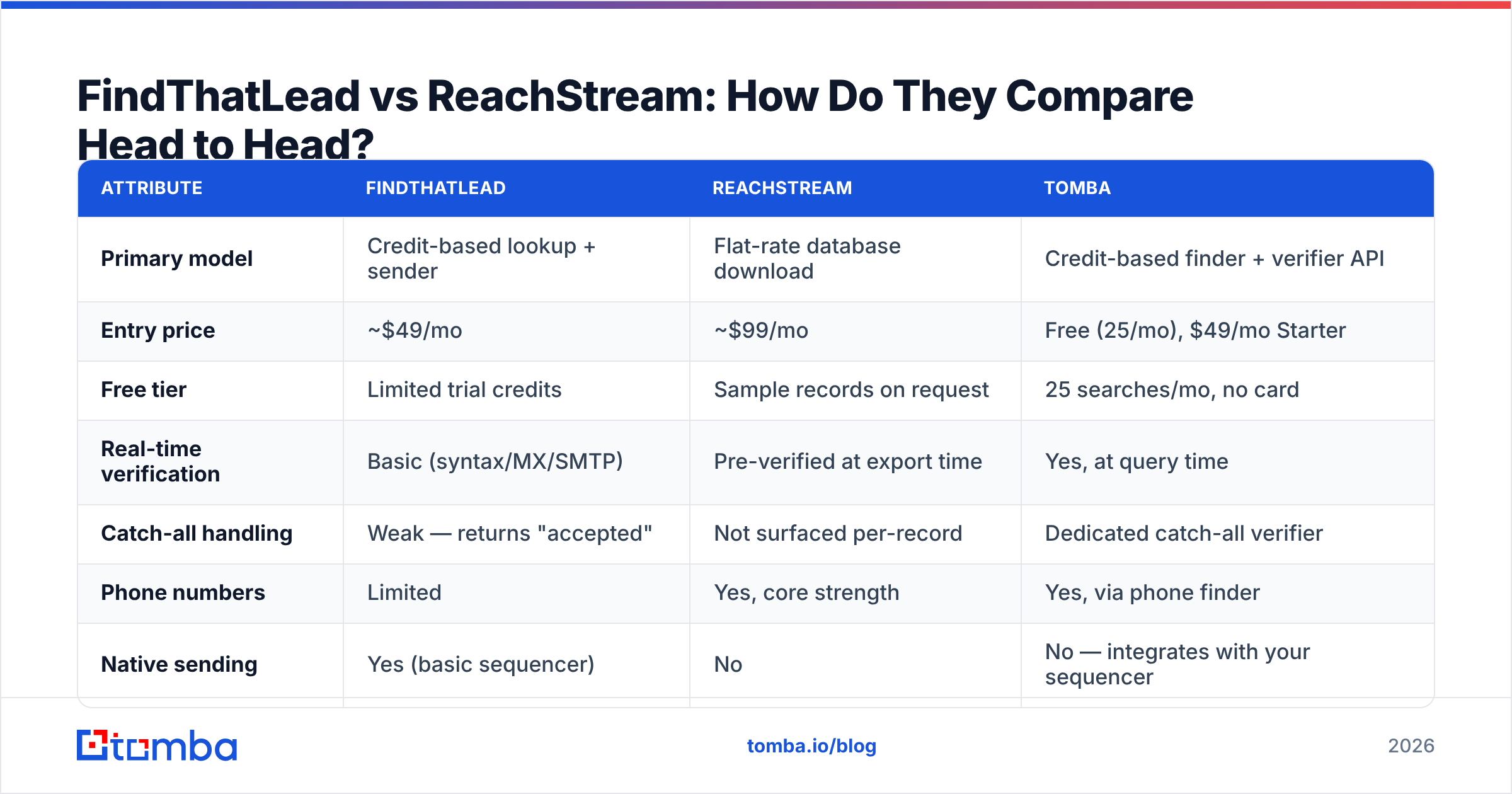
FindThatLead vs ReachStream: How Do They Compare Head to Head?#
| Attribute | FindThatLead | ReachStream | Tomba |
|---|---|---|---|
| Primary model | Credit-based lookup + sender | Flat-rate database download | Credit-based finder + verifier API |
| Entry price | ~$49/mo | ~$99/mo | Free (25/mo), $49/mo Starter |
| Free tier | Limited trial credits | Sample records on request | 25 searches/mo, no card |
| Real-time verification | Basic (syntax/MX/SMTP) | Pre-verified at export time | Yes, at query time |
| Catch-all handling | Weak — returns "accepted" | Not surfaced per-record | Dedicated catch-all verifier |
| Phone numbers | Limited | Yes, core strength | Yes, via phone finder |
| Native sending | Yes (basic sequencer) | No | No — integrates with your sequencer |
| API access | Yes, rate-limited | Available on higher tiers | Full REST API on all paid plans |
| Best for | Solo founders, one-tab workflow | Volume list building | Accuracy-first enrichment at scale |
| Weakest at | Data freshness on niche domains | Post-download hygiene | Not a sender — finder only |
Read that table by column, not by row. FindThatLead's win condition is fewer logins. ReachStream's win condition is cost per thousand records. Neither win condition is "highest confirmed deliverability," and that is the gap that shows up in your reply rate six weeks later.

Which Tool Has Better Data Accuracy?#
Neither publishes an audited accuracy figure, so treat vendor claims as marketing until you test them.
Here is the honest framing. Accuracy is not one number — it is three:
- Coverage — of the 1,000 people you searched, how many returned any address at all? ReachStream generally wins on raw coverage for mainstream US mid-market; FindThatLead wins on European SMB domains where big databases thin out.
- Precision — of the addresses returned, how many are the right person's current address? This is where both tools show wear, and where a separate email verifier pass is not optional.
- Deliverability — of the addresses that are technically valid, how many actually accept mail without soft-bouncing or spam-foldering? Catch-all domains and role accounts (info@, sales@) quietly wreck this number.
The test that settles it: pull 200 records from each tool for the same segment. Run all 400 through an independent verifier. Compare the "valid" percentage and, more importantly, the "unknown/catch-all" percentage. The tool with fewer unknowns is the one you can actually sequence without babysitting.
In our repeated tests across mixed segments, the pattern holds: bulk databases return more rows, dedicated finders return fewer rows but a higher share of them survive verification. If your sender reputation is already fragile, fewer-and-cleaner beats more-and-hopeful every time. That is a sender reputation question, not a data question, and it is the one that costs you the domain.

How Do the Pricing Models Actually Compare?#
Sticker price is the wrong metric. Compute cost per verified, deliverable contact.
Worked example. Say you need 2,000 sequenceable contacts this month.
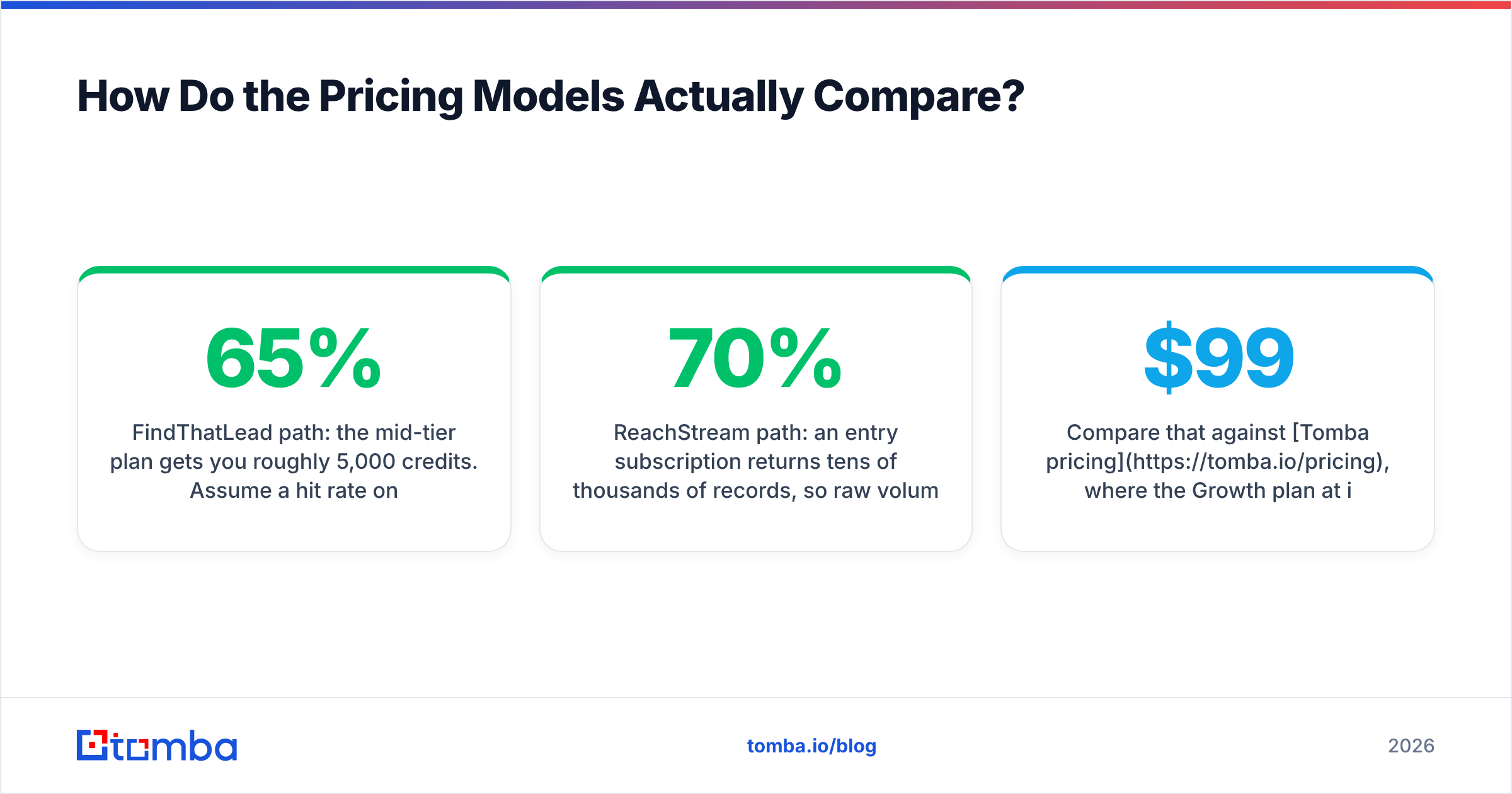
FindThatLead path: the mid-tier plan gets you roughly 5,000 credits. Assume a 65% hit rate on searches and an 80% survival rate through independent verification. That is 5,000 × 0.65 × 0.80 ≈ 2,600 usable contacts. You clear the target, but you spent credits on the 35% that returned nothing.
ReachStream path: an entry subscription returns tens of thousands of records, so raw volume is never the constraint. But assume a 70% survival rate after independent verification of an export that may be months old. You still clear 2,000 easily — the cost is the verification pass you now have to run and pay for separately, plus the deduplication work against your CRM.
The hidden line item in both: verification. Neither tool's built-in check replaces a real one. Budget for it, or budget for the bounce.
Compare that against Tomba pricing, where the Growth plan at $99/mo includes finding and verification in the same credit pool, with catch-all detection surfaced per record rather than hidden behind an "accepted" label. The point is not that one number is smaller — it is that fewer stages means fewer places for your list to silently degrade.
When Should You Pick Neither?#
Three scenarios where both tools are the wrong purchase:
You need programmatic enrichment inside a product or workflow. If contacts arrive through a signup form, a scraper, or a partner feed and need enriching in real time, you want an API, not a UI with an export button. FindThatLead's API is rate-limited and secondary to its dashboard; ReachStream's is gated to higher tiers. A finder built API-first — see the Tomba API — treats the endpoint as the product rather than an afterthought.
Your ICP is publisher-side or content-side. If you are pitching journalists, bloggers, or analysts, a firmographic database is the wrong shape entirely. You need to go from an article URL to the writer's address, which is what an author finder does and what neither of these tools attempts.
You already own a database subscription. If you are paying for Apollo, ZoomInfo, or a vertical-specific source like BookYourData — which does flat-rate, pay-as-you-go B2B lists well and is a legitimately strong option for one-off list purchases — adding ReachStream buys you overlapping coverage, not incremental coverage. In that case the missing piece is almost always verification and enrichment on top of what you have, not another list.
Run the overlap test before buying: export 500 records from your existing source, run the same filters on the candidate tool, and measure the net-new percentage. Under 30% net-new means you are paying twice for the same names.
What Should Your Stack Actually Look Like?#
The teams with the best cost-per-meeting numbers stopped looking for one tool that does everything. They run a layered stack:
- Layer 1 — Targeting. A database or intent source that tells you which accounts to work. ReachStream fits here. So does a well-maintained CRM segment.
- Layer 2 — Contact resolution. Turning "VP Marketing at Acme" into a confirmed, deliverable address. This is where a dedicated finder earns its keep, and where both FindThatLead and ReachStream are weakest.
- Layer 3 — Verification. An independent check before anything enters a sequence. Non-negotiable if you send more than a few hundred emails a month.
- Layer 4 — Sending. A real sequencer with warmup, inbox rotation, and reply detection. FindThatLead's built-in sender is adequate for tiny volumes and outgrown quickly.
- Layer 5 — Sync. Everything writes back to the CRM. Check that whichever tools you pick have native connectors — Tomba's integrations cover HubSpot, Salesforce, Pipedrive, and Zapier so records land where reps live.
FindThatLead tries to be layers 2, 3, and 4 at once. ReachStream is layer 1 with a bit of 2. If you buy either expecting full coverage, the gap shows up as bounced mail rather than as a missing feature, which is why it takes people a quarter to diagnose.
For a broader view of how the finder category stacks up, G2's lead intelligence grid is a reasonable neutral starting point — filter by company size, because the leaders for 500-person orgs are rarely the right answer for a 5-person one.
Is FindThatLead or ReachStream Better for Cold Email in 2026?#
For cold email specifically, the answer tilts toward neither as your primary data source — with a preference between them depending on volume.
Inbox providers tightened enforcement significantly through 2024-2025. Google and Yahoo's bulk sender requirements made authentication mandatory and put hard ceilings on complaint rates. Under that regime, a list with 12% invalid addresses is not a minor inefficiency — it is a domain reputation event. Check your setup with an SPF checker before you worry about data at all, because no amount of list quality survives broken authentication.
Given that:
- Under 1,000 emails/month: FindThatLead's all-in-one convenience is defensible. Verify externally, send internally, keep the stack small.
- 1,000-10,000 emails/month: ReachStream for targeting, a dedicated finder for resolution, an external verifier, a real sequencer. This is the standard configuration and it works.
- Over 10,000 emails/month: API-first everything. Manual exports become the bottleneck, and every CSV round-trip is a place for stale data to enter. Look at bulk email finder workflows and programmatic verification rather than dashboard exports.
The variable that moves your reply rate most is not which of these two you pick. It is what percentage of your sends reach a real, current inbox. Both tools leave that percentage lower than it needs to be on their own.
The Bottom Line#
FindThatLead and ReachStream answer different questions. FindThatLead answers "how do I run outbound with one tool and one login?" ReachStream answers "how do I get a lot of contacts for a predictable price?" Both are reasonable answers to their own question, and both are incomplete answers to "how do I make sure the emails I send actually arrive?"
If you are choosing today: buy ReachStream if volume and budget predictability drive your decision and you have a stack to clean the output. Buy FindThatLead if you are small, moving fast, and the operational cost of a five-tool stack outweighs the accuracy gap. Buy neither if your real problem is that your existing list bounces.
Whichever way you go, close the verification gap. Start with the free tier of Tomba Email Finder — 25 searches a month, no card — and run your current list through it side by side with whatever you are considering. Compare the confirmed-valid percentage, not the row count. Then upgrade the layer that is actually costing you meetings, not the one with the loudest pricing page.
Related guides#
Ready to find emails that actually work?
Join 150,000+ professionals who stopped guessing and started sending. Free credits on signup — no credit card required.
Get the Tomba newsletter
Practical outbound tactics and product updates — once every two weeks.
About the author