FindThatLead vs Rebump: Which Tool Fits Your Outbound?
One finds email addresses, the other chases replies inside Gmail. Here is how FindThatLead and Rebump actually compare in 2026, and which half of your outbound each one fixes.
TL;DR
- FindThatLead and Rebump are not competitors. FindThatLead is a prospecting tool that finds and sends to email addresses; Rebump is a Gmail extension that automatically follows up on emails you already sent.
- If your pipeline problem is "I don't have enough contacts," Rebump does nothing for you. If your problem is "I send one email and never chase," FindThatLead is overkill.
- FindThatLead is credit-based and priced in the $49–$399/mo range depending on tier; Rebump is a flat few-dollars-per-user Gmail add-on. They can happily run side by side.
- Both have a real weakness: FindThatLead's verification depth is thin for catch-all domains, and Rebump has zero data layer, so garbage contacts still get four polite follow-ups.
- The realistic 2026 stack is a dedicated finder/verifier for data, a sequencer or Rebump for cadence, and one place where bounce rate is measured.
What are FindThatLead and Rebump, actually?#
Start here, because the search query "FindThatLead vs Rebump" almost always comes from someone who has misread one of the two product pages.
FindThatLead is a Spanish-built B2B prospecting platform. Its core jobs are: find an email address from a name plus domain, pull a list of contacts from a company domain, scrape leads from LinkedIn via a Chrome extension, and then push those contacts into a basic drip campaign called Scrab.in / Email Sender. It sells credits. You spend them on searches and verifications. See the vendor's own description at findthatlead.com.
Rebump is a single-purpose Gmail extension. You send an email from Gmail as normal, tick the Rebump icon, and it sends up to a configurable number of follow-ups on a schedule until the recipient replies. When they reply, the sequence stops. That is the entire product. See rebump.cc.
So one tool answers who do I email and at what address, and the other answers what happens on day 3, 7 and 14 when nobody responds. Comparing them head-to-head is like comparing a supplier to a delivery van. The useful question is which gap you are actually trying to close.
Why is FindThatLead vs Rebump the wrong comparison?#
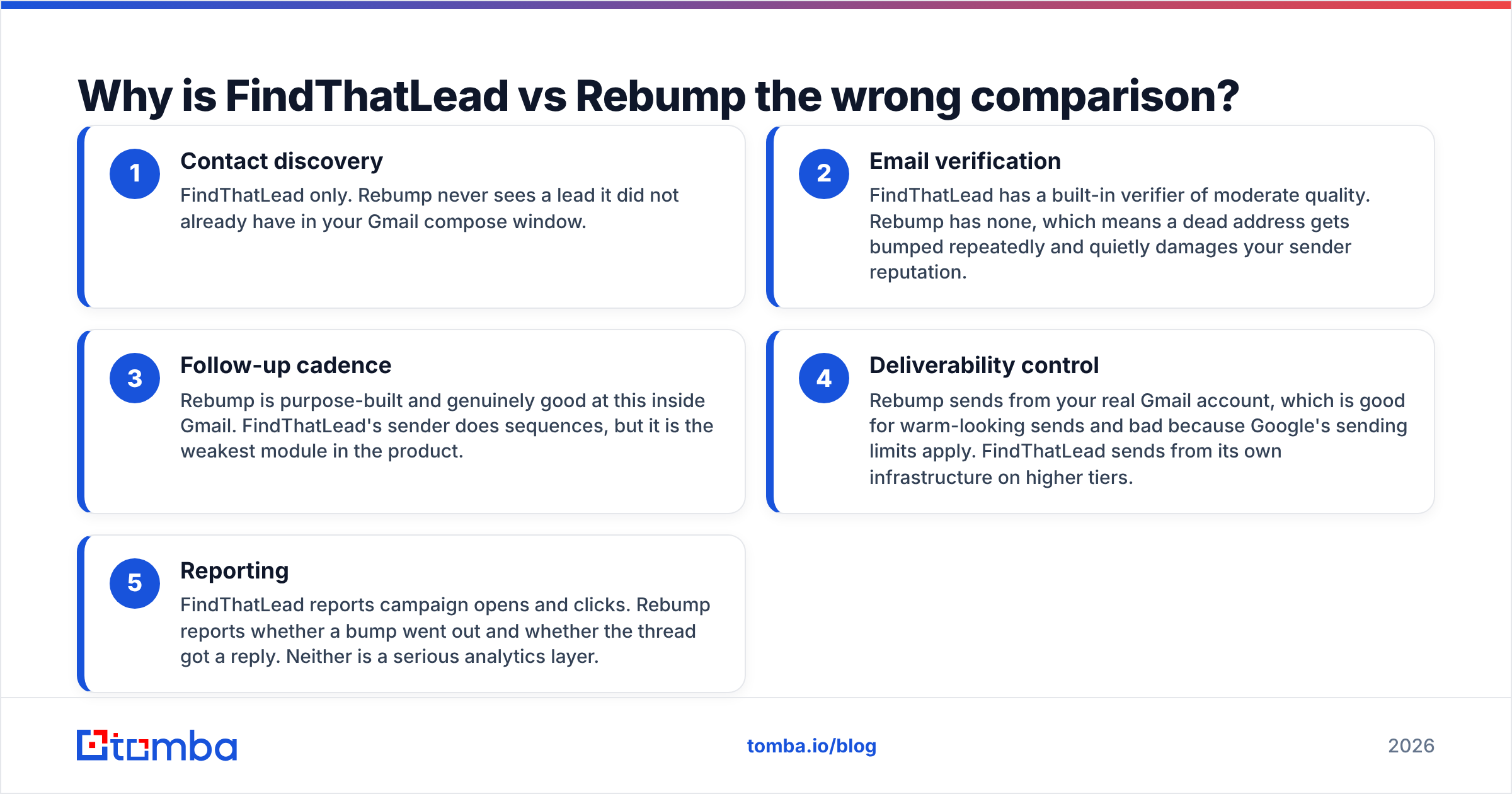
Because they sit at opposite ends of the same funnel. Here is the honest breakdown of what each one owns:
- Contact discovery — FindThatLead only. Rebump never sees a lead it did not already have in your Gmail compose window.
- Email verification — FindThatLead has a built-in verifier of moderate quality. Rebump has none, which means a dead address gets bumped repeatedly and quietly damages your sender reputation.
- Follow-up cadence — Rebump is purpose-built and genuinely good at this inside Gmail. FindThatLead's sender does sequences, but it is the weakest module in the product.
- Deliverability control — Rebump sends from your real Gmail account, which is good for warm-looking sends and bad because Google's sending limits apply. FindThatLead sends from its own infrastructure on higher tiers.
- Reporting — FindThatLead reports campaign opens and clicks. Rebump reports whether a bump went out and whether the thread got a reply. Neither is a serious analytics layer.
If you internalise only one thing: Rebump improves the reply rate of emails you already send. FindThatLead increases how many people you can send to. Those are different budget lines.
How do FindThatLead and Rebump compare feature by feature?#
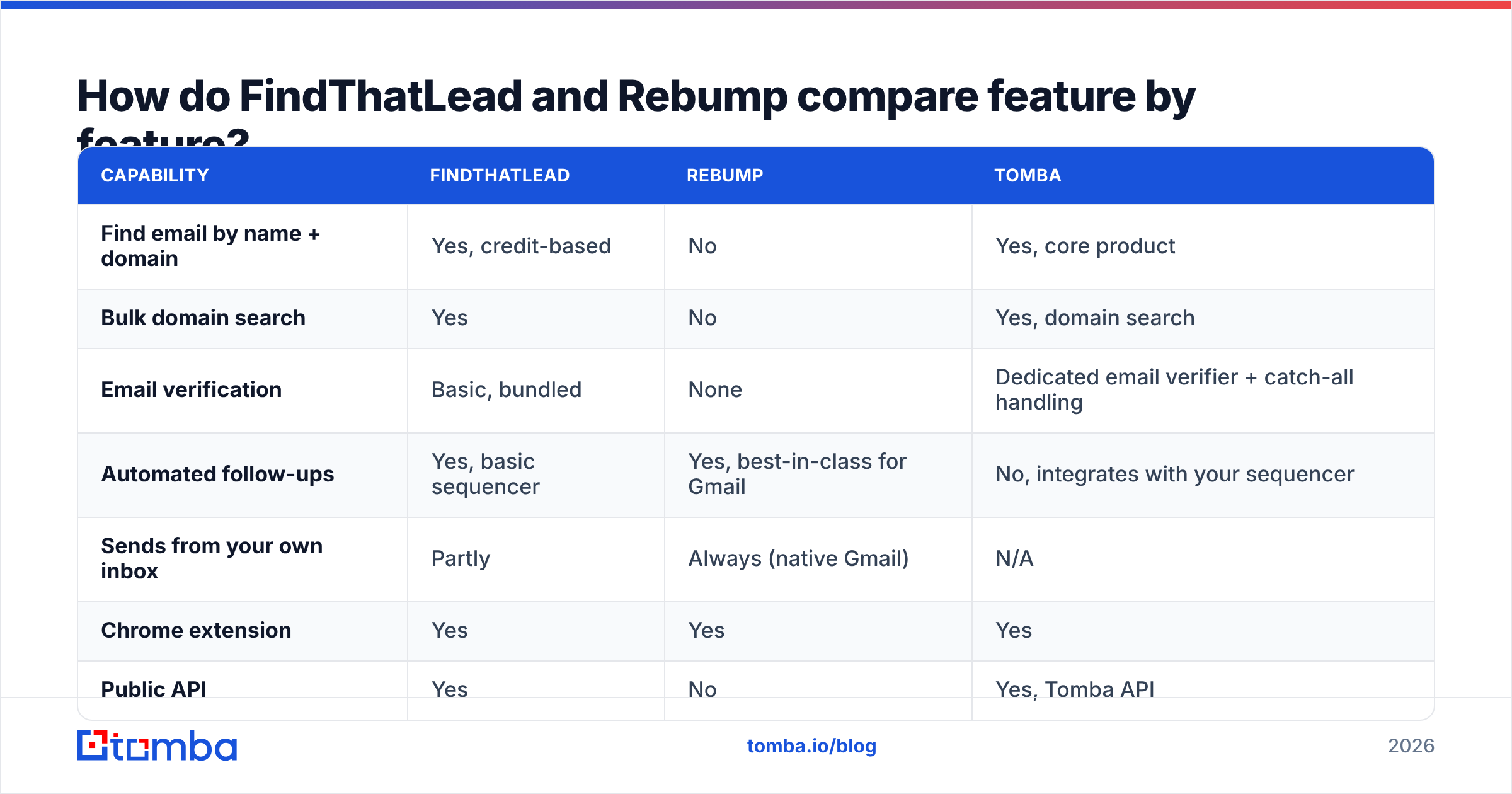
Here is the side-by-side, with a modern dedicated finder in the third column so you can see what a data-first tool looks like next to both.
| Capability | FindThatLead | Rebump | Tomba |
|---|---|---|---|
| Find email by name + domain | Yes, credit-based | No | Yes, core product |
| Bulk domain search | Yes | No | Yes, domain search |
| Email verification | Basic, bundled | None | Dedicated email verifier + catch-all handling |
| Automated follow-ups | Yes, basic sequencer | Yes, best-in-class for Gmail | No, integrates with your sequencer |
| Sends from your own inbox | Partly | Always (native Gmail) | N/A |
| Chrome extension | Yes | Yes | Yes |
| Public API | Yes | No | Yes, Tomba API |
| Free tier | Limited trial credits | Free trial only | 25 searches/mo, no card |
| Entry paid price | ~$49/mo | ~$5/user/mo | $49/mo Starter |
| Best for | Solo founders needing volume | Anyone who forgets to follow up | Teams that need clean, verified data at scale |
Pricing on both vendors moves. Treat the numbers above as directional and check the live pages before you buy; FindThatLead in particular has reshuffled its tiers more than once, and review aggregators like G2 often lag the vendor by a quarter.
Which one gives you better data quality?#
Only one of them has data at all, so the fair version of this question is: is FindThatLead's data good enough to feed a Rebump cadence?
Mostly, with caveats. FindThatLead's finder works on the same principle as every pattern-based tool: it infers likely formats (first.last@, f.last@, firstl@) and then tries to confirm them via SMTP handshake and cached sightings. On well-indexed mid-market and enterprise domains it performs fine. Where it degrades:
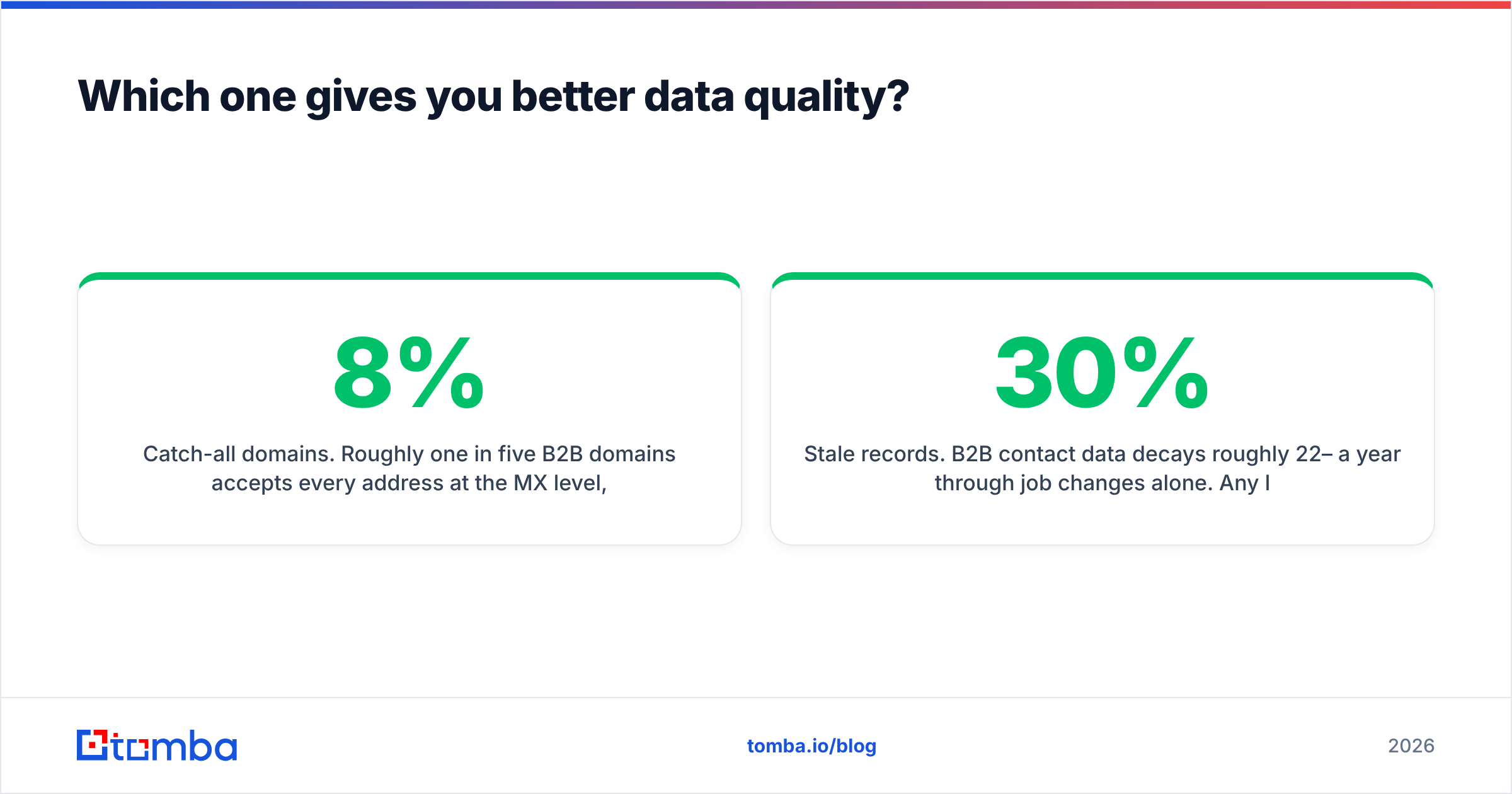
- Catch-all domains. Roughly one in five B2B domains accepts every address at the MX level, so an SMTP check returns "valid" for
asdfgh@company.com. FindThatLead's verifier tends to mark these as risky and hand the decision back to you. If you feed those into Rebump, you send four emails into a void and never learn why. A dedicated catch-all verifier is the difference between an 8% bounce rate and a 1% one. - Small companies and freelancers. Sub-20-employee domains are thinly sourced almost everywhere, FindThatLead included. Expect coverage, not accuracy, to be the failure mode: no result rather than a wrong result.
- Stale records. B2B contact data decays roughly 22–30% a year through job changes alone. Any list you pulled six months ago and are now bumping automatically is partly fiction.
That last point is where the Rebump risk compounds. A follow-up tool multiplies whatever you feed it. Send one email to a dead address and you take one bounce. Bump it four times and you take four, from your primary Gmail account, against Google's sending and reputation limits. Automation without verification is not leverage; it is a faster way to burn a domain.
What does each one cost in 2026?#
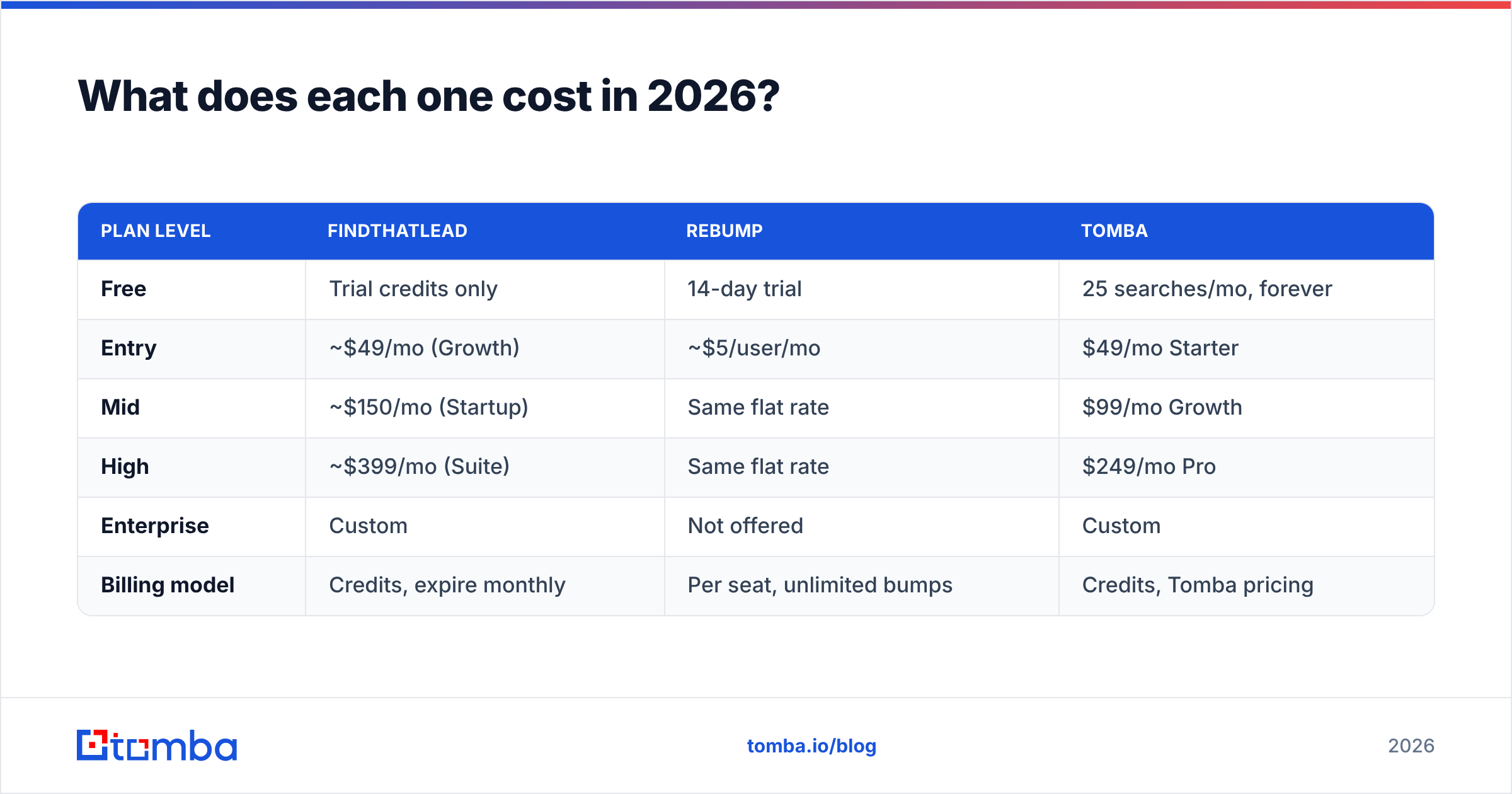
| Plan level | FindThatLead | Rebump | Tomba |
|---|---|---|---|
| Free | Trial credits only | 14-day trial | 25 searches/mo, forever |
| Entry | ~$49/mo (Growth) | ~$5/user/mo | $49/mo Starter |
| Mid | ~$150/mo (Startup) | Same flat rate | $99/mo Growth |
| High | ~$399/mo (Suite) | Same flat rate | $249/mo Pro |
| Enterprise | Custom | Not offered | Custom |
| Billing model | Credits, expire monthly | Per seat, unlimited bumps | Credits, Tomba pricing |
Two things matter more than the headline numbers.
First, credit expiry. FindThatLead credits reset monthly. If your prospecting is lumpy — heavy in campaign weeks, quiet otherwise — you pay for capacity you never touch. Model your actual monthly search volume, not your best month.
First-search-versus-verified-contact is the other trap. A tool that charges a credit for a search that returns nothing, or returns an unverified guess, has a real cost per usable contact that is two or three times its list price. Always divide by verified deliverable contacts, never by searches.
Rebump's pricing is refreshingly boring: a few dollars per user per month, flat, unlimited follow-ups. For what it does, it is one of the cheapest line items in any outbound stack. That is also the strongest argument for it — the ROI question barely needs asking at that price.
Who should pick FindThatLead?#
Choose FindThatLead if all of these are true:
- You are a solo founder, freelancer, or two-person agency doing your own prospecting.
- You want discovery and sending in one login and are willing to accept "good enough" on both rather than excellent on either.
- Your target accounts are mid-market European or LATAM companies, where FindThatLead's sourcing has historically been decent.
- You value a Chrome extension workflow over an API workflow.
Do not choose it if you need programmatic enrichment inside a product, high-volume bulk email finding with strict bounce SLAs, or a real sequencer with A/B testing, inbox rotation and deliverability guards. On those, purpose-built tools beat the bundle by a wide margin.
Who should pick Rebump?#
Choose Rebump if:
- You sell mostly through your own Gmail account and reply volume, not send volume, is the bottleneck.
- Your emails are individually written and semi-personal — consulting, recruiting, partnerships, fundraising, agency work.
- You have measurably lost deals by simply not following up. Most people have; the second and third touch is where a large share of replies land.
- You want zero learning curve. Rebump is a checkbox.
Do not choose Rebump if you need branching logic, multi-channel steps, LinkedIn touches, shared team sequences, or sending volume beyond what a single Google Workspace mailbox tolerates. Once you cross a few hundred emails a day you need a real sequencer with warmup and rotation, not a Gmail add-on.

Can you run FindThatLead and Rebump together?#
Yes, and for a small team it is a reasonable stack. The clean version of that workflow:
- Build the account list first. Decide on 100–300 target companies before you touch any tool. Volume without targeting is what makes outbound feel broken.
- Find contacts by domain, not one by one. Domain-level search returns roles and patterns together, which is faster and cheaper per contact than name lookups.
- Verify before you import. This is the step everyone skips. Run the whole list through a verifier and drop everything that is not deliverable or safely catch-all-resolved.
- Send from Gmail, bump with Rebump. Cap follow-ups at three. Four or more reads as pressure, not persistence, and it is where unsubscribes and spam complaints cluster.
- Measure bounce rate weekly. If it climbs above 3%, your data source is the problem, not your copy. Fix the input before you rewrite the subject line.
Step three is the one that decides whether the other four work. A follow-up engine is an amplifier: it makes good data compound and bad data expensive.
What are the alternatives if neither fits?#
If you tested both and neither closed the gap, the honest options split by what you actually needed:
| Need | Better fit than FindThatLead/Rebump |
|---|---|
| Higher-accuracy finding + verification | A dedicated finder/verifier with catch-all logic |
| Full multichannel sequencing | Instantly, Smartlead, Lemlist, Reply.io |
| Verified B2B lists you buy rather than build | BookYourData, a well-regarded database vendor with per-record verification |
| Enrichment inside your own product | A provider with a documented API and predictable rate limits |
| CRM-native cadences | HubSpot Sales Hub or Salesforce Sales Engagement |
BookYourData is worth a specific mention if your problem is "I need 5,000 verified contacts in a niche by Friday" rather than "I need to look up ten people today." Buying a pre-verified list and building one via search are different motions with different economics, and it is a solid choice for the first.
For the finding-and-verifying half, the criteria that actually predict outcomes are: does the tool tell you why it thinks an address is valid, does it handle catch-alls as a distinct state rather than a shrug, and can you hit it from an API when your workflow outgrows the browser. Those three questions separate the serious data vendors from the pattern-guessers faster than any feature grid.
The verdict#
There is no winner in FindThatLead vs Rebump, because there is no shared job. Rebump is an excellent $5 fix for a discipline problem. FindThatLead is a mid-tier all-in-one that is convenient for solos and outgrown quickly by teams. If you already send good emails and forget to chase, buy Rebump today and stop reading. If your lists are thin or bouncing, no amount of automated follow-up will save the campaign.
The failure mode to avoid is automating a bad list. Before your next sequence, run your contacts through a real finder and verifier: Tomba's email finder starts free at 25 searches a month, with Starter at $49/mo, catch-all handling, bulk processing and an API that plugs into whatever sequencer you land on. Get the data right first, then let Rebump — or anything else — do the chasing.
Related guides#
Ready to find emails that actually work?
Join 150,000+ professionals who stopped guessing and started sending. Free credits on signup — no credit card required.
Get the Tomba newsletter
Practical outbound tactics and product updates — once every two weeks.
About the author