FindThatLead vs Respona (2026): Which Tool Actually Wins?
FindThatLead sells volume prospecting. Respona sells relationship-led link building and PR outreach. They are not the same product — and picking the wrong one wastes a quarter. Here is the honest breakdown.
FindThatLead vs Respona is an odd match-up. One tool finds sales leads in bulk. The other finds writers and editors for link building. Both send cold email. That is where the overlap stops. Here is the honest breakdown.
TL;DR
- They are not really competitors. FindThatLead is a volume B2B prospecting tool. It finds emails and blasts sequences. Respona is built for link building, digital PR, and podcast or guest-post pitches.
- Pick FindThatLead if you need thousands of sales contacts a month and a cheap sender with them.
- Pick Respona if you email journalists, bloggers, and editors, and every message needs research.
- Data accuracy is the weak spot in both. Neither one leads on email discovery. Most teams bolt a dedicated finder and verifier onto whichever platform they pick.
- Budget reality: Respona starts near $99/mo for one seat. FindThatLead's paid plans start near $49/mo. The cheaper tool is not the cheaper outcome once bounces are counted.
What are FindThatLead and Respona, actually?#
FindThatLead is a Spanish-built prospecting suite. It offers domain-based email discovery, a Chrome extension for LinkedIn, lead search by role and location, a verifier, and a basic cold-email sender. (Scrab.in for LinkedIn sits in the same family.) Its center of gravity is volume. You point it at a market segment and it hands you a list.
Respona works a different way. It searches for content and opportunities — articles, podcasts, and pages tied to your topic. It then finds the right author or editor, adds AI-assisted personalization, and sends through a real inbox. SEO and PR teams at companies like Visme and Monday.com use it to earn backlinks.
Most buyers make the same mistake. They compare price per contact. That only works if the contacts do the same job. A sales-ops lead needs 5,000 emails at a fair cost per verified address. A link builder needs 80 emails that reach one specific editor — and read like a human wrote them.
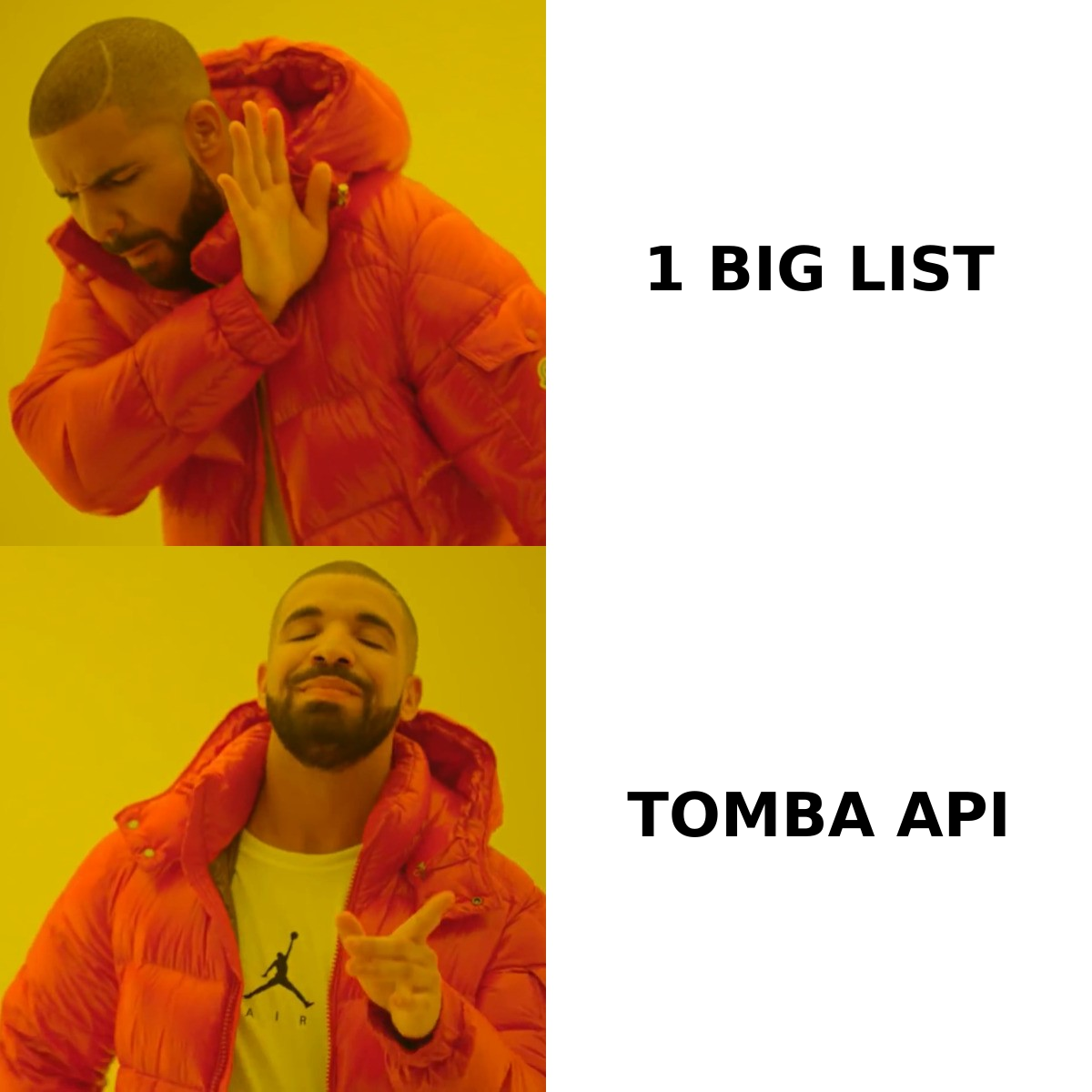
FindThatLead vs Respona: how do they compare head-to-head?#
| Dimension | FindThatLead | Respona |
|---|---|---|
| Primary use case | Volume B2B sales prospecting | Link building, digital PR, podcast outreach |
| Entry price | ~$49/mo (Growth tier) | ~$99/mo (Starter, 1 seat) |
| Free option | Limited free credits | Free trial only (no perpetual free tier) |
| Contact discovery | Domain search, name+company, LinkedIn extension | Opportunity-first: finds article → then finds author |
| Email verification | Built-in verifier | Built-in verification on found contacts |
| Personalization depth | Merge tags, basic spintax | AI research summaries, per-article variables |
| Sending infrastructure | Native sender, modest deliverability controls | Gmail/Outlook/SMTP with inbox rotation |
| CRM/pipeline features | Light | Campaign-level tracking, no real CRM |
| Best team size | 1–20 SDRs | 1–10 SEO/PR specialists |
| Learning curve | Low | Medium (workflow is opinionated) |
The table shows the split. FindThatLead optimizes for cost per contact. Respona optimizes for reply rate per contact. Neither does both. No feature list will change that.
Which one has better email data?#
Neither is a data company. That is the honest answer.
FindThatLead guesses emails from name patterns and a crawled index. It then runs SMTP checks. This works well on mid-market SaaS domains with clear patterns like first.last@. It gets shaky on enterprise domains, catch-all servers, and small regional firms. Reviews on G2 often flag credit burn on failed searches. You pay for the attempt, not the hit.
Respona's finder has a narrower job. It only needs the author or editor behind one URL. It does that well, because the byline is a strong clue. Ask it to list every VP of Marketing at 400 companies and it falls apart. It was never built for that.
Both tools will hand you addresses that bounce. The fix is not loyalty to one vendor. The fix is a verification step before anything reaches your sequencer. Run any list through a dedicated email verifier. You will usually strip 8–20% of a raw export. That includes catch-all addresses, which quietly wreck sender reputation. If you deal with many catch-all domains, use a catch-all verifier. Generic verifiers often mislabel them.
PR work often needs the writer behind a published article. A dedicated author finder does the same job as Respona's discovery step, for far less per seat. That helps if you already own a sequencer.
What does each tool cost in 2026?#
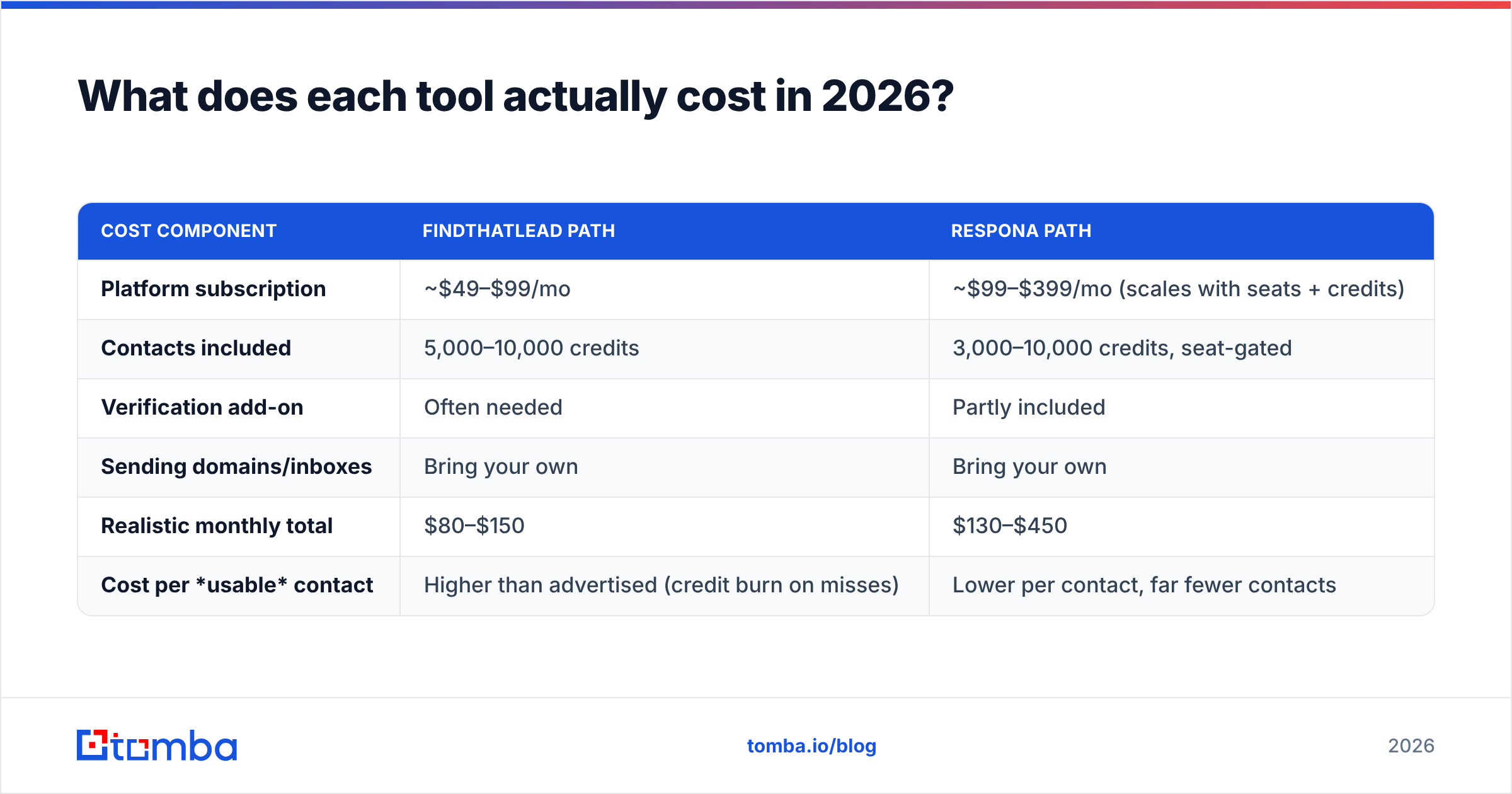
Sticker price hides the real number. Here is the total for a small team sending 3,000 outbound emails a month.
| Cost component | FindThatLead path | Respona path |
|---|---|---|
| Platform subscription | ~$49–$99/mo | ~$99–$399/mo (scales with seats + credits) |
| Contacts included | 5,000–10,000 credits | 3,000–10,000 credits, seat-gated |
| Verification add-on | Often needed | Partly included |
| Sending domains/inboxes | Bring your own | Bring your own |
| Realistic monthly total | $80–$150 | $130–$450 |
| Cost per usable contact | Higher than advertised (credit burn on misses) | Lower per contact, far fewer contacts |
Watch two things. First, credit-burn rules. If a search returns nothing and still costs a credit, your real cost per verified email can be 2–3x the headline. Second, seat pricing on Respona climbs fast. It is a per-seat product dressed up as a per-credit one.
For comparison, Tomba pricing has a free tier of 25 searches a month, Starter at $49/mo, Growth at $99/mo, and Pro at $249/mo. One credit pool covers finding, verifying, and enrichment instead of three separate meters.
When should you choose FindThatLead?#
Choose it if three or more of these are true:
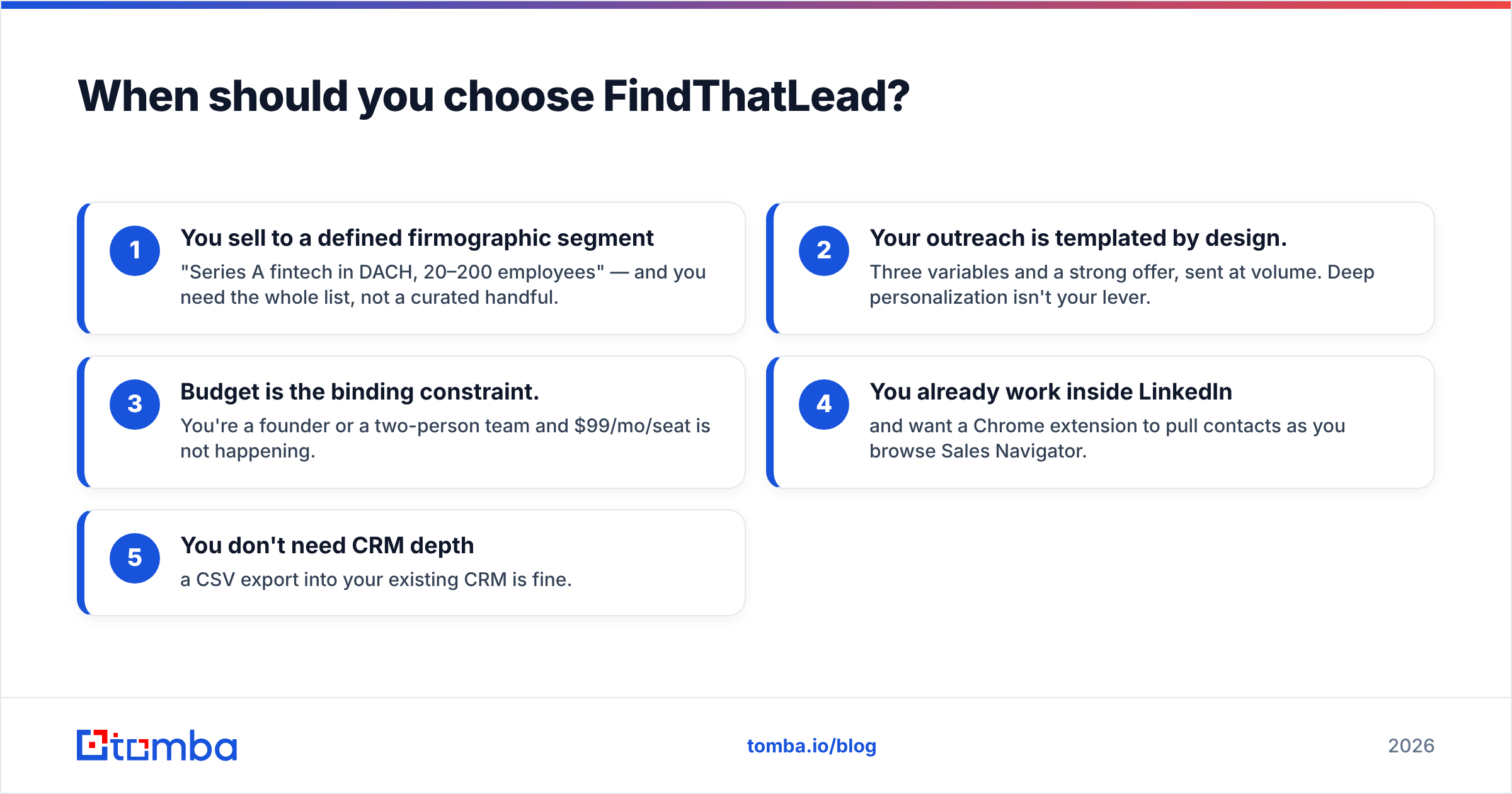
- You sell to a defined segment — say Series A fintech in DACH, 20–200 staff — and you want the whole list, not a short one.
- Your outreach is templated on purpose. Three variables and a strong offer, sent at volume. Deep research is not your lever.
- Budget is the hard limit. You are a founder or a two-person team, and $99/mo per seat is out of reach.
- You live inside LinkedIn and want a Chrome extension to grab contacts as you browse Sales Navigator.
- You don't need CRM depth. A CSV export into your CRM is enough.
Where it disappoints: the deliverability tooling is thin next to purpose-built senders. The UI has rough edges. Reviewers often complain about slow support. If inbox placement drives your whole outbound motion, treat FindThatLead as a data source and send from a dedicated tool.
When should you choose Respona?#
Choose it if your outreach is earned, not bought:
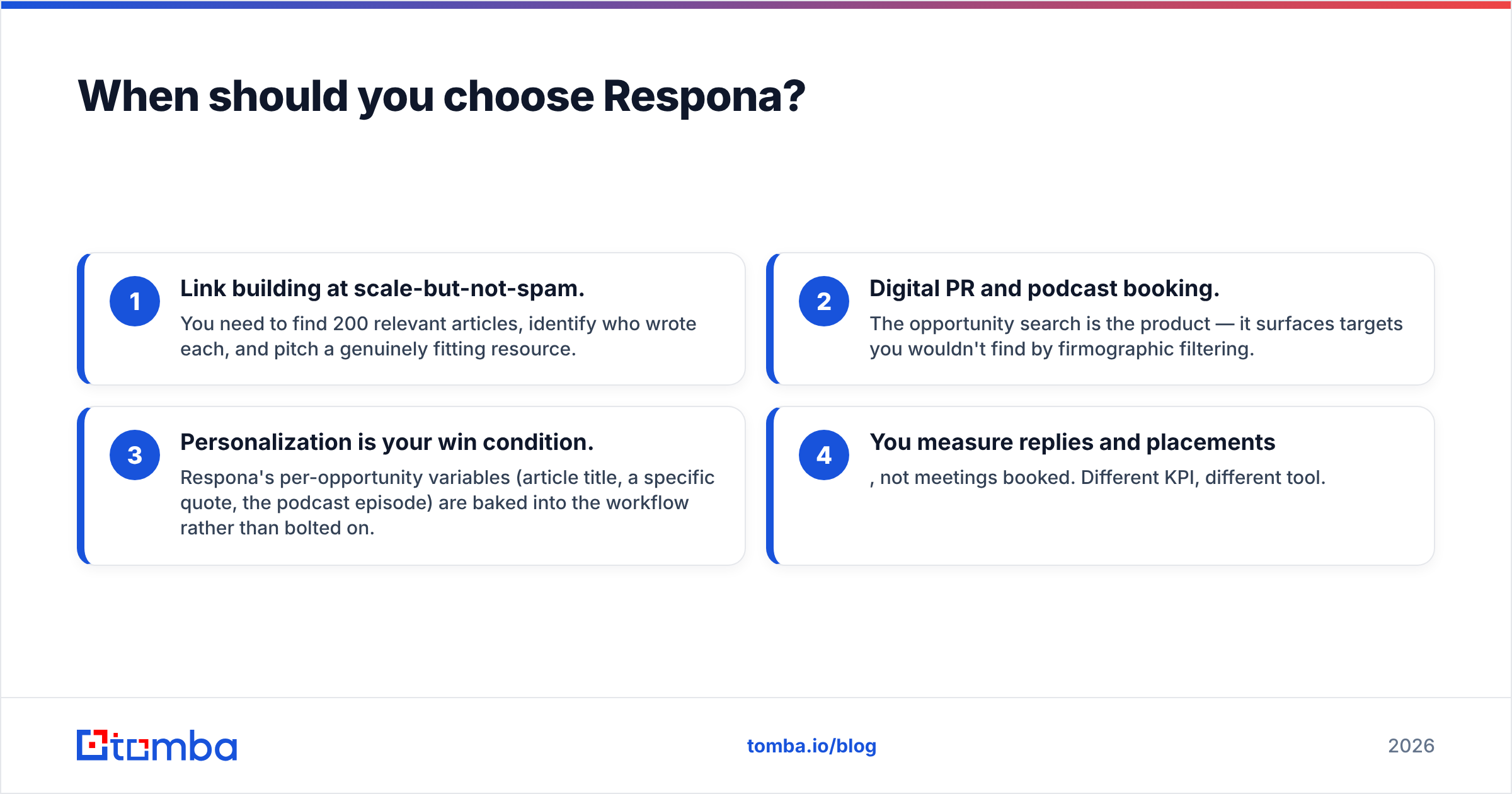
- Link building at scale, without spam. You need 200 relevant articles, the writer behind each one, and a pitch that fits.
- Digital PR and podcast booking. The opportunity search is the product. It surfaces targets that firmographic filters miss.
- Personalization is how you win. Article title, a quote, the episode name — these variables are built into the workflow, not bolted on.
- You count replies and placements, not booked meetings. Different KPI, different tool.
Where it disappoints: the seat price is high. It is not a sales prospecting tool, no matter how you set it up. The opinionated workflow fights you if you want a plain sequencer. Teams that buy Respona for cold sales usually churn within two quarters.

What's the third option most teams build?#
We see the same pattern again and again. Teams drop the all-in-one and assemble three layers.
- Data layer — a dedicated finder and verifier with an API, so any workflow can pull contacts on demand.
- Orchestration layer — a sequencer picked for deliverability: inbox rotation, warmup, sending caps.
- Enrichment layer — company and role data on each record, so personalization has something to use.
This unbundling wins twice. You stop paying for a weak sender inside a data tool. You stop paying for weak data inside a sender. Swapping one layer no longer breaks the whole stack.
In practice: run domain search to pull every public contact at a target company. Push it through verification. Then hand a clean list to the sequencer you trust. For engineering-led teams, the Tomba API turns this into a scheduled job instead of a weekly CSV chore. Past 5,000 contacts a month, that matters more than any feature chart.
If your real problem is email deliverability, note this: neither tool will fix a damaged sending domain. That takes SPF, DKIM, and DMARC hygiene, warmup discipline, and list quality — in that order. HubSpot's outbound research and vendor docs both rank list hygiene above copy as a bounce driver.
How do you decide in under ten minutes?#
Answer three questions honestly.
1. Who is the recipient? A buyer you picked by company traits → FindThatLead. A writer, editor, or podcast host you picked by their content → Respona.
2. What is your bottleneck? Not enough contacts → a data problem, so buy a finder. Plenty of contacts but no replies → a personalization or deliverability problem. More contacts will only make it worse.
3. How many seats? One or two → either tool works. Five or more → Respona's seat cost stacks up fast, and FindThatLead cannot support a team that size. At that point the unbundled stack usually wins on cost and control.
Still torn? Run both trials against the same 100 target companies. Count two numbers: how many verified addresses you got, and how many replies they produced. Feature lists lie. That test does not.
Final verdict#
So, FindThatLead vs Respona? FindThatLead wins on cost per contact for volume sales. Respona wins on reply quality for link building and PR. They rarely belong on the same shortlist. If both are on yours, your requirements are not clear yet. Go back to question one.
Neither one fixes the accuracy floor. Every hour spent comparing sequencer screens is an hour not spent on the thing that decides outbound results: whether the address is real, current, and tied to the right person.
Start there. Use the Tomba Email Finder to source and verify contacts. The free tier gives you 25 searches a month to test on your own list. Starter is $49/mo. Every result comes back with a confidence score and a verification status, so you know what you are sending to. Plug it into whichever outreach tool you pick, and let each tool do what it is good at.
Related guides#
Ready to find emails that actually work?
Join 150,000+ professionals who stopped guessing and started sending. Free credits on signup — no credit card required.
Get the Tomba newsletter
Practical outbound tactics and product updates — once every two weeks.
About the author