FindThatLead vs Sales Automation Systems: 2026 Comparison
FindThatLead finds contacts. Sales automation systems move them through a process. Here's where each one actually earns its money, what the stack costs, and how to avoid paying twice for the same job.
FindThatLead vs sales automation systems is a fair question with an unfair setup. One tool finds contacts. The other moves them through a process. Buy the wrong one first and you pay twice for the same job. Here is how to tell which one fixes your bottleneck now.
TL;DR
- FindThatLead is a prospecting and lead-sourcing tool with a light sending layer bolted on. Sales automation systems are workflow engines: sequences, tasks, routing, CRM sync, reporting.
- They are not really rivals. In the FindThatLead vs sales automation systems debate, the common mistake is buying one to replace the other.
- Short on good contacts? You need a data layer. Contacts rotting in a spreadsheet with no follow-up? You need an execution layer.
- Cheap all-in-one tools tend to be weak at both. A specialist data source plus a specialist sequencer usually costs less and performs better.
- Most stacks break on data quality, not automation. Automating outreach to a 65%-valid list just gets you blocked faster.
What is FindThatLead, exactly?#
FindThatLead is a Spanish-built B2B prospecting tool that launched in 2015. Its core job is finding work email addresses. You give it a domain, a name, or a LinkedIn profile, and it returns a likely email with a confidence score. Around that core sit a domain search, a lead filter (industry, location, headcount), a Chrome extension, and "Scrab.in" for LinkedIn activity.
It also ships a basic email sender, so you can push a list into a campaign without leaving the product. That sender is why people file it under "sales automation." It is also why the comparison gets muddy.
Think of FindThatLead as a water source. It finds the well and pumps water. It is not the plumbing that feeds every tap in the building on a schedule.
The practical shape of the product:
- Strength: turning a company list or a LinkedIn search into a contact list, fast.
- Strength: low entry price for solo founders and small agencies.
- Weakness: verification depth on catch-all domains and outside the US.
- Weakness: the sending layer is thin next to a real sequencer. Limited branching, weak deliverability tooling, shallow reporting.
What counts as a "sales automation system"?#
A sales automation system is the execution layer. It decides who gets contacted, on what day, through which channel, and what happens when they reply. Outreach, Salesloft, Instantly, Reply.io, Saleshandy, Apollo's engagement module, and HubSpot Sales Hub all live here.
What defines the category:
- Multi-step, multi-channel sequences — email, call task, LinkedIn touch, wait, branch on reply.
- Inbox and sending setup — mailbox rotation, warmup, throttling, bounce handling, spintax.
- CRM as the source of truth — two-way sync, so a rep's activity lands on the record instead of a silo.
- Task management for humans — call queues, snoozes, ownership, response times on new leads.
- Reporting that answers "which step is broken" — reply rate by variant, by persona, by mailbox.
- Governance — suppression lists, do-not-contact, sending caps, team permissions.
Sales automation platforms assume you already have contacts. Almost none of them are real data vendors, even when they resell a database. Their moat is process, not records.
FindThatLead vs sales automation systems: what's the real difference?#
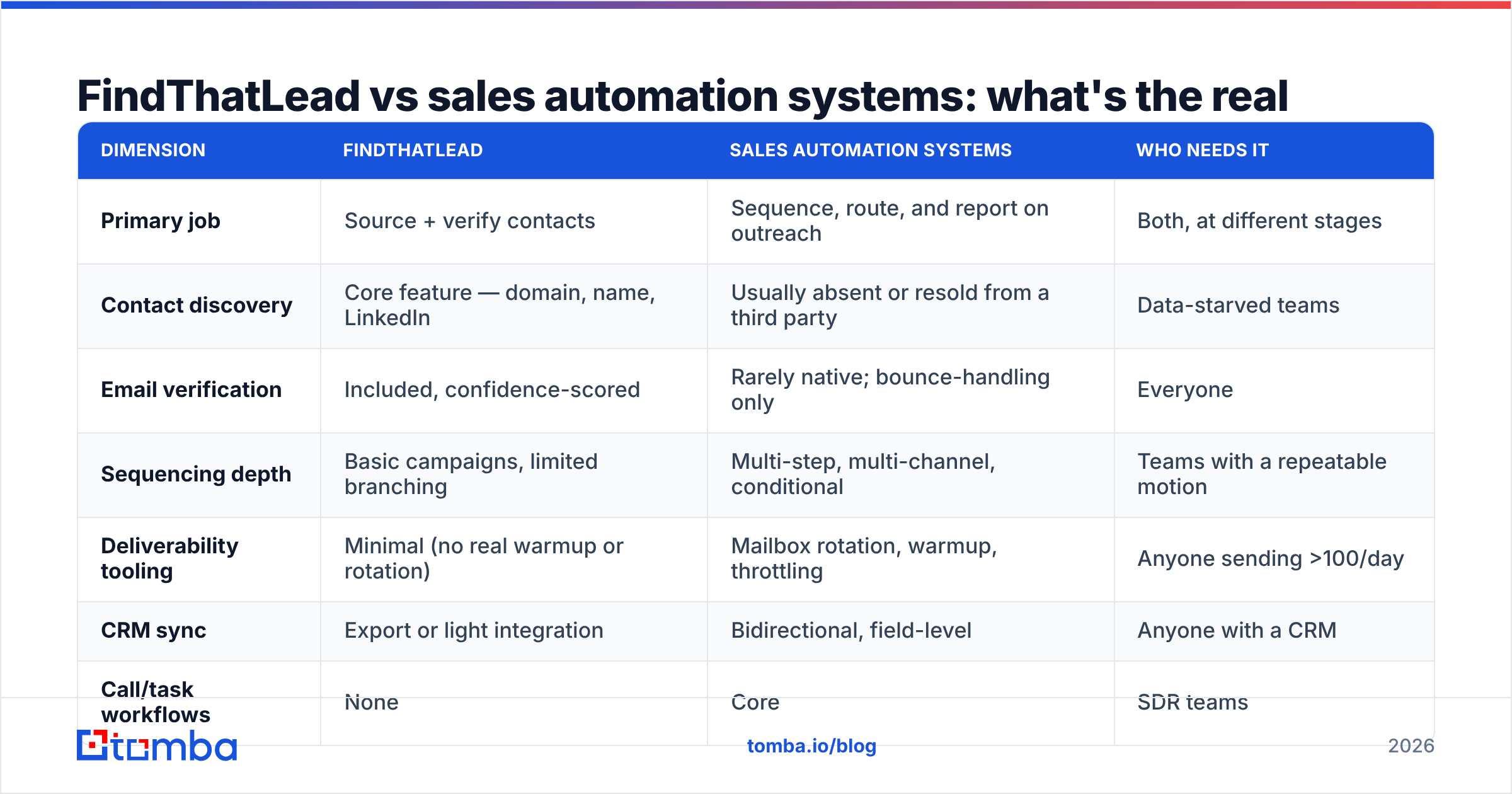
Here is the head-to-head on the things that actually change your numbers.
| Dimension | FindThatLead | Sales automation systems | Who needs it |
|---|---|---|---|
| Primary job | Source + verify contacts | Sequence, route, and report on outreach | Both, at different stages |
| Contact discovery | Core feature — domain, name, LinkedIn | Usually absent or resold from a third party | Data-starved teams |
| Email verification | Included, confidence-scored | Rarely native; bounce-handling only | Everyone |
| Sequencing depth | Basic campaigns, limited branching | Multi-step, multi-channel, conditional | Teams with a repeatable motion |
| Deliverability tooling | Minimal (no real warmup or rotation) | Mailbox rotation, warmup, throttling | Anyone sending >100/day |
| CRM sync | Export or light integration | Bidirectional, field-level | Anyone with a CRM |
| Call/task workflows | None | Core | SDR teams |
| Reporting | Campaign-level basics | Step, variant, rep, and cohort level | Managers |
| Typical entry price | ~$49/mo tier (check vendor page) | $30–$150/user/mo, enterprise far higher | — |
| Ceiling | Small team, ~10k contacts/mo | Hundreds of reps, millions of touches | — |
| Fails when… | You need process and accountability | You have no clean contacts to load | — |
Read that table once more and notice the pattern. The rows where FindThatLead wins are inputs. The rows where automation systems win are throughput. You cannot swap one for the other, and the market has quietly stopped pretending you can.

Which one should you buy first?#
Buy in the order your bottleneck bites. The FindThatLead vs sales automation systems choice is really a diagnosis, so be honest:
- Fewer than 500 qualified contacts and no repeatable list-build process. Buy the data layer. A sequencer with an empty database is a $99/mo screensaver.
- 10,000 contacts but a 22% bounce rate. Buy verification, not more volume. Fix the list first — see the email verifier approach below.
- Clean contacts, but reps forget follow-up #3. Buy the automation system. Here it is the highest-ROI purchase in the stack.
- Both in place, and still no revenue attribution. That is a CRM hygiene problem. Fix field mapping before adding software.
- Solo founder sending 30 emails a day. FindThatLead-class tooling plus your own inbox is genuinely enough. Outreach at this stage is theater.
- Onboarding your fourth SDR. You crossed the line. Process debt now costs more than license fees. Buy the automation system this quarter.
Most teams get this backwards. They buy the shiny sequencer. They load a scraped list. The reply rate sits at 0.4%. Then they decide that "cold email doesn't work anymore."
How do the costs actually compare?#
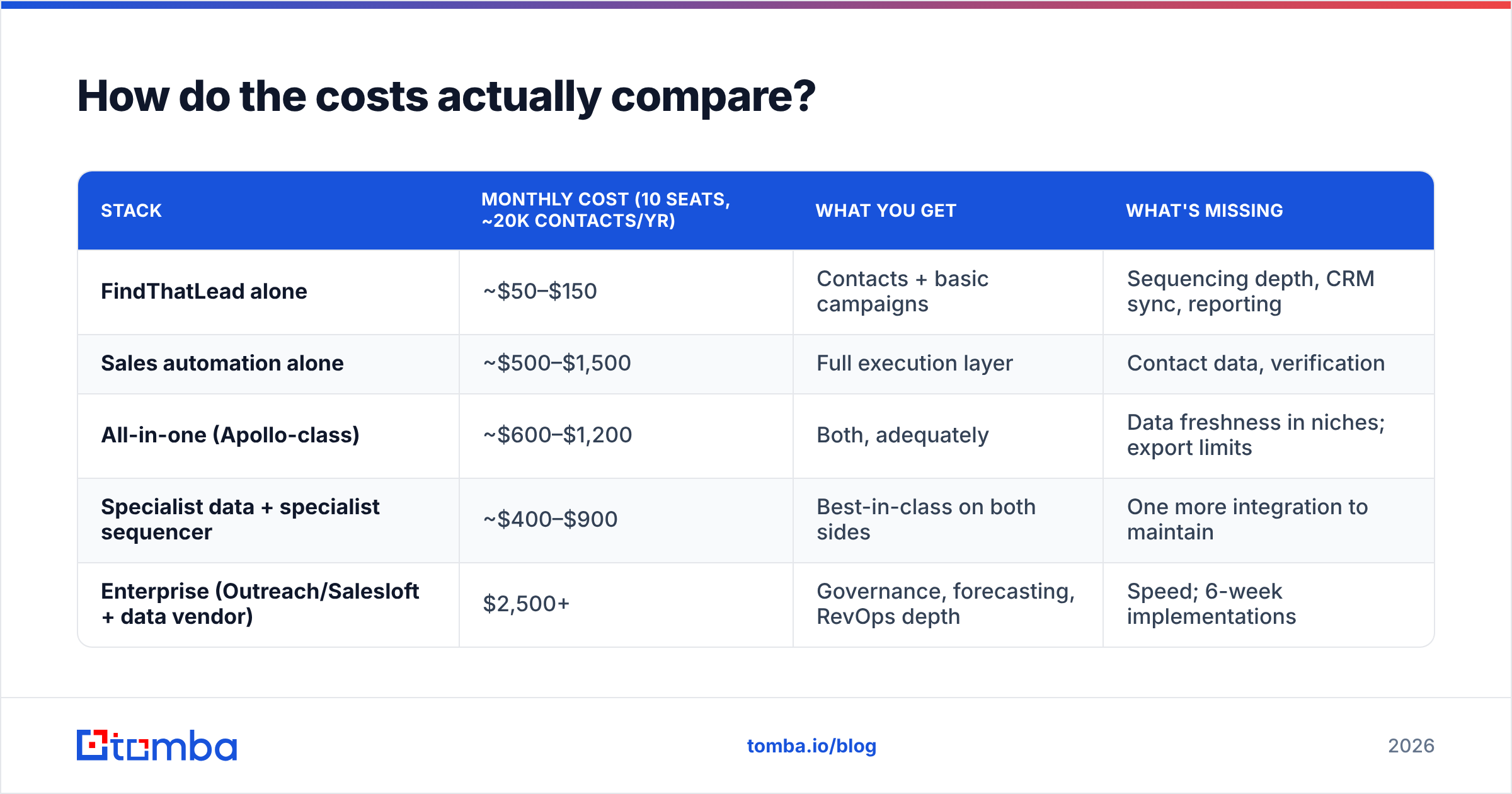
Pricing shifts constantly. Treat these numbers as directional, and check each vendor's page before you sign.
| Stack | Monthly cost (10 seats, ~20k contacts/yr) | What you get | What's missing |
|---|---|---|---|
| FindThatLead alone | ~$50–$150 | Contacts + basic campaigns | Sequencing depth, CRM sync, reporting |
| Sales automation alone | ~$500–$1,500 | Full execution layer | Contact data, verification |
| All-in-one (Apollo-class) | ~$600–$1,200 | Both, adequately | Data freshness in niches; export limits |
| Specialist data + specialist sequencer | ~$400–$900 | Best-in-class on both sides | One more integration to maintain |
| Enterprise (Outreach/Salesloft + data vendor) | $2,500+ | Governance, forecasting, RevOps depth | Speed; 6-week implementations |
The all-in-one looks cheapest on the invoice. It rarely is. Bundled credits are the usual trap. You hit an export cap mid-quarter, buy an overage pack, and end up above the unbundled price with worse data. G2's category reviews are full of this exact complaint.
Where does FindThatLead fall short?#
Three places, over and over.
Catch-all domains. Many mid-market and enterprise domains accept every address at the SMTP layer, so a simple ping proves nothing. Tools without a catch-all pipeline either mark these "risky" and leave you guessing, or mark them "valid" and let you bounce.
If much of your ICP sits behind Microsoft 365 with catch-all on, this is the single biggest accuracy factor. That is why a purpose-built catch-all verifier beats a headline accuracy percentage.
Coverage outside the US and EU. Coverage thins out fast in other markets. If you sell into LATAM, MENA, or APAC, run a 200-row test before you commit budget.
The sending layer. It exists, but it is not a real sequencer. No serious mailbox rotation, thin warmup, weak branching, shallow analytics. Send real volume through it and you burn a domain.
None of this makes FindThatLead a bad product. It makes it a data tool with a convenience feature, which is a fine thing to be — as long as you buy it as that.
Where do sales automation systems fall short?#
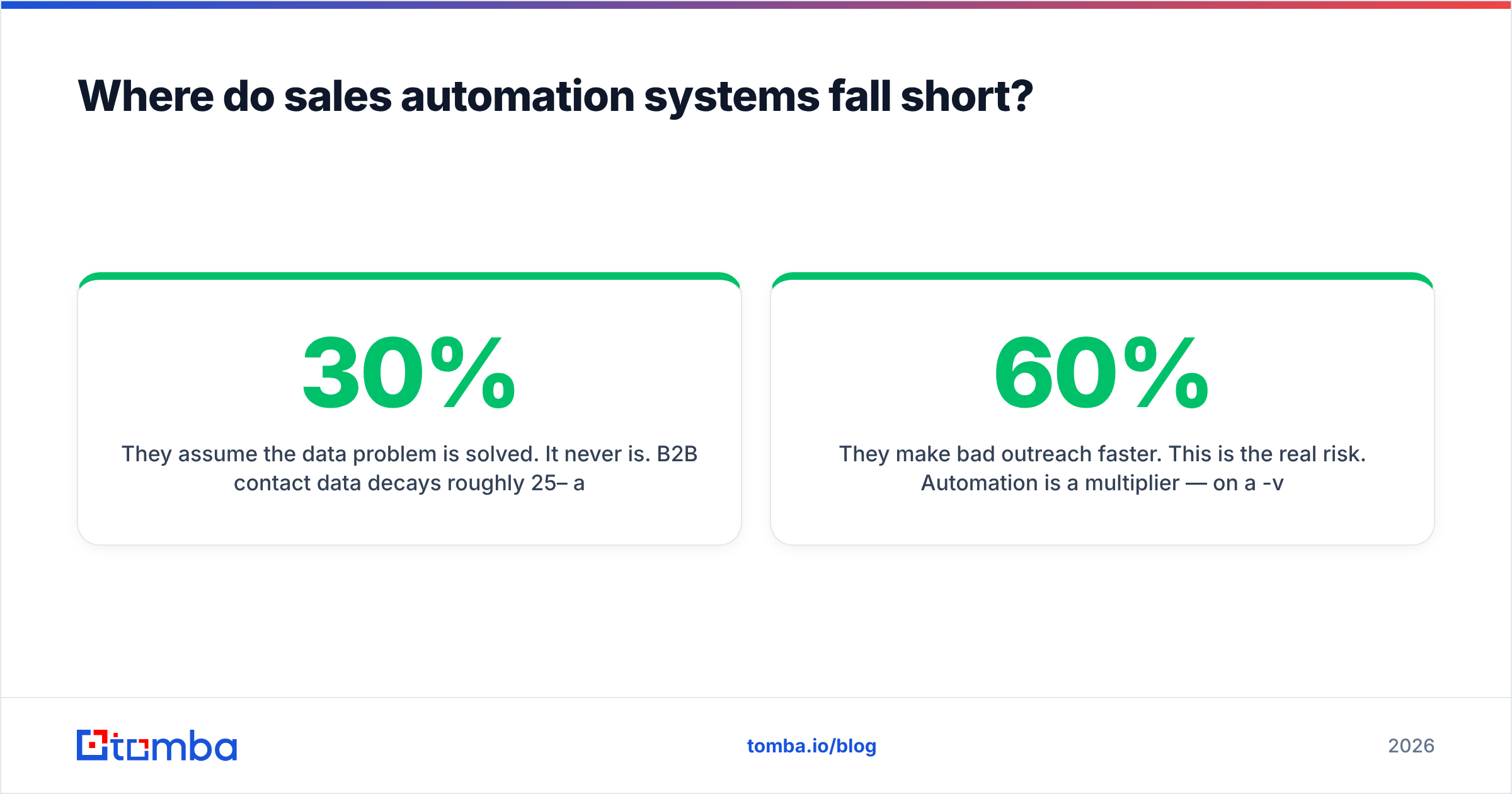
They assume the data problem is solved. It never is. B2B contact data decays roughly 25–30% a year as people change jobs. HubSpot's own research on database decay still puts it in that band. Your 12-step sequence runs against a list that gets 2.5% worse every month you skip a refresh.
Resold data is not owned data. When a sequencer bundles "contacts," it usually licenses a database it does not control. It cannot refresh that data on your schedule. You inherit someone else's stale records, with no view into where the data came from.
They punish small teams. Per-seat pricing, annual contracts, and setup timelines that assume a RevOps hire. With three people, the overhead eats the benefit.
They make bad outreach faster. This is the real risk. Automation is a multiplier. On a 60%-valid list with a generic template, it multiplies spam complaints and burns your sender reputation.
Can you run both? What the combined stack looks like#
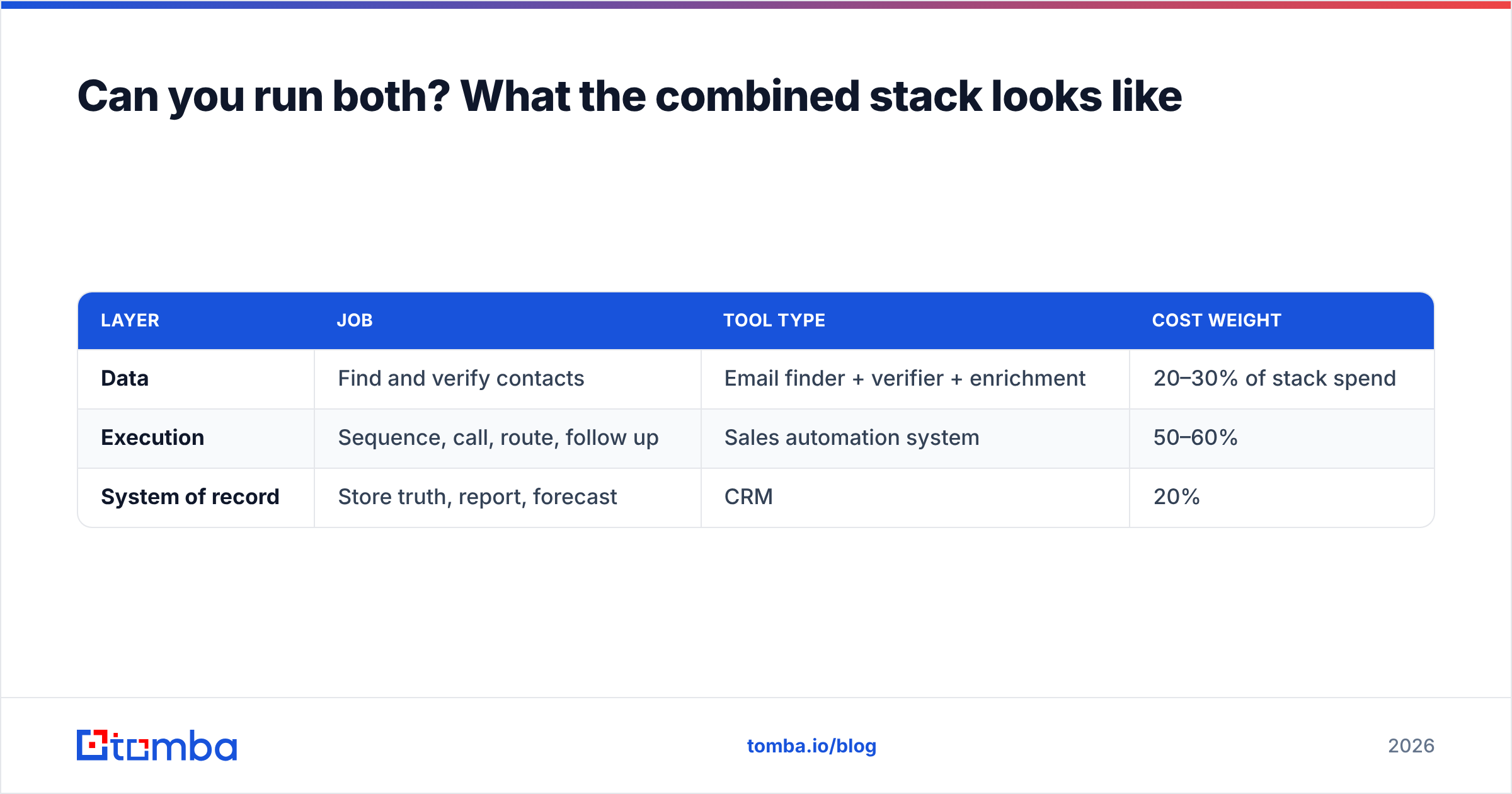
Yes. In practice, FindThatLead vs sales automation systems is rarely an either/or for teams that hit their number. The clean setup separates three layers:
| Layer | Job | Tool type | Cost weight |
|---|---|---|---|
| Data | Find and verify contacts | Email finder + verifier + enrichment | 20–30% of stack spend |
| Execution | Sequence, call, route, follow up | Sales automation system | 50–60% |
| System of record | Store truth, report, forecast | CRM | 20% |
One rule keeps this from breaking: nothing enters the execution layer unverified. Every contact passes a check before a sequence can touch it. Enforce it with an API call inside the workflow, not with a human who remembers.
A concrete version of that pipeline:
- Build the account list in your CRM or a sheet. Company data only, no contacts yet.
- Find contacts per account with a domain search, so you get every relevant role and not just the one name you had.
- Verify every address, catch-alls included. Drop anything below your confidence floor.
- Enrich with title, seniority, and location, so your sequencer can branch on real traits.
- Push only verified rows into the automation system by API or native integration.
- Re-verify each quarter. The list you built in January is measurably worse by April.
Step five is where most stacks leak. Teams export a CSV "just this once," skip the check, and feed decay into a system that amplifies it.
What should you actually optimize for in 2026?#
Inbox providers keep tightening. Google and Yahoo turned bulk sender rules into a hard gate on spam complaints and authentication. The result is simple: volume strategies are dead and precision strategies work. Sending 5,000 emails to a half-verified list is now worse than sending 300 to a clean one. It is not just wasteful. It damages your reputation.
That changes the FindThatLead vs sales automation systems math. The automation layer used to sell scale. Now it sells governance: suppression, throttling, mailbox health, reply detection. Meanwhile the data layer is worth more, because every bad address costs you more than it did two years ago.
If you have to underinvest somewhere, underinvest in fancy sequencing. Do not underinvest in data accuracy.
Practical checks before you buy anything:
- Run the same 200-contact list through every tool you test. Compare valid rate after real sending, not the claimed accuracy.
- Ask what happens on catch-all domains. A vague answer means no real pipeline.
- Check export limits and credit rollover in the contract, not the pricing page.
- Confirm the automation system can accept a verification field and filter on it.
- Price the two-specialist stack against the all-in-one at your real 12-month volume.
The verdict#
FindThatLead and sales automation systems solve different problems. So the honest answer to "which wins" is: whichever one fixes your current bottleneck. FindThatLead is a reasonable entry-level data tool with a sender attached. It is not a substitute for Outreach, Salesloft, or Instantly. A sales automation system is a serious execution layer. It is not a substitute for a contact database.
The real leverage in FindThatLead vs sales automation systems is treating the data layer as a first-class purchase, not an afterthought bundled with whichever platform you bought first. Verified contacts make an average sequence perform well. Unverified contacts make an excellent sequence perform badly. That gap is the whole game.
Want the data layer handled properly? Start with the Tomba Email Finder. It resolves contacts by domain, name, or company. It verifies them, catch-alls included, before anything reaches your sequencer. And it exposes all of it through an API, so "verify before send" is enforced by code rather than by discipline.
The free tier gives you 25 searches a month to run your own test list. Paid plans start at $49/mo — check current Tomba pricing for the Growth and Pro tiers if you move real volume. Build your 200-row benchmark, run it against whatever you use today, and let the bounce rate settle the FindThatLead vs sales automation systems argument.
Related guides#
Ready to find emails that actually work?
Join 150,000+ professionals who stopped guessing and started sending. Free credits on signup — no credit card required.
Get the Tomba newsletter
Practical outbound tactics and product updates — once every two weeks.
About the author