FindThatLead vs Salutary Data: Which Data Tool Wins in 2026
One is a self-serve email finder with a credit meter. The other is a licensed US contact file you buy through a rep. Here is which one actually fits your outbound motion in 2026 — and when a third option beats both.
FindThatLead vs Salutary Data is a choice between two different things. One is a self-serve email finder. The other is a licensed US contact file you buy through a sales rep. This guide compares price, data, and fit. Then it names the better pick for each kind of team.
TL;DR
- FindThatLead is a self-serve email finder and sender. You log in, spend credits, export a CSV, and send. Best for solo founders, agencies, and small SDR teams that need contacts today.
- Salutary Data is a compiled B2B contact database. It works like a licensed data file, not a search box. You talk to a rep, scope a segment, and buy records in bulk. Mobile numbers are usually included.
- In FindThatLead vs Salutary Data, the two are not true rivals. They fight for the same budget line. But one is a tool and the other is a dataset. Pick wrong and you lose either accuracy or six months of contract.
- Price is the sharpest divide. FindThatLead plans start near $49/mo. Salutary Data is quote-based, with no public self-serve tier.
- Want per-record accuracy and an API without a purchase committee? A verification-first finder like Tomba ($49/mo Starter, free tier included) often fits small teams better.
What is FindThatLead?#
FindThatLead is a Spanish prospecting suite that launched in 2015. The core loop is simple. Give it a domain, a name plus a company, or a LinkedIn URL. It returns a likely business email.
Around that core it adds a Chrome extension, a lead search by role and location, a Prospector for list building, and a basic cold-email sender. So you can go from list to campaign inside one app.
The pitch is speed. You sign up, you get credits, you burn them. There is no onboarding call and no data license to sign. That is why FindThatLead shows up in so many agency stacks and one-person outbound setups. The tool is live in about four minutes.
The trade-off is depth. Coverage leans toward SMB and European markets. Phone data is thin next to dedicated providers. Verification is a simple pass/fail signal, not a confidence score. You also pay per credit even when a search fails, which stings at scale.
What is Salutary Data?#
Salutary Data sells B2B contact data, not software. It is a compiled, US-focused database. The company leads with verified business emails, direct dials, and mobile numbers. Coverage runs to tens of millions of contacts across millions of companies.
You buy it as a licensed dataset, a platform seat, or a scoped file sent to your CRM or data warehouse. This is the data-as-a-service model. You do not search one contact at a time.
Instead you define a segment. Say: "VP Sales and above, US SaaS, 50 to 500 staff, with mobile." You then receive that segment as a file. Data teams, RevOps leads, and agencies reselling contact data are the natural buyers.
The catches are worth stating plainly. There is no free tier to poke at. Pricing is negotiated, usually annual, and sized to volume rather than seats. To judge the data, ask for a sample file and run your own bounce test. That is the right way to test any bulk provider. It also takes weeks, not minutes.

FindThatLead vs Salutary Data: how do they actually differ?#
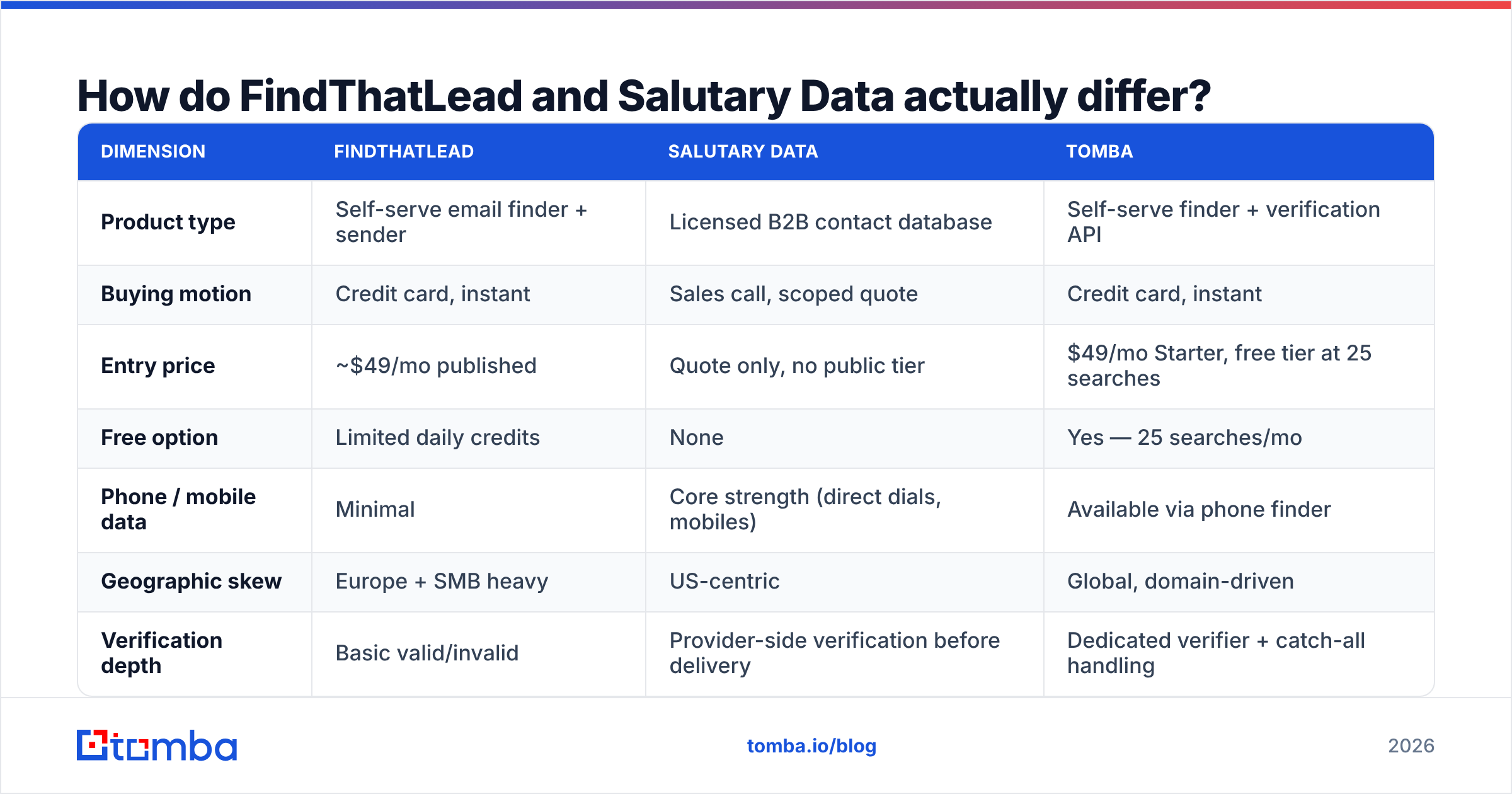
The honest framing: one sells you a search box, the other sells you records. Here is the side-by-side. Tomba is included as the reference point most readers already compare against.
| Dimension | FindThatLead | Salutary Data | Tomba |
|---|---|---|---|
| Product type | Self-serve email finder + sender | Licensed B2B contact database | Self-serve finder + verification API |
| Buying motion | Credit card, instant | Sales call, scoped quote | Credit card, instant |
| Entry price | ~$49/mo published | Quote only, no public tier | $49/mo Starter, free tier at 25 searches |
| Free option | Limited daily credits | None | Yes — 25 searches/mo |
| Phone / mobile data | Minimal | Core strength (direct dials, mobiles) | Available via phone finder |
| Geographic skew | Europe + SMB heavy | US-centric | Global, domain-driven |
| Verification depth | Basic valid/invalid | Provider-side verification before delivery | Dedicated verifier + catch-all handling |
| API access | Yes, plan-gated | Yes, contract-dependent | Yes, on all paid plans |
| Bulk workflow | CSV upload, credit-metered | Native — bulk is the whole product | Bulk finder + bulk verify |
| Best fit | Solo founders, small agencies | Data teams buying volume | SDR teams and developers needing per-record accuracy |
Three things fall out of that table.
First, the test timelines do not match. You can try FindThatLead against your ICP in an afternoon. Testing Salutary Data means asking for a sample, running it through an email verifier, and measuring the real bounce rate. Only then do you negotiate. If your quarter starts Monday, that gap decides the question for you.
Second, phone data is the real difference. Cold calling at volume needs mobile numbers. An email finder is the wrong category for that job. Salutary Data exists because email-first tools underinvest in dials.
Third, neither one is a verification product. FindThatLead flags clearly bad addresses. Salutary Data verifies before delivery, but any file goes stale from day one. Either way, verifying at send time is a separate job. Skipping it is the most common way teams wreck their sender reputation.
Which one has better data accuracy?#
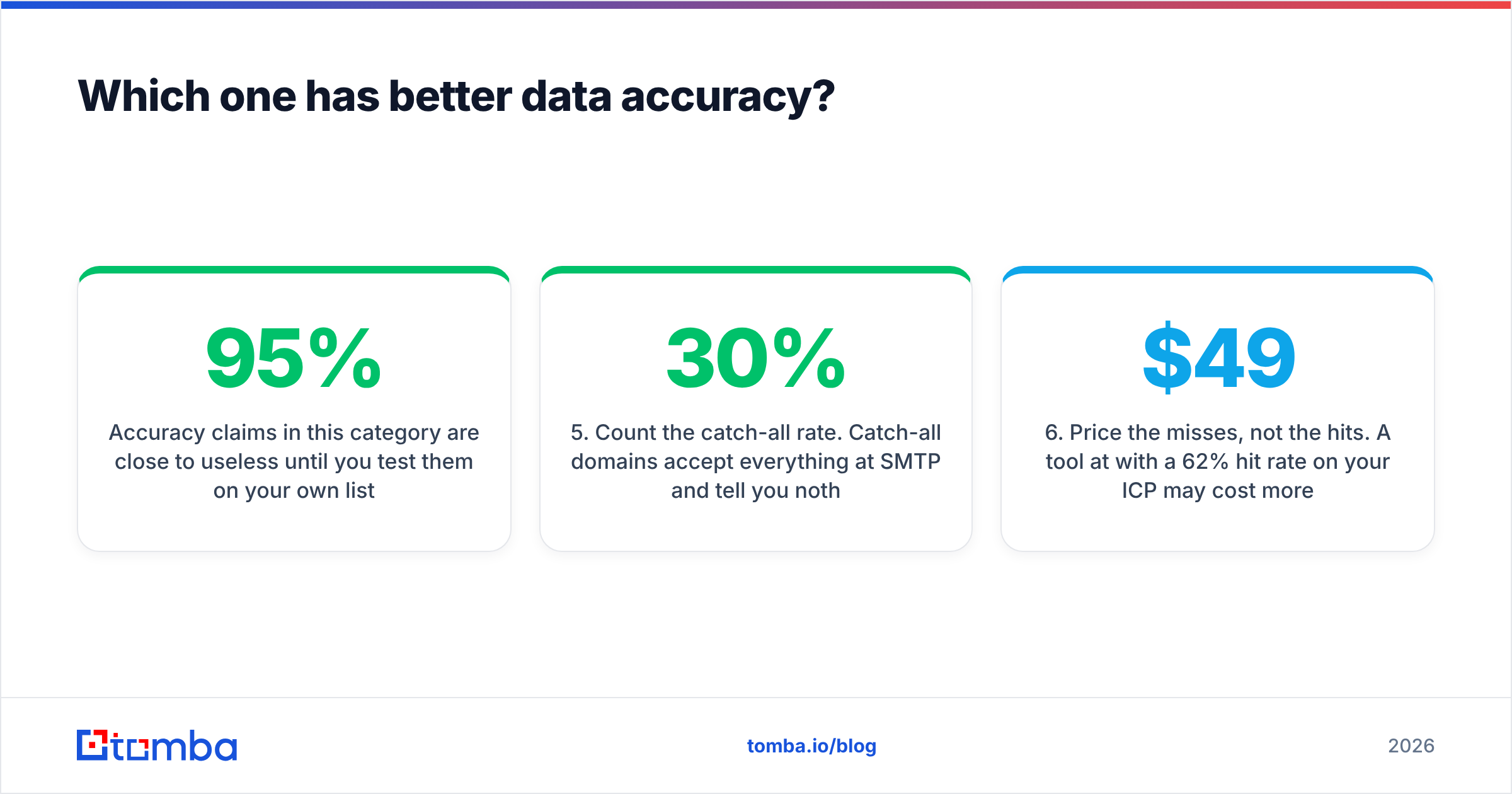
Accuracy claims here mean little until you test them on your own list. Every vendor quotes 95% or better. What changes is what they measure: syntax, SMTP acceptance, inbox delivery, or human-checked job titles.

Run this test before you commit to either vendor.
- Build a 200-contact control list from accounts you know well. Use customers, churned logos, and people who have replied to you. You already know the right answer for these.
- Run the same list through both vendors. Record hit rate and accuracy as two separate numbers. Hit rate is how many came back with anything. Accuracy is how many came back correct.
- Check every returned address in a third tool so no vendor grades its own homework. Use a free email checker for spot checks and a bulk verifier for the full run.
Then look at where the two datasets split apart.
- Segment by company size and country. FindThatLead tends to hold up on European SMBs. US-compiled databases hold up on mid-market US accounts. Both fall off outside their core.
- Count the catch-all rate. Catch-all domains accept every address and tell you nothing. A 30% catch-all share means a weaker dataset than the headline number suggests. That is why catch-all verification is a real feature and not a footnote.
- Price the misses, not the hits. A $49/mo tool with a 62% hit rate can cost more per usable contact than a $99/mo tool at 85%.
Teams skip that last step. Cost per usable record is the only number that matters. It is almost never the number on the pricing page.
What does each one cost in 2026?#
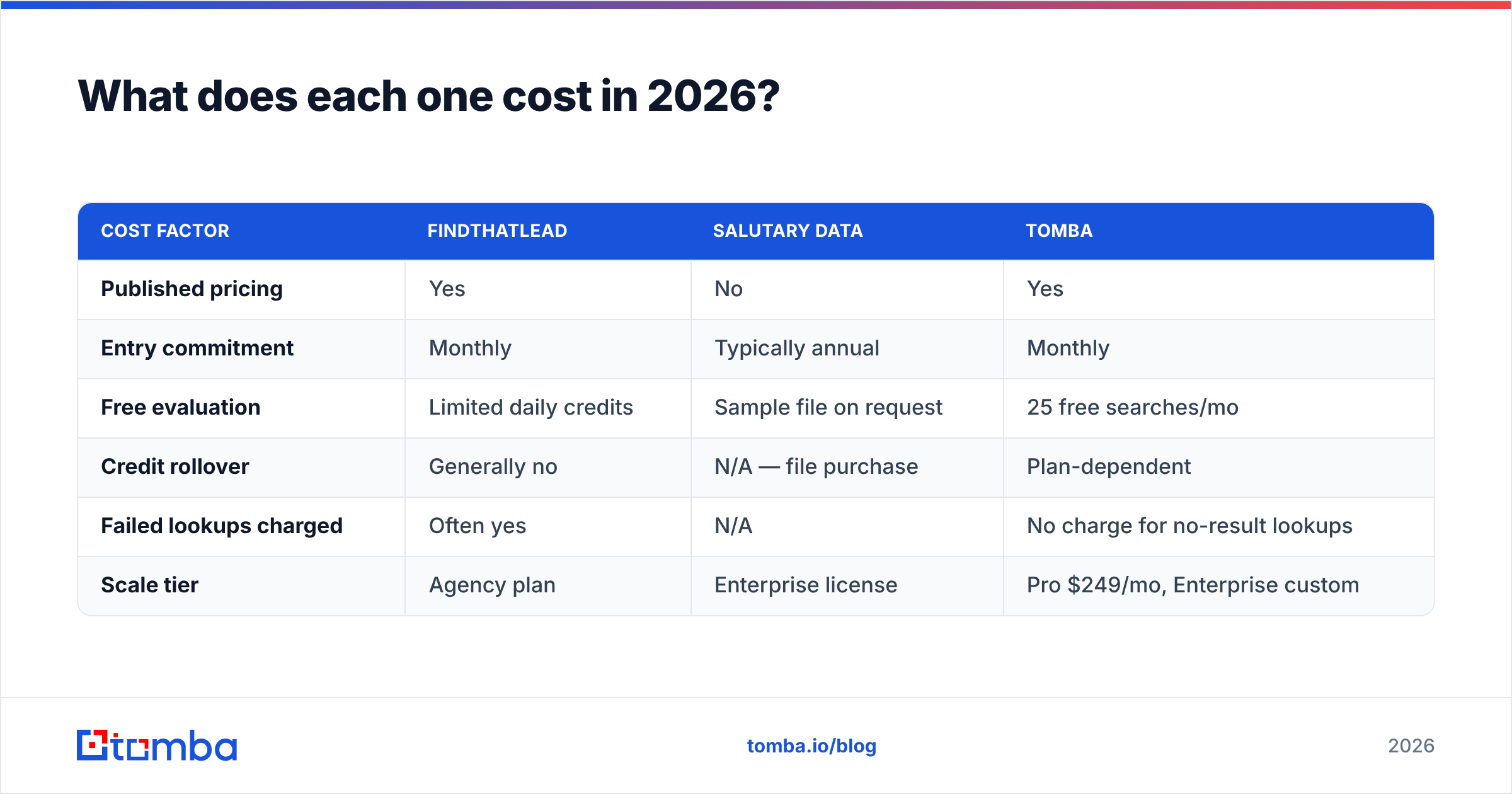
FindThatLead publishes tiered plans built on monthly credits. The entry tier sits near $49/mo. Mid tiers land in the low hundreds, and there is a top self-serve tier for agencies. Credits are spent on every search, hit or miss, and unused credits usually do not roll over. Check FindThatLead's current pricing before you budget, because this category changes tiers often.
Salutary Data publishes no self-serve pricing. Expect a discovery call, a scoped segment, and a quote. The quote depends on record volume, refresh rate, and license terms. Internal use versus resale changes the number a lot. Annual deals are the norm. See Salutary Data's site for current positioning, and read buyer reviews on G2 before you sign anything multi-year.

| Cost factor | FindThatLead | Salutary Data | Tomba |
|---|---|---|---|
| Published pricing | Yes | No | Yes |
| Entry commitment | Monthly | Typically annual | Monthly |
| Free evaluation | Limited daily credits | Sample file on request | 25 free searches/mo |
| Credit rollover | Generally no | N/A — file purchase | Plan-dependent |
| Failed lookups charged | Often yes | N/A | No charge for no-result lookups |
| Scale tier | Agency plan | Enterprise license | Pro $249/mo, Enterprise custom |
Want the full ladder — Free, Starter $49/mo, Growth $99/mo, Pro $249/mo, Enterprise custom? The Tomba pricing page lays it out with no call needed.
Who should pick which?#
Match the tool to the motion, not to the feature list. The FindThatLead vs Salutary Data answer changes with your team shape.
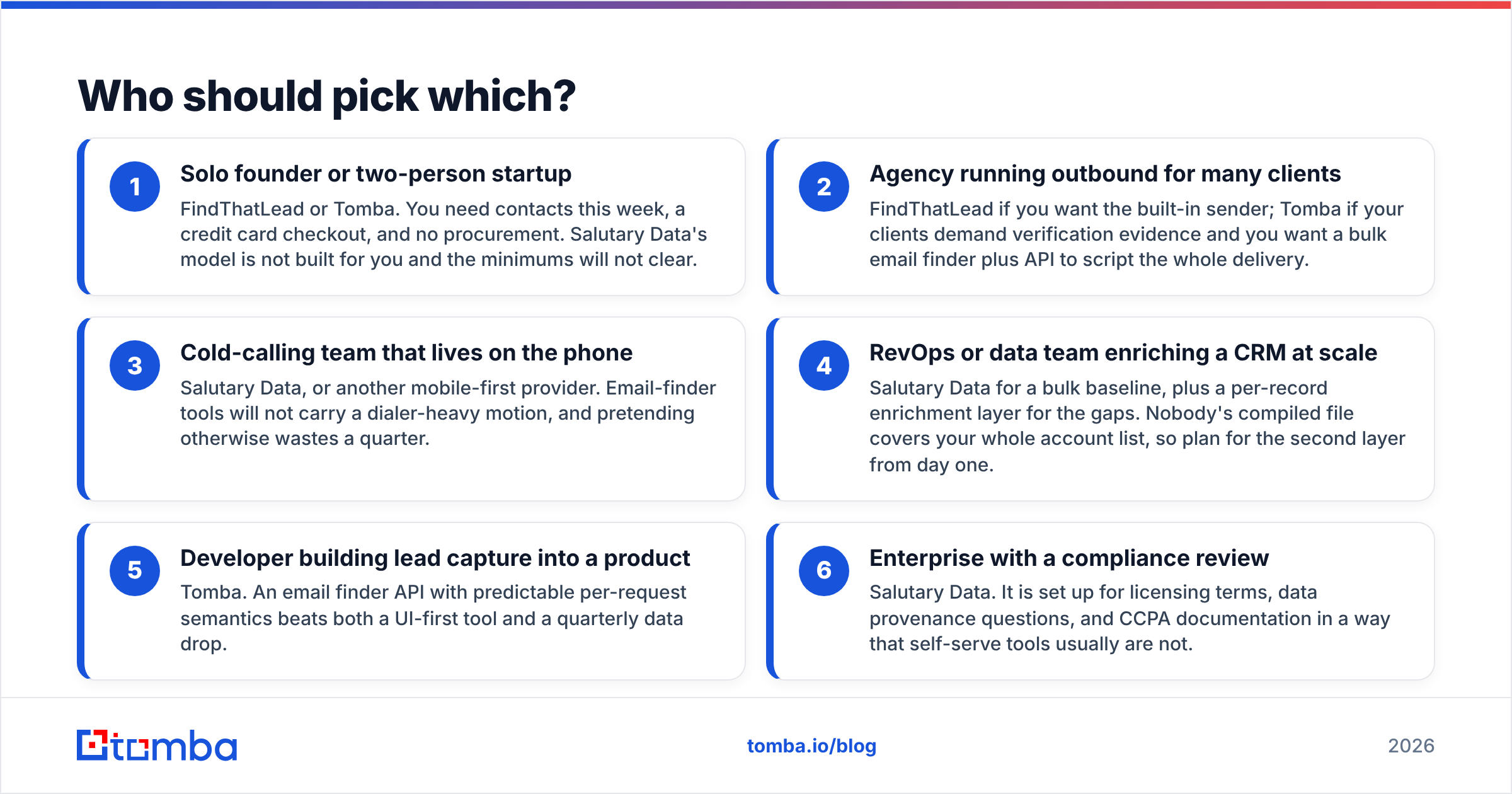
- Solo founder or two-person startup — FindThatLead or Tomba. You need contacts this week and a card checkout. Salutary Data is not built for you, and the minimums will not clear.
- Agency running outbound for many clients — FindThatLead if you want the built-in sender. Tomba if clients want verification proof and you want a bulk email finder plus an API to script delivery.
- Cold-calling team that lives on the phone — Salutary Data, or another mobile-first provider. Email finders cannot carry a dialer-heavy motion, and pretending otherwise wastes a quarter.
The bigger the data job, the more the answer shifts.
- RevOps or data team enriching a CRM at scale — Salutary Data for a bulk baseline, plus a per-record layer for the gaps. No compiled file covers your whole account list, so plan for that second layer on day one.
- Developer building lead capture into a product — Tomba. An email finder API with clear per-request rules beats both a UI tool and a quarterly data drop.
- Enterprise with a compliance review — Salutary Data. It is set up for license terms, data sourcing questions, and CCPA paperwork in a way self-serve tools are not.
If none of these fit, the answer is usually hybrid. Buy a bulk file for the accounts you already want. Use a real-time finder for everything you discover later.
What about compliance and data sourcing?#
Ask both vendors the same four questions, in writing.
- Where does the data come from? Web crawling, opt-in forms, licensed partners, and contributory networks carry different risk. A vendor that dodges this is telling you something.
- How often is it refreshed? B2B contact data decays 25–30% a year from job changes alone. A file refreshed once a year is wrong by the time you finish loading it.
- What is the GDPR and CCPA position? US-built databases and EU outreach are a common mismatch. If you prospect into Europe, the legal call is yours to make, not the vendor's.
- What do the license terms say about resale? Agencies get burned here constantly. Many licenses forbid passing records on to clients.
Tomba publishes its data sources for the same reason. Sourcing is now a buying criterion, not a legal footnote.
Whatever you buy, keep verification in your own hands at send time. Bought data plus unverified sending is how a warm domain turns into a spam-foldered one.
One more note: this category is wider than two names. BookYourData sits in a useful middle ground — pay-as-you-go, verified B2B lists, no annual license. Worth a look if the gap between self-serve and enterprise is exactly your problem.
So which one wins?#
Neither wins outright. Here is the honest verdict.
Pick FindThatLead if you are a small team, your targets skew European SMB, and you want to find emails and send them from one login. It is a solid, cheap, plain tool that does what it says.
Pick Salutary Data if you buy US contact records in volume and mobile numbers matter as much as email. You also need the budget and the patience to sample, test, and negotiate. It solves a problem self-serve tools genuinely do not.
Pick neither if you want accurate per-record lookup, real verification, an API you can build on, and pricing you can read on a page. That is a third category. Most outbound teams under 50 people land there after trying one of each.
Avoid the classic failure. Do not buy an enterprise data license for a 500-contact problem. Do not push 200,000 records through a credit-metered search box. Both happen constantly, and both are expensive.
Start with the lookup, not the license#
Benchmark your own ICP before you sign anything annual. Take 200 accounts you care about. Run them through the Tomba Email Finder. Measure hit rate and bounce rate against whatever you use now.
The free tier gives you 25 searches to sanity-check the data. Starter at $49/mo covers a real test. Every paid plan includes API access, so the test you run is the pipeline you would ship. If the numbers beat your incumbent, you never needed the purchase cycle. If they do not, you just saved yourself a discovery call.
Related guides#
Ready to find emails that actually work?
Join 150,000+ professionals who stopped guessing and started sending. Free credits on signup — no credit card required.
Get the Tomba newsletter
Practical outbound tactics and product updates — once every two weeks.
About the author