FindThatLead vs Skrapp: Which Email Finder Wins in 2026?
FindThatLead and Skrapp both promise verified B2B emails at low prices, but they win on very different jobs. Here is the honest breakdown of accuracy, credits, and where each one quietly costs you more.
TL;DR
- FindThatLead is a prospecting suite first, email finder second: lead search, LinkedIn extraction, and a built-in cold email sender bundled into one seat.
- Skrapp is narrower and calmer: a LinkedIn/Sales Navigator scraper plus domain search, built for people who live inside LinkedIn all day.
- Neither publishes an independently audited accuracy number. Both quote "95%+"; real-world bounce rates on scraped lists run higher, so verify before you send regardless of vendor.
- Credit accounting is where the two diverge most. FindThatLead charges credits for searches that return nothing useful; Skrapp's per-email model is easier to forecast but caps hard on lower tiers.
- If you want the finder and the verifier to be the same accountable layer — and an API you can wire into your own stack — a dedicated tool like Tomba is the cheaper long-run answer.
What are FindThatLead and Skrapp, exactly?#
Both tools solve the same narrow problem: you know a person's name and their company, and you need a work email that actually delivers. Where they split is what they wrap around that core.
FindThatLead launched out of Barcelona as an all-in-one growth stack. You get a lead search engine (filter by role, geography, industry), a Chrome extension that pulls contacts off LinkedIn, a bulk domain search, an email verifier, and Scrab.in / Cold Email — a sending layer so you can go from list to campaign without leaving the tab. The pitch is convenience: one login, one bill, prospect-to-send in an afternoon.
Skrapp is the opposite personality. It does LinkedIn and Sales Navigator extraction, company domain search, bulk enrichment, and verification. That is the whole menu. No sender, no sequencing, no CRM ambitions. The pitch is focus: it does the LinkedIn-to-email hop well and gets out of your way.
Think of it like buying a kitchen. FindThatLead sells you the full appliance package, and some pieces are better than others. Skrapp sells you one very good knife. Which is right depends on whether you already own the rest of the kitchen.
How do FindThatLead and Skrapp compare head to head?#
Pricing below reflects publicly listed monthly plans as of early 2026. Both vendors change tiers frequently — check their pricing pages before you commit to an annual contract.
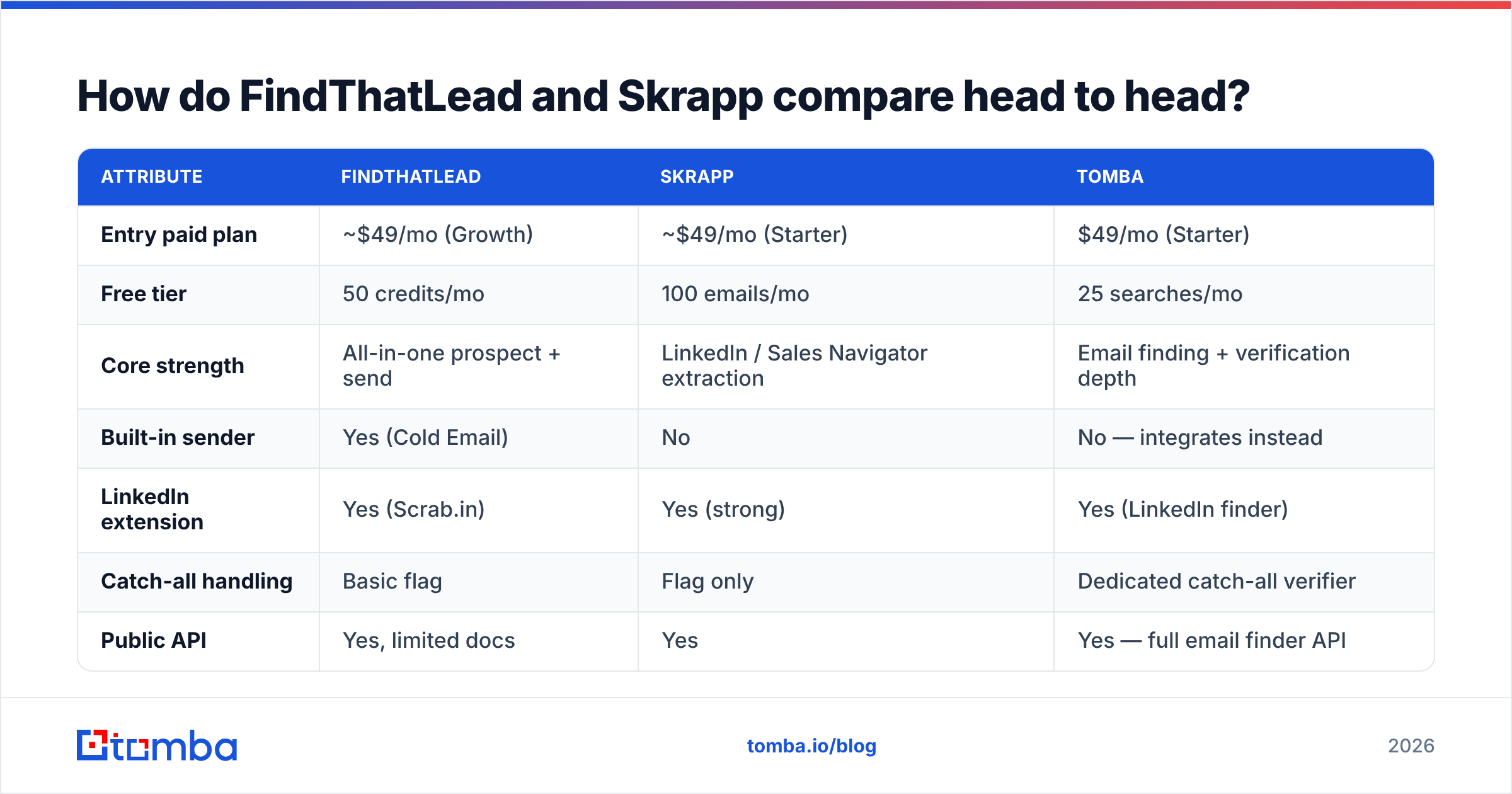
| Attribute | FindThatLead | Skrapp | Tomba |
|---|---|---|---|
| Entry paid plan | ~$49/mo (Growth) | ~$49/mo (Starter) | $49/mo (Starter) |
| Free tier | 50 credits/mo | 100 emails/mo | 25 searches/mo |
| Core strength | All-in-one prospect + send | LinkedIn / Sales Navigator extraction | Email finding + verification depth |
| Built-in sender | Yes (Cold Email) | No | No — integrates instead |
| LinkedIn extension | Yes (Scrab.in) | Yes (strong) | Yes (LinkedIn finder) |
| Catch-all handling | Basic flag | Flag only | Dedicated catch-all verifier |
| Public API | Yes, limited docs | Yes | Yes — full email finder API |
| Phone numbers | No | No | Yes |
| Best for | Solo founders wanting one tool | LinkedIn-first SDRs | Teams needing accuracy + API |
Two things jump out of that table.
First, entry pricing is effectively identical across the category. Nobody is winning on sticker price at the low end; the difference is what a credit buys. FindThatLead consumes credits on lead searches and enrichment attempts, so a hunting session that returns mostly noise still bills you. Skrapp meters closer to delivered emails, which is easier to forecast but means you hit the ceiling faster when you are working a large book.
Second, only one column in that table has a sender. That is FindThatLead's real differentiator and also its biggest risk — more on that below.
Which one is more accurate?#
Here is the uncomfortable answer: nobody can tell you, including the vendors.
Both FindThatLead and Skrapp market accuracy in the 95%+ range. Those numbers are self-reported, measured on the subset of results the tool chose to return, and not audited by anyone. Independent buyer reviews on G2 tell a messier story — users of both tools report bounce rates well into double digits on scraped LinkedIn lists, particularly for smaller companies and non-US domains.
What actually drives your bounce rate is not the vendor's headline number. It is three things:
- Pattern confidence vs. verified confirmation. Most finders guess a pattern (
first.last@,finitial+last@) from known company emails, then run an SMTP check. When the check is inconclusive, some tools return the guess anyway with a "probable" label. Those guesses are where your bounces live. - Catch-all domains. Roughly a fifth of B2B domains accept everything at the SMTP layer, so verification cannot confirm or deny. FindThatLead and Skrapp both flag catch-alls and hand you the problem. A dedicated catch-all finder narrows the risk instead of just labelling it.
- Data freshness. People change jobs. A contact scraped 14 months ago and never re-checked is a bounce waiting to happen, regardless of how accurate it was on capture day.

The practical move, whichever tool you pick: never send straight from the finder's export. Run the list through a separate email verifier as a second opinion, and treat anything the finder marked "guessed" or "catch-all" as a distinct, lower-priority segment. Google and Microsoft both now weight complaint and bounce signals heavily in inbox placement — Google's bulk sender guidelines put the spam complaint ceiling at 0.3%, and a bounce-heavy list burns sender reputation long before it burns your credits.
Screenshot placeholder: FindThatLead lead-search results panel showing the confidence badge on each returned email.
Is FindThatLead's built-in sender worth it?#
Sometimes. But understand what you are buying.
Bundling the finder and the sender in one platform is genuinely convenient for a solo founder doing 200 emails a week. You skip a CSV export, a mapping step, and a second subscription. If your entire outbound motion fits inside one seat, FindThatLead's stack collapses three tools into one bill.
The trade-off shows up as you scale. Bundled senders are consistently thinner than dedicated ones — fewer inbox-rotation controls, less granular warmup, weaker reply detection, less mature deliverability tooling. Once you are running multiple domains and mailboxes, you will want a purpose-built sender, and at that point you are paying FindThatLead for a feature you have stopped using.
There is also a concentration risk worth naming. When the same vendor sources your data and sends your mail, a data-quality problem becomes a deliverability problem with no independent checkpoint between them. Separating the layers — finder, verifier, sender — means a bad list gets caught before it touches your domain reputation. That is the same logic behind Skrapp's decision not to build a sender at all.
Which tool fits which team?#
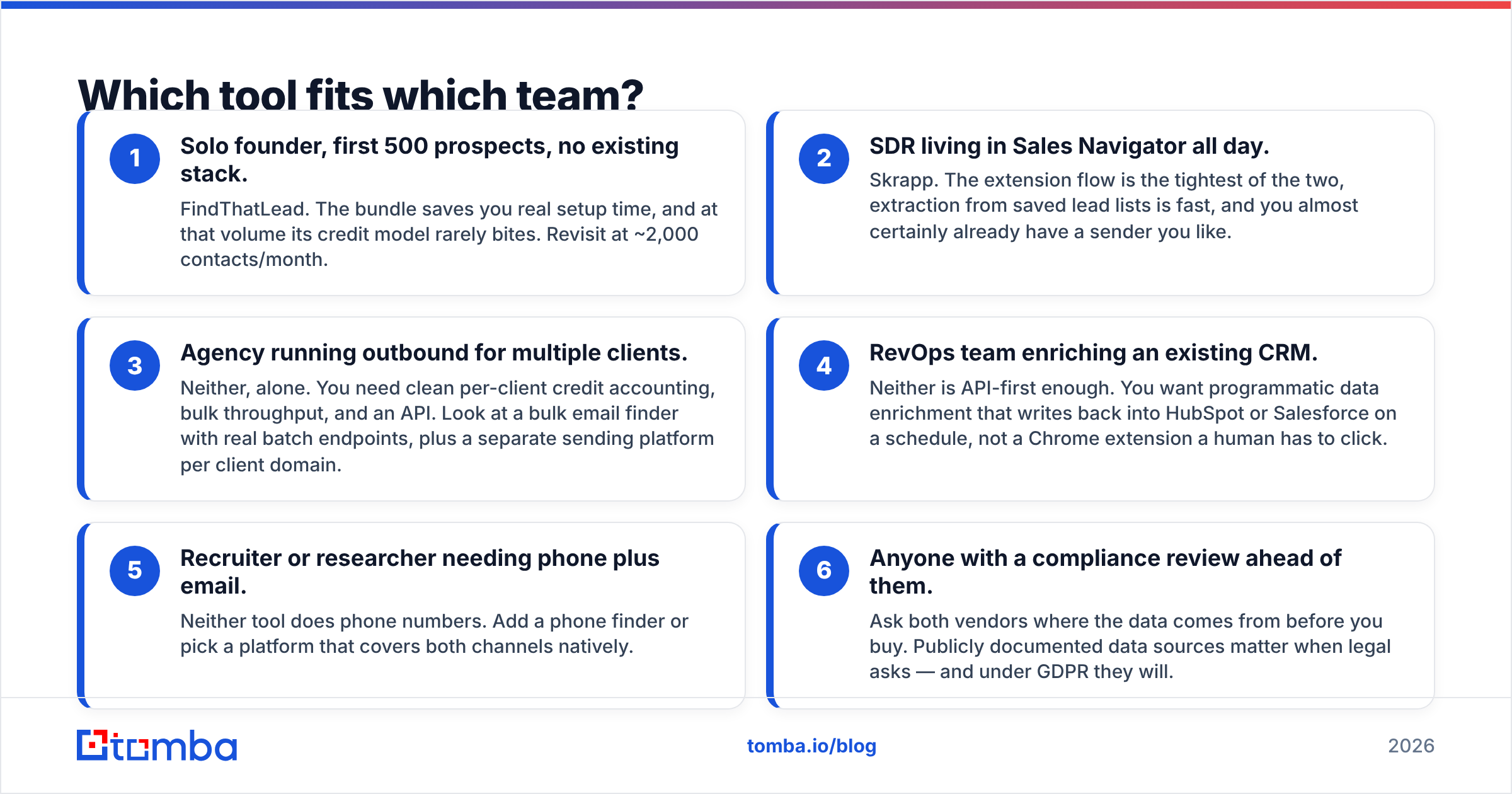
Match the tool to the shape of your motion, not to the feature count.
- Solo founder, first 500 prospects, no existing stack. FindThatLead. The bundle saves you real setup time, and at that volume its credit model rarely bites. Revisit at ~2,000 contacts/month.
- SDR living in Sales Navigator all day. Skrapp. The extension flow is the tightest of the two, extraction from saved lead lists is fast, and you almost certainly already have a sender you like.
- Agency running outbound for multiple clients. Neither, alone. You need clean per-client credit accounting, bulk throughput, and an API. Look at a bulk email finder with real batch endpoints, plus a separate sending platform per client domain.
- RevOps team enriching an existing CRM. Neither is API-first enough. You want programmatic data enrichment that writes back into HubSpot or Salesforce on a schedule, not a Chrome extension a human has to click.
- Recruiter or researcher needing phone plus email. Neither tool does phone numbers. Add a phone finder or pick a platform that covers both channels natively.
- Anyone with a compliance review ahead of them. Ask both vendors where the data comes from before you buy. Publicly documented data sources matter when legal asks — and under GDPR they will.

What does each one actually cost per verified email?#
Sticker price lies. What matters is cost per email that lands.
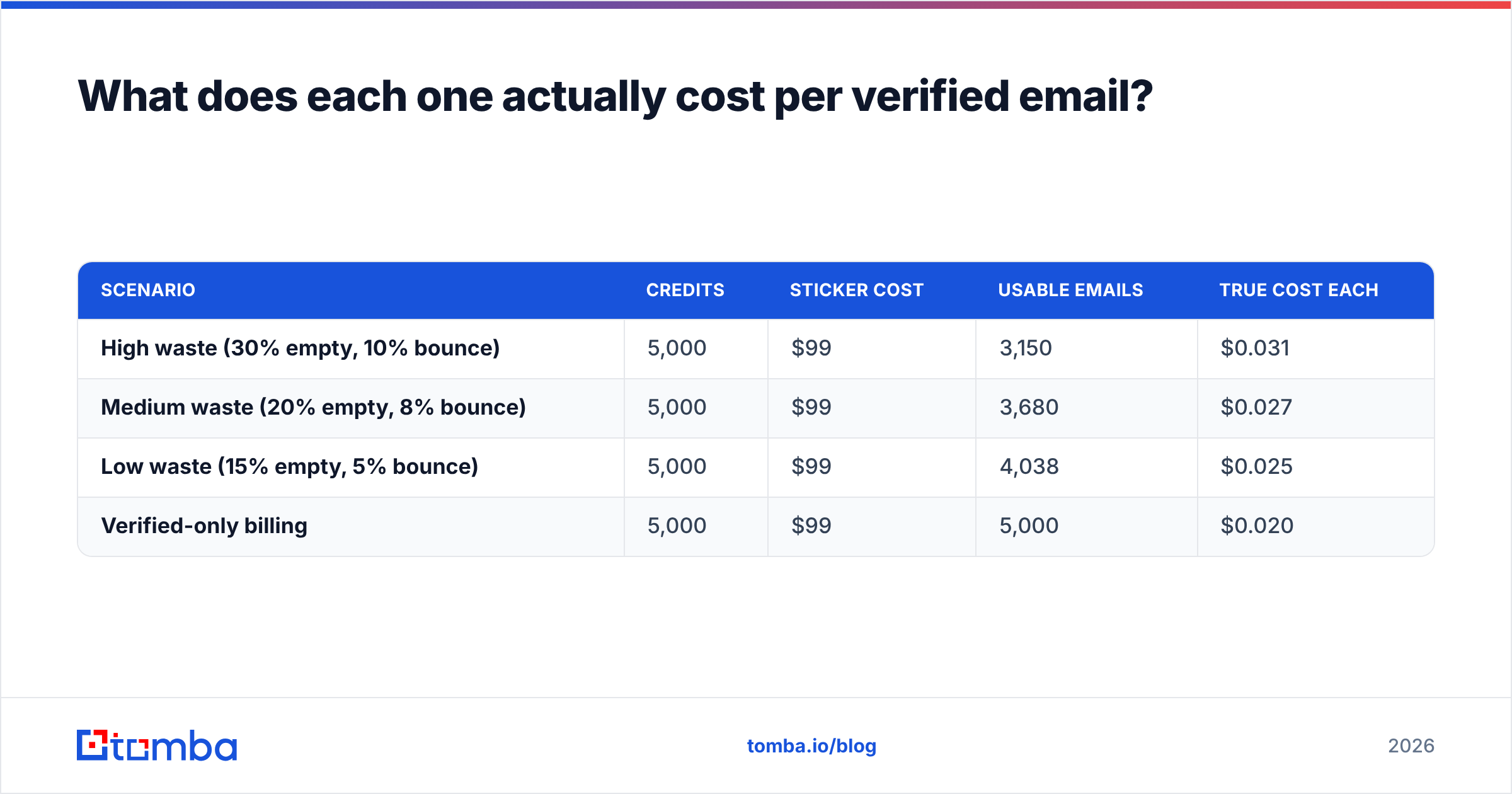
Work the math with your own numbers, but here is the shape of it. Say a plan gives you 5,000 credits for $99. If 30% of searches return nothing or return a guess you discard, and another 10% of what you keep bounces, your effective yield is about 3,150 usable contacts. Your real cost is roughly $0.031 per usable email — not the $0.020 the pricing page implies.
Now change one variable. A tool that returns nothing on 15% of searches instead of 30%, with the same bounce rate, yields ~3,825 usable contacts from the same spend. Same price, 21% more pipeline. That gap — not the monthly fee — is where the money is.
| Scenario | Credits | Sticker cost | Usable emails | True cost each |
|---|---|---|---|---|
| High waste (30% empty, 10% bounce) | 5,000 | $99 | 3,150 | $0.031 |
| Medium waste (20% empty, 8% bounce) | 5,000 | $99 | 3,680 | $0.027 |
| Low waste (15% empty, 5% bounce) | 5,000 | $99 | 4,038 | $0.025 |
| Verified-only billing | 5,000 | $99 | 5,000 | $0.020 |
Two questions to put to any vendor's sales rep before you sign:
- Do you charge for searches that return no result? If yes, your true cost is materially above the sticker.
- Do you charge again to verify what you just found? Some stacks bill the find and the verify separately, doubling the per-contact cost quietly.
This is where a tool that bundles finding and verification under one credit — and only bills on a returned result — changes the arithmetic. Compare Tomba pricing against the two: Free (25 searches/mo), Starter $49/mo, Growth $99/mo, Pro $249/mo, Enterprise custom, with verification built into the same workflow rather than sold as a separate meter.

Screenshot placeholder: side-by-side credit consumption logs from a 500-contact test run on each platform.
What are the honest weaknesses of each?#
FindThatLead's weak points. The interface carries a lot of surface area for what most people use it for, and support response times are the most common complaint in public reviews. Its non-US and non-European coverage thins out noticeably. The bundled sender is adequate but not competitive with dedicated platforms once you need mailbox rotation at scale. API documentation is lighter than the category standard, which matters if engineering wants to own the integration.
Skrapp's weak points. Deliberate narrowness is a feature until you need something outside it — no phone data, no sending, no visitor identification, no serious enrichment beyond the contact record. Skrapp is also more dependent on LinkedIn than FindThatLead; when LinkedIn tightens scraping enforcement, extraction-first tools feel it first. Lower tiers hit their email caps quickly for anyone running real volume.
What both share. Neither publishes third-party accuracy audits. Neither gives you a strong answer on catch-all domains. Both meter in ways that make true cost per landed email harder to forecast than it should be. And both leave verification as a step you should really do somewhere else anyway.
If either tool's limits are what pushed you to this comparison, it is worth looking at the wider field — including a Findymail alternative or a ContactOut alternative — rather than assuming these two are the only options at this price point. For established buyers, Capterra's filtered lead-intelligence category is a reasonable place to sanity-check what else is shipping in 2026.
So which should you pick?#
Pick FindThatLead if you are a solo operator or small team with no existing outbound stack, you value one login over best-in-class components, and your volume is under a couple thousand contacts a month. The bundle earns its keep at that size.
Pick Skrapp if LinkedIn is your primary sourcing surface, you already run a sender you trust, and you want a tool that does one hop well without upselling you into a suite.
Pick neither if accuracy, catch-all handling, or API access is the constraint. That is the case for most teams past their first ten customers, and it is where both of these tools start to feel like the wrong shape.
Whichever way you go, decouple your verification from your sourcing. The single highest-leverage change most outbound teams make is not switching finders — it is adding an independent verification pass before anything hits the sender. That one step protects email deliverability across every campaign you run afterward.
Ready to test the accuracy claim yourself instead of taking anyone's word for it? Run the same 100 contacts through the Tomba Email Finder that you ran through FindThatLead and Skrapp, and compare the bounce rate after sending. The free tier gives you 25 searches a month to start, verification is part of the same workflow rather than a second bill, and the API is documented well enough that your engineers will not file a ticket about it. Let the delivered-mail numbers decide.
Related guides#
Ready to find emails that actually work?
Join 150,000+ professionals who stopped guessing and started sending. Free credits on signup — no credit card required.
Get the Tomba newsletter
Practical outbound tactics and product updates — once every two weeks.
About the author