FindThatLead vs Supersend: Which Outbound Tool Wins in 2026?
FindThatLead finds the leads. Supersend sends the sequences. We break down where each one actually earns its price in 2026 — and where you still need a dedicated data layer underneath both.
FindThatLead vs Supersend is not really a head-to-head fight. One tool finds leads. The other sends to them. This guide shows which one you need first, and when you need both.
TL;DR
- They are not the same category. FindThatLead finds leads and exports them. Supersend runs sequences across email, LinkedIn, and X.
- Pick FindThatLead if your problem is a missing list.
- Pick Supersend if you have lists but no sending setup.
- Neither is a top-tier data provider. FindThatLead's finder is handy. Hit rates drop outside US and EU tech.
- Bounce rate decides everything. Verify the list before you load it, not after.
- Most 2026 stacks split the work. A data layer feeds a sender. That is why FindThatLead vs Supersend often ends in neither one alone.
FindThatLead vs Supersend: what are these tools?#
FindThatLead is a B2B lead generation platform from Barcelona. It launched in 2015. You search a domain or filter a database, pull email addresses, verify them, then send from a built-in cold email tool. It also bundles Scrab.in for LinkedIn, plus a Chrome extension. The pitch is simple: one login, list to inbox.
Supersend starts at the other end. It is a multichannel sequencer. You connect as many mailboxes as you need. You build steps that mix email, LinkedIn, and X (Twitter). Replies land in one shared inbox. Supersend assumes you already have contacts, from a CSV, an enrichment tool, or an API.
That gap explains most arguments about these two tools. Comparing them is like comparing a grocery store to a kitchen. You need both. The real question is which one you buy first.
FindThatLead vs Supersend: head-to-head comparison#
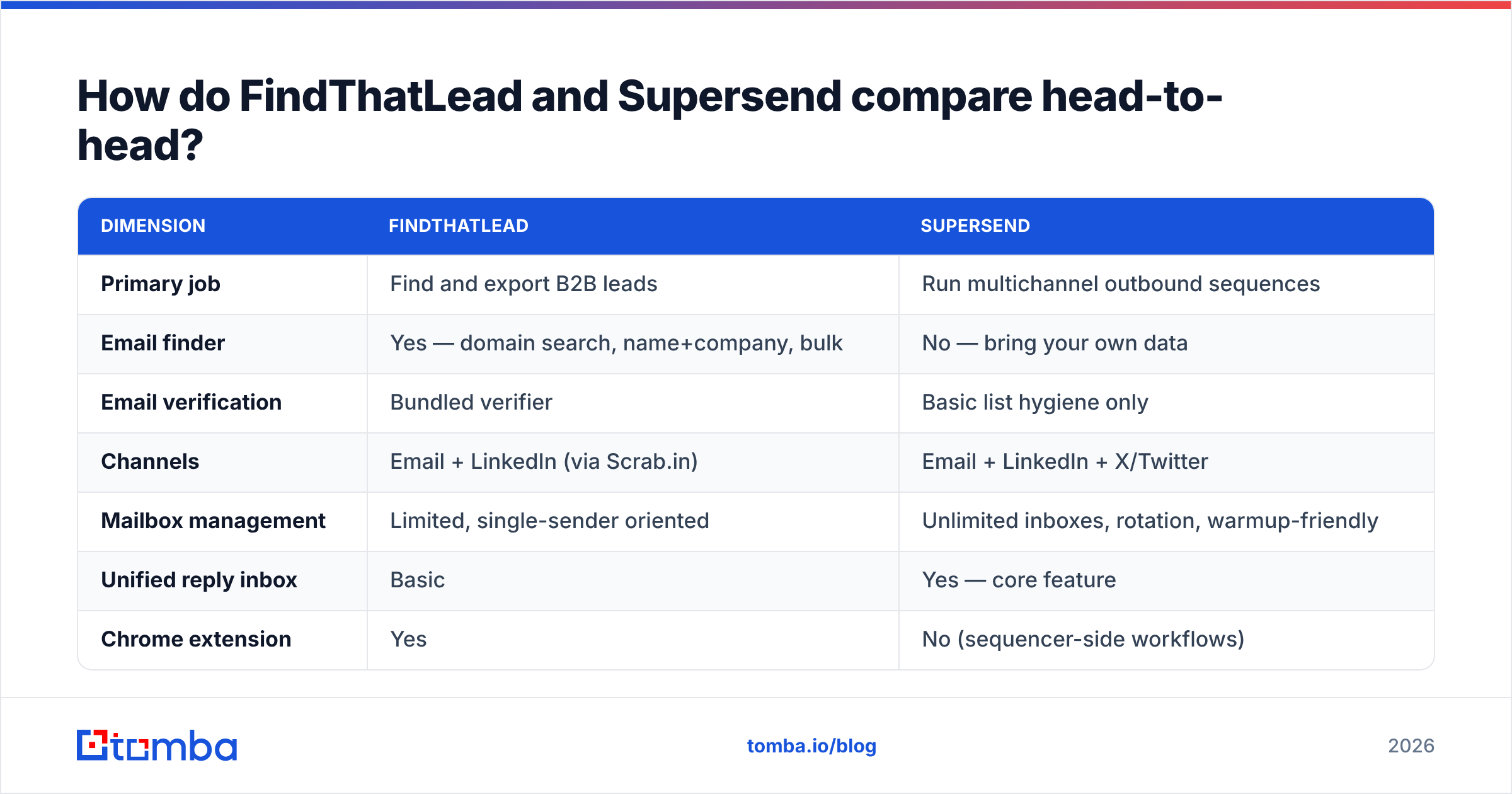
| Dimension | FindThatLead | Supersend |
|---|---|---|
| Primary job | Find and export B2B leads | Run multichannel outbound sequences |
| Email finder | Yes — domain search, name+company, bulk | No — bring your own data |
| Email verification | Bundled verifier | Basic list hygiene only |
| Channels | Email + LinkedIn (via Scrab.in) | Email + LinkedIn + X/Twitter |
| Mailbox management | Limited, single-sender oriented | Unlimited inboxes, rotation, warmup-friendly |
| Unified reply inbox | Basic | Yes — core feature |
| Chrome extension | Yes | No (sequencer-side workflows) |
| API access | Yes, on higher tiers | Yes |
| Best for | Solo founders, agencies building lists | SDR teams scaling sending volume |
| Weak spot | Data accuracy outside US/EU tech | Zero data sourcing — you supply everything |
Few rows overlap. The honest verdict: FindThatLead vs Supersend is a fight for the same budget line, not for the same job.
Which one finds better B2B data?#
FindThatLead wins here by default, because Supersend does not source data at all. But a win by default is not the same as good enough. Here is how the data side breaks down.
- Coverage depth — FindThatLead's database leans toward companies with a big web footprint: SaaS, agencies, e-commerce, mid-market tech. Look for a 40-person factory in Lyon or a logistics firm in Southeast Asia, and hit rates drop fast.
- Verification quality — the bundled verifier catches clear syntax and MX errors. It is weaker on catch-all domains. That is where most silent bounces start. A dedicated catch-all verifier settles cases a bundled checker just marks as unknown.
- Pattern guessing — like most finders, FindThatLead guesses formats such as first.last@ and then tests them. After a merger, one company can run mixed formats. Single-source guessing misses those. Cross-source checks fix it.
- Freshness — B2B contact data decays about 2–3% per month as people change jobs. A list you pulled 90 days ago is already worse today.
- Bulk throughput — CSV uploads are fine for a few thousand rows. Past that, teams move to an API so records are enriched as they arrive.
(Screenshot placeholder: FindThatLead domain search results panel showing confidence scores per contact.)
So the FindThatLead vs Supersend data question has a short answer. If you sell into a narrow, well-documented market, the bundled data is convenient. If your ICP reaches past English-language tech, plan for a second source. Many teams run a dedicated email finder alongside it, then push the clean output into whichever sender they use.

Which one sends better multichannel campaigns?#
Supersend, and it is not close.
FindThatLead's sender exists so you never leave the app. It handles a simple drip: three emails, a few days apart, stop on reply. That covers a founder emailing 200 people a month.
Supersend was built for a heavier load:
- Unlimited mailboxes, with sends spread across them. No single inbox carries the whole campaign.
- Real multichannel steps — email on day 1, a LinkedIn request on day 3, an X DM on day 6, another email on day 8, with branching.
- One shared inbox, so replies from three channels land in a single queue instead of three tabs.
- Per-account limits and ramp control, which matter a lot for email deliverability past a few hundred sends a day.
(Screenshot placeholder: Supersend sequence builder showing an email → LinkedIn → X multichannel branch.)
Here is the part no pricing page mentions. A sequencer cannot save a bad list. Supersend gives you great control over how mail goes out. It cannot tell you whether your 4,000 uploaded addresses are real. If 12% bounce, your domain reputation takes the hit anyway. Run the list through an email verifier before the first send, every time.

FindThatLead vs Supersend pricing in 2026#
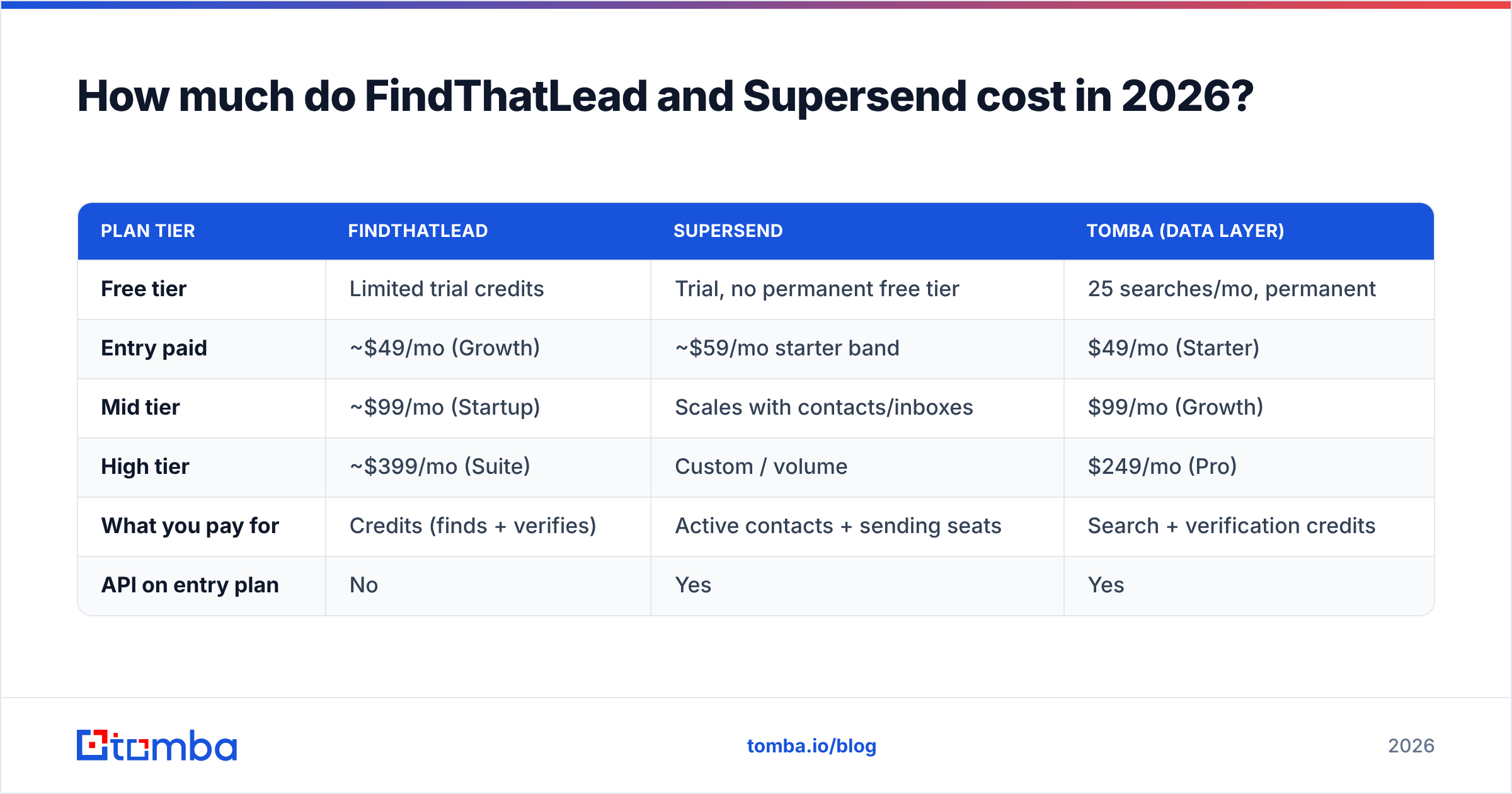
Both vendors have changed pricing more than once. Credits per tier move around. Treat the figures below as list-price ranges seen in 2026, and check each vendor's own page before you buy.
| Plan tier | FindThatLead | Supersend | Tomba (data layer) |
|---|---|---|---|
| Free tier | Limited trial credits | Trial, no permanent free tier | 25 searches/mo, permanent |
| Entry paid | ~$49/mo (Growth) | ~$59/mo starter band | $49/mo (Starter) |
| Mid tier | ~$99/mo (Startup) | Scales with contacts/inboxes | $99/mo (Growth) |
| High tier | ~$399/mo (Suite) | Custom / volume | $249/mo (Pro) |
| What you pay for | Credits (finds + verifies) | Active contacts + sending seats | Search + verification credits |
| API on entry plan | No | Yes | Yes |
Two things stand out.
First, you often pay twice for one job. Buy FindThatLead for its sender, and you barely touch the finder credits. Buy Supersend plus a separate finder, and you pay two bills. At least each bill matches the job it does.
Second, credit models do not line up. FindThatLead counts a search and a verification apart in most setups. Check whether failed lookups burn credits. On a low-coverage ICP, that gap can eat 30% of your monthly spend. Tomba's pricing details use the same credit logic, so the same test applies. Run 100 contacts from your real ICP and measure cost per usable contact, not cost per credit.
What do reviewers actually say about each tool?#
Public review data on G2 tells a steady story for both products.
FindThatLead fans praise ease of use, the Chrome extension, and the all-in-one flow for small teams. The common complaint is data accuracy. Users report higher bounce rates than they expected, plus slow support on credit disputes.
Supersend fans praise multichannel steps and the shared inbox. The common complaint is setup. Connecting LinkedIn and X accounts safely takes real care. Some buyers are also surprised that they must bring their own data.
Both patterns match the product design. Across a FindThatLead vs Supersend review sweep, neither flaw is a dealbreaker if you buy the tool for the job it does well.
Which should you pick for your team?#
Match the tool to your real bottleneck.
- Solo founder, first 500 cold emails, no list, no budget for two tools → FindThatLead. The bundled flow gets you sending this week. Plan to swap the data layer later.
- Agency running campaigns for 5+ clients across separate domains → Supersend. Mailbox control and per-client separation are the whole job here.
- SDR team of 3–10 with a CRM in place → Supersend for sending, plus a data provider with API access. Enrichment then happens on lead creation, not through CSV round-trips.
Two more cases are worth calling out:
- RevOps building an automated pipeline → neither tool as the base. Start with an email finder API as the data layer. Then pick a sender you can drive by code. Supersend fits that. FindThatLead leans on its UI.
- You sell mostly outside the US and Western Europe → test coverage before you commit to any bundled finder. Run the same 50 target companies through two or three providers, then count usable results.
Is a two-tool stack actually better than one?#
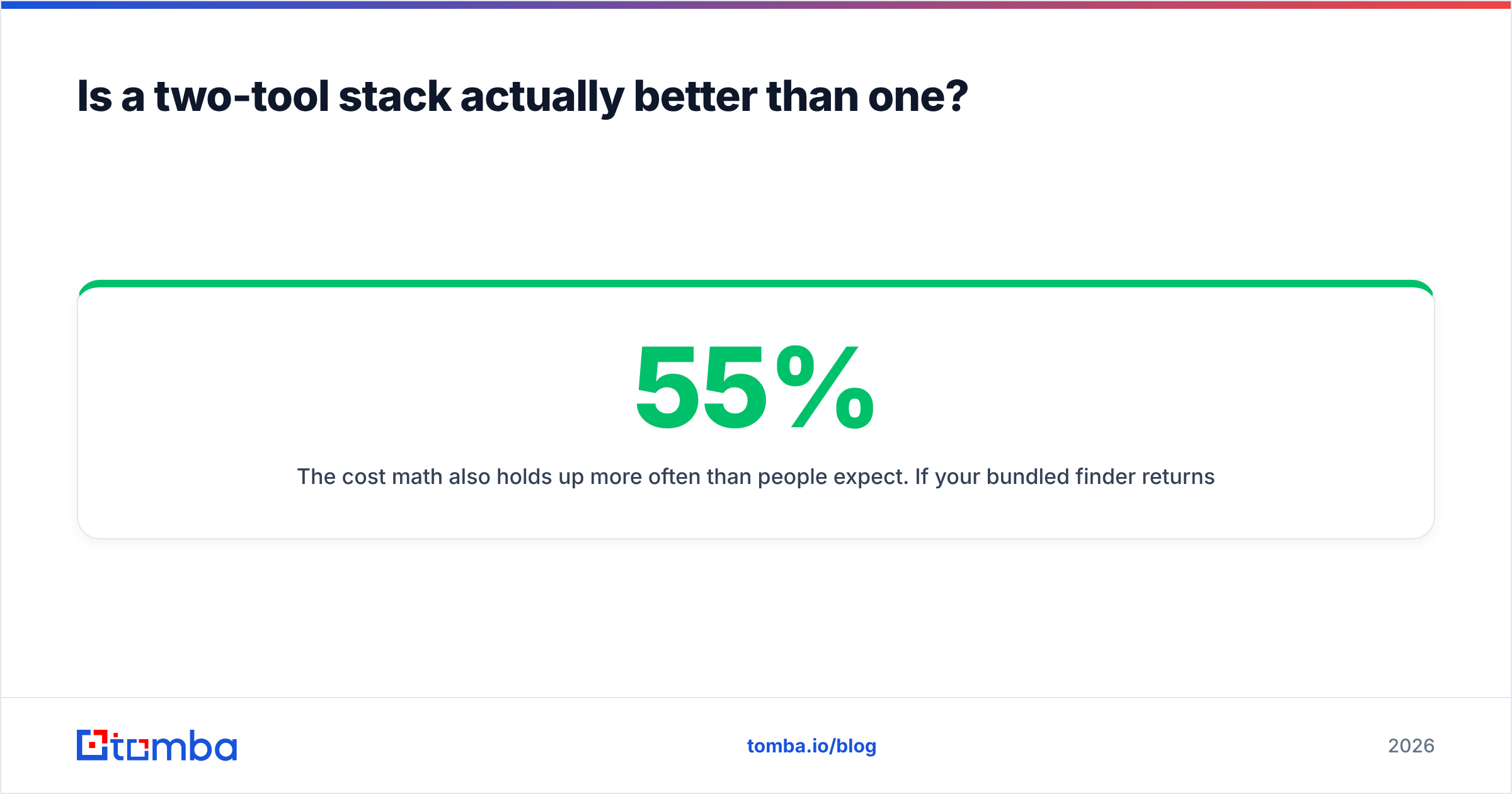
For most teams past 1,000 contacts a month, yes. Here is the reasoning rather than the sales pitch.
Bundled tools build for the median user. A platform that finds and sends will spend its engineering on whichever half keeps customers. The other half stalls. Specialist tools compete on one axis, so accuracy and deliverability both improve faster.
The math usually holds too. Say your bundled finder returns usable contacts 55% of the time, and a specialist returns 85%. You are not comparing $49 to $49. You are comparing cost per delivered email. At 5,000 lookups a month, that gap is thousands of wasted credits, plus the bounces you never caught.
Most teams end up with the same workflow:
- Source — pull target companies from your ICP filters or a scraped list.
- Find — resolve contacts by domain and name via API, not by manual export. Bulk email finder jobs cover backfills; the API covers ongoing flow.
- Verify — check every address, catch-all cases included, before it reaches the sender.
- Enrich — add role, seniority, and company data so your sequencer can personalize past
{{first_name}}. - Send — load only verified contacts into Supersend, or the sender of your choice.
Five steps. Two vendors. No step where you hope a bundled feature is good enough.
What about FindThatLead vs Supersend for LinkedIn outreach?#
Both touch LinkedIn, but in different ways. FindThatLead does it through Scrab.in, a separate companion product for profile visits, connection requests, and messages. Supersend treats LinkedIn as a native step inside a sequence. That is the cleaner model if you want channels to alternate on a schedule.
The safety rules are the same either way. Keep connection requests well under platform limits. Ramp new accounts slowly. Never automate an account you cannot afford to lose. If you also pull email addresses from LinkedIn profiles, a dedicated LinkedIn finder is safer than cookie-based scrapers, because it resolves addresses without driving your logged-in account.
Frequently asked questions#
Can I use FindThatLead only as a data source and send from elsewhere? Yes. Export to CSV, or use the API on higher tiers. Re-verify before you load the list, because exported data ages and the export step checks nothing.
Does Supersend have any lead database at all? No. That is a deliberate product choice, not an oversight. You supply the contacts.
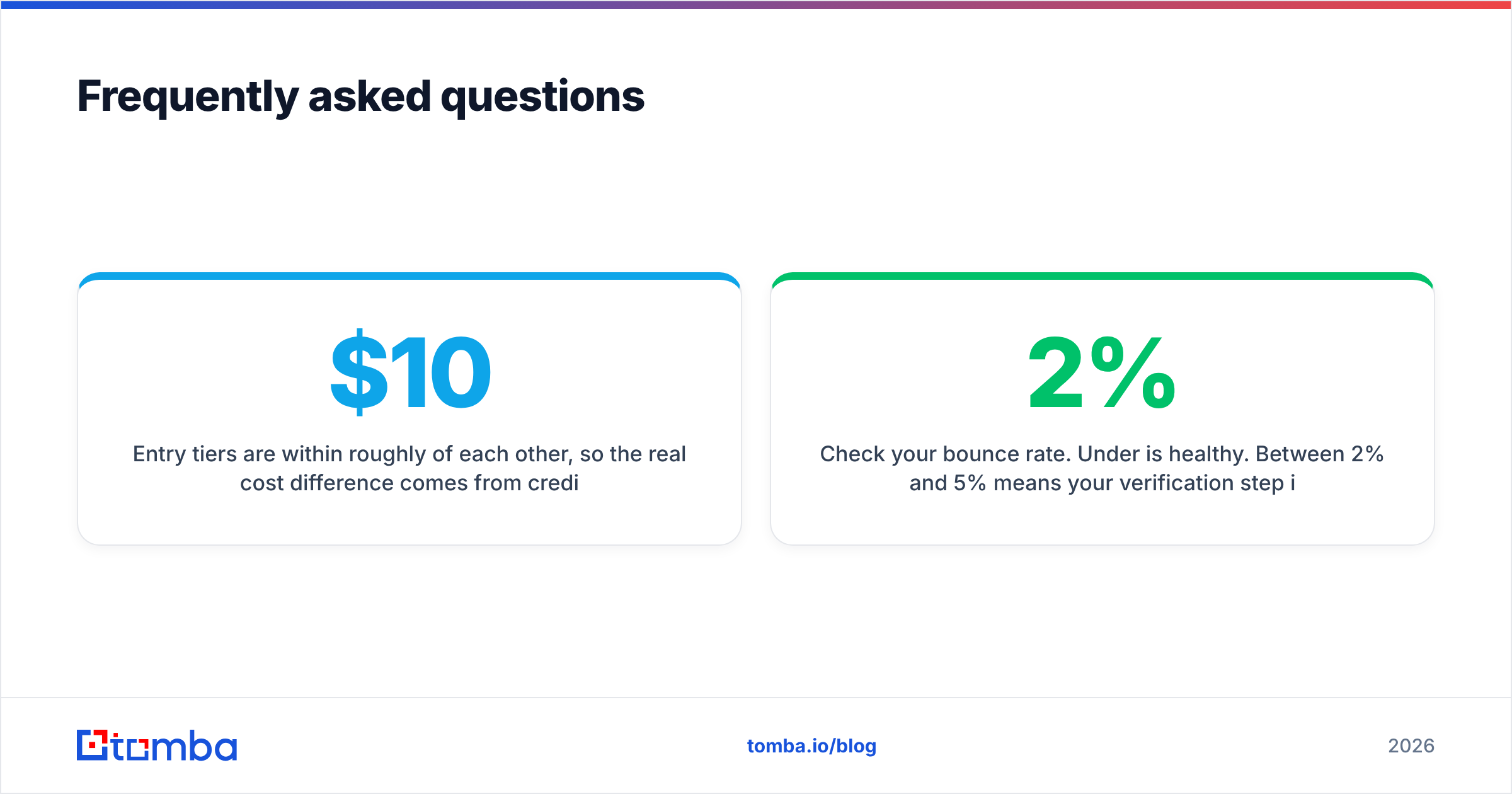
Which is cheaper in the FindThatLead vs Supersend matchup? Entry tiers sit within about $10 of each other. The real gap comes from credit use and how many contacts you keep active. Model it on your own volume for one month.
Do I need both tools? Only if you want FindThatLead for data and Supersend for sending. In that case, compare the FindThatLead finder against dedicated data providers first. Quality varies most on that piece.
How do I know if list quality is my problem? Check your bounce rate. Under 2% is healthy. Between 2% and 5% means your verification is too loose. Above 5%, stop sending and fix the data first.
Get the data layer right first#
Whichever sender you land on, the limit is the same. Your outbound results are capped by the quality of the contacts you feed in. Sequencers cannot fix invalid addresses. No amount of warmup offsets a 10% bounce rate.
Start by testing your real ICP, not a demo domain, against Tomba's Email Finder. The free tier gives you 25 searches a month with no card. That is enough to benchmark coverage on real target accounts before you spend a budget. If the hit rate beats your current bundled tool, plug the API into your workflow. Then let Supersend, FindThatLead, or anything else handle the sending on top of data you trust.
Related guides#
Ready to find emails that actually work?
Join 150,000+ professionals who stopped guessing and started sending. Free credits on signup — no credit card required.
Get the Tomba newsletter
Practical outbound tactics and product updates — once every two weeks.
About the author