FindThatLead vs Wiza (2026): Which Email Finder Wins?
FindThatLead and Wiza solve prospecting from opposite ends — bulk domain scraping versus LinkedIn export. Here's how they compare on accuracy, credits, and real cost per verified email in 2026.
TL;DR
- FindThatLead is a bulk prospecting suite: domain search, lead search by role and location, a built-in cold email sender, and the Scrab.in LinkedIn automation add-on. It is broad, and it is noisy.
- Wiza is a LinkedIn-native exporter. Point it at a Sales Navigator list, get back enriched contacts with work emails and (on higher plans) mobile numbers. Narrow, and very good at that one job.
- They are not really competitors. FindThatLead wins when you start from a company list; Wiza wins when you start from a LinkedIn search.
- Neither is cheap per verified email once you account for credit burn on catch-all and unknown results. Wiza's entry tier runs roughly $83/mo billed annually; FindThatLead's Growth tier sits near $49/mo with tight monthly caps.
- If you want the finding layer without the sequencer or the LinkedIn dependency, a dedicated API-first finder like Tomba covers domain search, verification, and enrichment at $49/mo with a free tier for testing.
What is FindThatLead and who is it for?#
FindThatLead is a Barcelona-built prospecting platform that has been around since 2015. Its pitch is end-to-end: find leads, verify them, and email them without leaving the tab.
The core modules are:
- Domain Search — paste a company domain, get back the email addresses it has on file for that domain, with a confidence score.
- Lead Search — filter a database by job title, industry, country, and company size. This is the part most people buy it for.
- Prospector — a bulk mode that takes a list of first name, last name, and domain and returns guessed-then-verified addresses.
- Email Sender — a lightweight cold email sequencer built into the same account.
- Scrab.in — a separate-but-bundled Chrome extension for LinkedIn visiting, connecting, and messaging.
The buyer profile is a small agency or solo founder who wants one subscription instead of four. That bundling is genuinely useful when your volume is low. It becomes a liability when any single module underperforms, because you cannot swap it out — you bought the suite.
The honest weakness: FindThatLead's Lead Search database has a reputation for stale titles. People change jobs; the record does not always follow. You will find the email; you will sometimes email the wrong role.
What is Wiza and how is it different?#
Wiza does one thing. You run a search in LinkedIn Sales Navigator, hand Wiza the list, and it returns a CSV (or a CRM push) with work emails, personal emails, and phone numbers appended.
That workflow difference matters more than any feature checklist. Wiza inherits LinkedIn's data freshness — the title and company come from the profile the person themselves maintains, not from a scraped snapshot from 2023. For title-sensitive outbound, that is a real advantage.
The trade-offs are equally real:
- You need Sales Navigator. That is roughly $99+/mo on top of Wiza. Budget for both.
- No sequencer. Wiza hands you data and stops. You still need Instantly, Smartlead, or whatever your team runs.
- Credit model punishes misses. Wiza only charges for valid emails on most plans, which is fair, but "valid" includes catch-all domains that your ESP may still bounce.
- LinkedIn-shaped TAM. If your buyers are plumbing distributors in Ohio who last logged into LinkedIn in 2019, Wiza has nothing to export.

How do FindThatLead and Wiza compare head to head?#
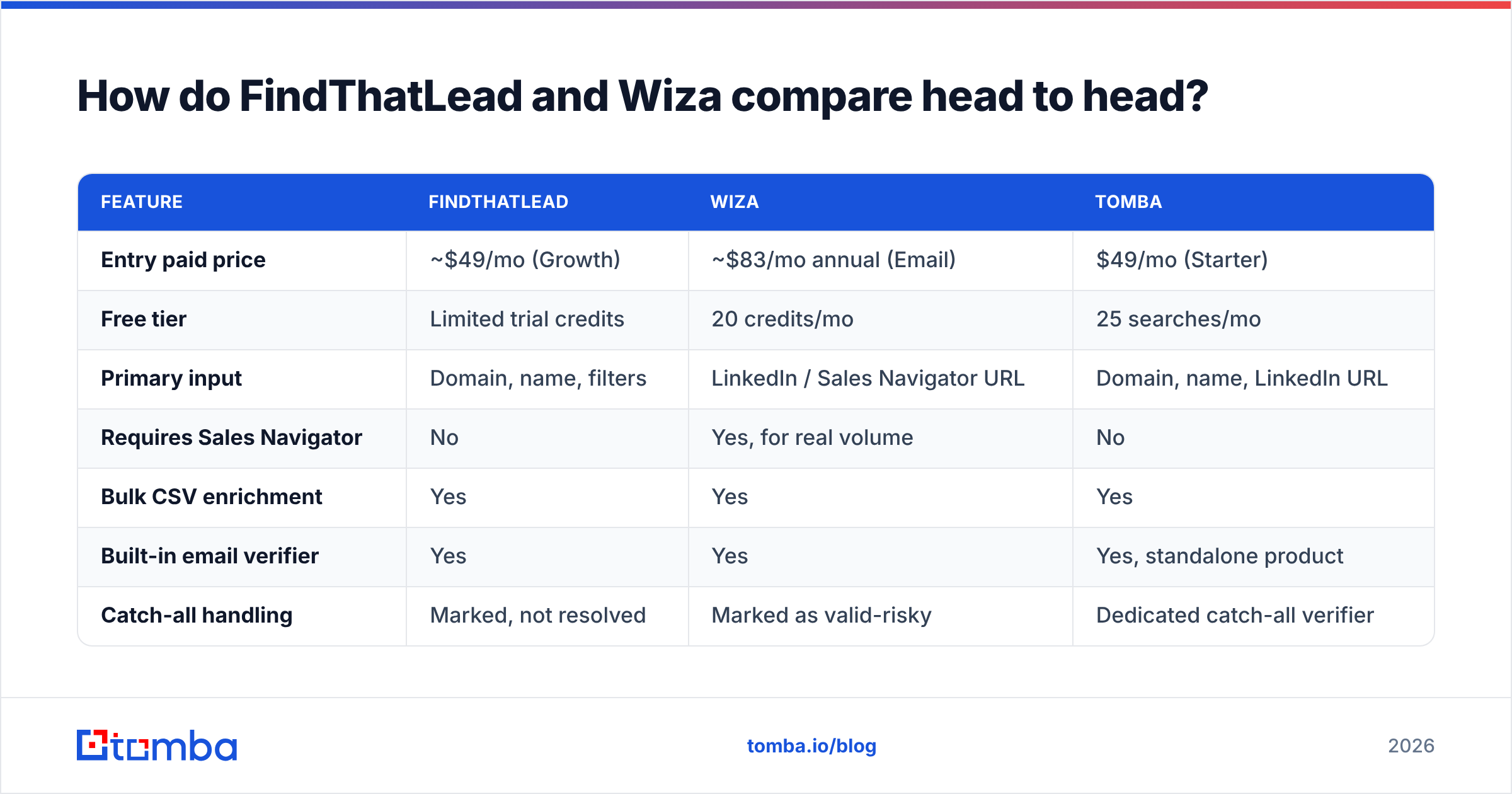
Here is the practical comparison. Pricing moves — check findthatlead.com and wiza.co before you commit to an annual contract.
| Feature | FindThatLead | Wiza | Tomba |
|---|---|---|---|
| Entry paid price | ~$49/mo (Growth) | ~$83/mo annual (Email) | $49/mo (Starter) |
| Free tier | Limited trial credits | 20 credits/mo | 25 searches/mo |
| Primary input | Domain, name, filters | LinkedIn / Sales Navigator URL | Domain, name, LinkedIn URL |
| Requires Sales Navigator | No | Yes, for real volume | No |
| Bulk CSV enrichment | Yes | Yes | Yes |
| Built-in email verifier | Yes | Yes | Yes, standalone product |
| Catch-all handling | Marked, not resolved | Marked as valid-risky | Dedicated catch-all verifier |
| Phone numbers | Limited | Yes, on Email + Phone plan | Yes, phone finder |
| Cold email sequencer | Yes, built in | No | No, integrates instead |
| LinkedIn automation | Yes, via Scrab.in | No (export only) | No |
| Public API | Yes | Yes | Yes, API-first |
| Credit rollover | No | Limited by plan | Plan dependent |
| Best for | Agencies wanting one bill | Sales Nav power users | Teams building data pipelines |

Read that table as two different bets. FindThatLead bets you value consolidation. Wiza bets you value freshness and will assemble your own stack around it. Neither bet is wrong; they are just aimed at different teams.
Which one actually finds more valid emails?#
This is where most comparison posts hand-wave. Let's be specific about how to test it yourself, because vendor-published hit rates are marketing numbers.
Build a control list of 200 contacts you already have confirmed emails for — past customers, webinar registrants, people who have replied to you. Strip the emails. Run the list through both tools. Then measure three things, not one:
- Coverage — what percentage returned any address at all?
- Match rate — of those returned, what percentage matched your known-good address exactly?
- Bounce rate — send a real (or seed-list) campaign and count hard bounces.
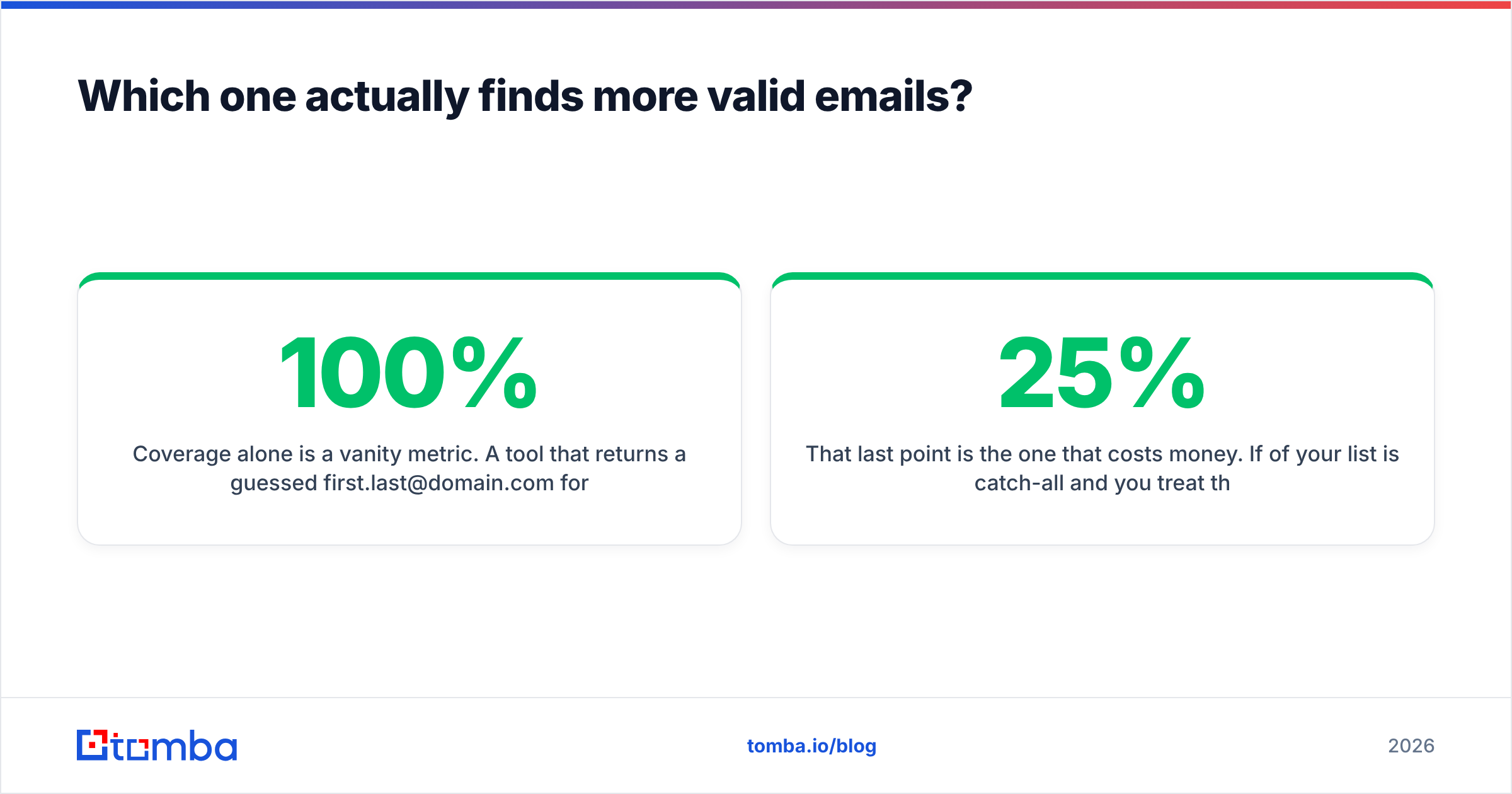
Coverage alone is a vanity metric. A tool that returns a guessed first.last@domain.com for every single row will show 100% coverage and destroy your sender reputation inside a week.

In practice, patterns hold across most independent tests published on G2 and in practitioner communities:
- Wiza scores higher on match rate for LinkedIn-active personas — SaaS, agency, tech, recruiting, VC. The profile data anchoring the lookup is current.
- FindThatLead scores higher on raw coverage for company-first workflows, because domain search returns everything on file for the domain rather than just your target person.
- Both degrade sharply on catch-all domains. A catch-all server accepts every address at SMTP time, so neither tool can prove the mailbox exists. Both will label it "valid" or "risky" and pass the risk to you.
That last point is the one that costs money. If 25% of your list is catch-all and you treat those as deliverable, your bounce rate can cross the 3% threshold that triggers throttling at Google and Microsoft. Running a dedicated catch-all verifier against that segment before you send is not optional at any real volume.
What do FindThatLead and Wiza actually cost per verified email?#
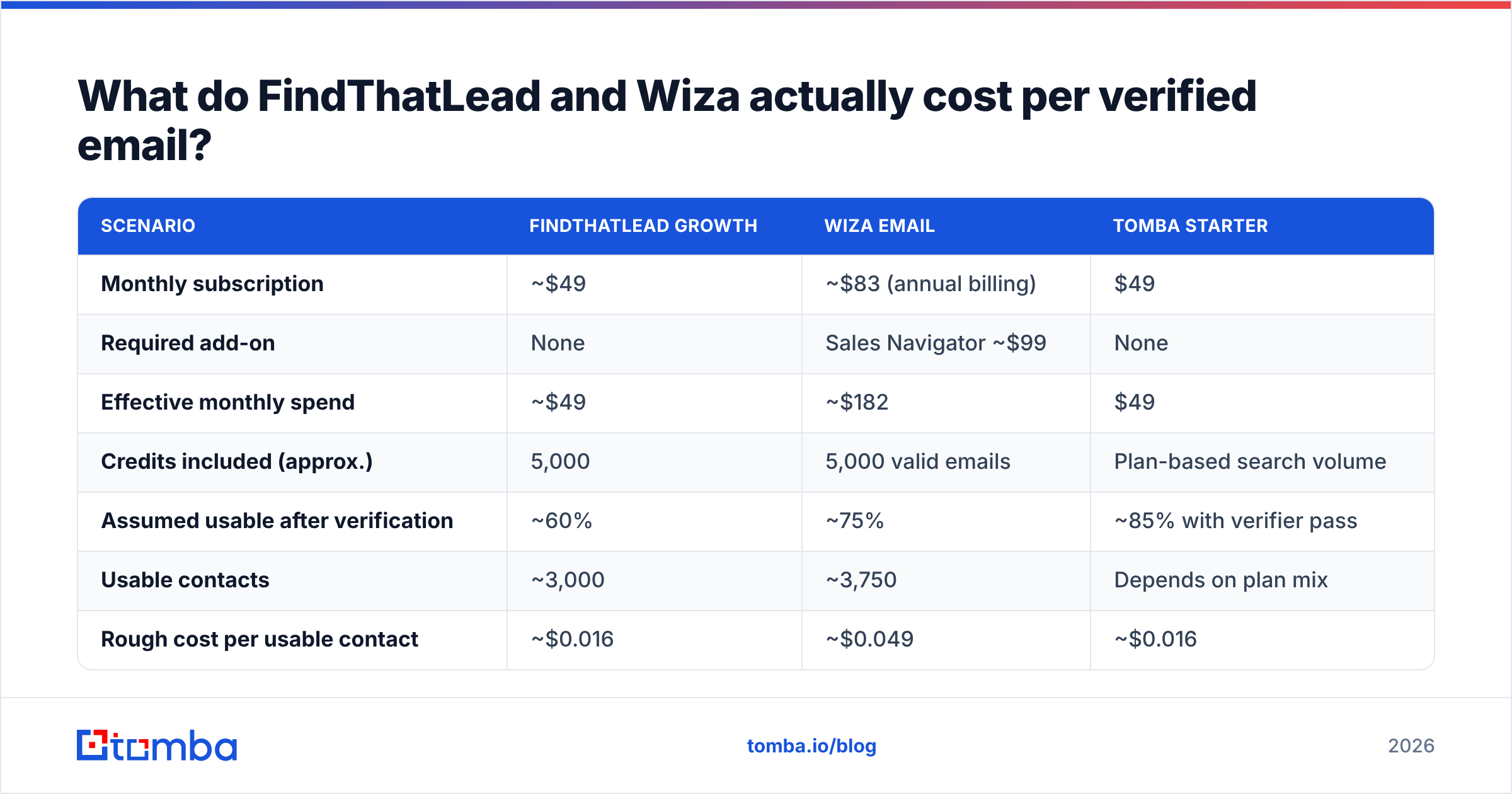
Sticker price is the wrong number. Cost per usable contact is the right one. Here is the arithmetic with conservative assumptions.
| Scenario | FindThatLead Growth | Wiza Email | Tomba Starter |
|---|---|---|---|
| Monthly subscription | ~$49 | ~$83 (annual billing) | $49 |
| Required add-on | None | Sales Navigator ~$99 | None |
| Effective monthly spend | ~$49 | ~$182 | $49 |
| Credits included (approx.) | 5,000 | 5,000 valid emails | Plan-based search volume |
| Assumed usable after verification | ~60% | ~75% | ~85% with verifier pass |
| Usable contacts | ~3,000 | ~3,750 | Depends on plan mix |
| Rough cost per usable contact | ~$0.016 | ~$0.049 | ~$0.016 |
Two caveats so this stays honest. First, the Sales Navigator line is not Wiza's fault — plenty of teams already pay it, in which case Wiza's effective cost drops to about $0.022 per usable contact and the gap narrows a lot. Second, "usable after verification" varies wildly by industry; enterprise tech skews clean, local services and healthcare skew catch-all and messy.
The general rule: Wiza costs more per contact and delivers fewer wrong-title mistakes. FindThatLead costs less per contact and asks you to absorb more cleanup. Which is cheaper depends entirely on what an SDR hour costs you.
If you want to reduce the variable that actually moves the number, verification is it. A separate email verifier pass costs a fraction of a finder credit and removes the bounces before they touch your domain reputation.
Where do both tools fall short?#
Being fair to both, here are the complaints that show up consistently across reviews on Capterra and vendor comparison threads.
FindThatLead
- Lead Search filters return contacts whose titles have changed. Verify seniority manually before you personalise.
- The built-in Email Sender is functional but well behind dedicated tools on warmup, inbox rotation, and reply detection.
- Credits do not roll over, which pushes you into end-of-month scraping sprees that pollute your list.
- Support responsiveness is inconsistent on lower tiers.
Wiza
- Hard dependency on LinkedIn. Rate limits, account risk, and Sales Navigator seat costs are yours to manage.
- No sequencing means at least one more tool in the stack, plus one more sync to break.
- Personal (non-work) emails are included in exports, which is great for recruiting and a compliance headache for EU B2B outbound.
- Catch-all addresses are counted as valid credits by default on some plans.
Both
- Neither is designed as an infrastructure layer. If you want find emails inside your own product, CRM automation, or data pipeline, you are working around a UI that was built for humans clicking buttons. That is what an API-first vendor is for — see the Tomba API for what a documented, rate-limit-transparent endpoint looks like.

Which should you choose in 2026?#
Pick by workflow, not by feature count.
- Choose Wiza if your ICP lives on LinkedIn, you already pay for Sales Navigator, and title accuracy matters more than cost per record. Recruiting, tech sales, and VC sourcing all fit here.
- Choose FindThatLead if you prospect company-first from domain lists, you are cost-sensitive, and you genuinely want the sequencer bundled so you do not manage a second vendor.
- Choose neither if you need the finding layer to be programmable — feeding a CRM enrichment job, a signup-time lookup, or a nightly batch. Both tools were designed around a dashboard first and an API second.
- Choose a stack if you are past 10k contacts a month: a finder for discovery, a verifier for hygiene, a sequencer for sending. Bundles fail at scale because one weak module drags the whole workflow.
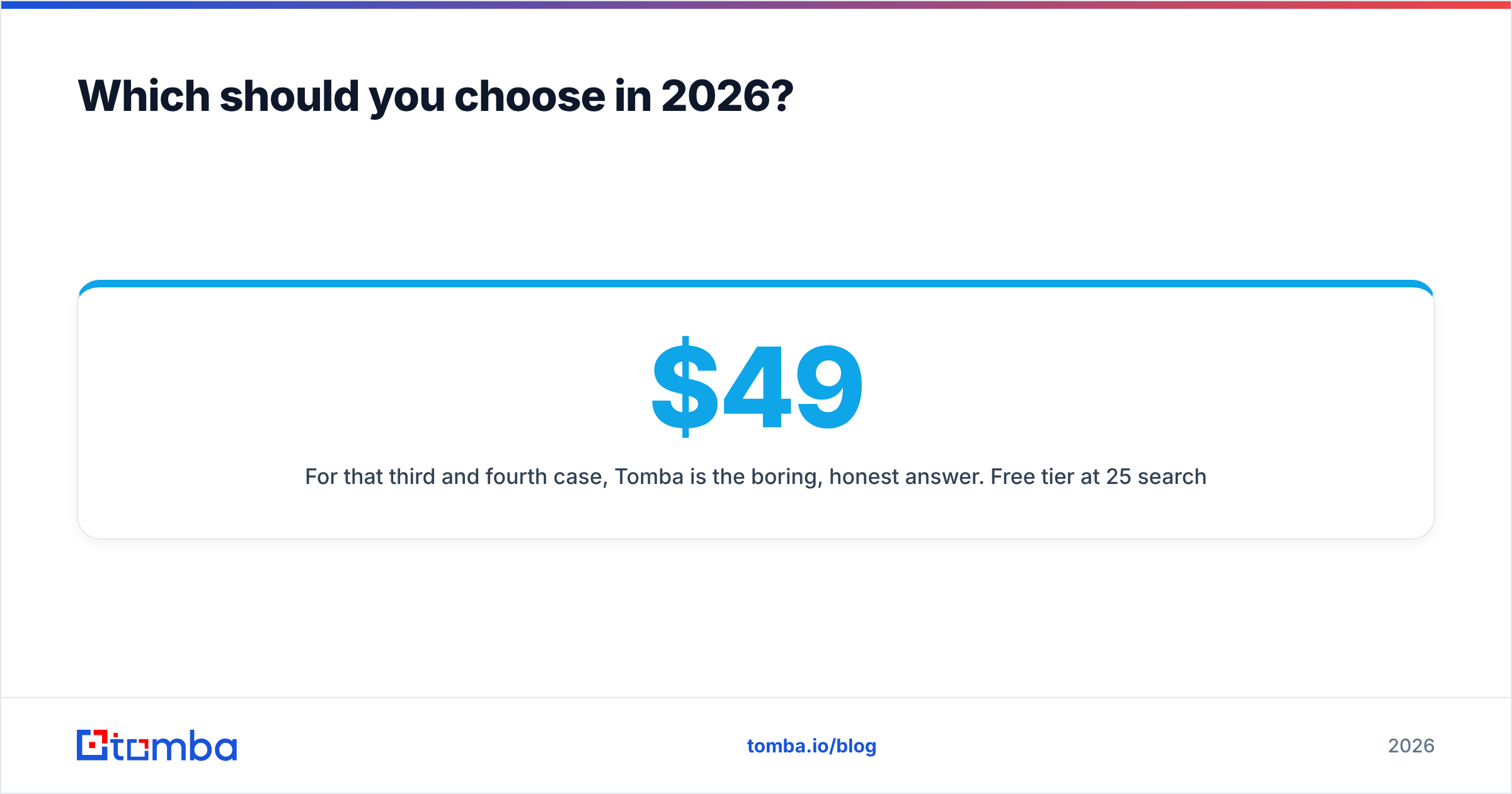
For that third and fourth case, Tomba is the boring, honest answer. Free tier at 25 searches a month to test against your own control list, $49/mo Starter, $99/mo Growth, $249/mo Pro — the full Tomba pricing is public with no seat minimums, no Sales Navigator dependency, and no forced sequencer.
How do you test all three without wasting a month?#
Run a 90-minute bake-off before you sign anything.
- Build the control list. 200 contacts with known-good emails from your CRM. Strip the email column.
- Sign up for the free tiers. Wiza gives 20 credits, Tomba gives 25 searches, FindThatLead gives trial credits. That is enough for a 20-row sample from each.
- Score all three on coverage, exact-match rate, and catch-all percentage. Record the numbers in a sheet — memory lies.
- Send to a seed list. Take the 20 addresses each tool returned, send a single plain-text email, and count bounces after 24 hours.
- Compute cost per landed email, not cost per credit. Divide the monthly price by the number of messages that actually reached an inbox.
Whichever tool wins that test on your data wins for you, regardless of what any comparison post — including this one — says about it in the abstract.
Ready to test the finding layer on its own?#
If your conclusion from the bake-off is "the sequencer is fine, the data is the problem," fix the data layer first. Tomba Email Finder gives you domain search, name-plus-domain lookup, and confidence scoring through the same API that powers bulk jobs and CRM enrichment — 25 free searches a month to run your control list, then $49/mo when it beats what you are paying now. Test it against your own 200 contacts before you renew anything else.
Related guides#
Ready to find emails that actually work?
Join 150,000+ professionals who stopped guessing and started sending. Free credits on signup — no credit card required.
Get the Tomba newsletter
Practical outbound tactics and product updates — once every two weeks.
About the author