FindThatLead vs Xverify: Which Tool Do You Actually Need?
FindThatLead finds addresses. Xverify checks whether they bounce. Here is where each one earns its budget line, where they overlap, and when one platform replaces both.
TL;DR
- FindThatLead and Xverify are not really competitors. FindThatLead finds and sends; Xverify validates the addresses you already have. Buying one instead of the other usually leaves a hole in your pipeline.
- Pick FindThatLead if your problem is "I don't have enough contacts." Pick Xverify if your problem is "my bounce rate is 6% and my domain is getting throttled."
- Xverify's strength is real-time API validation at the point of capture — form fills, signups, checkout. That is a different job than cleaning a scraped prospecting list.
- FindThatLead bundles a sender, which is convenient but couples your data vendor to your sequencing tool. That coupling is expensive to unwind later.
- If you'd rather not run two subscriptions, a combined find-plus-verify platform (Tomba starts at $49/mo, with a free tier at 25 searches) covers both jobs from one credit pool and one API key.
What do FindThatLead and Xverify actually do?#
Short version: they sit at opposite ends of the same pipeline.
FindThatLead is a prospecting platform. You give it a domain, a company name, or a first-name/last-name/domain triple, and it returns a business email address. It layers on lead search (filter by role, geography, industry), a Chrome extension, a bulk CSV processor, and a built-in cold email sender. Its center of gravity is acquisition — turning "I want to reach SaaS CTOs in Spain" into a list you can mail tomorrow.
Xverify is a data hygiene service. You feed it addresses — from a form, a CRM export, a purchased list — and it tells you whether each one is deliverable, risky, disposable, or dead. It also validates phone numbers and postal addresses, and its real-time API is designed to sit inside your signup form and block junk before it enters your database. Its center of gravity is protection — keeping bad records out and keeping your sender reputation intact.
Think of it like hiring. FindThatLead is the recruiter who sources candidates. Xverify is the background check. Asking which is "better" is the wrong question; asking which gap is costing you more money this quarter is the right one.
How do FindThatLead and Xverify compare head-to-head?#
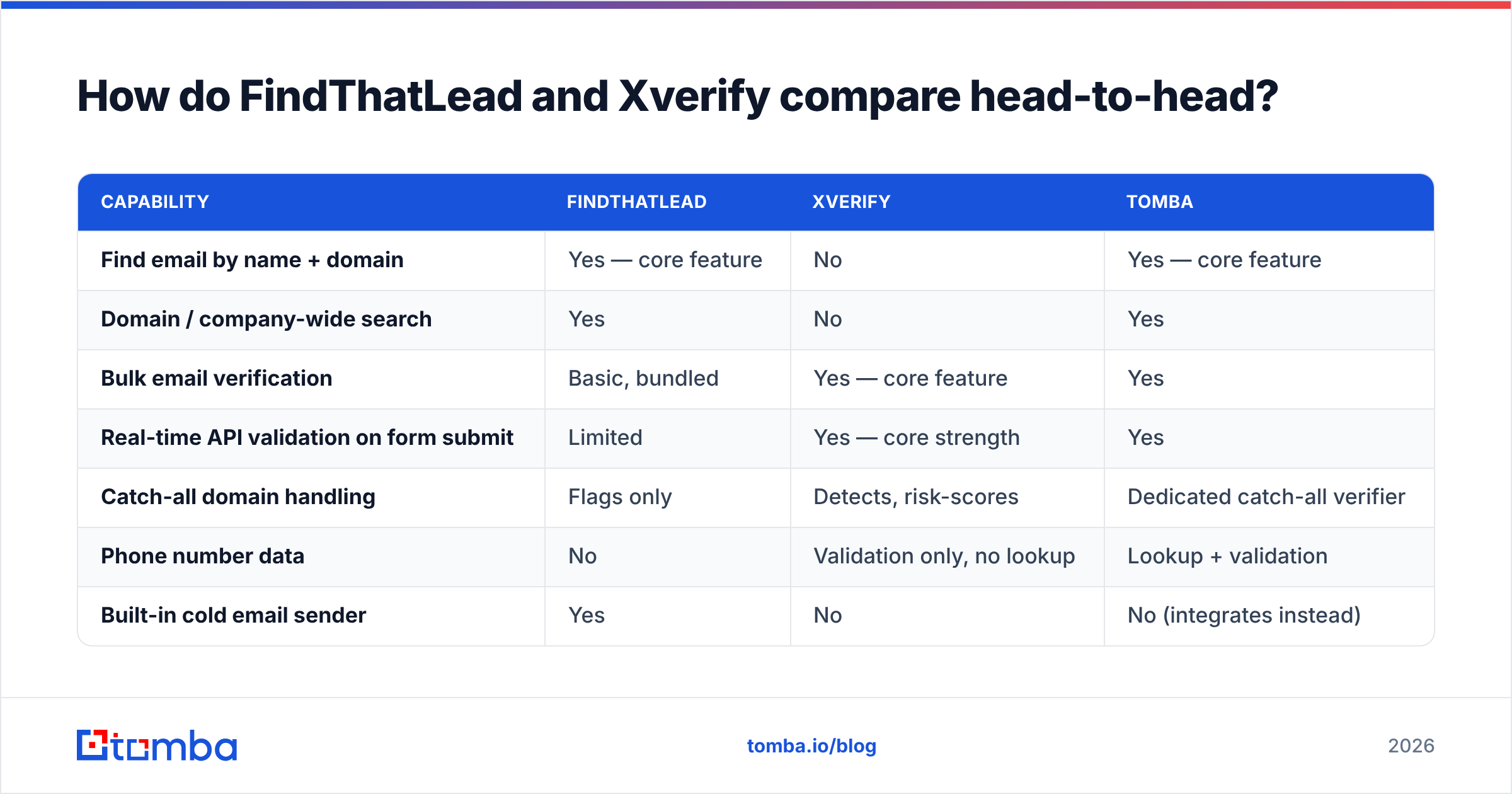
Here is the practical comparison, feature by feature. Note how few rows have a genuine head-to-head overlap — that is the whole story of this matchup.
| Capability | FindThatLead | Xverify | Tomba |
|---|---|---|---|
| Find email by name + domain | Yes — core feature | No | Yes — core feature |
| Domain / company-wide search | Yes | No | Yes |
| Bulk email verification | Basic, bundled | Yes — core feature | Yes |
| Real-time API validation on form submit | Limited | Yes — core strength | Yes |
| Catch-all domain handling | Flags only | Detects, risk-scores | Dedicated catch-all verifier |
| Phone number data | No | Validation only, no lookup | Lookup + validation |
| Built-in cold email sender | Yes | No | No (integrates instead) |
| Chrome extension | Yes | No | Yes |
| Public REST API | Yes | Yes | Yes |
| Free tier | Limited trial credits | Trial credits | 25 searches/mo |
| Entry paid plan | ~$49/mo published | Pay-as-you-go + monthly | $49/mo |

Two rows deserve a footnote. First, FindThatLead's bundled verification is a bounce-risk filter, not a full hygiene suite — it is fine for cleaning what the finder just produced, weaker on a 200,000-row legacy database. Second, Xverify's "no email finding" is not a weakness; the product was never built to guess addresses, and vendors that pretend to do both badly are worse than vendors that do one thing well.

Which one is more accurate — and accurate at what?#
Accuracy means two different things here, and conflating them is how teams end up disappointed.
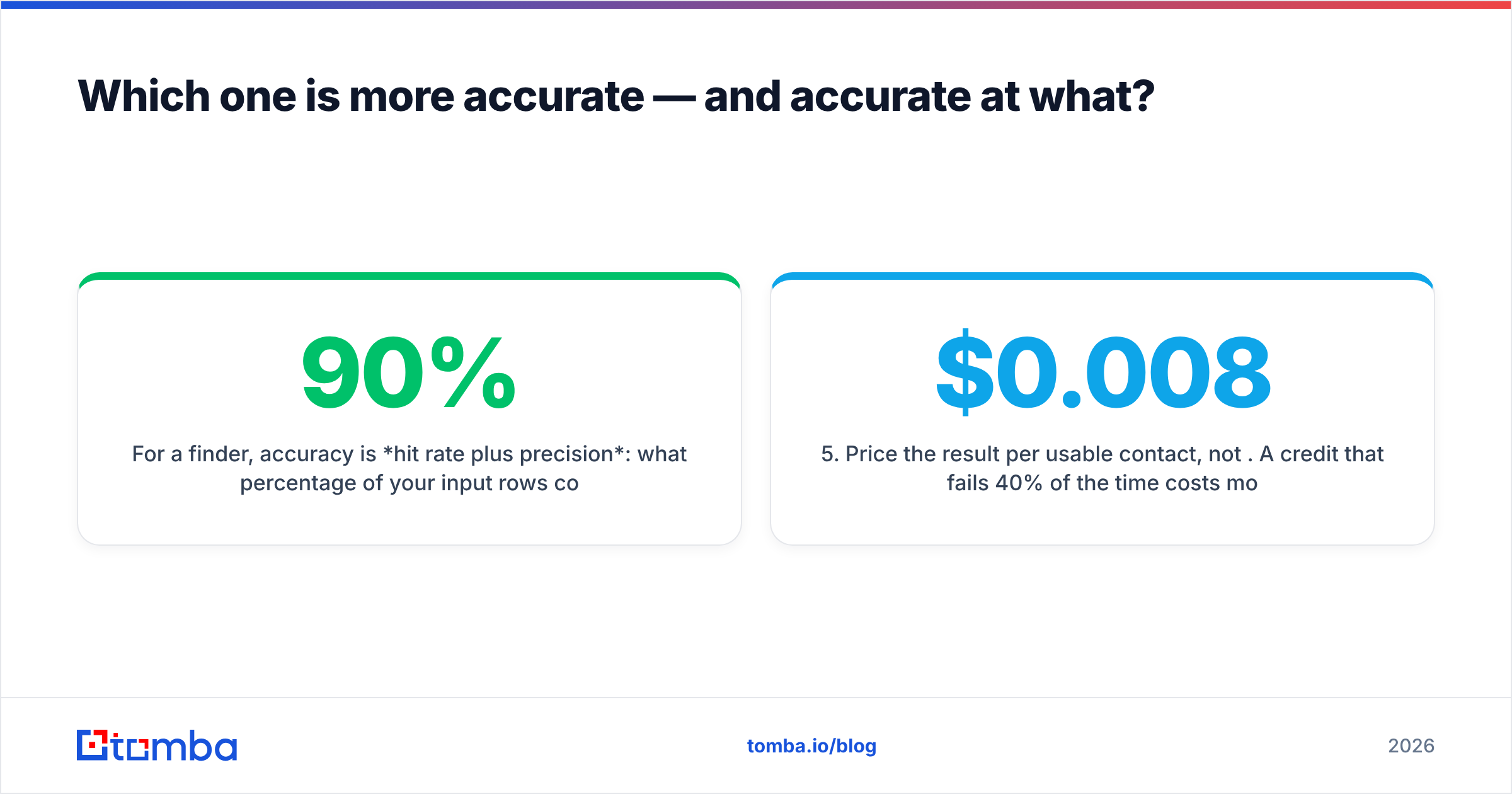
For a finder, accuracy is hit rate plus precision: what percentage of your input rows come back with an address, and what percentage of those addresses actually receive mail. A finder that returns 90% coverage with 20% bounces is worse than one returning 65% coverage with 2% bounces, because the second one doesn't burn your domain.
For a verifier, accuracy is classification correctness: how often "valid" really is valid, and — the harder metric — how it handles catch-all domains where the mail server accepts everything at the SMTP handshake. Catch-alls are roughly a fifth of B2B domains and the single biggest source of disagreement between vendors. Xverify handles them by risk-scoring rather than blanket-accepting, which is the honest approach. Tools that mark every catch-all "valid" are inflating their pass rate, not improving your delivery.

Run your own test before you sign anything. The method takes an afternoon:
- Build a 200-row control set from contacts you have already emailed successfully, plus 50 you know have left their company.
- Strip the addresses and feed only name + domain to each finder. Measure coverage and match rate against the known-good answers.
- Feed the full address list to each verifier. Count how many known-good addresses get marked risky (false negatives cost you real pipeline) and how many known-dead addresses get marked valid (false positives cost you your domain).
- Send a 500-address seed campaign through a throwaway subdomain and measure the true hard-bounce rate. This is the only number that matters to your mailbox provider.
- Price the result per usable contact, not per credit. A $0.008 credit that fails 40% of the time costs more than a $0.02 credit that works.
Vendor-published accuracy figures are marketing. Your 200-row test is data. G2 and Capterra reviews are useful for spotting support and billing complaints, but they are useless for accuracy claims — nobody runs a controlled test before leaving a star rating. Check G2's category pages for the operational gripes, not the percentages.
What does each one cost in 2026?#
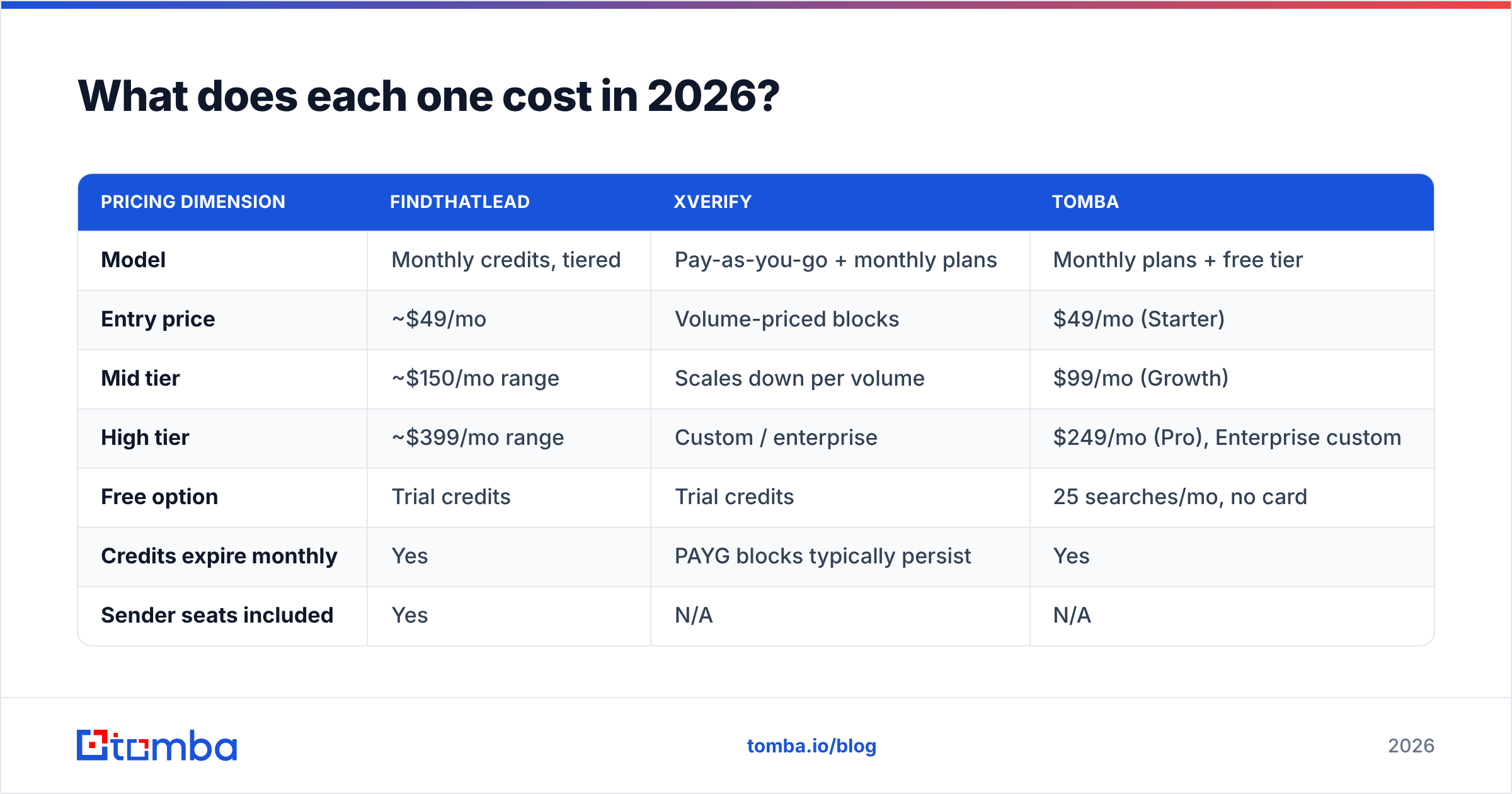
Pricing pages move, so treat these as shapes rather than quotes and confirm on the vendor sites before you budget.
| Pricing dimension | FindThatLead | Xverify | Tomba |
|---|---|---|---|
| Model | Monthly credits, tiered | Pay-as-you-go + monthly plans | Monthly plans + free tier |
| Entry price | ~$49/mo | Volume-priced blocks | $49/mo (Starter) |
| Mid tier | ~$150/mo range | Scales down per volume | $99/mo (Growth) |
| High tier | ~$399/mo range | Custom / enterprise | $249/mo (Pro), Enterprise custom |
| Free option | Trial credits | Trial credits | 25 searches/mo, no card |
| Credits expire monthly | Yes | PAYG blocks typically persist | Yes |
| Sender seats included | Yes | N/A | N/A |
The economics question nobody asks early enough: do you pay twice for the same contact? In a two-vendor stack you spend a finder credit to discover an address, then a verifier credit to confirm it. At 10,000 contacts a month that is 20,000 billable events across two invoices, two rate limits, and two support queues. In a single-vendor stack the verification is often part of the find operation, so you are billed once. Compare Tomba pricing against your combined FindThatLead + Xverify spend before you assume the two-tool route is cheaper because each line item looks small.
The other hidden cost is credit expiry. Monthly credits that reset punish spiky workloads — the quarter you run one big list build, you overpay for eleven quiet months. Pay-as-you-go blocks, which is closer to how Xverify prices verification, suit bursty usage better.
When should you pick FindThatLead?#
Choose FindThatLead when all of these are true:
- You are contact-starved, not data-dirty. Your list is small and you need volume more than polish.
- You want one tool from search to send. The bundled sequencer means fewer integrations to maintain, which genuinely matters for a two-person team.
- Your ICP maps cleanly to firmographic filters. Role + industry + country searches are where the lead-search module earns its keep.
- You are early enough that vendor lock-in is not yet a real cost. Coupling data and sending is fine at 2,000 sends/month. It gets painful at 200,000.
Where it strains: enterprise-grade list hygiene, real-time form validation, and phone data. None of those are what it was built for.
When should you pick Xverify?#
Choose Xverify when:
- Bad data is entering at the front door. Signup forms, gated content, webinar registrations, checkout. Real-time API validation at the point of capture is the highest-ROI use of a verifier, full stop, because it prevents the problem instead of cleaning up after it.
- You have a large legacy database. A CRM with five years of accumulated contacts needs a dedicated hygiene pass, and bundled finder-side verification won't cut it.
- Compliance and deliverability are board-level topics. If a marketing suspension would be a real incident, dedicated verification is cheap insurance for your sender reputation.
- You need more than email. Phone and postal validation in one vendor consolidates a real problem for ecommerce and lead-gen businesses.
Where it strains: it will never hand you a new prospect. If your pipeline problem is "not enough people to talk to," Xverify solves nothing.
Can one platform do both jobs?#
Yes — and for most outbound teams that is the cleaner architecture, because the find step and the verify step share the same underlying signal: whether a mail server will accept the address.

Tomba's email finder and email verifier run on one credit pool and one API key, so a found address arrives already scored. There is a dedicated catch-all verifier for the ambiguous fifth of domains, a bulk email finder for list builds, and a Tomba API if you want validation inside your own signup flow the way you would use Xverify's.
Honest caveat: Tomba does not send email. If FindThatLead's built-in sequencer is the reason you are looking at it, a find-and-verify platform plus a dedicated sender (Instantly, Smartlead, Lemlist, or your existing marketing automation) is a two-tool stack too — just split along a different seam. That seam is usually the better one, because swapping a sender is easy and swapping a data provider that your sender depends on is not.
How do you build a stack that doesn't bounce?#
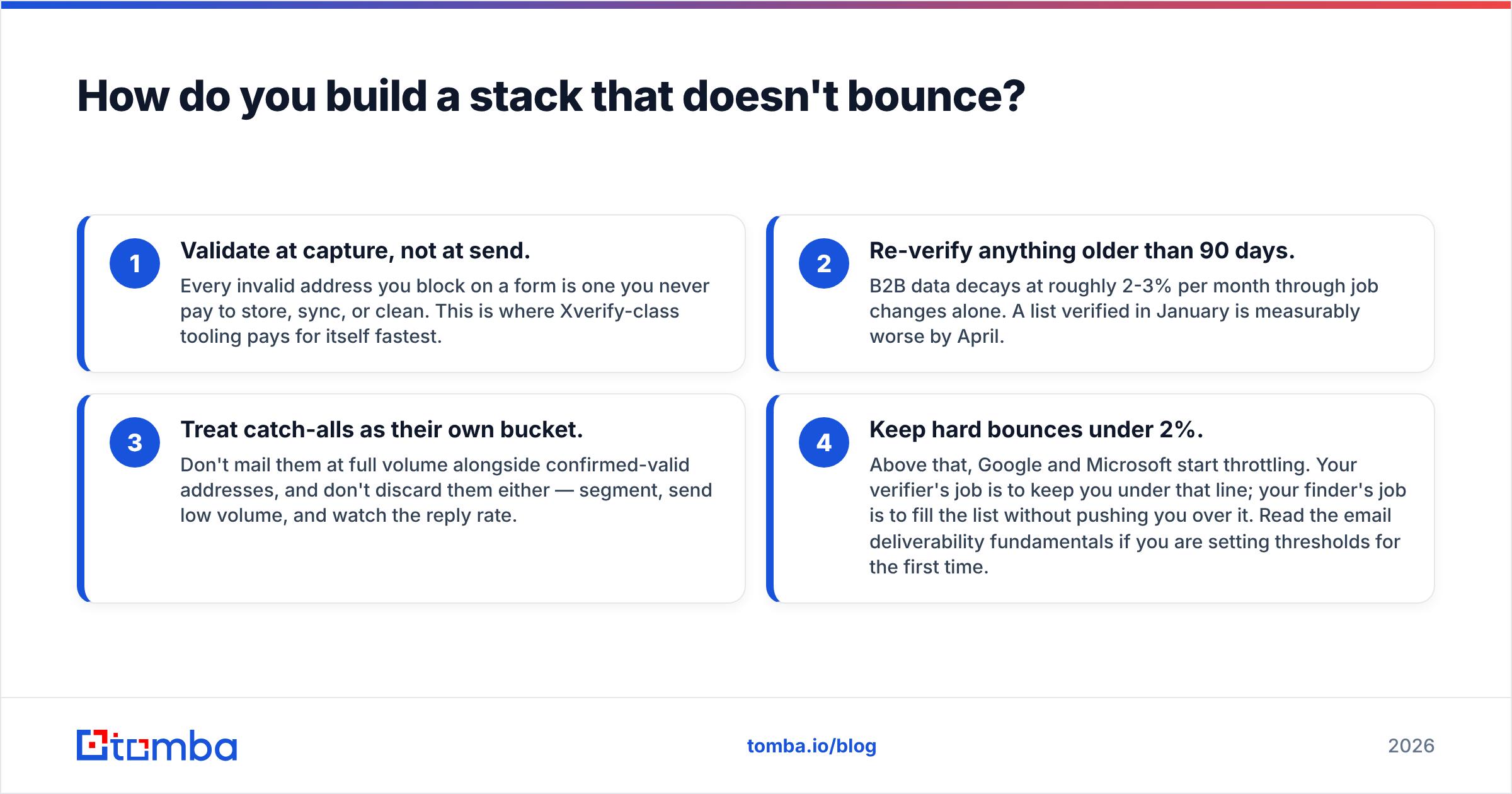
Four rules, in priority order:
- Validate at capture, not at send. Every invalid address you block on a form is one you never pay to store, sync, or clean. This is where Xverify-class tooling pays for itself fastest.
- Re-verify anything older than 90 days. B2B data decays at roughly 2-3% per month through job changes alone. A list verified in January is measurably worse by April.
- Treat catch-alls as their own bucket. Don't mail them at full volume alongside confirmed-valid addresses, and don't discard them either — segment, send low volume, and watch the reply rate.
- Keep hard bounces under 2%. Above that, Google and Microsoft start throttling. Your verifier's job is to keep you under that line; your finder's job is to fill the list without pushing you over it. Read the email deliverability fundamentals if you are setting thresholds for the first time.
Follow those four and the FindThatLead-vs-Xverify question mostly dissolves. You need discovery, and you need hygiene. The only real decision is whether you buy them from two specialists or one platform.
The verdict#
If you can only buy one: buy the one that fixes your current bottleneck. Empty pipeline → FindThatLead. Bouncing pipeline → Xverify. Do not buy a finder to fix a deliverability problem or a verifier to fix a volume problem; each will fail loudly at the other's job.
If you can buy the right one: consolidate. Two vendors means two invoices, two rate limits, two accuracy claims to audit, and double-billing on every contact. A platform that finds and verifies from one credit pool removes an entire integration seam from your stack, and the price difference at 10,000 contacts a month is rarely in the two-tool stack's favor.
Start with the free tier and run the 200-row control test described above against whatever you use today. Tomba's email finder gives you 25 searches a month with no card, with every result verified before it reaches you — enough to see your real hit rate on your real ICP before you commit a budget line to anyone.
Related guides#
Ready to find emails that actually work?
Join 150,000+ professionals who stopped guessing and started sending. Free credits on signup — no credit card required.
Get the Tomba newsletter
Practical outbound tactics and product updates — once every two weeks.
About the author