Findymail Reviews 2026: Accuracy, Pricing, and Real Limits
An independent look at Findymail in 2026: what its verified-email guarantee actually covers, where credits disappear faster than expected, and which teams get more from a cheaper stack.
TL;DR
- Findymail's pitch is narrow and honest: it returns only emails it believes will not bounce, and it charges you a credit only when it finds one. That model works well for outbound teams that live inside LinkedIn Sales Navigator.
- The accuracy is genuinely strong on mid-market and enterprise domains in the US and Western Europe. It weakens on small companies, catch-all domains, and non-Latin-script markets.
- Pricing starts around $49/mo for roughly 1,000 emails. Cost per verified contact is competitive at low volume and gets expensive fast above 10,000 contacts/month.
- The most common complaints in Findymail reviews are not about accuracy — they are about export limits, credit rollover, and the lack of a real free tier.
- If you need an API-first email finder, a free tier to test with, or bundled phone and enrichment data, compare it against Tomba pricing before committing to an annual plan.
What is Findymail, and who actually uses it?#
Findymail is a B2B email-finding tool built around one promise: every address it hands you has already been verified, so your bounce rate stays low without a second verification step. It launched in 2022 and grew mostly through the cold-email community — Lemlist and Instantly users who were tired of paying for a database subscription and then paying again to clean the exports.
The product has three real surfaces:
- A Chrome extension that pulls contacts off LinkedIn and Sales Navigator, including full list and search exports.
- A web app for single lookups, domain search, and CSV bulk enrichment.
- An API and native integrations with Lemlist, Instantly, Smartlead, HubSpot, Salesforce, Clay, Make, and Zapier.
The typical buyer is a two-to-ten-person outbound team, an agency running campaigns for several clients, or a solo founder doing their own prospecting. Enterprise RevOps teams tend to land elsewhere, because Findymail is deliberately not a database — you cannot browse 200 million contacts by filter. You bring the list; it finds the emails.
That distinction matters more than any feature comparison. If your workflow is "search a database, build a list, export," Findymail is the wrong shape. If your workflow is "I already know the 400 companies I want, get me the people," it fits cleanly.

How accurate is Findymail in practice?#
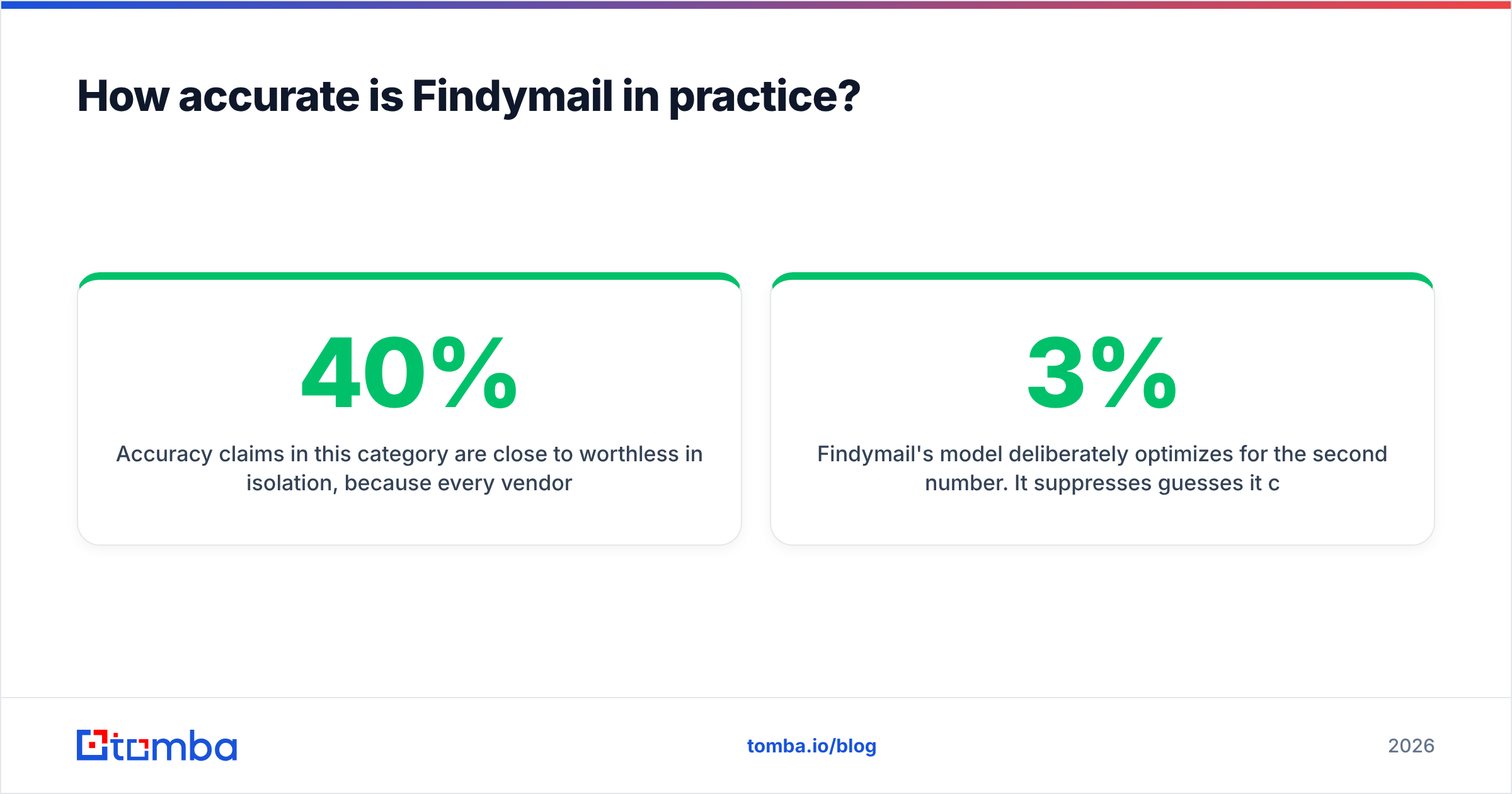
Accuracy claims in this category are close to worthless in isolation, because every vendor measures differently. Some report "match rate" (what percentage of your input produced any email). Some report "accuracy" (of the emails returned, what percentage were valid). A tool that returns an email for 40% of your list and gets 99% of those right will publish a better accuracy number than a tool that returns 75% and gets 95% right — while delivering far fewer usable contacts.
Findymail's model deliberately optimizes for the second number. It suppresses guesses it cannot verify, which is why users consistently report bounce rates in the 1-3% range on cold sends. That is a real result and worth paying for.
The trade-off is coverage. In independent tests across mixed lists, patterns show up consistently:

- Strong: US and Western European companies with 50+ employees, standard
first.last@patterns, tech and SaaS verticals. - Mixed: companies under 20 employees, agencies, and anything using a personal-domain-style setup.
- Weak: catch-all domains (where SMTP verification cannot give a definitive answer), Japanese and Korean company domains, and heavily gated European domains post-GDPR cleanup.
Catch-all handling is the single biggest differentiator between email finders in 2026, and it is where "verified only" tools quietly lose you contacts. A catch-all server accepts every address, so no verifier can prove a specific mailbox exists through SMTP alone. Vendors either drop those contacts entirely, return them with a warning, or run pattern-confidence scoring on top. Findymail leans toward the conservative end. If a meaningful chunk of your ICP sits behind catch-alls, run those separately through a dedicated catch-all verifier rather than accepting the empty result.
One practical test before you buy: take 100 contacts you already have confirmed emails for, strip the emails, and run the list. Measure how many came back and how many matched. That single hour tells you more than every review on the internet, including this one.
What does Findymail cost in 2026?#
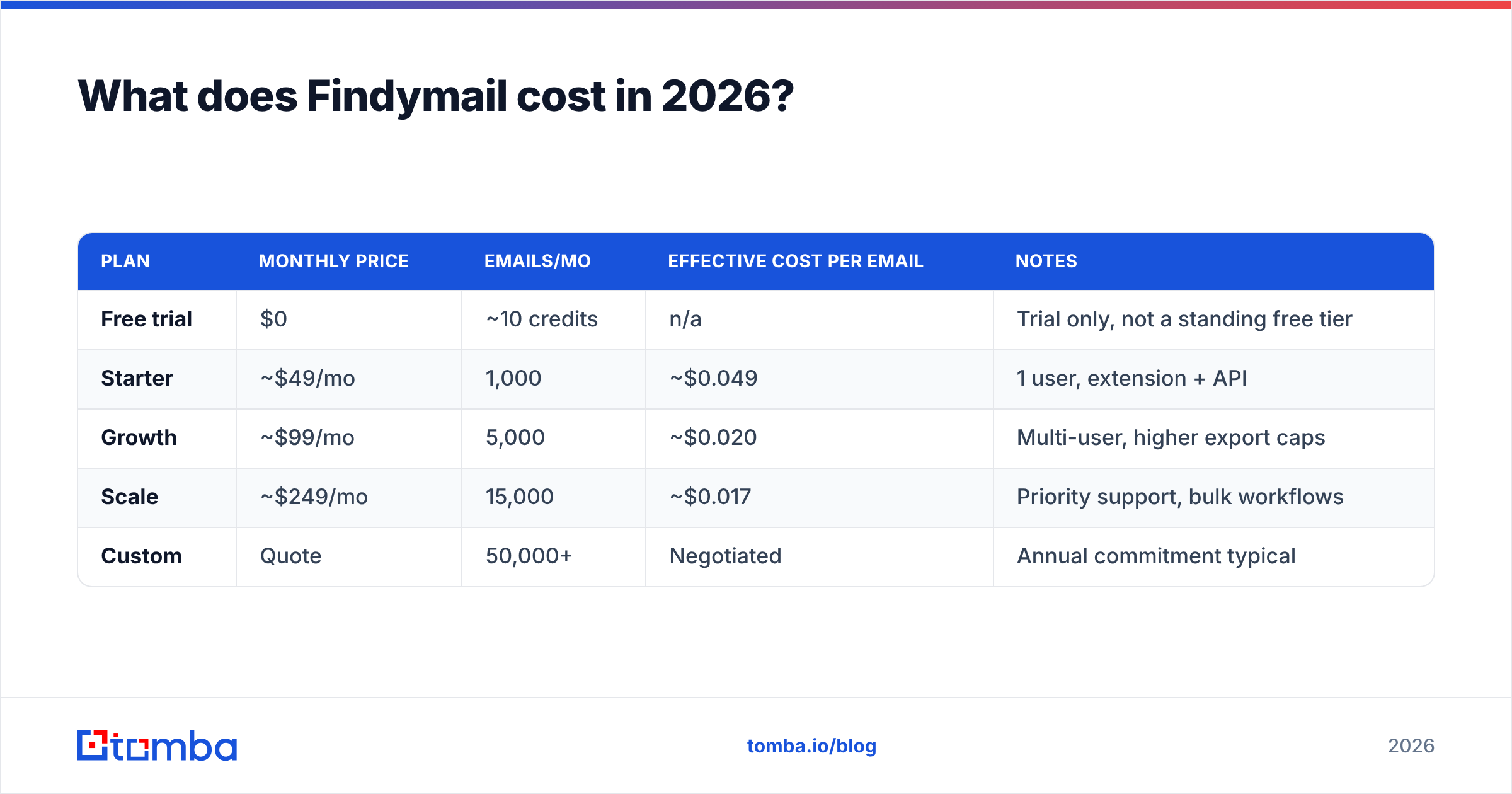
Findymail sells credits, not seats, and a credit is only consumed on a successful find. Verification of emails you already own is charged at a lower rate. Published pricing at the time of writing looks like this — check findymail.com directly, since tiers have moved twice since launch.
| Plan | Monthly price | Emails/mo | Effective cost per email | Notes |
|---|---|---|---|---|
| Free trial | $0 | ~10 credits | n/a | Trial only, not a standing free tier |
| Starter | ~$49/mo | 1,000 | ~$0.049 | 1 user, extension + API |
| Growth | ~$99/mo | 5,000 | ~$0.020 | Multi-user, higher export caps |
| Scale | ~$249/mo | 15,000 | ~$0.017 | Priority support, bulk workflows |
| Custom | Quote | 50,000+ | Negotiated | Annual commitment typical |
Two things to watch in the fine print.
Credits do not roll over indefinitely. If your outbound volume is spiky — heavy in Q1, quiet in August — you pay for capacity you never use. Agencies feel this most.
Export caps are separate from credits. The LinkedIn and Sales Navigator export limits are tier-gated, and several reviewers report hitting the export ceiling well before exhausting their credit balance. If bulk list export is the reason you are buying, confirm the specific cap on your tier in writing before you sign.
For a straight cost comparison, Tomba's Starter plan is $49/mo, Growth is $99/mo, and Pro is $249/mo, with a genuinely standing free tier of 25 searches per month rather than a one-time trial. The free tier matters less for pricing and more for testing: you can validate match rates on your own list without entering a card.
How does Findymail compare to other email finders?#
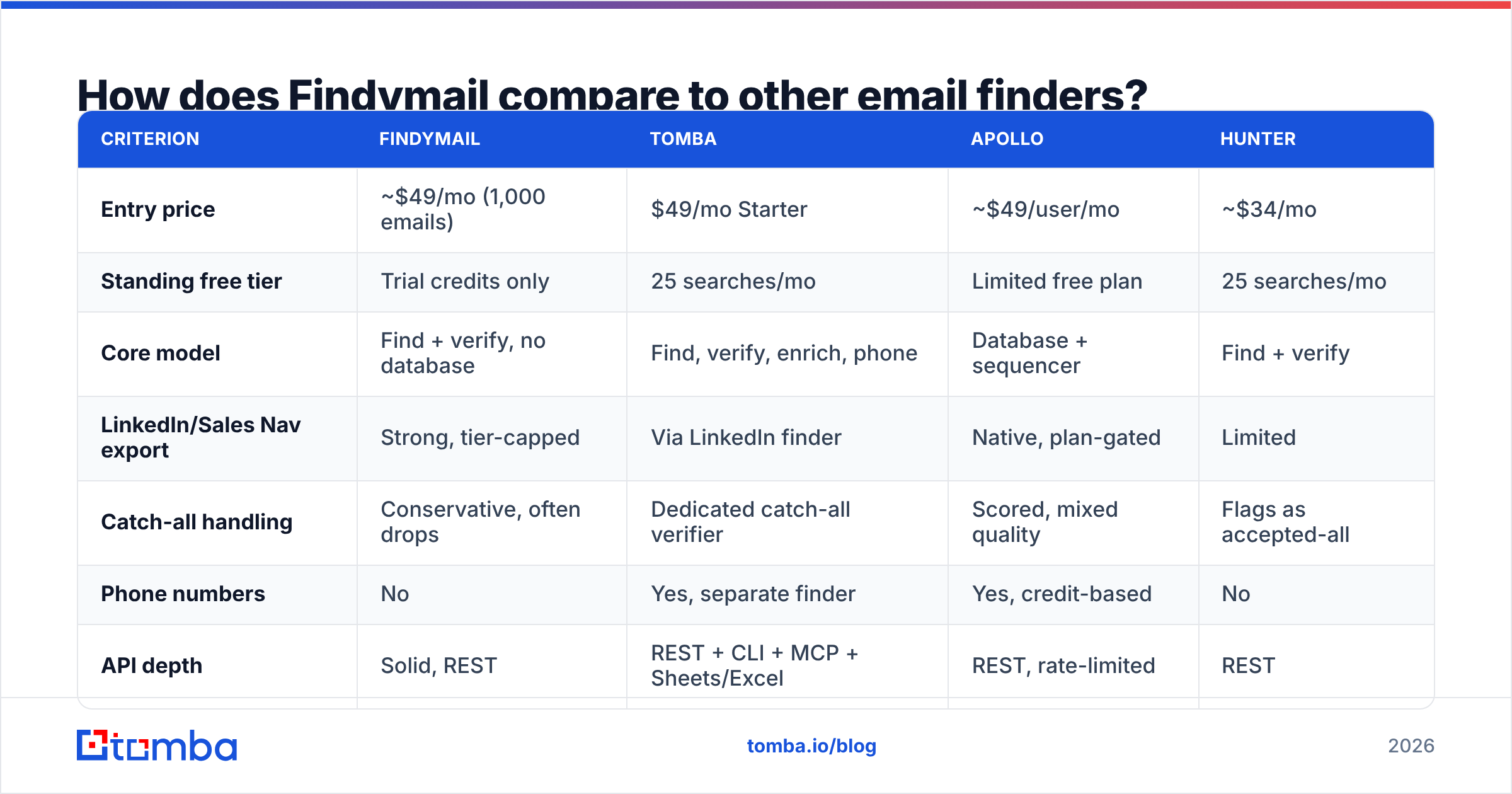
Here is the honest head-to-head on the dimensions that decide the purchase.

| Criterion | Findymail | Tomba | Apollo | Hunter |
|---|---|---|---|---|
| Entry price | ~$49/mo (1,000 emails) | $49/mo Starter | ~$49/user/mo | ~$34/mo |
| Standing free tier | Trial credits only | 25 searches/mo | Limited free plan | 25 searches/mo |
| Core model | Find + verify, no database | Find, verify, enrich, phone | Database + sequencer | Find + verify |
| LinkedIn/Sales Nav export | Strong, tier-capped | Via LinkedIn finder | Native, plan-gated | Limited |
| Catch-all handling | Conservative, often drops | Dedicated catch-all verifier | Scored, mixed quality | Flags as accepted-all |
| Phone numbers | No | Yes, separate finder | Yes, credit-based | No |
| API depth | Solid, REST | REST + CLI + MCP + Sheets/Excel | REST, rate-limited | REST |
| Best for | LinkedIn-first outbound | API + multi-channel enrichment | All-in-one prospecting | Simple domain lookups |
Read that table as a shape comparison rather than a scoreboard. Apollo wins if you want the database and the sequencer in one bill and can tolerate uneven data quality. Hunter wins on simplicity and brand trust for basic domain search. Findymail wins if LinkedIn is your prospecting surface and low bounce rate is non-negotiable. Tomba wins when you need the finder to be one call in a larger pipeline — CLI, MCP, Sheets, and a real email finder API matter more than the UI.
Also worth naming: for teams that would rather buy a static, pre-verified list than run finds on demand, providers like BookYourData occupy a different lane entirely — you pay per record for a downloadable file instead of paying for lookups. That is a legitimate alternative model, not a worse one, and it suits teams with stable, well-defined ICPs.

What do real Findymail reviews actually complain about?#
Pull the reviews on G2 and Capterra, filter out the incentivized five-stars, and the criticism clusters into five themes.
- Coverage gaps on small companies. Reviewers running SMB lists report match rates well below what they see on mid-market. The verified-only model means a miss is a silent miss — you get no row, no guess, no confidence score to act on.
- No standing free tier. Trial credits run out in an afternoon. Several reviewers note they could not properly evaluate coverage on their own ICP before paying, which is exactly the evaluation that matters.
- Export limits surprise people. The gap between credit allowance and export cap is the most repeated operational complaint. It is documented, but it is not the number on the pricing page people anchor to.
- Single-channel data. No phone numbers, no firmographic enrichment beyond the basics. If you run a multi-channel motion, you are buying a second tool anyway — a phone finder or a full data enrichment layer.
- Support responsiveness at lower tiers. Positive overall, but priority support is tier-gated, and agencies on Starter mention slower turnarounds during campaign crunches.
What is notably absent from the complaints: bounce rates. Almost nobody says the emails did not deliver. Whatever else you conclude, the core promise holds up, and that is more than most tools in this category can claim.
Is Findymail worth it for your team?#
Buy it if three or more of these are true:
- LinkedIn is your primary prospecting surface. The Sales Navigator export flow is genuinely one of the better ones on the market.
- Your ICP is 50+ employee companies in North America or Western Europe. This is where coverage is strongest.
- Deliverability is a board-level concern. If a 5% bounce rate would put your domain at risk, paying a premium for pre-verified output is rational.
- You send 1,000-10,000 emails a month. Below that, the per-credit math is unfavorable versus free tiers. Above it, negotiate or reconsider.
- You already own a sequencer. Findymail has no sending layer and does not pretend to.
Skip it if:
- You need a searchable database. Findymail does not have one. You will end up buying Apollo or a list provider anyway.
- You need phones, technographics, or firmographics. One tool, one data type.
- Your ICP is SMB, APAC, or heavy on catch-all domains. Test hard before committing; the conservative model costs you contacts here.
- You are API-first. The API works, but if you are wiring email lookup into a product or an internal pipeline, evaluate depth of tooling — SDKs, CLI, spreadsheet add-ins, MCP servers — not just endpoint availability.
A reasonable hybrid many teams land on: keep a verified-only finder for the LinkedIn-sourced list, and run a broader finder plus a standalone email verifier for everything else, including catch-alls the conservative tool refuses to touch. You recover contacts that would otherwise vanish, and you still control bounce risk. It costs slightly more in tooling and considerably less in missed pipeline.
How should you test an email finder before you buy?#
Do not trust any vendor's published accuracy figure, including the charts above. Run this in an afternoon:
- Build a 100-row golden set. Pull contacts from your CRM where you have a confirmed, replied-to email address. Mix company sizes and geographies to match your real ICP.
- Strip the emails. Keep name, company, and domain only.
- Run the same list through two or three tools. Use free tiers or trials. Note the timestamp and plan for each run.
- Score three numbers separately. Match rate (rows returned), precision (returned emails that match your known-good value), and cost per correct match.
- Send a small validation batch. Fifty addresses through your normal sending setup. Measure actual bounces, not predicted ones.
- Re-test in 90 days. Data decays at roughly 25-30% annually across B2B contact databases. A tool that won in January may not win in April.
That process takes about three hours and routinely changes purchasing decisions worth thousands of dollars a year. It is the only benchmark that reflects your list, not someone else's.
The verdict#
Findymail is a good, focused tool that does exactly what it advertises. The verified-only model is a real differentiator, the LinkedIn export workflow is best-in-class for its price band, and the bounce-rate results speak for themselves. The limitations are structural rather than fixable: no database, no phones, no standing free tier, and coverage that thins out on SMB and catch-all-heavy segments.
If your outbound motion is LinkedIn-led, mid-market, and deliverability-sensitive, it earns its $49-$99 a month. If you need the finder to sit inside a broader pipeline — enrichment, phones, spreadsheets, CI jobs, agent workflows — you will outgrow the single-channel model quickly.
Want to run the golden-set test before you commit to anyone? Start with the Tomba Email Finder free tier — 25 searches a month, no card, plus API, CLI, Sheets, and Excel access on paid plans from $49/mo. Load your 100-row list, compare the match rate against whatever you are using now, and let the numbers decide instead of the reviews.
Related guides#
Ready to find emails that actually work?
Join 150,000+ professionals who stopped guessing and started sending. Free credits on signup — no credit card required.
Get the Tomba newsletter
Practical outbound tactics and product updates — once every two weeks.
About the author