Findymail vs Kipplo (2026): Which Email Finder Actually Wins?
Findymail and Kipplo both promise verified B2B emails and low bounce rates. We compared coverage, pricing, credit models, and API depth to find where each one actually earns its keep.
TL;DR
- Findymail is the more mature option: strong verification-first positioning, native CRM and Clay integrations, and a credit model that only charges for emails it actually finds.
- Kipplo is the newer, cheaper challenger — attractive entry pricing and a simpler interface, but a thinner data footprint outside North America and Western Europe and far less third-party validation.
- Credit accounting is where the real cost hides. A "$49 plan" means nothing until you know whether failed lookups, verification, catch-all checks, and enrichment fields each burn credits.
- If you run outbound at volume and need API access, bulk processing, and catch-all handling in one place, a platform like Tomba Email Finder covers more of the workflow at $49/mo Starter than either tool does alone.
- Our pick: Findymail for teams already living in Clay or HubSpot; Kipplo for solo founders testing a channel; Tomba if you want finder, verifier, and API under one roof.
What are Findymail and Kipplo?#
Both tools solve the same narrow problem: you have a name and a company, and you need a working email address.
Think of an email finder like a locksmith who has seen a few million locks. It does not have your specific key on file. It infers the pattern — first.last@, flast@, first@ — from every other door in that building, then tests the guess against the mail server before handing it over.
Findymail launched with a single loud promise: emails that do not bounce. It leans on a verification layer applied before delivery, and it built early distribution through the Clay ecosystem and LinkedIn scraping workflows. It is the better-known of the two, with a visible presence on G2 and a customer base skewed toward agencies and outbound teams.
Kipplo is the newer entrant. Its pitch is price and simplicity — fewer moving parts, a cleaner dashboard, and a lower cost per credit at entry tiers. That makes it appealing if you are validating whether cold email works for you at all, before committing to a data budget.
The honest framing: these are not equivalent products at different prices. They are at different stages of maturity, and that shows up in coverage, in API depth, and in how much of your workflow you still have to solve elsewhere.
How do Findymail and Kipplo compare head to head?#
Here is the comparison that matters, with Tomba included as a third reference point since most buyers evaluating these two are also looking at broader platforms.
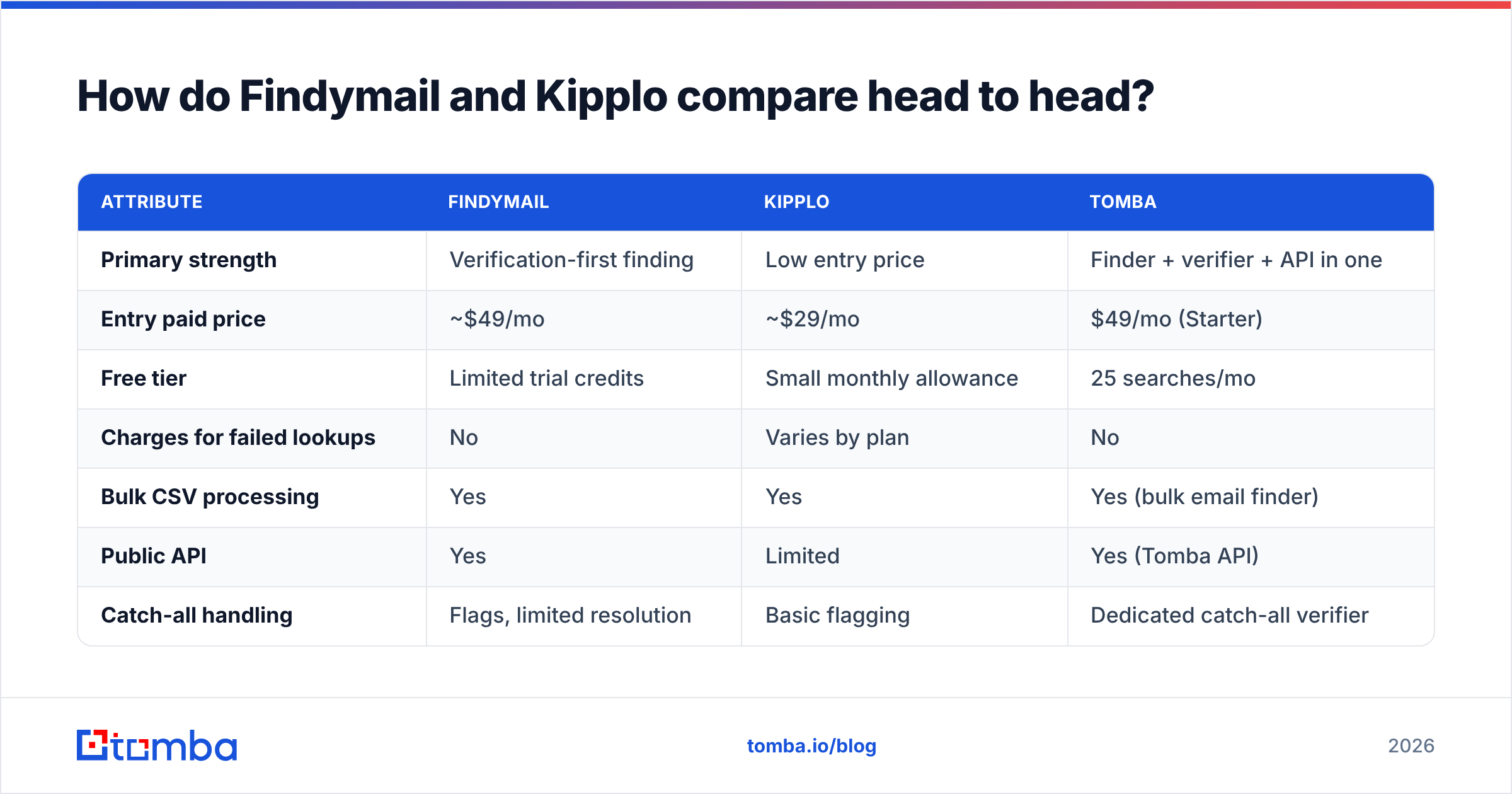
| Attribute | Findymail | Kipplo | Tomba |
|---|---|---|---|
| Primary strength | Verification-first finding | Low entry price | Finder + verifier + API in one |
| Entry paid price | ~$49/mo | ~$29/mo | $49/mo (Starter) |
| Free tier | Limited trial credits | Small monthly allowance | 25 searches/mo |
| Charges for failed lookups | No | Varies by plan | No |
| Bulk CSV processing | Yes | Yes | Yes (bulk email finder) |
| Public API | Yes | Limited | Yes (Tomba API) |
| Catch-all handling | Flags, limited resolution | Basic flagging | Dedicated catch-all verifier |
| Phone numbers | No | No | Yes |
| Chrome extension | Yes | Yes | Yes |
| CRM integrations | HubSpot, Salesforce, Clay | Fewer, growing | HubSpot, Salesforce, Pipedrive, Zapier |
| Best fit | Agencies, Clay users | Solo founders, early testing | Teams needing full coverage + API |
The pattern is consistent across every category: Findymail buys you maturity, Kipplo buys you a lower floor, and a full-stack platform buys you fewer tools to stitch together.

Which one finds more emails?#
Findymail generally wins on hit rate, especially outside the US tech bubble. That is the practical difference, and it comes down to data sourcing breadth rather than any clever algorithm.
But hit rate is the wrong single metric, and every vendor knows it. Four numbers actually matter, and they trade off against each other:
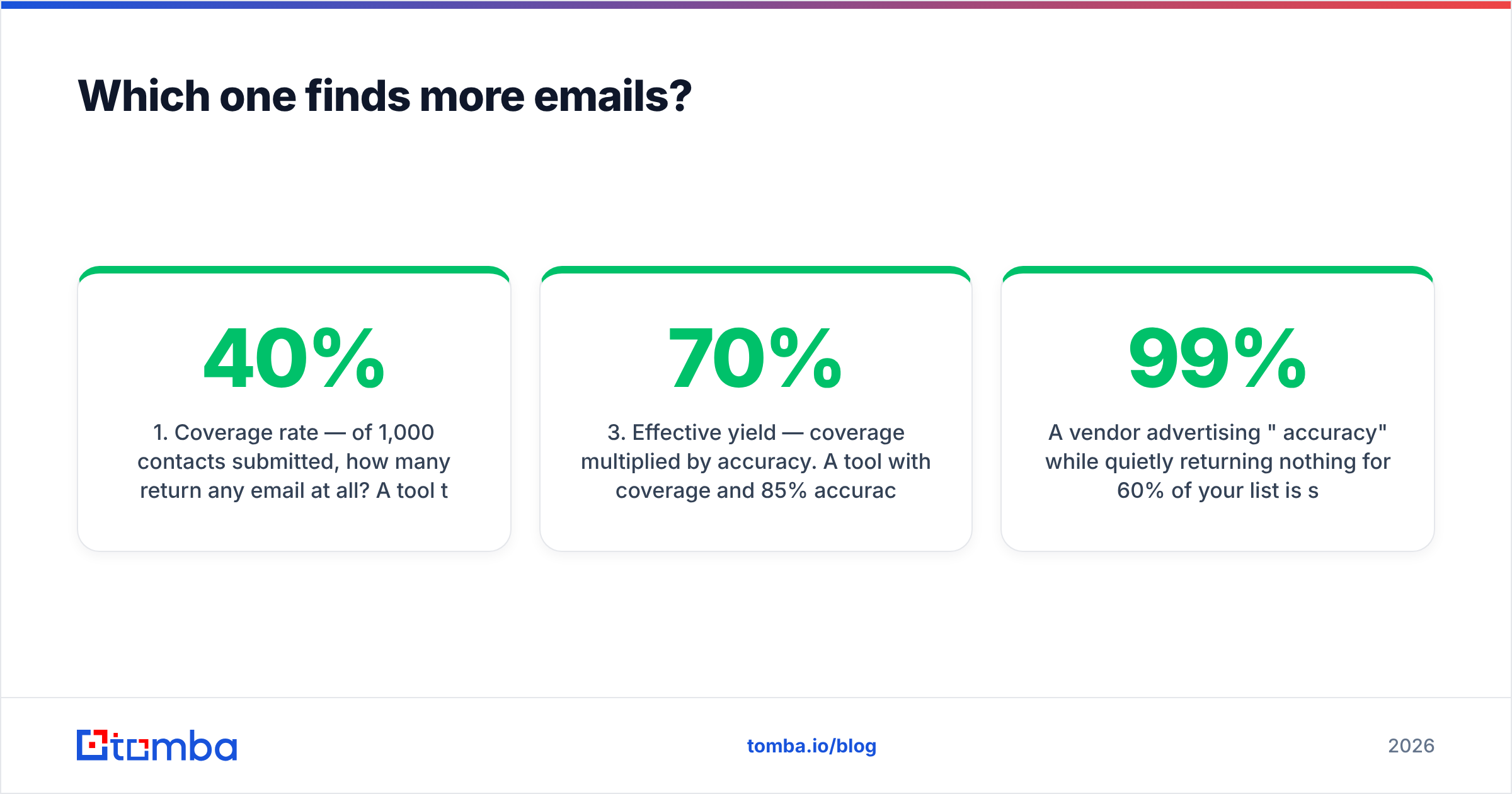
- Coverage rate — of 1,000 contacts submitted, how many return any email at all? A tool that returns 400 addresses from 1,000 rows has 40% coverage.
- Accuracy rate — of the emails returned, how many actually deliver? This is where verification-first tools separate themselves.
- Effective yield — coverage multiplied by accuracy. A tool with 70% coverage and 85% accuracy (59.5% yield) beats one with 50% coverage and 95% accuracy (47.5% yield) for most outbound use cases.
- Cost per valid email — plan price divided by effective yield. This is the only number your finance team should care about.
A vendor advertising "99% accuracy" while quietly returning nothing for 60% of your list is selling you a filtered denominator. Always run a test list of 200 contacts you already know the answers for, then compute the yield yourself.
In practice, both tools do well on US and Western European B2B SaaS contacts — the segment everyone optimizes for. Findymail holds up better on mid-market and non-tech verticals. Kipplo's coverage drops noticeably on APAC, LATAM, and smaller domains with no public email footprint. If your ICP lives outside the obvious segments, test before you buy an annual plan.
How does pricing really work for each tool?#
Sticker price is the least interesting part of the pricing page. What matters is the credit model.
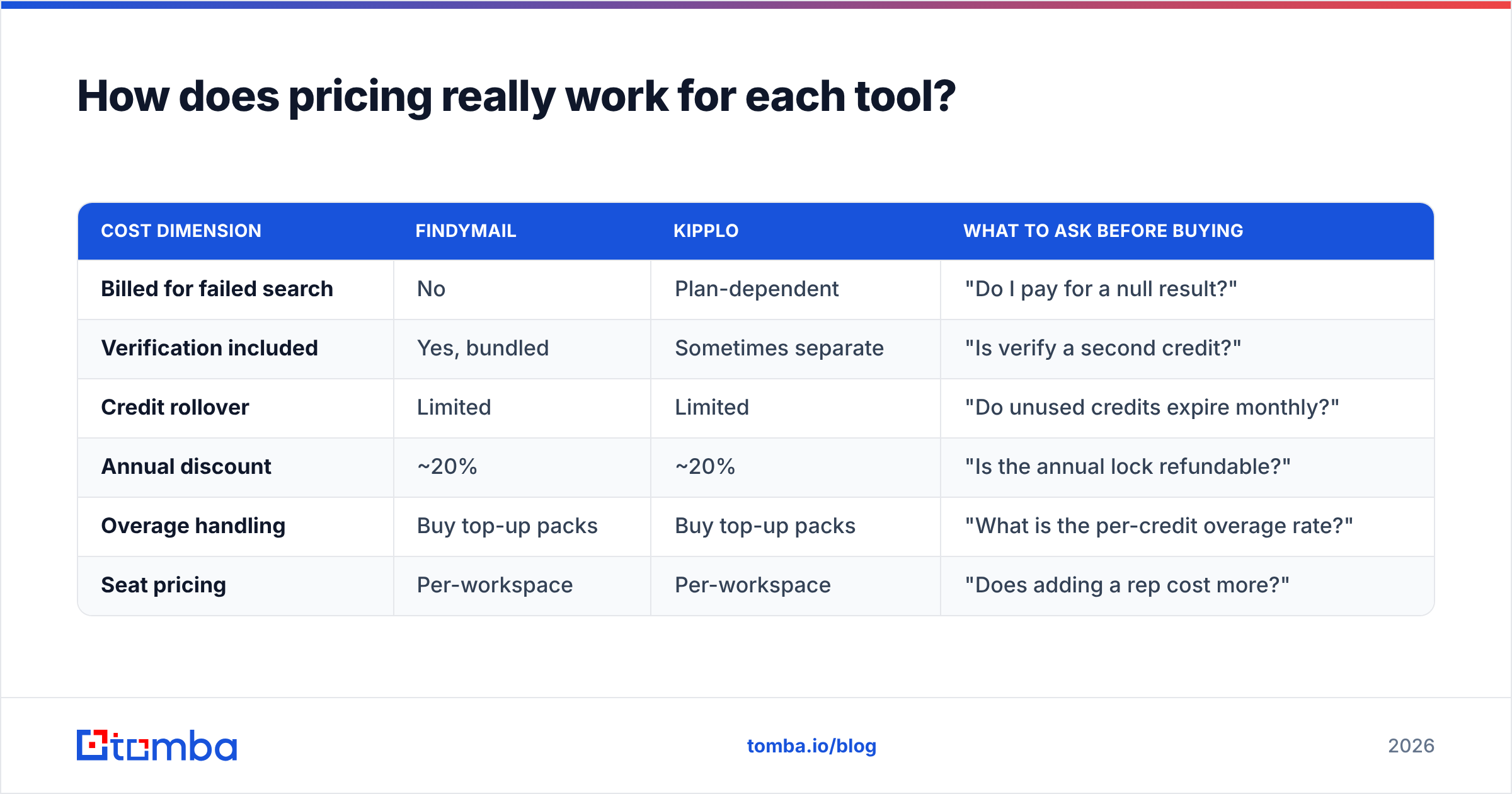
| Cost dimension | Findymail | Kipplo | What to ask before buying |
|---|---|---|---|
| Billed for failed search | No | Plan-dependent | "Do I pay for a null result?" |
| Verification included | Yes, bundled | Sometimes separate | "Is verify a second credit?" |
| Credit rollover | Limited | Limited | "Do unused credits expire monthly?" |
| Annual discount | ~20% | ~20% | "Is the annual lock refundable?" |
| Overage handling | Buy top-up packs | Buy top-up packs | "What is the per-credit overage rate?" |
| Seat pricing | Per-workspace | Per-workspace | "Does adding a rep cost more?" |
The single most expensive mistake buyers make is comparing entry tiers instead of the tier they will actually land on. A $29/mo plan with 500 credits and a 45% hit rate costs you roughly $0.13 per valid email. A $49/mo plan with 1,000 credits at a 65% hit rate costs about $0.075. The cheaper plan is nearly twice as expensive per usable contact.
For reference, Tomba pricing runs Free (25 searches/mo), Starter at $49/mo, Growth at $99/mo, Pro at $249/mo, and custom Enterprise — with the finder, email verifier, and domain search all drawing from the same pool rather than being sold as separate SKUs. That consolidation is usually where the savings show up, not in the headline number.
Worth noting: if your requirement is a large pre-built contact list rather than on-demand lookups, a database-first vendor like BookYourData solves a different shape of the problem well — you are buying inventory, not a search engine. Compare on cost per verified record delivered, not on plan price.
What about verification and bounce protection?#
Neither tool removes your obligation to verify before sending. This is the part buyers skip and regret.
Findymail bundles verification into its find step, which is genuinely useful — it means fewer obviously-dead addresses reach your sequencer. Kipplo does basic syntax and MX checks. Neither fully resolves catch-all domains, and catch-alls are where most modern bounce risk hides.
A catch-all domain accepts every address at SMTP time, then silently discards the invalid ones. Your finder sees "accepted" and marks the email valid. Three days later, your sender reputation is down and you cannot figure out why. Roughly a fifth of enterprise domains are configured this way.
Three habits fix most of it:
- Re-verify anything older than 90 days. B2B email data decays at roughly 2-3% per month through job changes alone.
- Segment catch-alls into a separate, lower-volume send. Do not mix them with your confirmed-valid list on the same sending domain.
- Keep a hard bounce ceiling below 2%. Google and Microsoft both treat sustained bounce rates as a spam signal, and Google's bulk sender guidelines are explicit about it.

If bounce control is the actual reason you are shopping, a dedicated verification layer will outperform whatever verification is bundled into a finder. Run finds in one tool, then push the output through a catch-all finder or a standalone verifier before it hits your sequencer.
Which integrates better with your existing stack?#
Findymail has the clear edge here, and it is not close.
Its Clay integration alone is decisive for a large slice of the outbound market — if your enrichment waterfall lives in Clay, a native provider slot beats a CSV round-trip every time. It also ships working HubSpot and Salesforce paths, plus a Chrome extension for LinkedIn prospecting.
Kipplo has a browser extension and a basic API, but the integration surface is smaller. Expect to do more manual export-import, or to build the glue yourself with Zapier or Make.
Ask three questions before you decide:
- Does it push to my CRM without a CSV? Manual export kills adoption within two weeks, every time.
- Is there a real API with documented rate limits? If you plan to enrich at volume or embed lookups in a product, this is non-negotiable.
- Can non-technical reps use it unassisted? A tool only your ops person can operate is an ops person's tool, not a team's.
Anything with a documented email finder API, spreadsheet add-ins for Google Sheets and Excel, and native integrations collapses several of these questions at once.
Is Findymail or Kipplo better for cold outbound at scale?#
Findymail, if you are choosing only between these two. At volume, the things that break are the things Kipplo has not built out yet: bulk throughput, API stability, integration reliability, and coverage on the long tail of your list.
Scale changes the math in ways that are not obvious at 100 contacts a month:
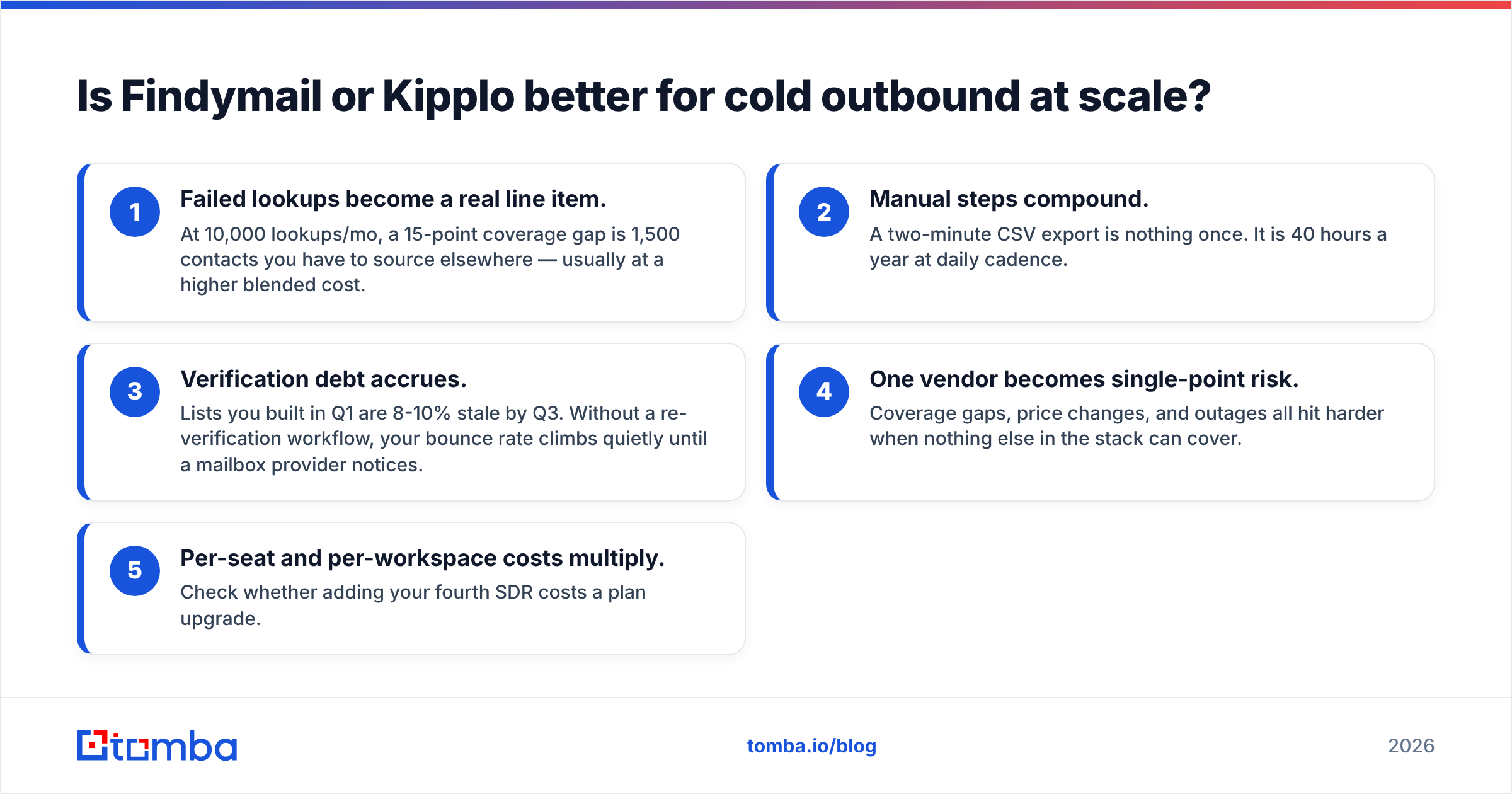
- Failed lookups become a real line item. At 10,000 lookups/mo, a 15-point coverage gap is 1,500 contacts you have to source elsewhere — usually at a higher blended cost.
- Manual steps compound. A two-minute CSV export is nothing once. It is 40 hours a year at daily cadence.
- Verification debt accrues. Lists you built in Q1 are 8-10% stale by Q3. Without a re-verification workflow, your bounce rate climbs quietly until a mailbox provider notices.
- One vendor becomes single-point risk. Coverage gaps, price changes, and outages all hit harder when nothing else in the stack can cover.
- Per-seat and per-workspace costs multiply. Check whether adding your fourth SDR costs a plan upgrade.
The teams that run outbound well almost never rely on a single finder. They run a primary source, a fallback source, and a separate verification step — then measure cost per booked meeting, not cost per credit.
What should you actually choose?#
Short version:
- Choose Findymail if you are in Clay or HubSpot daily, need reliable coverage across mixed verticals, and want verification bundled into the find step. It is the safer default of the two.
- Choose Kipplo if you are one person testing whether cold email works for your offer, your ICP is US or Western European B2B, and $20/mo of difference genuinely matters right now. Revisit in 90 days.
- Choose a consolidated platform if you need finder, verifier, catch-all handling, domain search, bulk processing, and an API — and you would rather pay one bill than four. Tomba's Starter tier at $49/mo puts all of those in the same account, with a free tier at 25 searches/mo to test coverage against your own list first.
Whatever you pick, do this before you commit to annual billing: take 200 contacts where you already know the correct email, run them through each tool, and compute effective yield and cost per valid address. Twenty minutes of testing beats twelve months of a plan that does not cover your ICP.
Ready to test coverage on your own list?#
Stop comparing marketing pages and start comparing hit rates on contacts you care about. Run your ICP through Tomba Email Finder — search by name and domain, pull entire companies with domain search, and verify before anything reaches your sequencer. The free tier gives you 25 searches a month with no card, which is enough to see whether the coverage holds up on your accounts. If it does, Starter is $49/mo and includes the verifier, bulk tools, and full API access in the same plan.
Related guides#
Ready to find emails that actually work?
Join 150,000+ professionals who stopped guessing and started sending. Free credits on signup — no credit card required.
Get the Tomba newsletter
Practical outbound tactics and product updates — once every two weeks.
About the author