Findymail vs LakeB2B: Which B2B Email Data Wins in 2026?
One is a real-time email finder built for cold outbound. The other is a licensed B2B database sold by quote. Here is how Findymail and LakeB2B actually compare on accuracy, cost, and risk.
Findymail vs LakeB2B is a choice between two data models, not two feature lists. One finds and verifies an email the moment you ask. The other sells you a list that was built months ago.
TL;DR
- Findymail is a real-time email finder built for cold outbound teams. You give it a name and a company. It resolves the address, verifies it, and only then charges you.
- LakeB2B is a licensed data provider. You buy a list — by industry, job function, or healthcare specialty — usually under a custom quote with a minimum order.
On accuracy, cost, and our pick:
- Each model treats accuracy differently. Finders check the address at query time. A bought list is only as fresh as the day it was built, and B2B contact data goes stale at roughly 2–3% per month.
- Cost is the real fork in the road. A per-credit finder costs you nothing when you stop prospecting. A bought list is sunk cost the moment the invoice clears.
- Our pick for most outbound teams: a real-time finder plus a verification layer. LakeB2B earns its place when you need full market coverage in niches — healthcare, education, manufacturing — that self-serve tools cover thinly.
Findymail vs LakeB2B: what are they, exactly?#
They solve the same surface problem — "I need email addresses for these people" — with very different machinery underneath.
Findymail is a self-serve email finder. You feed it a person and a domain, or you push a LinkedIn Sales Navigator export through it, and it returns a work email address. Verification is the selling point. It only bills you for addresses it believes will land, and it markets hard on bounce-rate protection for agencies running high-volume cold email.
LakeB2B is a data vendor in the older sense. It sells contact and account databases built from compiled sources, partner networks, event registrations, and licensed publisher data. You describe an audience — "CFOs at US manufacturers with 200+ employees," or "hospital procurement leads in the Midwest." The sales team comes back with a count and a quote. Delivery is usually a CSV or a CRM push, not a live API you call from your product.
That one difference shapes everything else: pricing, freshness, compliance, and what happens when the data is wrong.

How do the two data models actually differ?#
Read this list before you read the pricing table. The pricing only makes sense once the model is clear.
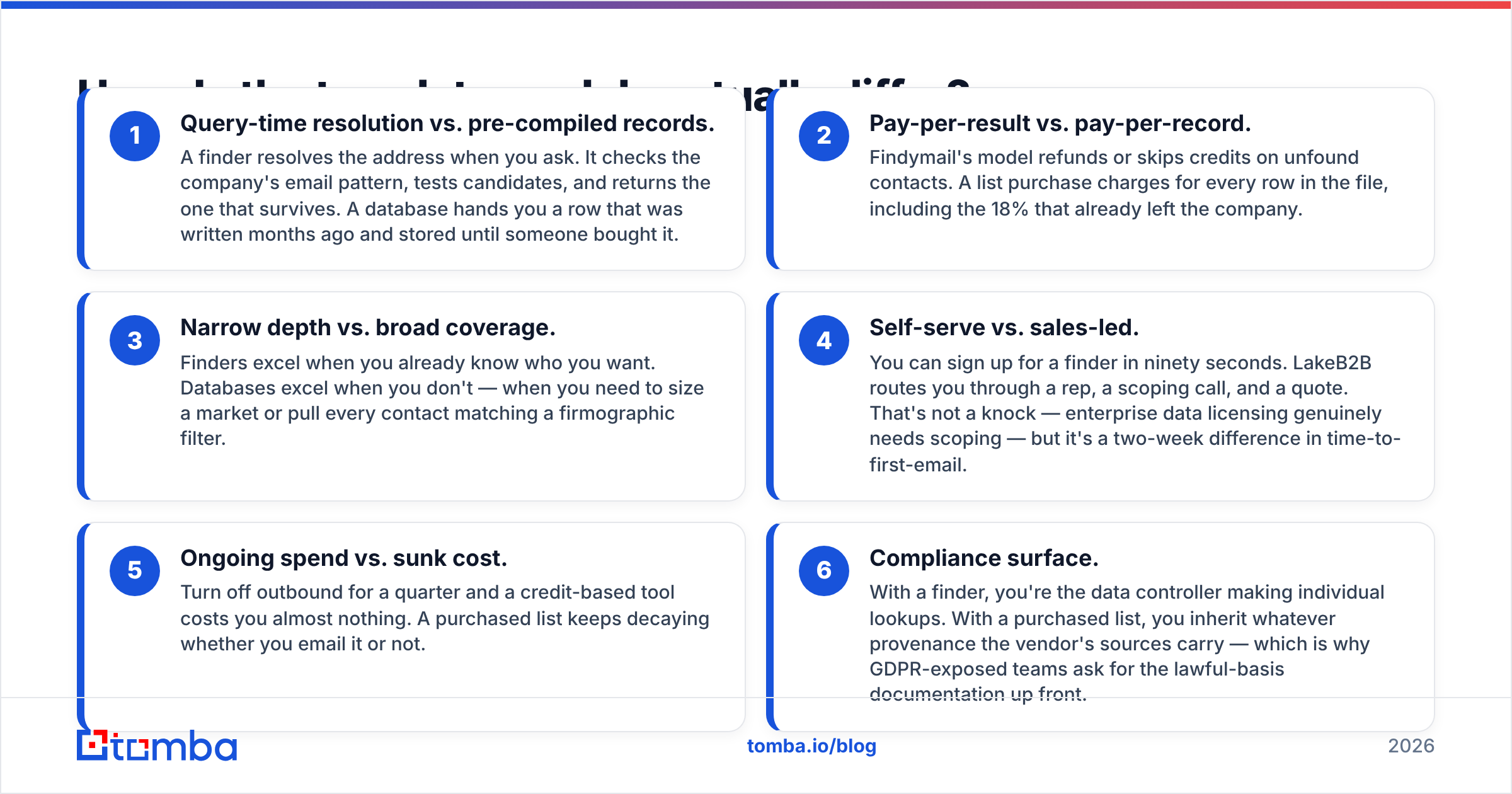
- Query-time lookup vs. pre-built records. A finder resolves the address when you ask. It checks the company's email pattern, tests candidates, and returns the one that survives. A database hands you a row that was written months ago and stored until someone bought it.
- Pay-per-result vs. pay-per-record. Findymail skips or refunds credits when a contact isn't found. A list purchase charges for every row in the file, including the 18% who already left the company.
- Narrow depth vs. broad coverage. Finders shine when you already know who you want. Databases shine when you don't — when you need to size a market or pull every contact that matches a filter.
The next three differences show up in how you buy, not in how the data is built.
- Self-serve vs. sales-led. You can sign up for a finder in ninety seconds. LakeB2B routes you through a rep, a scoping call, and a quote. That's not a knock — licensing enterprise data really does need scoping. But it's a two-week difference in time to first email.
- Ongoing spend vs. sunk cost. Turn off outbound for a quarter and a credit-based tool costs you almost nothing. A purchased list keeps going stale whether you email it or not.
- Compliance surface. With a finder, you're the one making each lookup. With a purchased list, you inherit whatever sources the vendor used. That's why teams exposed to GDPR ask for the lawful-basis paperwork up front.
Which one gives you better email accuracy?#
Neither wins on the marketing page. They win in different conditions.
Real-time finders win on freshness. When you query today, the SMTP check happens today. That matters more than most teams model. B2B job change rates run 20–30% a year across sales, marketing, and RevOps roles. A list built in Q1 is already wrong in places by Q4. HubSpot and other CRM vendors have published similar decay numbers for years, and nothing about 2026 hiring has slowed it down.

Compiled databases win on coverage in thin verticals. If you sell to independent clinics, rural school districts, or mid-market industrial suppliers, self-serve finders often return nothing. Those companies have no LinkedIn presence to scrape and no public email footprint to match a pattern against. LakeB2B's healthcare and education datasets exist because that long tail is expensive to build and dull to maintain.
The honest framing: a finder tells you whether an address works right now; a database tells you the address existed at some point. If you buy a list, verification is not optional. Run the whole file through an email verifier before it touches your sending domain. And treat any quoted "95% accuracy" as a claim to test, not a promise to trust.
One more wrinkle: catch-all domains. About a fifth of B2B domains accept every address at the MX level. A loose verifier marks those "valid" and a strict one marks them "unknown." Neither answer helps you. If many of your target accounts run Microsoft 365 with catch-all on, use a dedicated catch-all verifier instead of a simple valid/invalid flag. Otherwise you'll either burn your domain or throw away good prospects.

How do Findymail and LakeB2B compare on price and terms?#
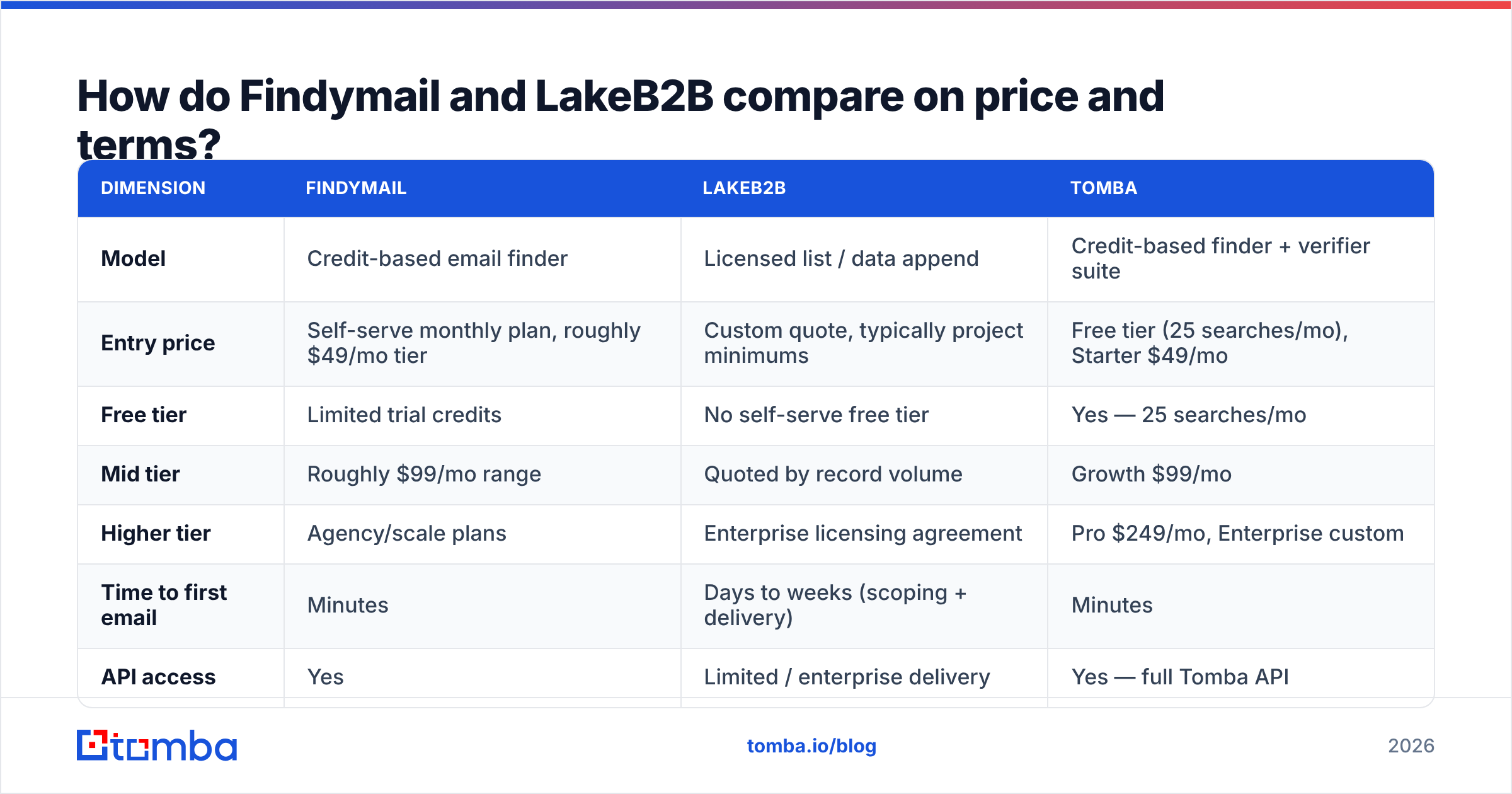
Pricing is where the two models stop being comparable in a spreadsheet and become a strategic choice. Findymail publishes self-serve tiers. LakeB2B quotes per project. The table below shows the shape of each offer at the time of writing, so confirm current numbers with the vendor.

| Dimension | Findymail | LakeB2B | Tomba |
|---|---|---|---|
| Model | Credit-based email finder | Licensed list / data append | Credit-based finder + verifier suite |
| Entry price | Self-serve monthly plan, roughly $49/mo tier | Custom quote, typically project minimums | Free tier (25 searches/mo), Starter $49/mo |
| Free tier | Limited trial credits | No self-serve free tier | Yes — 25 searches/mo |
| Mid tier | Roughly $99/mo range | Quoted by record volume | Growth $99/mo |
| Higher tier | Agency/scale plans | Enterprise licensing agreement | Pro $249/mo, Enterprise custom |
| Time to first email | Minutes | Days to weeks (scoping + delivery) | Minutes |
| API access | Yes | Limited / enterprise delivery | Yes — full Tomba API |
| Verification included | Yes, at find time | Vendor-side, pre-delivery | Yes, plus standalone catch-all checks |
| Best for | Agencies, SDR teams, LinkedIn-led prospecting | Healthcare, education, niche TAM builds | Teams that want finder + verifier + enrichment in one bill |
Two things fall out of that table.
First, the finder model is cheaper to be wrong with. If your ICP guess fails, you've spent a month of credits. If you licensed 40,000 records against that same guess, you've spent a quarter of your data budget on a segment that doesn't convert.
Second, the database model is cheaper to be right with — at scale. Once you've validated a niche and need every contact in it, per-record list pricing beats per-lookup credits. In most deals we've seen, that crossover sits somewhere north of 25,000 contacts in a single, stable segment.
Which one fits your GTM motion?#
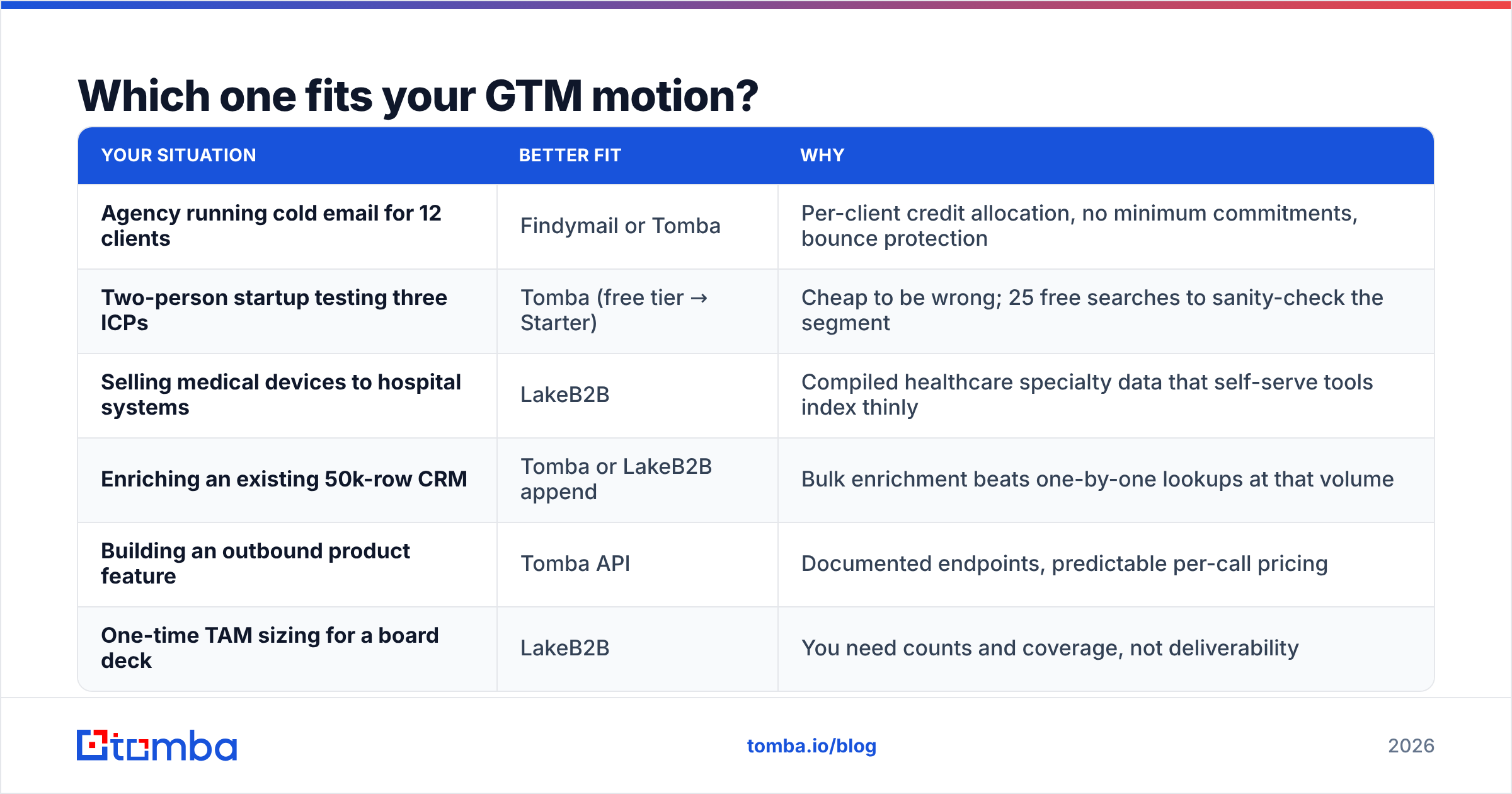
| Your situation | Better fit | Why |
|---|---|---|
| Agency running cold email for 12 clients | Findymail or Tomba | Per-client credit allocation, no minimum commitments, bounce protection |
| Two-person startup testing three ICPs | Tomba (free tier → Starter) | Cheap to be wrong; 25 free searches to sanity-check the segment |
| Selling medical devices to hospital systems | LakeB2B | Compiled healthcare specialty data that self-serve tools index thinly |
| Enriching an existing 50k-row CRM | Tomba or LakeB2B append | Bulk enrichment beats one-by-one lookups at that volume |
| Building an outbound product feature | Tomba API | Documented endpoints, predictable per-call pricing |
| One-time TAM sizing for a board deck | LakeB2B | You need counts and coverage, not deliverability |
Most teams don't need to pick a side here. The common pattern in 2026 is a licensed base file for market coverage, refreshed by a real-time finder for the accounts actually in play, with a verification pass before every send.
What do buyers actually complain about?#
Check G2 before you sign anything. But here's the pattern in the public reviews and in conversations with teams running both.
On Findymail: the complaints cluster around coverage outside tech and North America. It's strong on SaaS, agency, and startup contacts. It's thinner on EU mid-market industrials and non-English domains. Credits also don't roll over on some plans, which stings if your prospecting is seasonal.
On LakeB2B: the complaints cluster around list quality varying by segment, and around the sales-led buying process. Some verticals are excellent — healthcare in particular. Others feel compiled years ago and lightly refreshed. Buyers who negotiate a sample file and verify it themselves before signing report far better outcomes than buyers who trust the quoted accuracy figure.
Both complaints have the same fix: verify before you send, whatever the source. A bulk verify run costs a fraction of what a blacklisting costs. Not sure where your sender health stands? Run your domain through an email reputation check first, so you know how much bounce headroom you have.
Where does Tomba fit into this comparison?#
Honestly: Tomba competes with Findymail's model, not LakeB2B's. It's a real-time finder with a verification layer, not a licensed list vendor.
The differences that matter in a head-to-head against Findymail:
- A genuine free tier. 25 searches per month, no card. That's enough to test whether either tool can even find your ICP before you commit budget.
- Verification depth. Beyond a valid/invalid flag, Tomba ships a standalone catch-all verifier and a phone validator, which matters when your sequences are multi-channel.
- Surface area. Domain search, LinkedIn finder, data enrichment, Sheets and Excel add-ins, and an MCP server all sit on the same credit pool and the same pricing — Free, Starter $49/mo, Growth $99/mo, Pro $249/mo, Enterprise custom.
Against LakeB2B, the framing is different and less adversarial. If you need 60,000 verified nurse-practitioner contacts by specialty and state, a real-time finder is the wrong tool, and any vendor that says otherwise is selling. Buy the licensed file, then verify it. The two approaches complement each other more than they compete.
Findymail vs LakeB2B: so which should you choose in 2026?#
Choose Findymail if you run agency or SDR outbound on LinkedIn into tech and startup ICPs, you want bounce-protected credits, and you can live with thinner coverage outside that core.
Choose LakeB2B if your ICP sits in a vertical that self-serve tools cover poorly — healthcare, education, government-adjacent, industrial — and you need coverage and counts more than live deliverability. Negotiate a sample, verify it yourself, and price the verification into the deal.
Choose Tomba if you want the finder model with a wider tool set and a free tier to test on: find, verify, catch-all check, enrich, and push to your CRM without stacking three subscriptions. Start with 25 free searches on the Tomba Email Finder. Run the same 50 target contacts through whichever alternative you're weighing, then compare hit rate and bounce rate on real sends. That thirty-minute test tells you more than any comparison post — including this one.
Related guides#
Ready to find emails that actually work?
Join 150,000+ professionals who stopped guessing and started sending. Free credits on signup — no credit card required.
Get the Tomba newsletter
Practical outbound tactics and product updates — once every two weeks.
About the author