Findymail vs Logvalid: Which Email Data Tool Wins in 2026?
Findymail finds emails. Logvalid validates them. Most teams pick wrong because they compare the two as if they do the same job. Here is the honest breakdown of coverage, accuracy, pricing, and the stack that actually beats both.
TL;DR
- Findymail and Logvalid are not really competitors. Findymail is a finder (give it a name and a company, get an email). Logvalid is a validator (give it an email, get a verdict). Comparing them on "accuracy" without that distinction produces garbage conclusions.
- If your list is empty, Logvalid cannot help you. If your list is bought or scraped, Findymail is the wrong spend.
- Findymail's entry plan lands around $49/mo for roughly 1,000 finder credits; Logvalid runs on cheap per-verification credits. The combined bill for both is usually higher than a single platform that does finding and verification under one meter.
- Catch-all domains are where both tools get graded. Ask each vendor how it handles them before you commit budget — a "valid" verdict on a catch-all domain is often a guess.
- The practical 2026 answer for most outbound teams: one API that finds, verifies, and enriches, rather than gluing a finder to a standalone verifier and reconciling two credit systems.
What are Findymail and Logvalid, exactly?#
Findymail is a B2B email-finding tool built for outbound teams. You feed it a person and a company — usually from a LinkedIn export, a Clay table, or a CSV — and it returns a work email plus a verification status. Its pitch has always been bounce protection: it only bills you for emails it believes are deliverable, which makes the effective cost per usable contact easier to reason about than raw credit pricing.
Logvalid sits on the other side of the pipeline. It is an email validation service: syntax checks, MX record lookups, SMTP handshake probing, disposable-domain detection, role-account flagging, and catch-all classification. You upload a list you already have, and it tells you which addresses are safe to mail.
That difference matters more than any feature table. A verifier cannot invent an address that does not exist in your CRM. A finder cannot clean the 40,000 stale contacts your last SDR left behind. Teams that search "findymail vs logvalid" usually have one of two problems:
- "My list is empty." You need a finder. Logvalid is irrelevant to you today.
- "My bounce rate is 9% and Google is throttling me." You need a verifier — and probably a look at your email deliverability fundamentals before you blame the data.
The interesting question is not which tool wins. It is whether you should run two vendors at all.

How do Findymail and Logvalid compare head-to-head?#
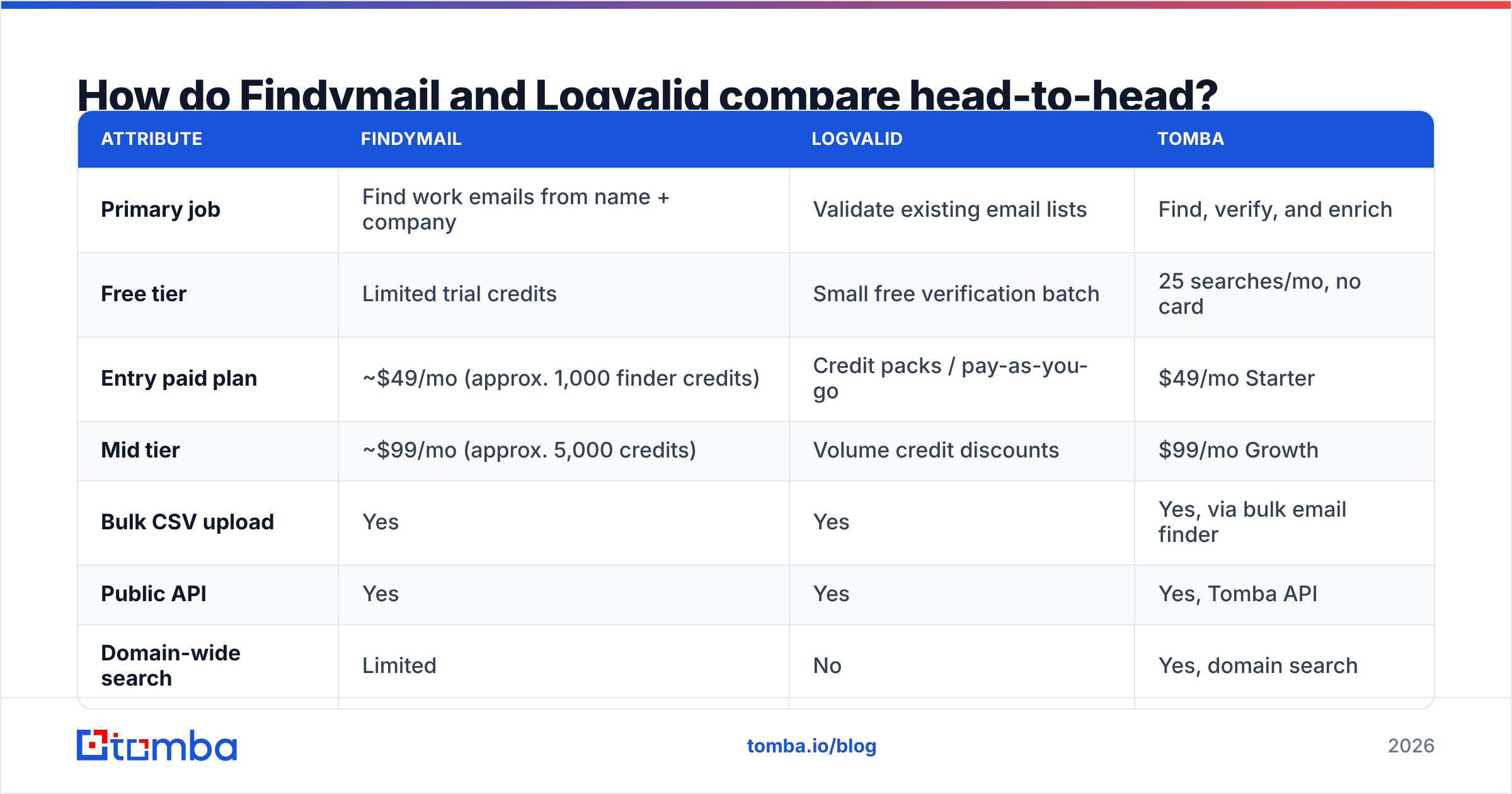
Here is the honest side-by-side. Pricing moves — check each vendor's page before you buy — but the structural differences are stable.
| Attribute | Findymail | Logvalid | Tomba |
|---|---|---|---|
| Primary job | Find work emails from name + company | Validate existing email lists | Find, verify, and enrich |
| Free tier | Limited trial credits | Small free verification batch | 25 searches/mo, no card |
| Entry paid plan | ~$49/mo (approx. 1,000 finder credits) | Credit packs / pay-as-you-go | $49/mo Starter |
| Mid tier | ~$99/mo (approx. 5,000 credits) | Volume credit discounts | $99/mo Growth |
| Bulk CSV upload | Yes | Yes | Yes, via bulk email finder |
| Public API | Yes | Yes | Yes, Tomba API |
| Domain-wide search | Limited | No | Yes, domain search |
| Catch-all handling | Flags, partial resolution | Flags as "accept-all" | Dedicated catch-all verifier |
| Phone numbers | No | No | Yes, phone finder |
| Only charges for valid results | Yes (core selling point) | N/A (charges per check) | Verified results included in search |
| Best fit | Clay/LinkedIn-driven prospecting | Cleaning purchased or aging lists | Teams wanting one meter for both jobs |
Two things jump out.
First, Findymail's "you only pay for verified emails" model is genuinely good pricing design. It aligns the vendor's incentive with yours, and it removes the most annoying part of credit-based tools: paying to learn that an address does not exist.
Second, Logvalid's per-check pricing is cheap in isolation and expensive in aggregate. Verification is a commodity. Paying a separate vendor for a commodity step that most finder platforms already include is how teams end up with three data invoices and no idea what a qualified contact actually costs them.
Which tool finds more valid emails?#
Wrong question — but there is a real one underneath it: what percentage of your target list ends up as a mailable, non-bouncing address?
That number, not "database size," is what you should benchmark. Run the same 200-row sample through every candidate and score four things:
- Hit rate — how many rows returned any email at all. Findymail typically performs well on tech, SaaS, and agency personas where the person has a public footprint. Coverage thins out for SMB, trades, non-English markets, and companies with no web presence.
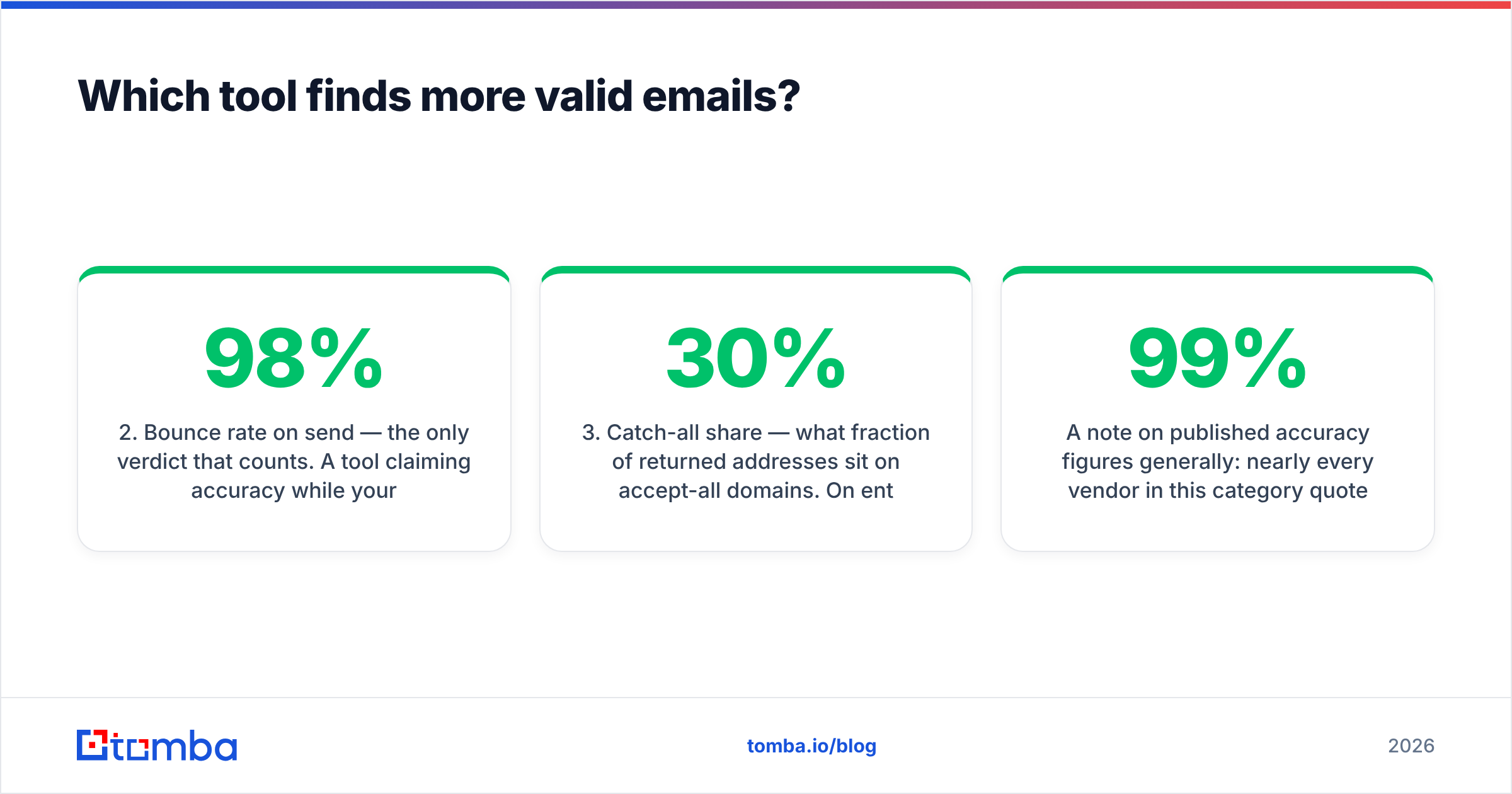
- Bounce rate on send — the only verdict that counts. A tool claiming 98% accuracy while your ESP reports 6% hard bounces is not accurate; it is optimistic.
- Catch-all share — what fraction of returned addresses sit on accept-all domains. On enterprise lists this can be 20-30% of your file, and it is where vendor accuracy claims quietly diverge.
- Cost per mailable contact — total spend divided by addresses that actually landed. This is the only metric your CFO cares about, and it reorders vendor rankings dramatically.

A note on published accuracy figures generally: nearly every vendor in this category quotes something in the 95-99% range, and nearly every buyer discovers the real-world number is lower on their specific ICP. That is not vendors lying — it is that accuracy is a function of your list composition. A finder tuned on Series-B SaaS contacts will look brilliant on a SaaS list and mediocre on a list of German manufacturing plants. Test on your own data or the comparison is theater.
If you want a neutral third-party read before you run your own test, G2's email-finder category is a reasonable starting point for coverage complaints and support quality — but it will not tell you your bounce rate.
How does the pricing actually work out?#
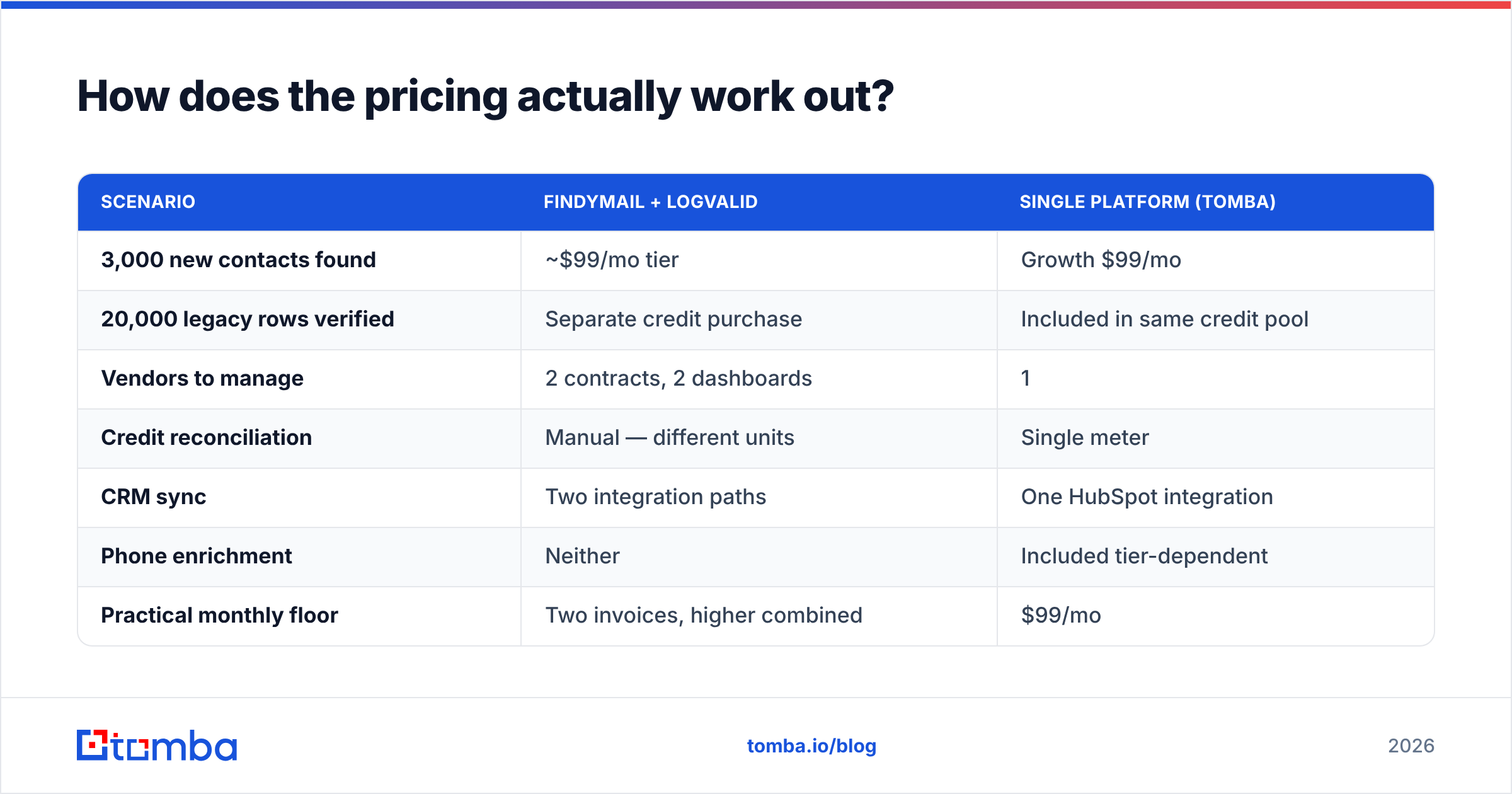
Let's model a realistic month: an SDR team building 3,000 new contacts and cleaning a 20,000-row legacy list inherited from a previous campaign.
| Scenario | Findymail + Logvalid | Single platform (Tomba) |
|---|---|---|
| 3,000 new contacts found | ~$99/mo tier | Growth $99/mo |
| 20,000 legacy rows verified | Separate credit purchase | Included in same credit pool |
| Vendors to manage | 2 contracts, 2 dashboards | 1 |
| Credit reconciliation | Manual — different units | Single meter |
| CRM sync | Two integration paths | One HubSpot integration |
| Phone enrichment | Neither | Included tier-dependent |
| Practical monthly floor | Two invoices, higher combined | $99/mo |
The single-platform math is not automatically better. If Findymail's hit rate on your exact ICP beats everything else by 15 points, paying two vendors is rational — data quality beats consolidation every time. But that has to be measured, not assumed. Most teams never measure it and end up paying the consolidation tax by default.
Full Tomba pricing for reference: Free at 25 searches/month, Starter $49/mo, Growth $99/mo, Pro $249/mo, Enterprise custom. No per-seat tax on the lower tiers, which matters if you have three SDRs and a RevOps person all pulling data.
What happens with catch-all domains?#
This is the section most comparison posts skip, and it is where money leaks.
A catch-all (or accept-all) domain accepts mail to any address at that domain, whether or not the mailbox exists. notarealperson@bigcorp.com gets a 250 OK from the server. That means SMTP verification — the technique every validator relies on — returns nothing useful.
Vendors handle this three ways:
- Flag and refuse. The honest option. You get "catch-all, unknown" and decide yourself. Most standalone validators, Logvalid included, land here.
- Flag and guess. You get "valid" with a confidence score derived from pattern matching and historical send data. Sometimes right, occasionally expensive.
- Resolve with secondary signals. Cross-reference the address against observed sends, pattern confidence for that domain, and third-party sightings. This is what a dedicated catch-all finder is for, and it is the only approach that meaningfully improves on a coin flip.
Practical rule for 2026: keep catch-all addresses in a separate sending segment. Warm them slowly, monitor bounce rate independently, and never mix them into a cold campaign on a domain you care about. Your sender reputation does not distinguish between "we guessed wrong" and "we spam."
Where does each tool fit in a real outbound stack?#
Rather than a winner, here is the placement logic:
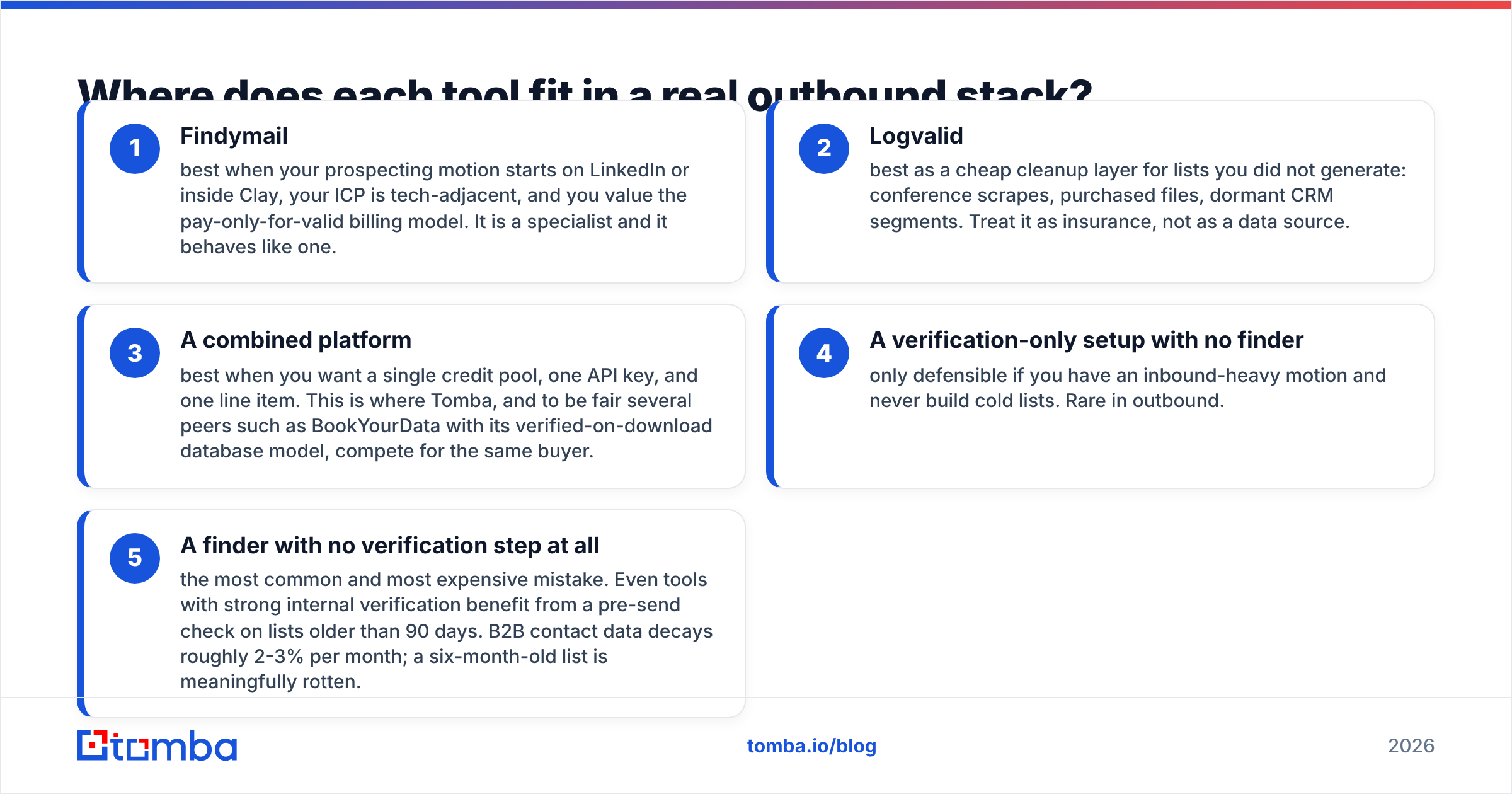
- Findymail — best when your prospecting motion starts on LinkedIn or inside Clay, your ICP is tech-adjacent, and you value the pay-only-for-valid billing model. It is a specialist and it behaves like one.
- Logvalid — best as a cheap cleanup layer for lists you did not generate: conference scrapes, purchased files, dormant CRM segments. Treat it as insurance, not as a data source.
- A combined platform — best when you want a single credit pool, one API key, and one line item. This is where Tomba, and to be fair several peers such as BookYourData with its verified-on-download database model, compete for the same buyer.
- A verification-only setup with no finder — only defensible if you have an inbound-heavy motion and never build cold lists. Rare in outbound.
- A finder with no verification step at all — the most common and most expensive mistake. Even tools with strong internal verification benefit from a pre-send check on lists older than 90 days. B2B contact data decays roughly 2-3% per month; a six-month-old list is meaningfully rotten.
Is there a third option worth testing?#
Yes, and it would be dishonest to write a findymail vs logvalid comparison without saying so, because the whole premise of running two vendors is what a third option removes.
Tomba's core product is the email finder — name plus domain in, verified work email out — with the email verifier, catch-all verification, phone lookup, and enrichment sharing the same credit pool and the same API. That structure is the point: you stop reconciling a finder invoice against a validator invoice, and you stop writing glue code between two schemas.

Where it fits well:
- RevOps teams that want one API endpoint in their enrichment pipeline instead of a fan-out to two vendors.
- Agencies running multiple client domains who need domain search plus verification without buying two subscriptions per client.
- Anyone starting from a company list, not a person list. If you have 500 target accounts and no names, a finder that only takes name + company is the wrong shape. Domain search solves that; Findymail's workflow generally assumes you already have the person.
Where it fits badly:
- If your entire motion lives in Clay and Findymail's waterfall position already performs, ripping it out to save $40/mo is not a good use of a quarter.
- If you need only verification and nothing else, a dedicated validator at commodity pricing is genuinely cheaper.
How should you run the test?#
Do not pick from a table — including this one. Run a 200-row bake-off:
- Pull 200 rows from your actual ICP, not a demo list. Include your hard segments deliberately.
- Run the same 200 through each candidate's free tier or trial. Tomba's free tier gives you 25 searches with no card, which is enough for a smoke test; extend to 200 on a one-month Starter if the smoke test passes.
- Send a real, low-volume campaign from a throwaway subdomain. Measure hard bounces, not vendor-reported validity.
- Segment catch-alls separately and score them on their own.
- Divide total spend by contacts that received the email. That is your true cost per contact.
- Repeat quarterly. Data vendors' coverage shifts as sources change; the winner in Q1 is not automatically the winner in Q4.
Two weeks of this beats two months of reading comparison posts, this one included. And if you want the process automated, both the Tomba API and a Google Sheets add-on will run the sample without engineering time.
Which one should you pick?#
- Empty list, tech ICP, Clay-native workflow: Findymail is a strong specialist and its billing model is buyer-friendly.
- Full list, high bounce rate, nothing to find: Logvalid does the job at commodity pricing. Do not overbuy.
- Both problems at once — which is most teams: consolidating beats stitching. One meter, one API, one invoice, and no arguments about which vendor caused the bounce.
Start with the free tier of Tomba Email Finder — 25 searches, no card — and run your 200-row bake-off against whatever you use today. If Tomba loses on your ICP, you have learned something concrete for free. If it wins, you have collapsed two line items into one at $49/mo and gained catch-all verification, phone lookup, and enrichment you were not paying for before.
Related guides#
Ready to find emails that actually work?
Join 150,000+ professionals who stopped guessing and started sending. Free credits on signup — no credit card required.
Get the Tomba newsletter
Practical outbound tactics and product updates — once every two weeks.
About the author