Findymail vs Mailcleanup: Which Email Tool Wins in 2026?
Findymail finds emails. Mailcleanup cleans lists. They solve different halves of the same problem — here's how they compare on accuracy, pricing, and what a sane 2026 outbound stack actually needs.
Findymail vs Mailcleanup is a comparison of two different jobs. Findymail finds new work emails. Mailcleanup cleans the lists you already own. Here is how the two tools compare on accuracy, pricing, and fit.
TL;DR
- Findymail is a finder-first tool. Give it a name and a company, or a LinkedIn list, and it returns a work email. Verification is bundled, not the headline.
- Mailcleanup is a verifier-first tool. Give it a list you already have. It tells you which addresses will bounce. It does not source new contacts.
- A head-to-head test is slightly unfair. The two tools sit at opposite ends of the same pipeline. The real question is which half of the problem you have right now.
- Need both halves? Two vendors means two dashboards and two credit balances. One combined platform (Tomba, Hunter, Dropcontact) usually costs less than the stacked total.
- Prices below are public list prices at the time of writing. Credit systems change often. Check the vendor's own pricing page before you buy an annual plan.
What is Findymail?#
Findymail is a B2B email finder built for outbound teams. Most of its users work out of LinkedIn and Sales Navigator. You feed it a person plus a company domain, or you point it at a saved LinkedIn search. It returns a verified business email. Its calling card is the bounce guarantee. The vendor only charges for emails it believes will deliver, and it credits you back when one bounces.
The usual workflow looks like this. Build a list in Sales Navigator. Export it through the Findymail extension. Get a CSV back with emails attached. Push that file into your email sequencer. The tool is built around that loop, and it runs it cleanly. You can check the current feature set on findymail.com.
What Findymail is not: a database you browse. There is no filter panel for "every VP of Engineering at 200-500 person SaaS firms in Berlin." You bring the list. Findymail fills in the contact data.
What is Mailcleanup?#
Mailcleanup is an email verification and list-hygiene service. You upload a list — a CRM export, a webinar signup file, a purchased database, an old newsletter file. It runs each address through a chain of checks: syntax, domain and MX record, disposable domains, role accounts (info@, sales@, support@), and an SMTP handshake where the server allows one. You get back a sorted file: valid, invalid, risky, unknown, catch-all.
That is the whole job. Mailcleanup does not find new addresses. It does not add job titles or phone numbers. It does not plug into LinkedIn. Think of a car wash, not a car dealership.
Why do bounces matter so much? Every hard bounce tells mailbox providers that you are mailing addresses you should not have. Wikipedia's overview of bounce messages is a decent primer. It is also the reason list hygiene became a category at all.

Findymail vs Mailcleanup: finding is not verifying#
Most "X vs Y" posts skip this part. It is the part that decides which tool you buy. Finding and verifying are steps in a row, not rivals.
- Finding turns a person plus a company into a candidate address. The tool picks the most likely pattern (first.last@, f.last@, firstinitiallast@). Output: a string that might be real.
- Verifying turns that candidate into a confidence score. The tool asks the mail server whether the mailbox exists. Nothing is sent. Output: a verdict on that string.
- Enriching adds the rest — title, seniority, LinkedIn URL, company size, tech stack, phone. Output: context for your copy and routing.
- Cleaning is verification run later, in bulk, on a list you already own. Teams usually start when deliverability slips.
- Monitoring is re-verification on a schedule. B2B contact data decays by roughly 2-3% per month as people change jobs.
Findymail lives at steps 1-2. Mailcleanup lives at steps 2 and 4. Verification is the overlap. That is why teams pay for it twice without noticing.
Findymail vs Mailcleanup: feature by feature#
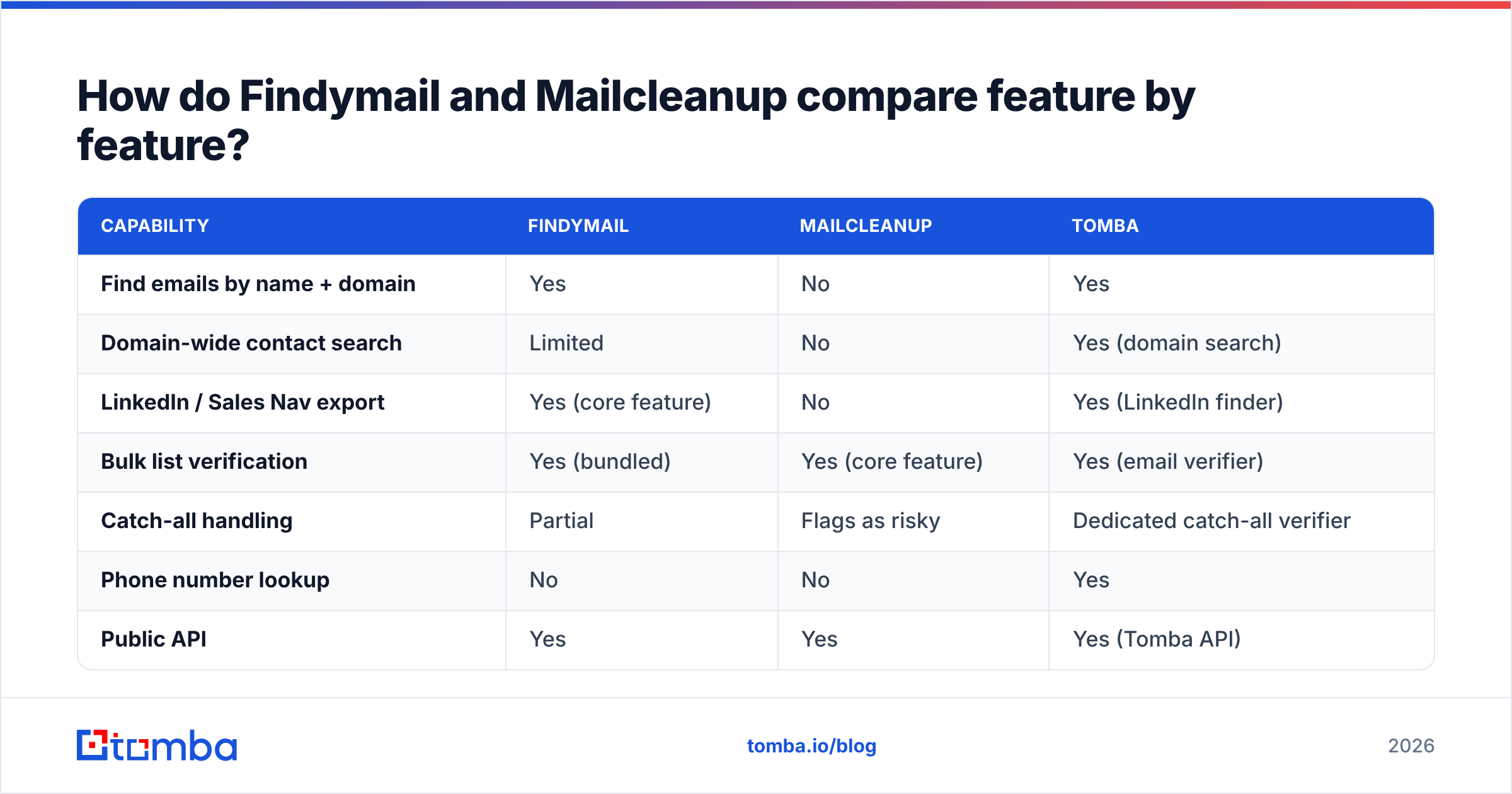
| Capability | Findymail | Mailcleanup | Tomba |
|---|---|---|---|
| Find emails by name + domain | Yes | No | Yes |
| Domain-wide contact search | Limited | No | Yes (domain search) |
| LinkedIn / Sales Nav export | Yes (core feature) | No | Yes (LinkedIn finder) |
| Bulk list verification | Yes (bundled) | Yes (core feature) | Yes (email verifier) |
| Catch-all handling | Partial | Flags as risky | Dedicated catch-all verifier |
| Phone number lookup | No | No | Yes |
| Public API | Yes | Yes | Yes (Tomba API) |
| Free tier | Trial credits | Trial credits | 25 searches/mo, no card |
| Bounce guarantee / credit-back | Yes | Refund on inaccuracy claims | Credits not charged for unverifiable results |
| Native CRM integrations | Limited set | Limited set | HubSpot, Salesforce, Pipedrive, Zapier |
Read the table as a shape, not a scoreboard. Findymail is deep on the left side. Mailcleanup is deep in the middle. A combined platform spreads across both, and it gives up some depth in each.

Which one is more accurate?#
"Accuracy" means two different things here. Mixing them up is how people end up disappointed.
For Findymail, accuracy means hit rate plus bounce rate. Hit rate is the share of your input list that comes back with an email. Bounce rate is the share of those emails that fail to land. Either number can be gamed on its own. Return fewer results and your bounce rate looks great. Return every guessed pattern and your hit rate looks great. The bounce guarantee pushes Findymail to the careful end. It would rather return nothing than a maybe. Users report strong deliverability on what it does return. Hit rates still swing a lot by segment: high in US tech, lower in EU SMB and non-English domains.
For Mailcleanup, accuracy means how often its verdict matches reality. There are two failure modes. A false invalid marks a real mailbox as bad, so you delete a good lead. A false valid marks a dead mailbox as good, so you bounce. False invalids cost the most. Nobody measures them, because you never find out.
Both vendors share one honest caveat. Catch-all domains break SMTP verification. A catch-all server accepts mail for every address at the domain, real or not. So the handshake always says yes. Roughly 15% to 25% of B2B domains work this way, and the share is higher in enterprise. Any verifier that returns a clean "valid" on a catch-all domain is guessing. The right move is to flag it and use a separate confidence method. That is why catch-all verification exists as its own product.
Benchmark either tool on your own list, not on the vendor's demo file:
- Take 300 contacts from a segment you actually sell into.
- Run them through the tool.
- Send a real sequence at low volume from a warmed inbox.
- Count hard bounces at 72 hours, not soft bounces at hour one.
- Compare cost per delivered email, not cost per credit.

How does pricing compare?#
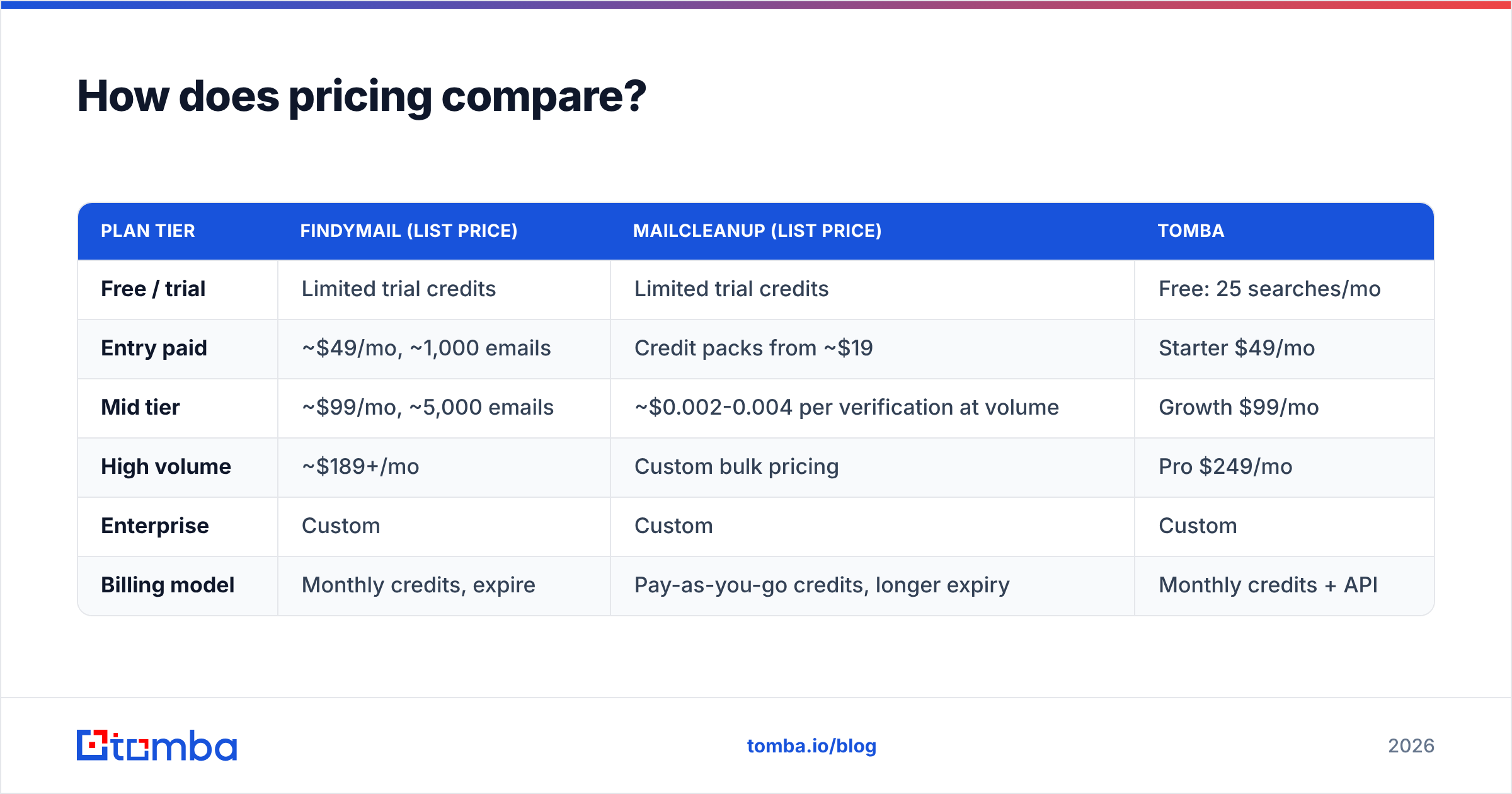
| Plan tier | Findymail (list price) | Mailcleanup (list price) | Tomba |
|---|---|---|---|
| Free / trial | Limited trial credits | Limited trial credits | Free: 25 searches/mo |
| Entry paid | ~$49/mo, ~1,000 emails | Credit packs from ~$19 | Starter $49/mo |
| Mid tier | ~$99/mo, ~5,000 emails | ~$0.002-0.004 per verification at volume | Growth $99/mo |
| High volume | ~$189+/mo | Custom bulk pricing | Pro $249/mo |
| Enterprise | Custom | Custom | Custom |
| Billing model | Monthly credits, expire | Pay-as-you-go credits, longer expiry | Monthly credits + API |
Check every number on the vendor's live pricing page before you buy. Credit ratios and tier names change several times a year in this category. You can see current Tomba pricing directly.
The structure matters more than the exact figures. Verification is cheap. Finding is expensive. A verification costs a fraction of a cent. It is a DNS lookup plus a socket connection. Finding costs real money. It needs crawled data, pattern models, and constant re-checking of a contact graph. That is why a pure verifier like Mailcleanup can price at pay-as-you-go rates that look tiny next to a finder's per-credit cost. They are not selling the same unit of work.
That leads to the stacking problem. Buy Findymail at $49/mo for finding, then add a verifier for list hygiene. You are at $70-80/mo minimum. You also get two credit balances with different expiry dates, two API keys, and two vendors to chase when a number looks wrong. Many teams later find that their finder had already verified the address they paid to verify again.

Which should you choose in 2026?#
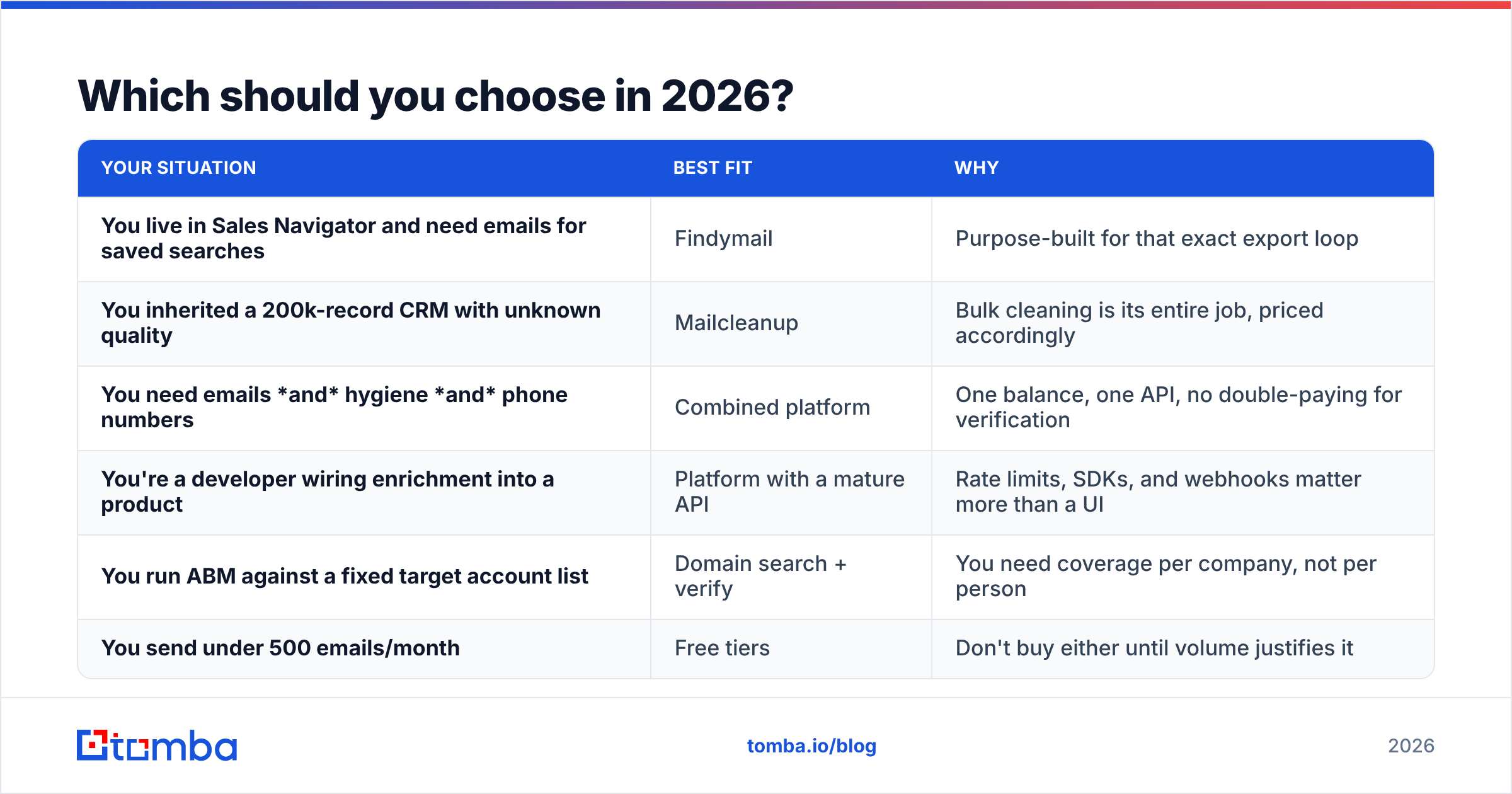
| Your situation | Best fit | Why |
|---|---|---|
| You live in Sales Navigator and need emails for saved searches | Findymail | Purpose-built for that exact export loop |
| You inherited a 200k-record CRM with unknown quality | Mailcleanup | Bulk cleaning is its entire job, priced accordingly |
| You need emails and hygiene and phone numbers | Combined platform | One balance, one API, no double-paying for verification |
| You're a developer wiring enrichment into a product | Platform with a mature API | Rate limits, SDKs, and webhooks matter more than a UI |
| You run ABM against a fixed target account list | Domain search + verify | You need coverage per company, not per person |
| You send under 500 emails/month | Free tiers | Don't buy either until volume justifies it |
A few decision rules that hold up in practice:
- Bounce rate above 3%? Buy verification first. New contacts cannot fix a damaged sending domain. Fix hygiene, then scale volume. Not sure where you stand? Run your domain through a sender reputation checker first.
- Hit rate is the bottleneck? Buy finding first. If you only get emails for 40% of your target accounts, a verifier just polishes a short list.
- Doing both at real volume? Consolidate. Running two vendors costs more time than the small quality gain is worth, unless you spend six figures a year.
Where does Tomba fit in the Findymail vs Mailcleanup comparison?#
Tomba sits in the "one platform, both halves" spot. The honest framing is not "better than both." It is "fewer moving parts."
The email finder handles step 1: name plus domain in, verified address out. The email verifier handles steps 2 and 4, including bulk list cleaning, with a real catch-all path instead of a shrug. Domain search covers the ABM case Findymail does not. Give it a company domain and get every contact found there, with roles and confidence scores. A phone finder, data enrichment, and bulk processing finish the pipeline.
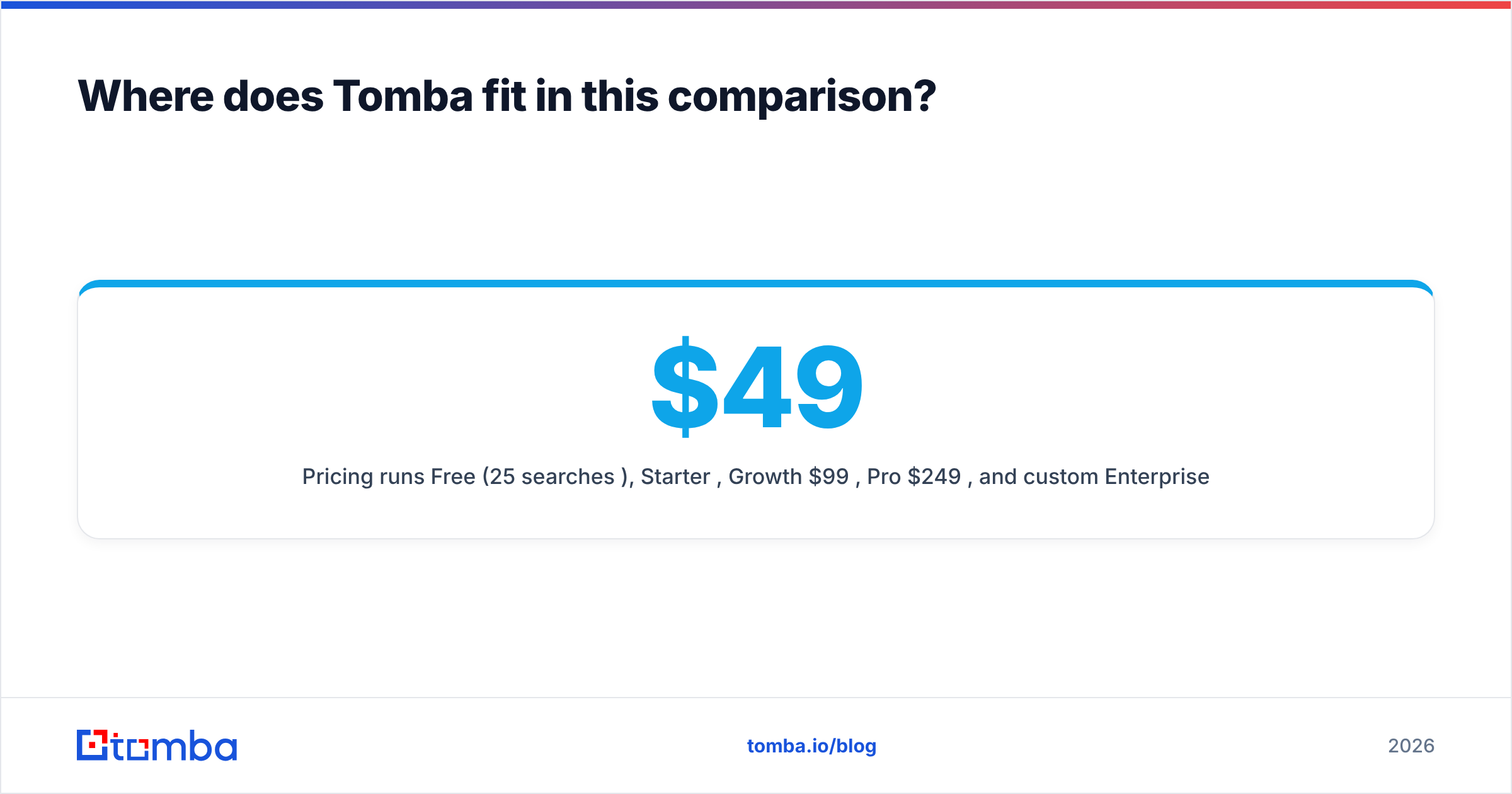
Pricing runs Free (25 searches/mo), Starter $49/mo, Growth $99/mo, Pro $249/mo, and custom Enterprise. The entry point is about the same as Findymail's, with verification included rather than bolted on. For engineering teams, the Tomba API exposes every function. There is also a CLI and an MCP server for agents and internal tools.
Where Tomba is not the answer: if your whole workflow is scraping Sales Navigator lists, a specialist may fit your habits better. If you only clean lists and never source new ones, a pay-as-you-go verifier will be cheaper per unit. Consolidation is a real advantage, but it is not a universal one. Both Findymail and Mailcleanup are good at the job they were built for.
What does a sane 2026 outbound data stack look like?#
- Source — build the target list from your ICP, not from whatever exports easily.
- Find — attach emails, and keep the confidence score next to each one. Do not throw the score away.
- Verify — validate before the first send. Treat catch-all domains as their own bucket, with a slower and safer sending cadence.
- Enrich — add the two or three fields you will actually use in copy. Skip the rest. Unused fields are just cost.
- Re-verify quarterly — data decays. Re-check anything older than 90 days before you mail it again.
- Measure delivered cost, not credit cost — the only number that matters is what you paid per email that landed in an inbox.
Steps 2 and 3 are where the Findymail vs Mailcleanup question really lives. The rest is process, and no vendor sells you that.
The bottom line#
Findymail and Mailcleanup are not really rivals. They are neighbors. Findymail wins if your problem is "I have accounts but no contacts." Mailcleanup wins if your problem is "I have contacts but my bounce rate is embarrassing." Buy the one that matches the problem you have this quarter, not the one with the nicer landing page.
Is your answer "both, honestly"? Then the two-vendor stack is a tax with no structural reason behind it. Start with the Tomba Email Finder free tier — 25 searches a month, no card. Run your own 300-contact benchmark against whatever you use now. Finding and verification come from the same credit balance, so the result reflects your true cost per delivered email.
Related guides#
Ready to find emails that actually work?
Join 150,000+ professionals who stopped guessing and started sending. Free credits on signup — no credit card required.
Get the Tomba newsletter
Practical outbound tactics and product updates — once every two weeks.
About the author