Findymail vs Mailfloss: Which One Do You Actually Need?
Findymail finds new B2B emails. Mailfloss cleans the ones already in your ESP. Here's an honest breakdown of pricing, accuracy, workflow fit, and when you genuinely need both.
TL;DR
- Findymail and Mailfloss are not competitors. Findymail finds B2B email addresses that don't exist in your CRM yet. Mailfloss cleans the addresses already sitting in your email platform.
- Pick Findymail if your bottleneck is sourcing net-new outbound contacts from LinkedIn, Sales Navigator, or company domains.
- Pick Mailfloss if your bottleneck is hygiene — bounce rates creeping up on a Mailchimp, Klaviyo, or HubSpot list you already own.
- Running both means two subscriptions, two credit systems, and two places where data can drift out of sync.
- If you want find + verify + enrich under one API and one billing line, a consolidated platform like Tomba covers both jobs starting at $49/mo, with a free tier to test first.
What do Findymail and Mailfloss actually do?#
They sit on opposite ends of the same pipeline.
Findymail is a prospecting tool. You give it a name and a company domain, a LinkedIn profile, a Sales Navigator search, or an uploaded CSV, and it returns work email addresses. Its pitch has always been accuracy-first: fewer results, but the ones it returns are more likely to land. It sells credits, and a credit is consumed when an email is found.
Mailfloss is a hygiene tool. You connect it to your email service provider — Mailchimp, Klaviyo, ActiveCampaign, HubSpot, ConvertKit, Brevo, and a long list of others — and it verifies your existing subscribers on a schedule, then automatically unsubscribes, deletes, or tags the bad ones. It also does typo fixing (gmial.com → gmail.com) and can run continuously on new signups.
So the honest framing for findymail vs mailfloss is not "which is better." It's "which problem do you have right now?" If you're staring at an empty prospect list, Mailfloss cannot help you. If you're staring at a 40,000-contact newsletter with a 9% bounce rate, Findymail cannot help you either.
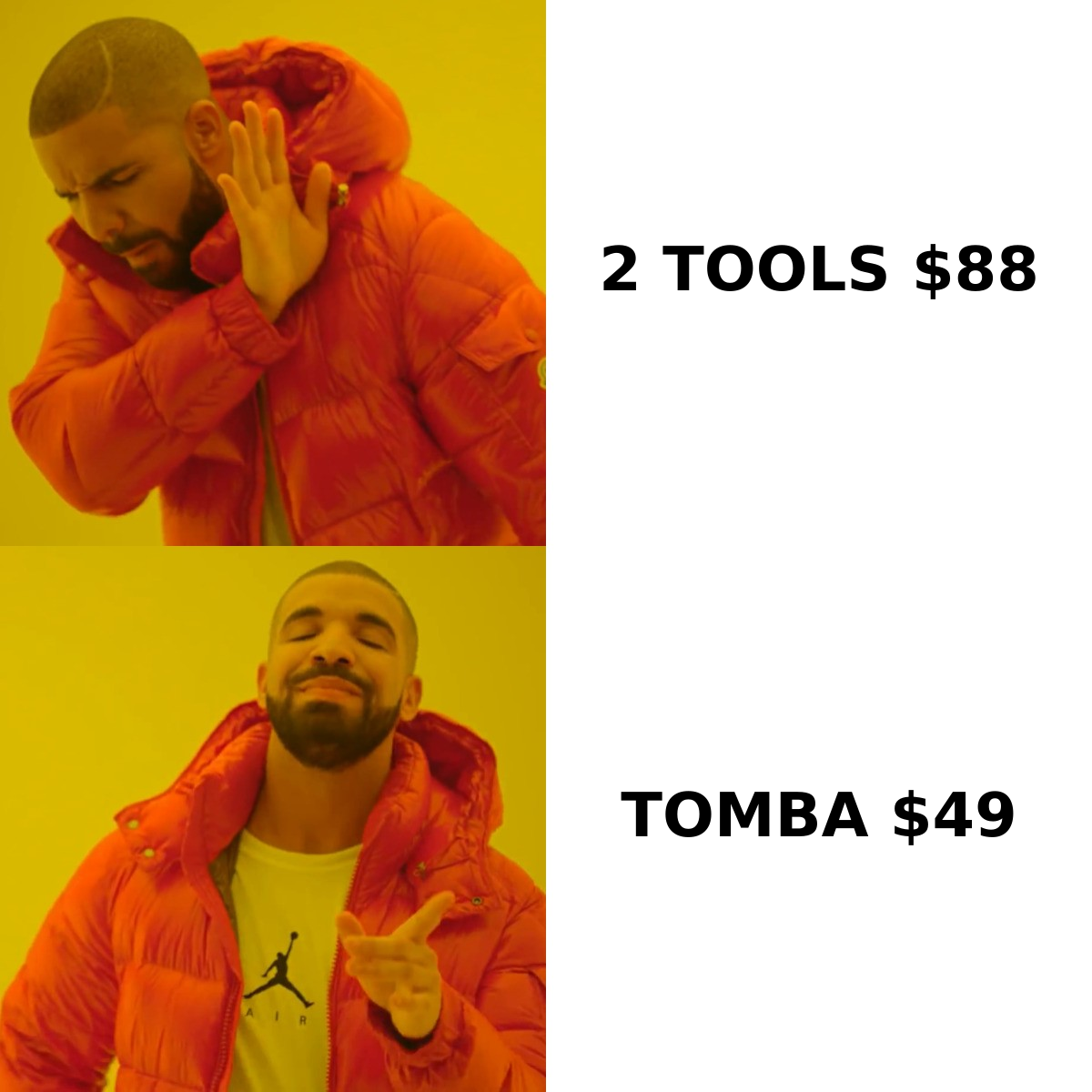
How do Findymail and Mailfloss compare head-to-head?#
| Dimension | Findymail | Mailfloss | Tomba |
|---|---|---|---|
| Primary job | Find net-new B2B emails | Clean existing ESP lists | Find, verify, and enrich |
| Core input | Name + domain, LinkedIn URL, CSV | Your connected mailing list | Domain, name, LinkedIn, CSV, API |
| Verification included | Yes, on found emails | Yes, that's the product | Yes, standalone verifier |
| Auto-clean on a schedule | No | Yes, daily/weekly/monthly | Via API + bulk jobs |
| Typo correction | No | Yes | No (verifier flags invalid) |
| LinkedIn / Sales Navigator export | Yes | No | Yes, LinkedIn finder |
| Native ESP sync | Limited | 30+ ESP integrations | CRM + automation integrations |
| Phone numbers | Limited | No | Yes, phone finder |
| Public API | Yes | Yes | Yes, full REST API |
| Free tier | Trial credits | Trial | 25 searches/mo, free forever |
| Best for | Outbound SDRs, agencies | Newsletter and lifecycle marketers | Teams that need both |
The table makes the split obvious. There is almost no feature overlap except the word "verification," and even there the two tools verify at different moments: Findymail verifies at discovery, Mailfloss verifies on a recurring schedule against a list you already own.
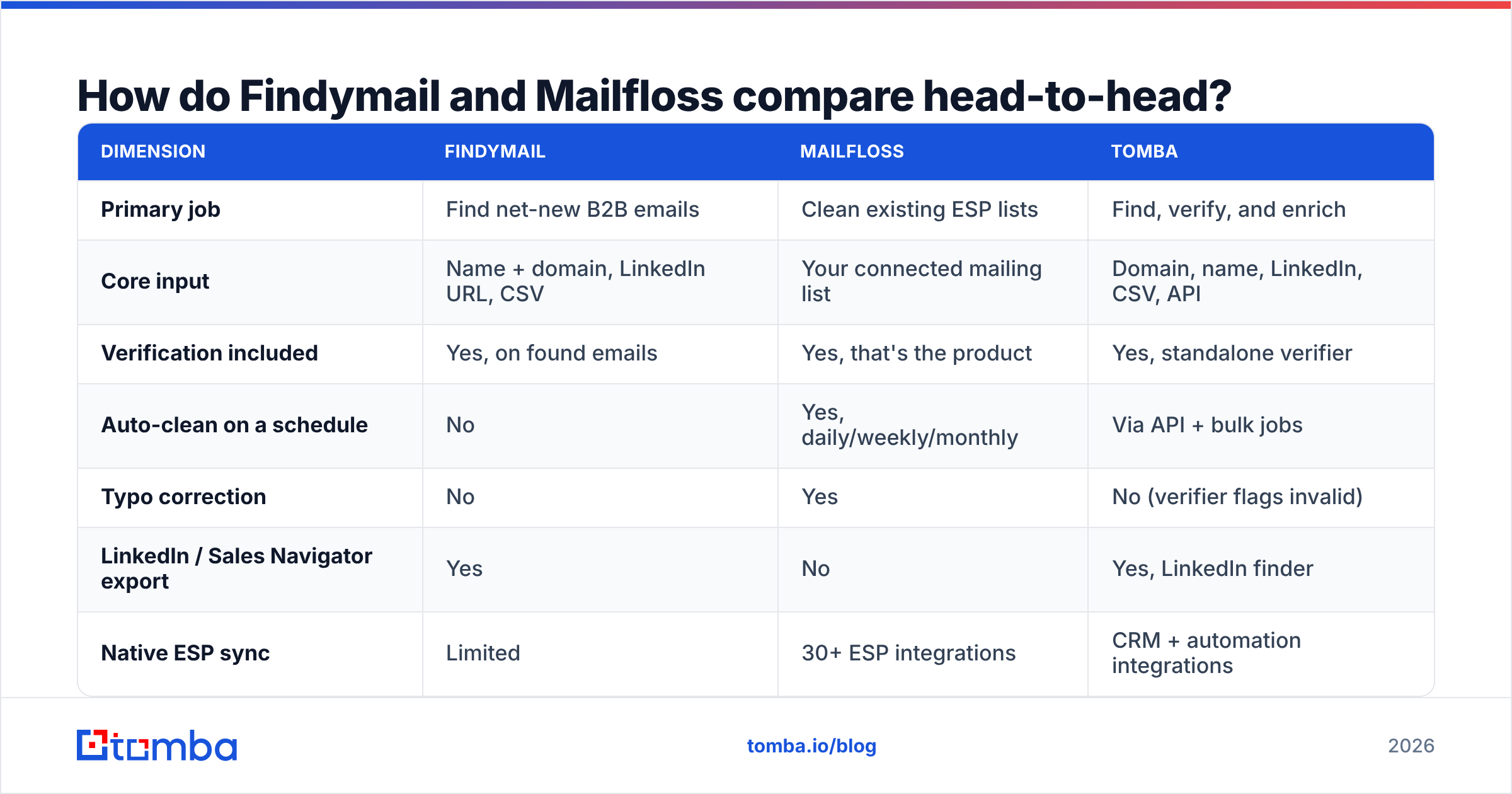
Is Findymail accurate enough for cold outbound?#
Findymail built its reputation on a specific promise: it would rather return nothing than return a guess. That's a real differentiator in a market where several finders will happily hand you a permutation like first.last@domain.com with no evidence behind it.
What that means in practice:
- Lower hit rate, higher trust. On a list of 1,000 mid-market prospects you may see a lower find rate than a volume-first tool, but a smaller share of what comes back will bounce.
- Credits only burn on results. You are not paying for a "maybe." That changes the real cost per usable contact, which is the only number that matters.
- Sales Navigator export is the killer workflow. If your team lives in Sales Navigator, exporting a search straight into enriched emails removes a whole manual step.
- Catch-all domains stay ambiguous. Like every finder, Findymail cannot fully resolve catch-all servers that accept everything. You need a dedicated catch-all verifier or a pattern-based confidence score to handle those.
- Coverage skews to SaaS and tech. Well-indexed industries return more. Trades, local services, and non-English markets get thinner — true of the entire category, not a Findymail-specific flaw.
If your outbound motion is high-intent and low-volume — 200 well-chosen accounts a month rather than 20,000 scraped ones — that accuracy-first tradeoff is the right one.
Is Mailfloss worth it if you already verify manually?#
Mailfloss's value isn't verification itself. Bulk verification is close to a commodity — dozens of vendors do it and price it per thousand. Mailfloss's value is that you never have to remember to do it.
The mechanics: connect your ESP once, choose a cadence, choose what happens to invalid addresses (unsubscribe, delete, tag, or move to a segment), and it runs forever. Add typo fixing on top and you recover a slice of signups that would otherwise be dead on arrival — misspelled domains at signup are a surprisingly large share of hard bounces on consumer-heavy lists.
That's a genuinely different product from "upload a CSV, download a CSV." The manual loop looks like this: export list → upload to verifier → wait → download → re-import → suppress. Six steps, done quarterly at best, usually done never. Mailfloss collapses it to zero steps after setup.
Where it's less compelling:
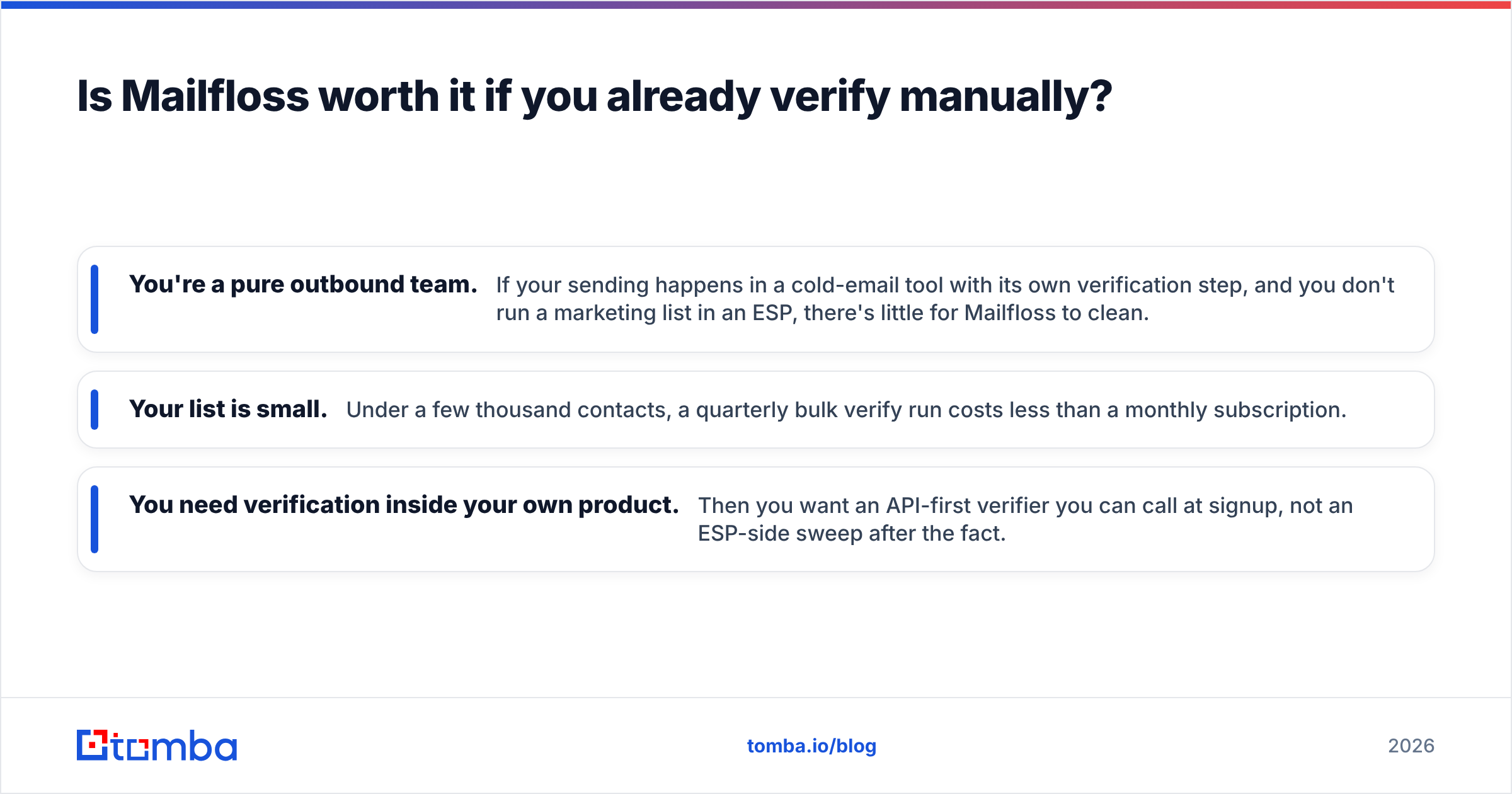
- You're a pure outbound team. If your sending happens in a cold-email tool with its own verification step, and you don't run a marketing list in an ESP, there's little for Mailfloss to clean.
- Your list is small. Under a few thousand contacts, a quarterly bulk verify run costs less than a monthly subscription.
- You need verification inside your own product. Then you want an API-first verifier you can call at signup, not an ESP-side sweep after the fact.
For a definitive read on real user sentiment, both vendors have profiles on G2 worth scanning for recent reviews — support responsiveness and credit-rollover policies are the two complaints that move most often.
How much do Findymail and Mailfloss cost?#
Pricing on both moves, so treat these as directional and confirm on the vendor pages before you buy. The shape of the pricing matters more than the exact number.
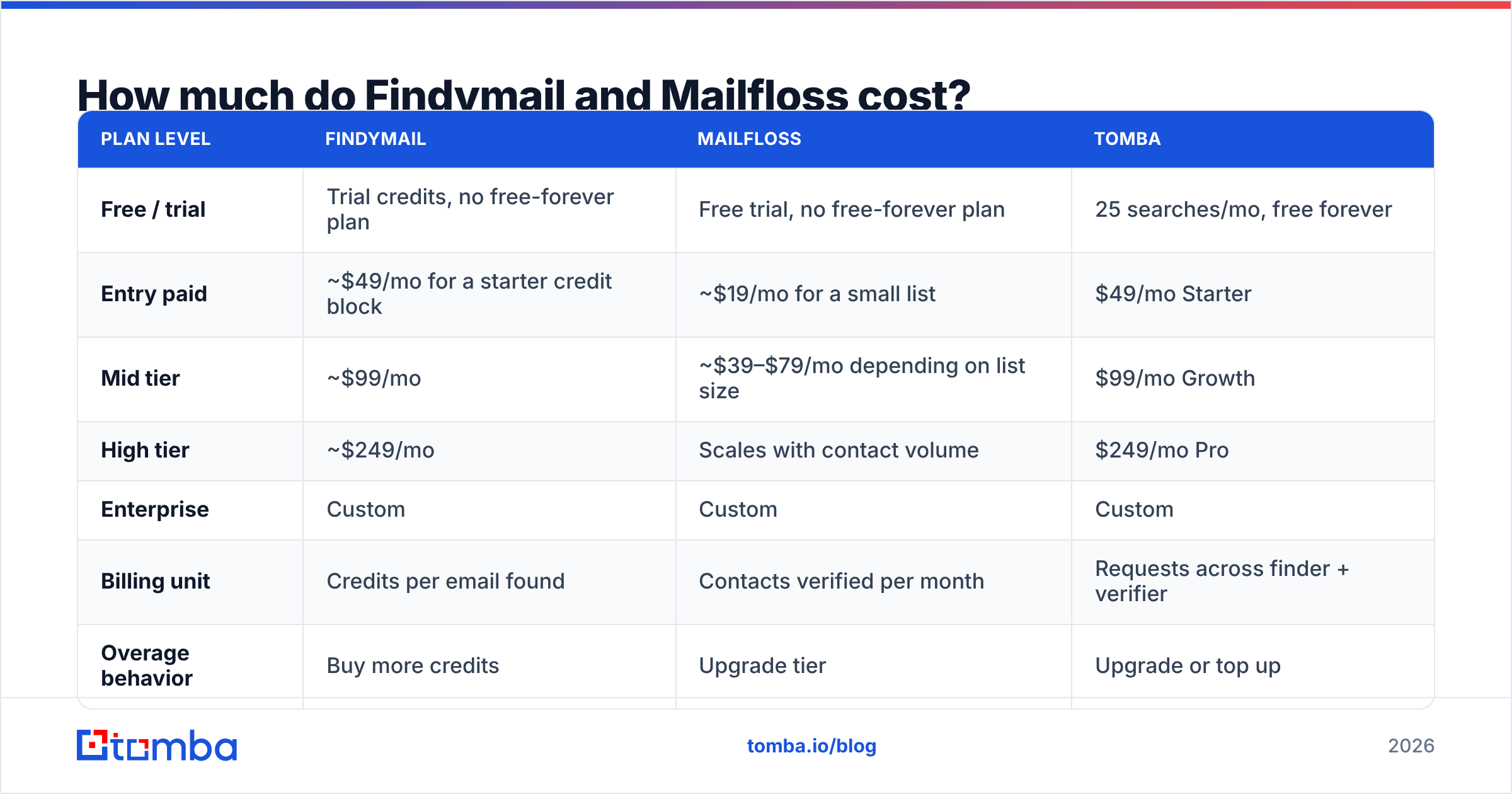
| Plan level | Findymail | Mailfloss | Tomba |
|---|---|---|---|
| Free / trial | Trial credits, no free-forever plan | Free trial, no free-forever plan | 25 searches/mo, free forever |
| Entry paid | ~$49/mo for a starter credit block | ~$19/mo for a small list | $49/mo Starter |
| Mid tier | ~$99/mo | ~$39–$79/mo depending on list size | $99/mo Growth |
| High tier | ~$249/mo | Scales with contact volume | $249/mo Pro |
| Enterprise | Custom | Custom | Custom |
| Billing unit | Credits per email found | Contacts verified per month | Requests across finder + verifier |
| Overage behavior | Buy more credits | Upgrade tier | Upgrade or top up |
Two things to notice.
First, the billing units aren't comparable. Findymail charges per result; Mailfloss charges per contact under management. A 50,000-contact newsletter costs a lot on Mailfloss and nothing on Findymail, because Findymail was never going to touch it. A 2,000-prospect outbound push costs real money on Findymail and nothing on Mailfloss.
Second, if you genuinely need both jobs done, you're looking at roughly $88+/mo combined at entry level, two dashboards, and two support queues. That's the moment to ask whether one platform covers both. Tomba's pricing puts the email finder and the email verifier on the same plan and the same API key, which removes the reconciliation problem entirely.

Do you actually need both tools — or one that does both?#
Run through this honestly. Most teams over-buy here.
- You only prospect, never broadcast. SDR team, cold email sequences, no marketing list. You need a finder with built-in verification. Mailfloss adds nothing. One tool.
- You only broadcast, never prospect. Ecommerce or content business with a big opt-in list and no outbound. You need hygiene automation. Findymail adds nothing. One tool.
- You do both, at small scale. Under ~5,000 contacts and under ~1,000 finds a month. One consolidated platform beats two point tools on cost and on operational overhead.
- You do both, at large scale, with distinct owners. Sales owns prospecting, marketing owns the list, different budgets, different compliance rules. Two specialized tools is defensible here — the integration cost is worth the depth.
- You're building this into a product. You need one API, one auth model, one rate limit, one invoice. Two vendors doubles your failure surface. Go with a single email finder API that also exposes verification endpoints.
The trap is the third scenario. Plenty of small teams pay for a finder and a hygiene tool because each was bought by a different person in a different quarter, and nobody ever audited the overlap.
What are the real switching costs?#
Whichever direction you move, budget for these:
Data format drift. Findymail exports have their own column names and confidence fields. Mailfloss writes status back into your ESP as tags or list membership. Moving between systems means someone maps fields by hand at least once.
Suppression list continuity. This is the one people forget. Your do-not-contact list, your prior hard bounces, your unsubscribes — those must survive the migration or you'll re-email someone you shouldn't. Export suppression data before you cancel anything.
Credit expiry. Most credit-based tools, including finders in this category, expire unused credits monthly. Don't pre-buy a large block right before evaluating an alternative.
API rewrites. If you've wired either tool into a workflow via Zapier, Make, or custom code, count that as a half-day minimum. A Zapier integration or native connector shortens this considerably compared to raw HTTP work.
Which should you choose in 2026?#
Here's the plain verdict.
Choose Findymail if you're an outbound team or agency whose only real problem is sourcing accurate B2B emails, you work heavily in LinkedIn Sales Navigator, and you'd rather get 600 good addresses than 900 shaky ones. It's a focused, well-built tool that does one thing.
Choose Mailfloss if you own a growing opt-in list in a supported ESP, your bounce rate is drifting, and the actual problem is that nobody remembers to clean it. Set-and-forget automation and typo correction are worth more than raw per-verification price at that point.
Choose neither, and consolidate, if you're doing both jobs at moderate scale. Two subscriptions for two halves of one pipeline is the most common avoidable line item in a small GTM stack. A single platform gives you one credit pool, one API, and one place to check why a contact bounced.
And if you're specifically evaluating a replacement for one of them, it's worth reading the direct Findymail alternative breakdown before you renew — the credit math changes materially once verification is included in the same plan rather than billed separately.
Ready to stop paying for two halves of one workflow?#
If your team needs to find work emails and keep them clean, start with the Tomba Email Finder. Search by domain, name, company, or LinkedIn profile, get a confidence score on every result, and run the same contacts through the built-in verifier without a second subscription or a second API key.
The free tier gives you 25 searches a month with no card, so you can benchmark find rates against your current tool on your own target accounts before you commit. Paid plans start at $49/mo, and every tier includes finder, verifier, domain search, and enrichment on the same credit pool. Test it against a list you already know the answers to — that's the only comparison that tells you anything real.
Related guides#
Ready to find emails that actually work?
Join 150,000+ professionals who stopped guessing and started sending. Free credits on signup — no credit card required.
Get the Tomba newsletter
Practical outbound tactics and product updates — once every two weeks.
About the author