Findymail vs Mailsso (2026): Which Email Finder Wins?
Findymail is built for LinkedIn-heavy prospecting; Mailsso is built for cheap, API-first verification. Here is how they compare on accuracy, credits, catch-alls, and real cost per usable lead in 2026.
Findymail vs Mailsso is a choice between two different jobs. Findymail finds emails from LinkedIn. Mailsso verifies emails at scale through an API. Here is the short version, then the detail.
TL;DR
- Findymail is a prospecting-first email finder built around LinkedIn and Sales Navigator exports. Verification is bundled in, and the credit model only charges you for emails it finds.
- Mailsso (mails.so) is verification-first and API-first: cheap per-check pricing, a light finder, and a developer-friendly interface rather than a full prospecting workspace.
- They are not really the same product. Pick Findymail if your pipeline starts in LinkedIn. Pick Mailsso if it starts in a database, a script, or a list you need cleaned.
- The number that matters is not price per credit. It is cost per contact that actually lands in an inbox. A $0.002 check is worthless if the finder behind it only resolves 40% of your list.
- If you need finding, verification, catch-all handling, and enrichment behind one API, a platform like Tomba removes a vendor from the stack — free tier at 25 searches/mo, Starter $49/mo.
What are Findymail and Mailsso, exactly?#
Findymail and Mailsso solve overlapping problems from opposite ends.
Findymail is an email finder for outbound teams who live in LinkedIn. The core loop is simple. Export a Sales Navigator or LinkedIn search, push it into Findymail, and get back verified work emails. Its most-cited feature is the credit policy — you are charged for results, not attempts. Verification is built in, so you do not pay a second vendor to clean the output.
Mailsso comes from the deliverability side. Its main product is an email verification API with low per-check pricing, a bulk list uploader, and a second endpoint that finds emails. The pitch is not "run your prospecting here." It is "wire this into your product or your ops stack and stop bouncing."
That gap drives everything else in this comparison. One is a workflow tool with data attached. The other is a data endpoint with a thin UI attached.
Where each one is strongest:
- Findymail — LinkedIn-sourced prospecting. Sales Navigator exports, Chrome extension capture, and list enrichment for SDR teams.
- Mailsso — list hygiene at volume. Cleaning a 200k-row marketing database before a send, or gating signups in real time.
- Findymail — non-technical operators. A rep can run it end to end without touching an API key.
- Mailsso — engineering-owned pipelines. A RevOps or product engineer calls it from a job, a webhook, or a signup form.
- Both — bounce reduction. Each will lower your bounce rate versus guessing patterns by hand. That is the floor, not the ceiling.
Findymail vs Mailsso: how do they compare feature by feature?#
Here is the head-to-head on the details that change your workflow. Treat pricing as directional. Both vendors move their tiers, so check the live pages before you buy.
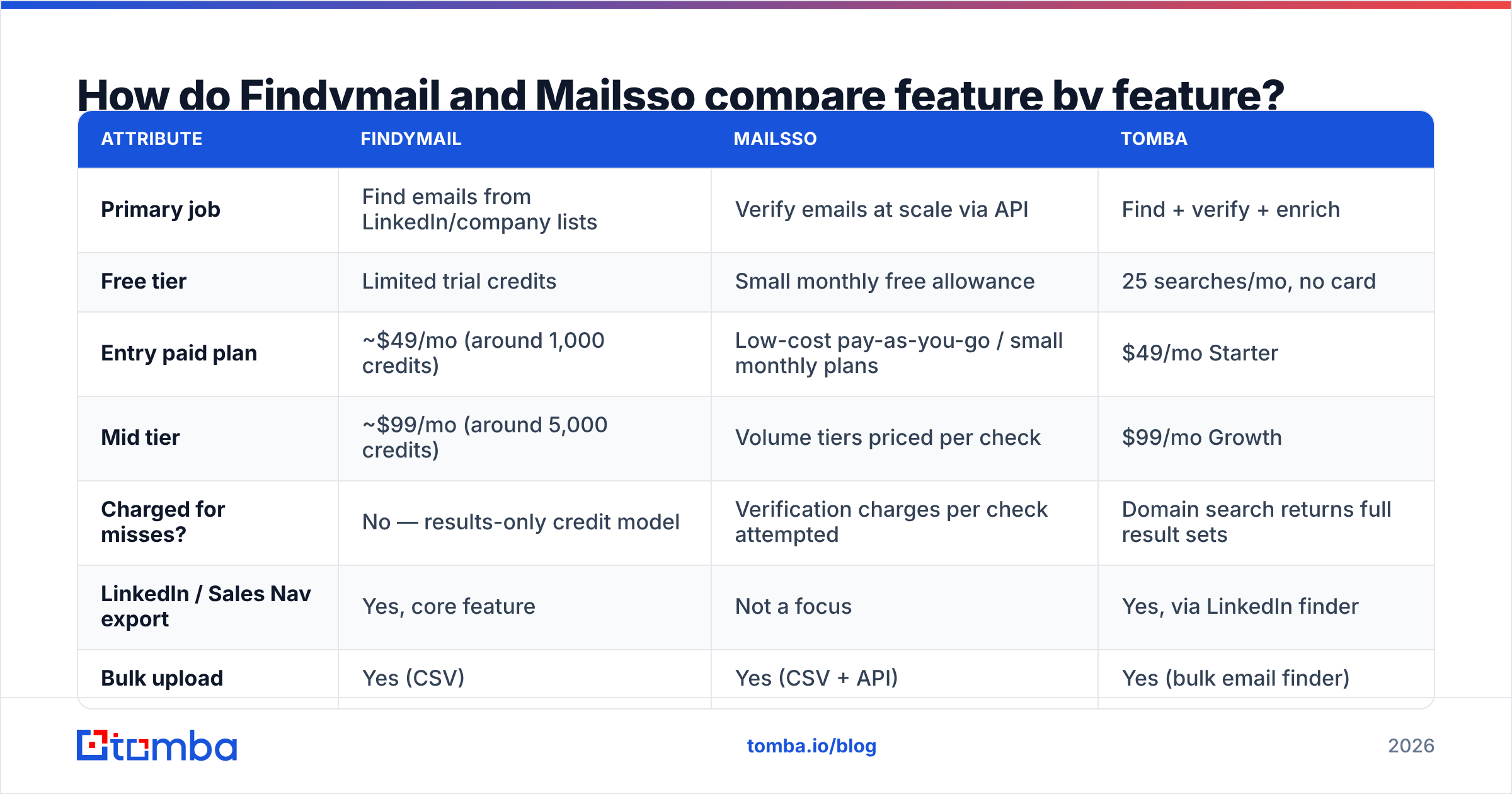
| Attribute | Findymail | Mailsso | Tomba |
|---|---|---|---|
| Primary job | Find emails from LinkedIn/company lists | Verify emails at scale via API | Find + verify + enrich |
| Free tier | Limited trial credits | Small monthly free allowance | 25 searches/mo, no card |
| Entry paid plan | ~$49/mo (around 1,000 credits) | Low-cost pay-as-you-go / small monthly plans | $49/mo Starter |
| Mid tier | ~$99/mo (around 5,000 credits) | Volume tiers priced per check | $99/mo Growth |
| Charged for misses? | No — results-only credit model | Verification charges per check attempted | Domain search returns full result sets |
| LinkedIn / Sales Nav export | Yes, core feature | Not a focus | Yes, via LinkedIn finder |
| Bulk upload | Yes (CSV) | Yes (CSV + API) | Yes (bulk email finder) |
| Public API | Yes | Yes — the main interface | Yes (Tomba API) |
| Catch-all handling | Flags catch-all, limited resolution | Flags catch-all / unknown | Dedicated catch-all verifier |
| Phone numbers | No | No | Yes |
| Best fit | SDR teams sourcing from LinkedIn | Engineers cleaning lists | Teams wanting one vendor for both |

Read that table as a role question, not a scoreboard. If nobody on your team writes code, Mailsso's biggest edge — the API — is invisible to you. If your data already lives in Postgres, Findymail's biggest edge — LinkedIn ingestion — is beside the point.
Which one finds more valid emails?#
Findymail wins on find rate. Mailsso wins on verification cost. That is the honest summary.
Findymail exists to turn a name plus a company into a deliverable address. So it invests in the discovery side: pattern inference, multi-source cross-checking, and a verification pass before it hands you a result and bills a credit. Mailsso's finder endpoint is a side product. It is useful, but it is not why people buy the platform.
Both stumble in the same place every provider stumbles: coverage varies a lot by segment. Expect strong results on North American and Western European SaaS companies with a public web presence. Expect much weaker results on SMBs in non-English markets, agencies with generic mailboxes, and any company running a strict catch-all setup.

The way to settle this for your own ICP is a blind test, not a vendor claim:
- Take 200 contacts you already know are valid — past customers, closed-won accounts, people who have replied to you.
- Strip the emails, keep name + company domain.
- Run the list through every tool on your shortlist on their free or trial tier.
- Score two numbers: find rate (how many returned anything) and match rate (how many matched the known-good address).
- Then, and only then, compare price.
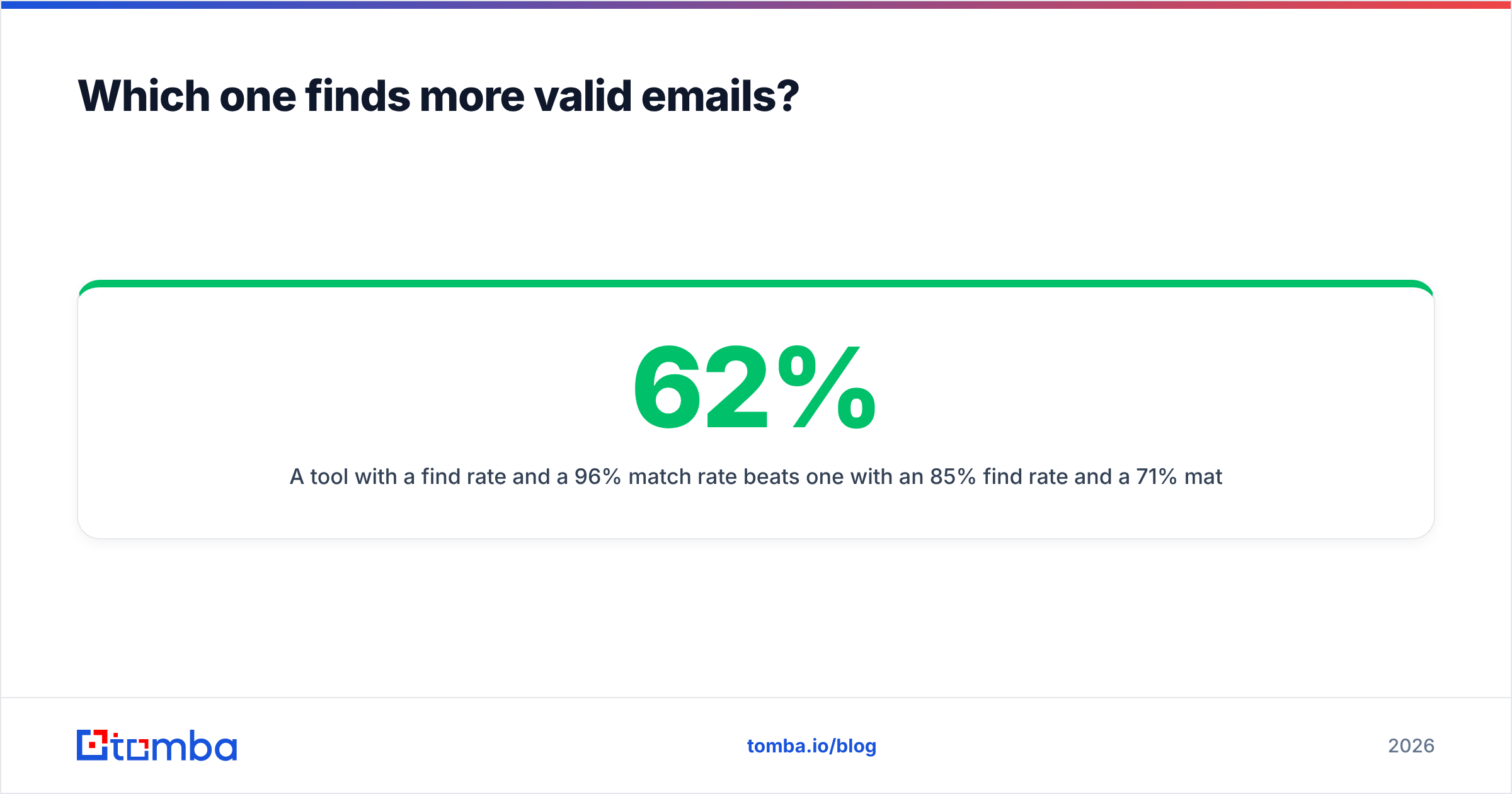
A tool with a 62% find rate and a 96% match rate beats one with an 85% find rate and a 71% match rate. The second one charges you to fill your list with plausible-looking garbage.

What does each actually cost per usable lead?#
Credits are a distraction. The metric is cost per contact that survives verification and lands in an inbox.
Work it out like this. Say a plan gives you 5,000 credits for $99. The tool resolves 55% of your input list, and 90% of those survive verification. You end up with about 2,475 usable contacts — roughly $0.04 per usable contact, not the $0.02 the pricing page implies. Run the same math on a cheaper per-check verifier. The total is often higher, because you still pay for a separate finder.
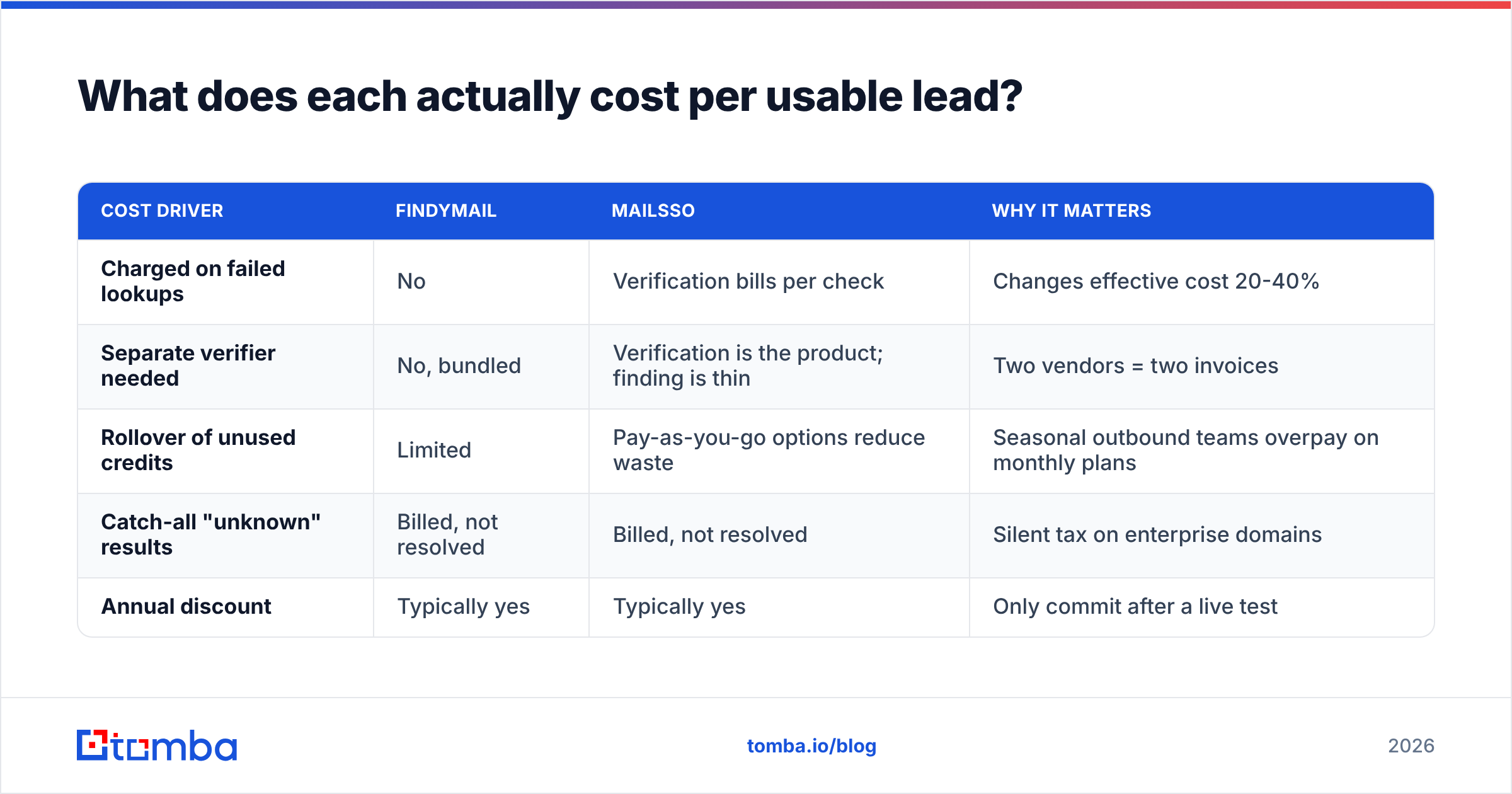
| Cost driver | Findymail | Mailsso | Why it matters |
|---|---|---|---|
| Charged on failed lookups | No | Verification bills per check | Changes effective cost 20-40% |
| Separate verifier needed | No, bundled | Verification is the product; finding is thin | Two vendors = two invoices |
| Rollover of unused credits | Limited | Pay-as-you-go options reduce waste | Seasonal outbound teams overpay on monthly plans |
| Catch-all "unknown" results | Billed, not resolved | Billed, not resolved | Silent tax on enterprise domains |
| Annual discount | Typically yes | Typically yes | Only commit after a live test |
Two practical rules from teams that have run the Findymail vs Mailsso test themselves:
- Never buy annual before a 200-contact test. A discount is cheap next to a year on the wrong data source.
- Track bounce rate as a vendor KPI. If your bounce rate creeps above 3%, the tool is costing you domain reputation, which is far more expensive than credits. Google and Yahoo bulk sender rules make sustained bounces a deliverability problem, not just an accuracy one — see the email deliverability basics if you need the background.
How do they handle catch-all domains?#
Neither one solves catch-alls. They both label them.
A catch-all domain accepts mail to every address at the domain. So an SMTP check cannot tell you whether jane.doe@ exists or whether the server is just being polite. Most verifiers return "unknown" or "accept-all" and move on. That is fine when catch-alls are 5% of your list. It is a real problem in enterprise SaaS, where catch-all setups are common and the accounts you most want are the ones you cannot confirm.
You have three options. Skip them, and you lose real prospects. Send anyway, and you gamble your reputation. Or use a tool that runs extra resolution passes on accept-all domains. That third path is where a dedicated catch-all verifier earns its place. It applies pattern confidence, historical sightings, and secondary signals instead of returning a shrug.
Before you migrate a list anywhere, check what share of it is catch-all. If it is over 20%, the "unknown" bucket will drive your decision more than any price gap between Findymail and Mailsso.

Which fits your workflow: extension, bulk, or API?#
Pick based on where your list is born.
- List is born in LinkedIn. Findymail. The Sales Navigator export path is its reason to exist. Rebuilding that flow around a verification API is wasted engineering.
- List is born in your product database. Mailsso. You want a fast, cheap endpoint you can call on signup or before a campaign. You do not need a UI at all.
The other three cases are less clear-cut:
- List is born in a CRM. Either tool works, but check integration depth first. If you need HubSpot or Salesforce sync without middleware, verify it exists. Do not assume a Zapier hop is acceptable.
- List is born in a spreadsheet. Whichever has the better bulk uploader for your file sizes. Test with your actual CSV, messy columns included.
- List is born from content or research. Neither is ideal. You want domain-level discovery, like a domain search that returns every public address at a company plus role and department context.
There is a fourth pattern worth naming: teams that buy both. Findymail for discovery, Mailsso for cheap re-verification of aging records. It works. But you are now reconciling two credit systems, two dashboards, and two support queues for a job most platforms handle in one.
Where does Tomba fit in this comparison?#
Tomba is the consolidation option — one vendor covering discovery, verification, catch-all resolution, and enrichment.
That matters when your stack has grown by accretion: a finder here, a verifier there, an enrichment tool that only fills firmographics. Every extra vendor adds a credit pool you forget to top up and a failure mode nobody owns. Tomba's email finder and email verifier share the same data layer. A found address is verified before it reaches you, not after you have paid twice.
Concretely, against these two:
- Versus Findymail: similar positioning for prospecting, plus phone numbers, reverse lookup, and enrichment in the same account instead of a separate purchase. If you are weighing a switch, the Findymail alternative breakdown covers the migration specifics.
- Versus Mailsso: a full API surface with the same developer ergonomics, plus a real finder behind it. You are not calling one vendor for discovery and another for hygiene.
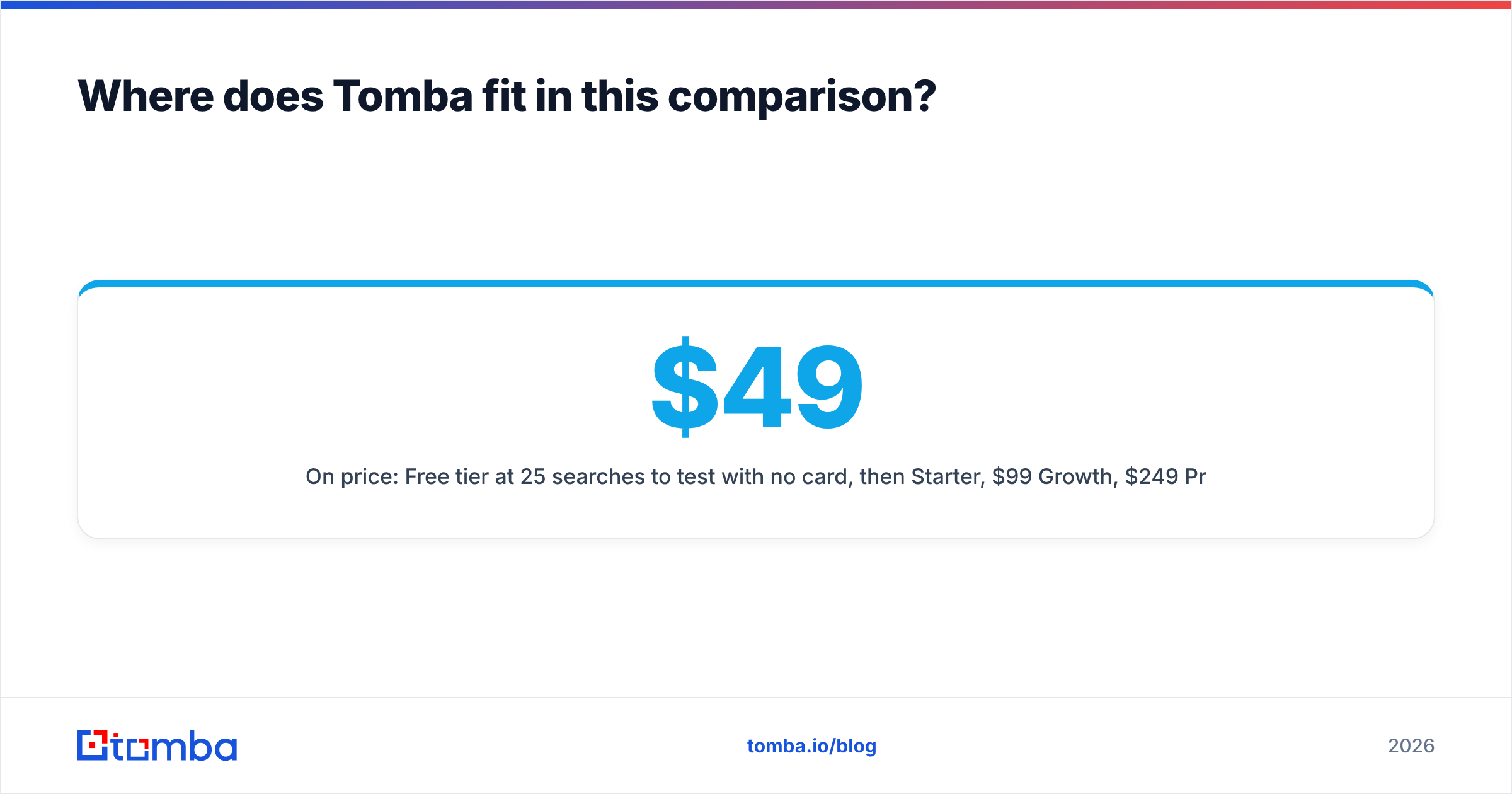
- On price: free tier at 25 searches/mo to test with no card, then $49/mo Starter, $99/mo Growth, $249/mo Pro, and custom Enterprise. Full Tomba pricing is public — no "contact sales" wall on the tiers most teams actually buy.
Tomba is not automatically the right answer. If your only job is verifying a 500k-row list once a quarter, and you never need to find anything, a pure verification endpoint priced per check will be cheaper. Buy the narrow tool for the narrow job.
Which should you choose in 2026?#
The Findymail vs Mailsso decision collapses to three questions:
- Do you need to find emails, verify them, or both? Both → Findymail or a consolidated platform. Verify only → Mailsso.
- Who operates it — a rep or an engineer? Rep → Findymail's UI. Engineer → Mailsso's API.
- How many vendors do you want to own? If the answer is "fewer than I have now," neither point tool is the endpoint. A platform is.
Do not outsource the final call to review sites, but do use them as a bias check. Scan recent G2 reviews filtered to your company size. Weight complaints about stale data far more heavily than complaints about UI polish. Stale data costs you meetings. An ugly dashboard costs you nothing.
Then run the 200-contact test. Every vendor in this category, Tomba included, publishes accuracy numbers measured on datasets that favor them. Your own closed-won list is the only benchmark that predicts your results.
Ready to test it on your own list?#
Start with the Tomba Email Finder. The free tier gives you 25 searches a month with no card. That is enough to run a real head-to-head against Findymail and Mailsso on contacts you already know are valid. Compare find rate, match rate, and how each tool labels your catch-all domains. Then buy the one that wins on your data instead of on a pricing page.
Related guides#
Ready to find emails that actually work?
Join 150,000+ professionals who stopped guessing and started sending. Free credits on signup — no credit card required.
Get the Tomba newsletter
Practical outbound tactics and product updates — once every two weeks.
About the author