Findymail vs OneMoreLead: Which B2B Data Tool Wins in 2026
One tool finds emails on demand, the other sells you a database. We break down accuracy, pricing, coverage, and workflow fit so you know which one your outbound team should actually buy in 2026.
Findymail vs OneMoreLead is not a fair fight, because the two tools do different jobs. One finds emails one at a time. The other sells you a big stored list. Here is how they differ, and which one fits your team.
TL;DR
- Findymail is a finder. OneMoreLead is a database. Findymail resolves emails for people you already identified, usually from LinkedIn or a CSV. OneMoreLead sells you access to a pre-built pool of B2B contacts you filter and export.
- Pick Findymail if your prospecting starts in LinkedIn Sales Navigator and you need verified emails for a named list.
- Pick OneMoreLead if you have no list at all, sell mostly into the US mid-market, and want volume at a flat price.
- Neither is a full data layer. Findymail is thin on company data and phone numbers. OneMoreLead's records age between refreshes, and its non-US coverage is limited.
- The honest third option: a finder, verifier, and enrichment API in one, so you're not stitching two vendors together. That's where Tomba pricing at $49/mo starter tends to undercut running both.
What are Findymail and OneMoreLead, exactly?#
People compare them all the time. They shouldn't. Each tool solves a different half of the same problem.
Findymail is a waterfall email finder. You give it a name plus a company. It also takes a LinkedIn URL or a Sales Navigator search. Findymail runs that identity through several data sources and its own SMTP check. You get back a deliverable address, or nothing. Its selling point is simple: verified or you don't pay. Credits only burn when a valid email comes back. It also ships a Chrome extension for LinkedIn and Sales Nav list exports. That is where most of its users live.
OneMoreLead is a B2B contact database. You don't feed it names. You feed it filters: industry, job title, company size, location, technology. It returns a slice of its stored records, and you export them as CSV. It markets tens of millions of business contacts, most of them in the United States. The pitch is coverage and price per record, not per-lookup precision.
The difference matters. It changes what "accuracy" even means. A finder's accuracy is did this specific person's email resolve correctly? A database's accuracy is what percentage of these 5,000 rows are still real people at real companies? Those are two different problems, and they cost you in different ways.

Findymail vs OneMoreLead: how do they compare head-to-head?#
Here's the practical comparison. Tomba is included as a reference point, because most teams who weigh these two also shortlist it.
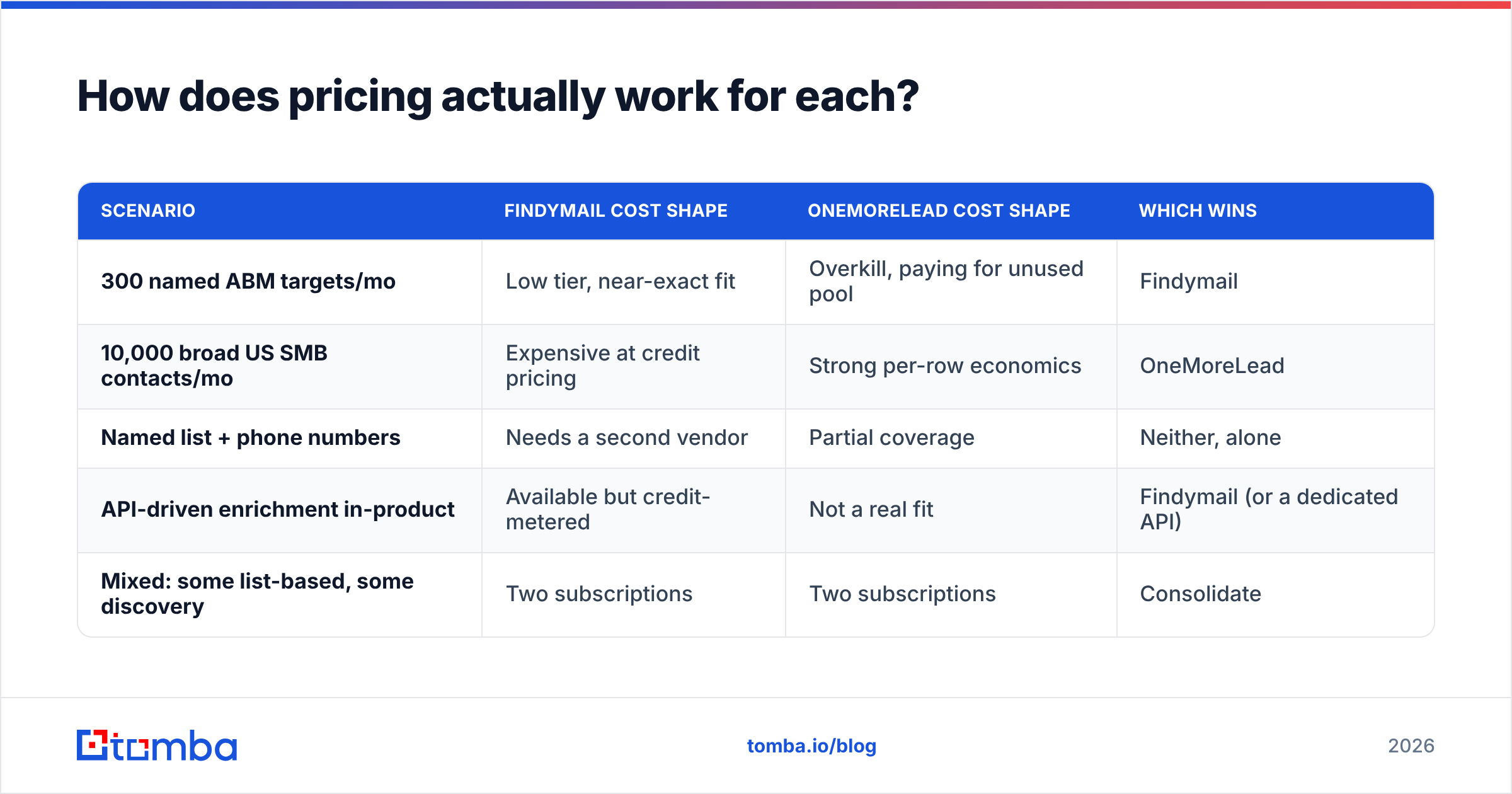
| Attribute | Findymail | OneMoreLead | Tomba |
|---|---|---|---|
| Core model | On-demand email finder | Static B2B contact database | Finder + verifier + enrichment |
| Entry price (published) | ~$49/mo tier | ~$99/mo range, deal pricing common | $49/mo Starter |
| Free tier | Limited trial credits | Trial/sample records | 25 searches/mo, free forever |
| Primary input | Name + domain, LinkedIn URL | Filters (title, industry, size) | Name + domain, domain, LinkedIn, bulk CSV |
| LinkedIn / Sales Nav export | Yes, core feature | No | Yes, via LinkedIn finder + extension |
| Built-in verification | Yes, before charging credit | Basic, list-level | Yes, standalone verifier + catch-all check |
| Catch-all handling | Returns as risky/unknown | Not surfaced clearly | Dedicated catch-all verifier |
| Phone numbers | No | Some records | Yes, phone finder + validator |
| API access | Yes | Limited | Full REST API, CLI, MCP server |
| Geographic strength | US + EU | Heavily US-weighted | Global, broad domain coverage |
| Best for | List-based outbound from LinkedIn | Cold-start volume prospecting | Teams needing both, plus programmatic access |
Two things jump out. First, the two barely overlap on inputs. No names? Findymail has nothing to work with. Have names? OneMoreLead can't look them up. Second, once you need phone numbers or programmatic enrichment, both start showing gaps.
Which one actually has better data accuracy?#
Wrong question, but here's the useful version of it.
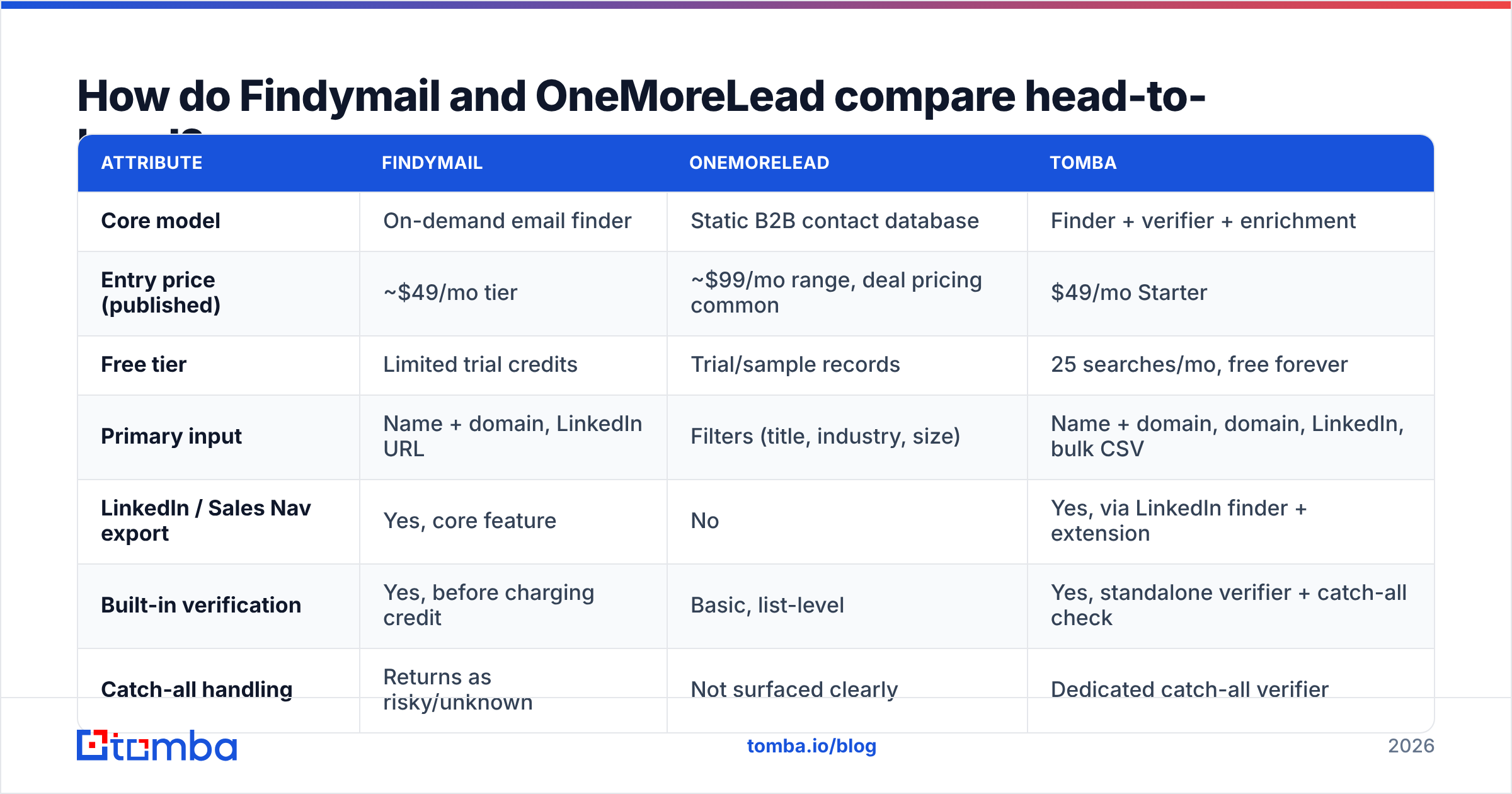
Findymail's accuracy is high on the records it returns, low on coverage. Because it only charges for verified hits, its published hit rate is a filtered number. In practice, about 55–75% of a LinkedIn list resolves. Those addresses bounce at low single digits. You don't pay for the people it can't find. You also don't get them. If that missing 30% is your ICP, the strong accuracy stat won't help you.
OneMoreLead's accuracy is a function of freshness. Every static database decays. Research puts B2B contact data decay at 20% to 30% a year. People change jobs. Companies get bought. Domains move. Say a record is 14 months old and nobody re-checked it. Your bounce risk on that row is much higher than on a fresh lookup. That is why blasting 10,000 exported rows straight into a sequence burns a sending domain so fast.
The fix for both is the same: verify at send time, not at export time.

Run any database export through an email verifier before it touches your sequencer. On a 5,000-row OneMoreLead export, expect to drop 8% to 20% of rows. They come back invalid, role-based, or dead. That's not a knock on OneMoreLead. It's true of every static file, including the one you bought last quarter and forgot about.
How does pricing actually work for each?#
This is where the two split hardest. It's also where most buyers get the comparison wrong.
Findymail prices per verified email found. Its tiers scale credits, and unfound contacts don't burn credit. So cost per outcome is predictable. Need 2,000 verified emails a month? You can size the plan almost exactly.
OneMoreLead prices per access window and export volume. You're buying the right to pull records from the pool, not paying per successful resolution. At high volume, that's cheaper per row. At 300 targeted contacts, it's poor value, because you pay for a database you barely touch.
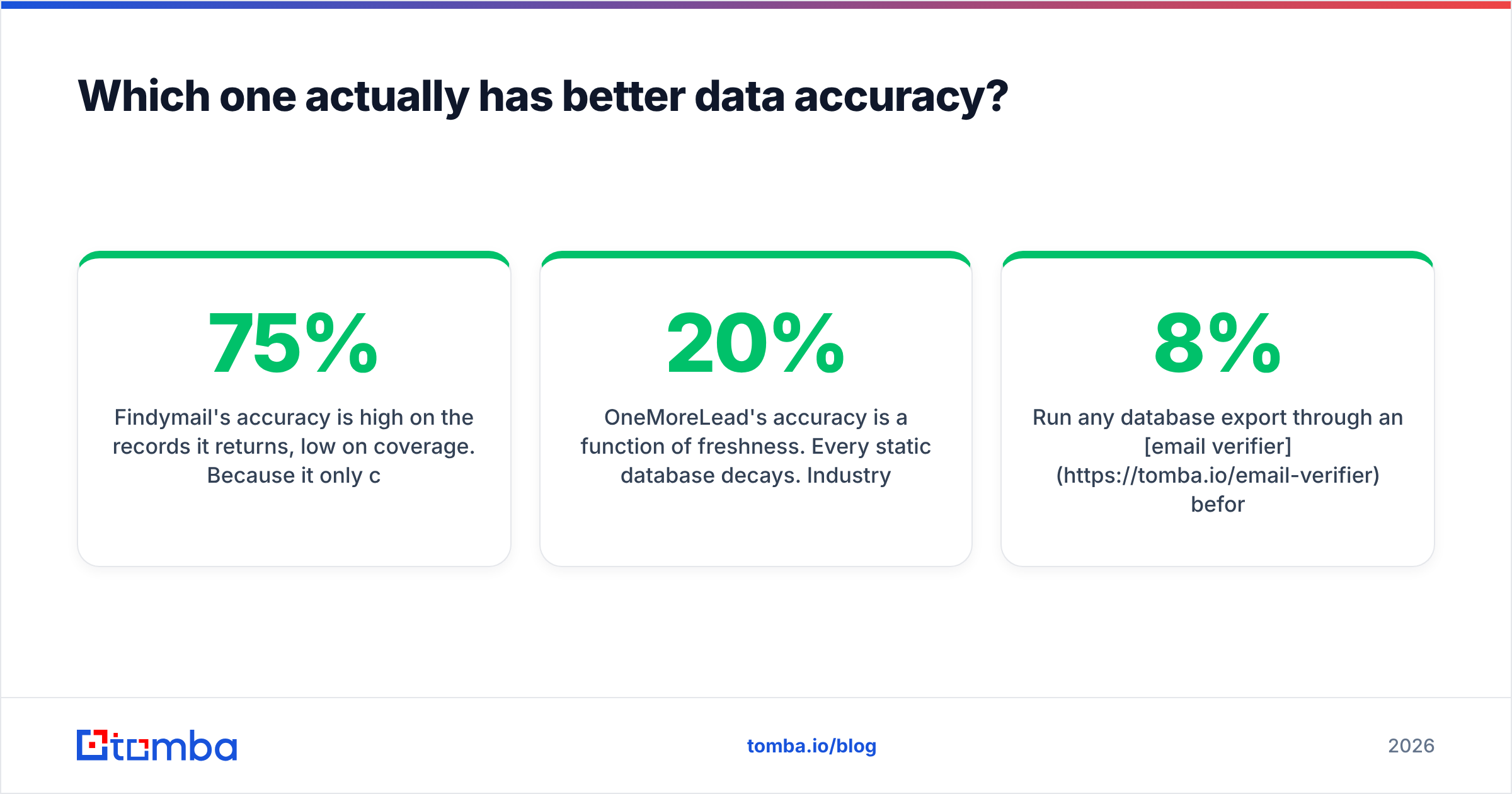
| Scenario | Findymail cost shape | OneMoreLead cost shape | Which wins |
|---|---|---|---|
| 300 named ABM targets/mo | Low tier, near-exact fit | Overkill, paying for unused pool | Findymail |
| 10,000 broad US SMB contacts/mo | Expensive at credit pricing | Strong per-row economics | OneMoreLead |
| Named list + phone numbers | Needs a second vendor | Partial coverage | Neither, alone |
| API-driven enrichment in-product | Available but credit-metered | Not a real fit | Findymail (or a dedicated API) |
| Mixed: some list-based, some discovery | Two subscriptions | Two subscriptions | Consolidate |
That last row is the one that costs teams money. Running both lands you around $150/mo before either is used seriously. Then add a separate verification tool. Then add a phone data vendor. One email finder with verification, domain search, and phone lookup on the same credit pool is usually cheaper. That holds as soon as you pay to fill more than one gap.
Who should genuinely buy Findymail?#
Buy Findymail if three or more of these describe you:
- Your prospecting starts in Sales Navigator. You build saved searches, export, and want emails attached. This is Findymail's home turf, and the extension workflow is genuinely good.
- You sell into EU or mixed geographies. Coverage outside the US holds up better than in a US-weighted database.
- You care about bounce rate above all else. The verify-before-charge model means you rarely pay for garbage.
- Your volume is moderate. Under roughly 3,000 lookups a month, credit pricing is competitive.
- You don't need phone numbers. If dials are part of your motion, you're adding a vendor anyway.
Where it disappoints: company data is thin. There's no real "give me 5,000 companies matching X" search. And bulk work on a wide CSV of mixed-quality rows can eat credits faster than you expect.
Who should genuinely buy OneMoreLead?#
Buy OneMoreLead if:
- You're starting from zero. No CRM history, no LinkedIn list, no ICP file. A database gives you something to segment against right away.
- Your ICP is US-centric SMB or mid-market. That's where the record density is real.
- Volume matters more than precision. High-volume, low-personalization outbound where a 10% invalid rate is an acceptable cost. Scrub the list before you send.
- Budget is flat and predictable. No credit anxiety, no mid-month top-ups.
Where it disappoints: freshness varies by segment. Filters are blunter than what an Apollo or ZoomInfo-tier platform gives you. And there's no real API if you want enrichment inside your own product. If you're comparing against the bigger platforms, our Apollo alternative breakdown covers where that tier draws the line.

What do both tools leave on the table?#
Four gaps show up in almost every evaluation we've seen:
- Catch-all domains. Roughly a fifth of B2B domains accept every address at the MX layer, so a standard SMTP check returns "unknown." Findymail flags these as risky. OneMoreLead mostly doesn't surface them. A catch-all verifier is the only way to get a real signal on those rows instead of guessing.
- Phone numbers. Findymail has none. OneMoreLead's are partial. If your sequence is email plus dial, that's a third subscription.
- Programmatic access. Findymail has an API. OneMoreLead effectively doesn't. Enriching signups in real time? Running an internal data pipeline? A proper email finder API with steady rate limits changes the whole build.
- Bulk workflows at scale. Uploading 20,000 rows and getting verified, enriched output back, with no babysitting, is a different product from a Chrome extension. A dedicated bulk email finder handles that shape of job better than either tool.
Is there a middle ground between a finder and a database?#
Yes. It's the reason most Findymail vs OneMoreLead comparisons end in "neither."
Most teams don't need a pure finder or a pure database. They need discovery when they don't have names, and resolution when they do. They also need verification on everything, plus a phone number where one exists. Ideally that runs on one credit pool, with one invoice, behind one API key.

That's the shape Tomba fills. Domain search covers the discovery motion OneMoreLead owns: give it a company domain, get the people and the email pattern. The email finder covers Findymail's motion: give it a name and a company, get a verified address. The verifier and catch-all checker cover the scrub step both tools push onto you. The phone finder covers the gap neither one addresses. Starter is $49/mo. The free tier is 25 searches, so you can test before you commit. The API, CLI, and MCP server are there if you want to wire it into your own stack.
To be fair: if you only prospect on LinkedIn, Findymail's extension workflow is tight, and there's no strong reason to switch. And if you just want a large, cheap US contact file to segment, buy a database. OneMoreLead, BookYourData, or similar. A finder is the wrong tool for that job. The case for one combined tool only wins when you straddle both motions. Most teams past their first 10 customers do.
How should you test all three in one week?#
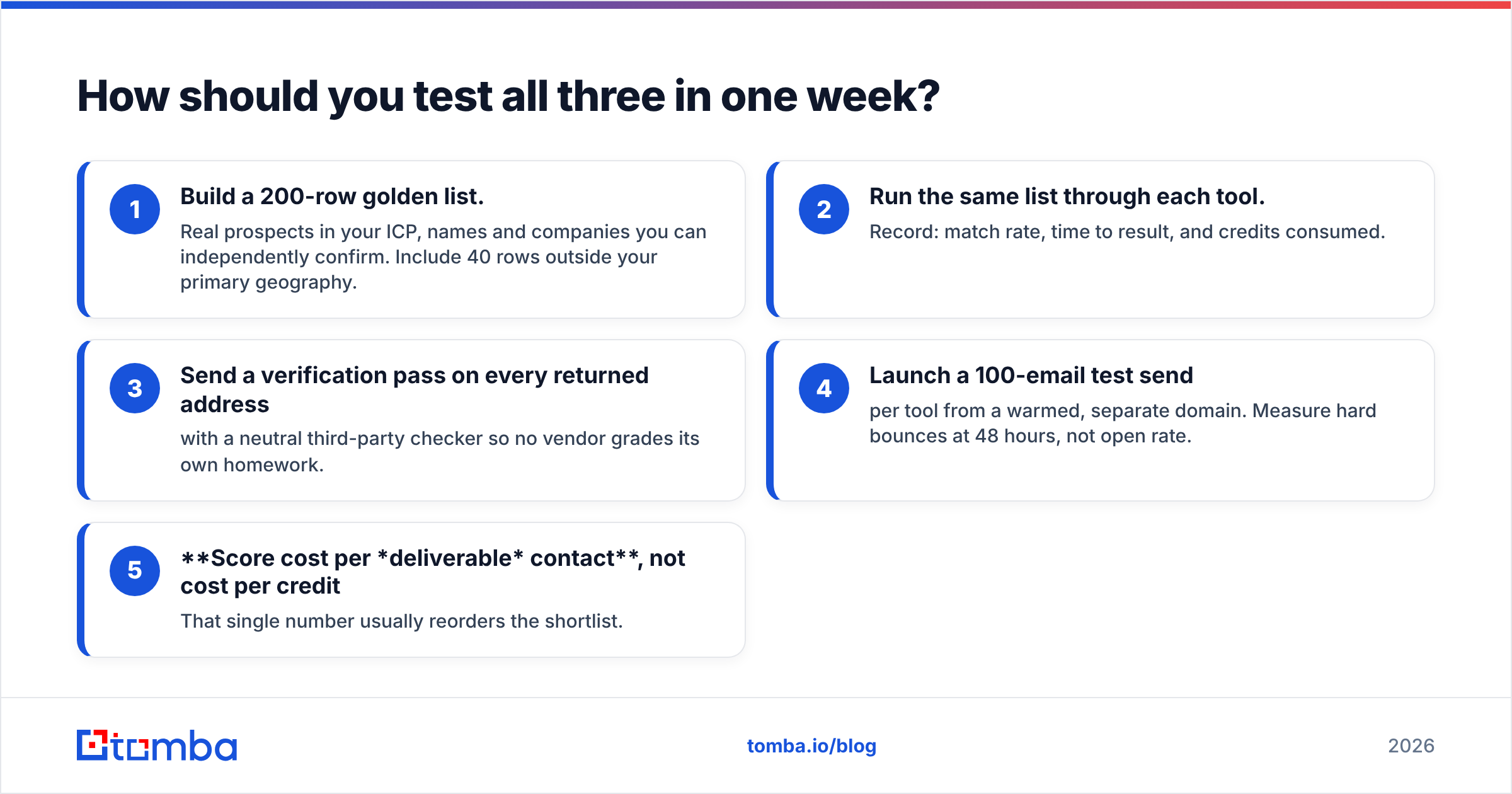
Don't take anyone's published hit rate, including ours. Run this:
- Build a 200-row golden list. Real prospects in your ICP, with names and companies you can confirm yourself. Include 40 rows outside your main geography.
- Run the same list through each tool. Record match rate, time to result, and credits used.
- Send a verification pass on every returned address with a neutral third-party checker, so no vendor grades its own homework.
- Launch a 100-email test send per tool from a warmed, separate domain. Measure hard bounces at 48 hours, not open rate.
- Score cost per deliverable contact, not cost per credit. That single number usually reorders the shortlist.
Most tests end with a surprise. The tool with the best advertised accuracy often loses on cost per deliverable contact. Coverage gaps never show up in accuracy stats. Check vendor claims against real reviews on G2 too. Look for refund and bounce complaints. They tell you more than star ratings do.
The verdict on Findymail vs OneMoreLead#
Findymail wins on precision for named lists. OneMoreLead wins on cheap volume for US cold-start prospecting. They aren't really competitors. Buy one because you read a comparison of the two, and you'll often need the other three months later.
If you're weighing them side by side, you probably need both motions. That means two subscriptions plus a verifier. Run the golden-list test above against a consolidated option before you sign anything annual.
Start with the Tomba Email Finder free tier: 25 searches, no card. Put it through the same 200-row test you'd run on the other two. Find emails by name, by domain, or in bulk. Verify them in the same pass. Then look at your real cost per deliverable contact before you commit to a stack you'll be untangling next quarter.
Related guides#
Ready to find emails that actually work?
Join 150,000+ professionals who stopped guessing and started sending. Free credits on signup — no credit card required.
Get the Tomba newsletter
Practical outbound tactics and product updates — once every two weeks.
About the author