Findymail vs Power Almanac (2026): Which B2B Data Tool Wins?
Findymail finds work emails for any B2B prospect. Power Almanac sells verified contacts for US local government. They rarely compete — here's how to pick, what each costs, and when neither one is the right buy.
Findymail vs Power Almanac is an odd matchup. One tool finds work emails for any B2B prospect. The other sells a verified list of US local government officials. Here is what each one does, what it costs, and which one fits your pipeline.
TL;DR
- They are not really competitors. Findymail is a real-time email finder for general B2B prospecting. Power Almanac is a static, human-verified database of US local government officials. Buying one when you needed the other is the costliest mistake here.
- Pick Findymail if your ICP is SaaS, agencies, or e-commerce — anything you can source from LinkedIn Sales Navigator and enrich at scale.
- Pick Power Almanac if you sell to cities, counties, townships, school districts, or public safety teams. It lists mayors, city managers, clerks, and public works directors by title.
- The pricing models differ. Findymail sells monthly credits (roughly $49/mo to start). Power Almanac sells records, so one large list can run into four figures.
- A third path exists. Want per-domain finding, verification, catch-all handling, and an API in one account? A general finder like Tomba (free tier, then $49/mo) covers the Findymail job at a similar price.
What are Findymail and Power Almanac, exactly?#
Both tools sell "B2B contact data," so they land in the same search results. They solve opposite problems.
Findymail is an email-finding and enrichment service built for outbound teams. Feed it a name plus a company, a LinkedIn URL, a Sales Navigator export, or a CSV. It returns a work email it believes will land. Its selling point is bounce protection: the company markets a low bounce guarantee and does not charge for emails it cannot find. It plugs into Lemlist, Instantly, Smartlead, Clay, HubSpot, and Zapier.
Power Almanac is a different species. It is a curated database of officials across roughly 40,000 US local government entities — cities, counties, and townships. Records cover mayors, city managers, council members, clerks, finance directors, public works directors, and police and fire chiefs. Human researchers compile and re-check the data, often by phone. Nothing is scraped or pattern-guessed. You filter a list by state, population size, government type, and title, then download it.
So one tool answers "what is this person's email?" The other answers "who runs the water department in every town in Ohio above 10,000 people?"

Findymail vs Power Almanac: how do they compare head to head?#
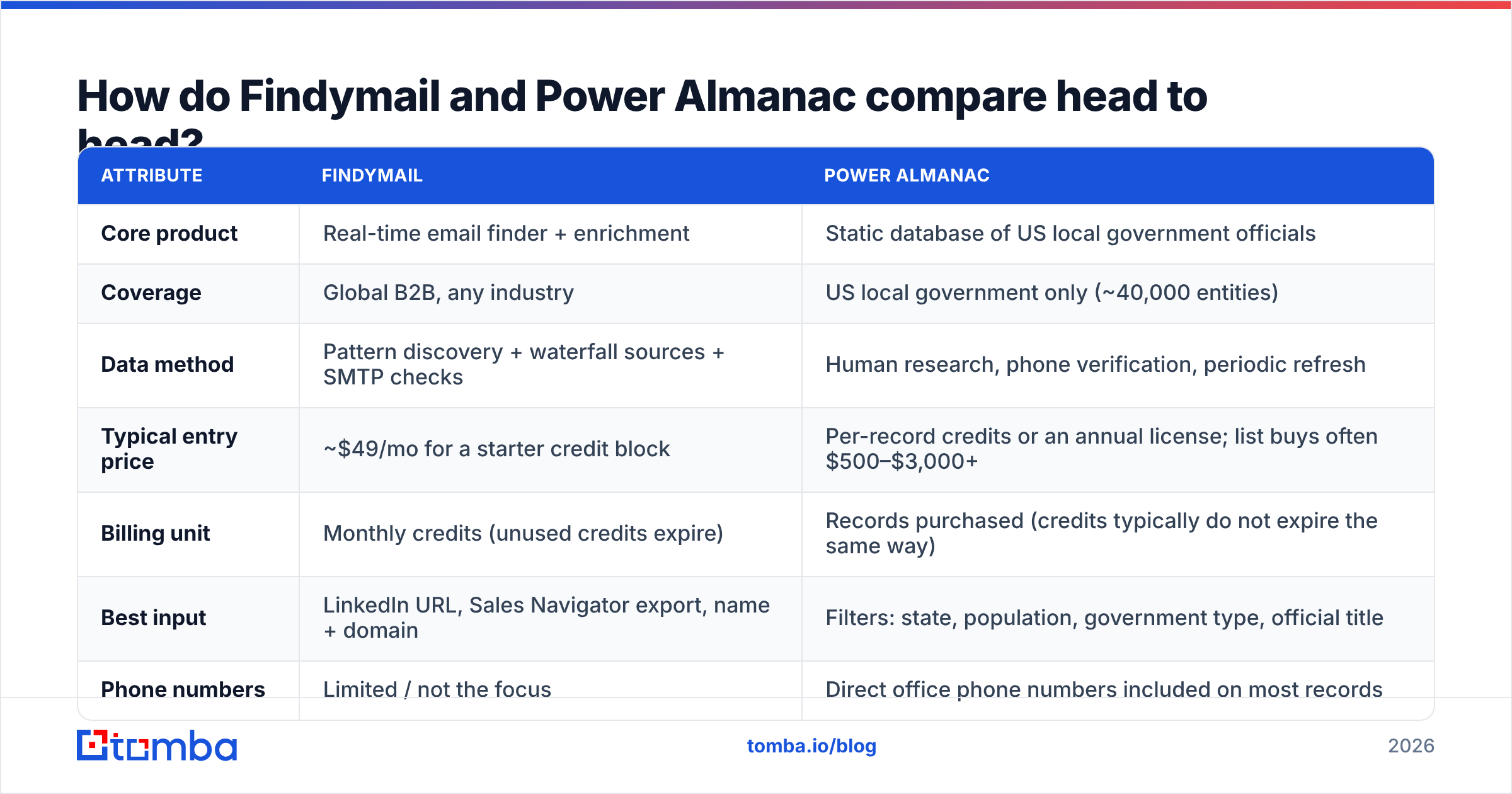
| Attribute | Findymail | Power Almanac |
|---|---|---|
| Core product | Real-time email finder + enrichment | Static database of US local government officials |
| Coverage | Global B2B, any industry | US local government only (~40,000 entities) |
| Data method | Pattern discovery + waterfall sources + SMTP checks | Human research, phone verification, periodic refresh |
| Typical entry price | ~$49/mo for a starter credit block | Per-record credits or an annual license; list buys often $500–$3,000+ |
| Billing unit | Monthly credits (unused credits expire) | Records purchased (credits typically do not expire the same way) |
| Best input | LinkedIn URL, Sales Navigator export, name + domain | Filters: state, population, government type, official title |
| Phone numbers | Limited / not the focus | Direct office phone numbers included on most records |
| API | Yes | Limited — the product is built around list export |
| Sequencer integrations | Lemlist, Instantly, Smartlead, Clay, HubSpot | CSV export into whatever you use |
| Refresh cadence | On demand, per lookup | Periodic re-verification cycles |
| Who it fits | SDR teams selling to businesses | GovTech, civil engineering, public safety, municipal services vendors |
Prices move on both sides. Treat the numbers above as directional and check each vendor's page before you buy. The structure is the part that stays put: Findymail charges you for lookups, Power Almanac charges you for records you keep.
That gap matters more than the sticker price. Burn 5,000 Findymail credits and find 3,200 emails, and you paid for a month of finding. Buy 3,200 Power Almanac records and you own the file. City clerks do not job-hop like SaaS reps, so in a slow market that ownership is worth real money. In a market with 30% annual churn, a subscription that re-finds on demand wins.
Which one wins for general B2B prospecting?#
Findymail, and it is not close — because Power Almanac does not compete here at all. If your buyers are VPs of Engineering at Series B startups, Power Almanac has zero records for you.
Inside general B2B, though, Findymail sits in a crowded field. A fair test looks at six things.
Start with the three that decide your cost per meeting:
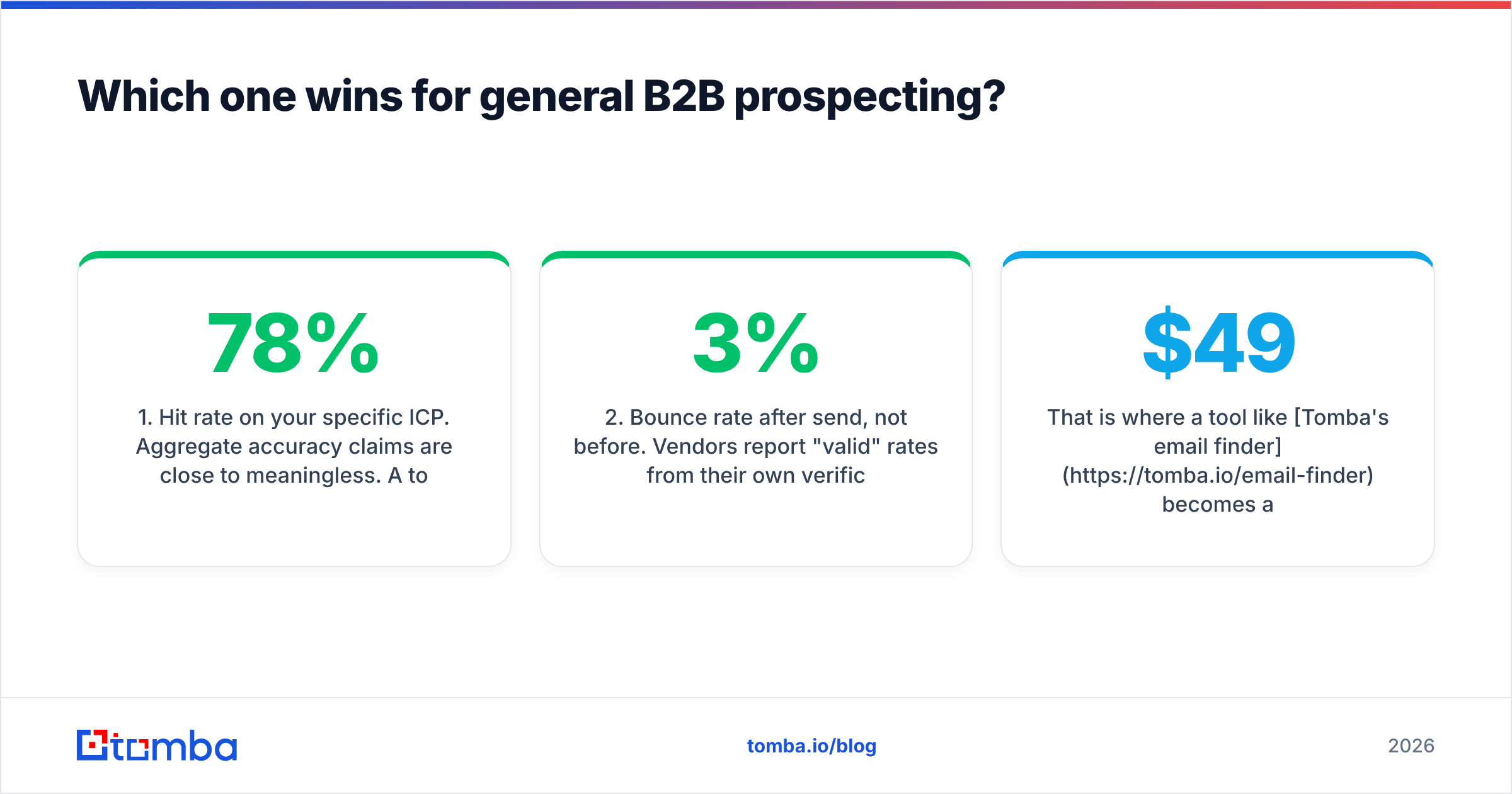
- Hit rate on your ICP. Broad accuracy claims mean little. A tool that hits 78% on US mid-market SaaS may hit 40% on German manufacturing. Run 200 known contacts from your own CRM through a trial first.
- Bounce rate after you send. Vendors grade their own homework. What counts is what your ESP reports a day later. Over 3% is a deliverability problem, whatever the dashboard said.
- Catch-all handling. About a fifth of B2B domains accept every address at the SMTP layer, so a naive verifier marks them all "valid." If a vendor has no explicit catch-all verifier, assume its "valid" bucket is padded.
Then check the three that decide how the tool fits your workflow:
- Credit expiry. Monthly credits that vanish punish spiky work. If you prospect in bursts, this alone can double your cost per email.
- API depth. A UI-only tool caps you at manual work. Look for a real REST API, spreadsheet add-ons, and native CRM sync — not just a Zapier shim.
- Data provenance. Ask where records come from and how opt-outs work. GDPR and CCPA risk is yours once you hit send.
Findymail scores well on 1, 2, and 5 for LinkedIn-sourced prospecting, and it is genuinely good at not charging you for misses. It scores worse on 4, since credits expire monthly. It is also narrower than platforms that bundle finding, verification, phone data, and enrichment in one plan.
That is where Tomba's email finder is the fair comparison, not Power Almanac. Same job, similar entry price: $49/mo Starter, $99/mo Growth, $249/mo Pro, plus a free tier at 25 searches a month. You also get domain search, catch-all logic, a phone finder, and a documented Tomba API in one account. If your issue with Findymail is scope, look there. If your issue is price, compare the Tomba pricing tiers against Findymail's credit blocks at your real volume, not the headline tier.
Which one wins for selling to local government?#
Power Almanac, decisively. This is the case where paying more per record is clearly right.
Selling into cities and counties breaks normal email finders in three ways.
Titles matter more than names. You are not chasing "Sarah Chen." You want the Director of Public Works in every Texas county above 50,000 people. A finder that starts from a person's name is the wrong shape for that job. Power Almanac starts from the entity and the role.
Domains are chaotic. Local government email lives on cityofsomewhere.gov, co.county.st.us, townshipname.org, and dozens of legacy formats. Pattern-based finders learn that a company uses first.last@ and extrapolate. That fails across 40,000 tiny domains with no pattern to learn.
Turnover follows elections, not the market. Mayors and council members change on a set schedule. A vendor that re-checks by phone on a cycle handles that better than a live lookup seeing the domain for the first time.
The trade-off is cost and rigidity. You buy a snapshot. Need Illinois school district superintendents next quarter? That is another purchase. Coverage also stops at the US border and at the local government line: no federal agencies, no private contractors.
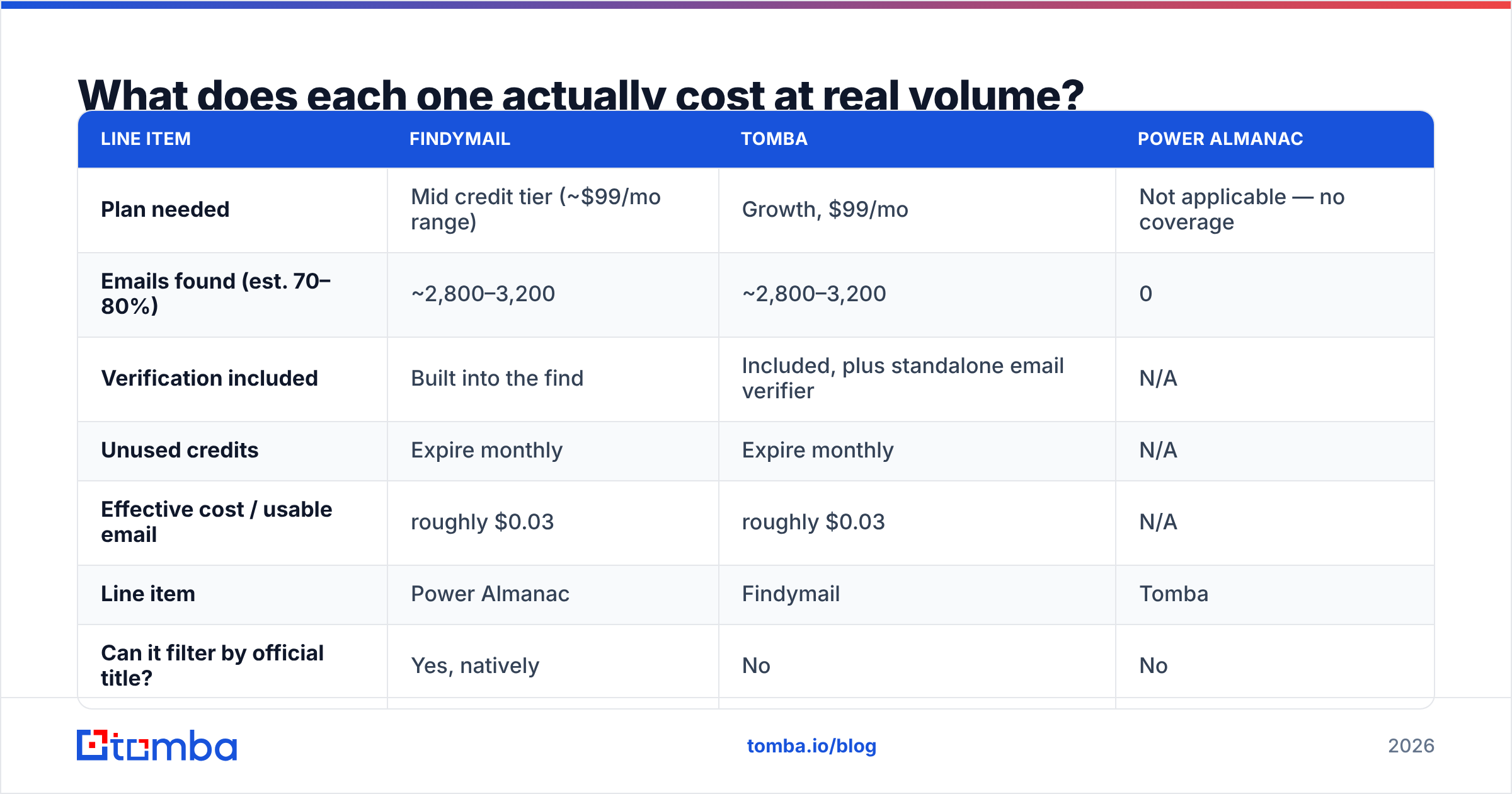
What does each one actually cost at real volume?#
Run the math on a concrete scenario instead of comparing tier names.
Scenario A — an SDR team prospecting 4,000 B2B contacts per month.
| Line item | Findymail | Tomba | Power Almanac |
|---|---|---|---|
| Plan needed | Mid credit tier (~$99/mo range) | Growth, $99/mo | Not applicable — no coverage |
| Emails found (est. 70–80%) | ~2,800–3,200 | ~2,800–3,200 | 0 |
| Verification included | Built into the find | Included, plus standalone email verifier | N/A |
| Unused credits | Expire monthly | Expire monthly | N/A |
| Effective cost / usable email | roughly $0.03 | roughly $0.03 | N/A |
Scenario B — a public-safety equipment vendor targeting 3,000 fire and police chiefs across 12 states.
| Line item | Power Almanac | Findymail | Tomba |
|---|---|---|---|
| Can it filter by official title? | Yes, natively | No | No |
| Records obtainable | ~3,000, one purchase | Low hit rate on .gov/.us domains | Partial, via domain-by-domain search |
| Typical spend | Four figures, one time, owned | ~$99/mo with poor yield | ~$99/mo with partial yield |
| Phone numbers | Included | Rarely | Via phone finder, uneven on gov domains |
| Time to usable list | Hours | Weeks of manual sourcing | Weeks of manual sourcing |
Scenario B is the whole argument. A $2,000 list that works beats a $99/month subscription that returns 30% coverage on a market you cannot otherwise reach.
Are there better alternatives to either one?#
It depends on the job you are hiring for.
If you need general B2B emails at volume: Findymail is solid. So are Tomba, the usual rivals in the enrichment category, and waterfall tools that chain several providers. Compare on your own test list, not on G2 star averages — though the lead intelligence category on G2 is a fine place to shortlist. If you want the finder plus data enrichment and bulk email finder runs in one place, that cuts your vendor count.
If you need prebuilt lists you own outright: Power Almanac for local government. For general commercial lists on the same "buy the records" model, BookYourData is well regarded. It sells verified B2B contacts by industry and title, and it suits teams that prefer a one-time file over a monthly credit plan.
If you need both: many GovTech companies run exactly this stack. Power Almanac covers the government side. A general finder covers the private contractors, consultancies, and engineering firms that sell alongside them. That is not indecision, it is correct segmentation. Just do not expect a general finder to cover the government half.
If your bottleneck is deliverability, not sourcing: neither tool fixes that. Bounces are a symptom. Sender reputation, warmup, SPF/DKIM/DMARC alignment, and list hygiene are the disease. Run any purchased list through verification before the first send, even a human-verified one — records age.
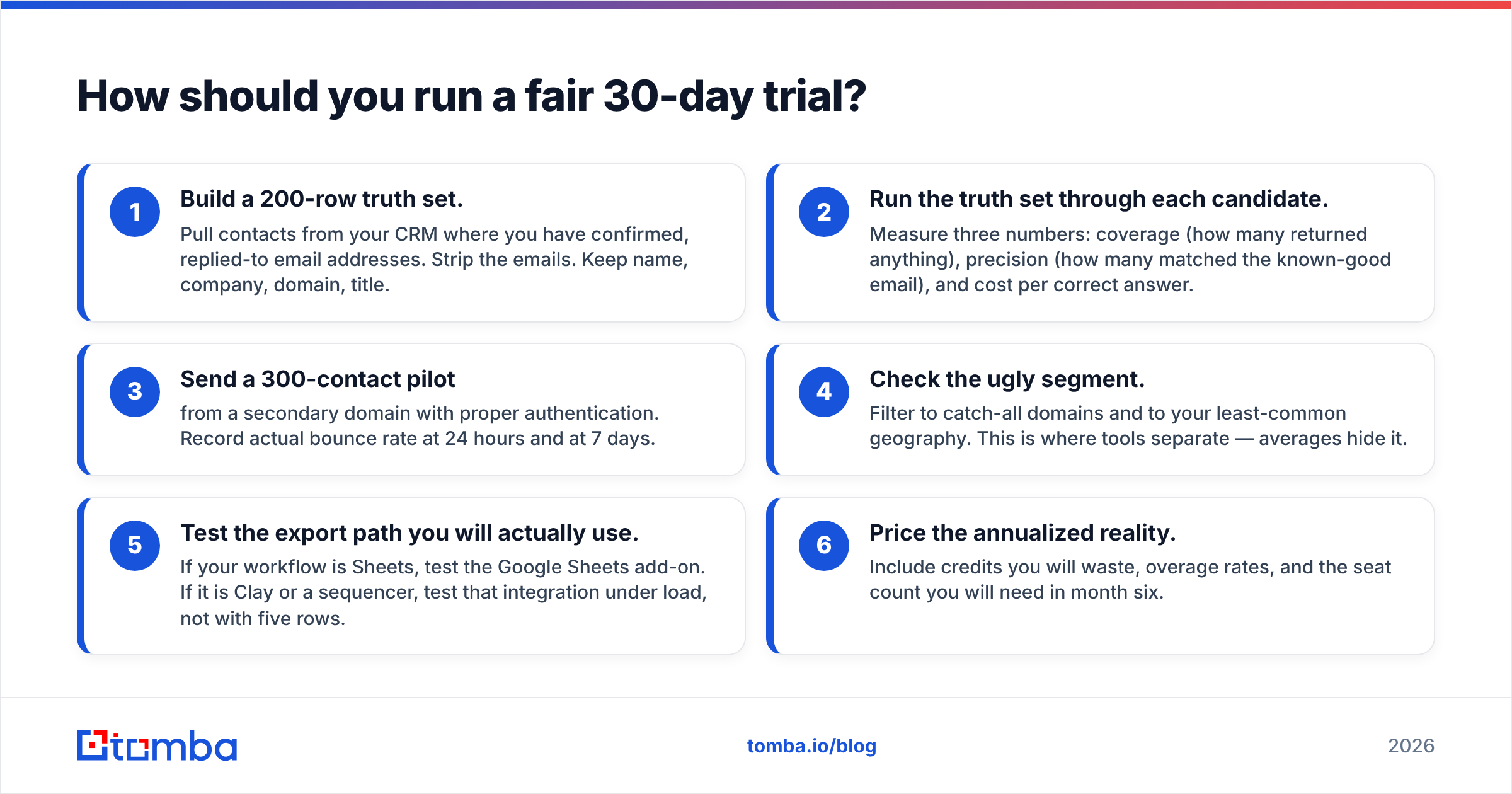
How should you run a fair 30-day trial?#
Do not evaluate on vendor demos. Evaluate on your own data.
First, build the test:
- Build a 200-row truth set. Pull contacts from your CRM where you have confirmed, replied-to addresses. Strip the emails. Keep name, company, domain, and title.
- Run the truth set through each candidate. Measure three numbers: coverage, precision against the known-good email, and cost per correct answer.
- Send a 300-contact pilot from a secondary domain with proper authentication. Record the real bounce rate at 24 hours and at 7 days.
Then stress the edges:
- Check the ugly segment. Filter to catch-all domains and to your least common geography. Averages hide the gap between tools.
- Test the export path you will actually use. If your workflow is Sheets, test the Google Sheets add-on. If it is Clay or a sequencer, test that integration under load, not with five rows.
- Price the annualized reality. Include the credits you will waste, overage rates, and the seats you will need in month six.
Thirty days of this beats six months of arguing about vendor accuracy claims in a Slack thread.
The verdict#
The Findymail vs Power Almanac call comes down to one question: who do you sell to? Findymail wins if you sell to businesses. Power Almanac wins if you sell to city halls. Neither one replaces the other, and any review that ranks them on a single leaderboard is not reading the products.
The better question is narrower: within general B2B email finding, is Findymail the best value at your volume? If you want one subscription that covers finding, verification, catch-all handling, phone lookup, enrichment, and a real API — instead of a finder plus three bolt-ons — start with the Tomba Email Finder. The free tier gives you 25 searches a month, enough to run the truth-set test above at no cost. Paid plans start at $49/mo when you scale. Build your 200-row list, run it through both, and let your own bounce report pick the winner.
Related guides#
Ready to find emails that actually work?
Join 150,000+ professionals who stopped guessing and started sending. Free credits on signup — no credit card required.
Get the Tomba newsletter
Practical outbound tactics and product updates — once every two weeks.
About the author