Findymail vs Reachfast: Which Email Finder Wins in 2026?
Findymail and Reachfast both promise verified B2B emails, but they price, verify, and scale in very different ways. Here is the honest breakdown — plus where a third option beats both.
Findymail vs Reachfast is really a choice between two workflows. One tool is built for bulk list exports. The other is built for one-click lookups. Here is the short version first.
TL;DR
- Findymail is the safer default if your workflow is list-building from LinkedIn and Sales Navigator exports, and you care more about bounce protection than raw volume.
- Reachfast leans toward speed and single-lookup convenience — a Chrome-extension-first workflow with lighter list tooling and thinner public documentation.
- Neither tool is cheap at scale: both bill in credits, and both charge you for lookups that return nothing usable unless you read the fine print.
- If you need an API, catch-all handling, and a free tier to test with, Tomba covers the same job starting at $49/mo with 25 free searches to sanity-check accuracy first.
- Test all three on the same 200-row list before you commit. Vendor-published accuracy numbers are marketing; your ICP is the only benchmark that matters.
Findymail vs Reachfast: what does each tool do?#
Both are B2B email-finding tools. You give them a name and a company (or a LinkedIn profile, or a domain), and they return a work email address they believe is deliverable.
Findymail built its reputation on one specific promise: bounce protection. Its pitch is that every email it returns has been verified, and that you should not pay for — or send to — addresses that will bounce. It grew inside the agency and lead-gen-freelancer crowd, where a 5% bounce rate can burn a sending domain in a week. Its strongest feature is LinkedIn and Sales Navigator list export. You point it at a saved search, and it scrapes and enriches the whole thing.
Reachfast is the newer, lighter entrant. It positions itself around instant single-contact lookup — install the extension, open a profile, get an email in a second or two. That framing works well for AEs doing manual, high-intent prospecting. It works less well for RevOps teams who need bulk jobs, audit trails, and an API that a data pipeline can hit at 3am.
The honest framing: these are not the same product category, even though they compete for the same search term. Findymail is a list-building tool with a verification layer. Reachfast is a lookup tool with a list feature bolted on. Which one "wins" depends on one thing: is your prospecting batch-shaped or one-at-a-time?
How do Findymail and Reachfast compare feature by feature?#
Here is the head-to-head on the attributes that actually change your workflow. Verify current plan details on each vendor's site before you buy — pricing in this category changes every few quarters.
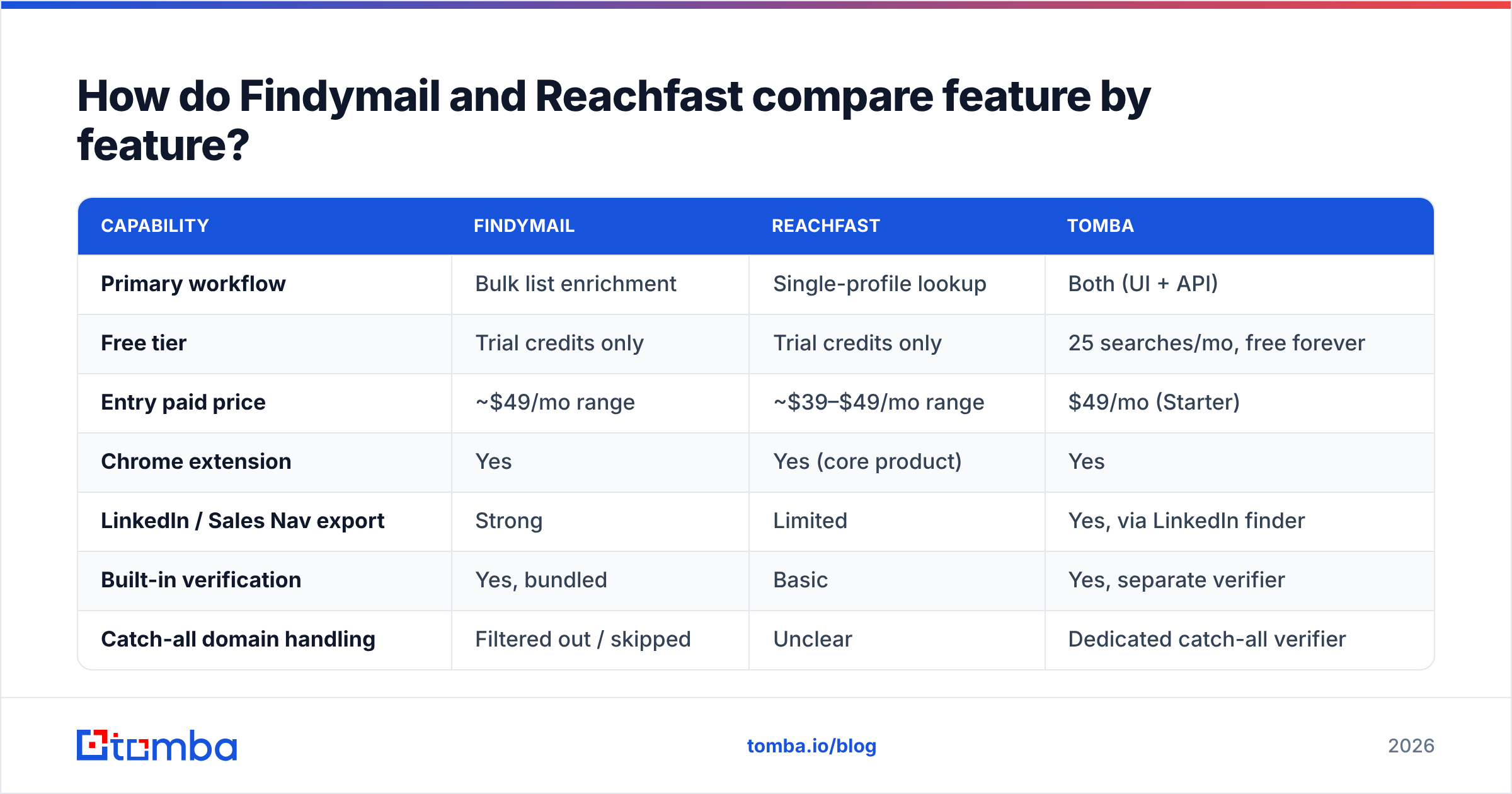
| Capability | Findymail | Reachfast | Tomba |
|---|---|---|---|
| Primary workflow | Bulk list enrichment | Single-profile lookup | Both (UI + API) |
| Free tier | Trial credits only | Trial credits only | 25 searches/mo, free forever |
| Entry paid price | ~$49/mo range | ~$39–$49/mo range | $49/mo (Starter) |
| Chrome extension | Yes | Yes (core product) | Yes |
| LinkedIn / Sales Nav export | Strong | Limited | Yes, via LinkedIn finder |
| Built-in verification | Yes, bundled | Basic | Yes, separate verifier |
| Catch-all domain handling | Filtered out / skipped | Unclear | Dedicated catch-all verifier |
| Public REST API | Yes | Limited | Yes, full REST API |
| Phone numbers | No | Partial | Yes, phone finder |
| Bulk CSV upload | Yes | Yes | Yes, bulk tools |
| Charged for no-result lookups | No (stated policy) | Check plan terms | No |
The row that decides most purchases is the last one. A tool that charges a credit whether or not it finds an email is quietly 20–40% more expensive than its sticker price. A realistic find rate on a mixed B2B list is 60–80%, not 100%.

Which tool is more accurate at finding emails?#
Neither vendor publishes a third-party-audited accuracy figure, so treat every number on either homepage as a claim, not a fact.
What you can compare is methodology, and here the two diverge:
- Findymail verifies before delivery and openly skips catch-all domains rather than guessing. That is a conservative posture. It produces a lower find rate and a lower bounce rate. If you send 3,000 emails a month from two domains, that trade is almost always correct.
- Reachfast optimises for returning something. Faster, higher apparent coverage, more risk pushed downstream to you. If you run your own email verifier before every send, that risk is manageable. If you don't, it isn't.

The gap most teams miss is catch-all domains. Roughly 15–25% of B2B domains accept mail for every address at the SMTP layer. That means a standard verification ping tells you nothing. One vendor may call an address on a catch-all domain "verified." Another may flag the same address as "risky." Both can be technically defensible — they just draw the line in different places. If your ICP skews enterprise, where catch-all setups are common, you need a catch-all verifier whichever finder you buy.
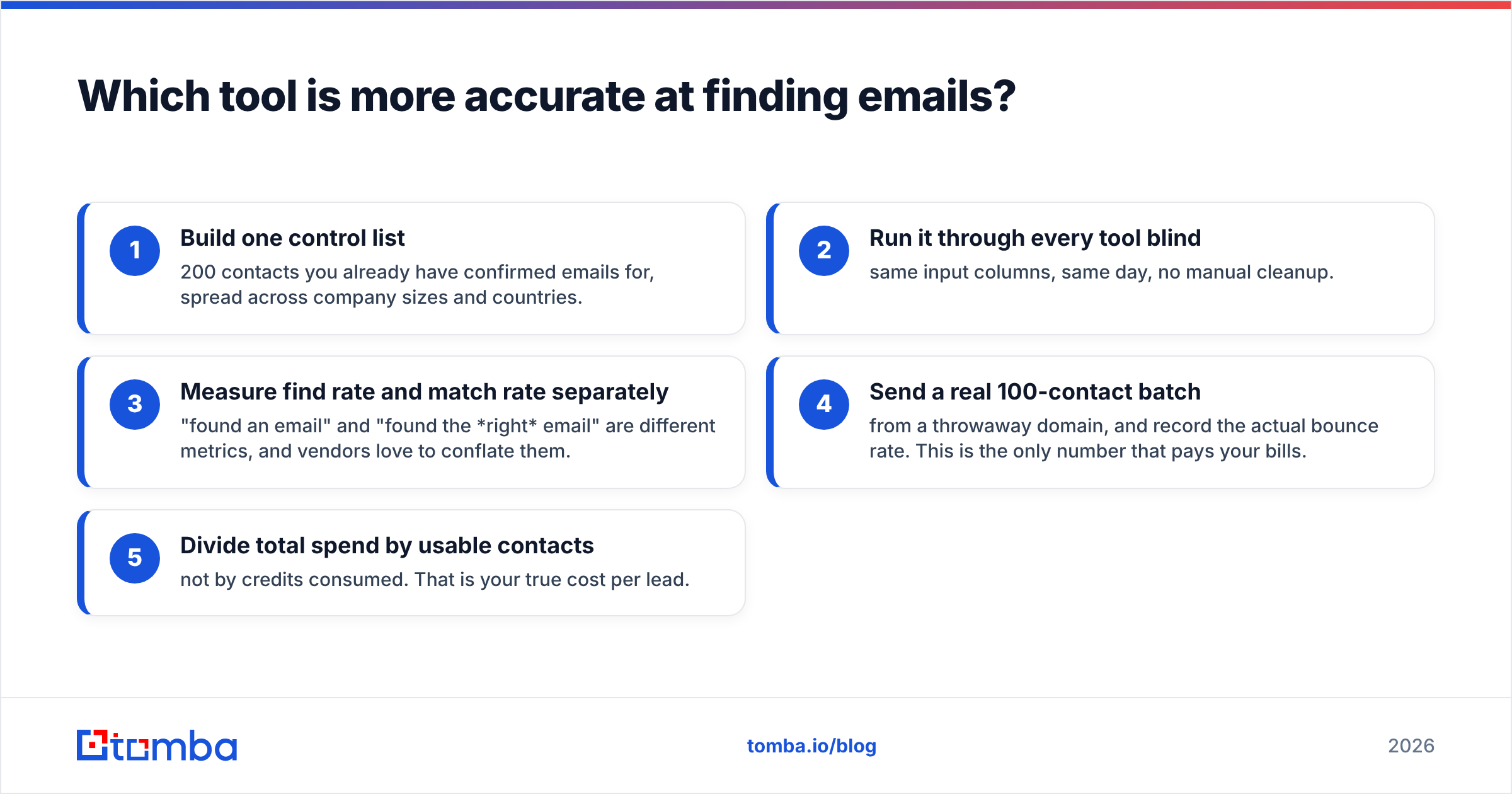
A fair accuracy test looks like this:
- Build one control list — 200 contacts you already have confirmed emails for, spread across company sizes and countries.
- Run it through every tool blind — same input columns, same day, no manual cleanup.
- Measure find rate and match rate separately — "found an email" and "found the right email" are different metrics, and vendors love to conflate them.
- Send a real 100-contact batch — from a throwaway domain, and record the actual bounce rate. This is the only number that pays your bills.
- Divide total spend by usable contacts — not by credits consumed. That is your true cost per lead.
Teams that skip step 4 buy on marketing copy. Teams that run it usually end up with a different tool than they expected.
How does pricing really compare?#
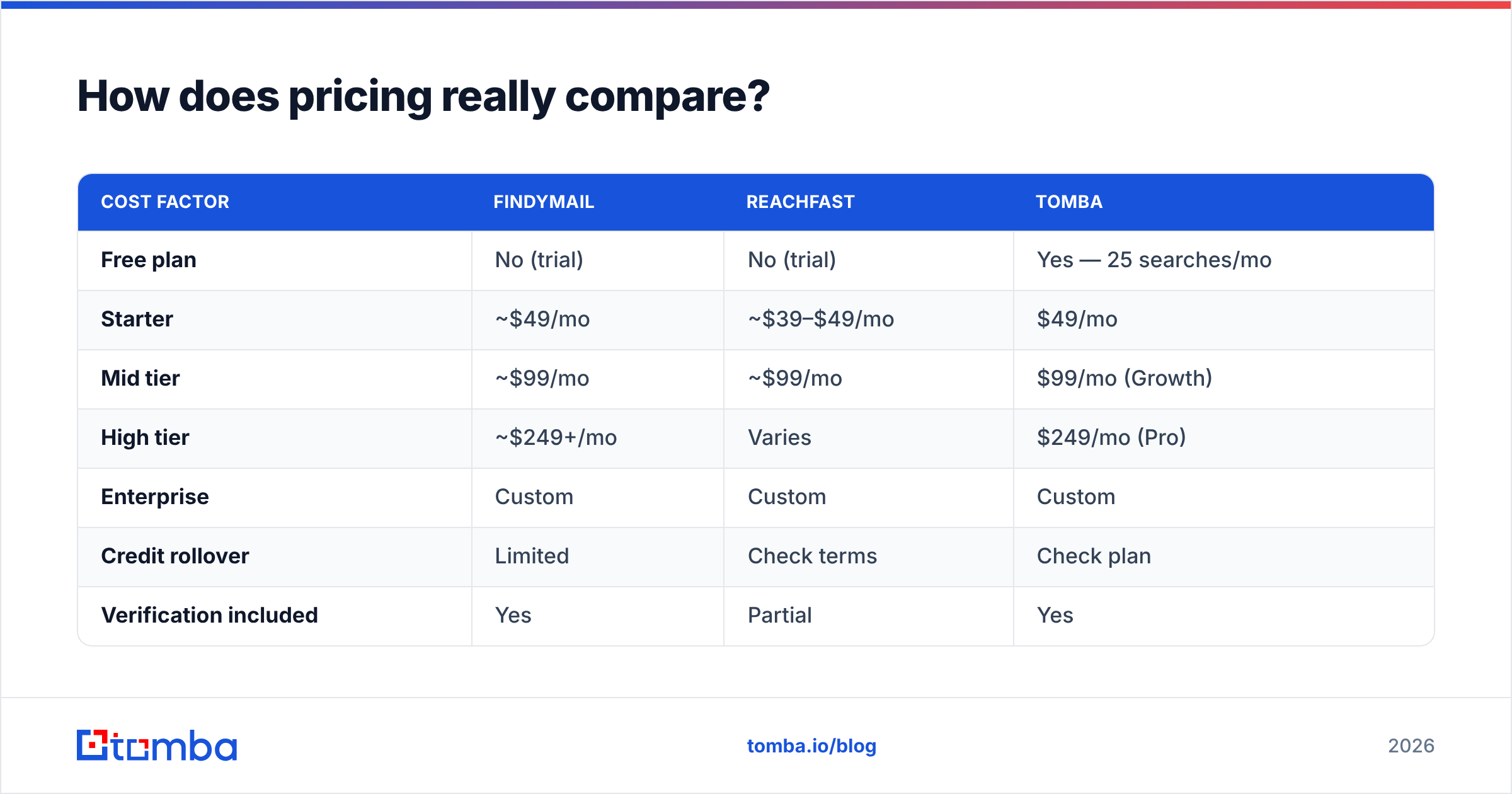
Sticker price is the least useful number in this category. On paper, Findymail vs Reachfast is a close call on price. Credit mechanics are what really determine spend.
| Cost factor | Findymail | Reachfast | Tomba |
|---|---|---|---|
| Free plan | No (trial) | No (trial) | Yes — 25 searches/mo |
| Starter | ~$49/mo | ~$39–$49/mo | $49/mo |
| Mid tier | ~$99/mo | ~$99/mo | $99/mo (Growth) |
| High tier | ~$249+/mo | Varies | $249/mo (Pro) |
| Enterprise | Custom | Custom | Custom |
| Credit rollover | Limited | Check terms | Check plan |
| Verification included | Yes | Partial | Yes |
| API access on entry plan | Yes | Limited | Yes |
| Extra seats | Paid add-on | Paid add-on | Included on higher tiers |

Three pricing traps to check before you enter a card:
1. Credit expiry. Most tools in this space expire unused credits monthly. If your outbound is seasonal or campaign-driven, you're pre-paying for a steady burn you don't actually have. Annual plans with quarterly pooling are worth negotiating for.
2. Verification double-billing. Some vendors charge one credit to find an email and another to verify it. That doubles your effective rate. Read the credit table, not the pricing page headline.
3. Seat pricing. A $49/mo tool that charges $29 per additional seat costs $165/mo for a five-person SDR team. Compare on team cost, not per-user cost. Full Tomba pricing is published per-plan for exactly this reason — you should be able to model your annual spend in five minutes without a sales call.
For a broader field, G2's lead intelligence category is a reasonable place to sanity-check review volume and recency. Just remember that review incentives skew toward whichever vendor is running a gift-card campaign that quarter.
What is each tool genuinely best at?#
Rather than declaring a universal winner, match the tool to the motion:
- Agency list-building at volume — Findymail. The Sales Navigator export path is mature, and the no-charge-on-miss policy protects margins when you're enriching client lists you didn't build.
- AE-led manual prospecting — Reachfast. If a rep opens 30 profiles a day and wants an email in one click, extension speed beats bulk features they'll never touch.
- Programmatic enrichment inside a product or pipeline — Tomba or another API-first vendor. If a workflow engine needs to call an email finder API on signup, extension UX is irrelevant; rate limits, uptime, and response schema are everything.
The next three cases are where both tools start to show their limits:
- Enterprise ICPs with heavy catch-all exposure — whichever tool exposes catch-all status explicitly. Silent skipping and silent guessing are both worse than an honest flag.
- Teams that need phones as well as emails — neither Findymail nor Reachfast is a phone-first tool. You'll need a separate phone finder or a multi-source waterfall.
- Budget-constrained testing — start on a free tier. Paying $49 to discover a 40% find rate on your ICP is an avoidable mistake.

Where do both tools fall short?#
Being direct about the limits, because every comparison post that reads as uniformly positive is useless:
- Neither is a database. Both are lookup engines. Want to discover accounts you don't already have — filtered by headcount, tech stack, or funding? You need a B2B database or an Apollo-class platform on top. These tools enrich lists; they don't generate them from filters.
- Coverage collapses outside North America and Western Europe. Ask both vendors for find-rate data on your specific geography before signing. APAC and LATAM find rates are routinely 20–30 points lower and almost never disclosed.
- Both are single-source-ish. Waterfall enrichment vendors query several providers per contact and pay per successful match. That model costs more per lead but finds more of them. If your list is small and high-value, a waterfall is often better economics than a flat-rate finder.
Two more limits show up once you start sending:
- Support depth varies with plan. Entry tiers usually get email-only support with multi-day turnaround. If a bulk job silently fails the night before a campaign launch, that matters.
- Deliverability is still your problem. No finder fixes a cold domain, missing DMARC, or a spammy first line. Verified emails sent from an unwarmed domain still land in spam. Understanding SMTP verification limits helps set realistic expectations about what any verifier can confirm.
It's also worth noting that this category is wider than two names. Depending on your motion, providers like BookYourData — a well-regarded pay-as-you-go B2B contact source — solve the "I need verified contacts without a subscription" problem from a different angle. Buying a curated list and buying a lookup API are different purchases. Don't force one tool to be both.
Which should you choose in 2026?#
The Findymail vs Reachfast decision comes down to workflow shape, not feature count.
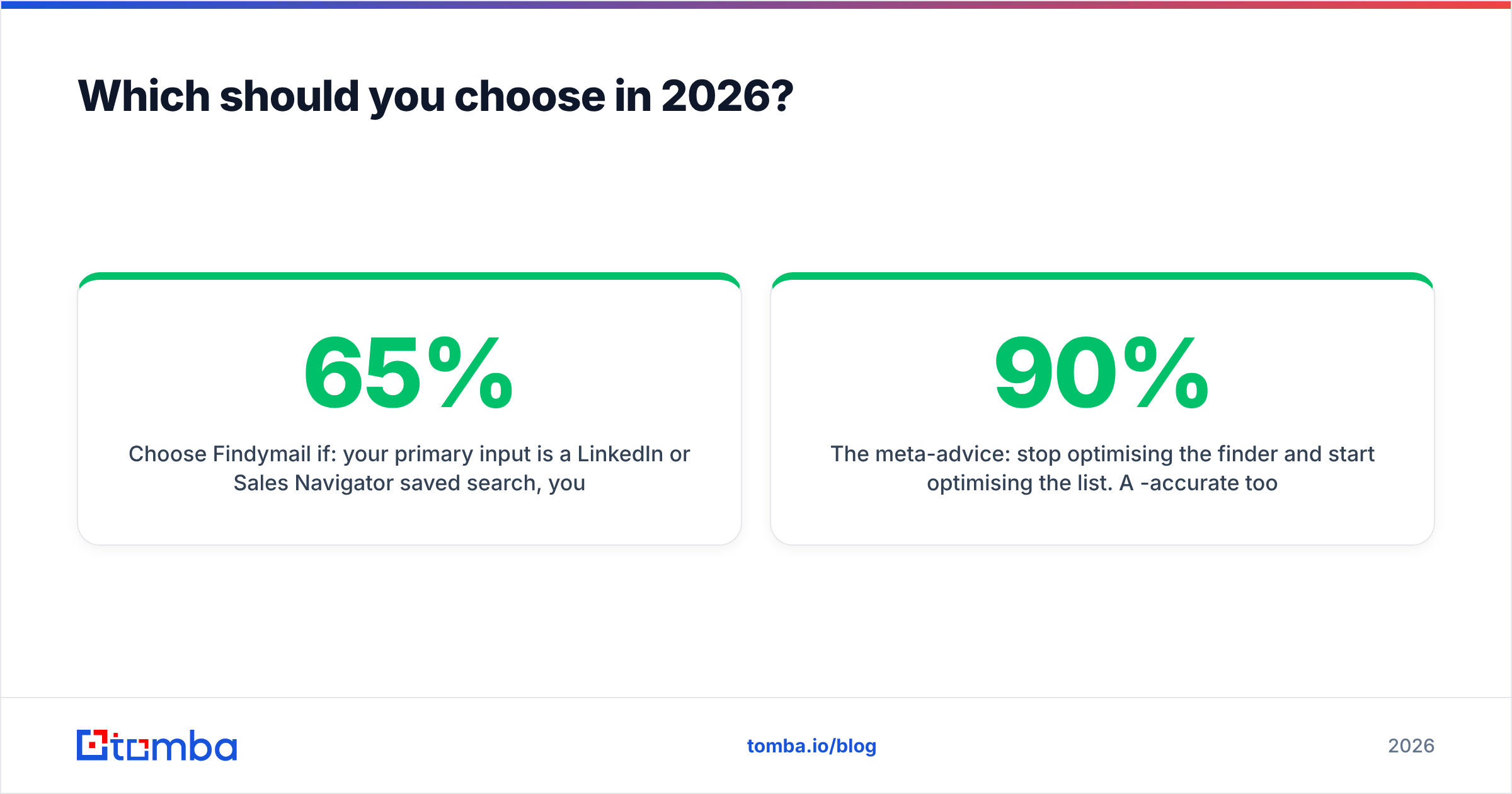
Choose Findymail if: your primary input is a LinkedIn or Sales Navigator saved search and your bounce tolerance is near zero. You'd rather get 65% of a list clean than 85% of it risky. The no-charge-on-miss policy is a genuine differentiator, and it is why agencies stay.
Choose Reachfast if: your reps prospect manually, one profile at a time, and speed-to-email is the metric that matters. Budget for a separate verification step, because you will need one.
Choose a third option if: you need an API, catch-all verification, phone numbers, or a free tier to run a real accuracy test before committing budget. That's the gap Tomba fills. The email finder is the core product, with a verifier, domain search, catch-all verifier, and enrichment on the same credit pool. If you're specifically weighing a Findymail alternative, the deciding factors are usually API depth and the free tier, not raw find rate.
The meta-advice: stop optimising the finder and start optimising the list. A 90%-accurate tool pointed at a vague ICP builds worse pipeline than a 70%-accurate tool pointed at 200 accounts you know well. Teams that chase the last five accuracy points have usually skipped the segmentation work. That work matters ten times more.
How should you run the evaluation?#
Give yourself two weeks and follow this sequence:
- Week 1, day 1–2: Assemble the 200-row control list. Include 40 rows where you already know the correct email.
- Day 3: Run all candidates on trial or free tiers. Record find rate, match rate against the known-40, and wall-clock time.
- Day 4–5: Send a 100-contact batch from a test domain. Record hard bounces, soft bounces, and spam-folder placement if you can measure it.
- Week 2: Model annual cost at your real monthly volume, including seats, verification credits, and overage. Ask each vendor in writing what happens to unused credits.
- Decision: Pick on cost-per-usable-contact, not cost-per-credit. Then re-run this test in six months, because coverage in this category shifts constantly.
Write the results down. In twelve months when someone proposes switching tools again, a documented benchmark is worth more than anyone's opinion — including this post's.
Want to run that benchmark today without a card? The Tomba Email Finder gives you 25 free searches a month, forever. That is enough to test your real ICP against both tools side by side before you spend a dollar. Paid plans start at $49/mo. The verifier, domain search, and API all share the same credit pool, so you're not stitching three vendors together to send one clean campaign.
Related guides#
Ready to find emails that actually work?
Join 150,000+ professionals who stopped guessing and started sending. Free credits on signup — no credit card required.
Get the Tomba newsletter
Practical outbound tactics and product updates — once every two weeks.
About the author