Findymail vs Salesgenie (2026): Which B2B Data Tool Wins?
Findymail sells verified emails for cold outreach. Salesgenie sells US business lists for calls and mail. They solve different problems — here is how to pick, and where the real costs hide.
Findymail vs Salesgenie comes down to one question: do you need emails or lists? Findymail finds and verifies work emails. Salesgenie sells US business lists with phone numbers and mailing addresses. Here is how to pick the right one.
TL;DR
- Findymail is an email finder. Give it a name and a domain, or a LinkedIn export. It returns a verified work email. It suits cold email teams who already know their targets.
- Salesgenie is a list database. Data Axle owns it. It sells a large US business and consumer file with firmographics, phones, and postal addresses. It suits reps who call, mail, and work a territory.
- They barely overlap. Judging Salesgenie on email accuracy is unfair. So is judging Findymail on US small business coverage.
- Pricing works in opposite ways. Findymail bills monthly credits you can cancel. Salesgenie has leaned on annual deals with per-seat and per-record terms. Check the terms before you sign.
- Pick by channel. Email-first outbound needs a finder plus a verifier, such as Findymail or Tomba. Phone and mail into local businesses needs a database.
What is Findymail?#
Findymail is a B2B email finder and verifier built for cold outreach teams. Give it a person and a company, and it returns an email it expects to deliver. The goal is simple: keep bounces off your sending domain. It ships a Chrome extension, LinkedIn and Sales Navigator exports, a spreadsheet-style view, and an API. Current plans are on the Findymail site.
Findymail assumes you already have a target list. It may come from LinkedIn, a scraper, or a CRM export. The missing piece is a valid email. It does not try to catalog every business in North America.
Two things follow from that design. First, you spend credits per successful find. So cost tracks your send volume, not how much data you browse. Second, coverage is best where the web is rich: tech, SaaS, agencies, and mid-market firms with real websites and public team pages.
What is Salesgenie?#
Salesgenie is a lead platform from Data Axle, a data compiler with roots in InfoUSA. It does not resolve one contact at a time. Instead, it gives you a search screen over a file of US businesses and consumers. You filter by SIC/NAICS code, employee count, sales volume, years in business, or radius from a ZIP code. On the consumer side, you can filter by household traits.
The output is a list. You draw a territory, see the count, and pull records. Each record carries a company name, address, phone, and often a contact name and email. Many teams also use the built-in CRM-lite tools, mailing exports, and direct-mail links.
The data is compiled. It comes from phone directories, public filings, business registrations, self-reported updates, and phone checks. That is a very different method than crawling the web and testing SMTP. It explains most of the gaps below.
Findymail vs Salesgenie: how do they really differ?#
Split the job in two. Discovery asks who you should contact. Resolution asks what their email is. Most teams need both. These two tools sit at opposite ends.
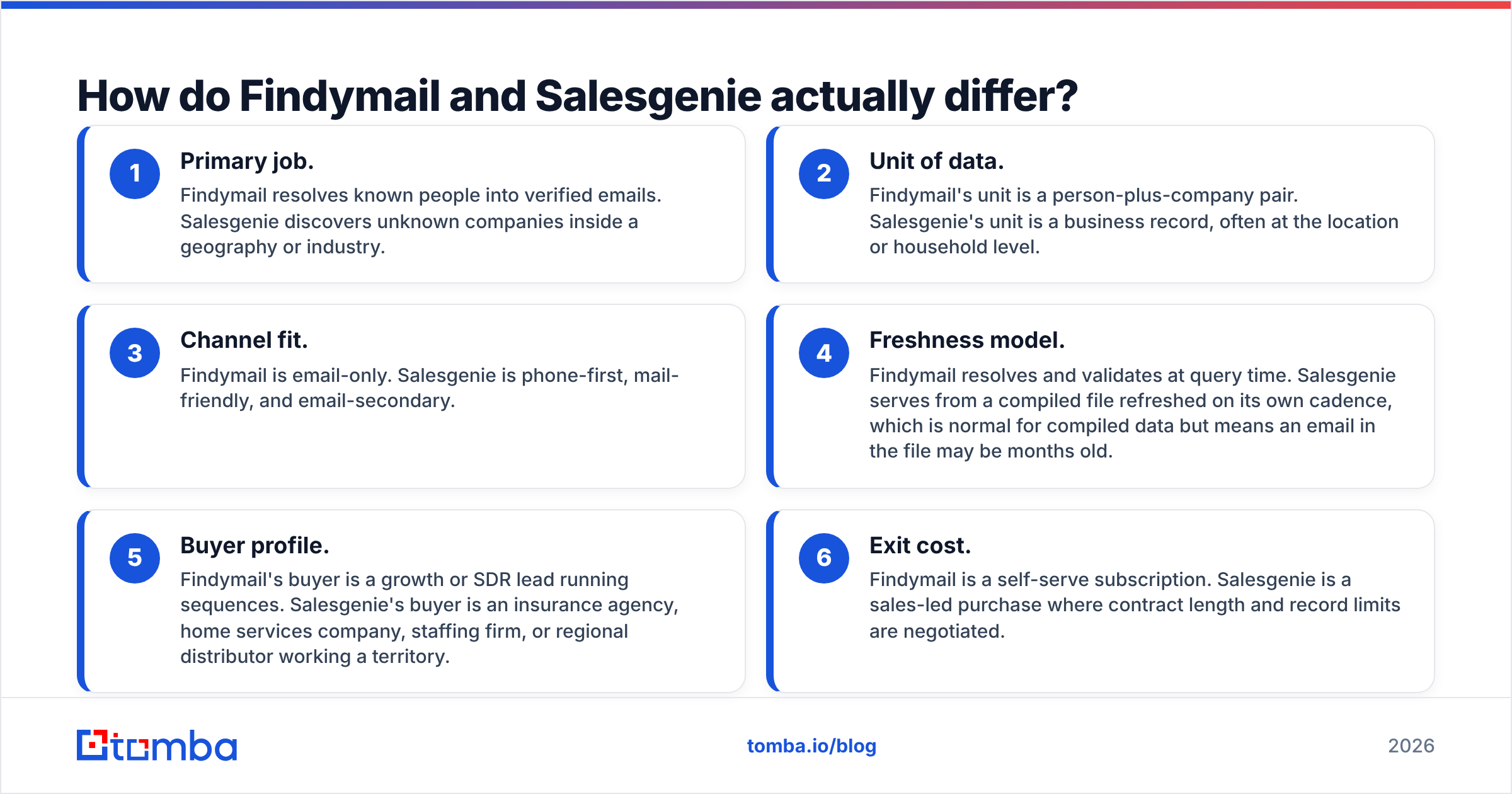
- Primary job. Findymail turns known people into verified emails. Salesgenie finds companies you did not know existed.
- Unit of data. Findymail works on a person plus a company. Salesgenie works on a business record, often per location or household.
- Channel fit. Findymail is email only. Salesgenie leans on phone, works well for mail, and treats email as a bonus.
The next three differences matter most at buying time.
- Freshness. Findymail checks the address when you ask. Salesgenie serves a file that refreshes on its own cycle, so an email in it may be months old.
- Buyer profile. Findymail suits a growth or SDR lead running sequences. Salesgenie suits an insurance agency, a home services firm, a staffing shop, or a regional distributor.
- Exit cost. Findymail is self-serve and monthly. Salesgenie is a sales-led deal, with contract length and record caps up for negotiation.
One line is worth keeping: a database tells you who exists, and a finder tells you how to reach one human. Buying the wrong one is the costly mistake here.
Which one gives you more deliverable emails?#
For cold email, the finder wins. The reason matters more than the verdict.
A compiled database stores email as one field among dozens. No vendor re-checks every email in a multi-million-record file each week. The cost would be absurd. So the email field is a snapshot, and snapshots decay. B2B data has long decayed at roughly 2–3% a month. That is about a quarter of a list per year. Job changes since the 2023 tech layoffs made it worse.
Finders flip the model. They resolve on request, test the address, and return either a result or nothing. That is why a finder reports a hit rate and a bounce rate. A database reports a record count.

Two rules hold with any vendor:
- Never send to a list you have not verified in the last 30 days. Export emails from a database, then run them through an email verifier first. Google and Yahoo treat a complaint rate above 0.3% as a hard limit. Dead addresses also drag every other metric down.
- Put catch-all domains in their own bucket. A catch-all accepts every address at the SMTP layer, so "valid" means little. Send to them at low volume and track replies on their own.

Findymail vs Salesgenie: features and pricing compared#
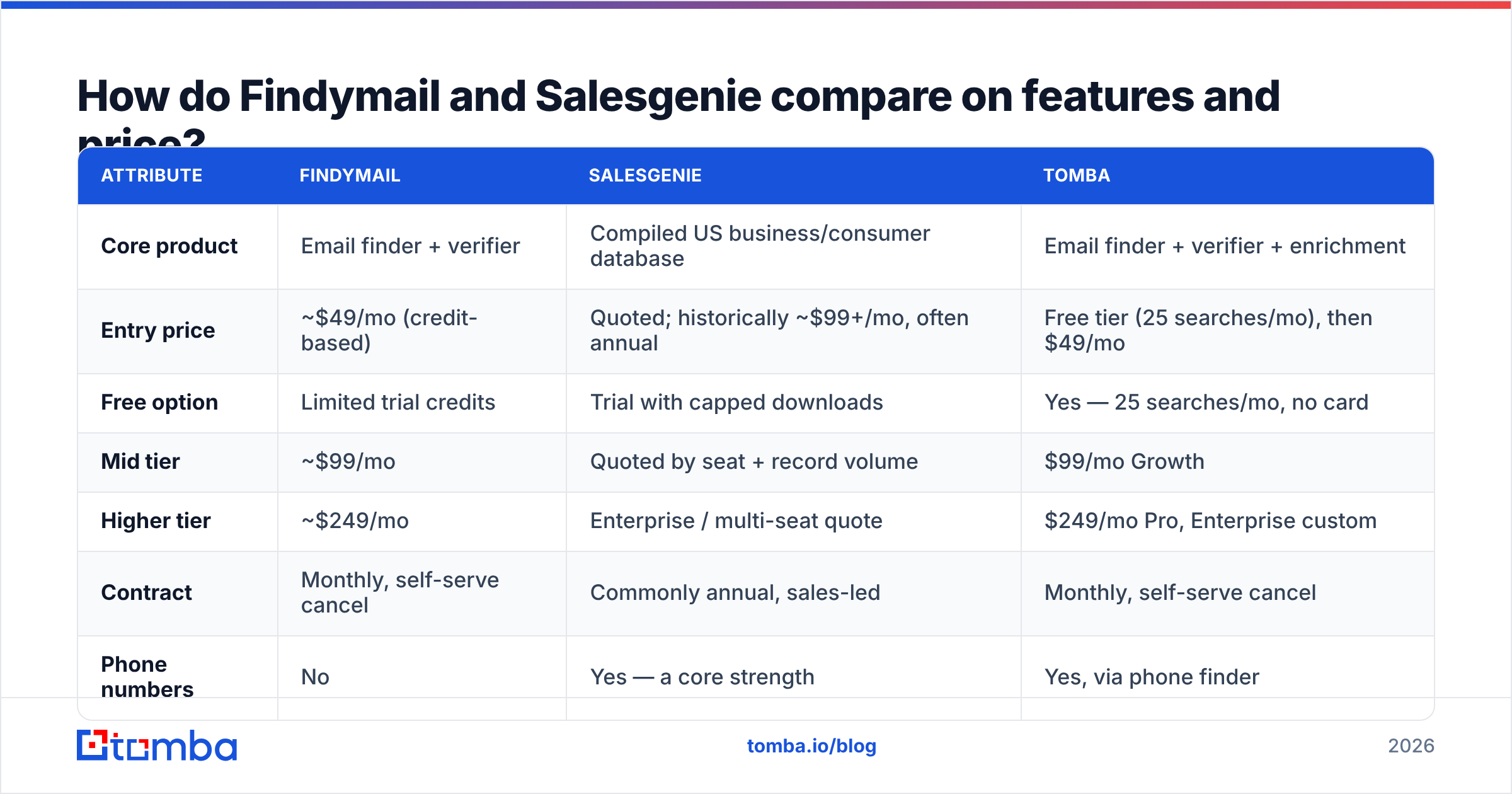
Prices move, and Salesgenie quotes rather than publishes. Treat the figures below as a guide. Confirm them on the vendor page before you buy.
| Attribute | Findymail | Salesgenie | Tomba |
|---|---|---|---|
| Core product | Email finder + verifier | Compiled US business/consumer database | Email finder + verifier + enrichment |
| Entry price | ~$49/mo (credit-based) | Quoted; historically ~$99+/mo, often annual | Free tier (25 searches/mo), then $49/mo |
| Free option | Limited trial credits | Trial with capped downloads | Yes — 25 searches/mo, no card |
| Mid tier | ~$99/mo | Quoted by seat + record volume | $99/mo Growth |
| Higher tier | ~$249/mo | Enterprise / multi-seat quote | $249/mo Pro, Enterprise custom |
| Contract | Monthly, self-serve cancel | Commonly annual, sales-led | Monthly, self-serve cancel |
| Phone numbers | No | Yes — a core strength | Yes, via phone finder |
| Postal addresses | No | Yes | No |
| Firmographic search | No | Yes — deep US filters | Yes, via domain search |
| API access | Yes | Limited / enterprise | Yes on all paid plans |
| Bulk processing | Yes | Yes (list export) | Yes, bulk finder and verifier |
| Best for | Cold email at scale | Local/regional phone and mail outreach | Email-first outbound needing API + verification |
Read that table with three cautions.
Price units differ. A Findymail credit and a Salesgenie record are not the same thing. One credit buys a verified email for a person you chose. One record buys a company you had not found, plus a phone you can dial today. Only cost per booked meeting reconciles them, and that depends on your channel.
Contracts differ. The loudest complaint in Salesgenie's G2 reviews is not data quality. It is the annual commitment and the work of getting out of it. That is normal for compiled-data vendors. Still, it changes your risk next to a $49 tool you can cancel after one bad month.
Coverage differs. Salesgenie is deep on US small business: the plumber, the two-office dental practice, the local insurance agency. Web crawlers are weak there. Those firms often have no team page, no LinkedIn profile, and a Gmail address on the website. If that is your ICP, no finder will please you.
Where does Tomba fit in this comparison?#
Tomba sits on the finder side of the line, next to Findymail, with a wider toolkit.
The email finder turns a name plus a domain into a verified address. That is the same core job Findymail does. The extras differ: domain search to map every public address at a company, a catch-all verifier for the murky bucket above, a phone finder, reverse email lookup, and enrichment for CRM records.
Three practical differences are worth naming:
- A real free tier. 25 searches a month, no card. Test accuracy on your own ICP before you spend. Vendor benchmarks run on samples that flatter the vendor.
- API on every paid plan. If you build enrichment into a Clay table, an n8n job, or a script, API access should not sit behind an upgrade. Tomba offers an email finder API, plus a CLI and an MCP server for agent workflows.
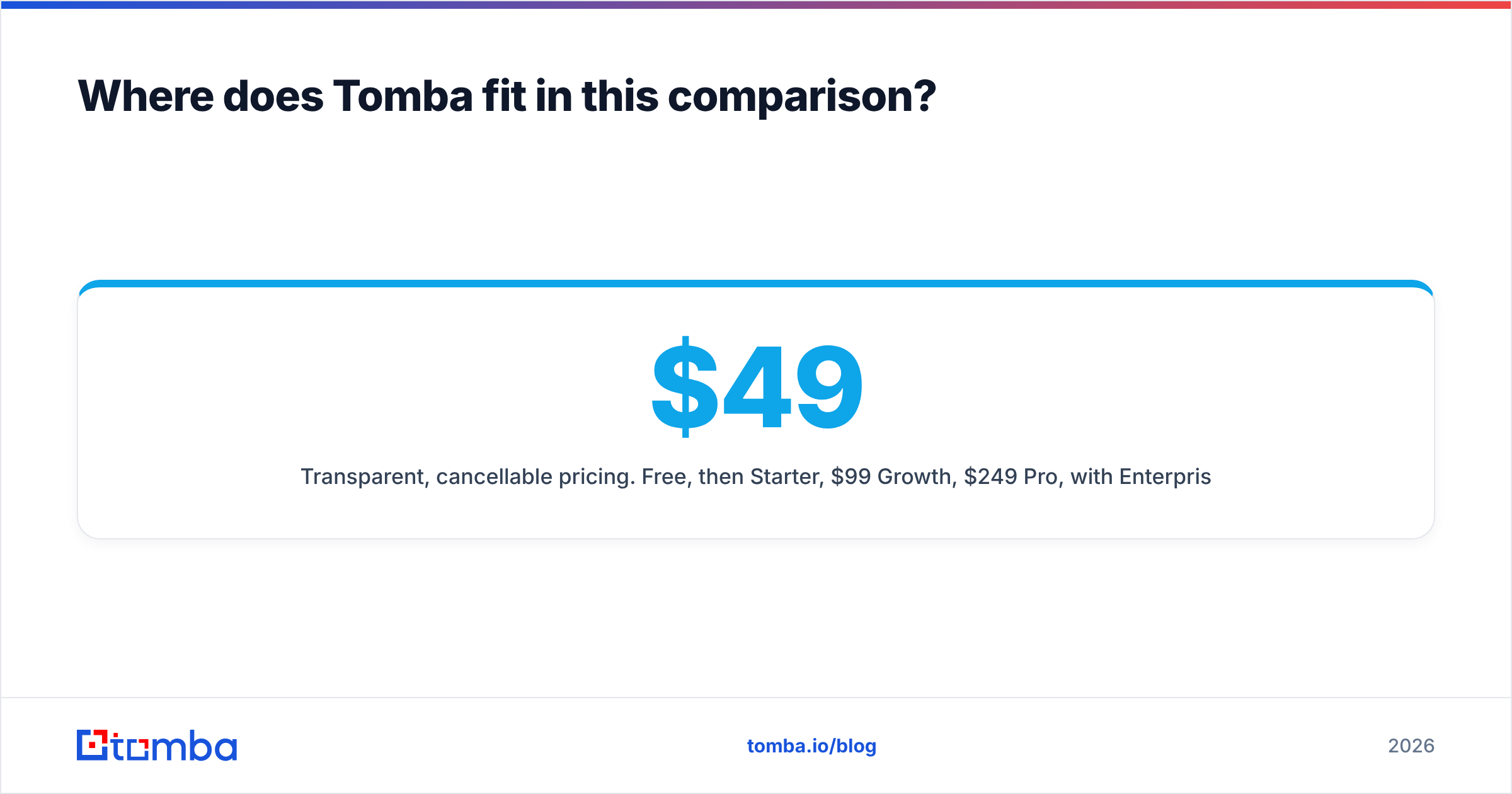
- Clear, cancellable pricing. Free, then $49/mo Starter, $99/mo Growth, and $249/mo Pro. Enterprise is quoted. See the Tomba pricing page. For a head-to-head, read the Findymail alternative page.
None of that replaces Salesgenie. If you need every HVAC firm within 40 miles of Tulsa with a phone attached, buy the database. No email finder can do that job.
Which should you choose?#
Answer three questions and the choice makes itself.
1. What channel do you run? If most of your pipeline comes from dials or direct mail to local firms, buy the database. If you run cold email to companies you have already researched, buy the finder.
2. Do you know your targets first? If you build lists from Sales Navigator, intent data, job boards, or site visitors, you have discovery covered. You only need resolution, and that is a finder. If you start from "who in this ZIP code does X," you need discovery, and finders cannot do it.
3. How much contract risk can you take? A seasonal business, an agency testing a vertical, or an early startup should skip annual data deals. Monthly credits let you scale down in a slow quarter.
A hybrid is common and often correct. Use a database to map the territory. Then use a finder and a verifier on the decision-makers you want to email. Verify the compiled emails first. That one step prevents most deliverability damage.
One compliance note before you buy either. Consumer records, household data, and phone data carry rules that business email does not. Calls fall under TCPA and state dialing laws. GDPR or CCPA may apply based on where your contacts live. Check whether your use case is B2B only. Confirm the vendor's data sources and lawful basis. HubSpot keeps a plain guide to GDPR for sales teams.
Frequently asked questions#
Is Salesgenie the same as Data Axle? Salesgenie is Data Axle's product for smaller teams. The file behind it is the same compiled data.
Can Findymail replace a database? No. It resolves contacts you supply. You cannot search for companies by industry, revenue, or radius.
Will emails from a compiled database bounce? Some will. The file refreshes on a cycle, not on request. Verify before every send, not just the first import.
Is a free trial enough to judge accuracy? Only if you test your own ICP. Run the same 50 real prospects through each tool. Then compare hit rate and bounce rate.
Findymail vs Salesgenie: can I use both? Yes, and many teams do. Build the territory list in Salesgenie, then resolve and verify emails with a finder.
Start with the list you already have#
Is your outbound email-first? Run the cheapest test first. Take 50 real targets from your ICP. Resolve them, verify them, and send. One week of that teaches more than any comparison post.
The Tomba Email Finder is a fine place to run that test. The free tier covers 25 searches a month with no card. Verification is built in, not bolted on. If the results do not beat your current tool, you lost only an afternoon.
Related guides#
Ready to find emails that actually work?
Join 150,000+ professionals who stopped guessing and started sending. Free credits on signup — no credit card required.
Get the Tomba newsletter
Practical outbound tactics and product updates — once every two weeks.
About the author