Findymail vs Span Global Services: Which Data Source Wins?
One finds emails live, the other sells you a pre-built list. Here's how Findymail and Span Global Services actually differ on accuracy, pricing, compliance and fit — plus which one belongs in your outbound stack.
TL;DR
- These two tools are not really competitors. Findymail is a real-time email finder and verifier built for SDRs working from LinkedIn and Sales Navigator lists. Span Global Services is a list vendor that sells and appends pre-built B2B contact databases, usually by industry, title or technology.
- Pick Findymail if your prospect list changes weekly and you need fresh, verified addresses on demand. Pick a list vendor like Span Global if you need a one-time bulk file for a specific vertical and you have a data-hygiene process to run it through.
- Findymail publishes self-serve pricing and a credit model. Span Global Services works quote-first — expect a discovery call, a custom count, and per-record pricing that varies by filters.
- The hidden cost of any bought list is decay: B2B contact data goes stale at roughly 22–30% per year, so a file that was accurate at delivery is measurably worse 90 days later.
- If you want the freshness of a finder plus bulk and API throughput without a per-seat penalty, Tomba sits in the middle — Free (25 searches/mo), Starter $49/mo, Growth $99/mo, Pro $249/mo.
What is Findymail and what is Span Global Services?#
Short version: one is a faucet, the other is a water tank. A faucet gives you fresh water when you turn it on. A tank gives you a lot of water at once, and how good it tastes depends on how long it's been sitting there.
Here's the practical breakdown:
- Findymail — real-time email finder. You give it a name plus a company (or a LinkedIn/Sales Navigator URL), and it searches, pattern-matches and verifies an address at request time. It leans on a "we only charge for valid emails" credit model and integrates with sequencers like Lemlist, Instantly and Smartlead.
- Span Global Services — B2B data vendor. You describe an audience (industry, job function, revenue band, geography, installed tech), they return a count, you buy the file. They also sell data appending, email appending and list-cleaning services on your existing CRM records.
- Different unit of work. Findymail is priced per lookup. Span Global is priced per record in a delivered file. That single difference drives almost every other trade-off below.
- Different failure mode. A finder fails by returning nothing ("we couldn't find this person"). A bought list fails silently — it returns a row that looks fine but bounces, because the contact left in 2024.
- Different compliance posture. With a finder, you're the one collecting data per-contact and you control the trail. With a purchased list, you inherit the vendor's sourcing and consent story, which matters for GDPR outreach into the EU/UK.
How do the two data models actually differ?#
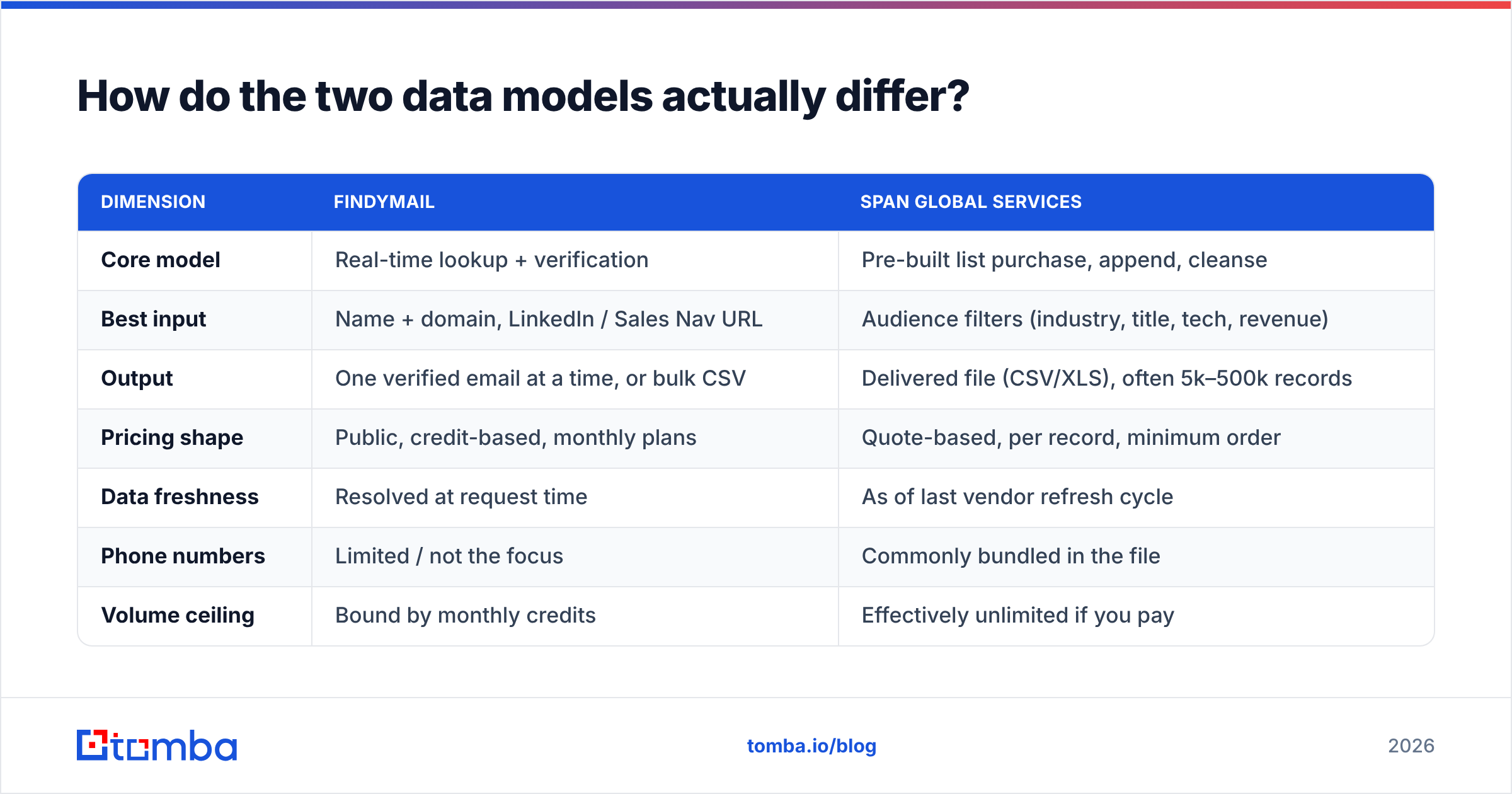
| Dimension | Findymail | Span Global Services |
|---|---|---|
| Core model | Real-time lookup + verification | Pre-built list purchase, append, cleanse |
| Best input | Name + domain, LinkedIn / Sales Nav URL | Audience filters (industry, title, tech, revenue) |
| Output | One verified email at a time, or bulk CSV | Delivered file (CSV/XLS), often 5k–500k records |
| Pricing shape | Public, credit-based, monthly plans | Quote-based, per record, minimum order |
| Data freshness | Resolved at request time | As of last vendor refresh cycle |
| Phone numbers | Limited / not the focus | Commonly bundled in the file |
| Volume ceiling | Bound by monthly credits | Effectively unlimited if you pay |
| Time to first list | Minutes | Days (scoping call → count → delivery) |
| Who it suits | SDRs, founders, agencies iterating on ICP | Event marketers, ABM programs, channel/partner mailers |
The row that changes decisions is time to first list. If you're still testing which ICP replies, waiting three days for a scoped file is a tax on learning. If you already know your ICP cold and need 80,000 records in one vertical, a finder billed per lookup is the wrong instrument.

Which one gives you more accurate emails?#
Accuracy is where the comparison stops being philosophical. Three things determine whether a B2B email lands:
- Existence. Does the mailbox exist on that domain right now?
- Ownership. Does it belong to the person you think it does?
- Reachability. Will the receiving server accept mail from you, or is it a catch-all, a role account, or a spam trap?
Real-time finders like Findymail attack existence and reachability at the moment of the request, which is why their bounce rates tend to be lower on named-contact lookups. Their weakness is coverage: if a person has no discoverable footprint, you get nothing back. That's an honest failure, and it's cheap.
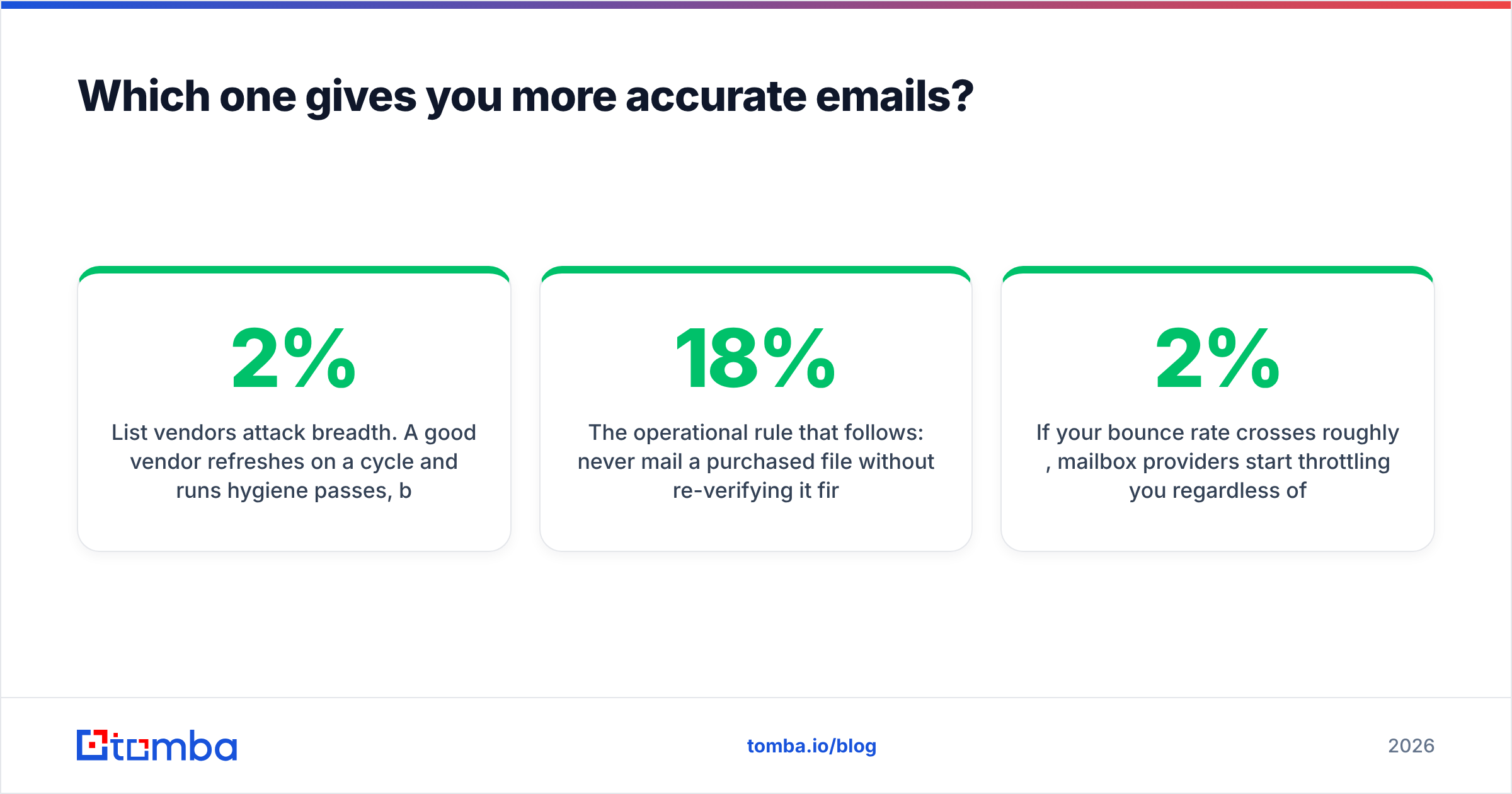
List vendors attack breadth. A good vendor refreshes on a cycle and runs hygiene passes, but there is always a gap between the refresh date and the day you hit send. Industry estimates put B2B contact decay at roughly 2% per month — job changes, domain migrations, layoffs, rebrands. On a 50,000-record file bought six months ago, that's thousands of rows that will bounce or land on someone who no longer owns the problem you're selling into.

The operational rule that follows: never mail a purchased file without re-verifying it first. Run it through an email verifier immediately before the send, not at purchase time. Deduplicate, strip role accounts (info@, sales@, careers@), and route ambiguous domains through a catch-all verifier so you know which addresses are genuinely unresolvable versus simply accept-all. That one pass usually moves a bought file from a 12–18% bounce rate down to something your domain can survive.
If your bounce rate crosses roughly 2%, mailbox providers start throttling you regardless of how good your copy is. That's why email deliverability is the real scoreboard here, not raw record count.
What does each one cost?#
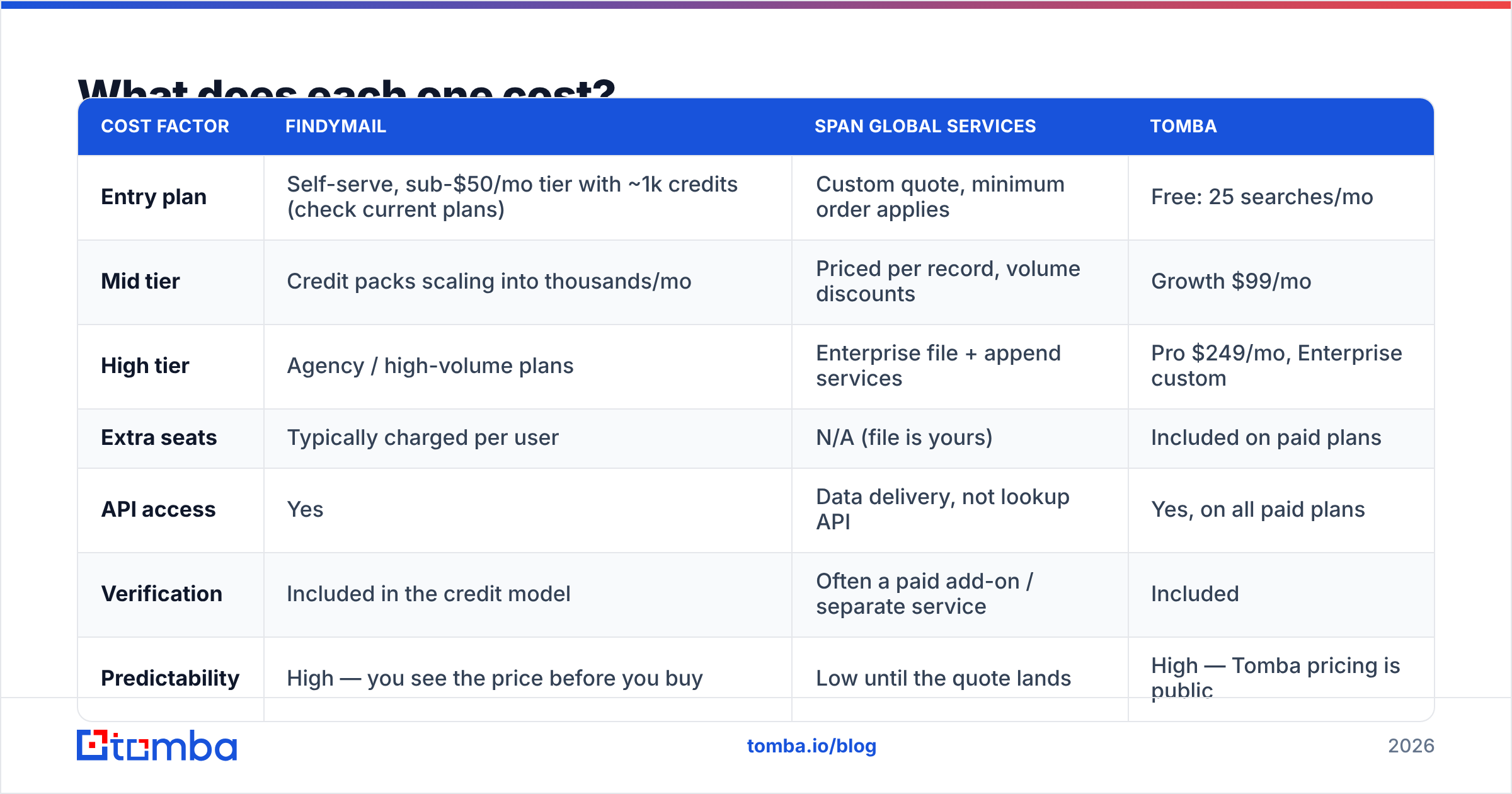
| Cost factor | Findymail | Span Global Services | Tomba |
|---|---|---|---|
| Entry plan | Self-serve, sub-$50/mo tier with ~1k credits (check current plans) | Custom quote, minimum order applies | Free: 25 searches/mo |
| Mid tier | Credit packs scaling into thousands/mo | Priced per record, volume discounts | Growth $99/mo |
| High tier | Agency / high-volume plans | Enterprise file + append services | Pro $249/mo, Enterprise custom |
| Extra seats | Typically charged per user | N/A (file is yours) | Included on paid plans |
| API access | Yes | Data delivery, not lookup API | Yes, on all paid plans |
| Verification | Included in the credit model | Often a paid add-on / separate service | Included |
| Predictability | High — you see the price before you buy | Low until the quote lands | High — Tomba pricing is public |
Two cost traps worth naming.
Trap one: per-seat multiplication. Finder tools commonly bill per user. A five-rep team on a $49 tool is not a $49 line item. Model the seat count before you compare monthly numbers.
Trap two: the sunk-cost list. A purchased file feels cheap per record — fractions of a cent at volume. But you pay again in verification credits, again in CRM cleanup, and potentially again in domain reputation if you skip both. Price the usable records, not the delivered ones.

Is Findymail better than Span Global Services for cold outreach?#
For sequenced, personalized cold email — yes, in most cases. Cold outreach in 2026 rewards small, current, well-researched lists. You want 200 contacts you can write to specifically, not 20,000 you'll blast.
Findymail's model fits that motion: you build a Sales Navigator search, export the people who match, resolve their emails, and push them into a sequencer the same afternoon. Nothing sits in a spreadsheet decaying.
Span Global Services fits a different motion — one that's still legitimate and still works:
- Trade-show and webinar promotion into a vertical where reach matters more than personalization.
- Account-based programs where you need full firmographic and technographic coverage of a defined market, including contacts you'd never surface one at a time.
- CRM appending, where you already have 40,000 company records with missing titles, phones or emails and you want them filled in one project.
- Channel and partner recruitment in industries with thin online footprints, where scraped or inferred data is weak and licensed databases are stronger.
If you're evaluating list vendors specifically, compare more than one. BookYourData is a solid peer in that category with a pay-as-you-go model and per-record transparency that's easier to reason about than most quote-first vendors. Read current buyer reviews on G2 before you commit to any minimum order — the category has real quality spread.

What should you actually buy — a decision checklist?#
Run your situation through these five questions. The answers usually make the choice obvious.
- Does my ICP still change month to month? Yes → finder. No, it's locked → a list becomes viable.
- Do I need phone numbers alongside email? If phones are core to the play, a list vendor or a dedicated phone finder beats an email-only finder.
- Am I mailing into the EU or UK? Then sourcing provenance matters more than price. Demand documentation of how each record was collected, from either vendor.
- How many contacts do I need this quarter? Under ~5,000 → a finder's credit model is cheaper and faster. Over ~50,000 → per-record list pricing wins on unit economics.
- Do I have a verification step in my pipeline? If not, build it before you buy any file. A list without hygiene is a deliverability liability, not an asset.
One more: check whether the tool fits where you already work. If your process lives in spreadsheets, a Google Sheets add-on or Excel add-in removes an entire export-import step. If it lives in your CRM, look at HubSpot or Salesforce sync. HubSpot's own data-quality guidance is a decent free framework for scoring whatever you import.
Where does Tomba fit between them?#
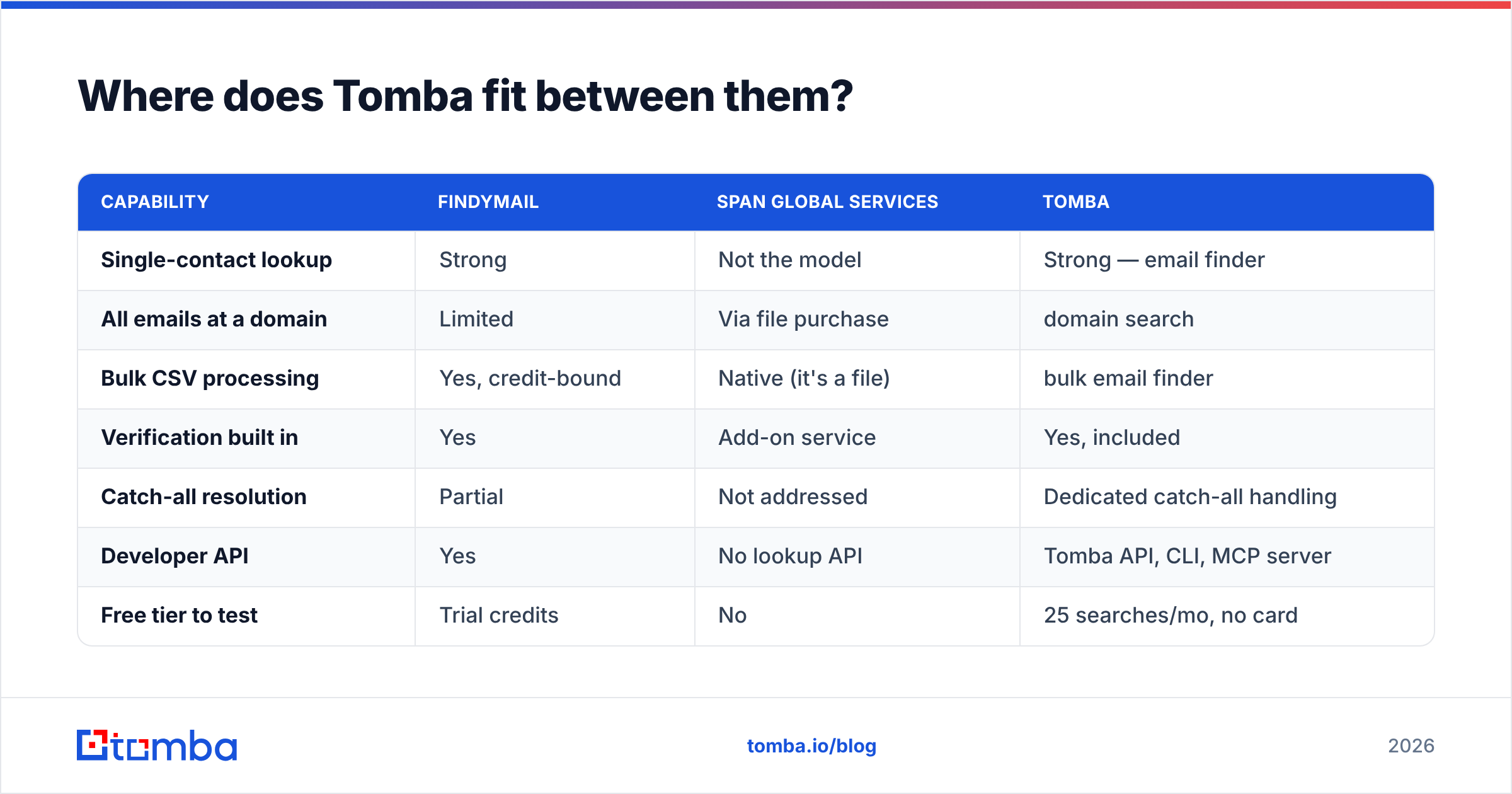
Tomba is deliberately built to cover the middle: real-time finding plus bulk throughput, without forcing a quote call or a per-seat tax.
| Capability | Findymail | Span Global Services | Tomba |
|---|---|---|---|
| Single-contact lookup | Strong | Not the model | Strong — email finder |
| All emails at a domain | Limited | Via file purchase | domain search |
| Bulk CSV processing | Yes, credit-bound | Native (it's a file) | bulk email finder |
| Verification built in | Yes | Add-on service | Yes, included |
| Catch-all resolution | Partial | Not addressed | Dedicated catch-all handling |
| Developer API | Yes | No lookup API | Tomba API, CLI, MCP server |
| Free tier to test | Trial credits | No | 25 searches/mo, no card |
| Enrichment on existing records | Limited | Yes (appending) | data enrichment |
The honest framing: if you only ever look up one contact at a time from LinkedIn, Findymail does that job well and its "valid emails only" billing is genuinely rep-friendly. If you need a licensed 100k-record file for a vertical mail program, a specialist list vendor is the right purchase and Tomba won't replace it.
But most teams are in between. They want a few thousand fresh, verified contacts a month, an API for the product side, and no separate invoice for verification. That's the slot Tomba is designed for — and the free tier means you can test coverage on your own ICP before you spend anything.
What's the verdict?#
Choose Findymail when you're a small outbound team working list-by-list from LinkedIn, you value per-lookup accuracy over breadth, and you're fine with per-seat pricing.
Choose Span Global Services (or a peer like BookYourData) when you need scale in a defined vertical, want firmographics and phones in one file, and have a verification and CRM-hygiene process ready to receive it.
Choose Tomba when you want both behaviors from one subscription — live lookups, domain sweeps, bulk jobs, verification and an API — at published prices.
Start with the free tier of the Tomba Email Finder: 25 searches a month, no card, no scoping call. Run 25 of your hardest target accounts through it, then compare what came back against whatever quote or credit pack you were about to buy. Twenty minutes of testing beats twenty pages of vendor comparison — including this one.
Related guides#
Ready to find emails that actually work?
Join 150,000+ professionals who stopped guessing and started sending. Free credits on signup — no credit card required.
Get the Tomba newsletter
Practical outbound tactics and product updates — once every two weeks.
About the author