Findymail vs Spherescout: Which Email Finder Wins in 2026?
Findymail and Spherescout both promise verified B2B emails, but they solve different problems. Here is the honest breakdown on accuracy, credits, pricing, and API depth — plus where each one quietly falls short.
Findymail vs Spherescout comes down to one question: do you already have a list, or do you still need to build one? Findymail cleans and verifies the lists you bring. Spherescout helps you find the accounts first. Here is how the two compare on accuracy, credits, price, and API depth.
TL;DR
- Findymail is a mature, deliverability-first email finder built for cold-email teams. It keeps bounce rates low and charges only for verified emails.
- Spherescout is the newer, smaller entrant. It works as a discovery layer: find the company, find the people, then find the contact data.
- The real choice is volume vs discovery. Findymail wins when you have a list to clean. Spherescout is more useful while you are still building one.
- Findymail publishes its pricing openly. Spherescout does not, so budget carefully before you sign an annual deal.
- Want both sides? Tomba starts at $49/mo with 25 free searches to test first.
What are Findymail and Spherescout?#
Findymail is a B2B email-finding tool aimed squarely at cold-email teams. It launched into a crowded market with one idea that stuck: it will not burn your credits on guesses. Search a contact, and if it can't return an address that passes its own verification, you don't pay. That single policy is why it spread through the agency and lead-gen community. You can see the current positioning on the Findymail homepage.
Spherescout is the newer name. It leans on discovery language — mapping a "sphere" of accounts and the people inside them — rather than the flat "paste a name and domain, get an email" workflow. In practice, the product puts more work into company search, filtering, and list building. Contact data is the payoff at the end of that funnel, not the first thing you touch.
That framing matters more than any single feature checkbox. One tool assumes you know who you want to reach. The other assumes you don't yet.
Worth stating plainly: Findymail has years of public reviews on G2 and a long paper trail of user-reported bounce rates. Spherescout does not yet. So test any accuracy claim — including the ones here — on your own list before you trust it at scale.
How do Findymail and Spherescout actually find emails?#
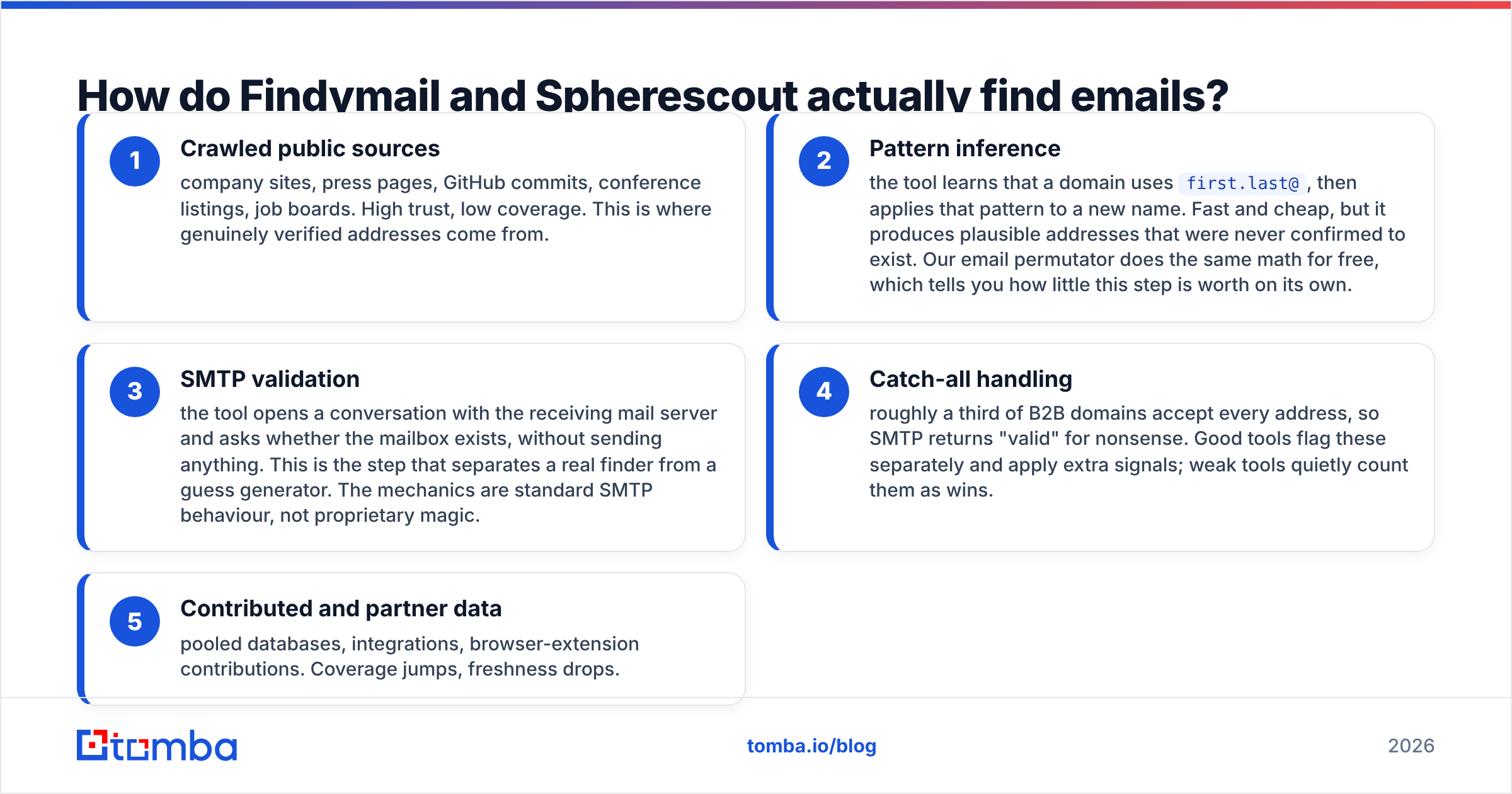
Every email finder in this category runs some combination of the same five techniques. Understanding the mix tells you where each tool will fail:
- Crawled public sources — company sites, press pages, GitHub commits, conference listings, job boards. High trust, low coverage. This is where genuinely verified addresses come from.
- Pattern inference — the tool learns that a domain uses
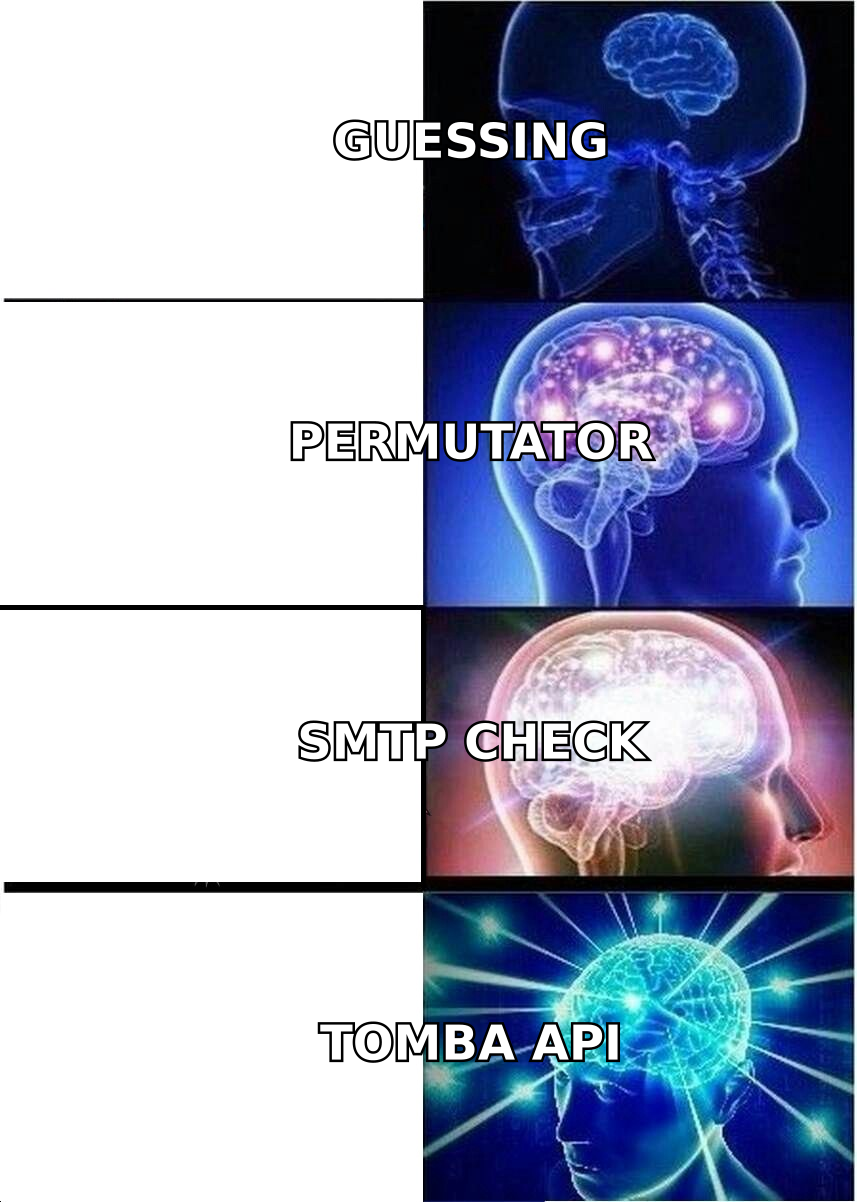
first.last@, then applies that pattern to a new name. Fast and cheap, but it produces plausible addresses that were never confirmed to exist. Our email permutator does the same math for free, which tells you how little this step is worth on its own. - SMTP validation — the tool opens a conversation with the receiving mail server and asks whether the mailbox exists, without sending anything. This is the step that separates a real finder from a guess generator. The mechanics are standard SMTP behaviour, not proprietary magic.
- Catch-all handling — roughly a third of B2B domains accept every address, so SMTP returns "valid" for nonsense. Good tools flag these separately and apply extra signals; weak tools quietly count them as wins.
- Contributed and partner data — pooled databases, integrations, browser-extension contributions. Coverage jumps, freshness drops.
Findymail is heavily weighted toward steps 1, 3 and 4. That is the whole reason it can promise low bounce rates: it drops anything it can't stand behind rather than returning a pattern guess. The trade-off is coverage. On thin domains — small agencies, non-English SMBs, stealth startups — you will get "not found" more often than you would from a big database vendor.
Spherescout, as a discovery-first product, needs breadth to make its search feel useful. Discovery tools almost always lean harder on steps 2 and 5. That is not a knock on the product. It is simple math: you cannot show a user 400 contacts at an account if you only list addresses you confirmed yourself. Verify a sample before you trust the numbers.
Findymail vs Spherescout: which one is more accurate?#
Accuracy in this market is measured two ways, and vendors love to blur them.
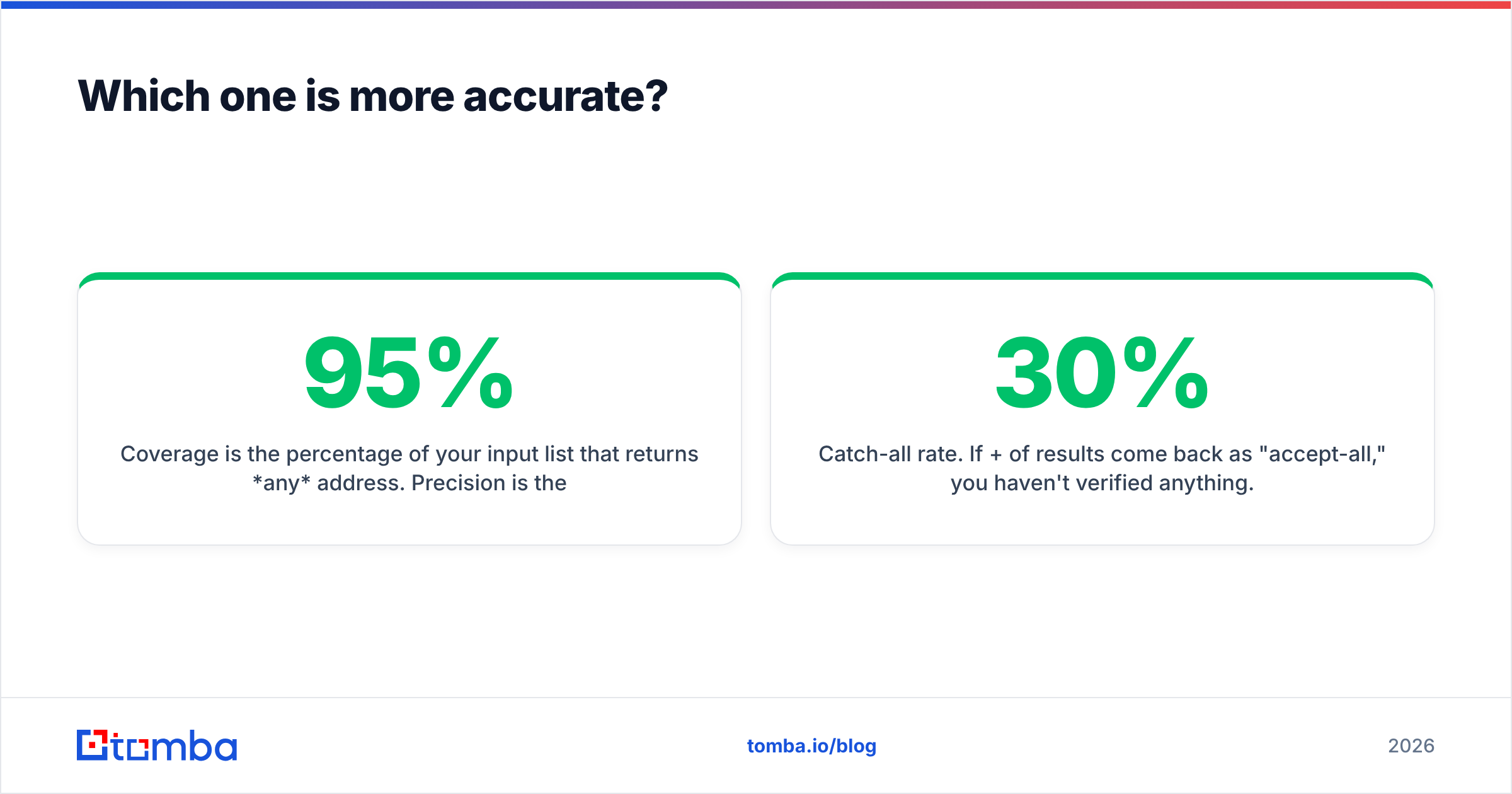
Coverage is the percentage of your input list that returns any address. Precision is the percentage of returned addresses that actually deliver. A tool can hit 95% coverage with 70% precision. It looks great in a demo, then wrecks your sender reputation three weeks later.
Findymail optimises for precision. Users commonly report bounce rates in the low single digits on clean B2B lists. The credit policy also lines the vendor's incentive up with yours: they only get paid when they are right. If you run high-volume cold email, and every bounce costs you inbox placement, this is the correct trade.
Spherescout's accuracy is harder to pin down, because there is far less independent testing available. Discovery-first tools usually report strong coverage numbers. Treat the coverage figure as the marketing number and the bounce rate as the real one.

The only honest way to settle this: take 200 contacts you already know are good, run them through both tools, and compare. Then run the outputs through an independent email verifier — never the vendor's own verifier, which is the same engine that produced the result and will happily confirm its own work.
Two things to watch during that test:
- Catch-all rate. If 30%+ of results come back as "accept-all," you haven't verified anything. Run those through a dedicated catch-all verifier before they go near a sequence.
- Role addresses.
info@,sales@,contact@are technically valid and practically useless for one-to-one outbound. Some tools count them toward coverage.
Findymail vs Spherescout: feature by feature#
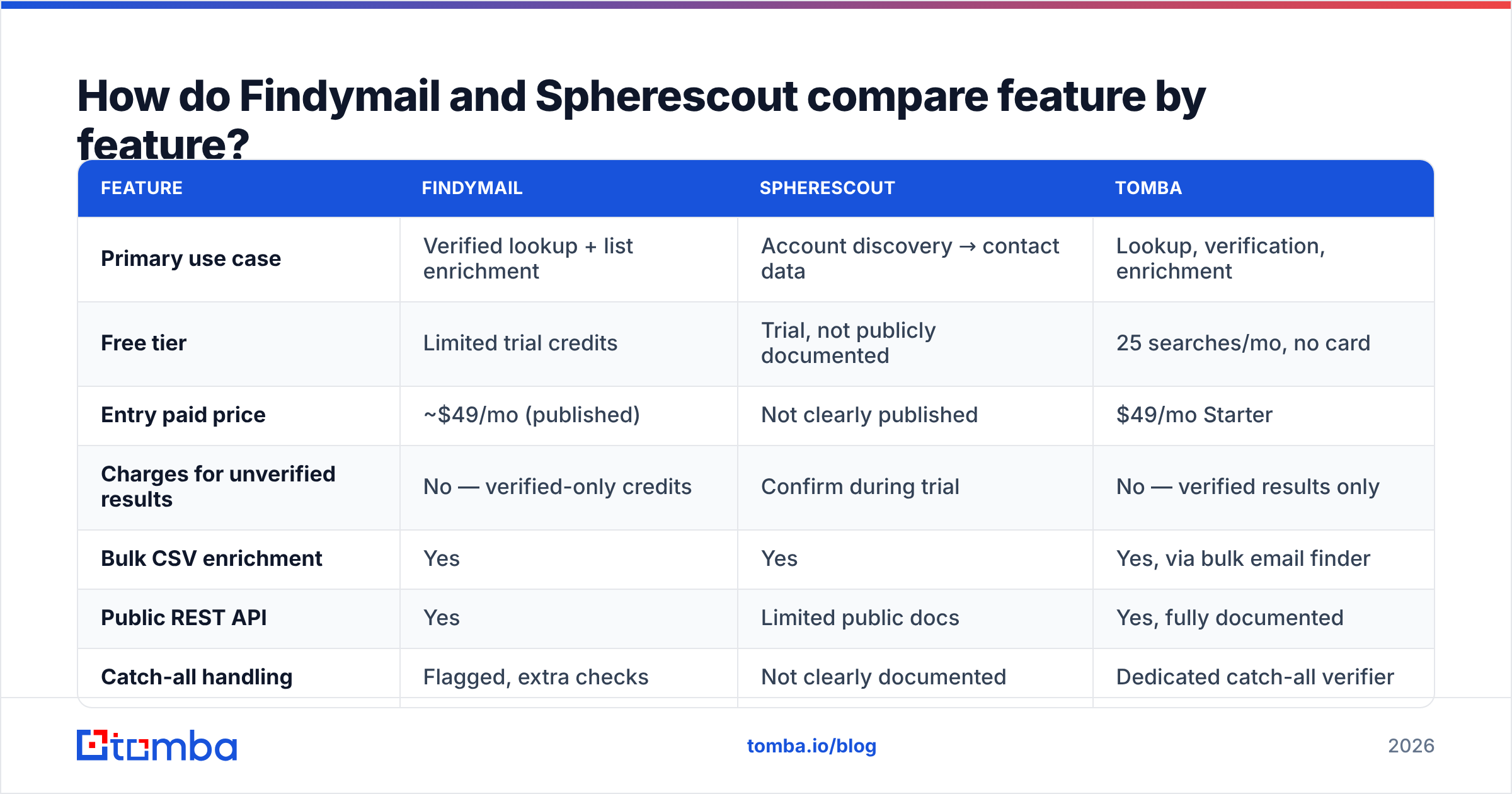
Findymail's public documentation is thorough; Spherescout's is thinner at the time of writing, so treat its column as "confirm during trial" rather than gospel.
| Feature | Findymail | Spherescout | Tomba |
|---|---|---|---|
| Primary use case | Verified lookup + list enrichment | Account discovery → contact data | Lookup, verification, enrichment |
| Free tier | Limited trial credits | Trial, not publicly documented | 25 searches/mo, no card |
| Entry paid price | ~$49/mo (published) | Not clearly published | $49/mo Starter |
| Charges for unverified results | No — verified-only credits | Confirm during trial | No — verified results only |
| Bulk CSV enrichment | Yes | Yes | Yes, via bulk email finder |
| Public REST API | Yes | Limited public docs | Yes, fully documented |
| Catch-all handling | Flagged, extra checks | Not clearly documented | Dedicated catch-all verifier |
| Phone numbers | No | Positioned as available | Yes, phone finder + validator |
| Chrome extension | Yes | Yes | Yes |
| Native CRM sync | HubSpot, Pipedrive, Salesforce | Limited | HubSpot, Salesforce, Pipedrive, Zapier |
| Spreadsheet add-ons | Sheets | Not documented | Sheets, Excel, Airtable |
| Independent review volume | High | Low (newer product) | Moderate and growing |

Two rows deserve more weight than the rest.
Public API depth. If you plan to enrich inside your own workflow — a Clay table, an n8n flow, a CRM webhook, an internal script — a documented, rate-limit-transparent API is not a nice-to-have. Findymail ships one. Spherescout's public API surface is thinner. Tomba's email finder API is documented with SDKs across the usual languages plus a CLI and MCP server, which matters if your prospecting increasingly runs through agents rather than a UI.
Credit policy. "Verified-only credits" sounds like fine print until you model it. At 5,000 lookups a month with a 55% hit rate, a charge-on-attempt tool bills you for 5,000 while a charge-on-success tool bills 2,750. Same work, nearly double the cost. Ask this question in the sales call and get the answer in writing.
What does each one really cost at your volume?#
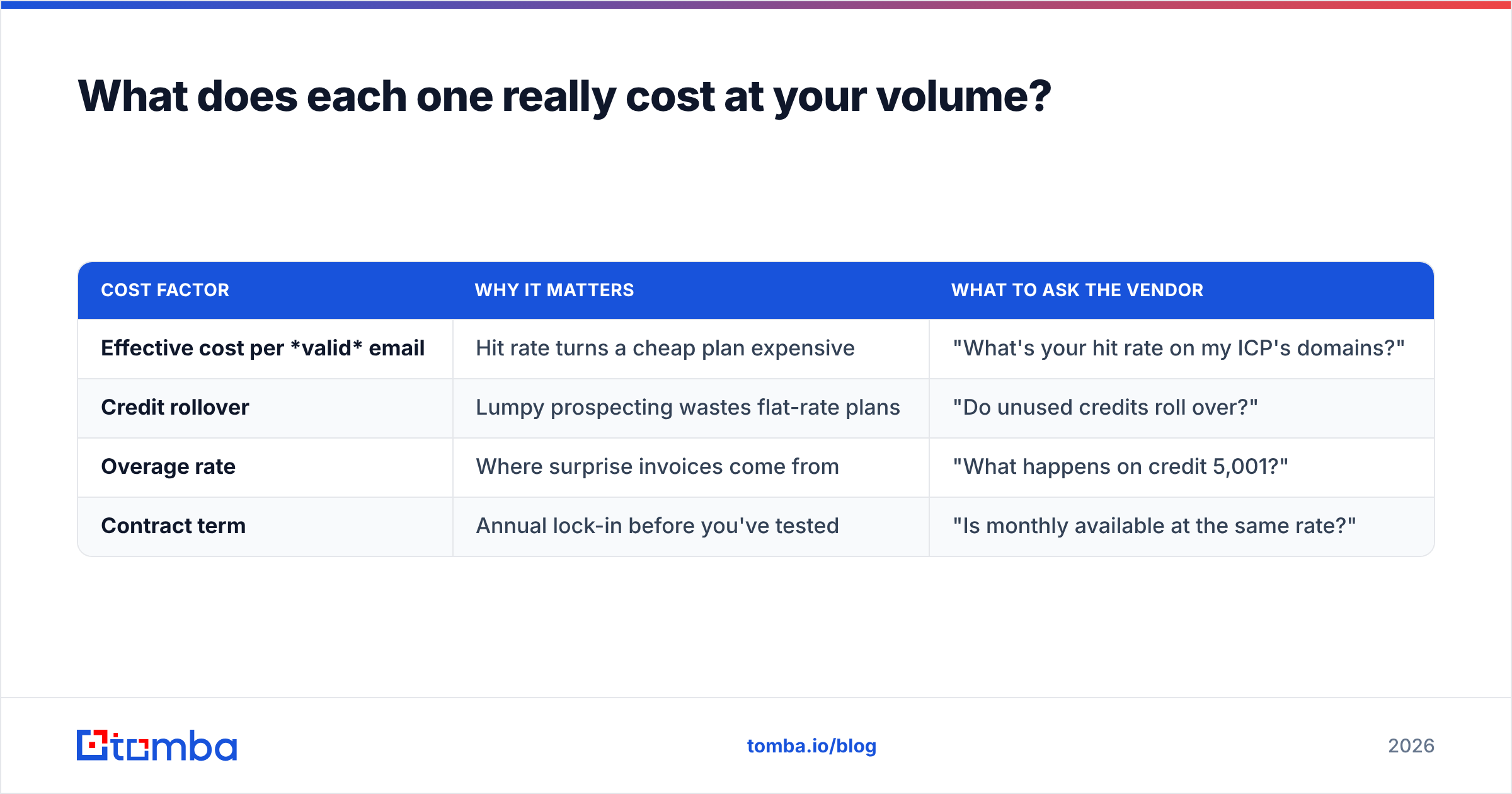
Sticker price is the least interesting number. Model these four instead:
| Cost factor | Why it matters | What to ask the vendor |
|---|---|---|
| Effective cost per valid email | Hit rate turns a cheap plan expensive | "What's your hit rate on my ICP's domains?" |
| Credit rollover | Lumpy prospecting wastes flat-rate plans | "Do unused credits roll over?" |
| Overage rate | Where surprise invoices come from | "What happens on credit 5,001?" |
| Contract term | Annual lock-in before you've tested | "Is monthly available at the same rate?" |
Findymail publishes its tiers openly, which makes modelling straightforward. Spherescout's pricing is less visible publicly — if you are quoted, insist on monthly terms for the first quarter. A newer vendor with a shorter track record is exactly the wrong place to sign a 12-month commitment before you've measured bounce rates on your own data.
For reference, Tomba pricing runs Free (25 searches/mo), Starter $49/mo, Growth $99/mo, Pro $249/mo, and Enterprise on quote — with verification, domain search, and enrichment included rather than sold as add-ons.
Which tool fits which team?#
Choose Findymail if:
- You already know your target accounts and need clean contact data at volume.
- Bounce rate is your primary constraint — you're protecting a warmed domain and can't afford a bad batch.
- You want a tool with years of public reviews behind it rather than a promising newcomer.
- You're running agency-style outbound where one bad list damages a client relationship.
Choose Spherescout if:
- Your bottleneck is finding accounts, not finding emails at known accounts.
- You value an integrated search-to-contact workflow over best-in-class verification.
- You're comfortable running a proper pilot and verifying output independently.
- Your team is small enough that one tool doing several jobs beats three specialised ones.
Consider a third option if:
- You need email and phone numbers from one vendor.
- Your enrichment runs through code, spreadsheets, or an automation platform rather than a UI.
- You want to test properly before paying anything — a real free tier, not a 5-credit teaser.
What should you check before you commit?#
Run this checklist during the trial, not after the invoice:
- Build a 200-row truth set. Contacts whose emails you already know are valid — customers, past replies, LinkedIn connections who've emailed you. Feed it to both tools and score them.
- Measure precision, not coverage. Export results, run them through an independent email checker, and calculate the percentage that actually pass.
- Segment by domain type. Big-tech domains are easy for everyone. Test on your real ICP — 30-person SaaS companies, regional manufacturers, whatever you actually sell to.
- Time the bulk job. A tool that takes six hours on 5,000 rows breaks your weekly cadence.
- Read the credit fine print. Charge-on-attempt vs charge-on-success can double your effective cost.
- Test the API and export path. Can you get your data out cleanly if you leave? Vendor lock-in in data tooling is a slow-motion problem.
One more thing worth saying out loud: no email finder fixes bad targeting. A verified address sent a generic pitch still gets ignored. Tool choice affects your bounce rate and your email deliverability; it does not affect your response rate. That part is still on your offer and your copy.
The verdict#
The short version of Findymail vs Spherescout: Findymail is the safer pick for teams whose main job is turning a known list into a clean, low-bounce sending list. It has the track record, the transparent credit policy, and the deliverability focus to back it up. Spherescout is the more interesting pick if account discovery is your real bottleneck. But it is a newer product with a thinner public record, so pilot it properly and stay on monthly terms until it earns the annual commitment.
If you'd rather not choose between accuracy and breadth, run the same 200-contact test against the Tomba Email Finder. You get 25 searches free with no card, verification and catch-all checks built in rather than bolted on, a documented API with CLI and MCP support for automated workflows, and $49/mo when you're ready to scale. Test all three on your own data — that's the only benchmark that means anything.
Related guides#
Ready to find emails that actually work?
Join 150,000+ professionals who stopped guessing and started sending. Free credits on signup — no credit card required.
Get the Tomba newsletter
Practical outbound tactics and product updates — once every two weeks.
About the author