Findymail vs Stirista: Which B2B Data Tool Wins in 2026?
Findymail is a self-serve email finder. Stirista is an enterprise identity-data platform. They get compared constantly but solve different problems — here's which one fits your outbound motion, and what each really costs.
Findymail vs Stirista is a comparison of two very different tools. One finds work emails one search at a time. The other licenses audience data by the million. Here is the short answer.
TL;DR
- Findymail is a self-serve B2B email finder for cold outreach. Search a person or upload a list, and you get verified work emails. It plugs into Lemlist, Instantly, Smartlead and HubSpot.
- Stirista is an enterprise identity-data and activation platform. It sells audience segments, data appends and targeting across CTV, programmatic and direct mail. Pricing is quote-only, usually on an annual contract.
- The two are not really rivals. If you are an SDR or founder doing outbound, Findymail is the right shape of tool. If you buy audiences for paid media, Stirista is.
- Price is the fastest way to rule one out. Findymail publishes credit plans from about $49/mo. Stirista publishes nothing and books you a sales call.
- Want Findymail's simplicity plus verification, enrichment and an API? Add Tomba to the bake-off. Same $49/mo entry point, with a free tier to test first.
What are Findymail and Stirista, actually?#
Short version: one sells you contacts one search at a time. The other sells you audiences by the million.
Findymail launched as an email finder for cold email teams. The pitch is bounce protection. Every email it returns is verified before delivery, and the company markets a bounce guarantee on credits. Its most-used feature is not the search box. It is the LinkedIn and Sales Navigator list export. Point it at a saved Sales Nav search, and it exports the list with emails attached. Native sequencer integrations drop each contact straight into your campaign, with no CSV round trip.
Stirista is a different animal. It is a data and identity company. It keeps a consumer and business identity graph, licenses audiences from it, then activates them across channels: programmatic display, connected TV, addressable email, direct mail and social. It also does data hygiene work. That means adding demographic, firmographic or intent fields to a customer file you already own. Deals are scoped by a salesperson, priced on CPM or record volume, and usually wrapped in an annual agreement.
That gap explains most of the confusion. People search "findymail vs stirista" because both vendors show up under "B2B contact data." But the buying committee, the price tag and the deliverable are all different.
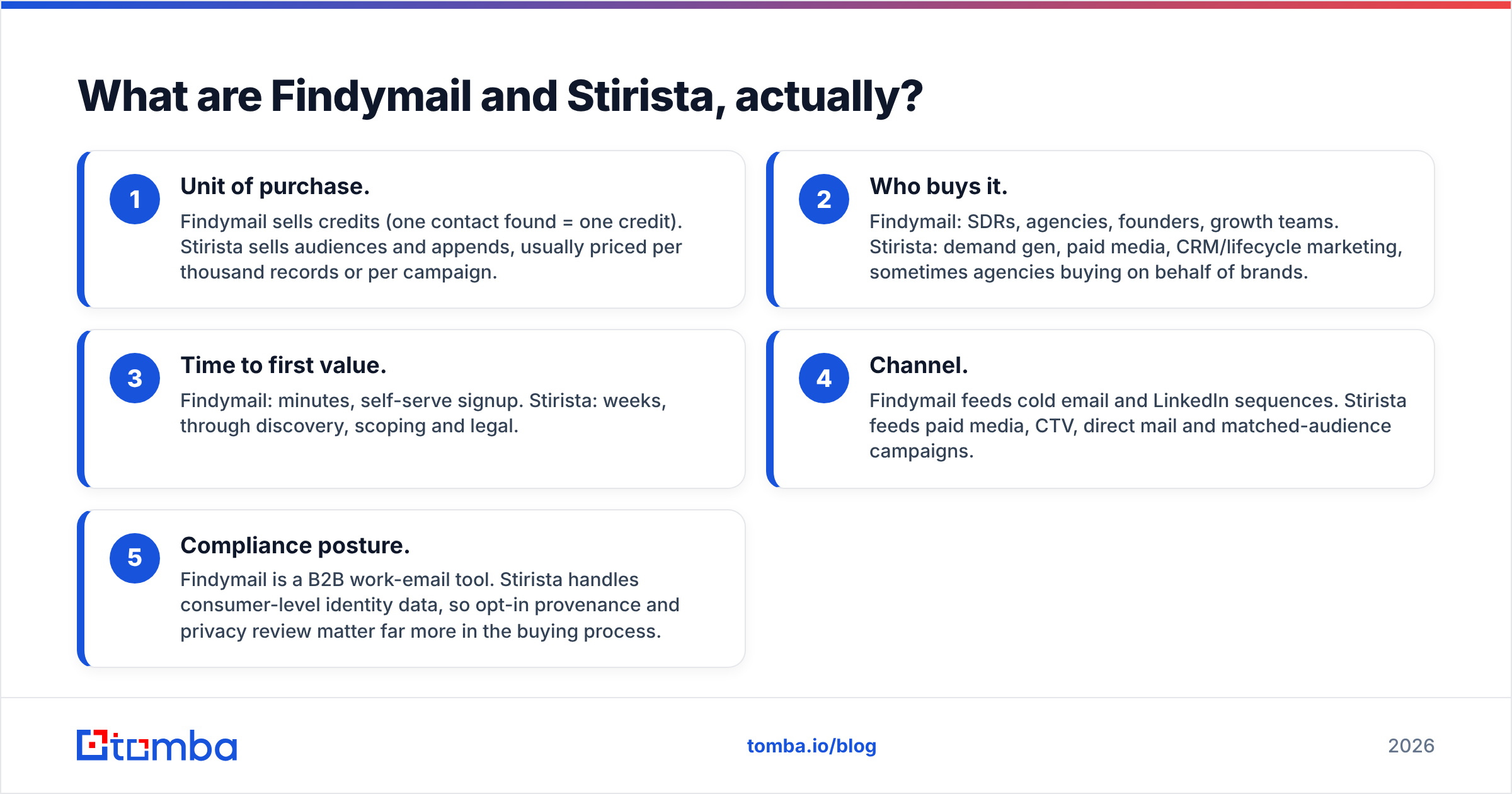
Here is the practical split in the Findymail vs Stirista match-up:
- Unit of purchase. Findymail sells credits. One contact found equals one credit. Stirista sells audiences and appends, priced per thousand records or per campaign.
- Who buys it. Findymail: SDRs, agencies, founders, growth teams. Stirista: demand gen, paid media and lifecycle marketing, plus agencies buying for brands.
- Time to first value. Findymail takes minutes. You sign up yourself. Stirista takes weeks, through discovery, scoping and legal.
- Channel. Findymail feeds cold email and LinkedIn sequences. Stirista feeds paid media, CTV, direct mail and matched-audience campaigns.
- Compliance posture. Findymail is a B2B work-email tool. Stirista handles consumer-level identity data, so opt-in provenance and privacy review matter far more.

Findymail vs Stirista: how do they compare head-to-head?#
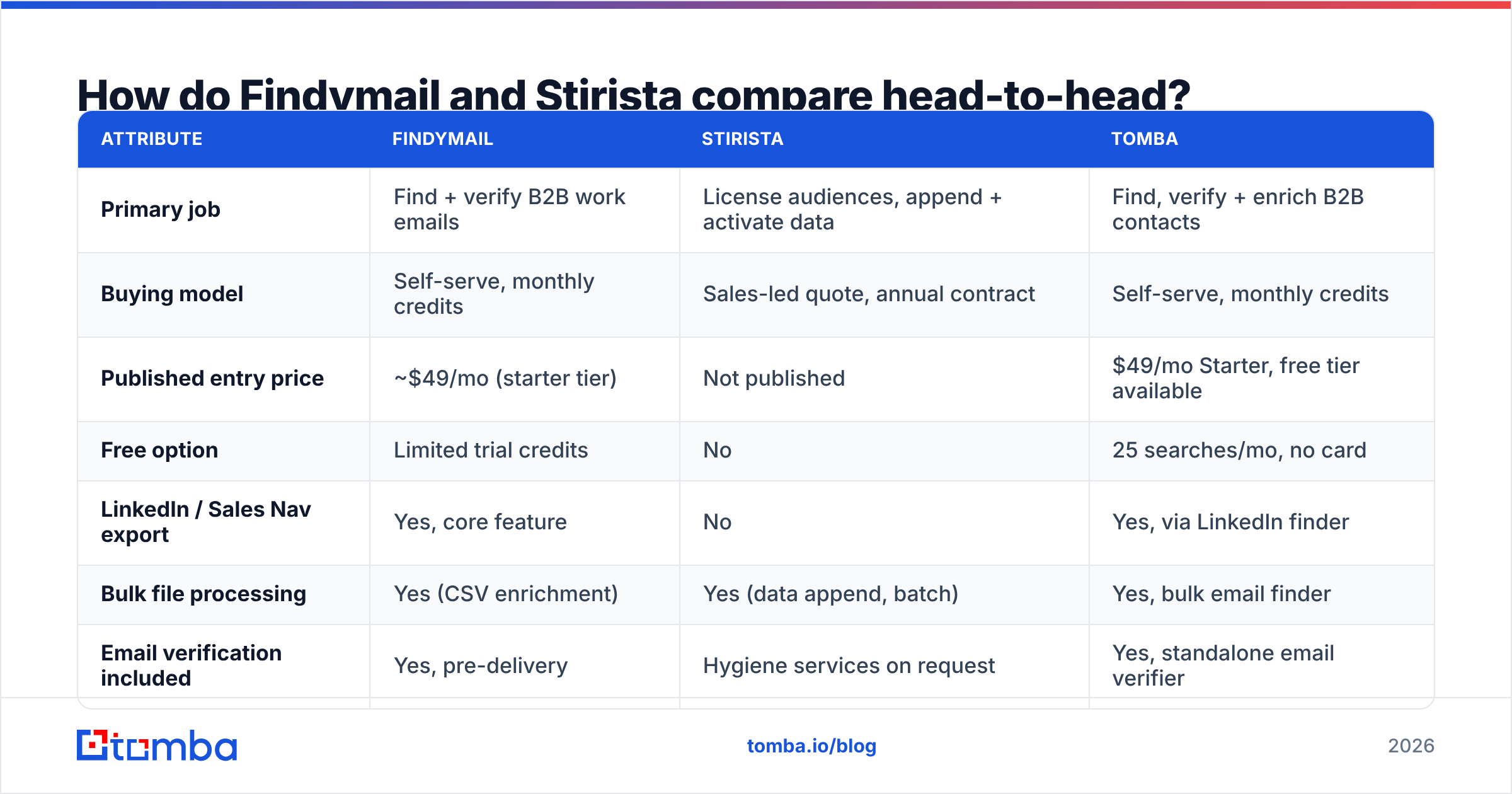
| Attribute | Findymail | Stirista | Tomba |
|---|---|---|---|
| Primary job | Find + verify B2B work emails | License audiences, append + activate data | Find, verify + enrich B2B contacts |
| Buying model | Self-serve, monthly credits | Sales-led quote, annual contract | Self-serve, monthly credits |
| Published entry price | ~$49/mo (starter tier) | Not published | $49/mo Starter, free tier available |
| Free option | Limited trial credits | No | 25 searches/mo, no card |
| LinkedIn / Sales Nav export | Yes, core feature | No | Yes, via LinkedIn finder |
| Bulk file processing | Yes (CSV enrichment) | Yes (data append, batch) | Yes, bulk email finder |
| Email verification included | Yes, pre-delivery | Hygiene services on request | Yes, standalone email verifier |
| Phone numbers | Limited | Yes, as part of audience data | Yes, phone finder + validator |
| Public API | Yes | Enterprise integrations | Yes, documented Tomba API |
| Consumer (B2C) data | No | Yes, core strength | No, B2B only |
| Best for | Cold email at SMB/mid-market scale | Paid media + omnichannel audience buys | Outbound teams who also need enrichment + API |
Read that table as a way to rule things out, not as a scoreboard. If you need B2C reach on CTV, Findymail cannot do it at any price. If you need 400 verified emails for a campaign that starts Monday, Stirista's procurement cycle rules it out on its own.
Findymail vs Stirista: which one has better data accuracy?#
Ignore both vendors' marketing numbers. Both claim accuracy in the 90s. So does every provider in this category, because nobody defines the denominator the same way twice.
The number that matters is your bounce rate on your ICP. Accuracy claims come from the vendor's own test set. That set usually leans toward large, well-indexed US companies with easy email patterns. Your list of 500 Series-A ops leaders in DACH is not that test set.

Run a real bake-off instead. It takes an afternoon:
- Build a 100-row control list from your actual ICP. Use real companies you would genuinely prospect, mixed across sizes and regions.
- Run it through each tool with identical inputs. Use full name plus company domain. Name plus company name introduces resolution errors.
- Score three things separately: hit rate, accepted rate and bounce rate. Hit rate is how many rows returned an email. Accepted rate is how many pass verification. Bounce rate is what happens when you send.
- Track catch-all handling. A tool that returns catch-all domains as "valid" inflates hit rate and hurts your sender reputation later. A dedicated catch-all verifier separates the two.
- Note the cost per usable contact, not the cost per credit. A cheap tool with a 40% hit rate costs more than a pricier one at 75%.
Findymail usually does well on this test for tech and SaaS targets. It re-verifies before returning a result, and it does not charge you for a miss. Stirista is not measured this way at all. Its accuracy question is match rate on your file: what share of your CRM records it can resolve and append. That is a different metric with a different failure mode.
Findymail vs Stirista pricing: what does each one cost?#
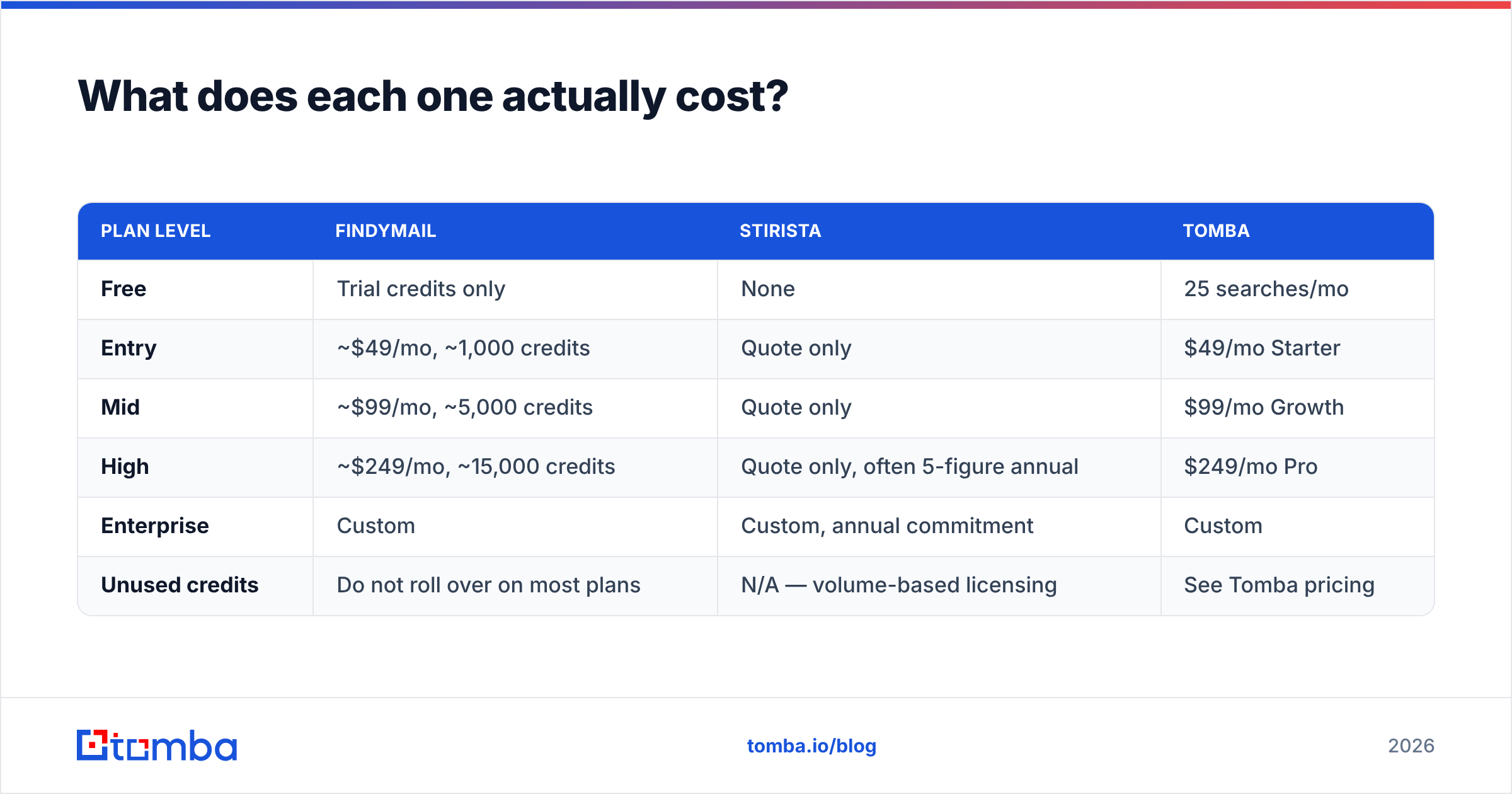
| Plan level | Findymail | Stirista | Tomba |
|---|---|---|---|
| Free | Trial credits only | None | 25 searches/mo |
| Entry | ~$49/mo, ~1,000 credits | Quote only | $49/mo Starter |
| Mid | ~$99/mo, ~5,000 credits | Quote only | $99/mo Growth |
| High | ~$249/mo, ~15,000 credits | Quote only, often 5-figure annual | $249/mo Pro |
| Enterprise | Custom | Custom, annual commitment | Custom |
| Unused credits | Do not roll over on most plans | N/A, volume-based licensing | See Tomba pricing |
Findymail's published tiers move around. Treat those figures as directional and check the site before you buy. The structure is the real point. It is a monthly credit plan you can start and stop yourself.
Stirista's absence from that table is the finding, not a gap in the research. Identity-data licensing is negotiated. Expect discovery calls, a scoping doc, a data-processing agreement, and a floor sized for a marketing budget rather than a two-person SDR team. That is normal for the category. Demandbase, 6sense and similar audience platforms work the same way. It is also why comparing them per credit is meaningless.
One more cost nobody quotes: a bad list. A 12% bounce rate on a new sending domain wastes credits and burns the domain. Whatever you buy, budget for verification as its own line item unless it is truly bundled.

Who should choose Findymail?#
Pick Findymail if most of these are true:
- You live in LinkedIn Sales Navigator. The list-export workflow is the main reason people pay for it. It is faster than exporting a CSV and enriching it elsewhere.
- Your outbound is email-first. Native pushes to Lemlist, Instantly and Smartlead remove the most annoying step in list building.
- You want zero procurement. Card in, credits out, cancel whenever.
- Your ICP is tech-adjacent and mostly US or Western Europe. Work-email coverage is strongest there across every vendor in this space.
- You care about bounce protection more than breadth. Findymail is deliberately cautious. It would rather return nothing than return a guess.
Where it frustrates people: coverage thins out for non-tech verticals and smaller regional companies. Phone coverage is limited next to the bigger platforms. Credits usually do not roll over. If you are weighing it against similar tools, this Findymail alternative breakdown covers the trade-offs in more detail.
Who should choose Stirista?#
Pick Stirista if:
- You are buying media, not sending cold email. Its value shows up in matched audiences for CTV, programmatic and addressable channels.
- You need B2C or household-level data. No email finder can give you that, ever.
- You have a large first-party file to enrich. Appending firmographic, demographic or intent fields across hundreds of thousands of records is a batch job, not a per-search job.
- You need omnichannel orchestration from one data spine. The same audience runs across display, CTV and direct mail, with identity resolution tying it together.
- You have budget authority and a legal team. Both are prerequisites, not nice-to-haves.
Where it frustrates people: there is no self-serve entry, no cheap way to test, and the sales cycle runs for weeks. For a team that needs 2,000 verified emails this quarter, that is a non-starter. Check current user reviews on G2 before you sign any annual contract in this category. The gap between demo and delivery is where most complaints live.
Is there a middle option between the two?#
Yes. It is why so many teams end up running a third tool next to whichever one they picked.
The common pattern looks like this. Findymail, or a peer, does the finding. A separate verifier handles hygiene. A separate vendor supplies firmographics. A homegrown script glues it together. Three subscriptions, three credit pools, three points of failure.
Tomba folds that into one account. The email finder handles single and bulk lookups. Domain search pulls every public address at a company, plus the pattern it uses. The verifier and catch-all checks run before anything reaches your sequencer. Data enrichment fills in the firmographic fields you would otherwise buy separately. One API covers all of it, so the glue script becomes a single call.
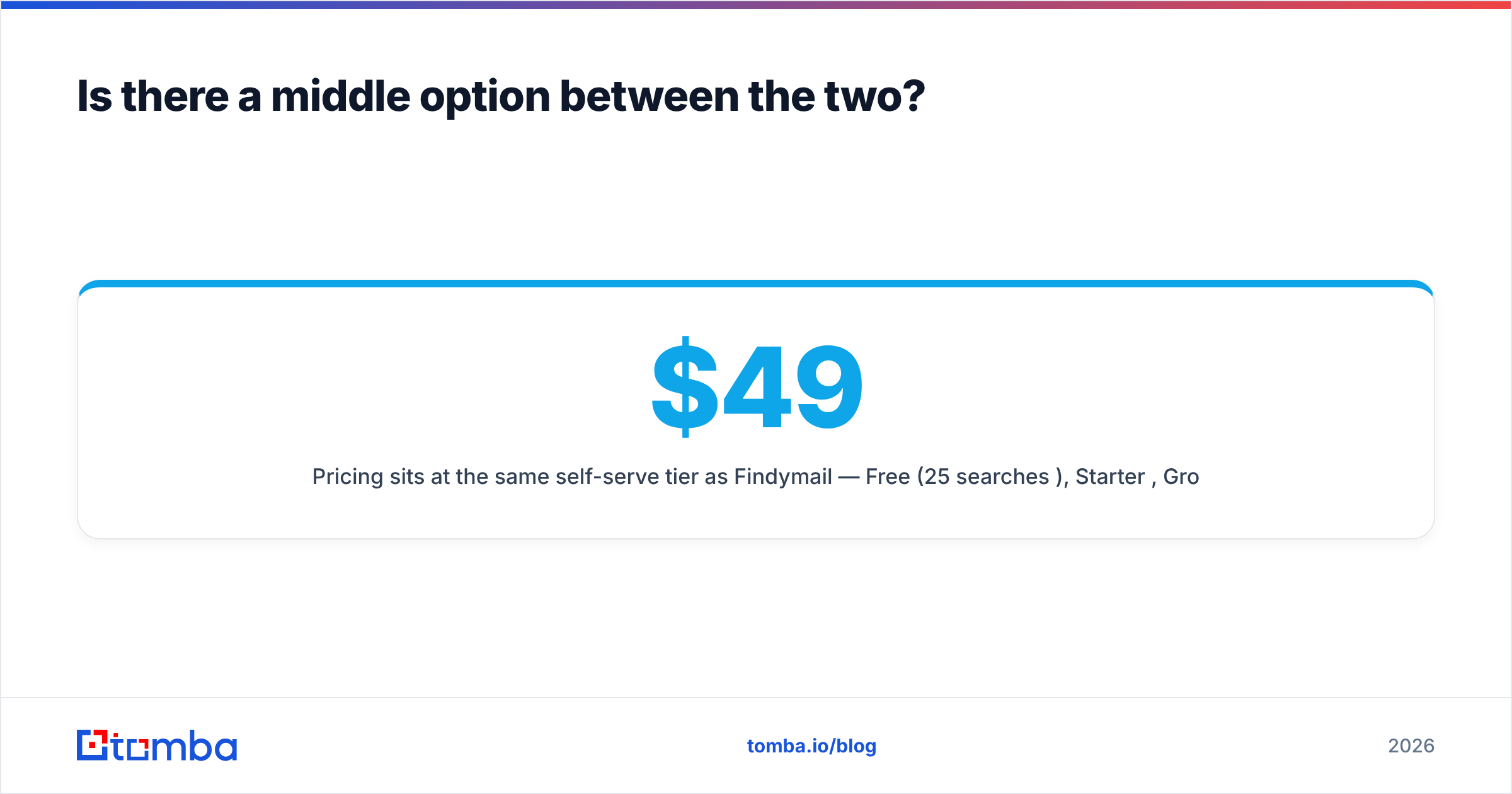
Pricing sits at the same self-serve tier as Findymail: Free (25 searches/mo), Starter $49/mo, Growth $99/mo, Pro $249/mo, Enterprise custom. The difference that matters is testing. You can run the free tier against your own control list before you spend anything.
To be fair, Tomba is not an audience platform. If your job is buying CTV inventory against a household segment, none of this applies, and you should talk to Stirista or a peer. The Findymail vs Stirista overlap with Tomba sits only in the B2B contact-data half of the question.
What should you do next?#
Run the 100-row bake-off. It settles the Findymail vs Stirista question faster than any comparison post, this one included. It swaps vendor claims for your own bounce rate on your own ICP.
The sequence is simple. Build the control list. Run it through Findymail's trial and Tomba's free tier on the same day with identical inputs. Score hit rate, verification pass rate and real bounce rate. If your answer is "we need audiences for paid media," stop the test and book the Stirista call. You are solving a different problem, and no email finder will get you there.
If the answer is "we need clean, verified work emails on demand, wired into our stack," start with the Tomba Email Finder. The free tier gives you 25 searches a month with no card. That is enough to run the comparison properly before a dollar changes hands. If it wins your bake-off, the $49/mo Starter plan picks up where the free tier ends.
Related guides#
Ready to find emails that actually work?
Join 150,000+ professionals who stopped guessing and started sending. Free credits on signup — no credit card required.
Get the Tomba newsletter
Practical outbound tactics and product updates — once every two weeks.
About the author