Findymail vs Vulcan7: Which Lead Data Tool Wins in 2026?
Findymail finds verified B2B work emails. Vulcan7 feeds real estate dialers with seller phone numbers. Here is the honest breakdown of pricing, data quality, and which one actually fits your pipeline.
TL;DR
- These are not competitors. Findymail is a B2B email finder built for SaaS and agency outbound. Vulcan7 is a real estate lead platform that pairs expired/FSBO listing data with a power dialer. If you are comparing them, you are probably choosing between two different businesses, not two products.
- Findymail wins on email. It verifies work emails, protects your bounce rate, and plugs into Apollo/Sales Nav exports and cold-email sequencers.
- Vulcan7 wins on phone. Its value is skip-traced homeowner numbers plus a triple-line dialer — email is an afterthought there.
- Pricing lands differently. Findymail starts around $49/mo for credits; Vulcan7 runs roughly $99–$350/mo plus a setup fee, billed per data feed and county.
- If you sell B2B and want both emails and phones on one bill, a general-purpose finder like Tomba covers the same job for $49/mo with a free tier to test first.
What are Findymail and Vulcan7, actually?#
The most useful thing you can learn from a "findymail vs vulcan7" search is that these tools solve unrelated problems, and picking the wrong one wastes a quarter.
Findymail (findymail.com) is a B2B email-finding tool. You give it a name plus a company domain, a LinkedIn profile, or a CSV export from Sales Navigator or Apollo, and it returns a work email that has already passed verification. Its whole marketing pitch is bounce protection: it refuses to hand back an address it cannot confirm, which keeps your sender reputation intact. It also ships a LinkedIn scraper and native integrations with cold-email platforms like Instantly, Lemlist, and Smartlead.
Vulcan7 (vulcan7.com) is a real estate prospecting platform. It delivers daily feeds of expired listings, for-sale-by-owner (FSBO), for-rent-by-owner (FRBO), and pre-foreclosure records, appends skip-traced homeowner phone numbers, and hands them to an integrated three-line power dialer. Agents use it to make 100+ calls a day to homeowners whose listing just fell out of contract.
So the honest framing:
- Findymail = B2B, email-first, self-serve, credit-based.
- Vulcan7 = residential real estate, phone-first, feed-based, county-scoped.
If you are a real estate agent trying to reach homeowners, Findymail will find you almost nothing — homeowners do not have corporate email patterns to infer. If you sell software to VPs of Engineering, Vulcan7 has no record of them at all.
How do Findymail and Vulcan7 compare head-to-head?#
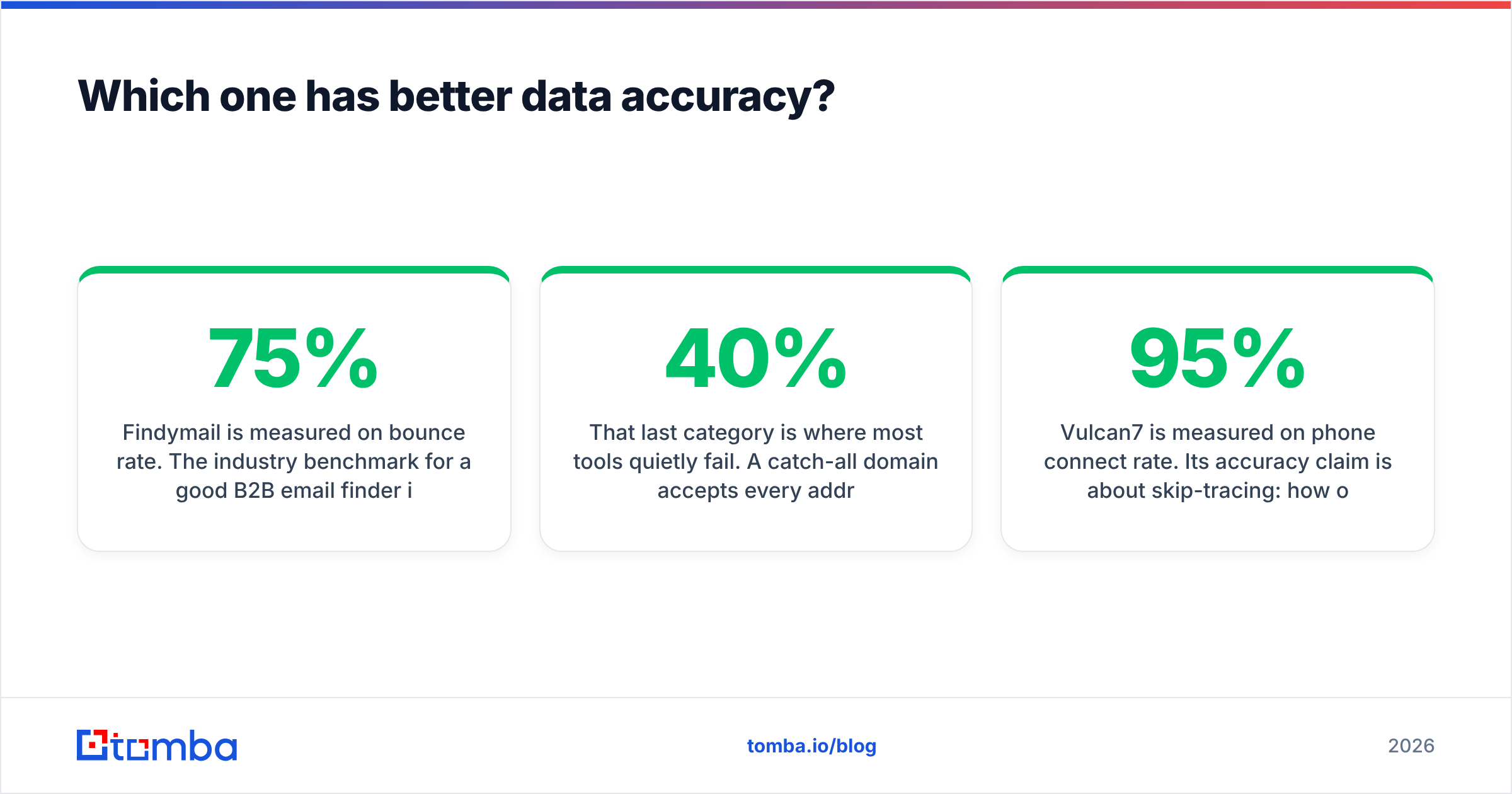
Here is the direct comparison, with a general-purpose B2B finder in the third column so you can see where each tool's boundary sits.
| Attribute | Findymail | Vulcan7 | Tomba |
|---|---|---|---|
| Primary use case | B2B work email discovery | Real estate seller leads + dialing | B2B email + phone + enrichment |
| Core data type | Verified business emails | Homeowner phone numbers, listing records | Emails, phones, company data |
| Audience | SaaS, agencies, recruiters | Residential real estate agents/teams | B2B sales, marketing, RevOps |
| Built-in verification | Yes, bounce-guaranteed | Limited (phone scrub/DNC) | Yes, dedicated email verifier |
| Dialer included | No | Yes, 3-line power dialer | No |
| Entry price | ~$49/mo (credits) | ~$99/mo + setup fee | $49/mo (free tier available) |
| Free tier | Trial credits only | No | 25 searches/mo |
| Bulk CSV enrichment | Yes | N/A (feeds are the product) | Yes |
| Public API | Yes | No self-serve public API | Yes |
| Geography | Global B2B | US/Canada MLS coverage | Global B2B |
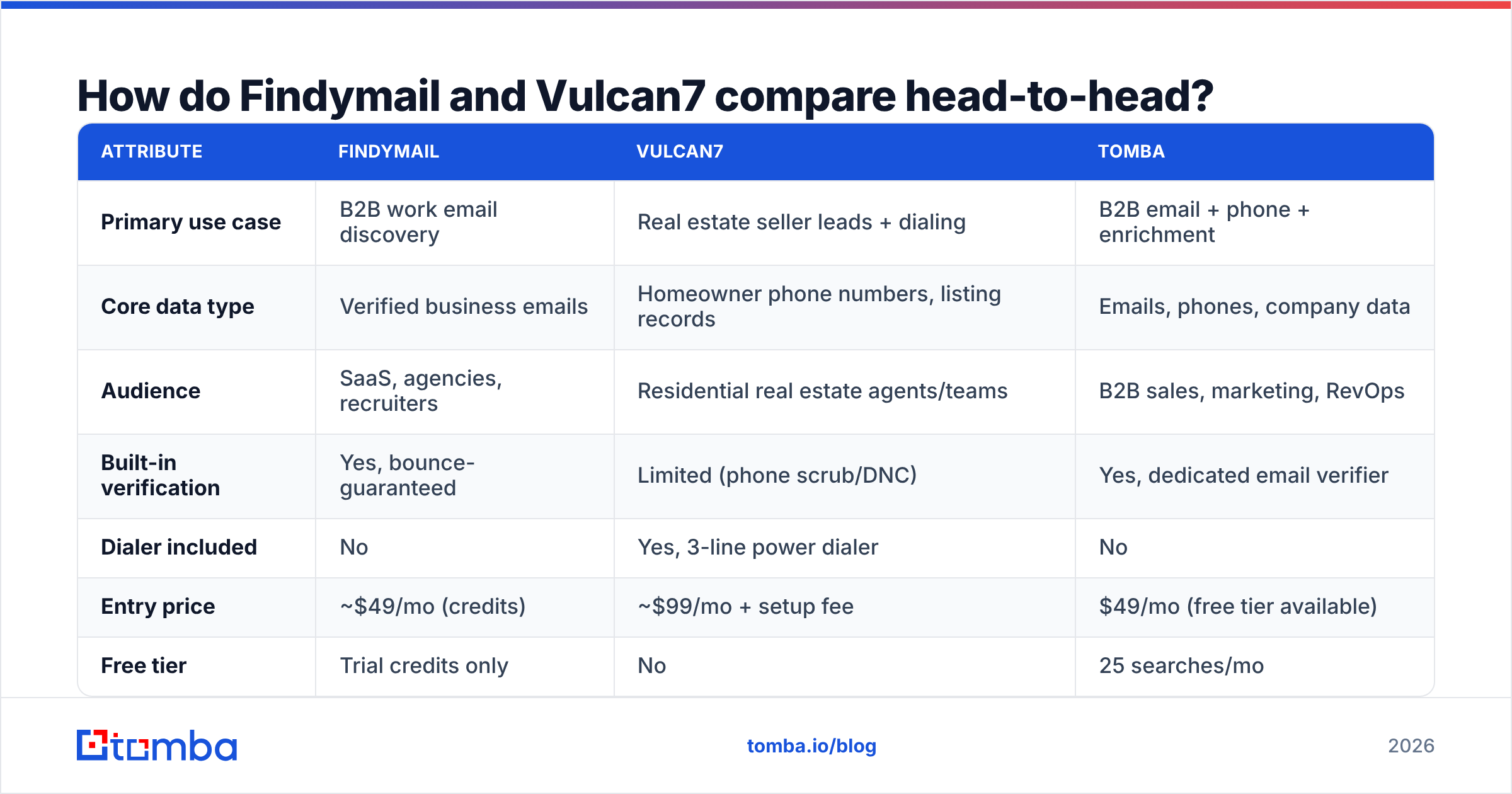
Two things jump out. First, Vulcan7 is a workflow product — the dialer and the daily feed are the point, and the data exists to feed them. Findymail is a data product — you bring your own sequencer. Second, only one of them is priced in a way you can test with a small budget.

What does each tool cost in 2026?#
Both vendors move pricing, so treat these as directional and confirm on their sites before you commit. The structure matters more than the exact number, because that is what determines your real cost at scale.
| Plan tier | Findymail | Vulcan7 | Tomba |
|---|---|---|---|
| Free | No standing free plan | No | 25 searches/mo |
| Entry | ~$49/mo, ~1,000 emails | ~$99/mo, one data feed, one county + setup fee | $49/mo Starter |
| Mid | ~$99/mo, ~5,000 emails | ~$199–$249/mo, multi-feed bundle | $99/mo Growth |
| High | ~$249/mo, ~20,000 emails | ~$300+/mo, all feeds + add-ons | $249/mo Pro |
| Billing model | Credits, monthly reset | Subscription per feed/territory | Credits, monthly reset |
| Contract | Monthly, cancel anytime | Monthly, setup fee is non-refundable | Monthly or annual |
The gotcha with Vulcan7 is the setup fee — commonly quoted around $149 — and the fact that additional counties or additional feeds (FSBO on top of expireds, for example) each add to the monthly. A team covering three counties with two feeds is not paying the headline price.
The gotcha with credit-based tools like Findymail is credit burn on failures. Findymail's model is friendlier than most here — it does not charge you for addresses it cannot verify — but bulk enrichment on a low-quality list still eats your allowance fast. Compare that with Tomba pricing, where the free tier gives you 25 searches a month indefinitely, which is enough to sanity-check accuracy on your own domain list before you spend anything.
Which one has better data accuracy?#
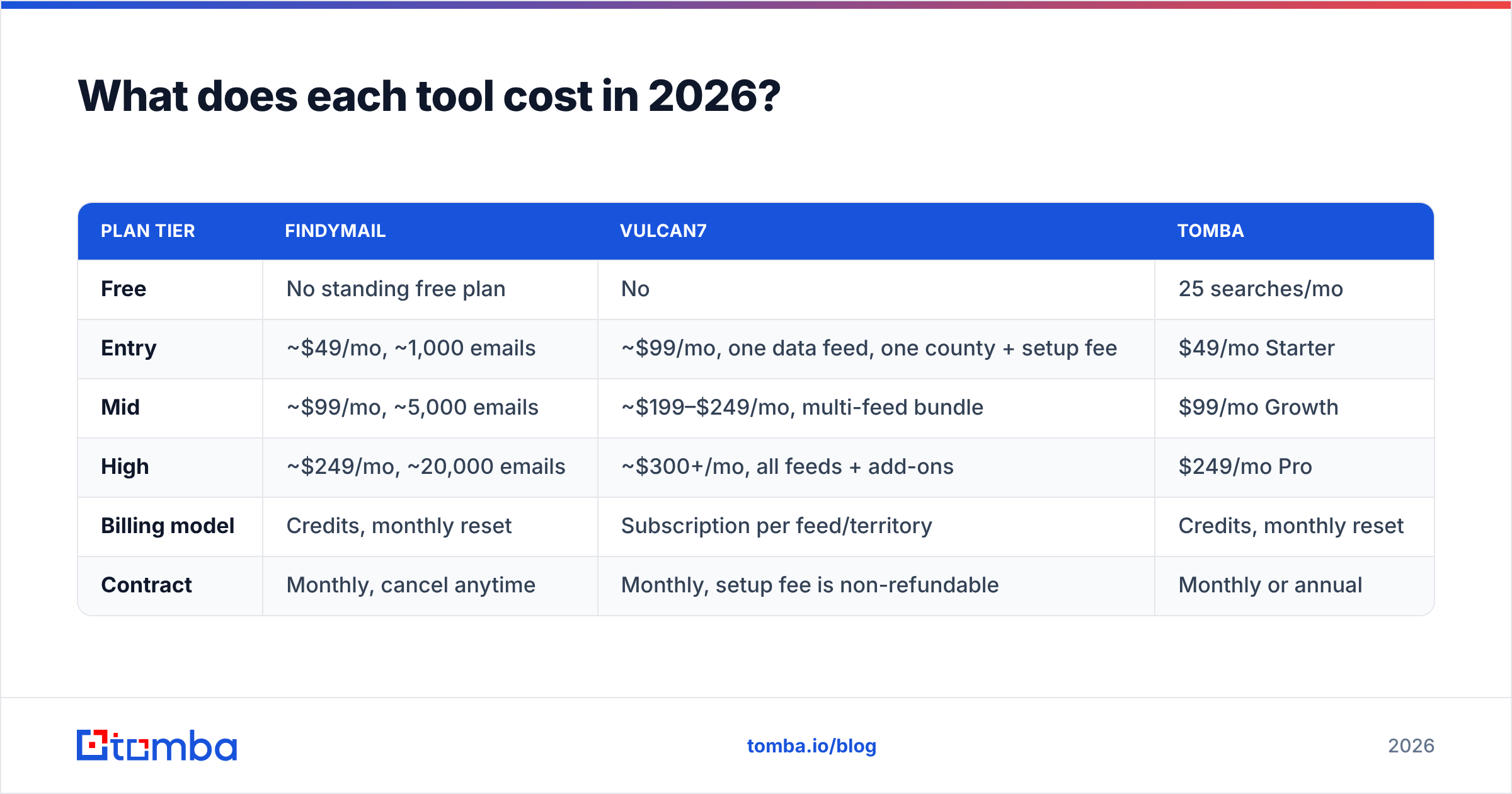
Wrong question — they are measured on different axes.
Findymail is measured on bounce rate. The industry benchmark for a good B2B email finder is a hit rate of 55–75% on a realistic list (not a cherry-picked demo list of Fortune 500 execs) with a bounce rate under 3%. Findymail leans hard on the second number: it would rather return nothing than return a guess. Reviewers on G2 consistently cite low bounces as the reason they switched to it from broader databases. The trade-off is coverage — a stricter filter means more blanks on small companies, non-English domains, and catch-all servers.
That last category is where most tools quietly fail. A catch-all domain accepts every address at SMTP, so a naive verifier marks everything "valid" and you find out the truth when 40% of the send bounces. If your ICP skews toward mid-market companies running Google Workspace with catch-all enabled, you need a dedicated catch-all verifier in the stack regardless of which finder you pick.
Vulcan7 is measured on phone connect rate. Its accuracy claim is about skip-tracing: how often the number attached to an expired listing actually reaches the homeowner. Vulcan7 markets numbers in the 95%+ range for phone match on expired listings, which is credible for US residential data sourced from MLS plus consumer records. But "match" is not "connect" — mobile carrier labeling, DNC scrubbing, and spam flags all sit between a valid number and a live conversation.
A fair summary:
- For B2B email, Findymail is the stronger of the two by a wide margin. Vulcan7 does not seriously compete here.
- For US homeowner phone data, Vulcan7 is the stronger of the two by a wide margin. Findymail does not compete here at all.
- For B2B phone data — direct dials for business contacts — neither is ideal. That is a third category, served by tools with a dedicated phone finder.
- For verification hygiene, assume you need a separate pass. Even a bounce-guaranteed finder cannot vouch for an address that was valid four months ago when the person left the company.
Who should pick Findymail?#
Pick Findymail if most of these describe you:
- You run cold email at volume into B2B accounts and your deliverability is fragile.
- You already live in LinkedIn Sales Navigator or Apollo and want a clean way to turn those exports into sendable addresses.
- Your ICP is mid-to-large companies with predictable email patterns (firstname@, firstname.lastname@).
- You have no need for phone data or you source it separately.
- You want zero infrastructure — no API build, just a Chrome extension and CSV upload.
Where it frustrates people: coverage gaps on very small businesses, no phone numbers, no built-in sequencer, and credits that do not roll over. Teams that outgrow it usually want one bill covering emails, phones, and enrichment, which is the standard reason people go shopping for a Findymail alternative.
Who should pick Vulcan7?#
Pick Vulcan7 if most of these describe you:
- You are a listing agent or run a real estate team and expired listings are your primary pipeline.
- You make outbound calls daily and dialer efficiency is the constraint, not lead volume.
- You work a defined geography — Vulcan7's pricing rewards a tight county footprint and punishes sprawl.
- You want the data pre-scrubbed against DNC so your ISA team can dial without a compliance review each morning.
- Email is secondary to you; a call and a text are the primary channels.
Where it frustrates people: the setup fee, the per-county cost creep, the learning curve on the dialer, and month-to-month data variance — an expired-listing feed is only as rich as the local market that month. In a slow market with few expireds, you are paying the same subscription for a thinner list.

Is there a tool that covers both jobs?#
Partly — and it depends which half of the job you mean.
Nothing replaces Vulcan7's MLS-sourced expired-listing feed. That data comes from real estate-specific sources, and a B2B provider simply does not have it. If expireds are your business, budget for Vulcan7 or a direct competitor and stop comparing.
But if what you actually want is "one vendor for contact data across email and phone, for businesses," that is a solved problem. A general B2B provider covers the Findymail job and adds the pieces Findymail leaves out:
- Email finder — name plus domain to a verified work email, single or in bulk.
- Domain search — pull every published address at a company, useful when you do not have a name yet.
- Email verifier — a separate validation pass on lists you bought, inherited, or scraped elsewhere.
- Phone finder — B2B direct dials, so your callers and your emailers share one source of truth.
- Enrichment and API — push everything into HubSpot, Pipedrive, or your warehouse instead of shuffling CSVs.
The practical difference in cost: Tomba's entry plan is $49/mo with a permanent free tier of 25 searches, so you can measure hit rate on your list before paying. Vulcan7 has no free tier and a non-refundable setup fee, which means the cheapest way to evaluate it is to talk to sales.
How do you choose in under five minutes?#
Run this sequence. It takes longer to read than to do.
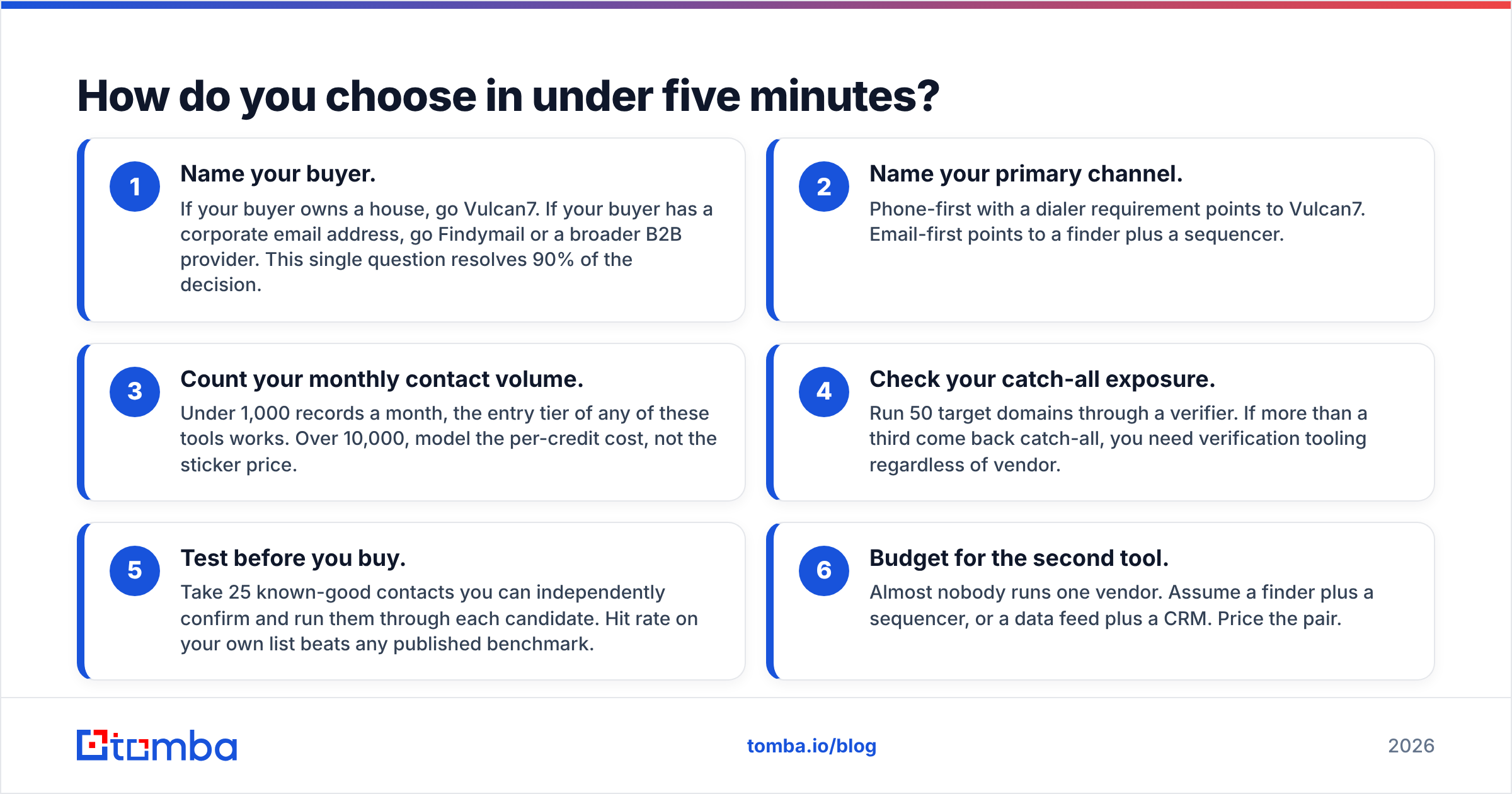
- Name your buyer. If your buyer owns a house, go Vulcan7. If your buyer has a corporate email address, go Findymail or a broader B2B provider. This single question resolves 90% of the decision.
- Name your primary channel. Phone-first with a dialer requirement points to Vulcan7. Email-first points to a finder plus a sequencer.
- Count your monthly contact volume. Under 1,000 records a month, the entry tier of any of these tools works. Over 10,000, model the per-credit cost, not the sticker price.
- Check your catch-all exposure. Run 50 target domains through a verifier. If more than a third come back catch-all, you need verification tooling regardless of vendor.
- Test before you buy. Take 25 known-good contacts you can independently confirm and run them through each candidate. Hit rate on your own list beats any published benchmark.
- Budget for the second tool. Almost nobody runs one vendor. Assume a finder plus a sequencer, or a data feed plus a CRM. Price the pair.
What is the final verdict on Findymail vs Vulcan7?#
They do not compete, and the comparison resolves on who you sell to.
Findymail is the better product if your pipeline is businesses: it is accurate on work emails, honest about what it cannot find, and priced so a solo founder can start. Vulcan7 is the better product if your pipeline is homeowners: the expired/FSBO feed plus the triple-line dialer is a genuinely hard combination to replicate, and real estate teams pay for it because the ROI math works on one listing.
The only real overlap is the underlying question both answer: how do I get a valid contact point for the person I need to reach? For B2B, that question has a cheaper and broader answer than a single-purpose finder.
If you sell B2B and you want emails, phone numbers, verification, and enrichment on one bill instead of three, start with the Tomba Email Finder. The free tier gives you 25 searches a month with no card, paid plans start at $49/mo, and every address runs through verification before it reaches your sequencer — so you can measure hit rate on your own list this afternoon instead of scheduling a demo.
Related guides#
Ready to find emails that actually work?
Join 150,000+ professionals who stopped guessing and started sending. Free credits on signup — no credit card required.
Get the Tomba newsletter
Practical outbound tactics and product updates — once every two weeks.
About the author