Findymail vs ZeroBounce (2026): Which Tool Do You Need?
Findymail finds emails. ZeroBounce verifies them. Here's the honest 2026 breakdown of accuracy, credit math, and which one your outbound stack actually needs — or whether you need either.
TL;DR
- Findymail and ZeroBounce are not direct competitors. Findymail is an email finder built for LinkedIn and Sales Navigator exports. ZeroBounce is an email verifier and deliverability suite. Buying one does not remove the need for the other.
- If your bottleneck is "I have a list of names and no emails," Findymail wins. If your bottleneck is "I have 80,000 emails of unknown age and my bounce rate is 9%," ZeroBounce wins.
- Both charge on credits, and both charge you for results you throw away. Real cost per usable contact is 1.5x–3x the sticker price on either platform.
- Findymail's bounce guarantee is the single strongest reason to pick it over a generic scraper. ZeroBounce's blacklist monitoring and inbox placement tests are the strongest reason to pick it over a bare-bones verifier.
- If you'd rather not run two vendors, a combined find-plus-verify platform like Tomba covers both jobs from one credit pool starting at $49/mo.
What are Findymail and ZeroBounce, exactly?#
They live at opposite ends of the same pipeline.
Findymail is a B2B email finder. You give it a name and a company (or a LinkedIn profile, or a Sales Navigator search URL) and it returns a work email address. Its pitch is accuracy-first: it markets a bounce guarantee, refunds credits on emails that bounce, and deliberately returns nothing rather than a guessed pattern when confidence is low. That last behavior is unusual and it matters — most finders happily hand you firstname.lastname@company.com with no evidence behind it.
ZeroBounce is an email validation platform. You give it addresses you already have and it tells you which ones are deliverable, invalid, catch-all, disposable, role-based, or toxic. Around that core it has stacked a deliverability toolkit: inbox placement testing, blacklist monitoring, DMARC/SPF/DKIM checks, email activity data, and an email-finder add-on that is genuinely secondary to the verification engine.
So the honest framing of "Findymail vs ZeroBounce" is not "which is better." It's which half of your problem is currently on fire.
Why does this comparison feel like apples to oranges?#
Because it is — and the search demand exists anyway, for a reason worth naming.
Teams end up comparing these two tools when they hit a bounce problem and don't yet know whether the cause is sourcing or hygiene. Those look identical from the outside: a campaign goes out, 7% hard-bounces, the domain reputation dips, reply rates crater.
The diagnosis matters:
- Bad sourcing — your finder guessed patterns instead of verifying them. New emails bounce on first send. A verifier catches this after the fact, but you paid twice: once for the bad email, once to discover it's bad.
- Stale data — your emails were correct 18 months ago. B2B contact data decays roughly 25–30% per year as people change jobs. A verifier is exactly the right fix here; a better finder is not.
- Sending-side problems — cold domain, no warmup, no SPF record, spam-triggering copy. Neither tool solves this, though ZeroBounce's deliverability suite will at least tell you it's happening.
Run the diagnosis before you buy. Pull a random sample of 200 addresses from your last bounced campaign, check when they were sourced, and check what tool sourced them. If the bounces cluster in emails found in the last 30 days, you have a sourcing problem. If they cluster in your oldest CRM records, you have a hygiene problem.
How do Findymail and ZeroBounce compare feature by feature?#
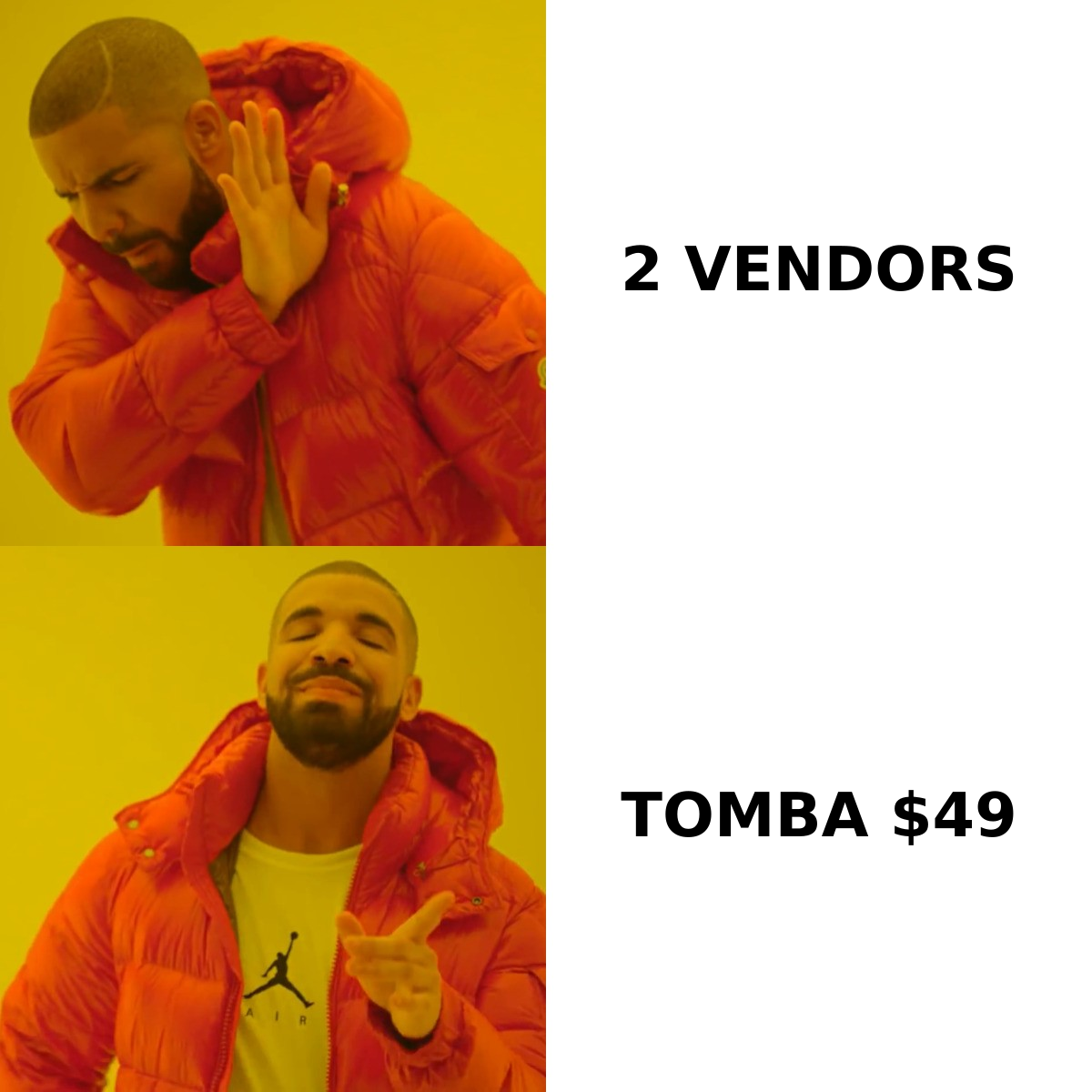
| Feature | Findymail | ZeroBounce |
|---|---|---|
| Primary job | Find work emails from names/LinkedIn | Verify and clean existing lists |
| Email finding | Core product | Add-on, limited coverage |
| Email verification | Included on found emails | Core product, 30+ status codes |
| Catch-all handling | Returns or skips based on confidence | Flagged as "catch-all / accept-all" |
| Bounce guarantee | Yes — credits refunded on bounces | No finder guarantee; verification accuracy claim only |
| LinkedIn / Sales Navigator export | Yes, a headline feature | No |
| Bulk CSV processing | Yes | Yes, large-file optimized |
| Deliverability tools | No | Inbox placement, blacklist monitor, DMARC/SPF check |
| Phone numbers | No | No |
| API | Yes | Yes, mature and widely integrated |
| Credit model | Monthly subscription | Subscription or pay-as-you-go |
| Best for | SDRs building fresh lists | RevOps cleaning large databases |
The table makes the split obvious. There is exactly one row where they genuinely overlap — verification — and even there they mean different things. Findymail verifies what it found, as part of delivering the result. ZeroBounce verifies whatever you throw at it, including 200,000 rows imported from a CRM nobody has audited since 2023.
Which one is more accurate — and what does "accuracy" even mean here?#
Accuracy claims in this category are close to meaningless unless you pin down what's being measured. Three different numbers get marketed as one:
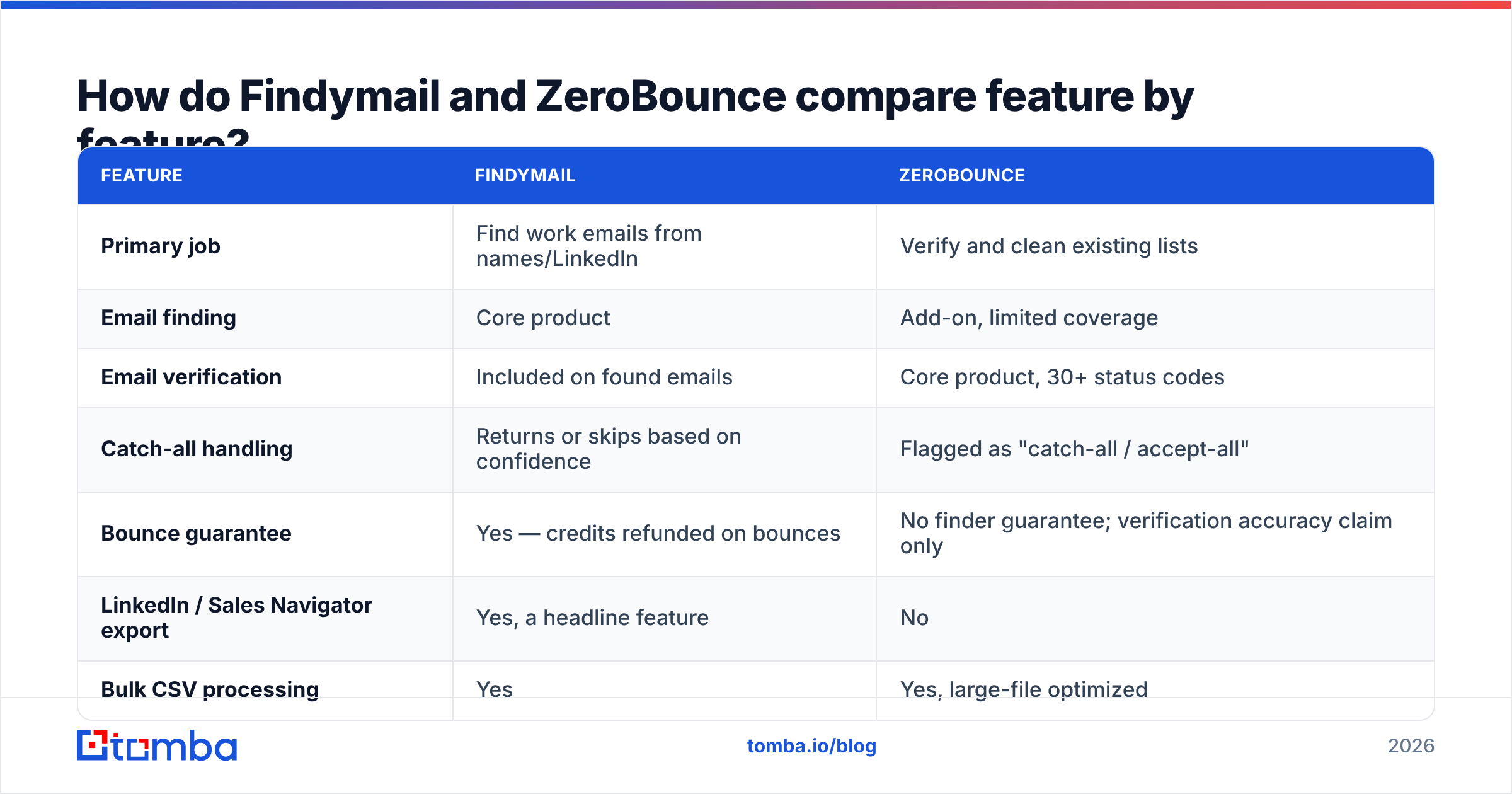
- Hit rate (finders): of 100 prospects you searched, how many returned an email at all? A tool that returns emails for 40% of your list has a 40% hit rate regardless of whether those 40 are correct.
- Deliverability rate (finders): of the emails returned, how many actually land? This is the number that maps to your bounce rate.
- Validation accuracy (verifiers): of the addresses marked "valid," how many were truly valid — and how many good addresses got wrongly marked invalid? That second half, the false-positive rate, is almost never published.
Findymail optimizes hard for deliverability rate at the expense of hit rate. It will return fewer emails than a permissive tool, and the ones it returns bounce less. That's a deliberate trade and it's the right one for cold outbound, where a bounce costs you domain reputation and a miss costs you nothing but a blank cell.
ZeroBounce optimizes for classification precision on lists it didn't source. Its practical weak point — shared by every verifier — is catch-all domains, where the mail server accepts everything at the SMTP layer and tells you nothing. On enterprise lists, catch-alls can be 20–30% of rows. What a verifier does with that bucket is the single biggest differentiator in real use, which is why a dedicated catch-all verifier matters more than the headline accuracy percentage on any vendor's homepage.

Before trusting anyone's published figure — including the one above — run your own 100-row test. Take a list where you already know the correct answers (your own customers, or a set of contacts you've successfully emailed), strip the emails, and run it through the tool. Measure hit rate and correctness separately. It takes an hour and it beats every case study.
What do Findymail and ZeroBounce actually cost?#
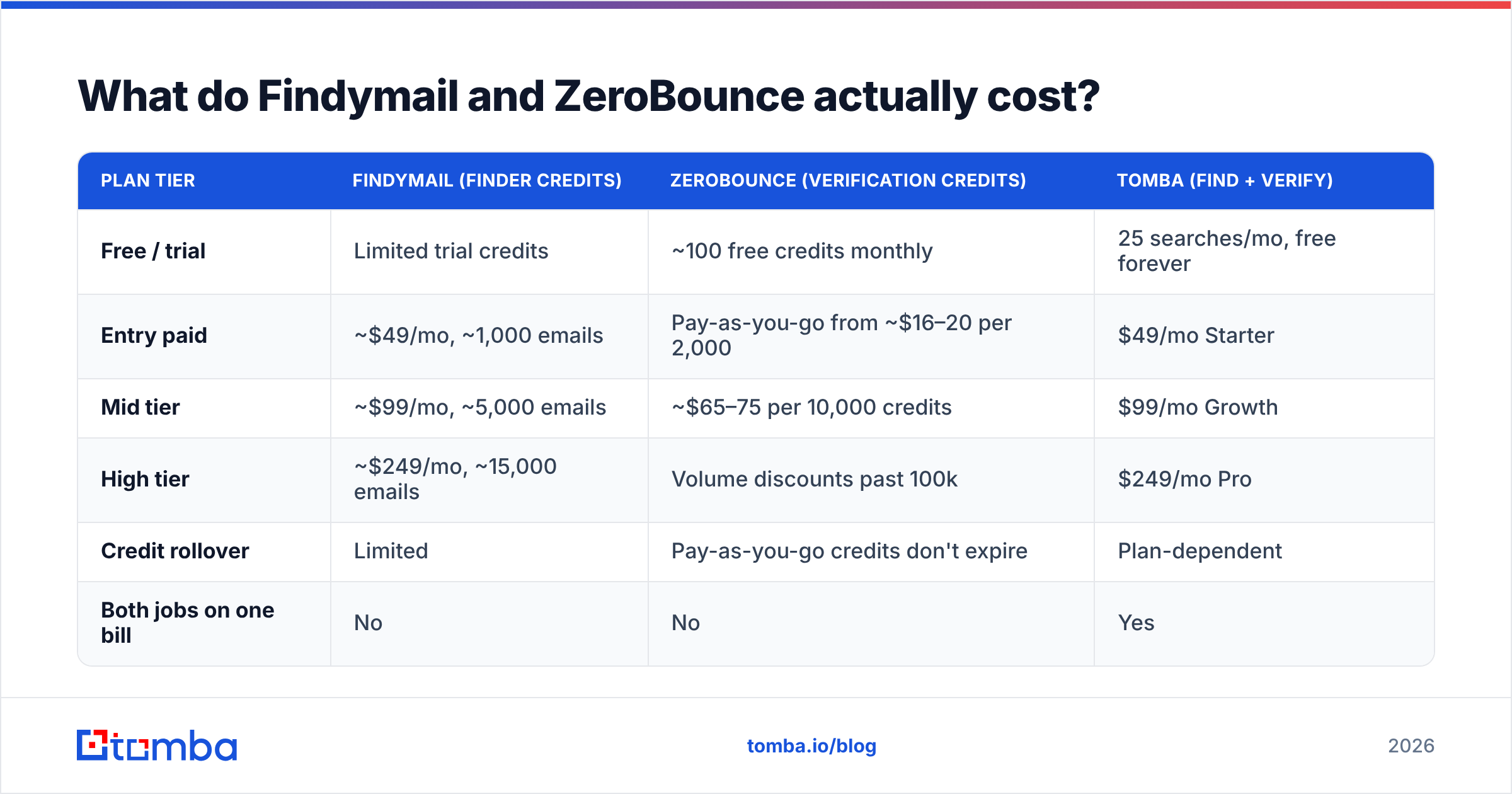
Pricing on both platforms moves, so treat these as directional and confirm on the vendors' own pages before you commit budget.
| Plan tier | Findymail (finder credits) | ZeroBounce (verification credits) | Tomba (find + verify) |
|---|---|---|---|
| Free / trial | Limited trial credits | ~100 free credits monthly | 25 searches/mo, free forever |
| Entry paid | ~$49/mo, ~1,000 emails | Pay-as-you-go from ~$16–20 per 2,000 | $49/mo Starter |
| Mid tier | ~$99/mo, ~5,000 emails | ~$65–75 per 10,000 credits | $99/mo Growth |
| High tier | ~$249/mo, ~15,000 emails | Volume discounts past 100k | $249/mo Pro |
| Credit rollover | Limited | Pay-as-you-go credits don't expire | Plan-dependent |
| Both jobs on one bill | No | No | Yes |
Two things this table hides.
First: the stacking problem. Run Findymail and ZeroBounce together and your entry-level outbound stack is roughly $49 + a pay-as-you-go verification budget, before your sequencer, before your data enrichment, before your CRM seats. For a two-person SDR team that's real money spent on plumbing.
Second: credits burned on nothing. Findymail's guarantee softens this — bounced emails get credited back — but searches that return no result still consume budget on most finders. On the verification side, you pay per address checked, including the 30% of your list that comes back invalid and gets deleted. Your effective cost per usable contact is always higher than the divide-price-by-credits math. Budget 1.5x–2x as a planning assumption, and check Tomba pricing if you want to compare like-for-like against a single-vendor setup.
Do you need both tools — or one that does both?#
Here's the structural question most teams skip.
The find-then-verify handoff exists because the two functions grew up as separate industries. But a finder that verifies at the point of discovery makes the second vendor redundant for newly sourced contacts. You still want a standalone verifier for one specific job: cleaning aged data you didn't source yourself — CRM imports, event lists, purchased databases, anything older than about six months.
That gives you a clean decision rule:
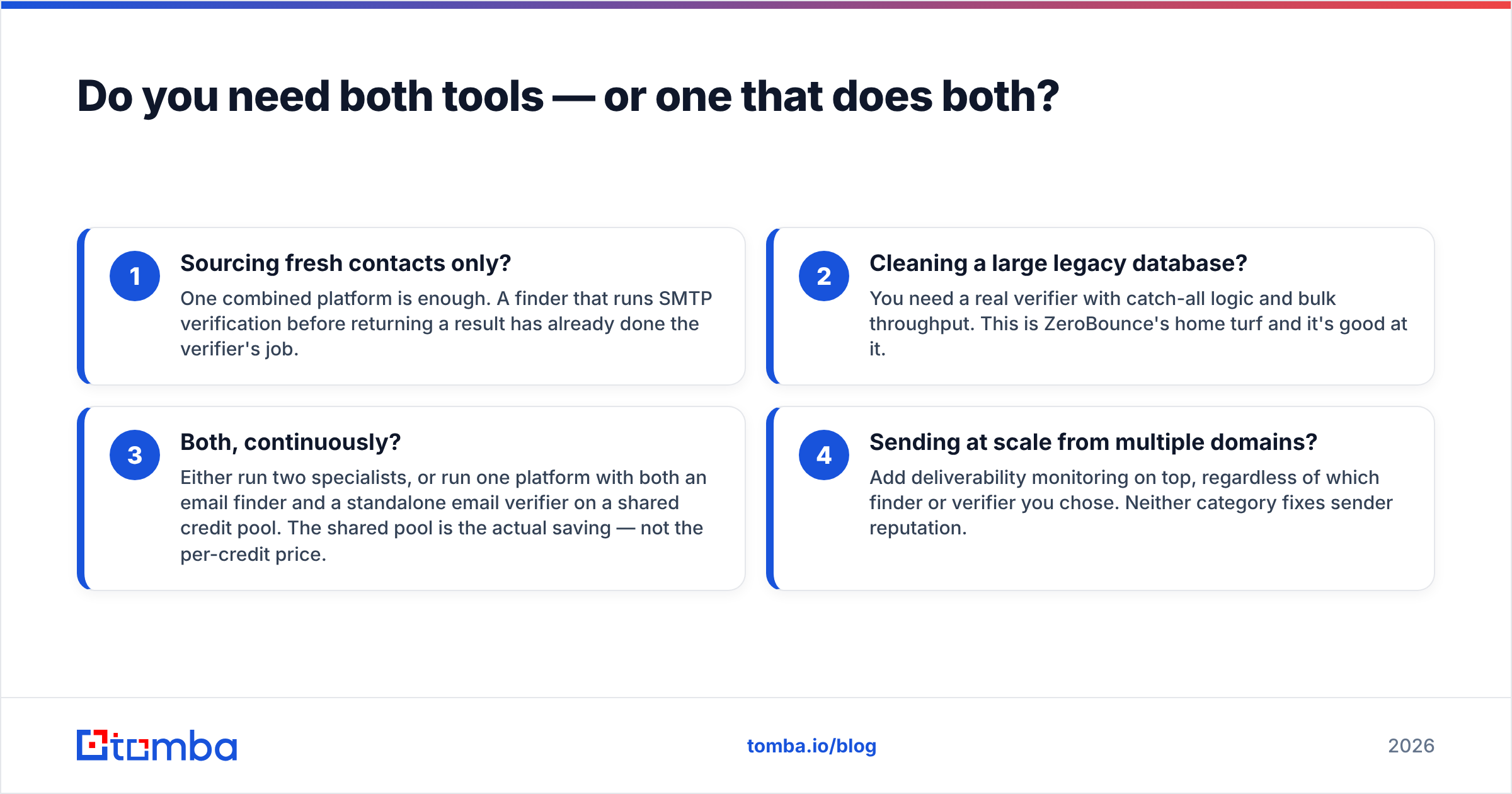
- Sourcing fresh contacts only? One combined platform is enough. A finder that runs SMTP verification before returning a result has already done the verifier's job.
- Cleaning a large legacy database? You need a real verifier with catch-all logic and bulk throughput. This is ZeroBounce's home turf and it's good at it.
- Both, continuously? Either run two specialists, or run one platform with both an email finder and a standalone email verifier on a shared credit pool. The shared pool is the actual saving — not the per-credit price.
- Sending at scale from multiple domains? Add deliverability monitoring on top, regardless of which finder or verifier you chose. Neither category fixes sender reputation.

Which tool should you pick for your specific situation?#
Pick Findymail if you're an SDR or founder doing LinkedIn-led prospecting, your volume is under ~5,000 new contacts per month, and bounce rate is what's hurting you. The Sales Navigator export flow is the fastest path from a saved search to a sendable list, and the bounce guarantee removes the argument about whose fault a hard bounce was.
Pick ZeroBounce if you're in RevOps or lifecycle marketing, you inherited a database of unknown quality, and you need defensible list hygiene before a big send. The deliverability toolkit — blacklist monitoring especially — is worth more than the verification itself once you're sending from several domains.
Pick a combined platform if you're building outbound from scratch in 2026 and don't want two contracts, two credit balances, and two API integrations for one workflow. This is the case for tools like Tomba, where bulk email finder runs and verification draw from the same plan, and the same key covers domain search, catch-all checks, and enrichment.
Pick none of them yet if your bounce problem is actually a sending problem. Warm the domain, fix authentication, and re-check. Buying data tools to solve an infrastructure problem is the most expensive mistake in this category.

Whatever you shortlist, read recent reviews on G2 rather than year-old blog roundups — verification vendors change their catch-all handling more often than they change their marketing pages, and that's the setting that will decide your real bounce rate.
How should you run a fair 30-day test?#
Don't evaluate on demos. Run this instead:
- Week 1 — build the control set. Take 200 contacts you can independently verify (existing customers, past repliers). Strip the emails.
- Week 2 — measure sourcing. Run the stripped list through each finder. Record hit rate and match-to-known-correct rate separately.
- Week 3 — measure hygiene. Take 2,000 aged rows from your CRM. Run them through each verifier. Send a small warmed campaign to the "valid" bucket and record real bounce rate against the tool's prediction.
- Week 4 — do the math. Total spend divided by contacts that (a) existed, (b) were correct, and (c) didn't bounce. That's your true cost per usable contact. Compare that number, not list prices.
Nine times out of ten this test reframes the decision. Teams that expected to need both tools discover their fresh-sourced emails were already clean, and their entire bounce rate was coming from 2022-era CRM records — a one-time cleanup, not a recurring subscription.
Findymail vs ZeroBounce: the verdict#
Findymail is the better finder. ZeroBounce is the better verifier. Neither is a replacement for the other, and anyone telling you otherwise is comparing a hammer to a level.
The more useful question is whether your workflow justifies two vendors. If you're sourcing fresh contacts continuously and cleaning legacy data occasionally, one platform that does both — with verification built into the find step and a standalone verifier for imports — removes a handoff, a bill, and an integration.
That's the gap Tomba is built for. The Tomba Email Finder verifies addresses at discovery rather than after the fact, and the same account covers domain search, catch-all checks, and bulk enrichment from one credit pool — free tier at 25 searches/month, Starter at $49/mo. Run it against your own 200-row control list next to whatever you're using now, and let the bounce rate pick the winner.
Related guides#
Ready to find emails that actually work?
Join 150,000+ professionals who stopped guessing and started sending. Free credits on signup — no credit card required.
Get the Tomba newsletter
Practical outbound tactics and product updates — once every two weeks.
About the author