FINTRX vs LeadsForge: Which B2B Data Platform Fits You?
FINTRX sells private-wealth intelligence to asset managers. LeadsForge builds AI-generated B2B lead lists for anyone. They barely compete — and picking the wrong one wastes a year of budget. Here's the honest breakdown.
TL;DR
- FINTRX is a vertical intelligence platform, not a generic lead database. It maps family offices, RIAs, and private-wealth allocators — the people who write investment checks. If you don't sell into wealth management, it is the wrong tool at any price.
- LeadsForge is a self-serve, AI-assisted list builder. You describe your ICP in plain language, it returns a contact list. Fast, cheap, horizontal, shallower.
- Pricing models are opposite. FINTRX is quote-only enterprise contracting with annual seats. LeadsForge is card-on-file monthly with credit-style limits. Neither publishes a number you can plan a budget around without talking to them.
- Neither replaces verification. Both hand you emails; neither guarantees the inbox is live on the day you send. Run a separate email verifier before any sequence.
- The honest verdict: buy FINTRX if your revenue depends on allocator relationships. Buy LeadsForge if you need volume lists fast. Buy neither — and pair a cheap finder plus verifier — if your ICP is ordinary B2B companies you can already name.
What are FINTRX and LeadsForge?#
Short answer: they solve different problems and only look similar because both output rows with email addresses in them.
- FINTRX — a private-wealth data platform covering family offices, registered investment advisers, and their decision-makers. Built for asset raisers, fund marketers, and wealth-tech vendors who need to know who allocates capital where. Details on their official site.
- LeadsForge — an AI lead-list builder. You type a prompt ("SaaS marketing directors in Germany, 50–200 employees"), it assembles a contact list with emails, usually with some verification pass applied.
- Buyer profile — FINTRX buyers are typically 5–50 person distribution teams inside investment firms. LeadsForge buyers are agencies, founders, and SDRs who need lists this week.
- Data philosophy — FINTRX curates a narrow universe deeply (relationships, mandates, AUM bands, filings). LeadsForge indexes a wide universe shallowly (firmographics + contact).
- Contract shape — FINTRX: annual, seat-based, quote-driven. LeadsForge: monthly, self-serve, cancel anytime.
If you're comparing fintrx vs leadsforge because both appeared in the same G2 category, that category is doing a lot of unearned work. The comparison is only fair on one axis: cost per usable contact for your ICP.
What does FINTRX actually do well?#
FINTRX earns its price on coverage that is genuinely hard to assemble yourself. Family offices are private by design — no marketing site, no press releases, frequently no public staff list. Building that map requires scraping regulatory filings, cross-referencing Form ADV data for registered investment advisers, tracking job moves, and calling people. That is a multi-year data operation, not a scraper.
What you get for that:
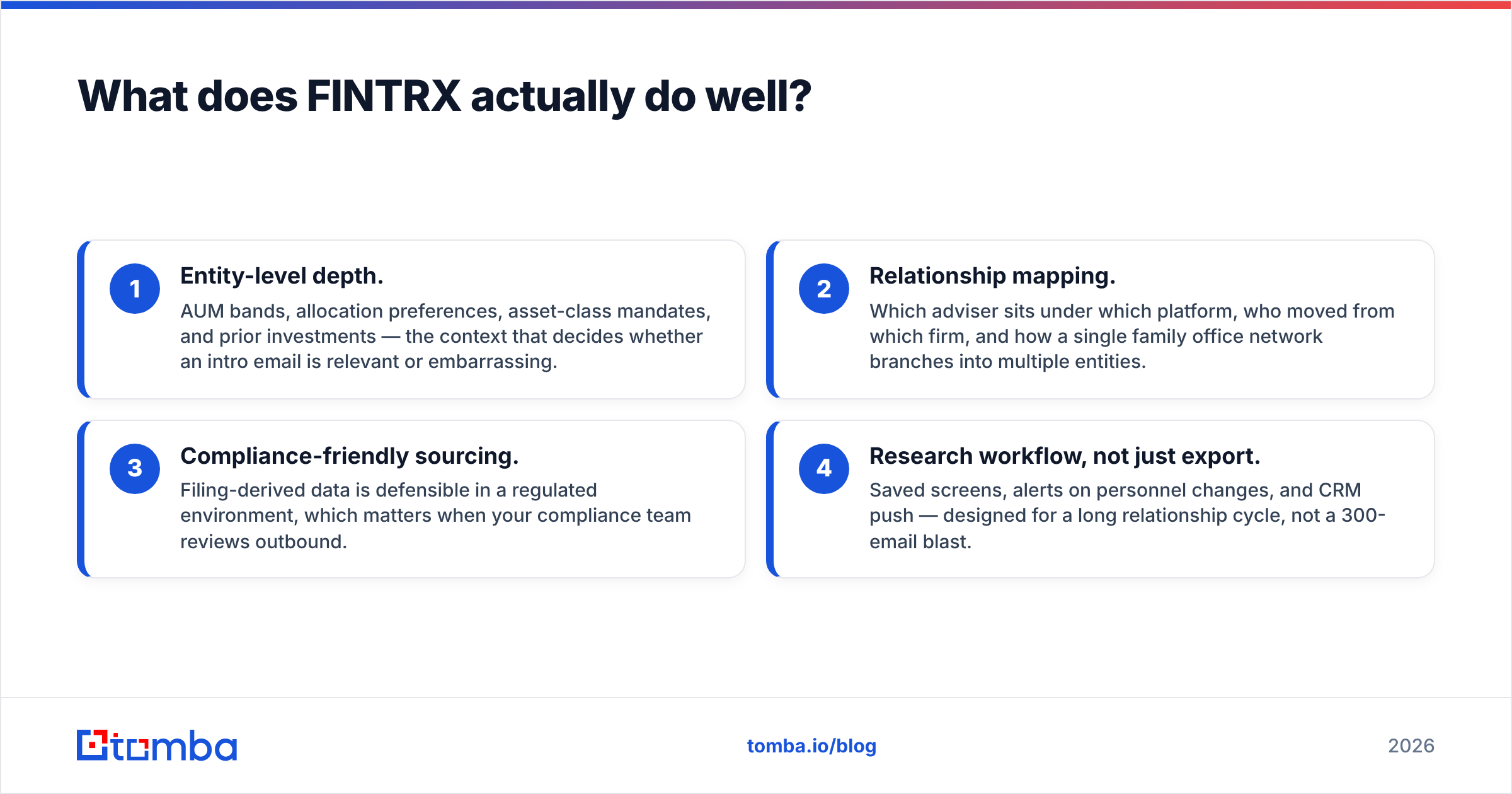
- Entity-level depth. AUM bands, allocation preferences, asset-class mandates, and prior investments — the context that decides whether an intro email is relevant or embarrassing.
- Relationship mapping. Which adviser sits under which platform, who moved from which firm, and how a single family office network branches into multiple entities.
- Compliance-friendly sourcing. Filing-derived data is defensible in a regulated environment, which matters when your compliance team reviews outbound.
- Research workflow, not just export. Saved screens, alerts on personnel changes, and CRM push — designed for a long relationship cycle, not a 300-email blast.
The tradeoff is equally clear. Outside private wealth, coverage thins fast. If you sell developer tooling or logistics software, you're paying enterprise rates for a database that mostly doesn't contain your buyers.

What does LeadsForge actually do well?#
LeadsForge sits at the other end. The pitch is speed and zero learning curve: a chat box instead of a filter panel. For teams that stall out on building boolean queries in a legacy database, that is a real unlock.
Where it shines:
- Time to first list. Minutes, not an onboarding call and a two-week implementation.
- Horizontal coverage. Standard B2B firmographics — industry, headcount, geography, title — across ordinary companies.
- Price accessibility. Self-serve tiers that a solo founder or a three-person agency can expense without a procurement cycle.
- Iteration speed. Wrong list? Rephrase the prompt and pull another. Cheap experiments beat perfect ones early.
Where it doesn't:
- Prompt ambiguity. Natural language hides what the filter actually did. "Fintech decision makers" can return CTOs, office managers, and a payments consultant in Lisbon. You only find out after the bounces and the replies that say "I don't handle this."
- Depth on niche verticals. Anything requiring filings, mandates, or private-entity mapping is out of scope.
- Verification claims. Vendor-side verification is a snapshot. It ages. Always re-check before send.
FINTRX vs LeadsForge: how do they compare head-to-head?#
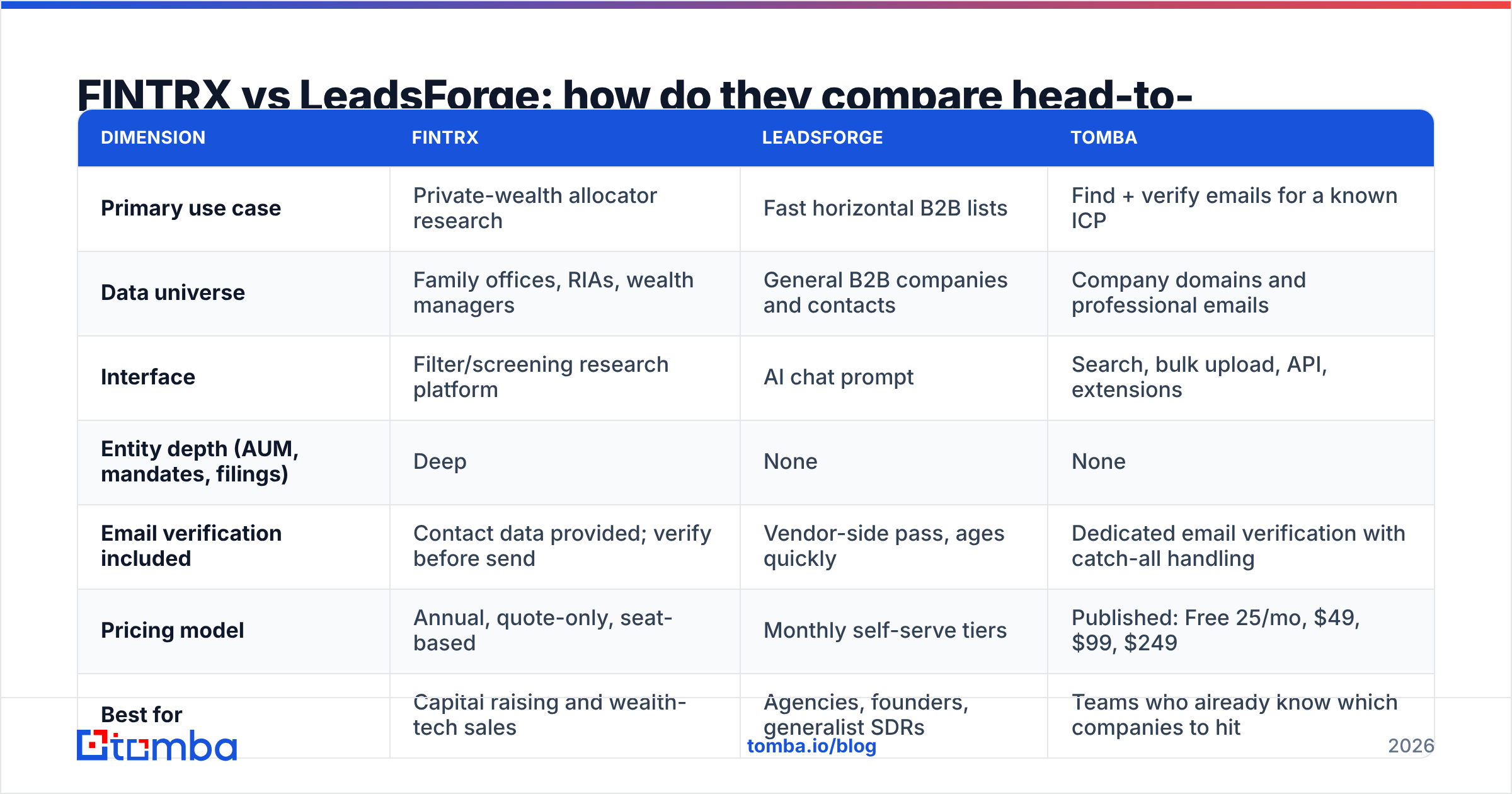
| Dimension | FINTRX | LeadsForge | Tomba |
|---|---|---|---|
| Primary use case | Private-wealth allocator research | Fast horizontal B2B lists | Find + verify emails for a known ICP |
| Data universe | Family offices, RIAs, wealth managers | General B2B companies and contacts | Company domains and professional emails |
| Interface | Filter/screening research platform | AI chat prompt | Search, bulk upload, API, extensions |
| Entity depth (AUM, mandates, filings) | Deep | None | None |
| Email verification included | Contact data provided; verify before send | Vendor-side pass, ages quickly | Dedicated email verification with catch-all handling |
| Pricing model | Annual, quote-only, seat-based | Monthly self-serve tiers | Published: Free 25/mo, $49, $99, $249 |
| Best for | Capital raising and wealth-tech sales | Agencies, founders, generalist SDRs | Teams who already know which companies to hit |
| Time to first usable list | Days (onboarding) | Minutes | Minutes |
Read that table as three answers to three different questions, not a ranking. The mistake teams make is buying the deepest tool available instead of the one matched to their motion.
How does pricing compare in practice?#
Neither vendor publishes a full public price card, so treat any specific figure you see on a listicle as unverified. What you can plan around is the shape of the cost.
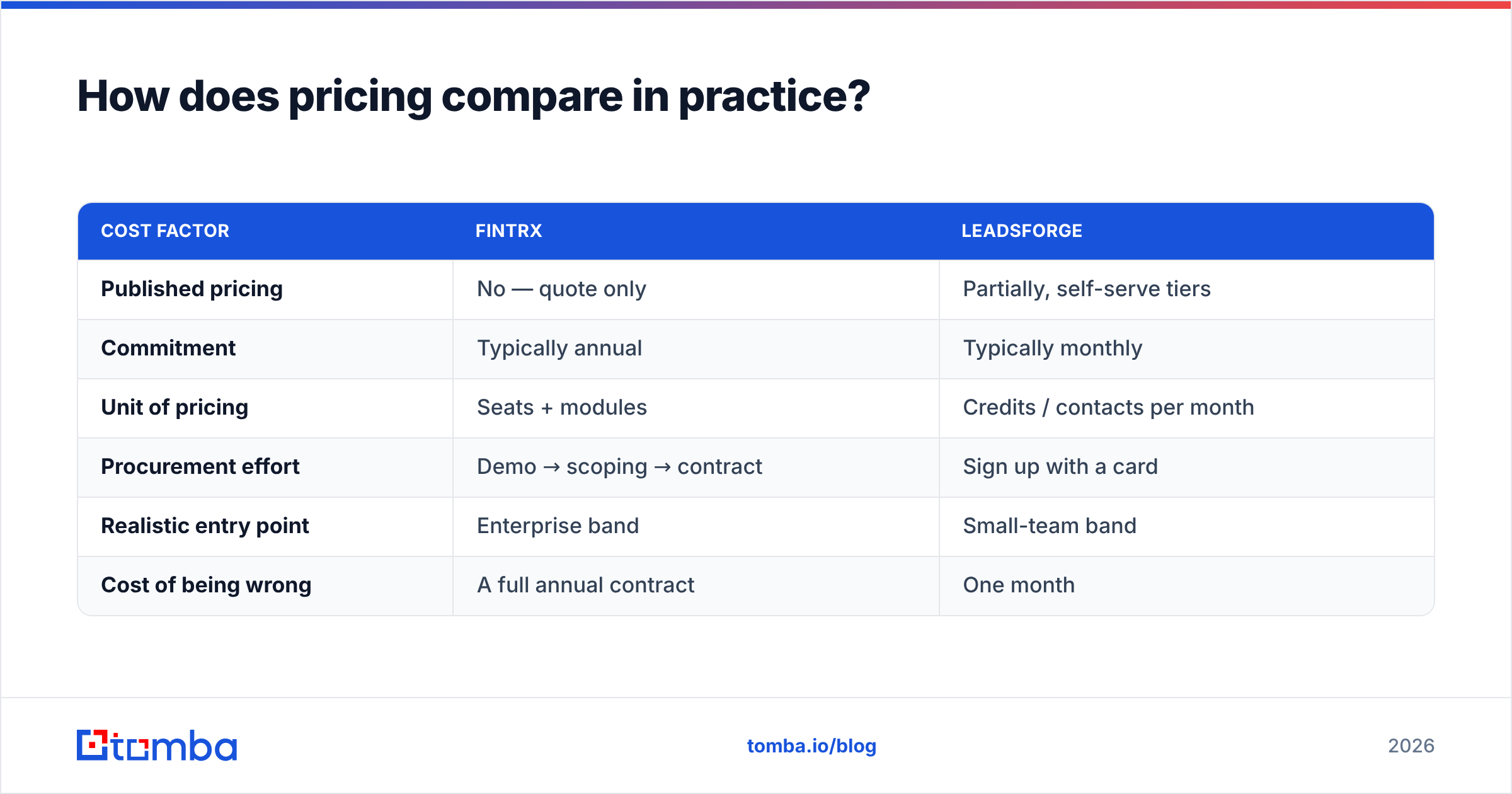
| Cost factor | FINTRX | LeadsForge |
|---|---|---|
| Published pricing | No — quote only | Partially, self-serve tiers |
| Commitment | Typically annual | Typically monthly |
| Unit of pricing | Seats + modules | Credits / contacts per month |
| Procurement effort | Demo → scoping → contract | Sign up with a card |
| Realistic entry point | Enterprise band | Small-team band |
| Cost of being wrong | A full annual contract | One month |
That last row is the one to weigh seriously. A self-serve tool with a wrong-fit database costs you a month and some bounced sends. An annual enterprise contract with a wrong-fit database costs you a fiscal year and the political capital you spent to get it approved.
Compare both against a published, boring baseline: Tomba pricing runs a free tier at 25 searches per month, then $49/mo Starter, $99/mo Growth, and $249/mo Pro, with Enterprise on quote. That's not a claim that Tomba does what FINTRX does — it doesn't map family-office mandates. It's a reference point for what "find and verify the email" costs as a standalone line item, so you know how much of a platform's price is data depth versus contact retrieval you could buy cheaply elsewhere.
Which one has better data quality?#
Wrong question. Ask instead: better at what, for whom?
- Coverage rate — the percentage of your target list the tool can find at all. FINTRX wins inside private wealth by a wide margin. LeadsForge wins on ordinary mid-market B2B, where FINTRX may return nothing.
- Field accuracy — whether the AUM band, title, or company size is right. FINTRX's filing-derived fields are structurally more reliable than inferred firmographics.
- Contact freshness — whether the email works today. This is where both platforms are weakest, and where nearly every "bad data" complaint actually originates. People change jobs; databases lag by weeks or quarters.
- Signal-to-noise — how many rows you delete before sending. Prompt-built lists tend to need more manual pruning than filter-built ones, because the filter is invisible.
Freshness is the fixable one. Whatever platform you buy, add a verification step immediately before send, not at import time. A list verified 60 days ago is not a verified list. Catch-all domains need their own treatment — a generic "valid" flag on a catch-all domain tells you almost nothing, which is why a dedicated catch-all verifier exists as a separate step.

When should you pick each one?#
Pick FINTRX if:
- You raise capital, distribute funds, or sell software into wealth management.
- Your deal cycle is measured in quarters and a single relationship is worth six figures or more.
- Compliance reviews your prospecting sources.
- You need context — mandates, allocations, prior positions — not just a mailbox.
Pick LeadsForge if:
- Your ICP is ordinary B2B and you can describe it in a sentence.
- You need lists this week and can't wait on procurement.
- Your volume model tolerates some list noise.
- You want to test three ICPs cheaply before committing to a data contract.
Pick neither if:
- You already know the companies you want to reach — from a conference list, a funding round, an integration directory, or your CRM.
- Your bottleneck is getting the right person's email at a company you named, not discovering companies.
- You want per-seat costs that don't scale with headcount.
That third scenario is more common than vendors like to admit. Most outbound teams don't have a discovery problem. They have a 400-row spreadsheet of target accounts and no contact details. In that case, a domain search plus bulk email finder run does the job for a fraction of a platform seat, and the Tomba API drops it straight into whatever workflow already exists.
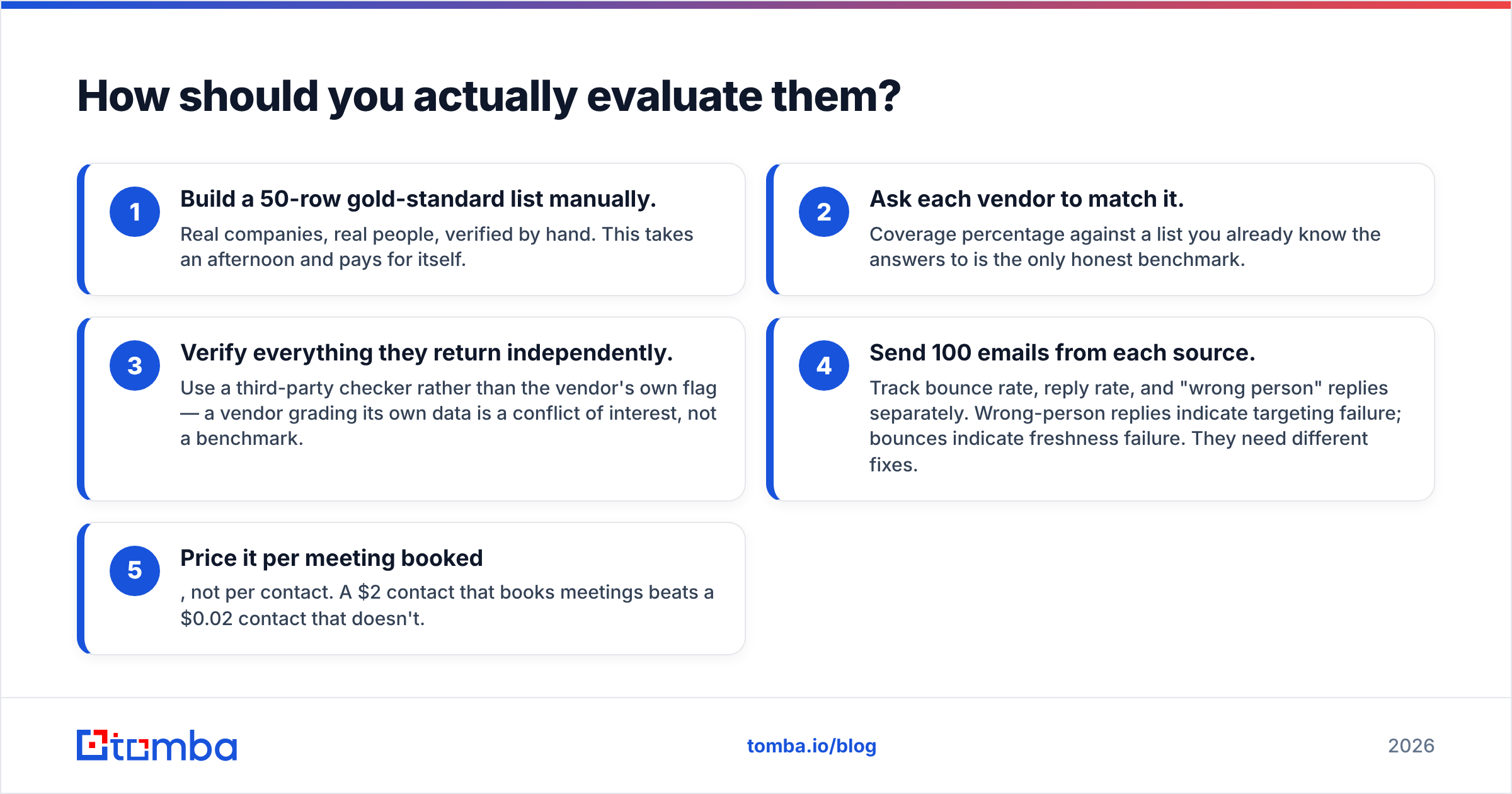
How should you actually evaluate them?#
Don't watch two demos and pick the better presenter. Run the same test against both.
- Build a 50-row gold-standard list manually. Real companies, real people, verified by hand. This takes an afternoon and pays for itself.
- Ask each vendor to match it. Coverage percentage against a list you already know the answers to is the only honest benchmark.
- Verify everything they return independently. Use a third-party checker rather than the vendor's own flag — a vendor grading its own data is a conflict of interest, not a benchmark.
- Send 100 emails from each source. Track bounce rate, reply rate, and "wrong person" replies separately. Wrong-person replies indicate targeting failure; bounces indicate freshness failure. They need different fixes.
- Price it per meeting booked, not per contact. A $2 contact that books meetings beats a $0.02 contact that doesn't.
Vendor review sites like G2 are useful for spotting recurring complaints — billing surprises, support latency, export limits — but review scores in mismatched categories won't tell you which of these two fits your motion. Your 50-row test will.
What about combining them?#
Stacking is legitimate and common. A wealth-tech vendor might use FINTRX for account selection and entity intelligence, then use a lightweight finder to fill contact gaps for individuals FINTRX lists but doesn't have direct emails for. An agency might use LeadsForge for top-of-funnel volume, then enrich the promising subset with firmographic and social context before a human writes the first line.
The rule: pay premium prices for premium context, and commodity prices for commodity contact data. Email addresses and phone numbers are commodity. Mandates, filings, and relationship graphs are not. Teams overspend by buying an entire platform to solve the commodity half of the problem — then discover the data enrichment layer they actually needed was a $99/month line item all along.
The bottom line#
FINTRX and LeadsForge aren't competitors so much as answers to different questions. FINTRX is the right call when the buyer universe is small, private, and worth deep research per account. LeadsForge is the right call when the universe is broad, public, and worth testing fast. Comparing them on price alone tells you nothing, because the cost per usable contact depends entirely on how much of your ICP each one actually contains.
Whichever you land on, the last mile is identical: confirm the address is live before you send, keep catch-all domains in their own bucket, and re-verify anything older than a few weeks.
If your real problem is the last mile — you know the accounts, you just need the right person's address — start with the Tomba Email Finder. Free tier gives you 25 searches a month to test it against your own account list before you spend anything, and paid plans start at $49/month with verification, bulk processing, and API access included. Run it against your gold-standard 50 rows and see how much of your data budget you were about to spend on something you could solve for the price of a team lunch.
Related guides#
Ready to find emails that actually work?
Join 150,000+ professionals who stopped guessing and started sending. Free credits on signup — no credit card required.
Get the Tomba newsletter
Practical outbound tactics and product updates — once every two weeks.
About the author