FirstQuadrant Pricing Review 2026: Costs, Pros and Cons
A neutral look at what FirstQuadrant actually costs in 2026, where the AI sales platform earns its price, where it frustrates teams, and which cheaper stack covers the same ground.
This FirstQuadrant pricing review covers what the AI sales platform costs in 2026, what buyers report after a few months, and when a cheaper stack does the same job.
TL;DR
- FirstQuadrant is an AI sales platform. It runs inbound triage, outbound sequencing, and follow-up nurturing in one workspace. It is not a data vendor, and that gap drives most of the pricing confusion.
- Pricing is tier-plus-usage: a free workspace with caps, a paid monthly tier, and a custom enterprise deal. The list price is only part of the bill. Contact data, mailboxes, and seats stack on top.
- The best reviews come from small teams who replaced three tools with one. The harshest come from teams who wanted an autonomous AI SDR.
- If your problem is finding and verifying contacts, a $49/mo data layer beats a platform seat at several times the price.
- Best move for most teams: use FirstQuadrant for motion, and keep contact discovery in a cheap, accurate tool.
What is FirstQuadrant and who is it actually for?#
FirstQuadrant (firstquadrant.ai) markets itself as an all-in-one AI sales platform. The pitch is simple. Instead of stitching together a sequencer, an inbox manager, a CRM sync tool, and a few AI writing add-ons, you run inbound, outbound, and nurturing from one workspace where AI agents draft, schedule, classify, and follow up.
That framing matters when you evaluate cost. FirstQuadrant sits in the category G2 calls AI sales assistants — software that acts on your pipeline, not software that supplies raw contact records. Those are two very different budget lines, and buyers confuse them constantly.
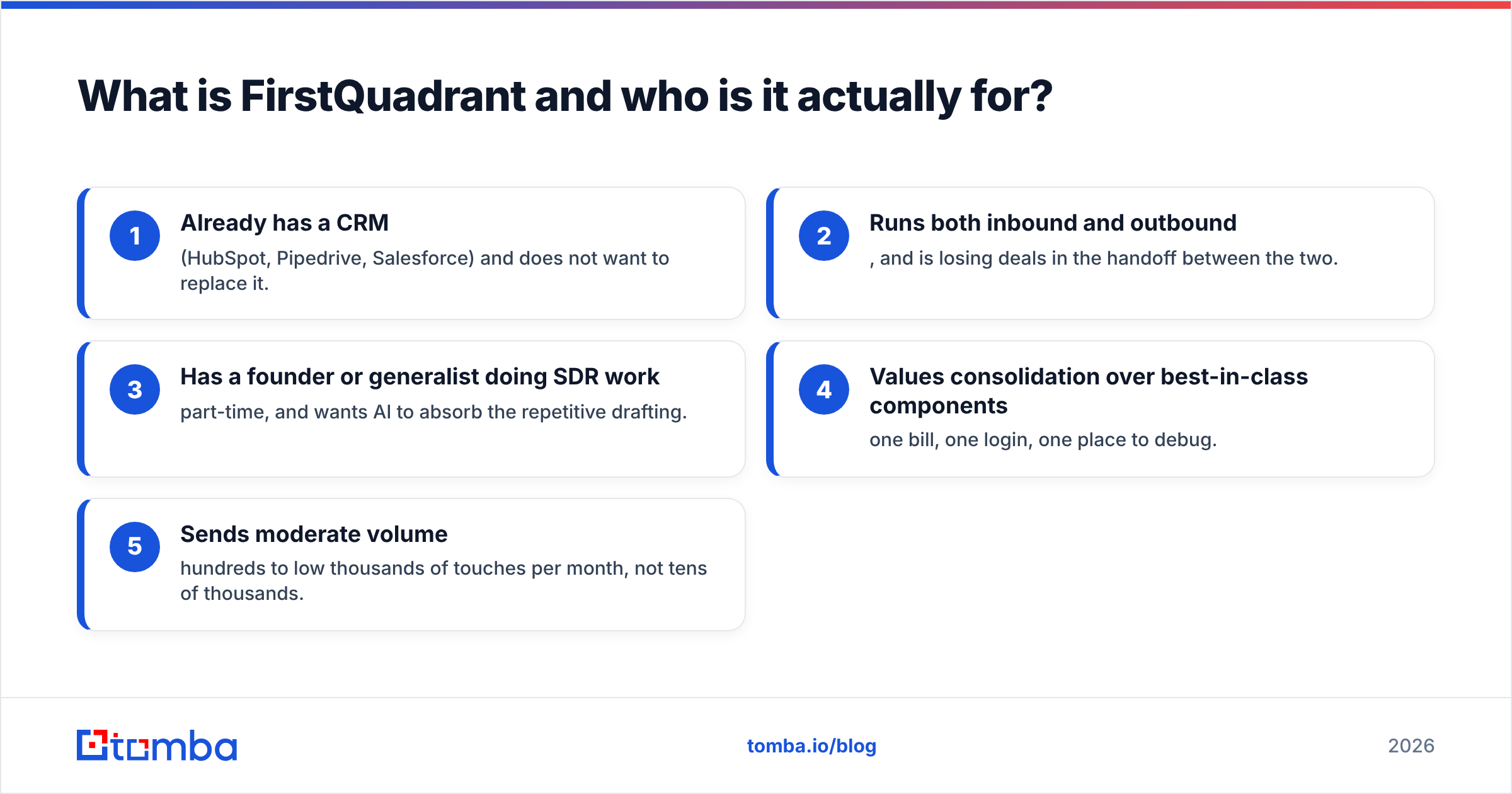
The typical buyer is a 3–30 person revenue team that:
- Already has a CRM (HubSpot, Pipedrive, Salesforce) and does not want to replace it.
- Runs both inbound and outbound, and is losing deals in the handoff between the two.
- Has a founder or generalist doing SDR work part-time, and wants AI to absorb the repetitive drafting.
- Values consolidation over best-in-class components — one bill, one login, one place to debug.
- Sends moderate volume — hundreds to low thousands of touches per month, not tens of thousands.
If you do not recognize your team in at least three of those, the pricing math tends to go against you.
How much does FirstQuadrant cost in 2026?#
Any honest FirstQuadrant pricing review has to start with a caveat. The published pricing has changed more than once, and the platform has moved between per-seat, usage-inclusive, and hybrid models as its AI features grew. Anyone quoting you an exact figure from memory is guessing. Check the live pricing page before you budget.
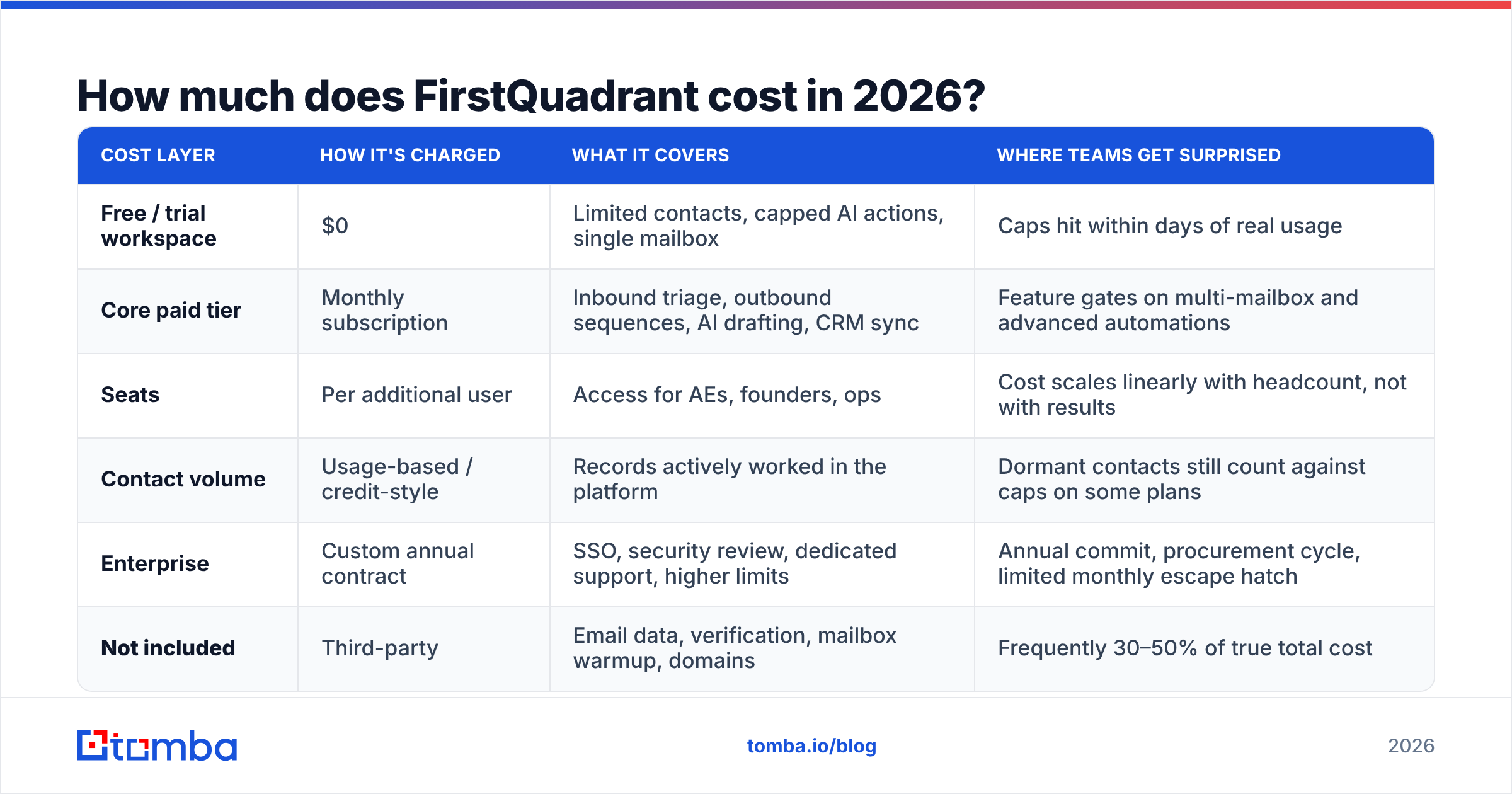
What is stable is the shape of the bill. That shape is what decides whether it is worth it:
| Cost layer | How it's charged | What it covers | Where teams get surprised |
|---|---|---|---|
| Free / trial workspace | $0 | Limited contacts, capped AI actions, single mailbox | Caps hit within days of real usage |
| Core paid tier | Monthly subscription | Inbound triage, outbound sequences, AI drafting, CRM sync | Feature gates on multi-mailbox and advanced automations |
| Seats | Per additional user | Access for AEs, founders, ops | Cost scales linearly with headcount, not with results |
| Contact volume | Usage-based / credit-style | Records actively worked in the platform | Dormant contacts still count against caps on some plans |
| Enterprise | Custom annual contract | SSO, security review, dedicated support, higher limits | Annual commit, procurement cycle, limited monthly escape hatch |
| Not included | Third-party | Email data, verification, mailbox warmup, domains | Frequently 30–50% of true total cost |
That last row decides your ROI. A sales orchestration platform is only as good as the contacts you pour into it, and FirstQuadrant is not a contact database. You supply the list. If your list is stale, the AI writes beautiful emails to addresses that bounce.
What do FirstQuadrant reviews actually say?#
Strip out the launch-week enthusiasm and the review pattern is consistent.
What reviewers praise:
- Inbound handling. The classification and auto-reply layer is the feature people mention unprompted. Turning a messy shared inbox into triaged, drafted responses saves real time for teams without an SDR.
- Setup speed. Days, not the multi-week rollouts typical of enterprise sales engagement platforms.
- Draft quality. The AI-written emails read like a competent junior rep, not like a template with merge fields. That is a real bar, and many tools miss it.
- Consolidation. Killing three subscriptions and one Zapier plan makes the headline price easier to swallow.
What reviewers criticize:
- Expectation gap. "AI sales agent" reads as autonomous to a lot of buyers. In practice it is assistive: it drafts, you approve. Teams who budgeted for a replacement hire and got a productivity tool feel misled, even though the tool works as designed.
- Cost per seat as the team grows. Fine for three people. Uncomfortable at twelve.
- Reporting depth. Attribution and cohort reporting lag behind dedicated sales engagement platforms.
- Data quality is your problem. Almost every negative review about "low reply rates" traces back to list quality, not the platform. This is the most common complaint, and the most fixable.
- Integration edges. Core CRM syncs are solid. Niche stacks require workarounds.
The takeaway is not "good tool" or "bad tool." It is this: FirstQuadrant sells motion, not data. Buy it for motion, and it delivers. Buy it hoping it will fix a bad list, and you will write a one-star review.
FirstQuadrant pricing review: is it worth the price?#
It depends almost entirely on what is broken in your pipeline right now. Run this diagnostic before you spend anything:
- Where do deals die? If replies come in and nothing happens for four days, you have an orchestration problem. FirstQuadrant addresses it directly.
- What is your bounce rate? Above 3% and your problem is upstream. No AI platform fixes an invalid address. It just sends to it faster. Run your list through an email verifier before you subscribe to anything.
- How many humans need a login? Multiply the seat price by headcount. Compare that to the loaded cost of the hours saved. Under three seats, consolidation usually wins. Over ten, the math tightens fast.
- What are you cancelling? If nothing gets cancelled, this is added spend, not consolidation. The business case is much weaker.
- Is your volume steady? Usage-based components punish spiky, campaign-driven sending.
Teams that answer "orchestration, under 3%, three seats, cancelling two tools, steady volume" get real value. Teams that answer "we don't have enough good contacts" are buying the wrong layer of the stack.
How does FirstQuadrant compare to other options?#
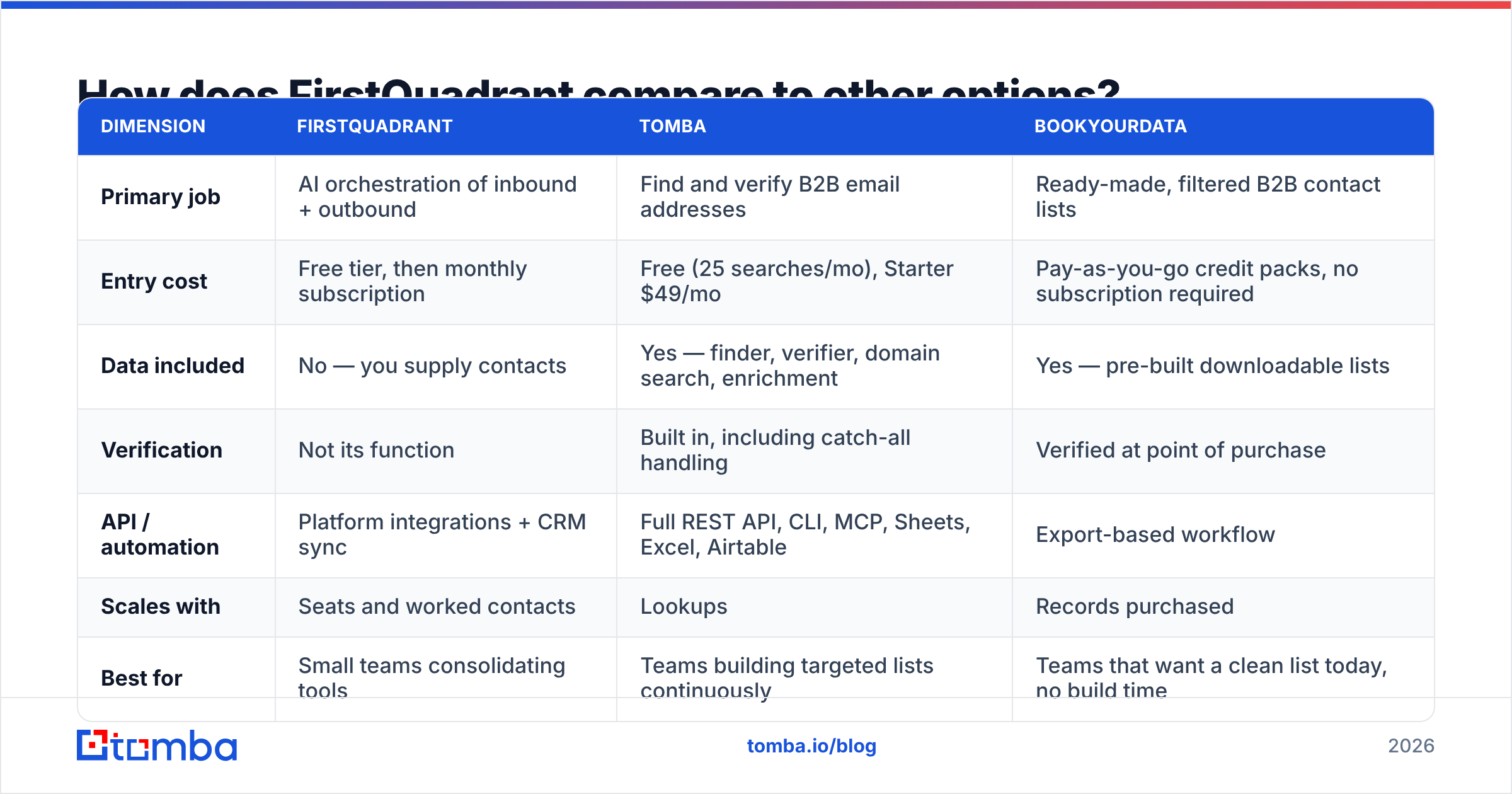
The useful comparison is not FirstQuadrant versus another AI SDR. It is FirstQuadrant versus the layers you could buy instead with the same budget.
| Dimension | FirstQuadrant | Tomba | BookYourData |
|---|---|---|---|
| Primary job | AI orchestration of inbound + outbound | Find and verify B2B email addresses | Ready-made, filtered B2B contact lists |
| Entry cost | Free tier, then monthly subscription | Free (25 searches/mo), Starter $49/mo | Pay-as-you-go credit packs, no subscription required |
| Data included | No — you supply contacts | Yes — finder, verifier, domain search, enrichment | Yes — pre-built downloadable lists |
| Verification | Not its function | Built in, including catch-all handling | Verified at point of purchase |
| API / automation | Platform integrations + CRM sync | Full REST API, CLI, MCP, Sheets, Excel, Airtable | Export-based workflow |
| Scales with | Seats and worked contacts | Lookups | Records purchased |
| Best for | Small teams consolidating tools | Teams building targeted lists continuously | Teams that want a clean list today, no build time |
| Weak spot | Cost per seat at headcount; you still need data | Not a sequencer or CRM | Less suited to hyper-niche, one-off targeting |
Three honest conclusions from that table:
FirstQuadrant and a data tool are complements, not substitutes. Anyone telling you to pick one is selling something. The platform moves contacts through a process. Something else has to produce those contacts.
BookYourData is the right call when speed beats specificity. Say you need 5,000 verified contacts in one industry by Friday and have no interest in building a discovery workflow. Buying a curated list outright is cleaner, and often cheaper, than assembling one. It is a good fit for that job.
A finder-plus-verifier is the right call when your ICP is narrow or moving. If your targeting changes campaign to campaign — new verticals, new job titles, companies that just raised — you need discovery on demand, not a static file. That is where an email finder and domain search earn their keep month after month.

What are the real pros and cons?#
Pros
- Genuine consolidation. One workspace for inbound triage, outbound sequencing, and nurturing removes a class of handoff failures that cost real revenue.
- Low time-to-value. You can be sending inside a day. Compare that to the six-week rollouts common with enterprise engagement platforms, documented across HubSpot's own sales resources.
- AI that respects the human in the loop. Draft-and-approve is the right default for outbound in 2026, when every inbox filter is tuned against bulk AI sends.
- Good fit for founder-led sales. The product is clearly built for teams without a dedicated SDR bench.
- Transparent free tier. You can test the real workflow before you commit budget. Use it properly and hit the caps on purpose.
Cons
- Data is not included, and that is the expensive part. Budget for it separately or your ROI math is fiction.
- Seat-based scaling. The value curve flattens as headcount rises while the bill keeps climbing.
- Assistive, not autonomous. Set expectations with your team before rollout, or you will get pushback in week two.
- Reporting is adequate, not deep. If your RevOps function needs granular multi-touch attribution, plan on exporting to your warehouse.
- Deliverability is still on you. The platform sends. It does not own your domain reputation. SPF, DKIM, warmup, and list hygiene stay your job — check your SPF record and your sender reputation before you scale volume, not after.
What should you do before you buy?#
A sequence that has saved teams a lot of wasted subscription money:
- Audit your current list. Run a sample of 500 contacts through verification. If more than 5% are invalid or risky, your outbound problem is data, not tooling. Fix that first. It is cheaper, and the gain is immediate.
- Time-box the free tier. Two weeks, one real campaign, one real inbound flow. Log the hours you actually save.
- Price the whole stack, not the platform. Platform + data + mailboxes + domains + warmup. Compare that total to your current total.
- Decide your data layer explicitly. Continuous discovery, bought lists, or both. Pick before you sign, because retrofitting a data source into a live workflow is painful.
- Set the autonomy expectation in writing. Tell the team it drafts and they approve. That one sentence prevents most rollout failures.
Where does the data layer fit?#
Right at the front, and it is the cheapest high-leverage part of the stack.
An AI sales platform multiplies whatever you feed it. Feed it 1,000 verified, well-targeted contacts and it produces a steady stream of real conversations. Feed it 5,000 scraped guesses and it produces bounces, spam complaints, and a damaged sending domain that takes months to repair.
So the sane split is: orchestration where orchestration is hard, data where data is cheap. Tomba's pricing starts free at 25 searches per month and moves to Starter at $49/mo, Growth at $99/mo, and Pro at $249/mo. That is a fraction of a typical platform seat, and it covers finding, verifying, catch-all checks, and enrichment in one place. Pair it with FirstQuadrant's workflow layer and each tool does the job it is good at.
That is the practical conclusion of this FirstQuadrant pricing review: pay for motion, and keep your data layer cheap and clean.
Start with the contacts. Run your target domains through the Tomba Email Finder — free for your first 25 searches, no card required — and see how many valid addresses your current list is missing before you commit to any platform subscription. Clean data makes an average sequencer look great. Bad data makes the best AI sales platform on the market look like a waste of money.
Related guides#
Ready to find emails that actually work?
Join 150,000+ professionals who stopped guessing and started sending. Free credits on signup — no credit card required.
Get the Tomba newsletter
Practical outbound tactics and product updates — once every two weeks.
About the author